
ajax实现无刷新两级联动DropDownList
ajax实现的无刷新三级联动
http://zhangyu028.cnblogs.com/articles/310568.html
本文来自小山blog:
http://singlepine.cnblogs.com/articles/257954.html
里面是三级联动,有数据库文件可下栽.
我只是将三级更改为两级,使用SQL SERVER数据库而已.
我的截图如下: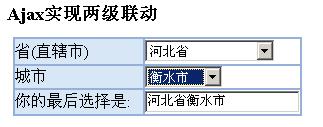
1.首先要在项目中增加对ajax.dll 的引用.
2.AjaxMethod.cs

 AjaxMethod.cs
 using System;using System.Data;using System.Data.SqlClient;namespace MyAjaxSample
 {
{
 /**//// <summary>
 /// AjaxMethod 的摘要说明。
 /// </summary> public class AjaxMethod { GetPovinceList#region GetPovinceList public static DataSet GetPovinceList() { string sql="select * from povince"; return GetDataSet(sql); } #endregion GetCityList#region GetCityList [Ajax.AjaxMethod] public DataSet GetCityList(int povinceid) { string sql="select * from city where father='"+povinceid+"'"; return GetDataSet(sql); } #endregion GetAreaList#region GetAreaList [Ajax.AjaxMethod] public DataSet GetAreaList(int cityid) { string sql="select * from area where father='"+cityid+"'"; return GetDataSet(sql); } #endregion GetDataSet#region GetDataSet public static DataSet GetDataSet(string sql) { string ConnectionString=System.Configuration.ConfigurationSettings.AppSettings["ConnectionString"]; SqlDataAdapter sda =new SqlDataAdapter(sql,ConnectionString); DataSet ds=new DataSet(); sda.Fill(ds); return ds; } #endregion }
 }
}3.HTML代码:
FourAjaxSample.aspx<%@ Page language="c#" Codebehind="FourAjaxSample.aspx.cs" AutoEventWireup="false" Inherits="MyAjaxSample.FourAjaxSample" %><!DOCTYPE HTML PUBLIC "-//W3C//DTD HTML 4.0 Transitional//EN" ><HTML> <HEAD> <title>FourAjaxSample</title> <meta content="Microsoft Visual Studio .NET 7.1" name="GENERATOR"> <meta content="C#" name="CODE_LANGUAGE"> <meta content="JavaScript" name="vs_defaultClientScript"> <meta content="http://schemas.microsoft.com/intellisense/ie5" name="vs_targetSchema"> <script language="javascript"> function cityResult() { var city=document.getElementById("DropDownList1"); AjaxMethod.GetCityList(city.value,get_city_Result_CallBack); } function get_city_Result_CallBack(response) { if (response.value != null) { document.all("DropDownList2").length=0; var ds = response.value; if(ds != null && typeof(ds) == "object" && ds.Tables != null) { for(var i=0; i<ds.Tables[0].Rows.length; i++) { var name=ds.Tables[0].Rows[i].city; var id=ds.Tables[0].Rows[i].cityID; document.all("DropDownList2").options.add(new Option(name,id)); } document.all("TextBox1").value=""; } } return } function areaResult() { var area=document.getElementById("DropDownList2"); AjaxMethod.GetAreaList(area.value,get_area_Result_CallBack); } function get_area_Result_CallBack() { var province=document.getElementById("DropDownList1"); var pindex = province.selectedIndex; var pValue = province.options[pindex].value; var pText = province.options[pindex].text; var city=document.getElementById("DropDownList2"); var cindex = city.selectedIndex; var cValue = city.options[cindex].value; var cText = city.options[cindex].text; document.all("TextBox1").value=pText+cText; } </script> </HEAD> <body MS_POSITIONING="GridLayout"> <form id="Form1" method="post" runat="server"> <h3>Ajax实现两级联动</h3> <TABLE class="border" id="border" style="Z-INDEX: 101; LEFT: 16px; WIDTH: 289px; POSITION: absolute; TOP: 48px; HEIGHT: 79px" borderColor="#95b0d9" cellSpacing="0" cellPadding="0" width="289" align="center" bgColor="#ffffff" border="1"> <TR> <TD style="WIDTH: 130px; HEIGHT: 27px" bgColor="#d8e7f6"> <asp:label id="Lab_province" runat="server">省(直辖市)</asp:label></TD> <TD style="HEIGHT: 27px"> <asp:dropdownlist id="DropDownList1" runat="server" onchange="cityResult();"></asp:dropdownlist></TD> </TR> <TR> <TD style="WIDTH: 130px; HEIGHT: 24px" bgColor="#d8e7f6"> <asp:Label id="Lab_City" runat="server">城市</asp:Label></TD> <TD style="HEIGHT: 24px"> <asp:DropDownList id="DropDownList2" runat="server" onchange="areaResult();"></asp:DropDownList></TD> </TR> <TR> <TD style="WIDTH: 130px" bgColor="#d8e7f6">你的最后选择是: </TD> <TD> <asp:TextBox id="TextBox1" runat="server"></asp:TextBox></TD> </TR> </TABLE> </form> </body></HTML>4 .cs文件:
FourAjaxSample.aspx.csusing System;using System.Collections;using System.ComponentModel;using System.Data;using System.Drawing;using System.Web;using System.Web.SessionState;using System.Web.UI;using System.Web.UI.WebControls;using System.Web.UI.HtmlControls;namespace MyAjaxSample{ /**//// <summary> /// FourAjaxSample 的摘要说明。 /// </summary> public class FourAjaxSample : System.Web.UI.Page { protected System.Web.UI.WebControls.DropDownList DropDownList1; protected System.Web.UI.WebControls.Label Lab_province; protected System.Web.UI.WebControls.Label Lab_City; protected System.Web.UI.WebControls.TextBox TextBox1; protected System.Web.UI.WebControls.DropDownList DropDownList2; private void Page_Load(object sender, System.EventArgs e) { Ajax.Utility.RegisterTypeForAjax(typeof(MyAjaxSample.AjaxMethod)); if(!Page.IsPostBack) { this.DropDownList1.DataSource=AjaxMethod.GetPovinceList(); this.DropDownList1.DataTextField="province"; this.DropDownList1.DataValueField="provinceID"; this.DropDownList1.DataBind(); this.DropDownList1.Attributes.Add("onclick","cityResult();"); this.DropDownList2.Attributes.Add("onclick","areaResult();"); } } Web 窗体设计器生成的代码#region Web 窗体设计器生成的代码 override protected void OnInit(EventArgs e) { // // CODEGEN: 该调用是 ASP.NET Web 窗体设计器所必需的。 // InitializeComponent(); base.OnInit(e); } /**//// <summary> /// 设计器支持所需的方法 - 不要使用代码编辑器修改 /// 此方法的内容。 /// </summary> private void InitializeComponent() { this.Load += new System.EventHandler(this.Page_Load); } #endregion }}5.web.config
web.config设置数据库连接串 <appSettings> <!-- SQL数据库连接 --> <add key="ConnectionString" value="Data Source=localhost;User Id=sa;Password=zhangzs;Initial Catalog=mytest;"/> </appSettings>ajax实现无刷新两级联动DropDownList的更多相关文章
- Ajax省市区无刷新单表联动查询
方法一: 在很多时候都需要用到无刷新级联查询,本文将以省市区的级联查询作为例子.注:此为单表三级联动 环境:Vistual Studio 2015 .MSSQL 1.首先下载AjaxControlTo ...
- 使用ajax实现无刷新改变页面内容
如何使用ajax实现无刷新改变页面内容(也就是ajax异步请求刷新页面),下面通过一个小demo说明一下,前端页面代码如下所示 1 <%@ Page Language="C#" ...
- jsp+ajax实现无刷新
jsp+ajax实现无刷新,鼠标离开文本框即验证用户名 jsp+ajax实现无刷新,鼠标离开文本框即验证用户名(本功能多用于注册) input.jsp(表单提交页面): %@ page content ...
- window.history.pushState与ajax实现无刷新更新页面url
ajax能无刷新更新数据,但是不能更新url HTML5的新API: window.history.pushState, window.history.replaceState 用户操作history ...
- Ajax 实现无刷新分页
Ajax 实现无刷新分页
- Ajax 实现无刷新页面
注意:如本文所用,在前面的文章库的数目可以在源代码中找到,我将指示在文本,其中链路,为了缩短制品的长度,阅读由此带来的不便.乞求被原谅. 评论文章 Ajax 实现无刷新页面.其原理.代码库.代码. 这 ...
- PHP+Ajax+plupload无刷新上传头像代码
很简单的一款PHP+Ajax+plupload无刷新上传头像代码,兼容性很好,可以直接拿来用.你可以自定义各种类型的文件.本实例中只能上传"jpg", "png" ...
- JS练习:两级联动
代码: <!DOCTYPE html> <html> <head> <meta charset="UTF-8"> <title ...
- Combobox下拉框两级联动
下拉框的两级联动是我们开发中经常遇到一种情况.比如一个学生管理系统中,根据年级.科目及姓名查询学生考试成绩,年级和科目都是硬盘中的有限数据(数据库)而学生则可以有用户手动指定,这时在数据库中有年级和科 ...
随机推荐
- RTT之ENV
一 先安装工具git:在CMD命令行中运行git命令检验git环境变量安装成功 二 下载env工具:然后解压,打开对应的exe然后右击-setting-intergration-registor这样后 ...
- 性能测试工具LoadRunner28-LR之内部数据参数类型
Date/Time 在“Parameter type”中您可以选择Date/Time,即:用当前的日期/时间替换参数.要指定日期/时间的格式,可以从格式列表中选择一个格式,或者指定您自己的格式. [l ...
- Day3监督学习——决策树原理
Day3 机器学习监督学习——决策树原理 一.决策树的原理 1.机器学习中分类和预测算法的评估: 准确率 速度 强壮型:有数据缺失或错误时算法的运行 可规模性:数量级规模比较大 可解释性 2.决策树( ...
- LeetCode 887.鸡蛋掉落(C++)
每个蛋的功能都是一样的,如果一个蛋碎了,你就不能再把它掉下去. 你知道存在楼层 F ,满足 0 <= F <= N 任何从高于 F 的楼层落下的鸡蛋都会碎,从 F 楼层或比它低的楼层落下的 ...
- Spring Boot(一)Hello World
Spring Boot适合与微服务,方便快速开发,简化配置(约定>配置). 准备工作: SpringBoot 2.0 jdk8 IDEA或者eclipse+Spring Tool Suits 创 ...
- URAL 1145—— Rope in the Labyrinth——————【求树的直径】
Rope in the Labyrinth Time Limit:500MS Memory Limit:65536KB 64bit IO Format:%I64d & %I64 ...
- HDU 5384——Danganronpa——————【AC自动机】
Danganronpa Time Limit: 2000/1000 MS (Java/Others) Memory Limit: 131072/131072 K (Java/Others)Tot ...
- DB2错误码大全
sqlcode sqlstate 说明 000 00000 SQL语句成功完成 01xxx SQL语句成功完成,但是有警告 +012 01545 未限定的列名被解释为一个有相互关系的引用 +098 0 ...
- java 使用Queue在队列中异步执行任务
先创建一个总的Handler(队列统一处理接口),名字就叫做 QueueTaskHandler public interface QueueTaskHandler { void processData ...
- Maven,SVN,快捷键,数据库等
1.Eclipse中Maven的搭建: 1.1 从Apache网站 http://maven.apache.org/ 下载并且解压缩安装Apache Maven 下载地址: http://maven. ...