
JSP Response Set Status
JSP Response Set Status
In this tutorial you will learn about how to set the HTTP status code in JSP.
In Java you can specify a HTTP-specific functionality regarding to send response. An interface HttpServletResponse provides these facility. This interface provides some static final fields to set the status which are indicating their respective status code, these codes are used for indicating their respective operations. There are number of fields are defined some of them fields value with their status code are given here :
| Field's Name | Status Code |
|---|---|
| SC_ACCEPTED | Status code (202) which shows a request was admitted for processing, but could not be completed. |
| SC_BAD_GATEWAY | Status code (502) which shows HTTP server got an invalid response from a server it looked up when acting as a proxy or gateway. |
| SC_BAD_REQUEST | Status code (400) which shows a request sent by the client is syntactically incorrect. |
| SC_CONFLICT | Status code (409) which shows a request could not be completed due to a conflict with the current state of the resource. |
| SC_CONTINUE | Status code (100) which shows a client can continue. |
| SC_CREATED | Status code (201) which shows a request succeeded and created a new resource on the server. |
| SC_EXPECTATION_FAILED | Status code (417) which shows the server could not meet the expectation given in the Expect request header. |
| SC_FORBIDDEN | Status code (403) which shows the server understood the request but refused to fulfill it. |
| SC_FOUND | Status code (302) which shows a resource reside temporarily under a different URI. |
| SC_GATEWAY_TIMEOUT | Status code (504) which shows the server did not receive a timely response from the upstream server while acting as a gateway or proxy. |
| SC_GONE | Status code (410) which shows the resource is no longer available at the server and no forwarding address is known. |
| SC_HTTP_VERSION_NOT_SUPPORTED | Status code (505) which shows the server does not support or refuses to support the HTTP protocol version that was used in the request message. |
| SC_INTERNAL_SERVER_ERROR | Status code (500) which shows an error inside the HTTP server which prevented it from fulfilling the request. |
| SC_LENGTH_REQUIRED | Status code (411) which shows a request cannot be handled without a defined Content-Length. |
| SC_MOVED_PERMANENTLY | Status code (301) which shows a resource has permanently moved to a new location, and that future references should use a new URI with their requests. |
| SC_MOVED_TEMPORARILY | Status code (302) which shows a resource has temporarily moved to another location, but that future references should still use the original URI to access the resource. |
| SC_NOT_FOUND | Status code (404) which shows a requested resource is not available. |
| SC_NOT_IMPLEMENTED | Status code (501) which shows the HTTP server does not support the functionality needed to fulfill the request. |
| SC_REQUEST_TIMEOUT | Status code (408) which shows a client did not produce a request within the time that the server was prepared to wait. |
| SC_REQUEST_URI_TOO_LONG | Status code (414) which shows the server is refusing to service the request because the Request-URI is longer than the server is willing to interpret. |
| SC_USE_PROXY | Status code (305) which shows a requested resource MUST be accessed through the proxy given by the Location field. |
Above mentioned statuses can be set using setStatus() method of HttpServletResponse interface.
Syntax of setStatus() method
void setStatus(int sc)
Argument of this method is a specified field name given in the above table.
Example :
Here I am giving a simple example which will demonstrate you about how to set the HTTP status code. In this example I have created a JSP page where designed a form to take input from the user. In the first input textbox, name of the website (e.g. google, facebook, orkut) have to be given and in the second input textbox domain (like com, in. uk) of that website have to be given and taken a submit button to submit a form. In further steps used scriptlet to write the java code where I have gotten both the values provided in the textboxes and created a new url using URL class of java.net package and converted the newly created url into a String because in the next steps where I have used the setHeader() method to set the response header takes String value only. Then I have used the setStatus() method of HttpServletResponse interface to set the status and gave the value response.SC_MOVED_TEMPORARILY (moves resource to another location) as an argument and also used the setHeader() method to set the header value. First argument of this method is a String and the value "location" is a common response header which specifies where the client should go to get document.
jspSetStatus.jsp
<%@ page language="java" contentType="text/html; charset=ISO-8859-1"
pageEncoding="ISO-8859-1"%>
<%@ page import="java.net.URL, java.util.*" %>
<!DOCTYPE html PUBLIC "-//W3C//DTD HTML 4.01 Transitional//EN" "http://www.w3.org/TR/html4/loose.dtd">
<html>
<head>
<meta http-equiv="Content-Type" content="text/html; charset=ISO-8859-1">
<title>JSP HTTP setStatus</title>
</head>
<body>
<form>
<table>
<tr>
<td>Enter website's name only : <br>
(e.g. devmanuals, google)</td>
<td><input type="text" name="webAdd"/></td>
</tr>
<tr>
<td>Enter domain of website : <br>
(like com, net, in)</td>
<td><input type="text" name="domain"/></td>
</tr>
<tr>
<td></td><td><input type="submit" value="submit"/></td>
</tr>
</table>
</form>
<%
String webAddress = request.getParameter("webAdd");
String dom = request.getParameter("domain");
URL newUrl = new URL("http://"+webAddress+"."+dom);
String url = newUrl.toString();
if(webAddress != null)
{
// resource will be moved to another location
response.setStatus(response.SC_MOVED_TEMPORARILY);
response.setHeader("Location", url);
}
%>
</body>
</html>
Output :
When you will execute the above JSP page output will be as follows :
1. At first, a page will be displayed to input the values in the textboxes.
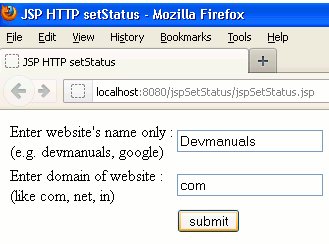
2. When you will click a submit button, resource will be moved to that website (if available).

JSP Response Set Status的更多相关文章
- 【FAQ】【JSP】HTTP Status 500 - Summary(问题排查时候应该仔细分析所有的错误打印说明)
Question 1.HTTP Status 500 - Unable to compile class for JSP:'***' cannot be resolved to a type 原因分析 ...
- Jsp——response对象
<%@ page language="java" contentType="text/html; charset=UTF-8" import=" ...
- JSP response.setCharacterEncoding与response.setContentType的区别
问题描述 昨天在参考别人的项目时,发现页面引用js,css等文件总是乱码,后来才发现是MIME类型统一设置为text/html,并且仅仅编码设置了浏览器端的解析编码.另外,可以先通过文本编辑器(如no ...
- jsp response对象
所属接口:javax.servlet.http.HttpServletResponse,其父接口是ServletResponse,而且 ServletResponse也现在只有唯一一个HttpServ ...
- request 和response
当今web程序的开发技术真是百家争鸣,ASP.NET, PHP, JSP,Perl, AJAX 等等. 无论Web技术在未来如何发展,理解Web程序之间通信的基本协议相当重要, 因为它让我们理解了We ...
- Servlet&jsp基础:第二部分
声明:原创作品,转载时请注明文章来自SAP师太技术博客( 博/客/园www.cnblogs.com):www.cnblogs.com/jiangzhengjun,并以超链接形式标明文章原始出处,否则将 ...
- HTTP Response Splitting攻击探究 <转>
第一小节:HTTP Basics:使用Proxy软件(例如Webscarab)来截断浏览器(客户端)和Server之间的HTTP通信,之后任意篡改得到预期结果即可. 第二小节:HTTP Splitti ...
- JSP处理AJAX
register.jsp: <script type="text/javascript"> var req; function validate() { var idF ...
- #HTTP协议学习# (一)request 和response 解析
注:本文转自:http://www.cnblogs.com/TankXiao/archive/2012/02/13/2342672.html , 粉字[]内内容为个人笔记 当今web程序的开发技术真是 ...
随机推荐
- Tomcat学习笔记(七)
Tomcat载入器(一) 在了解tomcat的载入器时,首先需要了解的是java的类加载部分的内容. 在java体系中,系统分为3中类型的加载器 1.启动类加载器(Bootstrap ClassLoa ...
- WebSocket贪吃蛇例子学习
在Tomcat7.0.64下的examples文件夹内,有多人贪吃蛇的例子. Multiplayer snake 这是一个多人在线小游戏,客户端通过操作上下左右键指挥自己的蛇,如果碰到别的蛇就死掉.还 ...
- 去除TB二合一页面弹窗
AdBlock插件 自定义AdBlock ###J_MMREDBOX_MASK 保存
- vim编辑器快捷运用
vim下可以使用常用的箭头键 但是 还有其它键可以让你更快的达到目标 hjkl 这是代替箭头键功能的 H M L 跳到屏幕的顶上 中间 下方 w 跳到下一个单词的开始e 跳到单词的结束b 向后跳 gg ...
- median(NOIP模拟赛Round 3)
也是神奇的题目.. 原题传送门 首先看到这道题目,很明显我们需要线性算法 1.前缀和+统计 2.DP+统计 对于第一种算法,我们可以对于任何一个a[i]对b进行比较,如果大于b标上1,等于b标上0,小 ...
- snmp 默认团体名检测利用
[root@izj6c2n1nth4tg8emd8h58z tmp]# lsb_release LSB Version: :core-4.1-amd64:core-4.1-noarch[root ...
- 优化html中mp4视频加载速度
如果使用参数faststart就会在生成完上边结构之后将moov移动到mdat前面:ffmpeg –i input.flv –c copy –f mp4 –movflags faststart out ...
- RobotFramework自动化2-自定义关键字【转载】
本篇转自博客:上海-悠悠 原文地址:http://www.cnblogs.com/yoyoketang/tag/robotframework/ 前言 有时候一个页面上有多个对象需要操作,如果一个个去定 ...
- 使用bottle进行web开发(2):http request
我们知道,http request有多个方法,比如get,post,delete,patch,put等.对用的,bottle都定义了相应的装饰器,目前定义了五个: get(),post(),put() ...
- 【转】Talend作业设计模式和最佳实践-Part I
原文地址:https://mp.weixin.qq.com/s?__biz=MzA3OTg1Mzk4Nw==&mid=2453261363&idx=2&sn=e0f426022 ...