
HCNA配置接口IP地址
1、拓扑图
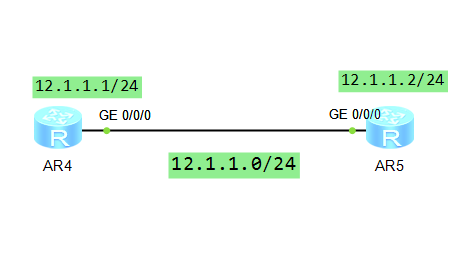
2、R1配置
The device is running!

<Huawei>sys

<Huawei>system-view

Enter system view, return user view with Ctrl+Z.

[Huawei]sysn

[Huawei]sysname r1

[r1]int

[r1]interface ?

  Bridge-if         Bridge-if interface

  Dialer            Dialer interface

  Eth-Trunk         Ethernet-Trunk interface

  GigabitEthernet   GigabitEthernet interface

  Ima-group         ATM-IMA interface

  LoopBack          LoopBack interface

  MFR               MFR interface

  Mp-group          Mp-group interface

  NULL              NULL interface

  Tunnel            Tunnel interface

  Virtual-Ethernet  Virtual-Ethernet interface

  Virtual-Template  Virtual-Template interface

  Vlanif            Vlan interface

  Wlan-Ess          Wlan-Ess interface

[r1]dis int

[r1]dis interface

GigabitEthernet0// current state : UP

Line protocol current state : DOWN

Description:HUAWEI, AR Series, GigabitEthernet0// Interface

Route Port,The Maximum Transmit Unit is

Internet protocol processing : disabled

IP Sending Frames' Format is PKTFMT_ETHNT_2, Hardware address is 00e0-fc3e-555d

Last physical up time   : -- :: UTC-:

Last physical down time : -- :: UTC-:

Current system time: -- ::-:

Port Mode: COMMON COPPER

Speed : ,  Loopback: NONE

Duplex: FULL,  Negotiation: ENABLE

Mdi   : AUTO

Last  seconds input rate  bits/sec,  packets/sec

Last  seconds output rate  bits/sec,  packets/sec

Input peak rate  bits/sec,Record time: -

Output peak rate  bits/sec,Record time: -

Input:   packets,  bytes

  Unicast:                  ,  Multicast:

  Broadcast:                ,  Jumbo:

  Discard:                  ,  Total Error:

  CRC:                      ,  Giants:

[r1]int

[r1]interface g

[r1]interface GigabitEthernet

[r1]interface GigabitEthernet //

[r1-GigabitEthernet0//]ip add

[r1-GigabitEthernet0//]ip address 12.1.1.1 255.255.255.0

[r1-GigabitEthernet0//]

Dec    ::-: r1 %%01IFNET//LINK_STATE(l)[]:The line protocol IP

on the interface GigabitEthernet0// has entered the UP state.

[r1-GigabitEthernet0//]q

[r1]dis ip int br

*down: administratively down

^down: standby

(l): loopback

(s): spoofing

The number of interface that is UP in Physical is

The number of interface that is DOWN in Physical is

The number of interface that is UP in Protocol is

The number of interface that is DOWN in Protocol is

Interface                         IP Address/Mask      Physical   Protocol

GigabitEthernet0//              12.1.1.1/          up         up

GigabitEthernet0//              unassigned           down       down

GigabitEthernet0//              unassigned           down       down

NULL0                             unassigned           up         up(s)

[r1]
3、R2配置
 Configuration console exit, please press any key to log on

<Huawei>sys

<Huawei>system-view

Enter system view, return user view with Ctrl+Z.

[Huawei]sysn

[Huawei]sysname R2

[R2]int g

[R2]int GigabitEthernet //

[R2-GigabitEthernet0//]ip add 12.1.1.2

Error: The address already exists.

[R2-GigabitEthernet0//]ip add 12.1.1.3

[R2-GigabitEthernet0//]q

[R2]dis ip int

[R2]dis ip interface br

[R2]dis ip interface brief

*down: administratively down

^down: standby

(l): loopback

(s): spoofing

The number of interface that is UP in Physical is

The number of interface that is DOWN in Physical is

The number of interface that is UP in Protocol is

The number of interface that is DOWN in Protocol is

Interface                         IP Address/Mask      Physical   Protocol

GigabitEthernet0//              12.1.1.3/          up         up

GigabitEthernet0//              unassigned           down       down

GigabitEthernet0//              unassigned           down       down

NULL0                             unassigned           up         up(s)

[R2]
4、测试
 Configuration console time out, please press any key to log on

<r1>ping  12.1.1.2

  PING 12.1.1.2:   data bytes, press CTRL_C to break

    Request time out

    Request time out

    Request time out

  --- 12.1.1.2 ping statistics ---

     packet(s) transmitted

     packet(s) received

    100.00% packet loss

<r1>

<r1>ping 12.1.1.3

  PING 12.1.1.3:   data bytes, press CTRL_C to break

    Reply from 12.1.1.3: bytes= Sequence= ttl= time= ms

    Reply from 12.1.1.3: bytes= Sequence= ttl= time= ms

    Reply from 12.1.1.3: bytes= Sequence= ttl= time= ms

    Reply from 12.1.1.3: bytes= Sequence= ttl= time= ms

    Reply from 12.1.1.3: bytes= Sequence= ttl= time= ms

  --- 12.1.1.3 ping statistics ---

     packet(s) transmitted

     packet(s) received

    0.00% packet loss

    round-trip min/avg/max = // ms

<r1>ping 12.1.1.3 ?

  ip-forwarding  Specify the request packet forward by IP

  <cr>           Please press ENTER to execute command

<r1>ping 12.1.1.3

  PING 12.1.1.3:   data bytes, press CTRL_C to break

    Reply from 12.1.1.3: bytes= Sequence= ttl= time= ms

    Reply from 12.1.1.3: bytes= Sequence= ttl= time= ms

    Reply from 12.1.1.3: bytes= Sequence= ttl= time= ms

    Reply from 12.1.1.3: bytes= Sequence= ttl= time= ms

    Reply from 12.1.1.3: bytes= Sequence= ttl= time= ms

  --- 12.1.1.3 ping statistics ---

     packet(s) transmitted

     packet(s) received

    0.00% packet loss

    round-trip min/avg/max = // ms

<r1>
[R2]ping  12.1.1.1

  PING 12.1.1.1:   data bytes, press CTRL_C to break

    Reply from 12.1.1.1: bytes= Sequence= ttl= time= ms

    Reply from 12.1.1.1: bytes= Sequence= ttl= time= ms

    Reply from 12.1.1.1: bytes= Sequence= ttl= time= ms

    Reply from 12.1.1.1: bytes= Sequence= ttl= time= ms

    Reply from 12.1.1.1: bytes= Sequence= ttl= time= ms

  --- 12.1.1.1 ping statistics ---

     packet(s) transmitted

     packet(s) received

    0.00% packet loss

    round-trip min/avg/max = // ms
HCNA配置接口IP地址的更多相关文章
- linux配置网卡IP地址命令详细介绍及一些常用网络配置命令
linux配置网卡IP地址命令详细介绍及一些常用网络配置命令2010-- 个评论 收藏 我要投稿 Linux命令行下配置IP地址不像图形界面下那么方 便,完全需要我们手动配置,下面就给大家介绍几种配置 ...
- VMware中安装CentOS7网络配置静态IP地址,常用配置和工具安装
VMware中安装CentOS7网络配置静态IP地址,常用配置和工具安装在阿里云开源镜像地址下载镜像Index of /centos/7.2.1511/isos/x86_64/http://mirro ...
- 如何为CentOS 7配置静态IP地址
问题:在CentOS 7上,我想要将我其中一个网络接口从DHCP改为静态IP地址配置,如何才能永久为CentOS或RHEL 7上的网络接口分配静态IP地址? 如果你想要为CentOS 7中的某个网络接 ...
- VMware虚拟CentOS 6.5在NAT模式下配置静态IP地址及Xshell远程控制配置
VMware虚拟CentOS 6.5在NAT模式下配置静态IP地址及Xshell远程控制配置 标签: LinuxXshellCentOS 2016-10-15 04:58 127人阅读 评论(0) 收 ...
- 为CentOS 7配置静态IP地址及遇到的问题解决策略
为CentOS 7配置静态IP地址及遇到的问题解决策略 1. 为CentOS 7配置静态IP地址的两种方法 (原文地址:http://www.linuxidc.com/Linux/2014-10/10 ...
- 如何在Ubuntu Server 18.04 LTS中配置静态IP地址
安装Ubuntu Server 18.04后需要分配一个的静态IP地址.先前的LTS版本Ubuntu 16.04使用/etc/network/interfaces文件配置静态IP地址,但是Ubuntu ...
- CentOS 7配置静态IP地址的两种方法 来自:互联网
CentOS 7配置静态IP地址的两种方法 来自:互联网 时间:2021-01-12 阅读:4 如果你想要为CentOS 7中的某个网络接口设置静态IP地址,有几种不同的方法,这取决于你是否想要使用网 ...
- Ubuntu 为网卡配置静态IP地址
为网卡配置静态IP地址编辑文件/etc/network/interfaces:sudo vi /etc/network/interfaces并用下面的行来替换有关eth0的行:# The primar ...
- Ubuntu12.04配置静态ip地址
Ubuntu12.04配置静态ip地址 $sudo gedit /etc/network/interfaces 原有内容只有如下两行: auto lo iface lo inet loopback 向 ...
随机推荐
- Gym - 101572G Galactic Collegiate Programming Contest 小根堆(set)
题目传送门 题目大意: n个人,m次提交,每次提交都代表某支队伍做出一题,并且给出罚时,让你输出每次提交后,编号为1的队伍的排名. 思路: 首先处理ac和罚时,由于罚时最大1000,最多有1e5次,要 ...
- linux磁盘与文件管理
一.硬盘的组成与分区 1.物理组成 *圆形的盘片(主要记录数据的部分) *机械手臂与机械手臂上的磁头(可读写盘片上的数据) *主轴马达,可以转动盘片,让机械手臂的磁头在盘片上写数据. *扇区为最小的物 ...
- MYSQL生成两个日期之间的所有日期数据
set @i = -1; set @sql = repeat(" select 1 union all",-datediff('2021-01-01','2030-12-31')+ ...
- SQL SERVER – Configuration Manager – Cannot Connect to WMI Provider. You Do Not Have Permission or The Server is Unreachable
打开SQL SERVER Configuarion Manger 出现以下错误 SQL Server Configuration Manager—————————Cannot connect to W ...
- windows 7 下安装VMWARE 和 red-hat 7 64bit
按F2 进入BIOS: 在inter virtualization technology 选择YES 就可以安装linux 64bit 操作系统了 https://blog.csdn.net/coco ...
- sql 中单引号内嵌套单引号该怎么解决
# 在mybatis 中写过一个比较少见的sql, 单引号呢需要嵌套一个单引号,使用双引号就会报错,怎么解决呢: * 这个时候可以使用两个单引号,eg : select id from pgr_dij ...
- svn被锁 The project was not built due to "org.apache.subversion.javahl.ClientException: Attempted to lock an already-locked dir
解决办法 : 右键该项目 ,---->Team---->选"Team"-->"Refresh/Cleanup",并确认"Ref ...
- UGUI [TextArea]
- [原创]II7/IIS8屏蔽YisouSpider蜘蛛
来源:http://www.0531s.com/content-46-1927014-1.html YisouSpider蜘蛛抓取网页能够导致CPU暴涨,影响其他蜘蛛和用户的访问,多次实验后,发现II ...
- Android多线程源码学习笔记一:handler、looper、message、messageQueue
最近在学习Android多线程相关知识的源码,现在把自己的笔记整理一下,写出来加深印象. Android多线程通讯的核心是handler.looper.message.messageQueue,这篇文 ...