
SpringCloud集群(三)
一、构造步骤
1、进行其他的服务中心的域名映射
127.0.0.1 eureka7001.com
127.0.0.1 eureka7002.com
127.0.0.1 eureka7003.com
2、修改microservicecloud-eureka-7001 yml文件
server:

  port: 7001

  ###eureka 基本信息配置

eureka:

  instance:

        ###注册到eurekaip地址

    hostname: eureka7001.com #eureka服务端的实例名称

  client:

    service-url:

      defaultZone:  http://localhost:7002/eureka/,http://localhost:7003/eureka/

        ###因为自己是为注册中心,不需要自己注册自己

    register-with-eureka: false #表示不像注册中心注册自己

    ###因为自己是为注册中心,不需要检索服务

    fetch-registry: false #false表示自己端就是注册中心,我的职责就是维护服务实例,并不需要去检索服务
3、microservicecloud-eureka-7002 eureka服务注册中心Module
新建工程microservicecloud-eureka-7002,创建完成后请回到父工程查看pom文件变化
pom文件
<dependencies>

<!--eureka-server服务端-->

    <dependency>

        <groupId>org.springframework.cloud</groupId>

        <artifactId>spring-cloud-starter-eureka-server</artifactId>

    </dependency>

</dependencies>
yml文件
server:

  port: 7002

  ###eureka 基本信息配置

eureka:

  instance:

        ###注册到eurekaip地址

    hostname: eureka7002.com #eureka服务端的实例名称

  client:

    service-url:

      defaultZone:  http://localhost:7001/eureka/,http://localhost:7003/eureka/  #单机  设置与Eureka Server交互的地址查询服务和注册服务都需要依赖这个地址(单机)。

        ###因为自己是为注册中心,不需要自己注册自己

    register-with-eureka: false #表示不像注册中心注册自己

    ###因为自己是为注册中心,不需要检索服务

    fetch-registry: false #false表示自己端就是注册中心,我的职责就是维护服务实例,并不需要去检索服务
主启动类
@SpringBootApplication

@EnableEurekaServer // EurekaServer服务器端启动类,接受其它微服务注册进来

public class SpringCloudService7002_APP {

    public static void main(String[] args) {

        SpringApplication.run(SpringCloudService7002_APP.class);

    }

}
4、microservicecloud-eureka-7003 eureka服务注册中心Module
新建工程microservicecloud-eureka-7003,创建完成后请回到父工程查看pom文件变化
pom文件
<dependencies>

        <!--eureka-server服务端-->

        <dependency>

            <groupId>org.springframework.cloud</groupId>

            <artifactId>spring-cloud-starter-netflix-eureka-server</artifactId>

        </dependency>

    </dependencies>
yml文件
server:

  port: 7003

  ###eureka 基本信息配置

eureka:

  instance:

        ###注册到eurekaip地址

    hostname: eureka7003.com #eureka服务端的实例名称

  client:

    service-url:

      defaultZone:  http://localhost:7002/eureka/,http://localhost:7003/eureka/

        ###因为自己是为注册中心,不需要自己注册自己

    register-with-eureka: false #表示不像注册中心注册自己

    ###因为自己是为注册中心,不需要检索服务

    fetch-registry: false #false表示自己端就是注册中心,我的职责就是维护服务实例,并不需要去检索服务
启动主启动类
@SpringBootApplication

@EnableEurekaServer // EurekaServer服务器端启动类,接受其它微服务注册进来

public class SpringCloudService7003_APP {

    public static void main(String[] args) {

        SpringApplication.run(SpringCloudService7003_APP.class);

    }

}
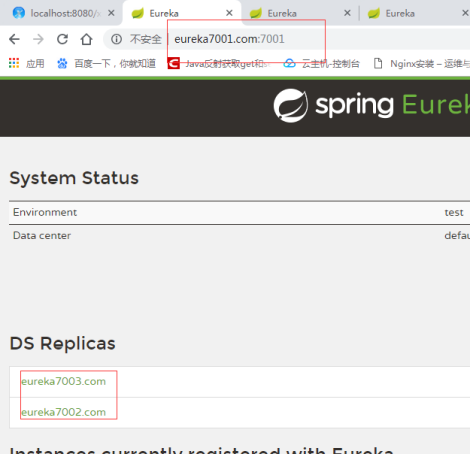
5、启动测试
http://eureka7002.com:7002/,
效果:
SpringCloud集群(三)的更多相关文章
- centos LB负载均衡集群 三种模式区别 LVS/NAT 配置 LVS/DR 配置 LVS/DR + keepalived配置 nginx ip_hash 实现长连接 LVS是四层LB 注意down掉网卡的方法 nginx效率没有LVS高 ipvsadm命令集 测试LVS方法 第三十三节课
centos LB负载均衡集群 三种模式区别 LVS/NAT 配置 LVS/DR 配置 LVS/DR + keepalived配置 nginx ip_hash 实现长连接 LVS是四层LB ...
- 使用windos电脑模拟搭建集群(三)实现全网监控
这里我们采用小米监控 open-falcon 这是server端就是 192.168.5.200 这台主机, agent就是负责将数据提交到 server端 agent整个集群所有主机都 ...
- Redis Cluster 集群三主三从高可用环境搭建
前言 Redis 是我们目前大规模使用的缓存中间件,由于它强大高效而又便捷的功能,得到了广泛的使用. Window环境下载地址:https://github.com/tporadowski/redis ...
- Windows系统搭建Redis集群三种模式(零坑、最新版)
目录 主从复制 修改配置文件 启动各节点 验证 哨兵模式 修改配置文件 启动实例 验证 集群模式 修改配置文件 启动实例 验证 主从复制 新建以下三个目录,用来部署一主二从 redis 的安装在另外一 ...
- 搭建Hadoop集群 (三)
通过 搭建Hadoop集群 (二), 我们已经可以顺利运行自带的wordcount程序. 下面学习如何创建自己的Java应用, 放到Hadoop集群上运行, 并且可以通过debug来调试. 有多少种D ...
- Centos7部署kubernetes-ETCD集群(三)
1.下载etcd软件包 wget https://github.com/coreos/etcd/releases/download/v3.2.18/etcd-v3.2.18-linux-amd64.t ...
- Hadoop集群(三) Hbase搭建
前面已经完成Zookeeper和HDFS的安装,本文会详细介绍Hbase的安装步骤.以及安装过程中遇到问题的汇总. 系列文章: Hadoop集群(一) Zookeeper搭建 Hadoop集群(二 ...
- Hadoop集群三种作业调度算法介绍
Hadoop集群中有三种作业调度算法,分别为FIFO,公平调度算法和计算能力调度算法 先来先服务(FIFO) Hadoop中默认的调度器FIFO,它先按照作业的优先级高低,再按照到达时间的先后选择被执 ...
- kubeadm安装Kubernetes13.1集群-三
环境: master: 192.168.3.100 node01: 192.168.3.101 node02: 192.168.3.102 关闭所有主机防火墙,selinux: 配置主机互信: mas ...
随机推荐
- python学习笔记五:模块和包
一.模块用import导入 cal.py: #!/usr/bin/python def add(x,y): return x+y if __name__ == '__main__': print ad ...
- Python import与from import使用
Python程序可以调用一组基本的函数(即内建函数),比如print().input()和len()等函数.Python本身也内置一组模块(即标准库).每个模块都是一个Python程序,且包含了一组相 ...
- 【Python】Django学习一:第一个Django程序
项目开发环境 Python 3.6 Django 1.11.5 Django安装 在开始安装Django之前,Django更新比较频繁,所以要选择合适的版本,这里选择Django1.11.5. pip ...
- Microsxxxxxxx-面试总结
策略题 There are four kinds of cards, respectively, 1,2, 3,4 numbers. There are seven cards for each ty ...
- css:hover状态改变另一个元素样式的使用
效果演示 css:hover状态改变另一个元素样式的使用 .box { width: 150px; height: 150px; background-color: #069; line-height ...
- python pip install XXX出现报错问题
重装Anacondas后,将pip 和python.exe路径加入到环境变量后直接在cmd窗口进行pip 操作,报错如下 报错内容为: pip is configured with locations ...
- 201621123033 《Java程序设计》第10周学习总结
1. 本周学习总结 1.1 以你喜欢的方式(思维导图或其他)归纳总结异常相关内容. 2. 书面作业 本次PTA作业题集异常 1. 常用异常 结合题集题目7-1回答 1.1 自己以前编写的代码中经常出现 ...
- VMware ESXI 5.5 注册码
VMware ESXI 5.5 注册码 ESXI 注册码0A42V-8M182-3ZZ88-R21N6-32K5H ESXi Server许可证类型产品: Mware vSphere 5 Enterp ...
- [bzoj] 1878 HH的项链 || 莫队
原题 给定长为 n 的一个序列,接下来 m 次询问,每次询问区间 [ l , r ] 内有多少个不同的数. 莫队: 离线\(O(n\log(n))\). 将序列分块. 以左端点所在块为第一关键字,右端 ...
- 【CF Edu 28 A. Curriculum Vitae】
time limit per test 1 second memory limit per test 256 megabytes input standard input output standar ...