
android wifi框架
---恢复内容开始---
frameworks/base/services/java/com/android/server/wifi 中的ReadMe文件
WifiService: Implements the IWifiManager 3rd party API. The API and the device state information (screen on/off, battery state, sleep policy) go as input into the WifiController which tracks high level states as to whether STA or AP mode is operational and controls the WifiStateMachine to handle and shut down.
实现IWifiManager第三方API。API和设备信息(比如屏幕亮/暗,电量状态,睡眠方案)作为WifiController的输入。WifiController跟踪高级别状态(STA或者AP模式是否可用)
并且控制WifiStateMachine去操控
1):AP模式: Access Point,提供无线接入服务,允许其它无线设备接入,提供数据访问,一般的无线路由/网桥工作在该模式下。AP和AP之间允许相互连接
AP,也就是无线接入点,是一个无线网络的创建者,是网络的中心节点。一般家庭或办公室使用的无线路由器就一个AP。
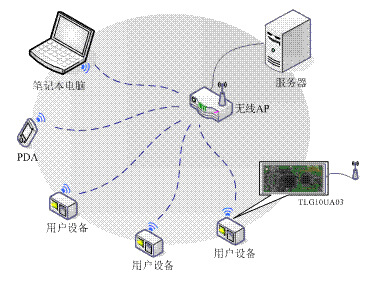
2):STA模式: Station, 类似于无线终端,sta本身并不接受无线的接入,它可以连接到AP,一般无线网卡即工作在该模式。
STA站点,每一个连接到无线网络中的终端(如笔记本电脑、PDA及其它可以联网的用户设备)都可称为一个站点。

WifiController: Acts as a controller to the WifiStateMachine based on various inputs (API and device state). Runs on the same thread created in WifiService.
基于各种API和设备状态的输入,充当WifiStateMachine的控制器。和WifiService运行在同一个线程
WifiSettingsStore: Tracks the various settings (wifi toggle, airplane toggle, tethering toggle, scan mode toggle) and provides API to figure if wifi should be turned on or off.
跟踪各种用户设置(wifi,飞行模式,网络分享,扫描模式的切换),并将这些设置提供给API,去计算出wifi需要开还是关
Tethering,意指通過智能手機或平板電腦等行動裝置,將它的上網功能分享給其他裝置使用的功能。中文尚未有合適譯名,有人譯為Internet 共享、網絡共享、以手機作為數據機、手機帶動電腦上網、共用上網、继流联等。
如果是以WiFi進行分享,通常稱為行動熱點(Mobile Hotspot)。
WifiTrafficPoller: Polls traffic on wifi and notifies apps listening on it.
wifi传输量轮询:轮询wifi传输量,通知监听传输量的app
WifiNotificationController: Controls whether the open network notification is displayed or not based on the scan results.
控制 wifi扫描结果中的开放网络是否通过nodification通知给用户
WifiStateMachine: Tracks the various states on STA and AP connectivity and handles
跟踪STA和AP连接的各种状态。控制开启和关闭
Feature description:
Scan-only mode with Wi-Fi turned off:
- Setup wizard opts user into allowing scanning for improved location. We show no further dialogs in setup wizard since the user has just opted into the feature. This is the reason WifiService listens to DEVICE_PROVISIONED setting.
- Once the user has his device provisioned, turning off Wi-Fi from settings or from a third party app will show up a dialog reminding the user that scan mode will be on even though Wi-Fi is being turned off. The user has the choice to turn this notification off.
- In the scan mode, the device continues to allow scanning from any app with Wi-Fi turned off. This is done by disabling all networks and allowing only scans to be passed.
以下参考www.cnblogs.com/snake-hand/p/3174650.html
1. 系统架构
Android WiFi系统引入了wpa_supplicant,它的整个WiFi系统以wpa_supplicant为核心来定义上层用户接口和下层驱动接口。整个WiFi系统架构如下图所示:

一切尽在上图中,下面将对每部分进行详细分析。
1.1 WifiService
由SystemServer启动的时候生成的ConnecttivityService创建,负责启动关闭wpa_supplicant,启动和关闭WifiMonitor线程,把命令下发给wpa_supplicant以及更新WIFI的状态。
处理其它模块通过IWifiManager接口发送过来的远端WiFi操作。
1.2 WifiMonitor
负责从wpa_supplicant接收事件通知。
1.3 wpa_supplicant
1) 读取配置文件
2) 初始化配置参数,驱动函数
3) 让驱动scan当前所有的bssid
4) 检查扫描的参数是否和用户设置的相符
5) 如果相符,通知驱动进行权限和认证操作
6) 连上AP
1.4 Wifi驱动模块
厂商提供的source,主要进行load firware和kernel的wireless进行通信
1.5 Wifi电源管理模块
主要控制硬件的GPIO和上下电,让CPU和Wifi模组之间通过sdio接口或USB接口通信
1.6 Wifi工作步骤
1) Wifi启动
2) 开始扫描
3) 显示扫描的AP
4) 配置AP
5) 连接AP
6) 获取IP地址
7) 上网
1.7 Wifi模块代码
1) Wifi Settings应用程序
packages/apps/Settings/src/com/android/settings/wifi
2) Wifi Framework
frameworks/base/wifi/java/android/net/wifi (UI通过android.net.wifi package
发送命令给wifi.c)
frameworks/base/core/java/android/net(更高一级的网络管理)
frameworks/base/services/java/com/android/server
3) Wifi JNI
frameworks/base/core/jni/android_net_wifi_Wifi.cpp
4) Wifi Hardware (wifi管理库)
hardware/libhardware_legacy/wifi/wifi.c
5) wpa_supplicant(wifi tool)
external/wpa_supplicant8
(1) wpa_client (生成库libwpaclient.so)
external/wpa_supplicant_8/wpa_supplicant/src/common/wpa_ctrl.c
(2) wpa_server (生成守护进程wpa_supplicant)
external/wpa_supplicant_8/wpa_supplicant/main.c
6) Wifi kernel
net/wireless drivers/wlan_xxx arch/arm/mach-xxx/wlan_pm.c
2. WifiService和wpa_supplicant启动流程
WifiService和wpa_supplicant启动流程如下图所示:

2.1 状态变化
• 加载wifi驱动的状态变化流程如下:
初始状态:mInitialState
|
mDriverUnloadedState
|
mWaitForP2pDisableState
|
mDriverLoadingState(其enter中调用WifiNative.loadDriver)
• 启动wpa_supplicant的状态变化如下:
在DriverLoadedState状态的processMessage中调用WifiNative.startSupplicant
3. 生产时自动打开Wifi
在生产时, 默认Wifi是关闭的,如果需要默认打开,可修改wifiservice.java中的如下代码:
- /**
- * Check if Wi-Fi needs to be enabled and start
- * if needed
- *
- * This function is used only at boot time
- */
- public void checkAndStartWifi() {
- mAirplaneModeOn.set(isAirplaneModeOn());
- mPersistWifiState.set(getPersistedWifiState());
- /* Start if Wi-Fi should be enabled or the saved state indicates Wi-Fi was on */
- boolean wifiEnabled = shouldWifiBeEnabled() || testAndClearWifiSavedState();
- Slog.i(TAG, "WifiService starting up with Wi-Fi " +
- (wifiEnabled ? "enabled" : "disabled"));
- setWifiEnabled(wifiEnabled); //强制设置为true
- mWifiWatchdogStateMachine = WifiWatchdogStateMachine.
- makeWifiWatchdogStateMachine(mContext);
- }
---恢复内容结束---
android wifi框架的更多相关文章
- android -------- WIFI 详解
今天简单的来聊一下安卓开发中的Wifi,一些常用的基础,主要分为两部分: 1:WiFi的信息 2:WiFi的搜索和连接 现在app大多都需要从网络上获得数据.所以访问网络是在所难免.但是在访问网络之前 ...
- android wifi驱动移植详细过程
转自:http://bbs.imp3.net/thread-10558924-1-1.html 对于刚入手android没多久的人来说,android wifi 驱动的移植确实还是有难度的,不过参考了 ...
- Android注解框架实战-ButterKnife
文章大纲 Android注解框架介绍 ButterKnife实战 项目源码下载 一.框架介绍 为什么要用注解框架? 在Android开发过程中,我们经常性地需要操作组件,操作方法有findVie ...
- 2017年Android百大框架排行榜
框架:提供一定能力的小段程序 >随意转载,标注作者"金诚"即可 >本文已授权微信公众号:鸿洋(hongyangAndroid)原创首发. >本文已经开源到Gith ...
- Android Wi-Fi Peer-to-Peer(Android的Wi-Fi P2P对等网络)
Wi-Fi peer-to-peer(P2P,对等网络),它同意具备对应硬件的Android 4.0(API level 14)或者更高版本号的设备能够直接通过wifi而不须要其他中间中转节点就能直接 ...
- android 优秀框架整理
程序员界有个神奇的网站,那就是github,这个网站集合了一大批优秀的开源框架,极大地节省了开发者开发的时间,在这里我进行了一下整理,这样可以使我们在使用到时快速的查找到,希望对大家有所帮助! 1. ...
- Android WiFi直连 双向通信
代码地址如下:http://www.demodashi.com/demo/13965.html 原文地址:https://blog.csdn.net/VNanyesheshou/article/det ...
- Android网络框架Volley
Volley是Google I/O 2013推出的网络通信库,在volley推出之前我们一般会选择比较成熟的第三方网络通信库,如: android-async-http retrofit okhttp ...
- 2017年Android百大框架排行榜(转)
一.榜单介绍 排行榜包括四大类: 单一框架:仅提供路由.网络层.UI层.通信层或其他单一功能的框架 混合开发框架:提供开发hybrid app.h5与webview结合能力.web app能力的框架 ...
随机推荐
- 262. Trips and Users
问题描述 解决方案 -- case when 的效率比if的效率高 -- select Trips.Request_at as 'Day', -- round(sum(case Trips.Statu ...
- Jenkins自动化部署及代码检查配置应用
首先jenkins是基于java开发的一种持续集成工具,它的存在和实际应用使得我们在开发过程中节省了很多宝贵时间,既然基于java,所以java环境是必须的. 其次Tomcat是针对Java的一个开源 ...
- MLPClassifier 隐藏层不包括输入和输出
多层感知机(MLP)原理简介 多层感知机(MLP,Multilayer Perceptron)也叫人工神经网络(ANN,Artificial Neural Network),除了输入输出层,它中间可以 ...
- java调接口
package util; import java.io.BufferedReader; import java.io.DataOutputStream; import java.io.InputSt ...
- L121
今天上午签字仪式的布置与该场合的严肃性非常协调.The setting for this morning's signing ceremony matched the solemnity of the ...
- Python中类的约束
如何在python中进行类的约束 使某些类必须有一些方法 1 python 的抽象类实现 === 约束性不高 Python是 解释性语言 from abc import ABCMeta from ab ...
- C++中string的常见用法
在ACM中主要用到string的这几个功能:赋值,添加,删除,替换,查找,比较,反向排序. 1.赋值 直接来就行: string ss; ss="aaa"; 或者 string s ...
- HihoCoder1337 动态第k大(treap)
描述 小Ho:小Hi,之前你不是讲过Splay和Treap么,那么还有没有更简单的平衡树呢? 小Hi:但是Splay和Treap不是已经很简单了么? 小Ho:是这样没错啦,但是Splay和Treap和 ...
- EF各版本增删查改及执行Sql语句
自从我开始使用Visual Studio 也已经经历了好几个版本了,而且这中间EF等框架的改变也算是比较多的.本篇文章记录下各个版本EF执行Sql语句和直接进行增删查改操作的区别,方便自己随时切换版本 ...
- 排列(加了点小set就过了,哈哈哈)
Ray又对数字的列产生了兴趣: 现有四张卡片,用这四张卡片能排列出很多不同的4位数,要求按从小到大的顺序输出这些4位数. 输入描述: 1 2 3 4 1 1 2 3 0 1 2 3 0 0 0 0输出 ...