
springboot 采用HttpClient获取天气预报 异常及原因
采用httpClient调用天气预报地址获取出现异常
2018-10-04 15:18:25.815 ERROR 10868 --- [nio-8080-exec-5] o.a.c.c.C.[.[.[/].[dispatcherServlet]    : Servlet.service() for servlet [dispatcherServlet] in context with path [] threw exception [Request processing failed; nested exception is org.springframework.web.client.HttpServerErrorException: 502 Bad Gateway] with root cause

org.springframework.web.client.HttpServerErrorException: 502 Bad Gateway

    at org.springframework.web.client.DefaultResponseErrorHandler.handleError(DefaultResponseErrorHandler.java:97) ~[spring-web-5.0.9.RELEASE.jar:5.0.9.RELEASE]

    at org.springframework.web.client.DefaultResponseErrorHandler.handleError(DefaultResponseErrorHandler.java:79) ~[spring-web-5.0.9.RELEASE.jar:5.0.9.RELEASE]

    at org.springframework.web.client.ResponseErrorHandler.handleError(ResponseErrorHandler.java:63) ~[spring-web-5.0.9.RELEASE.jar:5.0.9.RE
LEASE]
当前异常产生原因是调用服务器地址我写错了导致的异常
错误代码:
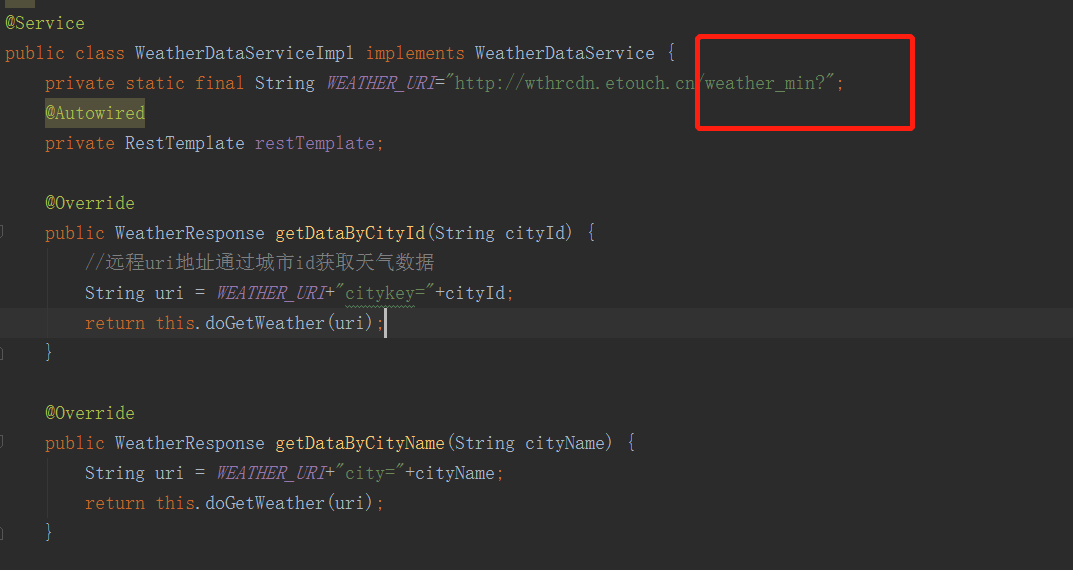
正确的服务地址:

第二个异常json转换异常
正确获取到一个json格式数据后要将当前json字符串转换成指定类型对象
    private WeatherResponse doGetWeather(String uri){

        //通过spring  restTemplate 客户端发送请求获取 String类型响应实体

        ResponseEntity<String> respString = restTemplate.getForEntity(uri, String.class);

        //Springboot内部集成了json操作对象

        ObjectMapper objectMapper = new ObjectMapper();

        WeatherResponse resp=null;

        String strBody = null;

        //通过响应客户端获取状态码判断是否为成功状态码

        if(respString.getStatusCodeValue()==200){

            //获取响应实体内容实体

            strBody = respString.getBody();

        }

        try {

            //通过json操作对象将string 类型数据转为指定类型对象

            resp = objectMapper.readValue(strBody, WeatherResponse.class);

        } catch (IOException e) {

            e.printStackTrace();

        }

        return resp;

    }

}
由于weatherResponse实体内定义的属性与json 返回属性不一致
public class WeatherResponse implements Serializable{

    private Weather weather;

    private Integer status;

    private String desc;
json数据属性: 返回json 数据属性为data 而实体中属性Weather 为weather 应该修改为Weather data
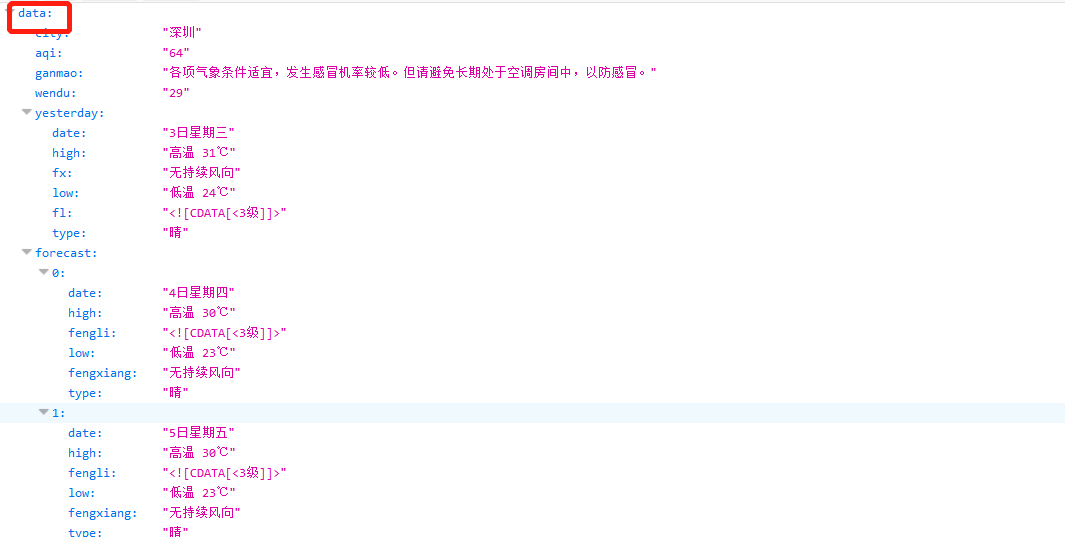
异常信息:这里会清晰的指出属性是哪一个问题

springboot 采用HttpClient获取天气预报 异常及原因的更多相关文章
- HttpClient的CircularRedirectException异常原因及解决办法
HttpClient的CircularRedirectException异常原因及解决办法 这两天在使用我自己爬虫抓取网页的时候总是出现 org.apache.http.client.ClientPr ...
- Android 采用HttpClient提交数据到服务器
在前几篇文章中<Android 采用get方式提交数据到服务器><Android 采用post方式提交数据到服务器>介绍了android的两种提交数据到服务器的方法 本文继续介 ...
- 查看语句运行时间异常的原因(SQLServer)
转载:http://www.cnblogs.com/fygh/archive/2012/01/17/2324926.html 查看语句运行时间异常的原因(SQLServer) 经常有开发同事反映如 ...
- SpringBoot JPA懒加载异常 - com.fasterxml.jackson.databind.JsonMappingException: could not initialize proxy
问题与分析 某日忽然发现在用postman测试数据时报错如下: com.fasterxml.jackson.databind.JsonMappingException: could not initi ...
- SpringBoot 拦截器获取http请求参数
SpringBoot 拦截器获取http请求参数-- 所有骚操作基础 目录 SpringBoot 拦截器获取http请求参数-- 所有骚操作基础 获取http请求参数是一种刚需 定义拦截器获取请求 为 ...
- .net Monitor产生SynchronizationLockException异常的原因
有时在使用Monitor进行并发同步编程时,会产生SynchronizationLockException异常,抛出的异常内容是"Object synchronization method ...
- 出现 org.springframework.beans.factory.BeanCreationException 异常的原因及解决方法
1 异常描述 在从 SVN 检出项目并配置完成后,启动 Tomcat 服务器,报出如下错误: 2 异常原因 通过观察上图中被标记出来的异常信息,咱们可以知道 org.springframework.b ...
- jsp出现getOutputStream() has already been called for this response异常的原因和解决方法
jsp出现getOutputStream() has already been called for this response异常的原因和解决方法 在tomcat5下jsp中出现此错误一般都是在js ...
- SpringBoot启动使用elasticsearch启动异常:Received message from unsupported version:[2.0.0] minimal compatible
SpringBoot启动使用elasticsearch启动异常:Received message from unsupported version:[2.0.0] minimal compatible ...
随机推荐
- python-daemon
http://legacy.python.org/dev/peps/pep-3143/#python-daemon install yum install python-daemon example ...
- sudoer解释
/etc/sudoer ## Sudoers allows particular users to run various commands as ## the root user, without ...
- mybatis学习目录
mybatis详解动态SQL https://www.cnblogs.com/ysocean/p/7289529.html mybatis查询时间段sql语句 http://www.cnblogs.c ...
- centos6.5_64bit_tomcat7开机自启
一.创建tomcat脚本 vim /etc/init.d/tomcat 将下面的内容拷到脚本里面 =================================================== ...
- Sublime Text3 + Markdown + 实时预览
Sublime Text3是一款给力的文本编辑器,通过安装插件可以编辑Markdown文本,在编辑Markdown文本的同时可以实时预览编辑效果. 安装准备: 找到菜单栏:Preferences → ...
- MySQL数据库实验三:连接查询
实验三 连接查询 实验名称:连接查询(2课时) 一.实验目的 理解JOIN语句的操作和基本使用方法,掌握内连接.外连接.自身连接的概念和使用. 二.实验环境 是MS SQL SERVER 200 ...
- 微信小程序加载本地图片方法
目录结构如下,只要图片按正确的方式放入小程序的开发工具的项目中,即可在wxml文件中用内联样式或者image标签都可以引用本地的图片. 步骤一:微信开发工具 打开项目 步骤二:新建个文件夹(放项目的一 ...
- 基数排序C#界面版
第一步:生成数据 第二步:读取数据 第三步:创建队列 第四步:入队分配 第五步:出队收集重复第四步与第五步,直到出队入队各四次,完成基数排序:如下:4次入队结束后如下:最后一次出队:基数排序完成.. ...
- LA 3635 派
题目链接:https://icpcarchive.ecs.baylor.edu/index.php?option=com_onlinejudge&Itemid=8&page=show_ ...
- python 面向对象(四)--实例属性和类属性
由于Python是动态语言,根据类创建的实例可以任意绑定属性. 给实例绑定属性的方法是通过实例变量,或者通过self变量: class Student(object): def __init__(se ...