
Producer & Consumer
需要与Eureka结合使用
Producer
一、pom文件
<?xml version="1.0" encoding="UTF-8"?>

<project xmlns="http://maven.apache.org/POM/4.0.0" xmlns:xsi="http://www.w3.org/2001/XMLSchema-instance"

         xsi:schemaLocation="http://maven.apache.org/POM/4.0.0 http://maven.apache.org/xsd/maven-4.0.0.xsd">

    <modelVersion>4.0.0</modelVersion>

    <groupId>peter.test</groupId>

    <artifactId>producer1</artifactId>

    <version>0.0.1-SNAPSHOT</version>

    <packaging>jar</packaging>

    <name>producer1</name>

    <description>Demo project for Spring Eureka Producer</description>

    <parent>

        <groupId>org.springframework.boot</groupId>

        <artifactId>spring-boot-starter-parent</artifactId>

        <version>2.0.3.RELEASE</version>

        <relativePath/> <!-- lookup parent from repository -->

    </parent>

    <properties>

        <project.build.sourceEncoding>UTF-8</project.build.sourceEncoding>

        <project.reporting.outputEncoding>UTF-8</project.reporting.outputEncoding>

        <java.version>10</java.version>

        <spring-cloud.version>Finchley.RELEASE</spring-cloud.version>

    </properties>

    <dependencies>

        <dependency>

        <groupId>org.springframework.cloud</groupId>

        <artifactId>spring-cloud-starter-netflix-eureka-client</artifactId>

    </dependency>

        <dependency>

            <groupId>org.springframework.cloud</groupId>

            <artifactId>spring-cloud-starter-netflix-eureka-server</artifactId>

        </dependency>

        <dependency>

            <groupId>org.springframework.boot</groupId>

            <artifactId>spring-boot-starter-test</artifactId>

            <scope>test</scope>

        </dependency>

        <dependency>

            <groupId>javax.xml.bind</groupId>

            <artifactId>jaxb-api</artifactId>

            <version>2.3.0</version>

        </dependency>

    </dependencies>

    <dependencyManagement>

        <dependencies>

            <dependency>

                <groupId>org.springframework.cloud</groupId>

                <artifactId>spring-cloud-dependencies</artifactId>

                <version>${spring-cloud.version}</version>

                <type>pom</type>

                <scope>import</scope>

            </dependency>

        </dependencies>

    </dependencyManagement>

    <build>

        <plugins>

            <plugin>

                <groupId>org.springframework.boot</groupId>

                <artifactId>spring-boot-maven-plugin</artifactId>

            </plugin>

        </plugins>

    </build>

</project>
二、application.yml文件
---

spring:

  application:

    name: spring-cloud-producer

  profiles: producer1

server:

  port: 9010

eureka:

  instance:

    hostname: peterhost1

    #ip-address: 127.0.0.1

    #prefer-ip-address: true

  client:

    service-url:

      defaultZone: http://peterhost1:9000/eureka/
三、启动注解与Rest Controller
@SpringBootApplication

@EnableDiscoveryClient

@ComponentScan({"peter.test.producer1","Service"})

public class Producer1Application {

    public static void main(String[] args) {

        SpringApplication.run(Producer1Application.class, args);

    }

}

@RestController

class TestController{

    @RequestMapping("/test")

    public String index(){

        return "peter host.";

    }

    @RequestMapping("/test2")

    public String index(@RequestParam String name) {

        return "hello "+name+",this is first messge";

    }

}
Consumer
一、pom文件
<?xml version="1.0" encoding="UTF-8"?>

<project xmlns="http://maven.apache.org/POM/4.0.0" xmlns:xsi="http://www.w3.org/2001/XMLSchema-instance"

         xsi:schemaLocation="http://maven.apache.org/POM/4.0.0 http://maven.apache.org/xsd/maven-4.0.0.xsd">

    <modelVersion>4.0.0</modelVersion>

    <groupId>peter.test</groupId>

    <artifactId>consumer1</artifactId>

    <version>0.0.1-SNAPSHOT</version>

    <packaging>jar</packaging>

    <name>consumer1</name>

    <description>Demo project for Spring Boot</description>

    <parent>

        <groupId>org.springframework.boot</groupId>

        <artifactId>spring-boot-starter-parent</artifactId>

        <version>2.0.3.RELEASE</version>

        <relativePath/> <!-- lookup parent from repository -->

    </parent>

    <properties>

        <project.build.sourceEncoding>UTF-8</project.build.sourceEncoding>

        <project.reporting.outputEncoding>UTF-8</project.reporting.outputEncoding>

        <java.version>10</java.version>

        <spring-cloud.version>Finchley.RELEASE</spring-cloud.version>

    </properties>

    <dependencies>

        <dependency>

            <groupId>org.springframework.cloud</groupId>

            <artifactId>spring-cloud-starter-netflix-eureka-client</artifactId>

        </dependency>

        <dependency>

            <groupId>org.springframework.cloud</groupId>

            <artifactId>spring-cloud-starter-netflix-eureka-server</artifactId>

        </dependency>

        <dependency>

            <groupId>org.springframework.cloud</groupId>

            <artifactId>spring-cloud-starter-openfeign</artifactId>

        </dependency>

        <dependency>

            <groupId>org.springframework.boot</groupId>

            <artifactId>spring-boot-starter-test</artifactId>

            <scope>test</scope>

        </dependency>

        <dependency>

            <groupId>javax.xml.bind</groupId>

            <artifactId>jaxb-api</artifactId>

            <version>2.3.0</version>

        </dependency>

        <!--

        Monitor

        -->

        <!-- https://mvnrepository.com/artifact/org.springframework.cloud/spring-cloud-starter-netflix-hystrix -->

        <dependency>

            <groupId>org.springframework.cloud</groupId>

            <artifactId>spring-cloud-starter-netflix-hystrix</artifactId>

        </dependency>

        <!-- https://mvnrepository.com/artifact/org.springframework.cloud/spring-cloud-starter-netflix-hystrix-dashboard -->

        <dependency>

            <groupId>org.springframework.cloud</groupId>

            <artifactId>spring-cloud-starter-netflix-hystrix-dashboard</artifactId>

        </dependency>

        <!-- https://mvnrepository.com/artifact/org.springframework.boot/spring-boot-starter-actuator -->

        <dependency>

        <groupId>org.springframework.boot</groupId>

        <artifactId>spring-boot-starter-actuator</artifactId>

    </dependency>

        <!--

        turbine

        -->

        <!-- https://mvnrepository.com/artifact/org.springframework.cloud/spring-cloud-netflix-turbine -->

        <dependency>

            <groupId>org.springframework.cloud</groupId>

            <artifactId>spring-cloud-netflix-turbine</artifactId>

        </dependency>

        <!-- https://mvnrepository.com/artifact/org.springframework.cloud/spring-cloud-starter-netflix-turbine -->

        <dependency>

            <groupId>org.springframework.cloud</groupId>

            <artifactId>spring-cloud-starter-netflix-turbine</artifactId>

        </dependency>

    </dependencies>

    <dependencyManagement>

        <dependencies>

            <dependency>

                <groupId>org.springframework.cloud</groupId>

                <artifactId>spring-cloud-dependencies</artifactId>

                <version>${spring-cloud.version}</version>

                <type>pom</type>

                <scope>import</scope>

            </dependency>

        </dependencies>

    </dependencyManagement>

    <build>

        <plugins>

            <plugin>

                <groupId>org.springframework.boot</groupId>

                <artifactId>spring-boot-maven-plugin</artifactId>

            </plugin>

        </plugins>

    </build>

</project>
二、application.yml文件
---

spring:

  application:

    name: spring-cloud-consumer1

  profiles: consumer1

server:

  port: 9021

feign:

  hystrix:

    enabled:true

eureka:

  instance:

    hostname: peterhost1

  client:

    service-url:

      defaultZone: http://peterhost1:9000/eureka/
三、FeignClient请求Producer
@FeignClient(name= "spring-cloud-producer",fallback =Producer1ServiceHelloHystrix.class)

@Component

public interface Producer1Service {

    @RequestMapping(value = "/hello")

    public String hello(@RequestParam(value = "name") String name);

}
name="spring-cloud-producer" 指明producer在Eureka中注册的服务名称
四、Hystrix断路器实现
@Component

public class Producer1ServiceHelloHystrix implements  Producer1Service{

    @Override

    public String hello(String name) {

        return "hello" +name+", this messge from hystrix. ";

    }

}
五、Consumer对外提供的Controller
@RestController

public class ConsumerController {

    @Autowired

    Producer1Service producer1Service;

    @RequestMapping("/hello/{name}")

    public String index(@PathVariable("name") String name) {

        System.out.println("log begin\r\n");

        String remoteResult="Air";

        System.out.println(producer1Service.toString());

        try

        {

            if(producer1Service==null)   {

                remoteResult="Null remote service.";

                System.out.println("Null remote service.\r\n");

            }

            else

                remoteResult=producer1Service.hello(name);

        }

        catch (Exception ex){

            remoteResult+="\r\n"+ex.getMessage()+ex.getCause()+ex.getStackTrace().toString();

        }

        return remoteResult;

    }

    @Autowired

    private DiscoveryClient discoveryClient;

    @RequestMapping("/service-instances/{applicationName}")

    public List<ServiceInstance> serviceInstancesByApplicationName(

            @PathVariable String applicationName) {

        return this.discoveryClient.getInstances(applicationName);

    }

}
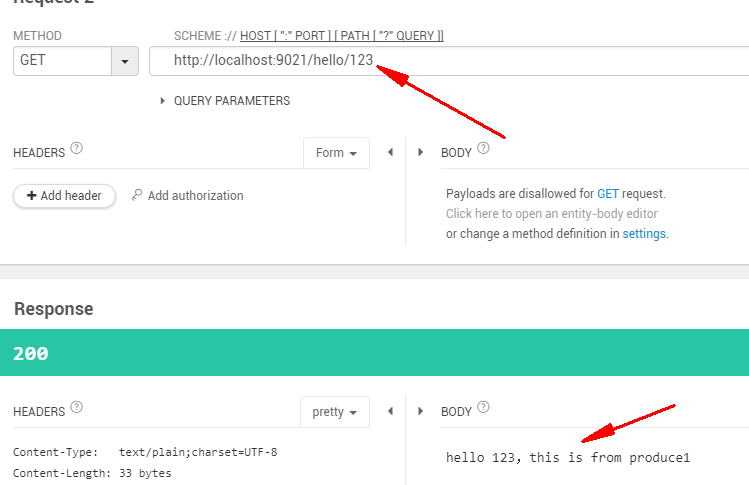
六、运行
负载均衡
新建一个Producer的项目,为了区分把Controller中返回的信息做一些调整即可
一、application.yml文件
---

spring:

  application:

    name: spring-cloud-producer

  profiles: producer2

server:

  port: 9011

eureka:

  instance:

    hostname: peterhost2

    #ip-address: 127.0.0.1

    #prefer-ip-address: true

  client:

    service-url:

      defaultZone: http://peterhost2:9001/eureka/
spring.application.name要和前面一个producer的一样,此处是spring-cloud-producer
二、运行
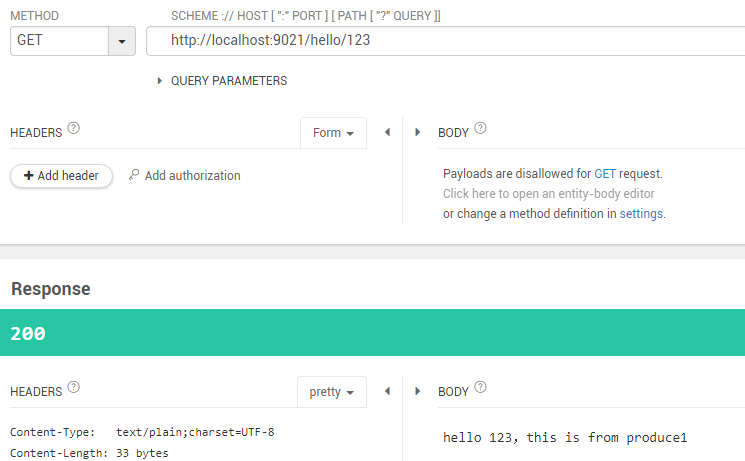
新的Producer注册至Eureka会有一定的延迟

Producer & Consumer的更多相关文章
- .net IO异步和Producer/Consumer队列实现一分钟n次http请求
简介 最近工作中有一个需求:要求发送http请求到某站点获取相应的数据,但对方网站限制了请求的次数:一分钟最多200次请求. 搜索之后,在stackoverflow网站查到一个类似的问题..但里面用到 ...
- C# Producer Consumer (生产者消费者模式)demo
第一套代码将producer Consumer的逻辑写到from类里了,方便在demo的显示界面动态显示模拟生产和消费的过程. 第二套代码将producer Consumer的逻辑单独写到一个 ...
- Kafka 学习笔记之 Kafka0.11之producer/consumer(Scala)
Kafka0.11之producer/consumer(Scala): KafkaConsumer: import java.util.Properties import org.apache.kaf ...
- Kafka Producer Consumer
Producer API org.apache.kafka.clients.producer.KafkaProducer props.put("bootstrap.servers" ...
- asyncio标准库7 Producer/consumer
使用asyncio.Queue import asyncio import random async def produce(queue, n): for x in range(1, n + 1): ...
- RocketMQ学习笔记(6)----RocketMQ的Client的使用 Producer/Consumer
1. 添加依赖 pom.xml如下: <dependency> <groupId>org.apache.rocketmq</groupId> <artifa ...
- Kafka 学习笔记之 Producer/Consumer (Scala)
既然Kafka使用Scala写的,最近也在慢慢学习Scala的语法,虽然还比较生疏,但是还是想尝试下用Scala实现Producer和Consumer,并且用HashPartitioner实现消息根据 ...
- kafka producer consumer demo(三)
我们在前面把集群搭建起来了,也设置了kafka broker的配置,下面我们用代码来实现一下客户端向kafka发送消息,consumer端从kafka消费数据.大家先不要着急着了解 各种参数的配置,先 ...
- Python实现:生产者消费者模型(Producer Consumer Model)
#!/usr/bin/env python #encoding:utf8 from Queue import Queue import random,threading,time #生产者类 clas ...
随机推荐
- 小R的棋子
小R的棋子(dp) 数轴上有 n 个位置可以摆放棋子,标号为1,2,3...n.小 R 现在要在一些位置摆放棋子,每个位置最多摆放一个棋子,摆放棋子的总数没有限制.小 R 不希望他摆放的棋子过于拥挤, ...
- Hadoop 3.0完全分布式集群搭建方法(CentOS 7+Hadoop 3.2.0)
本文详细介绍搭建4个节点的完全分布式Hadoop集群的方法,Linux系统版本是CentOS 7,Hadoop版本是3.2.0,JDK版本是1.8. 一.准备环境 1. 在VMware worksta ...
- Python使用Zero-Copy和Buffer Protocol实现高性能编程
无论你程序是做什么的,它经常都需要处理大量的数据.这些数据大部分表现形式为strings(字符串).然而,当你对字符串大批量的拷贝,切片和修改操作时是相当低效的.为什么? 让我们假设一个读取二进制数据 ...
- 表单和css
表单和CSS 一.==表单== 1. form表单本身 <form name="myform" action="#" method="get&q ...
- js index of()用法
含义: indexOf() 方法可返回某个指定的字符串值在字符串中首次出现的位置.(工作中常用) 提示和注释: 注释:indexOf() 方法对大小写敏感! 注释:如果要检索的字符串值没有出现,则该方 ...
- js原型链,作用域,闭包讲解
当面试的时候遇到问原型链,闭包,还有作用域,直接 拿张纸和笔把原型链画出来,闭包跟作用域直接用笔写几道题出来加深理解(因为我们是理科生,图形和题目以及控制台输出结果才是最直观的方法) 问:什么是原型链 ...
- 关于webpack的版本导致的postcss-loader的问题
来源自问题 https://segmentfault.com/q/1010000006987956 !!!发现这解决方案还是不能用,估计是webpack又更新了一轮,请看看下下方的答案 某个版本web ...
- mybatis批量处理sql
转载大神 https://www.cnblogs.com/xujingyang/p/8301130.html
- LL_01
http://www.52pojie.cn/thread-262602-1-1.html C http://www.92jh.cn/forum.php?mod=viewthread&tid=1 ...
- 009 Palindrome Number 判断一个正整数是否是回文数
详见:https://leetcode.com/problems/palindrome-number/description/ 实现语言:Java 方法一: class Solution { publ ...