
UWP Popup 弹出
一:需求
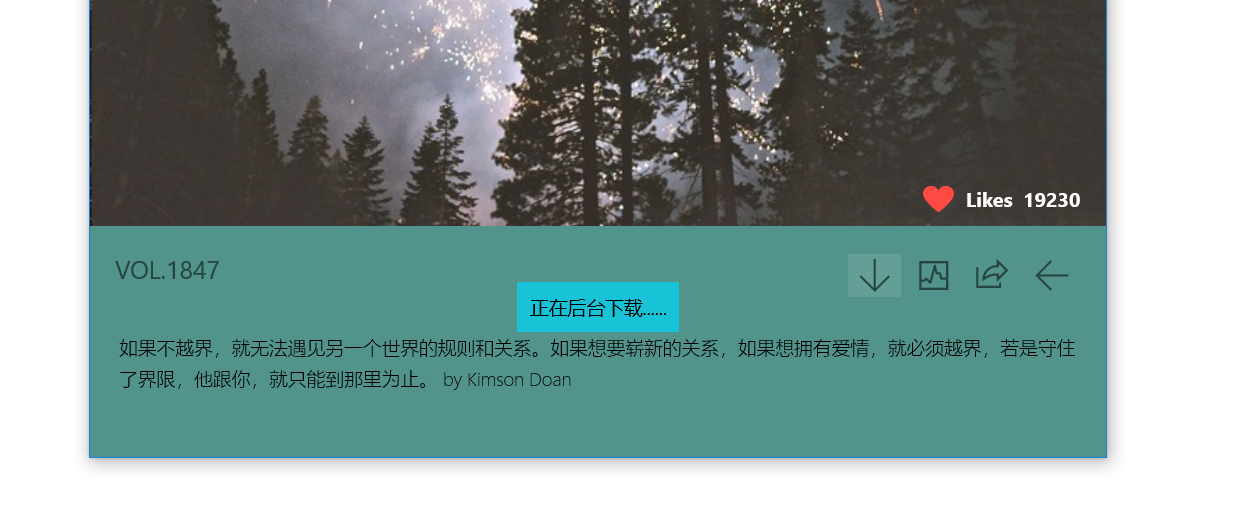
做一个类似于安卓的弹出消息框,如图。当用户点击下载或者选择时,能够从底部弹出一个提示框,用于提示用户。
二:Popup 类
不需要我们自己额外去写一个弹窗类,微软自己有一个Popup 弹窗类。当弹窗打开时,会自动放在当前应用页面的最顶层。
//获取或设置要在弹出项中承载的内容。

public UIElement Child { get; set; }
Popup类里有一个Child属性,用来存弹窗中的内容。
child的类型是UIElement。
UIElement 是具有可视外观并可以处理基本输入的大多数对象的基类。
因此child属性可以存grid stackpannel 这些......
//获取或设置弹出项当前是否显示在屏幕上。

//如果当前显示了弹出项,则为 **true**;否则为 **false**。 默认值为 **false**。

public bool IsOpen { get; set; }
Popup类还有一个IsOpen属性,当会true的时候,弹窗是打开的。false则相反。
三:ps。。。
当创建一个popup的对象,并且将它的IsOpen属性设置为true的时候,代表将会有一个弹窗 显示在当前应用的最顶层。
像上面图中的做法,看上去只有一小块是弹窗,其实我的做法是,最顶层的popup的child属性里放的是一个grid,在grid里才是我显示出来的那一小块提示框,因为grid如果没有背景颜色的话,底下一层是会显示的,所以没有什么问题。不会因为盖了一层grid,底下的内容会被盖住。
四:直接上代码
创建一个用户控件
<UserControl

    x:Class="One.UC.PopupNotice"

    xmlns="http://schemas.microsoft.com/winfx/2006/xaml/presentation"

    xmlns:x="http://schemas.microsoft.com/winfx/2006/xaml"

    xmlns:local="using:One.UC"

    xmlns:d="http://schemas.microsoft.com/expression/blend/2008"

    xmlns:mc="http://schemas.openxmlformats.org/markup-compatibility/2006"

    mc:Ignorable="d"

    d:DesignHeight=""

    d:DesignWidth="">

    <UserControl.Resources>

        <Storyboard x:Name="PopupIn">

            <DoubleAnimation From=""

                             To=""

                             Duration="00:00:00.5"

                             Storyboard.TargetName="PopupContainer"

                             Storyboard.TargetProperty="Opacity"

                             >

                <DoubleAnimation.EasingFunction>

                    <PowerEase EasingMode="EaseOut"></PowerEase>

                </DoubleAnimation.EasingFunction>

            </DoubleAnimation>

            <DoubleAnimation From="-10"

                             To="-100"

                             Duration="00:00:00.5"

                             Storyboard.TargetName="PopupContainer"

                             Storyboard.TargetProperty="(UIElement.RenderTransform).(TranslateTransform.Y)"

                             >

                <DoubleAnimation.EasingFunction>

                    <PowerEase EasingMode="EaseOut"></PowerEase>

                </DoubleAnimation.EasingFunction>

            </DoubleAnimation>

        </Storyboard>

        <Storyboard x:Name="PopupOut">

            <DoubleAnimation From=""

                             To=""

                             Duration="00:00:00.5"

                             Storyboard.TargetName="PopupContainer"

                             Storyboard.TargetProperty="Opacity"

                             >

                <DoubleAnimation.EasingFunction>

                    <PowerEase EasingMode="EaseOut"></PowerEase>

                </DoubleAnimation.EasingFunction>

            </DoubleAnimation>

            <DoubleAnimation From="-100"

                             To="-10"

                             Duration="00:00:00.5"

                             Storyboard.TargetName="PopupContainer"

                             Storyboard.TargetProperty="(UIElement.RenderTransform).(TranslateTransform.Y)"

                             >

                <DoubleAnimation.EasingFunction>

                    <PowerEase EasingMode="EaseOut"></PowerEase>

                </DoubleAnimation.EasingFunction>

            </DoubleAnimation>

        </Storyboard>

    </UserControl.Resources>

    <Grid>

        <StackPanel Background="#18C3D8"

                    Padding=""

                    HorizontalAlignment="Center"

                    VerticalAlignment="Bottom"

                    Name="PopupContainer"

                    Opacity="">

            <!--改变Y轴和透明底-->

            <StackPanel.RenderTransform>

                <TranslateTransform Y="-10"></TranslateTransform>

            </StackPanel.RenderTransform>

            <TextBlock Name="PopupContent"></TextBlock>

        </StackPanel>

    </Grid>

</UserControl>
using System;

using System.Collections.Generic;

using System.IO;

using System.Linq;

using System.Runtime.InteropServices.WindowsRuntime;

using System.Threading.Tasks;

using Windows.Foundation;

using Windows.Foundation.Collections;

using Windows.UI.Xaml;

using Windows.UI.Xaml.Controls;

using Windows.UI.Xaml.Controls.Primitives;

using Windows.UI.Xaml.Data;

using Windows.UI.Xaml.Input;

using Windows.UI.Xaml.Media;

using Windows.UI.Xaml.Navigation;

// The User Control item template is documented at https://go.microsoft.com/fwlink/?LinkId=234236

namespace One.UC

{

    public sealed partial class PopupNotice : UserControl

    {

        //存放弹出框中的信息

        private string _popupContent;

        //创建一个popup对象

        private Popup _popup = null;

        public PopupNotice()

        {

            this.InitializeComponent();

            //将当前的长和框 赋值给控件

            this.Width = Window.Current.Bounds.Width;

            this.Height = Window.Current.Bounds.Height;

            //将当前的控价赋值给弹窗的Child属性  Child属性是弹窗需要显示的内容 当前的this是一个Grid控件。

            _popup = new Popup();

            _popup.Child = this;

            //给当前的grid添加一个loaded事件,当使用了ShowAPopup()的时候,也就是弹窗显示了,这个弹窗的内容就是我们的grid,所以我们需要将动画打开了。

            this.Loaded += PopupNoticeLoaded;

        }

        /// <summary>

        /// 重载

        /// </summary>

        /// <param name="popupContentString">弹出框中的内容</param>

        public PopupNotice(string popupContentString):this()

        {

            _popupContent = popupContentString;

        }

        /// <summary>

        /// 显示一个popup弹窗 当需要显示一个弹窗时,执行此方法

        /// </summary>

        public void ShowAPopup()

        {

            _popup.IsOpen = true;

        }

        /// <summary>

        /// 弹窗加载好了

        /// </summary>

        /// <param name="sender"></param>

        /// <param name="e"></param>

        public void PopupNoticeLoaded(object sender, RoutedEventArgs e)

        {

            PopupContent.Text = _popupContent;

            //打开动画

            this.PopupIn.Begin();

            //当进入动画执行之后,代表着弹窗已经到指定位置了,再指定位置等一秒 就可以消失回去了

            this.PopupIn.Completed += PopupInCompleted;

        }

        /// <summary>

        /// 当进入动画完成后 到此

        /// </summary>

        /// <param name="sender"></param>

        /// <param name="e"></param>

        public async void PopupInCompleted(object sender, object e)

        {

            //在原地续一秒

            await Task.Delay();

            //将消失动画打开

            this.PopupOut.Begin();

            //popout 动画完成后 触发

            this.PopupOut.Completed += PopupOutCompleted;

        }

        //弹窗退出动画结束 代表整个过程结束 将弹窗关闭

        public void PopupOutCompleted(object sender, object e)

        {

            _popup.IsOpen = false;

        }

    }

}
在要显示一个弹窗的代码里调用ShowAPopup()
 PopupNotice popupNotice = new PopupNotice("正在后台下载......");

 popupNotice.ShowAPopup();
最终效果:

--------some words----------
1.Popup 弹出
2.UIElement ui元素
----------the end------------
UWP Popup 弹出的更多相关文章
- UWP Popup 弹出提示框
一:需求 做一个类似于安卓的弹出消息框,如图.当用户点击下载或者选择时,能够从底部弹出一个提示框,用于提示用户. 二:Popup 类 不需要我们自己额外去写一个弹窗类,微软自己有一个Popup 弹窗类 ...
- vant - 弹框 【Popup 弹出层】【DatetimePicker 时间选择】
[HelloWorld.vue] <template> <div class="hello"> <van-row class="m-head ...
- 【ABAP系列】SAP ABAP POPUP弹出框自建内容
公众号:SAP Technical 本文作者:matinal 原文出处:http://www.cnblogs.com/SAPmatinal/ 原文链接:[MM系列]SAP ABAP POPUP弹出框自 ...
- Popup - 弹出层
//图片类快捷弹出层 <a href="" target="_blank"> <div class="panlifang1" ...
- pentaho cde popup弹出框口
弹出窗口在pentaho cde里面相对比较容易,不过还是记录一下,以防时间久了,忘记关键参数. 先看一下效果图: 画出自己想要在弹出框展示的图形,把他的HtmlObject设置成弹出窗口,如图: 然 ...
- Django:popup弹出框简单应用实例
效果:在p1.html页面点击,弹出p2的弹出框,填写数据,在 popup_response页面处理数据 1.url设置 urlpatterns = patterns( url(r'^p1.html' ...
- Xamarin 自定义 ToolbarItem 溢出菜单实现(Popover/Popup) 弹出下拉效果
使用 Rg.Plugins.Popup 插件 1. 新建 PopupMenu.xaml <?xml version="1.0" encoding="utf-8& ...
- 背水一战 Windows 10 (36) - 控件(弹出类): ToolTip, Popup, PopupMenu
[源码下载] 背水一战 Windows 10 (36) - 控件(弹出类): ToolTip, Popup, PopupMenu 作者:webabcd 介绍背水一战 Windows 10 之 控件(弹 ...
- 控件(弹出类): ToolTip, Popup, PopupMenu
示例1.ToolTip 的示例Controls/FlyoutControl/ToolTipDemo.xaml <Page x:Class="Windows10.Controls.Fly ...
随机推荐
- linux下iconv()函数的用法(转载并修改)
linux shell 配置文件中默认的字符集编码为UTF-8 .UTF-8是unicode的一种表达方式,gb2312是和unicode都是字符的编码方式,所以说gb2312跟utf-8的概念应该不 ...
- 浅谈JAVA中“增强”类的某个方法的几个中方法!
一.继承 使用场景:能够控制这个类的构造的时候,才可以使用继承. 优点:简单容易使用, 缺点:耦合性大大的增强,不利于后期的维护,所以对于继承这种方法,谨慎使用. 代码实现:二.装饰者模式 使用场景 ...
- Struts2标签:checkboxlist
参考自博文:http://www.blogjava.net/koradji/articles/307399.html 语法: <s:checkboxlist name="" ...
- SSH框架搭建最终版【测试、log4j、baseDao】
最详细搭建SSH框架环境 本博文主要是讲解如何搭建一个比较规范的SSH开发环境,以及对它测试[在前面的搭建中,只是整合了SSH框架,能够使用SSH实现功能],而这次是相对规范的. 导入开发包 在Str ...
- Java Sftp上传下载文件
需要使用jar包 jsch-0.1.50.jar sftp上传下载实现类 package com.bstek.transit.sftp; import java.io.File; import ja ...
- IOS SDWebImage实现基本原理详解(转载)
1)当我门需要获取网络图片的时候,我们首先需要的便是URl没有URl什么都没有,获得URL后我们SDWebImage实现的并不是直接去请求网路,而是检查图片缓存中有没有和URl相关的图片,如果有则直接 ...
- S3C2440 时钟设置分析(FCLK, HCLK, PCLK)
时钟对于一个系统的重要性不言而喻,时钟决定了系统发送数据的快慢,高性能的芯片往往能支持更快速度的时钟,从而提供更好的体验. S3C2440的输入时钟频率是12MHZ,对于这款芯片,显然速度是不够的,所 ...
- MVC(3DOnLine)开发过程的一些难点以及知识点
1.当修改数据然后保存时,会提示有一行受影响无法保存 @Html.HiddenFor(model => model.UserID) 最好将主键隐藏 也就是不去修改它 原因:修改了主键 然 ...
- Tree(uva 536)
先声明,我还在学习中,这个题大部分代码借鉴的大佬的,其实这算是比较经典二叉树题了,关键在于递归建树. 代码附上: #include <iostream> #include <cstr ...
- 第4章 同步控制 Synchronization ----critical section 互斥区 ,临界区
本章讨论 Win32 同步机制,并特别把重点放在多任务环境的效率上.撰写多线程程序的一个最具挑战性的问题就是:如何让一个线程和另一个线程合作.除非你让它们同心协力,否则必然会出现如第2章所说的&quo ...