
java二维码生成技术
自从微信扫描出世,二维码扫描逐渐已经成为一种主流的信息传递和交换方式。下面就介绍一下我学习到的这种二维码生成方式。预计再过不久身份证户口本等都会使用二维码识别了,今天就做一个实验案例;
二维码主要实现这两点:
1.生成任意的二维码。
2.在二维码的中间加入图像。
一、准备工作。
准备QR二维码3.0 版本的core包和一张jpg图片。
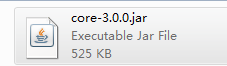

下载QR二维码包。
当然你也可以从maven仓库下载jar 包: http://central.maven.org/maven2/com/google/zxing/core/
二、程序设计
1、启动eclipse,新建一个java项目,命好项目名(本例取名为QRCodeSoft)。点下一步:
2、导入zxing.jar 包, 我这里用的是3.0 版本的core包:点“添加外部JAR(X)…”。
3、新建两个类,分别是:
BufferedImageLuminanceSource.java
QRCodeUtil.java
package com.code.liu;

import java.awt.Graphics2D;

import java.awt.geom.AffineTransform;

import java.awt.image.BufferedImage;

import com.google.zxing.LuminanceSource;

public class BufferedImageLuminanceSource extends LuminanceSource {

    private final BufferedImage image;

    private final int left;

    private final int top;

    public BufferedImageLuminanceSource(BufferedImage image) {

        this(image, 0, 0, image.getWidth(), image.getHeight());

    }

    public BufferedImageLuminanceSource(BufferedImage image, int left,

            int top, int width, int height) {

        super(width, height);

        int sourceWidth = image.getWidth();

        int sourceHeight = image.getHeight();

        if (left + width > sourceWidth || top + height > sourceHeight) {

            throw new IllegalArgumentException(

                    "Crop rectangle does not fit within image data.");

        }

        for (int y = top; y < top + height; y++) {

            for (int x = left; x < left + width; x++) {

                if ((image.getRGB(x, y) & 0xFF000000) == 0) {

                    image.setRGB(x, y, 0xFFFFFFFF); // = white

                }

            }

        }

        this.image = new BufferedImage(sourceWidth, sourceHeight,

                BufferedImage.TYPE_BYTE_GRAY);

        this.image.getGraphics().drawImage(image, 0, 0, null);

        this.left = left;

        this.top = top;

    }

    public byte[] getRow(int y, byte[] row) {

        if (y < 0 || y >= getHeight()) {

            throw new IllegalArgumentException(

                    "Requested row is outside the image: " + y);

        }

        int width = getWidth();

        if (row == null || row.length < width) {

            row = new byte[width];

        }

        image.getRaster().getDataElements(left, top + y, width, 1, row);

        return row;

    }

    public byte[] getMatrix() {

        int width = getWidth();

        int height = getHeight();

        int area = width * height;

        byte[] matrix = new byte[area];

        image.getRaster().getDataElements(left, top, width, height, matrix);

        return matrix;

    }

    public boolean isCropSupported() {

        return true;

    }

    public LuminanceSource crop(int left, int top, int width, int height) {

        return new BufferedImageLuminanceSource(image, this.left + left,

                this.top + top, width, height);

    }

    public boolean isRotateSupported() {

        return true;

    }

    public LuminanceSource rotateCounterClockwise() {

        int sourceWidth = image.getWidth();

        int sourceHeight = image.getHeight();

        AffineTransform transform = new AffineTransform(0.0, -1.0, 1.0,

                0.0, 0.0, sourceWidth);

        BufferedImage rotatedImage = new BufferedImage(sourceHeight,

                sourceWidth, BufferedImage.TYPE_BYTE_GRAY);

        Graphics2D g = rotatedImage.createGraphics();

        g.drawImage(image, transform, null);

        g.dispose();

        int width = getWidth();

        return new BufferedImageLuminanceSource(rotatedImage, top,

                sourceWidth - (left + width), getHeight(), width);

    }

}
package com.code.liu;

import java.awt.BasicStroke;

import java.awt.Graphics;

import java.awt.Graphics2D;

import java.awt.Image;

import java.awt.Shape;

import java.awt.geom.RoundRectangle2D;

import java.awt.image.BufferedImage;

import java.io.File;

import java.io.OutputStream;

import java.util.Hashtable;

import java.util.Random;

import javax.imageio.ImageIO;

import com.google.zxing.BarcodeFormat;

import com.google.zxing.BinaryBitmap;

import com.google.zxing.DecodeHintType;

import com.google.zxing.EncodeHintType;

import com.google.zxing.MultiFormatReader;

import com.google.zxing.MultiFormatWriter;

import com.google.zxing.Result;

import com.google.zxing.common.BitMatrix;

import com.google.zxing.common.HybridBinarizer;

import com.google.zxing.qrcode.decoder.ErrorCorrectionLevel;

/**

 * 二维码工具类

 *

 */

public class QRCodeUtil {

    private static final String CHARSET = "utf-8";

    private static final String FORMAT_NAME = "JPG";

    // 二维码尺寸

    private static final int QRCODE_SIZE = 300;

    // LOGO宽度

    private static final int WIDTH = 60;

    // LOGO高度

    private static final int HEIGHT = 60;

    private static BufferedImage createImage(String content, String imgPath,

            boolean needCompress) throws Exception {

        Hashtable<EncodeHintType, Object> hints = new Hashtable<EncodeHintType, Object>();

        hints.put(EncodeHintType.ERROR_CORRECTION, ErrorCorrectionLevel.H);

        hints.put(EncodeHintType.CHARACTER_SET, CHARSET);

        hints.put(EncodeHintType.MARGIN, 1);

        BitMatrix bitMatrix = new MultiFormatWriter().encode(content,

                BarcodeFormat.QR_CODE, QRCODE_SIZE, QRCODE_SIZE, hints);

        int width = bitMatrix.getWidth();

        int height = bitMatrix.getHeight();

        BufferedImage image = new BufferedImage(width, height,

                BufferedImage.TYPE_INT_RGB);

        for (int x = 0; x < width; x++) {

            for (int y = 0; y < height; y++) {

                image.setRGB(x, y, bitMatrix.get(x, y) ? 0xFF000000

                        : 0xFFFFFFFF);

            }

        }

        if (imgPath == null || "".equals(imgPath)) {

            return image;

        }

        // 插入图片

        QRCodeUtil.insertImage(image, imgPath, needCompress);

        return image;

    }

    /**

     * 插入LOGO

     *

     * @param source

     *            二维码图片

     * @param imgPath

     *            LOGO图片地址

     * @param needCompress

     *            是否压缩

     * @throws Exception

     */

    private static void insertImage(BufferedImage source, String imgPath,

            boolean needCompress) throws Exception {

        File file = new File(imgPath);

        if (!file.exists()) {

            System.err.println(""+imgPath+"   该文件不存在!");

            return;

        }

        Image src = ImageIO.read(new File(imgPath));

        int width = src.getWidth(null);

        int height = src.getHeight(null);

        if (needCompress) { // 压缩LOGO

            if (width > WIDTH) {

                width = WIDTH;

            }

            if (height > HEIGHT) {

                height = HEIGHT;

            }

            Image image = src.getScaledInstance(width, height,

                    Image.SCALE_SMOOTH);

            BufferedImage tag = new BufferedImage(width, height,

                    BufferedImage.TYPE_INT_RGB);

            Graphics g = tag.getGraphics();

            g.drawImage(image, 0, 0, null); // 绘制缩小后的图

            g.dispose();

            src = image;

        }

        // 插入LOGO

        Graphics2D graph = source.createGraphics();

        int x = (QRCODE_SIZE - width) / 2;

        int y = (QRCODE_SIZE - height) / 2;

        graph.drawImage(src, x, y, width, height, null);

        Shape shape = new RoundRectangle2D.Float(x, y, width, width, 6, 6);

        graph.setStroke(new BasicStroke(3f));

        graph.draw(shape);

        graph.dispose();

    }

    /**

     * 生成二维码(内嵌LOGO)

     *

     * @param content

     *            内容

     * @param imgPath

     *            LOGO地址

     * @param destPath

     *            存放目录

     * @param needCompress

     *            是否压缩LOGO

     * @throws Exception

     */

    public static void encode(String content, String imgPath, String destPath,

            boolean needCompress) throws Exception {

        BufferedImage image = QRCodeUtil.createImage(content, imgPath,

                needCompress);

        mkdirs(destPath);

        String file = new Random().nextInt(99999999)+".jpg";

        ImageIO.write(image, FORMAT_NAME, new File(destPath+"/"+file));

    }

    /**

     * 当文件夹不存在时,mkdirs会自动创建多层目录,区别于mkdir.(mkdir如果父目录不存在则会抛出异常)

     * @author lanyuan

     * Email: mmm333zzz520@163.com

     * @date 2013-12-11 上午10:16:36

     * @param destPath 存放目录

     */

    public static void mkdirs(String destPath) {

        File file =new File(destPath);

        //当文件夹不存在时,mkdirs会自动创建多层目录,区别于mkdir.(mkdir如果父目录不存在则会抛出异常)

        if (!file.exists() && !file.isDirectory()) {

            file.mkdirs();

        }

    }

    /**

     * 生成二维码(内嵌LOGO)

     *

     * @param content

     *            内容

     * @param imgPath

     *            LOGO地址

     * @param destPath

     *            存储地址

     * @throws Exception

     */

    public static void encode(String content, String imgPath, String destPath)

            throws Exception {

        QRCodeUtil.encode(content, imgPath, destPath, false);

    }

    /**

     * 生成二维码

     *

     * @param content

     *            内容

     * @param destPath

     *            存储地址

     * @param needCompress

     *            是否压缩LOGO

     * @throws Exception

     */

    public static void encode(String content, String destPath,

            boolean needCompress) throws Exception {

        QRCodeUtil.encode(content, null, destPath, needCompress);

    }

    /**

     * 生成二维码

     *

     * @param content

     *            内容

     * @param destPath

     *            存储地址

     * @throws Exception

     */

    public static void encode(String content, String destPath) throws Exception {

        QRCodeUtil.encode(content, null, destPath, false);

    }

    /**

     * 生成二维码(内嵌LOGO)

     *

     * @param content

     *            内容

     * @param imgPath

     *            LOGO地址

     * @param output

     *            输出流

     * @param needCompress

     *            是否压缩LOGO

     * @throws Exception

     */

    public static void encode(String content, String imgPath,

            OutputStream output, boolean needCompress) throws Exception {

        BufferedImage image = QRCodeUtil.createImage(content, imgPath,

                needCompress);

        ImageIO.write(image, FORMAT_NAME, output);

    }

    /**

     * 生成二维码

     *

     * @param content

     *            内容

     * @param output

     *            输出流

     * @throws Exception

     */

    public static void encode(String content, OutputStream output)

            throws Exception {

        QRCodeUtil.encode(content, null, output, false);

    }

    /**

     * 解析二维码

     *

     * @param file

     *            二维码图片

     * @return

     * @throws Exception

     */

    public static String decode(File file) throws Exception {

        BufferedImage image;

        image = ImageIO.read(file);

        if (image == null) {

            return null;

        }

        BufferedImageLuminanceSource source = new BufferedImageLuminanceSource(

                image);

        BinaryBitmap bitmap = new BinaryBitmap(new HybridBinarizer(source));

        Result result;

        Hashtable<DecodeHintType, Object> hints = new Hashtable<DecodeHintType, Object>();

        hints.put(DecodeHintType.CHARACTER_SET, CHARSET);

        result = new MultiFormatReader().decode(bitmap, hints);

        String resultStr = result.getText();

        return resultStr;

    }

    /**

     * 解析二维码

     *

     * @param path

     *            二维码图片地址

     * @return

     * @throws Exception

     */

    public static String decode(String path) throws Exception {

        return QRCodeUtil.decode(new File(path));

    }

    public static void main(String[] args) throws Exception {

        String text = "http://www.cnblogs.com/qianxiaoruofeng/";

        QRCodeUtil.encode(text, "c:/Users/Administrator/Desktop/liupeng/1.png", "c:/Users/Administrator/Desktop/liupeng/barcode", true);

    }

}
生成不带logo 的二维码
程序代码
public static void main(String[] args) throws Exception {
String text = "http://www.cnblogs.com/qianxiaoruofeng/";
QRCodeUtil.encode(text,"", "c:/Users/Administrator/Desktop/liupeng/barcode",true);
}
运行这个测试方法,生成的二维码不带 logo , 样式如下:
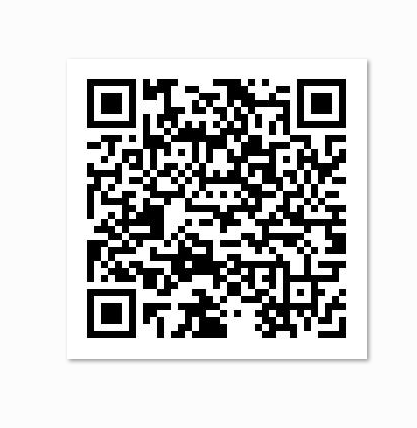
有兴趣可以用手机扫描一下
生成带logo 的二维码
logo 可以用自己的头像,或者自己喜欢的一个图片都可以 , 采用如下代码
程序代码
public static void main(String[] args) throws Exception {
String text = "http://www.cnblogs.com/qianxiaoruofeng/";
QRCodeUtil.encode(text, "c:/Users/Administrator/Desktop/liupeng/1.png", "c:/Users/Administrator/Desktop/liupeng/barcode", true);
}
唯一的区别是,在前面的基础上指定了logo 的地址,这里测试都用了C盘的图片文件
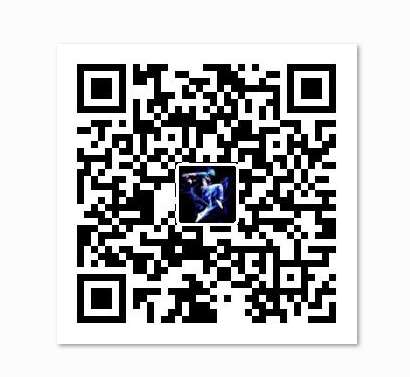
手机扫描二维码进入浅笑若风的博客。
java二维码生成技术的更多相关文章
- java二维码生成-谷歌(Google.zxing)开源二维码生成学习及实例
java二维码生成-谷歌(Google.zxing)开源二维码生成的实例及介绍 我们使用比特矩阵(位矩阵)的QR码编码在缓冲图片上画出二维码 实例有以下一个传入参数 OutputStream ou ...
- Java二维码生成与解码
基于google zxing 的Java二维码生成与解码 一.添加Maven依赖(解码时需要上传二维码图片,所以需要依赖文件上传包) <!-- google二维码工具 --> &l ...
- java 二维码生成
直接上代码: 二维码生成核心类: package com.bbkj.wechat.tool; import java.awt.image.BufferedImage; import java.io.F ...
- Java二维码生成与解码工具Zxing使用
Zxing是Google研发的一款非常好用的开放源代码的二维码生成工具,目前源码托管在github上,源码地址: https://github.com/zxing/zxing 可以看到Zxing库有很 ...
- java 二维码生成(可带图片)springboot版
本文(2019年6月29日 飞快的蜗牛博客) 有时候,男人和女人是两个完全不同的世界,男人的玩笑和女人的玩笑也完全是两码事,爱的人完全不了解你,你也不要指望一个女人了解你,所以男的不是要求别人怎么样, ...
- [转]java二维码生成与解析代码实现
转载地址:点击打开链接 二维码,是一种采用黑白相间的平面几何图形通过相应的编码算法来记录文字.图片.网址等信息的条码图片.如下图 二维码的特点: 1. 高密度编码,信息容量大 可容纳多达1850个大 ...
- java二维码生成与解析代码实现
TwoDimensionCode类:二维码操作核心类 package qrcode; import java.awt.Color; import java.awt.Graphics2D; import ...
- java二维码生成
import java.io.File; import java.nio.file.Path; import java.util.HashMap; import com.google.zxing.Ba ...
- java二维码生成工具
import java.awt.image.BufferedImage; import java.io.File; import java.io.IOException; import java.ut ...
随机推荐
- 【读书笔记与思考】《python数据分析与挖掘实战》-张良均
[读书笔记与思考]<python数据分析与挖掘实战>-张良均 最近看一些机器学习相关书籍,主要是为了拓宽视野.在阅读这本书前最吸引我的地方是实战篇,我通读全书后给我印象最深的还是实战篇.基 ...
- 谈谈promise
最近在看<你不知道的javascript中卷>,发觉作者花了基本一半的篇幅去讲异步和promise,觉得有必要总结一下. 其实本文的目的是想手写一个Promise的,无奈总结着总结着发觉篇 ...
- JSR-303校验类型
空检查 @Null 验证对象是否为null @NotNull 验证对象是否不为null, 无法查检长度为0的字符串 @NotBlank 检查约束字符串是不是Null还有被Trim的长 ...
- C# 构造函数总结
构造函数 构造函数分为:实例构造函数,静态构造函数,私有构造函数. 实例构造函数 1.构造函数的名字与类名相同. 2.使用 new 表达式创建类的对象或者结构(例如int)时,会调用其构造函数.并且通 ...
- 请求库-request使用
# -*- coding: utf-8 -*- import requests from urllib.parse import urlencode # python模仿百度搜索引擎 # keywor ...
- Luogu P1231 教辅的组成
Luogu P1231 教辅的组成 题目背景 滚粗了的HansBug在收拾旧语文书,然而他发现了什么奇妙的东西. 题目描述 蒟蒻HansBug在一本语文书里面发现了一本答案,然而他却明明记得这书应该还 ...
- POJ2503-Babelfish-二分
Babelfish Time Limit: 3000MS Memory Limit: 65536K Total Submissions: 44545 Accepted: 18803 Descr ...
- '<<' '|' '>>' 等位运算符 课本祥解
a<<1 相当于a*2 a>>1 相当于a/2 a<<|1 相当于a*2+1 一些算法用得到.
- VS2012 TFS解决离职后代码遗留未迁入问题
第一步: 在命令行中输入 C:\Program Files (x86)\Microsoft Visual Studio 12.0\Common7\IDE 第二步: 根据用户查找该用户下workspac ...
- 解决 重启nginx: [alert] kill(189, 1) failed (3: No such process)
解决 nginx: [alert] kill(189, 1) failed (3: No such process) [root@localhost/]# nginx -s reloadnginx: ...