
nodejs+websocket实时聊天系统
介绍下websocket:
webSocket协议本质上是一个基于tcp的协议;
建立一个websocket连接,大体的过程:
1.客户端浏览器首先向服务器发起一个http请求,这个请求和平常的请求有什么不同呢?
多了一点附加头信息:"upgrade:web Socket” 表明我这申请的是一个websocket的http请求;
2.服务器收到请求后,解析这些附加的头信息,然后产生应答信息返回给客户端,这样,连接就建立了;
3.双方就可以通过这个连接通道自由的信息传递,这个连接会一直存在,直到一方自动关闭连接;
客户端到服务端:

GET /demo HTTP/1.1

Host: example.com

Connection: Upgrade

Sec-WebSocket-Key2: 12998 5 Y3 1 .P00

Upgrade: WebSocket

Sec-WebSocket-Key1: 4@1 46546xW%0l 1 5

Origin: http://example.com

[8-byte security key]

服务端到客户端:

HTTP/1.1 101 WebSocket Protocol Handshake

Upgrade: WebSocket

Connection: Upgrade

WebSocket-Origin: http://example.com

WebSocket-Location: ws://example.com/demo

[16-byte hash response]
从客户端到服务端请求的信息里面包含:‘Sec-webSocket-key1","Sec-WebSocket-key2"和“[8-byte security key]”这样的信息;这是客户端浏览器需要向服务端提供的握手信息,服务端解析这些头信息,并且在握手的过程中依据这些信息生成一个16位的安全密钥并返回给客户端,以表明服务器端获取了客户端的请求;
大致步骤:
1.	逐个字符读取 Sec-WebSocket-Key1 头信息中的值,将数值型字符连接到一起放到一个临时字符串里,同时统计所有空格的数量;

2.	将在第 1 步里生成的数字字符串转换成一个整型数字,然后除以第 1 步里统计出来的空格数量,将得到的浮点数转换成整数型;

3.	将第 2 步里生成的整型值转换为符合网络传输的网络字节数组;

4.	对 Sec-WebSocket-Key2 头信息同样进行第 1 到第 3 步的操作,得到另外一个网络字节数组;

5.	将 [8-byte security key] 和在第 3,第 4 步里生成的网络字节数组合并成一个 16 字节的数组;

6.	对第 5 步生成的字节数组使用 MD5 算法生成一个哈希值,这个哈希值就作为安全密钥返回给客户端,以表明服务器端获取了客户端的请求,同意创建 WebSocket 连接
 var  wsServer = 'ws://localhost:8888/Demo';  //连接地址

 var  websocket = new WebSocket(wsServer);   //建立连接

 websocket.onopen = function (evt) { onOpen(evt) };  //4个事件

 websocket.onclose = function (evt) { onClose(evt) };

 websocket.onmessage = function (evt) { onMessage(evt) };

 websocket.onerror = function (evt) { onError(evt) };

 function onOpen(evt) {

 console.log("Connected to WebSocket server.");

 }

 function onClose(evt) {

 console.log("Disconnected");

 }

 function onMessage(evt) {

 console.log('Retrieved data from server: ' + evt.data);

 }

 function onError(evt) {

 console.log('Error occured: ' + evt.data);

 }
浏览器的支持情况:
浏览器	支持情况

Chrome	Supported in version 4+

Firefox	Supported in version 4+

Internet Explorer	Supported in version 10+

Opera	Supported in version 10+

Safari	Supported in version 5+
正文来了:基于websocket制作的简单聊天系统;
client.html:
 <style>

        .kuang {

            width: 600px;

            min-height: 50px;

            max-height: 296px;

            border: 1px solid;

            float: left;

            display: block;

            position: relative;

            overflow-y: scroll;

        }

    </style>

</head>

<body>

    <div class="container">

        <div class="row">

              <div class="jumbotron  bg-dark">

                <h1 class="jumbotron-heading">WebSocket chat,欢迎使用:</h1>

              </div>

            <div class="input-group text-left">

                <label>输入用户名:</label>

                <input type="text" id="name" />

                <button id="conn">连接</button>

                <button id="close">断开</button>

            </div>

            <div class="input-group text-muted">

                <div class="kuang" id="mess"></div>

            </div>

         <hr class="featurette-divider">

            <div class="input-group text-left">

                <input type="text" class="value" id="value1" />

                <button id="send">发送</button>

            </div>

        </div>

    </div>
简单的界面,大致效果就是这样的:
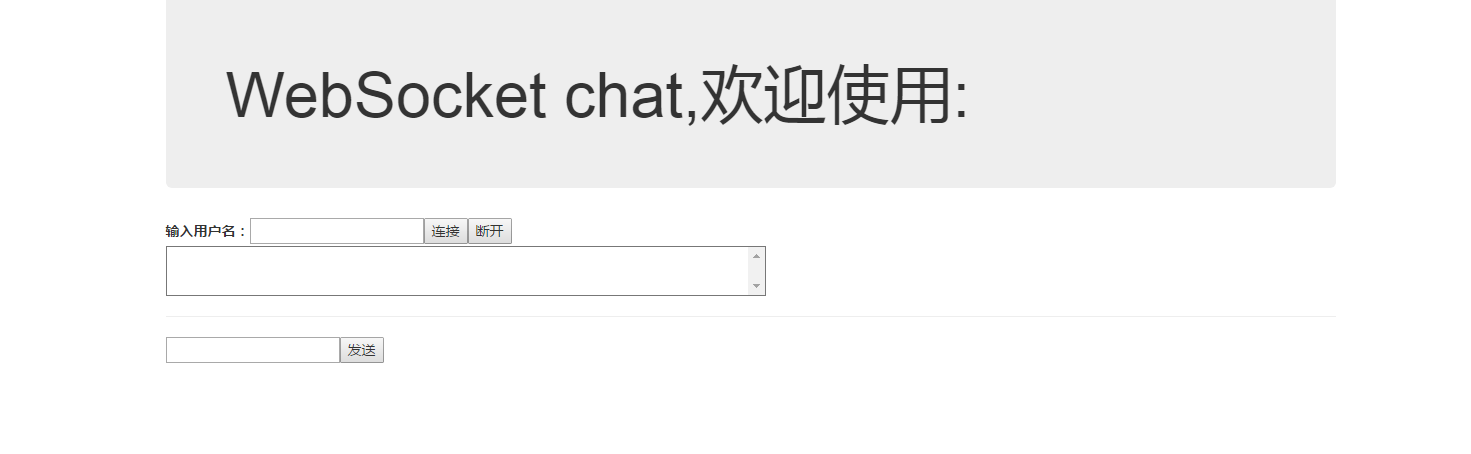
然后实现逻辑代码:
 var ws = new WebSocket('ws://127.0.0.1:8082');

                ws.onopen = function (e) {

                    console.log("连接服务器成功");

                }

                ws.onmessage = function (e) {

                    value1.removeAttribute("readOnly");

                    var time = new Date();

                    mess.innerHTML += time.toUTCString() + ":" + e.data + "<br>";

                    document.getElementById("send").onclick = function (e) {

                        ws.send(input.value + "说:" + value1.value);

                        value1.value = " ";

                    }

                    document.onkeydown = function (e) {

                        e = e || window.event;

                        if (e.keyCode == 13) {

                            document.getElementById("send").onclick();

                            return false;

                        }

                    }

                }

                ws.onclose = function (e) {

                    console.log("服务器关闭");

                }

                ws.onerror = function () {

                    console.log("连接出错");

                }
连接地址:ws://127.0.0.1:8082 那是哪里来的呢? (注意http请求则是写成http://xxx,https请求则是https://xxx;ws当然是ws://xxx);
wbsocket只是客服端,地址当然是从我们的服务端给的呀;
服务端的搭建采用了一个这样的库:
var server = ws.createServer(function (conn) {

    conn.on('text', function (str) {

    })

    conn.on("close", function (code, reason) {

        console.log("关闭连接");

    })

    conn.on("error", function (code, reason) {

        console.log("异常关闭");

    });

}).listen(8082);

console.log("websocket连接完毕")
好了,websocket连接算是建立啦!
下面展示下具体代码:
client.html
<!DOCTYPE html>

<html lang="en">

<head>

    <meta charset="UTF-8">

    <meta name="viewport" content="width=device-width, initial-scale=1.0">

    <meta http-equiv="X-UA-Compatible" content="ie=edge">

    <title>Document</title>

    <link rel="stylesheet" type="text/css" href="bootstrap-3.3.7-dist/css/bootstrap.min.css" />

    <script src="jquery.min.js"></script>

    <script src="bootstrap-3.3.7-dist/js/bootstrap.min.js"></script>

    <style>

        .kuang {

            width: 600px;

            min-height: 50px;

            max-height: 296px;

            border: 1px solid;

            float: left;

            display: block;

            position: relative;

            overflow-y: scroll;

        }

    </style>

</head>

<body>

    <div class="container">

        <div class="row">

              <div class="jumbotron  bg-dark">

                <h1 class="jumbotron-heading">WebSocket chat,欢迎使用:</h1>

              </div>

            <div class="input-group text-left">

                <label>输入用户名:</label>

                <input type="text" id="name" />

                <button id="conn">连接</button>

                <button id="close">断开</button>

            </div>

            <div class="input-group text-muted">

                <div class="kuang" id="mess"></div>

            </div>

         <hr class="featurette-divider">

            <div class="input-group text-left">

                <input type="text" class="value" id="value1" />

                <button id="send">发送</button>

            </div>

        </div>

    </div>

    <script>

        var input = document.getElementById("name");

        var conn = document.getElementById("conn");

        var close = document.getElementById("close");

        var mess = document.getElementById("mess");

        var value1 = document.getElementById("value1");

        var pattern = /^[\u4e00-\u9fa5]{2,10}$/;

        close.disabled = true;

        if (window.WebSocket) {

            conn.onclick = function () {

                if (!pattern.test(input.value)) {

                    alert("名称不能为空且必须为中文");

                    return;

                }

                var ws = new WebSocket('ws://127.0.0.1:8082');

                conn.disabled = true;

                close.disabled = false;

                ws.onopen = function (e) {

                    console.log("连接服务器成功");

                    ws.send(input.value);

                    input.setAttribute("readOnly", 'true');

                    value1.setAttribute("readOnly", 'true');

                }

                ws.onmessage = function (e) {

                    value1.removeAttribute("readOnly");

                    var time = new Date();

                    mess.innerHTML += time.toUTCString() + ":" + e.data + "<br>";

                    document.getElementById("send").onclick = function (e) {

                        ws.send(input.value + "说:" + value1.value);

                        value1.value = " ";

                    }

                    document.onkeydown = function (e) {

                        e = e || window.event;

                        if (e.keyCode == 13) {

                            document.getElementById("send").onclick();

                            return false;

                        }

                    }

                }

                ws.onclose = function (e) {

                    console.log("服务器关闭");

                }

                ws.onerror = function () {

                    console.log("连接出错");

                }

                close.onclick = function () {

                    ws.onclose();

                    ws.send(input.value + 'close' + "了连接");

                    input.removeAttribute("readOnly");

                    conn.disabled = false;

                    close.disabled = true;

                }

            }

        }

    </script>

</body>

</html>
server.js
var ws = require("nodejs-websocket");

console.log("开始建立连接...");

var str1 = null, str2 = null, clientReady = false, serverReady = false;

var a = [];

var server = ws.createServer(function (conn) {

    conn.on('text', function (str) {

          a.push(str);

        if (!clientReady) {

            if (a[0] === str) {

                str1 = conn;

                clientReady = true;

                str1.sendText("欢迎你" + str);

            }

        } else if (!serverReady) {

            if (str.indexOf('close') >= 0) {

                     a.splice(2,1);

                     clientReady = false;

                     str1=null;

                     return;

                }

            if (a[1] === str) {

                str2 = conn;

                serverReady = true;

                str2.sendText("欢迎你" + str);

                str1.sendText(str + "在线啦,你们可以聊天啦");

                return;

            }

        } else if (clientReady && serverReady) {

                str2.sendText(str);

                str1.sendText(str);

                if (str.indexOf('close') >= 0) {

                    a.splice(2, a.length);

                    var len = a.length;

                    for (var i = 0; i < len; i++) {

                        // 定位该元素位置

                        if (str.indexOf(a[i])>=0) {

                           a.splice(i,1);

                           if(i==0){

                               str1=str2;

                           }

                           serverReady = false;

                           str2=null;

                           return;

                        }

                    }

                }

            }

    })

    conn.on("close", function (code, reason) {

        console.log("关闭连接");

        clientReady = false;

        serverReady = false;

    })

    conn.on("error", function (code, reason) {

        console.log("异常关闭");

    });

}).listen(8082);

console.log("websocket连接完毕")
实现双人聊天,client.html开启两个窗口就行!
详细代码在github上:
https://github.com/sulishibaobei/websocket-
nodejs+websocket实时聊天系统的更多相关文章
- WebSocket实现实时聊天系统
WebSocket实现实时聊天系统 等闲变却故人心,却道故人心易变. 简介:前几天看了WebSocket,今天体验下它的实时聊天. 一.项目介绍 WebSocket 实时聊天系统自己一个一码的搞出来还 ...
- 把酒言欢话聊天,基于Vue3.0+Tornado6.1+Redis发布订阅(pubsub)模式打造异步非阻塞(aioredis)实时(websocket)通信聊天系统
原文转载自「刘悦的技术博客」https://v3u.cn/a_id_202 "表达欲"是人类成长史上的强大"源动力",恩格斯早就直截了当地指出,处在蒙昧时代即低 ...
- 使用Nodejs实现实时推送MySQL数据库最新信息到客户端
下面我们要做的就是把MySQL这边一张表数据的更新实时的推送到客户端,比如MySQL这边表的数据abc变成123了,那使用程序就会把最新的123推送到每一个连接到服务器的客户端.如果服务器的连接的客户 ...
- WebSocket实时异步通信
WebSocket实时异步通信 [一]WebSocket简介 WebSocket是HTML5推出一个协议规范,用来B/S模式中服务器端和客户端之间进行实时异步通信. 众所周知,传统的HTTP协议中,服 ...
- Uniapp使用GoEasy实现websocket实时通讯
Uniapp作为近来最火的移动端开发技术,一套代码,可以打包成Android/iOS app和各种平台的小程序,可谓是没有最方便只有更方便. GoEasy上架DCloud Uniapp插件市场已经有一 ...
- 微信小程序使用GoEasy实现websocket实时通讯
不需要下载安装,便可以在微信好友.微信群之间快速的转发,用户只需要扫码或者在微信里点击,就可以立即运行,有着近似APP的用户体验,使得微信小程序成为全民热爱的好东西~ 同时因为微信小程序使用的是Jav ...
- 使用Node.js+Socket.IO搭建WebSocket实时应用
Web领域的实时推送技术,也被称作Realtime技术.这种技术要达到的目的是让用户不需要刷新浏览器就可以获得实时更新.它有着广泛的应用场景,比如在线聊天室.在线客服系统.评论系统.WebIM等. W ...
- python tornado websocket 实时日志展示
一.主题:实时展示服务器端动态生成的日志文件 二.流程: 1. 客户端浏览器与服务器建立websocket 链接,服务器挂起保存链接实例,等待新内容触发返回动作 2. 日志服务器脚本循环去发现新内容, ...
- Nodejs websocket入门
websocket 2011年技术文档 http://www.ibm.com/developerworks/cn/web/1112_huangxa_websocket/index.html 浏览器端接 ...
随机推荐
- TS Eslint规则说明
,//禁止使用alert confirm prompt ,//禁止使用数组构造器 ,//禁止使用按位运算符 ,//禁止使用arguments.caller或arguments.callee ,//禁止 ...
- 基于div表单模拟右对齐
基于div表单模拟右对齐 --------------------------------------------------------- ----------------------------- ...
- fastdfs集群
高可用的两大目的:数据备份,数据分片 1.FastDFS安装配置 先配置一台,将其中的配置文件打包,下载,然后配置其他机器时只需要解压即可, 打包命令 然后下载,上传到其他机器相对应的/etc目录下 ...
- [异常解决] 奇巧淫技——VirtualBox中的linux无显示启动,并在win7上远程控制
楼主是资深技术宅(癖),由于感觉手上的老笔记本太卡,遂狠心买了个性能至强的主机同时配了个投影仪(满足躺着打代码的意淫场景).但是体验了大概一个月发现还是坐着打代码舒服,但是如下图坐着打代码总是要抬头看 ...
- linux下centos6.8相关配置,以及音频相关配置
一:安装上传下载命令 1:cd /tmp 2:wget http://www.ohse.de/uwe/releases/lrzsz-0.12.20.tar.gz 3:tar zxvf lrzsz-0. ...
- 14.7.1.2 MySQL创建用户句法
14.7.1.2 CREATE USER Syntax 单击此处查看原文 以下是MySQL 5.7.6及以上版本的CREATE USER句法 CREATE USER [IF NOT EXISTS] u ...
- PC端截取GIF图片的软件
PC端截取GIF图片的软件分享:下载>>
- 初学HTML5,你要懂得哪些?
很多人问过我这个问题,想要做HTML5页面你要懂得哪些知识?而问这个问题的人基本上都是刚听说过或刚接触HTML5,处在迷茫的阶段,他们往往会被一些网上炫酷页面所吸引,然后自己也想学习HTML5,能通过 ...
- c/s与b/s 动态网站与静态网站 (网站编码统一“UTF-8”)
1.c/s和b/s 第一张图是b/s 可以随时随地的浏览 (在服务器增加网页就能增加功能,只要改变网页就能使用户同步更新,共享性也强,开发也简单,在广域网和局域网都能建造b/s结构,然后通过int ...
- deeplearning.ai 神经网络和深度学习 week3 浅层神经网络 听课笔记
1. 第i层网络 Z[i] = W[i]A[i-1] + B[i],A[i] = f[i](Z[i]). 其中, W[i]形状是n[i]*n[i-1],n[i]是第i层神经元的数量: A[i-1]是第 ...