
qq面板/ 好友列表
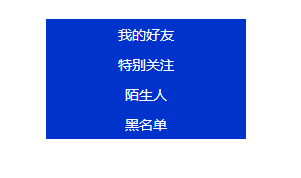
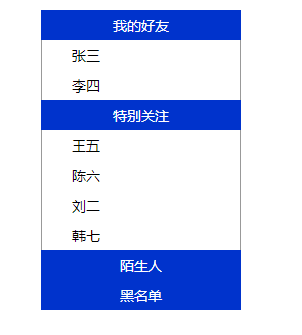
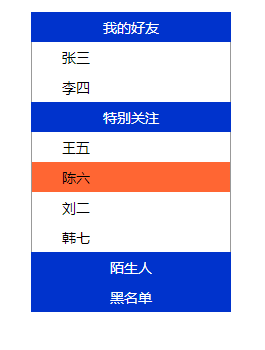
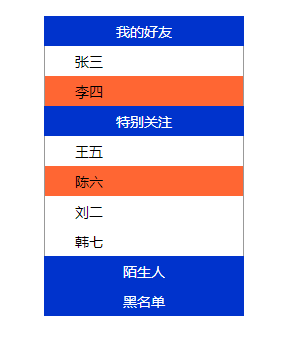
效果如下:依次为图一---图二----图三----图四
主要实现效果:
点击主标题显示下拉好友,再点击收起下拉好友;鼠标移到好友上背景颜色改变;选中的好友背景颜色也要改变;
代码如下:
<!DOCTYPE html PUBLIC "-//W3C//DTD XHTML 1.0 Transitional//EN" "http://www.w3.org/TR/xhtml1/DTD/xhtml1-transitional.dtd">
<html xmlns="http://www.w3.org/1999/xhtml">
<head>
<meta http-equiv="Content-Type" content="text/html; charset=utf-8" />
<title>无标题文档</title>
<style type="text/css">
*{ margin:0px auto;
padding:0px;
font-family:微软雅黑;
font-size:14px;
}
.zhu{ width:200px;
height:30px;
text-align:center;
line-height:30px;
vertical-align:middle;
background-color:#03C;
color:white;
}
.zi{ width:200px;
display:none}
.list{ width:198px;
height:30px;
text-align:left;
line-height:30px;
vertical-align:middle;
border-left:1px solid #999;
border-right:1px solid #999;
}
.kg{
margin-left: 30px;
}
.kg1{
margin-left: 10px;
}
.list:hover{
cursor: pointer;
}
#z4{ border-bottom:1px solid #999;}
</style>
</head>
<body>
<div style="width:200px; height:600px; margin-top:30px">
<div class="zhu" onclick="Show('z1')">
我的好友
</div>
<div class="zi" id="z1">
<div class="list" onclick="Xuan(this)" onmouseover="Bian(this)" onmouseout="Hui(this)" xz="0"><span class="kg">张三</span></div>
<div class="list" onclick="Xuan(this)" onmouseover="Bian(this)" onmouseout="Hui(this)" xz="0"><span class="kg">李四</span></div>
</div>
<div class="zhu" onclick="Show('z2')">
特别关注
</div>
<div class="zi" id="z2">
<div class="list" onclick="Xuan(this)" onmouseover="Bian(this)" onmouseout="Hui(this)" xz="0"><span class="kg">王五</span></div>
<div class="list" onclick="Xuan(this)" onmouseover="Bian(this)" onmouseout="Hui(this)" xz="0"><span class="kg">陈六</span></div>
<div class="list" onclick="Xuan(this)" onmouseover="Bian(this)" onmouseout="Hui(this)" xz="0"><span class="kg">刘二</span></div>
<div class="list" onclick="Xuan(this)" onmouseover="Bian(this)" onmouseout="Hui(this)" xz="0"><span class="kg">韩七</span></div>
</div>
<div class="zhu" onclick="Show('z3')">
陌生人
</div>
<div class="zi" id="z3">
<div class="list" onclick="Xuan(this)" onmouseover="Bian(this)" onmouseout="Hui(this)" xz="0"><span class="kg">王四</span></div>
<div class="list" onclick="Xuan(this)" onmouseover="Bian(this)" onmouseout="Hui(this)" xz="0"><span class="kg">陈三</span></div>
</div>
<div class="zhu" onclick="Show('z4')">
黑名单
</div>
<div class="zi" id="z4">
<div class="list" onclick="Xuan(this)" onmouseover="Bian(this)" onmouseout="Hui(this)" xz="0"><span class="kg">刘二</span></div>
<div class="list" onclick="Xuan(this)" onmouseover="Bian(this)" onmouseout="Hui(this)" xz="0"><span class="kg">韩七</span></div>
</div>
</div>
</body>
<script type="text/javascript">
function Show(id) //作用是收起或显示下拉好友
{
var z = document.getElementById(id);
if(z.style.display=="block")
{
z.style.display = "none";
}
else
{
z.style.display = "block";
}
}
function Xuan(a) //作用是点击好友,好友背景颜色改变
{
var attr = document.getElementsByClassName("list");
for(var i=0;i<attr.length;i++)
{
attr[i].style.backgroundColor = "white";
attr[i].setAttribute("xz","0");
}
a.setAttribute("xz","1"); //自定义属性,将XZ属性添加给选中的div
a.style.backgroundColor = "#F63";
}
function Bian(a) //作用:鼠标移上背景颜色发生改变
{
var attr = document.getElementsByClassName("list");
for(var i=0;i<attr.length;i++)
{
if(attr[i].getAttribute("xz")=="0")
{
attr[i].style.backgroundColor = "white";
}
}
a.style.backgroundColor = "#F63";
}
function Hui(a) //作用是鼠标移走时,背景颜色取消
{
var attr = document.getElementsByClassName("list");
for(var i=0;i<attr.length;i++)
{
if(attr[i].getAttribute("xz")=="0")
{
attr[i].style.backgroundColor = "white";
}
}
}
</script>
</html>
注意:
1、自定义函数运用的形参;
2、为什么不用hover属性,而用onmouseover,onmouseout属性:内嵌样式在js中无法读取。
3、this表示:选中的本div
qq面板/ 好友列表的更多相关文章
- web qq 获取好友列表hash算法
web qq 获取好友列表hash算法 在使用web qq的接口进行好友列表获取的时候,需要post一个参数:hash 在对其js文件进行分析之后,发现计算hash的函数位于: http://0.we ...
- XMPP通讯开发-仿QQ显示好友列表和用户组
在 XMPP通讯开发-服务器好友获取以及监听状态变化 中我们获取服务器上的用户好友信息,然后结合XMPP通讯开发-好友获取界面设计 我们将两个合并起来,首先获取用户组,然后把用户组用List ...
- iOS实现类似QQ的好友列表,自由展开折叠(在原来TableView的基础上添加一个字典,一个Button)
//直接代码 只包含 折叠展开字典的处理搭建#import "CFViewController.h" @interface CFViewController ()<UITab ...
- 基于Qt的相似QQ好友列表抽屉效果的实现
版权声明:本文为博主原创文章.未经博主同意不得转载. https://blog.csdn.net/shuideyidi/article/details/30619167 前段时间在忙毕业设计, ...
- Hadoop_24_MapReduce实现QQ共同好友
1.社交粉丝数据分析: 以下是qq的好友列表数据,冒号前是一个用户,冒号后是该用户的所有好友(数据中的好友关系是单向的) A:B,C,D,F,E,O B:A,C,E,K C:F,A,D,I D:A,E ...
- OS开发UI篇—使用UItableview完成一个简单的QQ好友列表
本文转自:http://www.cnblogs.com/wendingding/p/3763330.html 一.项目结构和plist文件 二.实现代码 1.说明: 主控制器直接继承UITableVi ...
- iOS开发UI篇—使用UItableview完成一个简单的QQ好友列表(一)
iOS开发UI篇—使用UItableview完成一个简单的QQ好友列表(一) 一.项目结构和plist文件 二.实现代码 1.说明: 主控制器直接继承UITableViewController // ...
- iOS开发UI篇—使用UItableview完成一个简单的QQ好友列表(二)
一.实现效果 二.实现代码 1.数据模型部分 YYQQGroupModel.h文件 // // YYQQGroupModel.h // 02-QQ好友列表(基本数据的加载) / ...
- [iOS基础控件 - 6.9.3] QQ好友列表Demo TableView
A.需求 1.使用plist数据,展示类似QQ好友列表的分组.组内成员显示缩进功能 2.组名使用Header,展示箭头图标.组名.组内人数和上线人数 3.点击组名,伸展.缩回好友组 code so ...
随机推荐
- js获取浏览器宽高
IE中: document.body.clientWidth ==> BODY对象宽度 document.body.clientHeight ==> BODY对象高度 document.d ...
- js原生Ajax 的封装和原理
原理及概念 AJAX即“Asynchronous Javascript And XML”(异步JavaScript和XML),是一种用于创建快速动态网页的技术. 动态网页:是指可以通过服务器语言结合数 ...
- Linux部署与基本指令
把以前写的linux发布一下下吧,写的真的好差劲... Linux部署 chmod:改变一个文件的权限 改变abc的权限为777 常用的权限: 777-644-755 ************** ...
- linux 私房菜 CH6 Linux 的档案权限与目录配置
查看文件属性 ls -al 第一栏:类型与权限 d:目录: -:档案: l:链接档: b:可随机存取装置: c:一次性存取装置: 第二栏:有多少档名连结到此节点 第三栏:拥有者 第四栏:所属群组 第五 ...
- JavaScript的基本规范
1.不要在同一行声明多个变量: 2.请使用===/!==来比较true/false或者数值: 3.使用对象字面量替代new Array这种形式: 4.Switch语句必须带有default分支: 5. ...
- 纯HTML自动刷新页面或重定向
refresh 属性值 -- 刷新与跳转(重定向)页面 refresh出现在http-equiv属性中,使用content属性表示刷新或跳转的开始时间与跳转的网址 refresh示例一:5秒之后刷 ...
- Android之XListView下拉刷新,更新网络美女图
一.简介: 下拉刷新是一种特定的手动刷新交互,和其他的同类操作不同的地方在于它采用了更加直觉的下拉操作,所以它的交互足够清晰明显. 下拉刷新主要用在类似ListView这样的控件,设计下拉刷新有三 ...
- Java基础--定时任务Timer(转载)
Java基础--定时任务Timer 一.Timer介绍 java.util.Timer java.util.TimerTask Timer是一个定时器类,通过该类可以为指定的定时任务进行配置.Time ...
- Android开发之NavigationView的使用
NavigationView主要是和DrawerLayout框架结合使用,来完成抽屉导航实现侧边栏 引用一段官方文档的示例代码 <android.support.v4.widget.Drawer ...
- javascript 将数字(金额)转成大写
将计算好的金额转换成大写,这些功能非常多,下面我改进了一下代码(原文在这里:http://www.cnblogs.com/zsanhong/p/3509464.html). /** * _SetNum ...