
百度OCR文字识别-身份证识别
总目录地址:AI 系列 总目录
需要最新源码,或技术提问,请加QQ群:538327407
我的各种github 开源项目和代码:https://github.com/linbin524
简介
答应了园区大牛张善友 要写AI 的系列博客,所以开始了AI 系列之旅。
一、介绍
身份证识别 API 接口文档地址:http://ai.baidu.com/docs#/OCR-API/top
接口描述
用户向服务请求识别身份证,身份证识别包括正面和背面。
请求说明
请求示例
HTTP 方法:POST
请求URL: https://aip.baidubce.com/rest/2.0/ocr/v1/idcard
备注:你需要 成为百度开发者,获取API key 和Secret Key

Access_Token 的获取
百度Access_token 有效期有时间限制,大概是30天左右,所以建议封装成功能方法每次调用最新的。
- access_token:要获取的Access Token;
- expires_in:Access Token的有效期(秒为单位,一般为1个月);
二、技术实现
百度 文字识别 有提供SDK。如果有支持的语言,可以直接用sdk。笔者自己用的Http 请求封装
对于图片大小有要求的,图像数据,base64编码后进行urlencode,要求base64编码和urlencode后大小不超过4M,最短边至少15px,最长边最大4096px,支持jpg/png/bmp格式

接口基础封装
 using System;

 using System.Collections.Generic;

 using System.Linq;

 using System.Text;

 using System.Threading.Tasks;

 namespace BaiduAIAPI.Model

 {

     public class AccessTokenModel {

         public bool IsSuccess { get; set; }

         public SuccessAccessTokenModel SuccessModel { get; set; }

         public ErrorAccessTokenModel ErrorModel { get; set; }

     }

     /// <summary>

     /// 获取accesstoken,正常 的 百度接口返回的json 实体模型

     /// </summary>

     public class SuccessAccessTokenModel

     {

         public string refresh_token { get; set; }

         public int expires_in { get; set; }

         public string scope { get; set; }

         public string session_key { get; set; }

         public string session_secret { get; set; }

         public string access_token { get; set; }

     }

     /// <summary>

     /// 获取accesstoken,失败的 百度接口返回的json 实体模型

     /// </summary>

     public class ErrorAccessTokenModel

     {

         public string error { get; set; }

         public string error_description { get; set; }

     }

 }
 using System;

 using System.IO;

 using System.Net;

 using System.Text;

 using System.Web;

 using AOP.Common;

 using AOP.Common.DataConversion;

 using BaiduAIAPI.Model;

 using BaiduAIAPI.Type;

 namespace BaiduAIAPI.ORC_Characterbase64

 {

     /// <summary>

     /// 文字识别--身份证识别 应用(只是获取身份证图片 信息,没有和公安部联网,无法确认真假,只是单纯从图片上识别文字)

     /// </summary>

     public class IDCardRecognition

     {

         // 身份证识别

         /// <summary>

         /// 身份证识别

         /// </summary>

         /// <param name="token">Accesstoken</param>

         /// <param name="imagePath">图片路径</param>

         /// <param name="recognitionString">识别结果</param>

         /// <param name="errorMsg">错误信息</param>

         /// <param name="id_card_side"> front:身份证正面;back:身份证背面</param>

         /// <param name="detect_direction">是否检测图像朝向,默认不检测,即:false。朝向是指输入图像是正常方向、逆时针旋转90/180/270度。可选值包括:- true:检测朝向;- false:不检测朝向。</param>

         /// <param name="detect_risk"> string 类型 是否开启身份证风险类型(身份证复印件、临时身份证、身份证翻拍、修改过的身份证)功能,默认不开启,即:false。可选值:true-开启;false-不开启</param>

         /// <returns>结果状态</returns>

         public static IDCardRecognitionModel GetIdcardRecognitionString(string token, string imagePath, ref string recognitionString, out string errorMsg, string id_card_side="front", bool detect_direction=false, string detect_risk="false")

         {

             bool resultState = true;

             IDCardRecognitionModel tempModel = new IDCardRecognitionModel();

             try

             {

                 #region 基础校验

                 string verificationMsg = "";

                 errorMsg = "";

                 bool isVerification = ImageVerification.VerificationImage(imagePath, out verificationMsg);

                 if (!isVerification)

                 {

                     errorMsg += verificationMsg;

                     tempModel.state = false;

                     tempModel.errorMsg = errorMsg;

                     return tempModel;

                 }

                 string strbaser64 = ConvertDataFormatAndImage.ImageToByte64String(imagePath, System.Drawing.Imaging.ImageFormat.Jpeg); // 图片的base64编码

                 Encoding encoding = Encoding.Default;

                 string urlEncodeImage = HttpUtility.UrlEncode(strbaser64);

                 byte[] tempBuffer = encoding.GetBytes(urlEncodeImage);

                 if (tempBuffer.Length >  *  * )

                 {

                     errorMsg += "图片加密 后的大小超过4MB!";

                     recognitionString = "";

                     tempModel.state = false;

                     tempModel.errorMsg = errorMsg;

                     return tempModel;

                 }

                 #endregion

                 #region 请求接口

                 recognitionString = "";

                 string host = "https://aip.baidubce.com/rest/2.0/ocr/v1/idcard?access_token=" + token;

                 String str = "id_card_side=" + id_card_side + "&detect_direction=" + detect_direction + "&detect_risk=" + detect_risk + "&image=" + HttpUtility.UrlEncode(strbaser64);

                 var tempResult = HttpRequestHelper.Post(host, str);

                 recognitionString = tempResult;

                 if (recognitionString.Contains("\"error_code\""))//说明异常

                 {

                     resultState = false;

                     tempModel.state = false;

                     tempModel.errorTypeModel = Json.ToObject<ErrorTypeModel>(tempResult);

                     tempModel.errorTypeModel.error_discription = ORC_CharacterRecognitionErrorType.GetErrorCodeToDescription(tempModel.errorTypeModel.error_code);

                 }

                 else

                 {

                     tempModel.state = true;

                     tempModel.successModel = Json.ToObject<IDCardRecognitionSuccessResultModel>(tempResult);

                 }

                 #endregion

                 return tempModel;

             }

             catch (Exception ex)//接口外部异常,如网络异常

             {

                 resultState = false;

                 errorMsg = ex.ToString();

                 tempModel.state = false;

                 tempModel.errorMsg = ex.ToString();

                 return tempModel;

             }

         }

     }

 }
winform 调用核心部分
 /// <summary>

         /// 识别操作

         /// </summary>

         /// <param name="filePath"></param>

         /// <param name="id_card_side">身份证 正面还是背面</param>

         /// <param name="detect_direction"></param>

         /// <param name="detect_risk"></param>

         public void Distinguish(string filePath, string id_card_side = "front", bool detect_direction = false, string detect_risk = "false")

         {

             DoTime();//主线程执行进度条,子线程进行数据请求操作

             t1 = new Thread(new ThreadStart(() =>

             {

                 var temp = BaiduAIAPI.Access_Token.GetAccessToken();

                 if (temp.IsSuccess)

                 {

                     string data = "";

                     string error = "";

                     var result = IDCardRecognition.GetIdcardRecognitionString(temp.SuccessModel.access_token, filePath, ref data, out error, id_card_side, detect_direction, detect_risk);

                     this.Invoke(new Action(() =>

                     {

                         tb_showInfo.AppendText("\r\n -----------------------------------------------------------------");

                     }));

                     if (result.state)

                     {

                         this.Invoke(new Action(() =>

                         {

                             tb_showInfo.AppendText("\r\n ---------------------------识别成功-------------------------------");

                             tb_showInfo.AppendText("\r\n" + result.successModel.ToJson() + "\r\n");

                         }));

                     }

                     else

                     {

                         this.Invoke(new Action(() =>

                         {

                             tb_showInfo.AppendText("\r\n-----------------------------识别失败!--------------------------------");

                             tb_showInfo.AppendText("\r\n" + result.successModel.ToJson() + result.errorMsg + "\r\n");

                         }));

                     }

                 }

                 else

                 {

                     this.Invoke(new Action(() =>

                     {

                         AttrMessage.ErrorMsg(temp.ErrorModel.error);

                     }));

                 }

                 this.Invoke(new Action(() =>

                 {

                     progressBar_ToReadDistinguish.Value = ;

                     timer1.Enabled = false;

                     progressBar_ToReadDistinguish.Value = ;

                 }));

             }));

             t1.IsBackground = true;

            t1.Start();

         }
效果如图:图中的身份证是我百度贴吧搜索的,不知道真伪。
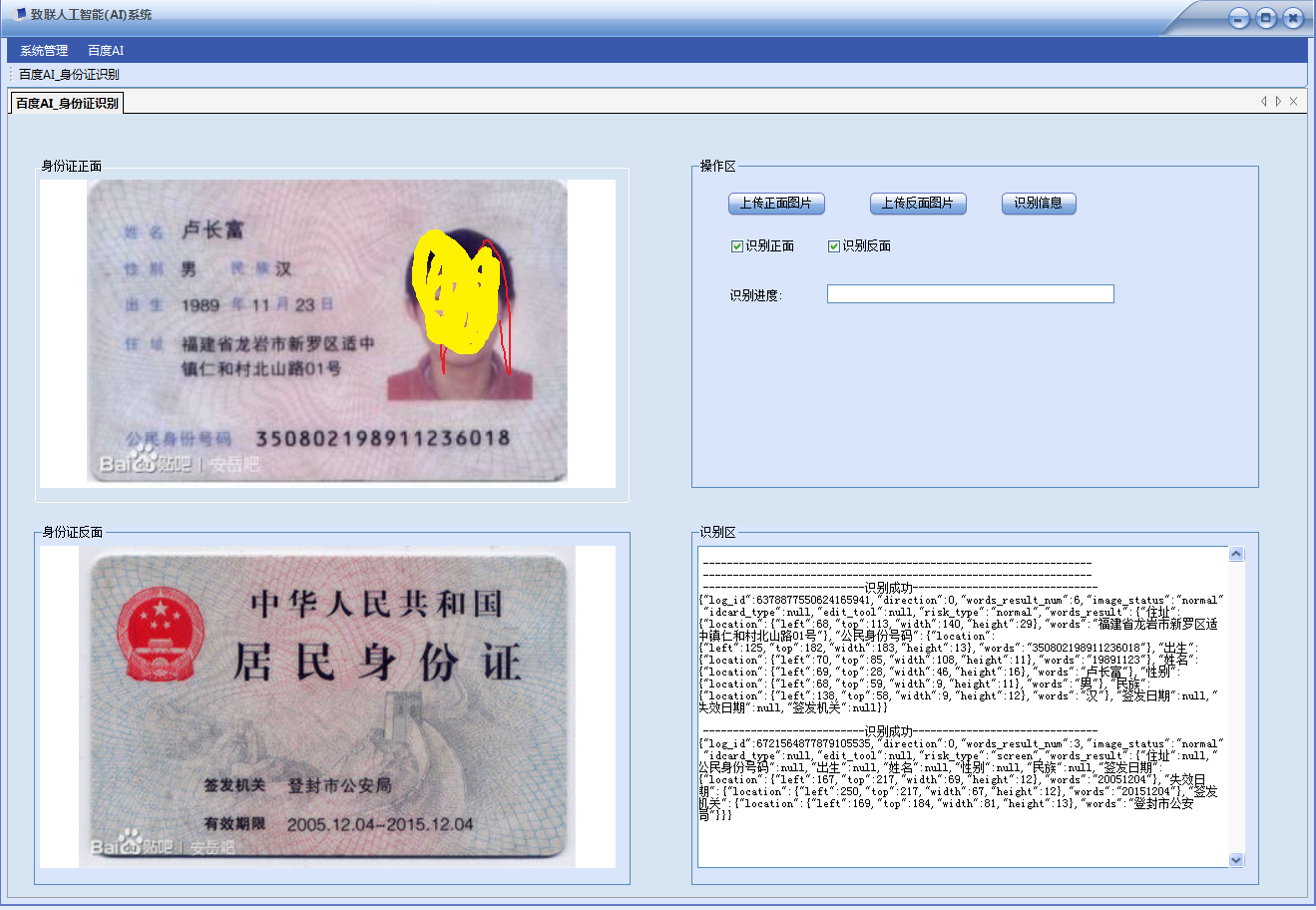
PS:这个只是文字识别,并不是真正公安部联网识别(身份有效性识别),要连接公安部识别需要 付费。
三、整合应用
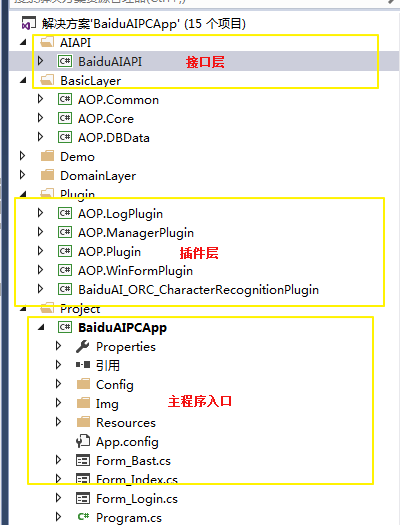
笔者的应用是结合自己写的插件化热插拔模式写的,把每个接口封装成为一个插件,采用注入形式动态化结合
为了便于友好用户体验,在请求使用加入进度条,采用新的线程去进行接口请求,防止 界面卡住。
源码地址:https://github.com/linbin524/AI_Project/tree/master
读后感觉不错,有收获可以微信请作者喝杯咖啡,读后有疑问请加微信,拉群研讨,注明来意


百度OCR文字识别-身份证识别的更多相关文章
- 百度OCR 文字识别 Android安全校验
百度OCR接口使用总结: 之前总结一下关于百度OCR文字识别接口的使用步骤(Android版本 不带包名配置 安全性弱).这边博客主要介绍,百度OCR文字识别接口,官方推荐使用方式,授权文件(安全模式 ...
- 百度OCR文字识别-Android安全校验
本文转载自好基友upuptop:https://blog.csdn.net/pyfysf/article/details/86438769 效果图: 如下为文章正文: 百度OCR接口使用总结:之前总结 ...
- 百度Ocr文字识别
简述 最近开发一个项目需要用到Ocr文字识别技术来识别手写文字,在评估过程中体验了百度的文字识别和腾讯的文字识别.查找官方开发文档,发现它们都有印刷体和手写体两种符合项目需求的识别模式,但是腾讯的手写 ...
- 百度OCR文字识别API使用心得===com.baidu.ocr.sdk.exception.SDKError[283604]
异常com.baidu.ocr.sdk.exception.SDKError[283604]App identifier unmatch.错误的packname或bundleId.logId::303 ...
- PHP:基于百度大脑api实现OCR文字识别
有个项目要用到文字识别,网上找了很多资料,效果不是很好,偶然的机会,接触到百度大脑.百度大脑提供了很多解决方案,其中一个就是文字识别,百度提供了三种文字识别,分别是银行卡识别.身份证识别和通用文字识别 ...
- Java文字识别软件-调用百度ocr实现文字识别
java_baidu_ocr Java调用百度OCR文字识别API实现图片文字识别软件 这是一款小巧方便,强大的文字识别软件,由Java编写,配上了窗口界面 调用了百度ocr文字识别API 识别精度高 ...
- 身份证识别OCR,开启视频模式扫一扫即可识别身份证信息
文章摘要:身份证识别等证件识别OCR技术在各个行业得到广泛应用,例如:车险移动查勘会用到身份证识别.行驶证识别.车架号识别: 寿险移动展业会用到名片识别.银行卡识别:电信实名制代理网点采集身份证信息会 ...
- 【程序员的吃鸡大法】利用OCR文字识别+百度算法搜索,玩转冲顶大会、百万英雄、芝士超人等答题赢奖金游戏
[先上一张效果图]: 一.原理: 其实原理很简单: 1.手机投屏到电脑: 2.截取投屏画面的题目部分,进行识别,得到题目和三个答案: 3.将答案按照一定的算法,进行搜索,得出推荐答案: 4.添加了一些 ...
- Ocr答题辅助神器 OcrAnswerer4.x,通过百度OCR识别手机文字,支持屏幕窗口截图和ADB安卓截图,支持四十个直播App,可保存题库
http://www.cnblogs.com/Charltsing/p/OcrAnswerer.html 联系qq:564955427 最新版为v4.1版,开放一定概率的八窗口体验功能,请截图体验(多 ...
随机推荐
- 使用Aspose.Cells利用模板导出Excel(C#)
前言 随着互联网的流行,web项目逐渐占据主流.我相信大部分人开发项目的过程中都写过上传以及导出Excel和Word的功能,本文仅讨论导出Excel.C#中有很多第三方组件支持导出Excel,比如:N ...
- WSGI框架及Paste+Pastedeploy+route+webob开发
一.前言 WSGI服务器 一个Web服务器网关接口 (WSGI)服务器实现了WSGI接口的Web服务器端运行的Python的Web应用程序. 为什么需要WSGI? 传统的Web服务器不理解或有任何方式 ...
- java设计模式-工厂模式(springweb为例子)
一般而言,工厂模式分为3种,简单工厂模式,工厂方法模式,抽象工厂模式.这三种工厂模式逐层深入吧. 一,从springWeb.jar包使用抽象工厂模式的一个例子聊起 之前对spring各种痴迷,所以在需 ...
- LeetCode 643. Maximum Average Subarray I (最大平均值子数组之一)
Given an array consisting of n integers, find the contiguous subarray of given length k that has the ...
- python生成式
本篇将介绍Python的列表生成式,更多内容请参考:Python列表生成式 列表生成式即List Comprehensions,是Python内置的非常简单却强大的可以用来创建list的生成式. 举个 ...
- Leetcode题解(24)
73. Set Matrix Zeroes 分析:如果没有空间限制,这道题就很简单,但是要求空间复杂度为O(1),因此需要一些技巧.代码如下(copy网上的代码) class Solution { p ...
- WuKong
WuKong Time Limit: 2000/1000 MS (Java/Others) Memory Limit: 32768/32768 K (Java/Others) Total Submis ...
- stack 的入门
#include "iostream"#include "stack" using namespace std; void main12(){ stack &l ...
- UWP Composition API - RadialMenu
用Windows 8.1的童鞋应该知道OneNote里面有一个RadialMenu.如下图,下图是WIn10应用Drawboard PDF的RadialMenu,Win8.1的机器不好找了.哈哈,由于 ...
- spring配置文件一般结构
xml schema:schema在文档根节点当中通过xmlns对文档当中的命名空间进行申明,第三行代码定义了默认命名空间用于spring bean的定义.xsi命名空间用于为每个文档中指定 ...