
pxe+kickstart cobbler无人值守装机
环境准备:
一台服务器
[root@admin tftpboot]# cat /etc/redhat-release

CentOS Linux release 7.2.1511 (Core)

[root@admin tftpboot]# uname -a

Linux admin 3.10.0-327.el7.x86_64 #1 SMP Thu Nov 19 22:10:57 UTC 2015 x86_64 x86_64 x86_64 GNU/Linux

[root@admin tftpboot]#
###########################pxe+kickstart###############################
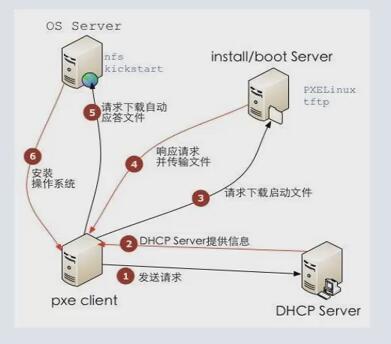
pxe+kickstart自动装机原理:
PXE(preboot execute environment,预启动执行环境)是由Intel公司开发的最新技术,工作于Client/Server的网络模式,支持工作站通过网络从远端服务器下载映像,并由此支持通过网络启动操作系统,在启动过程中,终端要求服务器分配IP地址,再用TFTP(trivial file transfer protocol)或MTFTP(multicast trivial file transfer protocol)协议下载一个启动软件包到本机内存中执行,由这个启动软件包完成终端(客户?)基本软件设置,从而引导预先安装在服务器中的终端操作系统。PXE可以引导多种操作系统,如:Windows95/98/2000/windows2003/windows2008/winXP/win7/win8,linux等。
原理图

准备条件:
一个镜像文件
httpd服务
tftp服务
dhcp服务
设置步骤:
挂载ISO镜像
[root@admin tftpboot]# mount /dev/cdrom /mnt/

[root@admin tftpboot]# yum install httpd dhcp tftp-server createrepo xinetd -y

[root@admin tftpboot]# mkdir /var/www/html/CentOS-7.1-x86_64/             /va/www/html是httpd默认的资源目录

[root@admin tftpboot]# cp -a /mnt/* /var/www/html/CentOS-7.1-x86_64/

[root@admin tftpboot]# createrepo -pdo /var/www/html/CentOS-7.1-x86_64/ /var/www/html/CentOS-7.1-x86_64/                   制作yum仓库

[root@admin tftpboot]# createrepo -g `ls /var/www/html/CentOS-7.1-x86_64/*-comps.xml` /var/www/html/CentOS-7.1-x86_64/

[root@admin tftpboot]# vim /etc/xinetd.d/tftp

disable                            = no

[root@admin dhcp-4.2.5]# cp /usr/share/doc/dhcp-4.2.5/dhcpd.conf.example /etc/dhcp/dhcpd.conf            设置dhcp服务

subnet 192.168.220.0 netmask 255.255.255.0 {

  range dynamic-bootp 192.168.220.10 192.168.220.90;

  option subnet-mask 255.255.255.0;

  next-server 192.168.220.165;

  filename "pxelinux.0";

}

[root@admin dhcp-4.2.5]# service dhcpd start

Redirecting to /bin/systemctl start  dhcpd.service

[root@admin dhcp-4.2.5]# service httpd start

Redirecting to /bin/systemctl start  httpd.service

[root@admin dhcp-4.2.5]# service xinetd start

Redirecting to /bin/systemctl start  xinetd.service

[root@admin dhcp-4.2.5]#

上传ks.cfg文件至/var/www/html/CentOS-7.1-x86_64/

[root@admin dhcp-4.2.5]# yum install syslinux -y                 安装syslinux是为了得到 pxelinux.0文件

[root@admin dhcp-4.2.5]# cp /usr/share/syslinux/pxelinux.0 /var/lib/tftpboot/

[root@admin dhcp-4.2.5]# cp /mnt/isolinux/* /var/lib/tftpboot/

[root@admin tftpboot]# mkdir /var/lib/tftpboot/pxelinux.cfg

[root@admin tftpboot]# cp /mnt/isolinux/isolinux.cfg /var/lib/tftpboot/pxelinux.cfg/default

[root@admin pxelinux.cfg]# vim default

label linux

  menu label ^AUTO Install CentOS 7

  kernel vmlinuz

  append initrd=initrd.img ks=http://192.168.220.165/CentOS-7.1-x86_64/CentOS-7.1-x86_64.cfg

[root@admin pxelinux.cfg]# getenforce

Permissive

[root@admin pxelinux.cfg]# setenforce 0

[root@admin pxelinux.cfg]# vim /etc/selinux/config

    SELINUX=disabled

[root@admin pxelinux.cfg]# service firewalld stop

Redirecting to /bin/systemctl stop  firewalld.service

[root@admin pxelinux.cfg]#
设置开机关闭防火墙

[root@admin pxelinux.cfg]# systemctl disable firewalld.service

Removed symlink /etc/systemd/system/dbus-org.fedoraproject.FirewallD1.service.

Removed symlink /etc/systemd/system/basic.target.wants/firewalld.service.

[root@admin pxelinux.cfg]# systemctl list-unit-files|grep firewalld

firewalld.service                           disabled

[root@admin pxelinux.cfg]#
所需要的kickstart配置文件
[root@admin pxelinux.cfg]# cat /var/www/html/CentOS-7.1-x86_64/CentOS-7.1-x86_64.cfg

#Kickstart Configurator by Jason Zhao

#platform=x86, AMD64, or Intel EM64T

#System  language

lang en_US

#System keyboard

keyboard us

#Sytem timezone

timezone Asia/Shanghai

#Root password

#rootpw --iscrypted $default_password_crypted

rootpw --iscrypted $$ops-node$7hqdpgEmIE7Z0RbtQkxW20

#Use text mode install

text

#Install OS instead of upgrade

install

#Use NFS installation Media

#url --url=$tree

url --url=http://192.168.220.165/CentOS-7.1-x86_64

#System bootloader configuration

bootloader --location=mbr

#Clear the Master Boot Record

zerombr

#Partition clearing information

clearpart --all --initlabel

#Disk partitioning information

part /boot --fstype xfs --size  --ondisk sda

part swap --size  --ondisk sda

part / --fstype xfs --size  --grow --ondisk sda

#System authorization infomation

auth  --useshadow  --enablemd5

#Network information

#$SNIPPET('network_config')

network --bootproto=dhcp --device=eth0 --onboot=on

# Reboot after installation

reboot

#Firewall configuration

firewall --disabled

#SELinux configuration

selinux --disabled

#Do not configure XWindows

skipx

#Package install information

%packages

@ base

@ core

sysstat

iptraf

ntp

lrzsz

ncurses-devel

openssl-devel

zlib-devel

OpenIPMI-tools

mysql

nmap

screen

%end

%post

systemctl disable postfix.service

%end

[root@admin pxelinux.cfg]#
###########################cobbler###############################
一.环境准备
yum install net-tools -y
CentOS7需要更换epel源 详见博客: http://www.cnblogs.com/along1226/p/5317833.html
更换epel源,epel是yum的一个软件用源,包含了很多基本源中没有的软件,cobbler就属于基本源中没有的软件,所以需要安装epel源
yum源:
wget -O /etc/yum.repos.d/CentOS-Base.repo http://mirrors.aliyun.com/repo/Centos-6.repo
epel源:
wget -O /etc/yum.repos.d/epel.repo http://mirrors.aliyun.com/repo/epel-6.repo
二.安装cobbler
[root@admin ~]# yum install cobbler cobbler-web dhcp tftp-server pykickstart httpd -y
看看都装了什么东西
[root@linux-node1 ~]# rpm -ql cobbler     #查看安装了什么文件,下面列出重要部分来注释

/etc/cobbler                               #配置文件目录

/etc/cobbler/settings                    #cobbler主配置文件,这个文件是YAML格式,cobbler是Python写的程序

/etc/cobbler/dhcp.template            #DHCP服务的配置模板

/etc/cobbler/tftpd.template          #tftp服务的配置模板

/etc/cobbler/rsync.template           #rsync服务的配置模板

/etc/cobbler/iso              # iso模板配置文件目录

/etc/cobbler/pxe              # pxe模板文件目录

/etc/cobbler/power            # 电源的配置文件目录

/etc/cobbler/users.conf       # Web服务授权配置文件

/etc/cobbler/users.digest     # 用于web访问的用户名密码配置文件

/etc/cobbler/dnsmasq.template # DNS服务的配置模板

/etc/cobbler/modules.conf     # Cobbler模块配置文件

/var/lib/cobbler              # Cobbler数据目录

/var/lib/cobbler/config       # 配置文件

/var/lib/cobbler/kickstarts   # 默认存放kickstart文件

/var/lib/cobbler/loaders      # 存放的各种引导程序

/var/www/cobbler              # 系统安装镜像目录

/var/www/cobbler/ks_mirror    # 导入的系统镜像列表

/var/www/cobbler/images       # 导入的系统镜像启动文件

/var/www/cobbler/repo_mirror  # yum源存储目录

/var/log/cobbler              # 日志目录

/var/log/cobbler/install.log  # 客户端系统安装日志

/var/log/cobbler/cobbler.log  # cobbler日志
三.启动cobbler
启动cobbler之前应该先启动httpd
systemctl restart httpd.servie
注意:第一次启动cobbler的时候如果报错,只需要重新启动即可
四.配置cobbler
启动之后还不能立即就用,还需要修改cobbler的配置文件,使用命令cobbler check命令查看我们需要修改哪些配置。
[root@admin yum.repos.d]# ps -ef|grep cobbler

apache         : ?        :: (wsgi:cobbler_w -DFOREGROUND

root              : ?        :: /usr/bin/python2 /usr/bin/cobblerd -F

root           : pts/    :: grep --color=auto cobbler

[root@admin yum.repos.d]# cobbler check

The following are potential configuration items that you may want to fix:

1 : The 'server' field in /etc/cobbler/settings must be set to something other than localhost, or kickstarting features will not work.  This should be a resolvable hostname or IP for the boot server as reachable by all machines that will use it.

2 : For PXE to be functional, the 'next_server' field in /etc/cobbler/settings must be set to something other than 127.0.0.1, and should match the IP of the boot server on the PXE network.

3 : some network boot-loaders are missing from /var/lib/cobbler/loaders, you may run 'cobbler get-loaders' to download them, or, if you only want to handle x86/x86_64 netbooting, you may ensure that you have installed a *recent* version of the syslinux package installed and can ignore this message entirely.  Files in this directory, should you want to support all architectures, should include pxelinux.0, menu.c32, elilo.efi, and yaboot. The 'cobbler get-loaders' command is the easiest way to resolve these requirements.

4 : enable and start rsyncd.service with systemctl

5 : debmirror package is not installed, it will be required to manage debian deployments and repositories

6 : The default password used by the sample templates for newly installed machines (default_password_crypted in /etc/cobbler/settings) is still set to 'cobbler' and should be changed, try: "openssl passwd -1 -salt 'random-phrase-here' 'your-password-here'" to generate new one

7 : fencing tools were not found, and are required to use the (optional) power management features. install cman or fence-agents to use them

Restart cobblerd and then run 'cobbler sync' to apply changes.

[root@admin yum.repos.d]#
 sed -i 's/server: 127.0.0.1/server: 10.0.0.6/' /etc/cobbler/settings

 sed -i 's/manage_dhcp: 0/manage_dhcp: 1/' /etc/cobbler/settings

 sed -i 's/pxe_just_once: 0/pxe_just_once: 1/' /etc/cobbler/settings

 cobbler get-loaders
[root@admin yum.repos.d]# openssl passwd -1 -salt 'chenyao' 123456 ----> 123456就是我们系统被自动安装之后的初始密码
$1$chenyao$QHgE3Wwj5X6DFyEP1YifY0
[root@admin yum.repos.d]#
default_password_crypted: "$1$test$at615QShYKduQlx5z9Zm7/" //修改setting中的这个一行,替换为生成的密码,
注意:如果是CentOS7中在/etc/xinetd.d/目录下是没有rsync这个文件的,需要创建并加入如下的参数,CentOS6中有rsync文件,只需修改即可
# default: off

# # description: The rsync server is a good addition to an ftp server, as it \

# #       allows crc checksumming etc.

 service rsync

 {

    disable = no

    flags           = IPv6

    socket_type     = stream

    wait            = no

    user            = root

    server          = /usr/bin/rsync

    server_args     = --daemon

    log_on_failure  += USERID

 }
配置dhcp
vim /etc/cobbler/dhcp.template
subnet 192.168.220.0 netmask 255.255.255.0 {

     option routers             192.168.220.2;

     option domain-name-servers 192.168.220.2;

     option subnet-mask         255.255.255.0;

     range dynamic-bootp        192.168.220.10 192.168.220.90;
执行以上操作之后,就已经改的差不多了,就算执行了cobbler check还有报错叶不用理会,当修改了cobbler的配置之后需要执行cobbler sync让配置生效。
[root@admin yum.repos.d]# cobbler sync
[root@admin yum.repos.d]# cobbler sync

task started: --24_143129_sync

task started (id=Sync, time=Thu Mar  :: )

running pre-sync triggers

cleaning trees

removing: /var/lib/tftpboot/pxelinux.cfg/default

removing: /var/lib/tftpboot/grub/images

removing: /var/lib/tftpboot/grub/grub-x86.efi

removing: /var/lib/tftpboot/grub/grub-x86_64.efi

removing: /var/lib/tftpboot/grub/efidefault

removing: /var/lib/tftpboot/s390x/profile_list

copying bootloaders

trying hardlink /var/lib/cobbler/loaders/pxelinux. -> /var/lib/tftpboot/pxelinux.

copying: /var/lib/cobbler/loaders/pxelinux. -> /var/lib/tftpboot/pxelinux.

trying hardlink /var/lib/cobbler/loaders/menu.c32 -> /var/lib/tftpboot/menu.c32

copying: /var/lib/cobbler/loaders/menu.c32 -> /var/lib/tftpboot/menu.c32

trying hardlink /var/lib/cobbler/loaders/grub-x86.efi -> /var/lib/tftpboot/grub/grub-x86.efi

trying hardlink /var/lib/cobbler/loaders/grub-x86_64.efi -> /var/lib/tftpboot/grub/grub-x86_64.efi

copying distros to tftpboot

copying images

generating PXE configuration files

generating PXE menu structure

rendering DHCP files

generating /etc/dhcp/dhcpd.conf

rendering TFTPD files

generating /etc/xinetd.d/tftp

cleaning link caches

running post-sync triggers

running python triggers from /var/lib/cobbler/triggers/sync/post/*

running python trigger cobbler.modules.sync_post_restart_services

running: dhcpd -t -q

received on stdout:

received on stderr:

running: service dhcpd restart

received on stdout:

received on stderr: Redirecting to /bin/systemctl restart  dhcpd.service

running shell triggers from /var/lib/cobbler/triggers/sync/post/*

running python triggers from /var/lib/cobbler/triggers/change/*

running python trigger cobbler.modules.scm_track

running shell triggers from /var/lib/cobbler/triggers/change/*

*** TASK COMPLETE ***

[root@admin yum.repos.d]#
同步完成之后可以执行less /etc/dhcp/dhcpd.conf 查看一下dhcp的设置是否生效了
cobbler的日志
[root@admin cobbler]# ll

total

drwxr-xr-x  root root      Jan  : anamon

-rw-r--r--  root root  Mar  : cobbler.log

drwxr-xr-x  root root      Jan  : kicklog

drwxr-xr-x  root root      Jan  : syslog

drwxr-xr-x  root root   Mar  : tasks

[root@admin cobbler]#
五.启动相关的服务
因为cobbler的使用需要httpd,tftp,dhcp,xinetd,cobblerd服务的配合,所以想要成功实现自动化装机,就需要启动这么多个服务,那我们就通过一个脚本来启动,关闭,重启这些服务。
#!/bin/bash

# chkconfig:

# description:cobbler

case $ in

  start)

    /etc/init.d/httpd start

    /etc/init.d/xinetd start

    /etc/init.d/dhcpd start

    /etc/init.d/cobblerd start

    ;;

  stop)

    /etc/init.d/httpd stop

    /etc/init.d/xinetd stop

    /etc/init.d/dhcpd stop

    /etc/init.d/cobblerd stop

    ;;

  restart)

    /etc/init.d/httpd restart

    /etc/init.d/xinetd restart

    /etc/init.d/dhcpd restart

    /etc/init.d/cobblerd restart

    ;;

  status)

    /etc/init.d/httpd status

    /etc/init.d/xinetd status

    /etc/init.d/dhcpd status

    /etc/init.d/cobblerd status

    ;;

  sync)

    cobbler sync

    ;;

  *)

    echo "Input error,please in put 'start|stop|restart|status|sync'!"

    exit

    ;;

esac
脚本
六.cobbler的常用命令
[root@linux-node1 ~]# cobbler

usage

=====

cobbler <distro|profile|system|repo|image|mgmtclass|package|file> ...

        [add|edit|copy|getks*|list|remove|rename|report] [options|--help]

cobbler <aclsetup|buildiso|import|list|replicate|report|reposync|sync|validateks|version|signature|get-loaders|hardlink> [options|--help]
cobbler check 核对当前设置是否有问题
cobbler list 列出所有的cobbler元素
cobbler report 列出元素的详细信息
cobbler sync 同步配置到数据目录,更改配置之后最好都执行一下
cobbler reposync 同步yum仓库
cobbler distro 查看导入的发行版系统信息
cobbler system 查看添加的系统信息
cobbler profile 查看配置信息
七.准备原材料
执行到这一步,就相当于我们开饭店已经把店面装修好了,下面就需要准备做饭的原材料了,导入镜像文件。
准备镜像文件,如果是光盘的话执行:

   mount /dev/cdrom /mnt/

如果有linux的iso镜像文件的话,就执行

  mount -o loop /path/xxxx.iso  /mnt/

 向cobber中导入镜像文件执行,进货,准备原材料,此过程会耗费一点时间:

    cobbler import --path=/mnt/ --name=CentOS-6.7-x86_64 --arch=x86_64
# --path 镜像路径
#--name 为安装源定义一个名字
# --arch 指定安装源是32位、64位、ia64,目前支持的选项有:x86 |x86_64|ia64
#安装源的唯一标示就是根据name参数来定义,想定义啥就定义啥,因为cobbler可以多样化安装,pxe+kickstart只能有一种,我们可以导入CentOS6.7的,还可以导入CentOS7.1的,所以--name就是不同镜像源的标识,可以使用cobbler distro list来查看,所以如果name重复,系统会提示导入失败。
镜像文件被导入到这里
[root@admin ks_mirror]# pwd
/var/www/cobbler/ks_mirror
[root@admin ks_mirror]# ll
total 4
dr-xr-xr-x 8 root root 4096 Dec 9 18:14 CentOS-6.7-x86_64
drwxr-xr-x 2 root root 6 Jan 24 09:40 config
[root@admin ks_mirror]#
八.准备菜谱
原材料已经准备好了,下面就因该准备菜谱了,其实就是配置文件,在自动化安装的过程中,有设置时区,密码,分区.....等等作,如何做这些操作就是在配置文件中定义的。
当我们将镜像导入进去之后,cobbler就会自动为这个镜像准备了一个菜谱了,就是这个文件/var/lib/cobbler/kickstarts/sample_end.ks,默认的不随我愿,所以我们使用自定义的配置文件
注意:在分区的时候菜谱中有规定文件系统,CentOS6的ext4,CentOS是xfs,所以,留意你装的系统版本
#Kickstart Configurator by Jason Zhao

#platform=x86, AMD64, or Intel EM64T

#System  language

lang en_US

#System keyboard

keyboard us

#Sytem timezone

timezone Asia/Shanghai

#Root password

rootpw --iscrypted $default_password_crypted

#rootpw --iscrypted $$ops-node$7hqdpgEmIE7Z0RbtQkxW20

#Use text mode install

text

#Install OS instead of upgrade

install

#Use NFS installation Media

url --url=$tree          #这些$开头的变量都是调用配置文件里的值。

#url --url=http://192.168.56.11/CentOS-7.1-x86_64

#System bootloader configuration

bootloader --location=mbr

#Clear the Master Boot Record

zerombr

#Partition clearing information

clearpart --all --initlabel

#Disk partitioning information

part /boot --fstype xfs --size  --ondisk sda   #centos7系统磁盘默认格式xfs

part swap --size  --ondisk sda

part / --fstype xfs --size  --grow --ondisk sda

#System authorization infomation

auth  --useshadow  --enablemd5

#Network information

$SNIPPET('network_config')

#network --bootproto=dhcp --device=eth0 --onboot=on

# Reboot after installation

reboot

#Firewall configuration

firewall --disabled

#SELinux configuration

selinux --disabled

#Do not configure XWindows

skipx

%pre

$SNIPPET('log_ks_pre')

$SNIPPET('kickstart_start')

$SNIPPET('pre_install_network_config')

# Enable installation monitoring

$SNIPPET('pre_anamon')

%end

#Package install information

%packages

@ base

@ core

sysstat

iptraf

ntp

lrzsz

ncurses-devel

openssl-devel

zlib-devel

OpenIPMI-tools

mysql

nmap

screen

%end

%post

systemctl disable postfix.service

%end
菜谱
菜谱的存放位置:
/var/lib/cobbler/kickstarts
查看一下我们都已经准备了什么东西:
[root@admin ~]# cobbler list

distros:

   CentOS-7.2-x86_64                      //原材料(镜像)的名字

profiles:

   CentOS-7.2-x86_64            //菜谱(配置文件的名字)

systems:

repos:

images:

mgmtclasses:

packages:

files:

[root@admin ~]# cobbler profile report

Name                           : CentOS-7.2-x86_64

TFTP Boot Files                : {}

Comment                        :

DHCP Tag                       : default

Distribution                   : CentOS-7.2-x86_64

Enable gPXE?                   :

Enable PXE Menu?               :

Fetchable Files                : {}

Kernel Options                 : {}

Kernel Options (Post Install)  : {}

Kickstart                      : /var/lib/cobbler/kickstarts/sample_end.ks      //这就默认的

Kickstart Metadata             : {}

Management Classes             : []

Management Parameters          : <<inherit>>

Name Servers                   : []

Name Servers Search Path       : []

Owners                         : ['admin']

Parent Profile                 :

Internal proxy                 :

Red Hat Management Key         : <<inherit>>

Red Hat Management Server      : <<inherit>>

Repos                          : []

Server Override                : <<inherit>>

Template Files                 : {}

Virt Auto Boot                 :

Virt Bridge                    : xenbr0

Virt CPUs                      :

Virt Disk Driver Type          : raw

Virt File Size(GB)             :

Virt Path                      :

Virt RAM (MB)                  :

Virt Type                      : kvm
九.什么样的原材料使用什么样的菜谱
我们前面也说了,cobbler可以导入多个镜像文件,提供多样化的安装,并且菜谱也可以有多个,那么不同的镜像就需要使用不同的配置文件,比如centos6分区的类型应该是ext4,centos7应该是xfs,所以我们需要将不用的镜像和不同的配置文件对应起来。
执行:
cobbler profile edit --name=CentOS-7.1-x86_64 --kickstart=/var/lib/cobbler/kickstarts/CentOS-7.1-x86_64.cfg
CentOS7的特殊性:
修改安装系统的内核参数,在centos7系统有一个地方变了,就是网卡名变为eno16777736这种形式,但是为了运维标准化,我们需要将它变成我们常用的eth0,因此使用下面的参数。但是注意是centOS7才需要下面的步骤,centOS6不需要!!
cobbler profile edit --name=CentOS-7.1-x86_64 --kopts='net.ifnames=0 biosdevname=0'
十.自定义系统
虽然是自动化安装,但是有时候还是避免不了对某些机器做一些特殊化操作,但是这些裸机都还没有系统,主机名等信息,如何将他们区别对待,好对某一台进行特殊化设置呢?OK,那就是MAC地址,都能做哪些设置呢,见下文。
[root@admin kickstarts]# cobbler system add --name=chenyao --mac=:0C:::8D:1F --profile=CentOS-7.2-x86_64 --ip-address=192.168.220.10 --subnet=255.255.255.0 --gateway=192.168.220.2 --interface=eth0 --static= --hostname=lvs --name-servers="114.114.114.144 8.8.8.8"

[root@admin kickstarts]# cobbler system list

   chenyao

[root@admin kickstarts]#
pxe+kickstart cobbler无人值守装机的更多相关文章
- pxe+kickstart实现无人值守批量安装linux
pxe+kickstart实现无人值守批量安装linux 实验准备:主机myrhel2作为服务器端,新建一个没有安装操作系统的虚拟主机,而且其与服务器端在同一个网段 安装的条件: 服务器端: ...
- 使用 PXE+Kickstart 实现无人值守批量部署系统
一.废话两句 在云数据中心,一次几十台甚至几百台服务器上线,系统安装将变得非常繁琐,系统安装好了后还会涉及很多配置,如果一台台来安装的话工作量非常大.(虽然有加班费,开个玩笑)为了解决这个问题,我们需 ...
- 第19章 使用PXE+Kickstart部署无人值守安装
章节概述: 本章节将教会您通过PXE+DHCP+TFTP+VSftpd+Kickstart服务程序搭建出无人值守安装系统,从而批量部署客户机系统. 这种系统能够实现自动化运维.避免了重复性劳动,帮助提 ...
- Linux服务器pxe+kickstart部署无人值守安装
一. 使用光盘镜像安装好一台Redhat6.8系统的虚拟机(图形化界面) 二. 部署相关服务程序 1. 安装并配置dhcpd服务程序 a)安装dhcp服务程序 b)对dhcp服务进 ...
- PXE+kickstart无人值守安装CentOS 7
kickstart+cobbler系列文章:http://www.cnblogs.com/f-ck-need-u/p/7048359.html 本文是PXE+kickstart无人值守安装CentOS ...
- (转)PXE+kickstart无人值守安装CentOS 7
kickstart+cobbler系列文章:http://www.cnblogs.com/f-ck-need-u/p/7048359.html 本文是PXE+kickstart无人值守安装CentOS ...
- (转)Cobbler无人值守批量安装Linux系统
本文目录: 1.1 pxe安装系统 1.2 cobbler基本介绍 1.3 安装和配置cobbler 1.3.1 安装cobbler 1.3.2 配置dhcp和tftp 1.4 cobbler从本地光 ...
- redhat 6.4下PXE+Kickstart无人值守安装操作系统
一 前言 作为中小公司的运维,经常会遇到一些机械式的重复工作,例如:有时公司同时上线几十甚至上百台服务器,而且需要我们在短时间内完成系统安装.常规的办法有什么?1.光盘安装系统:每个服务器DVD内置光 ...
- PXE+kickstart无人值守安装CentOS 6
本文目录: 1.1 PXE说明 1.2 PXE流程 1.3 部署环境说明 1.4 部署DHCP 1.5 部署TFTP 1.6 提供pxe的bootloader和相关配置文件 1.7 利用原版安装镜像获 ...
随机推荐
- 微端启动器LAUNCHER的制作之MFC版二(下载)
用了C#再回来用C++写真的有一种我已经不属于这个世界的感觉.C++的下载就没有C#那么方便了,我用的是libcurl.dll,官网上下载的源码自己cmake出来编译的,c++的库引用有debug和r ...
- 一篇文章搞定css3 3d效果
css3 3d学习心得 卡片反转 魔方 banner图 首先我们要学习好css3 3d一定要有一定的立体感 通过这个图片应该清楚的了解到了x轴 y轴 z轴是什么概念了. 首先先给大家看一个小例子: 卡 ...
- React-intl 实现多语言
前言 React 做国际化,我推荐使用 React-intl , 这个库提供了 React 组件和Api两种方式来格式化日期,数字和字符串等.知道这个库了,那让我们开始使用它 组件用法 为了和Reac ...
- 一个RESTful+MySQL程序
前言 本章内容适合初学者(本人也是初学者). 上一章内容(http://www.cnblogs.com/vanezkw/p/6414392.html)是在浏览器中显示Hello World,今天我们要 ...
- Mvc动态注册HttpModule详解
序言 注册Httpmodule可以让我们使用HttpApplication对象中的处理管道事件.目前大家所熟知的应该有2种方式来使用HttpApplication对象中的处理管道事件.第一种是通过Gl ...
- fiddler介绍
先看fiddler 的使用界面和各模块的功能介绍 1请求列表:请求列表中包含了许多信息,从左至右依次为,#(序列号),Result(结果状态码),Prottocol(请求的协议),Host(请求的主机 ...
- 【转】对于HttpClient和HtmlUnit的理解
原文地址:http://www.haohaoblog.com/?p=1327&utm_source=tuicool 做Java编程的人其实,很多不懂SEO,也不知道如何让百度收录等等,当然,对 ...
- Asp.net MVC4 ExtJS权限管理系统源码 C#开发框架源码
开发环境:VS2010或以上 数据库:SQL Server 2008 r2 MVC版本:Asp.net mvc 4.0 ExtJs版本:ext-4.2 功能介绍 1.多标签,js动态加载模式,全a ...
- 本地计算机上的XXX服务启动后停止,某些服务在未由其它服务或程序使用时将自动停止
创建WindowsService,以及安装和卸载网上的资料一搜一大堆,在这里就不再做演示,只说明下博主在工作中使用WindowsService服务出现的错误,以及最终的结局方案. 1.启动window ...
- 用smarty模板做的登录
用smarty模板做的登录和之前我们用php做的登录区别不大 首先要新建一个php文件 一般php文件,要放在这个文件里 它对应的html文件,要放在这个目录里 下面先来做php文件 要先引入入口文件 ...