
python1数据链接总结
本节内容
- 列表、元组操作
- 字符串操作
- 字典操作
- 集合操作
- 文件操作
- 字符编码与转码
1. 列表、元组操作
列表是我们最以后最常用的数据类型之一,通过列表可以对数据实现最方便的存储、修改等操作
定义列表
|
1
|
names = ['Alex',"Tenglan",'Eric'] |
通过下标访问列表中的元素,下标从
0开始计数
|
1
2
3
4
5
6
7
8
|
>>> names[0]'Alex'>>> names[2]'Eric'>>> names[-1]'Eric'>>> names[-2] #还可以倒着取'Tenglan' |
切片:取多个元素
names = ["Alex","Tenglan","Eric","Rain","Tom","Amy"]

>>> names[1:4]  #取下标1至下标4之间的数字,包括1,不包括4

['Tenglan', 'Eric', 'Rain']

>>> names[1:-1] #取下标1至-1的值,不包括-1

['Tenglan', 'Eric', 'Rain', 'Tom']

>>> names[0:3]

['Alex', 'Tenglan', 'Eric']

>>> names[:3] #如果是从头开始取,0可以忽略,跟上句效果一样

['Alex', 'Tenglan', 'Eric']

>>> names[3:] #如果想取最后一个,必须不能写-1,只能这么写

['Rain', 'Tom', 'Amy']

>>> names[3:-1] #这样-1就不会被包含了

['Rain', 'Tom']

>>> names[0::2] #后面的2是代表,每隔一个元素,就取一个

['Alex', 'Eric', 'Tom']

>>> names[::2] #和上句效果一样

['Alex', 'Eric', 'Tom']
追加
>>> names

['Alex', 'Tenglan', 'Eric', 'Rain', 'Tom', 'Amy']

>>> names.append("我是新来的")

>>> names

['Alex', 'Tenglan', 'Eric', 'Rain', 'Tom', 'Amy', '我是新来的']
插入
>>> names

['Alex', 'Tenglan', 'Eric', 'Rain', 'Tom', 'Amy', '我是新来的']

>>> names.insert(2,"强行从Eric前面插入")

>>> names

['Alex', 'Tenglan', '强行从Eric前面插入', 'Eric', 'Rain', 'Tom', 'Amy', '我是新来的']

>>> names.insert(5,"从eric后面插入试试新姿势")

>>> names

['Alex', 'Tenglan', '强行从Eric前面插入', 'Eric', 'Rain', '从eric后面插入试试新姿势', 'Tom', 'Amy', '我是新来的']
修改
>>> names

['Alex', 'Tenglan', '强行从Eric前面插入', 'Eric', 'Rain', '从eric后面插入试试新姿势', 'Tom', 'Amy', '我是新来的']

>>> names[2] = "该换人了"

>>> names

['Alex', 'Tenglan', '该换人了', 'Eric', 'Rain', '从eric后面插入试试新姿势', 'Tom', 'Amy', '我是新来的']
删除
>>> del names[2]

>>> names

['Alex', 'Tenglan', 'Eric', 'Rain', '从eric后面插入试试新姿势', 'Tom', 'Amy', '我是新来的']

>>> del names[4]

>>> names

['Alex', 'Tenglan', 'Eric', 'Rain', 'Tom', 'Amy', '我是新来的']

>>>

>>> names.remove("Eric") #删除指定元素

>>> names

['Alex', 'Tenglan', 'Rain', 'Tom', 'Amy', '我是新来的']

>>> names.pop() #删除列表最后一个值

'我是新来的'

>>> names

['Alex', 'Tenglan', 'Rain', 'Tom', 'Amy']
扩展
>>> names

['Alex', 'Tenglan', 'Rain', 'Tom', 'Amy']

>>> b = [1,2,3]

>>> names.extend(b)

>>> names

['Alex', 'Tenglan', 'Rain', 'Tom', 'Amy', 1, 2, 3]
拷贝
>>> names

['Alex', 'Tenglan', 'Rain', 'Tom', 'Amy', 1, 2, 3]

>>> name_copy = names.copy()

>>> name_copy

['Alex', 'Tenglan', 'Rain', 'Tom', 'Amy', 1, 2, 3]
统计
>>> names

['Alex', 'Tenglan', 'Amy', 'Tom', 'Amy', 1, 2, 3]

>>> names.count("Amy")

2
排序----翻转
>>> names

['Alex', 'Tenglan', 'Amy', 'Tom', 'Amy', 1, 2, 3]

>>> names.sort() #排序

Traceback (most recent call last):

  File "<stdin>", line 1, in <module>

TypeError: unorderable types: int() < str()   #3.0里不同数据类型不能放在一起排序了,擦

>>> names[-3] = ''

>>> names[-2] = ''

>>> names[-1] = ''

>>> names

['Alex', 'Amy', 'Amy', 'Tenglan', 'Tom', '', '', '']

>>> names.sort()

>>> names

['', '', '', 'Alex', 'Amy', 'Amy', 'Tenglan', 'Tom']

>>> names.reverse() #反转

>>> names

['Tom', 'Tenglan', 'Amy', 'Amy', 'Alex', '', '', '']
获取下标
元组
元组其实跟列表差不多,也是存一组数,只不是它一旦创建,便不能再修改,所以又叫只读列表
语法
|
1
|
names = ("alex","jack","eric") |
它只有2个方法,一个是count,一个是index.
2. 字符串操作
特性:不可修改
name.capitalize()  首字母大写

name.casefold()   大写全部变小写

name.center(50,"-")  输出 '---------------------Alex Li----------------------'

name.count('lex') 统计 lex出现次数

name.encode()  将字符串编码成bytes格式

name.endswith("Li")  判断字符串是否以 Li结尾

 "Alex\tLi".expandtabs(10) 输出'Alex      Li', 将\t转换成多长的空格

 name.find('A')  查找A,找到返回其索引, 找不到返回-1

format :

    >>> msg = "my name is {}, and age is {}"

    >>> msg.format("alex",22)

    'my name is alex, and age is 22'

    >>> msg = "my name is {1}, and age is {0}"

    >>> msg.format("alex",22)

    'my name is 22, and age is alex'

    >>> msg = "my name is {name}, and age is {age}"

    >>> msg.format(age=22,name="ale")

    'my name is ale, and age is 22'

format_map

    >>> msg.format_map({'name':'alex','age':22})

    'my name is alex, and age is 22'

msg.index('a')  返回a所在字符串的索引

'9aA'.isalnum()   True

''.isdigit() 是否整数

name.isnumeric

name.isprintable

name.isspace

name.istitle

name.isupper

 "|".join(['alex','jack','rain'])

'alex|jack|rain'

maketrans

    >>> intab = "aeiou"  #This is the string having actual characters.

    >>> outtab = "" #This is the string having corresponding mapping character

    >>> trantab = str.maketrans(intab, outtab)

    >>>

    >>> str = "this is string example....wow!!!"

    >>> str.translate(trantab)

    'th3s 3s str3ng 2x1mpl2....w4w!!!'

 msg.partition('is')   输出 ('my name ', 'is', ' {name}, and age is {age}')

 >>> "alex li, chinese name is lijie".replace("li","LI",1)

     'alex LI, chinese name is lijie'

 msg.swapcase 大小写互换

 >>> msg.zfill(40)

'00000my name is {name}, and age is {age}'

>>> n4.ljust(40,"-")

'Hello 2orld-----------------------------'

>>> n4.rjust(40,"-")

'-----------------------------Hello 2orld'

>>> b="ddefdsdff_哈哈"

>>> b.isidentifier() #检测一段字符串可否被当作标志符,即是否符合变量命名规则

True
3. 字典操作
字典一种key - value 的数据类型,使用就像我们上学用的字典,通过笔划、字母来查对应页的详细内容。
语法:
info = {

    'stu1101': "TengLan Wu",

    'stu1102': "LongZe Luola",

    'stu1103': "XiaoZe Maliya",

}
字典的特性:
- dict是无序的
- key必须是唯一的,so 天生去重
增加
>>> info["stu1104"] = "苍井空"

>>> info

{'stu1102': 'LongZe Luola', 'stu1104': '苍井空', 'stu1103': 'XiaoZe Maliya', 'stu1101': 'TengLan Wu'}
修改
>>> info['stu1101'] = "武藤兰"

>>> info

{'stu1102': 'LongZe Luola', 'stu1103': 'XiaoZe Maliya', 'stu1101': '武藤兰'}
删除
>>> info

{'stu1102': 'LongZe Luola', 'stu1103': 'XiaoZe Maliya', 'stu1101': '武藤兰'}

>>> info.pop("stu1101") #标准删除姿势

'武藤兰'

>>> info

{'stu1102': 'LongZe Luola', 'stu1103': 'XiaoZe Maliya'}

>>> del info['stu1103'] #换个姿势删除

>>> info

{'stu1102': 'LongZe Luola'}

>>>

>>>

>>>

>>> info = {'stu1102': 'LongZe Luola', 'stu1103': 'XiaoZe Maliya'}

>>> info

{'stu1102': 'LongZe Luola', 'stu1103': 'XiaoZe Maliya'} #随机删除

>>> info.popitem()

('stu1102', 'LongZe Luola')

>>> info

{'stu1103': 'XiaoZe Maliya'}
查找
>>> info = {'stu1102': 'LongZe Luola', 'stu1103': 'XiaoZe Maliya'}

>>>

>>> "stu1102" in info #标准用法

True

>>> info.get("stu1102")  #获取

'LongZe Luola'

>>> info["stu1102"] #同上,但是看下面

'LongZe Luola'

>>> info["stu1105"]  #如果一个key不存在,就报错,get不会,不存在只返回None

Traceback (most recent call last):

  File "<stdin>", line 1, in <module>

KeyError: 'stu1105'
多级字典嵌套及操作
av_catalog = {

    "欧美":{

        "www.youporn.com": ["很多免费的,世界最大的","质量一般"],

        "www.pornhub.com": ["很多免费的,也很大","质量比yourporn高点"],

        "letmedothistoyou.com": ["多是自拍,高质量图片很多","资源不多,更新慢"],

        "x-art.com":["质量很高,真的很高","全部收费,屌比请绕过"]

    },

    "日韩":{

        "tokyo-hot":["质量怎样不清楚,个人已经不喜欢日韩范了","听说是收费的"]

    },

    "大陆":{

        "":["全部免费,真好,好人一生平安","服务器在国外,慢"]

    }

}

av_catalog["大陆"][""][1] += ",可以用爬虫爬下来"

print(av_catalog["大陆"][""])

#ouput

['全部免费,真好,好人一生平安', '服务器在国外,慢,可以用爬虫爬下来']
其它姿势
#values

>>> info.values()

dict_values(['LongZe Luola', 'XiaoZe Maliya'])

#keys

>>> info.keys()

dict_keys(['stu1102', 'stu1103'])

#setdefault

>>> info.setdefault("stu1106","Alex")

'Alex'

>>> info

{'stu1102': 'LongZe Luola', 'stu1103': 'XiaoZe Maliya', 'stu1106': 'Alex'}

>>> info.setdefault("stu1102","龙泽萝拉")

'LongZe Luola'

>>> info

{'stu1102': 'LongZe Luola', 'stu1103': 'XiaoZe Maliya', 'stu1106': 'Alex'}

#update

>>> info

{'stu1102': 'LongZe Luola', 'stu1103': 'XiaoZe Maliya', 'stu1106': 'Alex'}

>>> b = {1:2,3:4, "stu1102":"龙泽萝拉"}

>>> info.update(b)

>>> info

{'stu1102': '龙泽萝拉', 1: 2, 3: 4, 'stu1103': 'XiaoZe Maliya', 'stu1106': 'Alex'}

#items

info.items()

dict_items([('stu1102', '龙泽萝拉'), (1, 2), (3, 4), ('stu1103', 'XiaoZe Maliya'), ('stu1106', 'Alex')])

#通过一个列表生成默认dict,有个没办法解释的坑,少用吧这个

>>> dict.fromkeys([1,2,3],'testd')

{1: 'testd', 2: 'testd', 3: 'testd'}
循环dict
#方法1

for key in info:

    print(key,info[key])

#方法2

for k,v in info.items(): #会先把dict转成list,数据里大时莫用

    print(k,v)
4.集合操作
集合是一个无序的,不重复的数据组合,它的主要作用如下:
- 去重,把一个列表变成集合,就自动去重了
- 关系测试,测试两组数据之前的交集、差集、并集等关系
常用操作
s = set([3,5,9,10])      #创建一个数值集合

t = set("Hello")         #创建一个唯一字符的集合

a = t | s          # t 和 s的并集

b = t & s          # t 和 s的交集

c = t – s          # 求差集(项在t中,但不在s中)

d = t ^ s          # 对称差集(项在t或s中,但不会同时出现在二者中)

基本操作:

t.add('x')            # 添加一项

s.update([10,37,42])  # 在s中添加多项

使用remove()可以删除一项:

t.remove('H')

len(s)

set 的长度

x in s

测试 x 是否是 s 的成员

x not in s

测试 x 是否不是 s 的成员

s.issubset(t)

s <= t

测试是否 s 中的每一个元素都在 t 中

s.issuperset(t)

s >= t

测试是否 t 中的每一个元素都在 s 中

s.union(t)

s | t

返回一个新的 set 包含 s 和 t 中的每一个元素

s.intersection(t)

s & t

返回一个新的 set 包含 s 和 t 中的公共元素

s.difference(t)

s - t

返回一个新的 set 包含 s 中有但是 t 中没有的元素

s.symmetric_difference(t)

s ^ t

返回一个新的 set 包含 s 和 t 中不重复的元素

s.copy()

返回 set “s”的一个浅复制
5. 文件操作
对文件操作流程
- 打开文件,得到文件句柄并赋值给一个变量
- 通过句柄对文件进行操作
- 关闭文件
现有文件如下
基本操作
|
1
2
3
4
5
6
7
8
|
f = open('lyrics') #打开文件first_line = f.readline()print('first line:',first_line) #读一行print('我是分隔线'.center(50,'-'))data = f.read()# 读取剩下的所有内容,文件大时不要用print(data) #打印文件f.close() #关闭文件 |
打开文件的模式有:
- r,只读模式(默认)。
- w,只写模式。【不可读;不存在则创建;存在则删除内容;】
- a,追加模式。【可读; 不存在则创建;存在则只追加内容;】
"+" 表示可以同时读写某个文件
- r+,可读写文件。【可读;可写;可追加】
- w+,写读
- a+,同a
"U"表示在读取时,可以将 \r \n \r\n自动转换成 \n (与 r 或 r+ 模式同使用)
- rU
- r+U
"b"表示处理二进制文件(如:FTP发送上传ISO镜像文件,linux可忽略,windows处理二进制文件时需标注)
- rb
- wb
- ab
其它语法
    def close(self): # real signature unknown; restored from __doc__

        """

        Close the file.

        A closed file cannot be used for further I/O operations.  close() may be

        called more than once without error.

        """

        pass

    def fileno(self, *args, **kwargs): # real signature unknown

        """ Return the underlying file descriptor (an integer). """

        pass

    def isatty(self, *args, **kwargs): # real signature unknown

        """ True if the file is connected to a TTY device. """

        pass

    def read(self, size=-1): # known case of _io.FileIO.read

        """

        注意,不一定能全读回来

        Read at most size bytes, returned as bytes.

        Only makes one system call, so less data may be returned than requested.

        In non-blocking mode, returns None if no data is available.

        Return an empty bytes object at EOF.

        """

        return ""

    def readable(self, *args, **kwargs): # real signature unknown

        """ True if file was opened in a read mode. """

        pass

    def readall(self, *args, **kwargs): # real signature unknown

        """

        Read all data from the file, returned as bytes.

        In non-blocking mode, returns as much as is immediately available,

        or None if no data is available.  Return an empty bytes object at EOF.

        """

        pass

    def readinto(self): # real signature unknown; restored from __doc__

        """ Same as RawIOBase.readinto(). """

        pass #不要用,没人知道它是干嘛用的

    def seek(self, *args, **kwargs): # real signature unknown

        """

        Move to new file position and return the file position.

        Argument offset is a byte count.  Optional argument whence defaults to

        SEEK_SET or 0 (offset from start of file, offset should be >= 0); other values

        are SEEK_CUR or 1 (move relative to current position, positive or negative),

        and SEEK_END or 2 (move relative to end of file, usually negative, although

        many platforms allow seeking beyond the end of a file).

        Note that not all file objects are seekable.

        """

        pass

    def seekable(self, *args, **kwargs): # real signature unknown

        """ True if file supports random-access. """

        pass

    def tell(self, *args, **kwargs): # real signature unknown

        """

        Current file position.

        Can raise OSError for non seekable files.

        """

        pass

    def truncate(self, *args, **kwargs): # real signature unknown

        """

        Truncate the file to at most size bytes and return the truncated size.

        Size defaults to the current file position, as returned by tell().

        The current file position is changed to the value of size.

        """

        pass

    def writable(self, *args, **kwargs): # real signature unknown

        """ True if file was opened in a write mode. """

        pass

    def write(self, *args, **kwargs): # real signature unknown

        """

        Write bytes b to file, return number written.

        Only makes one system call, so not all of the data may be written.

        The number of bytes actually written is returned.  In non-blocking mode,

        returns None if the write would block.

        """

        pass
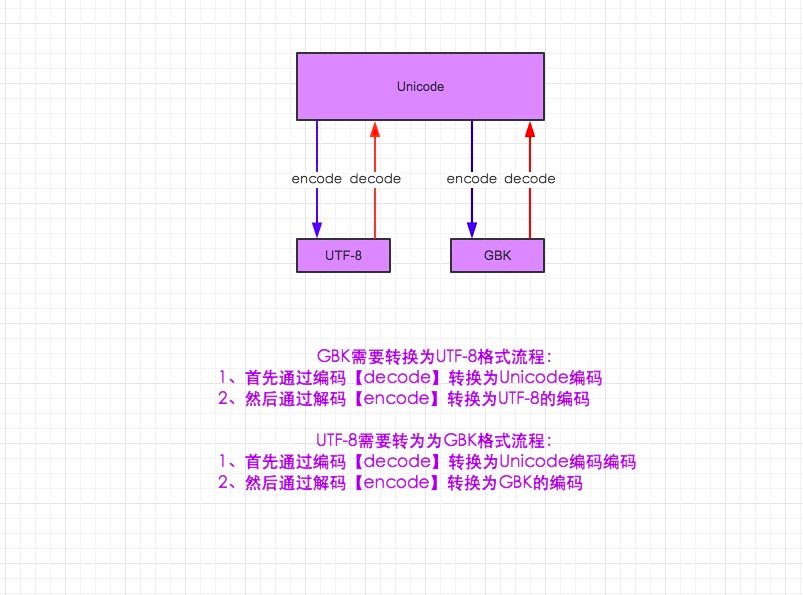
6. 字符编码与转码
详细文章:
http://www.cnblogs.com/yuanchenqi/articles/5956943.html
http://www.diveintopython3.net/strings.html
python1数据链接总结的更多相关文章
- 您的项目引用了最新实体框架;但是,找不到数据链接所需的与版本兼容的实体框架数据库 EF6使用Mysql的技巧
转载至: http://www.cnblogs.com/Imaigne/p/4153397.html 您的项目引用了最新实体框架:但是,找不到数据链接所需的与版本兼容的实体框架数据库 EF6使用Mys ...
- 通用数据链接(UDL)的用法
偶然看到UDL,决定看一下其用法. UDL:通用数据链接.此文件中提供 OleDbConnection 的连接信息.也就是说UDL只能在OleDbConnection中使用. 微软不建议使用UDL 因 ...
- Excel数据链接取消
Excel数据链接取消 2013-9-14 学校里弄来学生的成绩单,想去掉原来高一的学号,但是一删除,后面的成绩数据就一同消失,如以下两图对比所示. 删除第一列前 删除第一列后 此问题不知道怎么描述, ...
- Excel中如何查找并列出所有链接(外部数据链接)?
在 Excel 中,有时会需要创建外部链接来引用其他工作簿的单元格内容,但是如果想要找出所有链接并且还要将这些外部数据链接列在一个工作簿当中是有点难度的.下面我会介绍一些快捷方法,不仅能够快速帮你找出 ...
- oracle数据链接
using System; using System.Collections.Generic; using System.Data; using System.Data.OracleClient; u ...
- 在Delphi中调用"数据链接属性"对话框设置ConnectionString
项目需要使用"数据链接属性"对话框来设置ConnectionString,查阅了一些资料,解决办法如下: 1.Delphi 在Delphi中比较简单,步骤如下: 方法1: use ...
- VBS 处理断开excel数据链接格式,只保留值
最近有个项目是将一个excel压缩之后发给客户,但是由于excel数据过大,即使压缩之后仍然接近5M,因为是大批量发送数据,所以非常慢.急需要将EXCEL数据压缩. 后来我想到一个办法,就excel数 ...
- Excel中外部数据链接无法删除的解决方法【转】
[摘要] 当Excel中公式引用了外部数据,每次打开时,总是自动弹出自动更新链接的对话框.如何找到这些链接?有没有办法实现断开原有链接,而保持数值不变? 有客户反应,当Excel无法链接到外部数据后, ...
- excel跨表数据链接
按=,然后选择第二个页签下某个数据. 去掉$号,就可以下拉数据
随机推荐
- 【微服务】之六:轻松搞定SpringCloud微服务-API网关zuul
通过前面几篇文章的介绍,我们可以轻松搭建起来微服务体系中比较重要的几个基础构建服务.那么,在本篇博文中,我们重点讲解一下,如何将所有微服务的API同意对外暴露,这个就设计API网关的概念. 本系列教程 ...
- HDU-1828-Picture(线段树)
Problem Description A number of rectangular posters, photographs and other pictures of the same shap ...
- logstash 向elasticsearch写入数据,怎样指定多个数据template
之前在配置从logstash写数据到elasticsearch时,指定单个数据模板没有问题.可是在配置多个数据模板时候,总是不成功,后来找了非常多资料,最终找到解决的方法,就是要多加一个配置项: te ...
- HBase源代码分析之HRegion上MemStore的flsuh流程(一)
了解HBase架构的用户应该知道,HBase是一种基于LSM模型的分布式数据库.LSM的全称是Log-Structured Merge-Trees.即日志-结构化合并-树. 相比于Oracle普通索引 ...
- Python: The _imagingft C module is not installed错误的解决
Python: The _imagingft C module is not installed错误的解决 By 白熊花田(http://blog.csdn.net/whiterbear) 转载需注明 ...
- Python编程和 Lua编程的比较
Python编程和 Lua编程的比较 2016.4.21 定义函数: python: def functionname( parameters ): "函数_文档字符串" func ...
- Spring框架(四)AOP面向切面编程
一.前言 在以前的项目中,很少去关注spring aop的具体实现与理论,只是简单了解了一下什么是aop具体怎么用,看到了一篇博文写得还不错,就转载来学习一下,博文地址:http://www.cnbl ...
- 百度云BCC配置Apache VirtualHost 实现相同域名不同端口访问不同应用
问题描述:前戏:本人在百度云上购买了BCC虚拟服务,并购买域名,部署应用,可以正常访问(这里一切都很正常^_^). 事情正在起变化:随着开发的不断推进,工程在本地测试成功后,部署到服务器,会发现有些页 ...
- Memcached的简介和使用
缘起: 在数据驱动的web开发中,经常要重复从数据库中取出相同的数据,这种重复极大的增加了数据库负载.缓存是解决这个问题的好办法.但是ASP.NET中的虽然已经可以实现对页面局部进行缓存,但还是不够灵 ...
- Spring+MVC+Mybatis整合
本文是对慕课网上"搞定SSM开发"路径的系列课程的总结,详细的项目文档和课程总结放在github上了.点击查看 什么是秒杀业务 网站售卖某产品时,规定在某个日期开始售卖限量的产品, ...