
java应用:向用户注册的邮箱发送邮件
实现功能
忘记密码,注册成功等向用户发送验证码信息或注册信息。
业务流程
忘记密码:
1、验证邮箱是否注册过;
2、向邮箱发送验证码;
3、验证验证码是否正确;
4、重新设置密码;
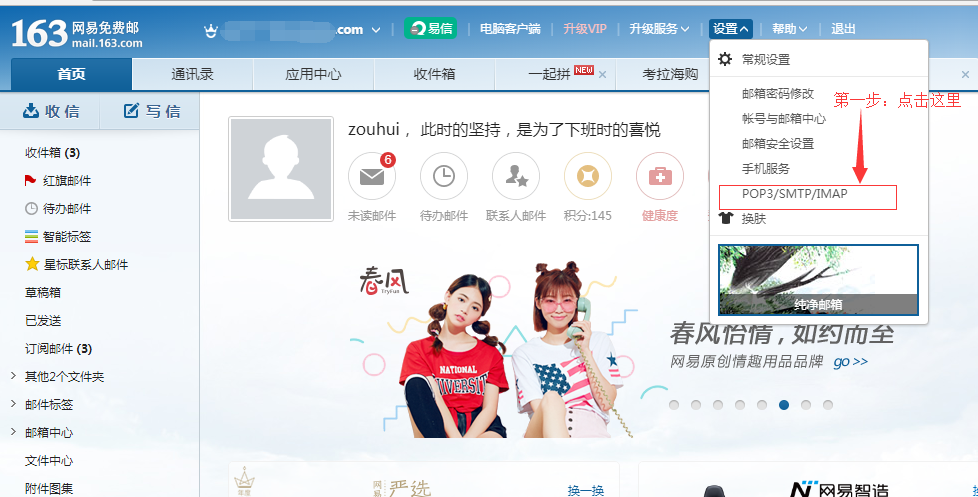
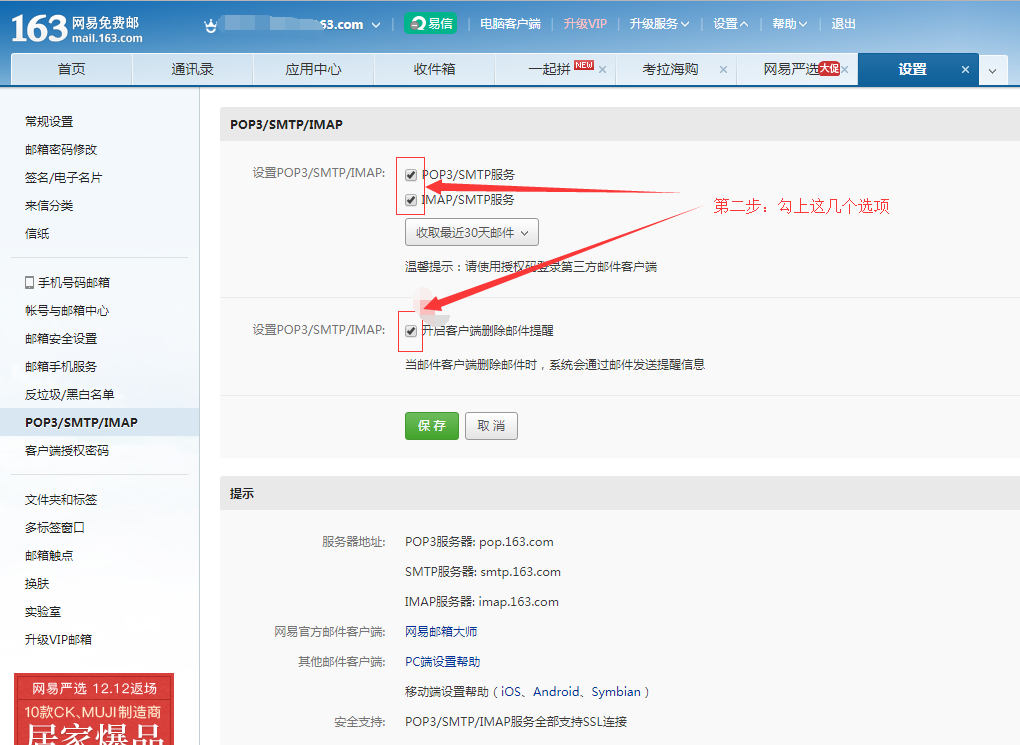
我这里着重介绍发送邮件的代码,其他的业务代码需要大家自己去敲。在写代码之前,建议先去申请一个163等其他公司的邮箱,并且获取该邮箱的授权码。这里介绍一下163邮箱的授权码获取。
第一步:
第二步:
第三步:
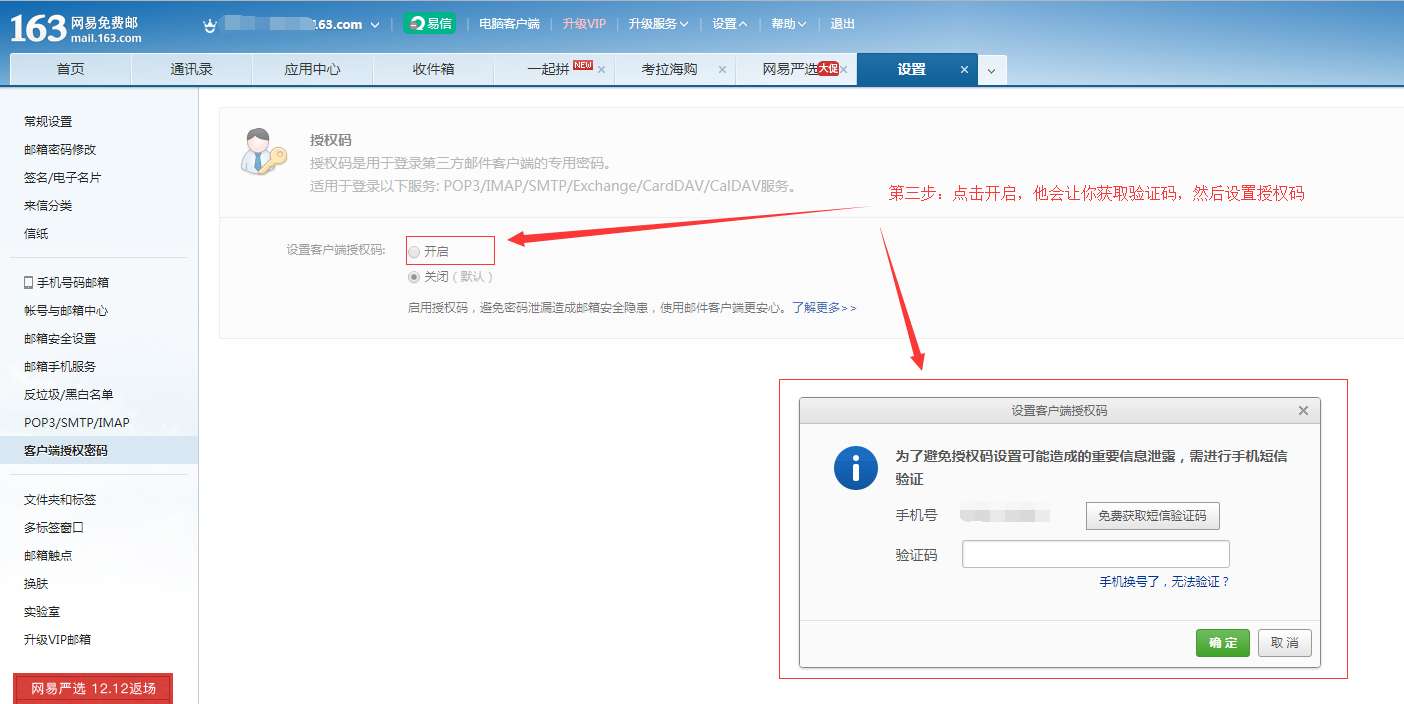
第四步:设置授权码就好,这里就不截图了。设置授权码后,你要记录授权码和SMTP服务器: smtp.163.com。SMTP服务器地址可以在POP3/SMTP/IMAP 查询到。163邮箱就是 smtp.163.com,可以直接拿去用。
附录:代码
一、js代码
 //查询邮箱是否存在

 $("#checkEm").click(function(){

               content = $("#content").val();

               if(content.length == 0 || content.length == ""){

                   alert("请输入您的邮箱");

                   return;

               }else if(checkContent(content) == 0){

                   alert("您输入的邮箱格式不正确!")

               }else if(checkContent(content) == 1){

                   inputType = "email";

                   $.ajax({

                       url:"<%=serverIp%>/webcons.do?method=checkEmail",

                       dataType:"text",

                       type:"get",

                       data:"fromWhere=<%=code%>&email="+content+"&type=1&isCountry=2",

                       async:false,

                       success:function(result){

                           console.log(result)

                           if(result == 1){

                               $("#checkTable").hide();

                               $("#codeTable").show();

                           }else{

                               alert("您输入的邮箱还没有注册!");

                           }

                       }

                   })

               }

           })
 $("#sendSms").click(function(){

             if(inputType == "email"){

                 $.ajax({

                     url:"<%=serverIp%>/webcons.do?sendEmailCode",

                     type:"post",

                     data:"email="+content+"&code=<%=code%>",

                     dataType:"json",

                     async:false,

                     success:function(result){

                         if(result.state == 1){

                             timer = window.setInterval("timego()",1000);

                         }

                     }

                 })

             }else if(inputType == "mobile"){

                 $.ajax({

                     url:"<%=serverIp%>/webcons.do?sendMobileCode",

                     type:"post",

                     data:"mobile="+content+"&code=<%=code%>",

                     dataType:"json",

                     async:false,

                     success:function(result){

                         if(result.state == 1){

                             if(result.state == 1){

                                 timer = window.setInterval("timego()",1000);

                             }

                         }else{

                             alert(result.msg);

                         }

                     }

                 })

             }

           })
二、action处理代码
 // 在发送验证码之前,先生成6位随机数

 private String randomBiocuration(){

         String result="";

         for(int i=0;i<6;i++){

         //生成97-122的int型的整型

         int intValue=(int)(Math.random()*9+1);

         //将intValue强制转化成char类型后接到resul后面

         result=result+String.valueOf(intValue);

         }

         return result;

     }
 // 检查邮箱是否存在

 @RequestMapping(params = "method=checkEmailBiocuration", method = RequestMethod.GET)

     public void checkEmailBiocuration(String email, int isCountry,

             HttpServletRequest request, HttpServletResponse response) {

         try {

             String fromWhere = request.getParameter("fromWhere") == null?null:request.getParameter("fromWhere");

             String type = request.getParameter("type") == null ? "1" : request

                     .getParameter("type");

             int type1 = Integer.parseInt(type);

             UserInfo userInfo = null;

             if(fromWhere != null){

                 userInfo = webService.getuserInfoByEmail(email,type1,fromWhere);

             }else{

                 userInfo = webService.getUserInfoByEmail(email, type1);

             }

             if (userInfo != null) {

                 response.getWriter().print("1");

             } else {

                 response.getWriter().print("0");

             }

         } catch (Exception e) {

             e.printStackTrace();

         }

     }
 //发送邮件

 @RequestMapping(params = "sendEmailCodeBiocuration",method = RequestMethod.POST)

     public void sendEmailCodeBiocuration(String email,String code,HttpServletResponse response){

         try {

             Conferences cons = webService.getConferencesByCode(code);

             JSONObject result = new JSONObject();

             ConPasswordBack passwordBack = webService.getPasswordBackByType(1,cons.getConferencesId());

             if(passwordBack != null){

                 String emailCodeStr = randomBiocuration();

                 EmailPublic emailPublic = webService.getEmailPublicById(passwordBack.getEmailPublicId());

                 EmailModel emailModel = webService.getEmailModelById(passwordBack.getEmailModelId());

                 EmailUtil.init().sendEmail('发件人邮箱', ‘发件人邮箱的密码’, ‘收件人邮箱’, ‘邮箱标题’, ‘邮箱内容’, ‘发件人邮箱Smtp地址’);

                 EmailCode emailCode = webService.getEmailCodeByConId(email,cons.getConferencesId());

                 if(emailCode == null){

                     emailCode = new EmailCode();

                 }

                 emailCode.setCode(emailCodeStr);

                 emailCode.setCreateTime(new Date());

                 emailCode.setConferencesId(cons.getConferencesId());

                 emailCode.setEmail(email);

                 webService.saveObject(emailCode);

             }

             result.accumulate("state", 1);

             writeJson(response, result.toString());

         } catch (Exception e) {

             e.printStackTrace();

         }

     }
三、serviceImpl 代码
 // 服务层实现类

 public class EmailUtil {

     private static EmailUtil emailUtil = null;

     public static EmailUtil init(){

         if(emailUtil == null){

             emailUtil = new EmailUtil();

         }

         return emailUtil;

     }

     public  boolean sendEmail(String emailName,String password,String email,String title,String content,String smtp) {

         try {

             MailSSLSocketFactory sf = new MailSSLSocketFactory();

             sf.setTrustAllHosts(true);

             // 建立邮件会话

             Properties props = new Properties(); // 用来在一个文件中存储键-值对的,其中键和值是用等号分隔的,

             // 存储发送邮件服务器的信息

             props.put("mail.smtp.host", smtp);

             // 同时通过验证

             props.put("mail.smtp.auth", "true");

             props.put("mail.smtp.port", "465");

             props.put("mail.smtp.ssl.enable", "true");

             props.put("mail.smtp.ssl.socketFactory", sf);

             props.setProperty("mail.transport.protocol", "smtp");

             // 根据属性新建一个邮件会话

             Session s = Session.getInstance(props);

             s.setDebug(false); // 有他会打印一些调试信息。

             // 由邮件会话新建一个消息对象

             MimeMessage message = new MimeMessage(s);

             // 设置邮件

             InternetAddress from = new InternetAddress(emailName); // 发件人邮箱

             message.setFrom(from); // 设置发件人的地址

             //

             // //设置收件人,并设置其接收类型为TO

             InternetAddress to = new InternetAddress(email); //收件人邮箱

             message.setRecipient(Message.RecipientType.TO, to);

             // 设置标题

             message.setSubject(title);

             // 设置信件内容

             message.setContent(content,"text/html;charset=gbk"); // 发送HTML邮件

             // 设置发信时间

             message.setSentDate(new Date());

             // 存储邮件信息

             message.saveChanges();

             // 发送邮件

             Transport transport = s.getTransport("smtp");

             // 以smtp方式登录邮箱,第一个参数是发送邮件用的邮件服务器SMTP地址,第二个参数为用户名,第三个参数为密码

             transport.connect(smtp,emailName,password);

             // 发送邮件,其中第二个参数是所有已设好的收件人地址

             transport.sendMessage(message, message.getAllRecipients());

             transport.close();

             return true;

         } catch (Exception e) {

             e.printStackTrace();

             return false;

         }

     }

 }
人生的路上,跋涉了很久,当蓦然回首,会发觉从前走过的每一段路、经历过的每一段时光都是美好奇妙、独一无二的。其实,不曾辜负走过的每一份光阴,就是生命最大的圆满与无憾。
java应用:向用户注册的邮箱发送邮件的更多相关文章
- Java Web(十三) 使用javamail进行发送邮件,(使用QQ,163,新浪邮箱服务器)
加油加油. --WH 一.发送邮件的原理 在了解其原理之前,先要知道两个协议,SMTP和POP3 SMTP:Simple Mail Transfer Protocol,即简单邮件传输协议,发送邮件的协 ...
- Java实现网易企业邮箱发送邮件
最近项目需要用网易企业邮箱发送邮件,特意来将实现过程记录一下: maven导入jar包 <!-- javax.mai 核心包 --> <dependency> <grou ...
- 基于java mail实现简单的QQ邮箱发送邮件
刚学习到java邮件相关的知识,先写下这篇博客,方便以后翻阅学习. -----------------------------第一步 开启SMTP服务 在 QQ 邮箱里的 设置->账户里开启 S ...
- 使用 QQ 邮箱发送邮件报错:java.net.SocketTimeoutException: Read timed out. Failed messages: javax.mail.MessagingException: Exception reading response
使用 QQ 邮箱发送邮件报错:java.net.SocketTimeoutException: Read timed out. Failed messages: javax.mail.Messagin ...
- (进阶篇)PHP实现用户注册后邮箱验证,激活帐号
我们在很多网站注册会员时,注册完成后,系统会自动向用户的邮箱发送一封邮件,这封邮件的内容就是一个URL链接,用户需要点击打开这个链接才能激活之前在该网站注册的帐号.激活成功后才能正常使用会员功能. 本 ...
- PHP激活用户注册验证邮箱
本文将结合实例介绍如何使用PHP+Mysql完成注册帐号.发送激活邮件.验证激活帐号.处理URL链接过期的功能. 注册邮箱激活流程 <ul class='ul_demo''> <li ...
- 基于JavaMail向邮箱发送邮件
参考:http://blog.csdn.net/ghsau/article/details/17839983 http://blog.csdn.net/never_cxb/article/detail ...
- 通过163smtp服务器向各大邮箱发送邮件(SOCKET编程)
package server; import java.io.*; import java.net.*; import java.sql.Time; import java.util.Scanner; ...
- legend3---lavarel中使用qq邮箱发送邮件
legend3---lavarel中使用qq邮箱发送邮件 一.总结 一句话总结: 第一步:配置邮箱做服务器,比如qq邮箱,网易163邮箱 第二步:配置lavarel的配置文件 第三部:写邮件发送代码就 ...
随机推荐
- minicom 安装 查看串口
因为现在电脑基本不配备串行接口,所以,usb转串口成为硬件调试时的必然选择.目前知道的,PL2303的驱动是有的,在dev下的名称是ttyUSB0 默认情况下ubuntu已经安装了USB转串口驱动(p ...
- 腾讯云CentOS7.4服务器添加swap分区
自己的腾讯云服务器搭建的zabbix监控中,提示Lack of free swap space 腾讯的官方说明在这: https://cloud.tencent.com/document/produc ...
- springboot添加多数据源 以及 动态添加数据源动态切换数据源
<!-- Druid 数据连接池依赖 --> <dependency> <groupId>com.alibaba</groupId> <artif ...
- SpringBoot MyBatis 配置多数据源 (静态多个)
转载地址:https://www.jianshu.com/p/118ca1d5ecf9?utm_campaign=haruki&utm_content=note&utm_medium= ...
- ubuntu 关闭 笔记本键盘背景灯
/etc/rc.local 加入 ' > /sys/class/leds/tpacpi::kbd_backlight/brightness
- 『TensorFlow』SSD源码学习_其二:基于VGG的SSD网络前向架构
Fork版本项目地址:SSD 参考自集智专栏 一.SSD基础 在分类器基础之上想要识别物体,实质就是 用分类器扫描整张图像,定位特征位置 .这里的关键就是用什么算法扫描,比如可以将图片分成若干网格,用 ...
- Failed to process import candidates for configuration class [com.simple.....]
主要原因: 是因为自己定制的starter在打包时(package)用了spring-boot-maven-plugin,即在你的定制starter工程的pom.xml中有如下配置: <buil ...
- hdu多校第3场A.Ascending Rating
Problem A. Ascending Rating Time Limit: / MS (Java/Others) Memory Limit: / K (Java/Others) Total Sub ...
- SHOW Syntax
MySQL 5.5 Reference Manual / SQL Statement Syntax / Database Administration Statements / SHOW ...
- Asp .Net Core 2.0 登录授权以及多用户登录
用户登录是一个非常常见的应用场景 .net core 2.0 的登录方式发生了点变化,应该是属于是良性的变化,变得更方便,更容易扩展. 配置 打开项目中的Startup.cs文件,找到Configur ...