
xtrabackup 备份和恢复
该文章接上一篇文章:
内核方面:
$ cat /etc/centos-release
CentOS Linux release 7.4.1708 (Core)
$ uname -r
3.10.0-693.el7.x86_64
下载安装xtrabackup:
$ wget https://www.percona.com/downloads/XtraBackup/Percona-XtraBackup-2.4.12/binary/redhat/7/x86_64/Percona-XtraBackup-2.4.12-r170eb8c-el7-x86_64-bundle.tar
$ tar -xf Percona-XtraBackup-2.4.12-r170eb8c-el7-x86_64-bundle.tar
$ yum -y install percona-xtrabackup-24-2.4.12-1.el7.x86_64.rpm
$ which xtrabackup
/usr/bin/xtrabackup
$ innobackupex -v
xtrabackup: recognized server arguments: --innodb_buffer_pool_size=1024M --datadir=/data/mysql/data --server-id=1
创建测试数据:
mysql> mysql -uroot -p
mysql> create database opop charset='utf8mb4';
mysql> use opop;
mysql> create table user(id int unsigned primary key auto_increment,name varchar(30));
mysql> show tables;
mysql> insert into user(name) values('jack'),('tom'),('lily'),('lucy');
mysql> select * from user;
mysql> commit;
mysql> select * from user;
Xtrabackup全量备份与恢复
$ innobackupex --defaults-file=/etc/my.cnf --user=sstuser --password="123456" --backup . #最后有个点,是当前目录
xtrabackup: recognized server arguments: --innodb_buffer_pool_size=1024M --datadir=/data/mysql/data --server-id=1
xtrabackup: recognized client arguments: --innodb_buffer_pool_size=1024M --datadir=/data/mysql/data --server-id=1 --backup=1
181025 08:27:43 innobackupex: Starting the backup operation
IMPORTANT: Please check that the backup run completes successfully.
At the end of a successful backup run innobackupex
prints "completed OK!".
181025 08:27:43 version_check Connecting to MySQL server with DSN 'dbi:mysql:;mysql_read_default_group=xtrabackup' as 'sstuser' (using password: YES).
181025 08:27:43 version_check Connected to MySQL server
181025 08:27:43 version_check Executing a version check against the server...
181025 08:27:43 version_check Done.
181025 08:27:43 Connecting to MySQL server host: localhost, user: sstuser, password: set, port: not set, socket: not set
Using server version 5.7.23-23-57
innobackupex version 2.4.12 based on MySQL server 5.7.19 Linux (x86_64) (revision id: 170eb8c)
xtrabackup: uses posix_fadvise().
xtrabackup: cd to /data/mysql/data
xtrabackup: open files limit requested 0, set to 1024
xtrabackup: using the following InnoDB configuration:
xtrabackup: innodb_data_home_dir = .
xtrabackup: innodb_data_file_path = ibdata1:12M:autoextend
xtrabackup: innodb_log_group_home_dir = ./
xtrabackup: innodb_log_files_in_group = 2
xtrabackup: innodb_log_file_size = 50331648
InnoDB: Number of pools: 1
181025 08:27:43 >> log scanned up to (2605686)
xtrabackup: Generating a list of tablespaces
InnoDB: Allocated tablespace ID 2 for mysql/plugin, old maximum was 0
181025 08:27:44 [01] Copying ./ibdata1 to /root/2018-10-25_08-27-43/ibdata1
181025 08:27:44 [01] ...done
....
....
181025 08:27:46 Executing LOCK TABLES FOR BACKUP... #翻译:执行锁定表以进行备份
181025 08:27:46 Starting to backup non-InnoDB tables and files
181025 08:27:46 [01] Copying ./mysql/db.opt to /root/2018-10-25_08-27-43/mysql/db.opt
181025 08:27:46 [01] ...done
181025 08:27:46 [01] Copying ./mysql/db.frm to /root/2018-10-25_08-27-43/mysql/db.frm
181025 08:27:46 [01] ...done
....
....
181025 08:27:47 [01] Copying ./opop/user.frm to /root/2018-10-25_08-27-43/opop/user.frm
181025 08:27:47 [01] ...done
181025 08:27:47 Finished backing up non-InnoDB tables and files
181025 08:27:47 Executing LOCK BINLOG FOR BACKUP... #执行锁定二进制文件开始备份
181025 08:27:47 Executing FLUSH NO_WRITE_TO_BINLOG ENGINE LOGS... #执行flush no_write_to_binlog引擎日志
xtrabackup: The latest check point (for incremental): '2605677'
xtrabackup: Stopping log copying thread. #停止日志复制线程。
.181025 08:27:47 >> log scanned up to (2605686) #日志扫描到(2605686)
181025 08:27:47 Executing UNLOCK BINLOG #执行解锁binlog
181025 08:27:47 Executing UNLOCK TABLES #执行解锁表
181025 08:27:47 All tables unlocked #所有表解锁
181025 08:27:47 [00] Copying ib_buffer_pool to /root/2018-10-25_08-27-43/ib_buffer_pool
181025 08:27:47 [00] ...done
181025 08:27:47 Backup created in directory '/root/2018-10-25_08-27-43/' #在/root/2018-10-25_08-27-43/目录中创建备份
181025 08:27:47 [00] Writing /root/2018-10-25_08-27-43/backup-my.cnf
181025 08:27:47 [00] ...done
181025 08:27:47 [00] Writing /root/2018-10-25_08-27-43/xtrabackup_info
181025 08:27:47 [00] ...done
xtrabackup: Transaction log of lsn (2605677) to (2605686) was copied. #已复制lsn(2605677)到(2605686)的事务日志。
181025 08:27:48 completed OK! #完成好了!
在当前目录下会生成一个以当前时间为名字的一个目录:

#这里面就是相关的备份文件,同样也可以看到我们创建的库的名称
使用以下命令使相关数据性文件保持一致性状态
[root@localhost ~]# innobackupex --apply-log /root/2018-10-25_08-27-43/
xtrabackup: recognized server arguments: --innodb_checksum_algorithm=crc32 --innodb_log_checksum_algorithm=strict_crc32 --innodb_data_file_path=ibdata1:12M:autoextend --innodb_log_files_in_group=2 --innodb_log_file_size=50331648 --innodb_fast_checksum=0 --innodb_page_size=16384 --innodb_log_block_size=512 --innodb_undo_directory=./ --innodb_undo_tablespaces=0 --server-id=1 --redo-log-version=1
xtrabackup: recognized client arguments: --innodb_checksum_algorithm=crc32 --innodb_log_checksum_algorithm=strict_crc32 --innodb_data_file_path=ibdata1:12M:autoextend --innodb_log_files_in_group=2 --innodb_log_file_size=50331648 --innodb_fast_checksum=0 --innodb_page_size=16384 --innodb_log_block_size=512 --innodb_undo_directory=./ --innodb_undo_tablespaces=0 --server-id=1 --redo-log-version=1
181025 08:57:41 innobackupex: Starting the apply-log operation
IMPORTANT: Please check that the apply-log run completes successfully.
At the end of a successful apply-log run innobackupex
prints "completed OK!".
innobackupex version 2.4.12 based on MySQL server 5.7.19 Linux (x86_64) (revision id: 170eb8c)
xtrabackup: cd to /root/2018-10-25_08-27-43/
xtrabackup: This target seems to be not prepared yet.
InnoDB: Number of pools: 1
xtrabackup: xtrabackup_logfile detected: size=8388608, start_lsn=(2605677)
xtrabackup: using the following InnoDB configuration for recovery:
xtrabackup: innodb_data_home_dir = .
xtrabackup: innodb_data_file_path = ibdata1:12M:autoextend
xtrabackup: innodb_log_group_home_dir = .
xtrabackup: innodb_log_files_in_group = 1
xtrabackup: innodb_log_file_size = 8388608
xtrabackup: using the following InnoDB configuration for recovery:
xtrabackup: innodb_data_home_dir = .
xtrabackup: innodb_data_file_path = ibdata1:12M:autoextend
xtrabackup: innodb_log_group_home_dir = .
xtrabackup: innodb_log_files_in_group = 1
xtrabackup: innodb_log_file_size = 8388608
xtrabackup: Starting InnoDB instance for recovery.
xtrabackup: Using 104857600 bytes for buffer pool (set by --use-memory parameter)
InnoDB: PUNCH HOLE support available
InnoDB: Mutexes and rw_locks use GCC atomic builtins
InnoDB: Uses event mutexes
InnoDB: GCC builtin __atomic_thread_fence() is used for memory barrier
InnoDB: Compressed tables use zlib 1.2.7
InnoDB: Number of pools: 1
InnoDB: Using CPU crc32 instructions
InnoDB: Initializing buffer pool, total size = 100M, instances = 1, chunk size = 100M
InnoDB: Completed initialization of buffer pool
InnoDB: page_cleaner coordinator priority: -20
InnoDB: Highest supported file format is Barracuda.
InnoDB: Log scan progressed past the checkpoint lsn 2605677
InnoDB: Doing recovery: scanned up to log sequence number 2605686 (0%)
InnoDB: Database was not shutdown normally!
InnoDB: Starting crash recovery.
InnoDB: Creating shared tablespace for temporary tables
InnoDB: Setting file './ibtmp1' size to 12 MB. Physically writing the file full; Please wait ...
InnoDB: File './ibtmp1' size is now 12 MB.
InnoDB: 96 redo rollback segment(s) found. 1 redo rollback segment(s) are active.
InnoDB: 32 non-redo rollback segment(s) are active.
InnoDB: Waiting for purge to start
InnoDB: 5.7.19 started; log sequence number 2605686
xtrabackup: Recovered WSREP position: bbe63ad7-d767-11e8-9ffc-073dc1824390:8
xtrabackup: starting shutdown with innodb_fast_shutdown = 1
InnoDB: FTS optimize thread exiting.
InnoDB: Starting shutdown...
InnoDB: Shutdown completed; log sequence number 2605783
InnoDB: Number of pools: 1
xtrabackup: using the following InnoDB configuration for recovery:
xtrabackup: innodb_data_home_dir = .
xtrabackup: innodb_data_file_path = ibdata1:12M:autoextend
xtrabackup: innodb_log_group_home_dir = .
xtrabackup: innodb_log_files_in_group = 2
xtrabackup: innodb_log_file_size = 50331648
InnoDB: PUNCH HOLE support available
InnoDB: Mutexes and rw_locks use GCC atomic builtins
InnoDB: Uses event mutexes
InnoDB: GCC builtin __atomic_thread_fence() is used for memory barrier
InnoDB: Compressed tables use zlib 1.2.7
InnoDB: Number of pools: 1
InnoDB: Using CPU crc32 instructions
InnoDB: Initializing buffer pool, total size = 100M, instances = 1, chunk size = 100M
InnoDB: Completed initialization of buffer pool
InnoDB: page_cleaner coordinator priority: -20
InnoDB: Setting log file ./ib_logfile101 size to 48 MB
InnoDB: Setting log file ./ib_logfile1 size to 48 MB
InnoDB: Renaming log file ./ib_logfile101 to ./ib_logfile0
InnoDB: New log files created, LSN=2605783
InnoDB: Highest supported file format is Barracuda.
InnoDB: Log scan progressed past the checkpoint lsn 2606092
InnoDB: Doing recovery: scanned up to log sequence number 2606101 (0%)
InnoDB: Database was not shutdown normally!
InnoDB: Starting crash recovery.
InnoDB: Removed temporary tablespace data file: "ibtmp1"
InnoDB: Creating shared tablespace for temporary tables
InnoDB: Setting file './ibtmp1' size to 12 MB. Physically writing the file full; Please wait ...
InnoDB: File './ibtmp1' size is now 12 MB.
InnoDB: 96 redo rollback segment(s) found. 1 redo rollback segment(s) are active.
InnoDB: 32 non-redo rollback segment(s) are active.
InnoDB: Waiting for purge to start
InnoDB: 5.7.19 started; log sequence number 2606101
xtrabackup: starting shutdown with innodb_fast_shutdown = 1
InnoDB: FTS optimize thread exiting.
InnoDB: Starting shutdown...
InnoDB: Shutdown completed; log sequence number 2606120
181025 08:57:48 completed OK!
恢复
先删除相应的表
注:这里需要注意的是没有删除库,因为删除库后恢复时会报错,因为它找不到相应的库,要新建出来相应名字的库再恢复
mysql -uroot -p
mysql> drop table opop.user;
mysql> select * from opop.user;
ERROR 1146 (42S02): Table 'opop.user' doesn't exist
mysql> use opop;
mysql> show tables;
mysql> exit
[root@localhost ~]# innobackupex --defaults-file=/etc/my.cnf --copy-back /root/2018-10-25_08-27-43/
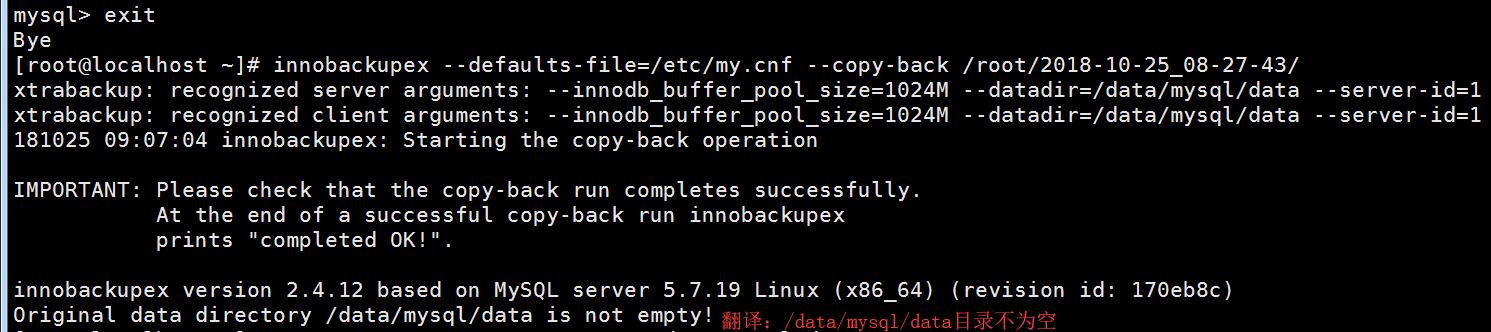
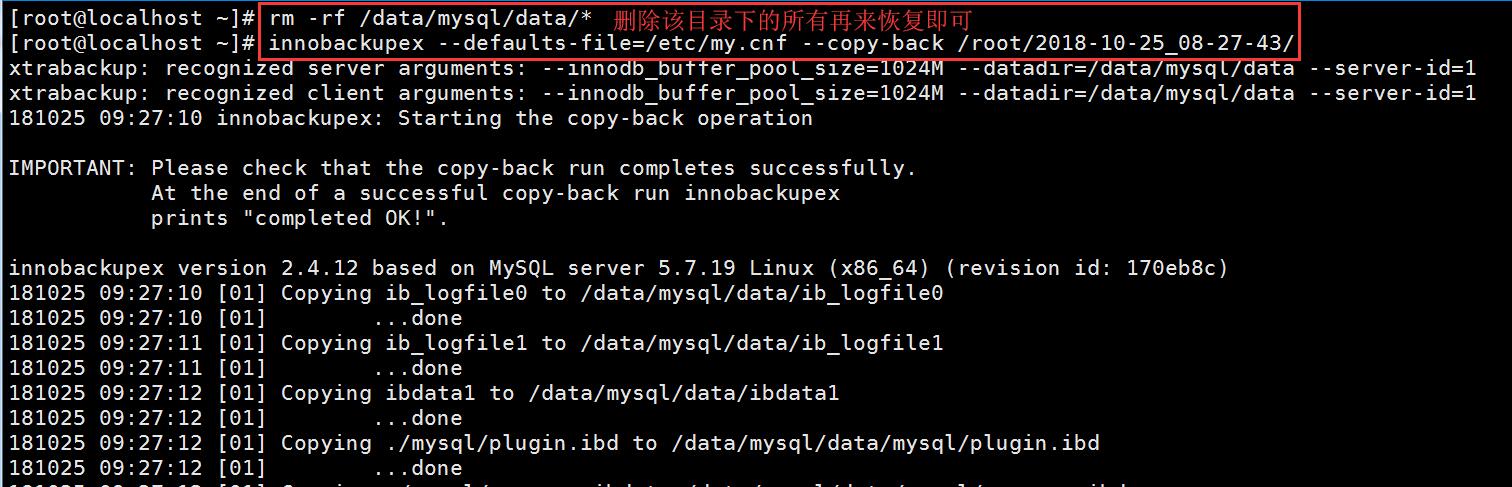
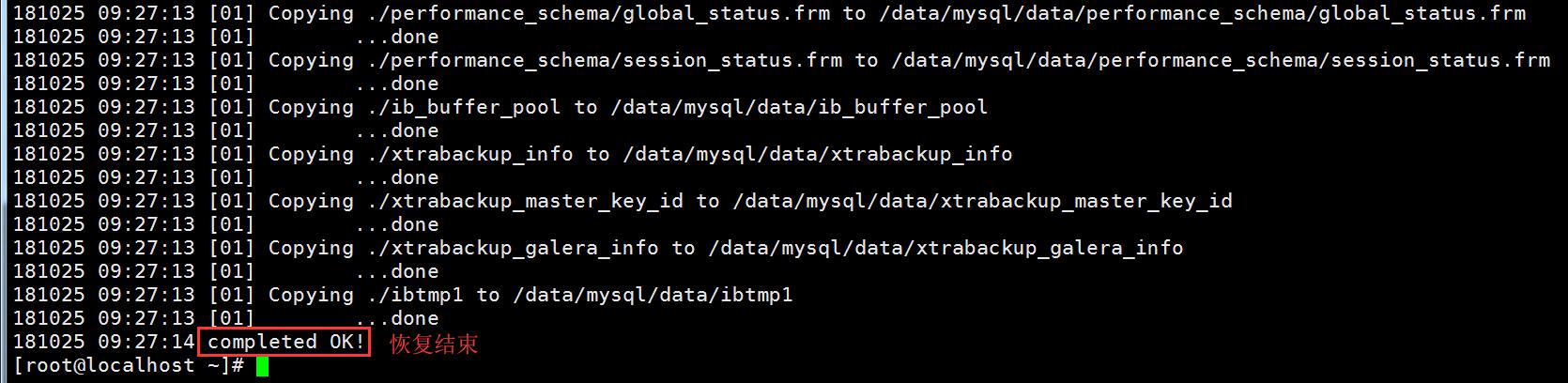
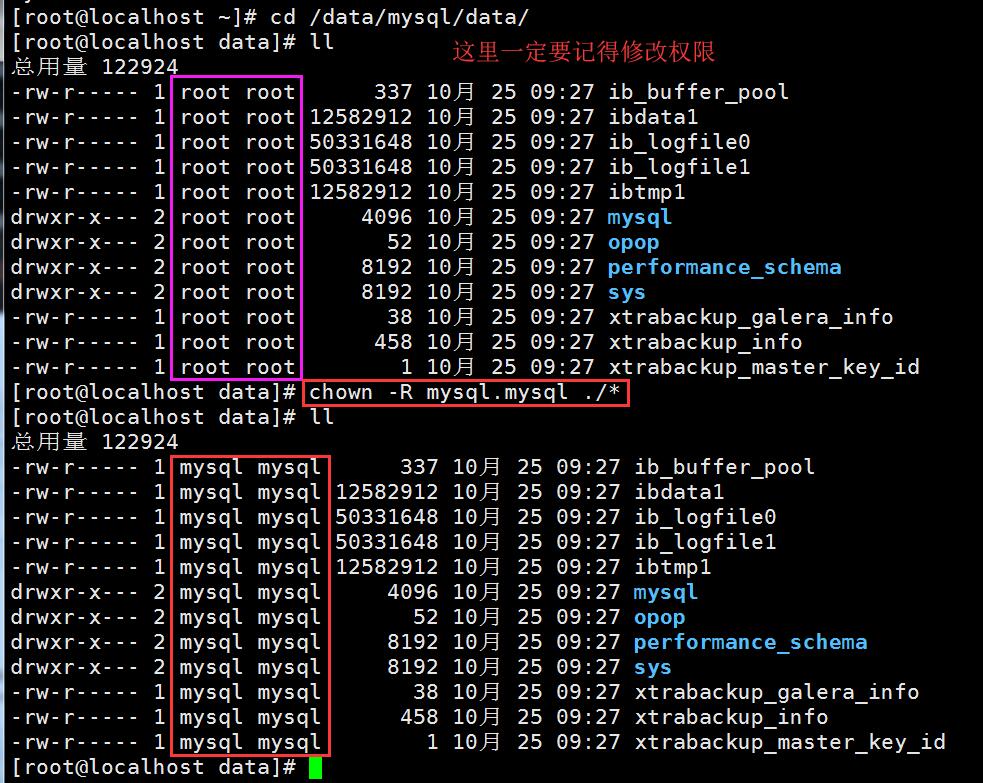

注:这里一定要记得重启,且在Percona XtraDB集群中主节点和其他节点的启动、重启方式不一样,因为该文档是接上一篇文档
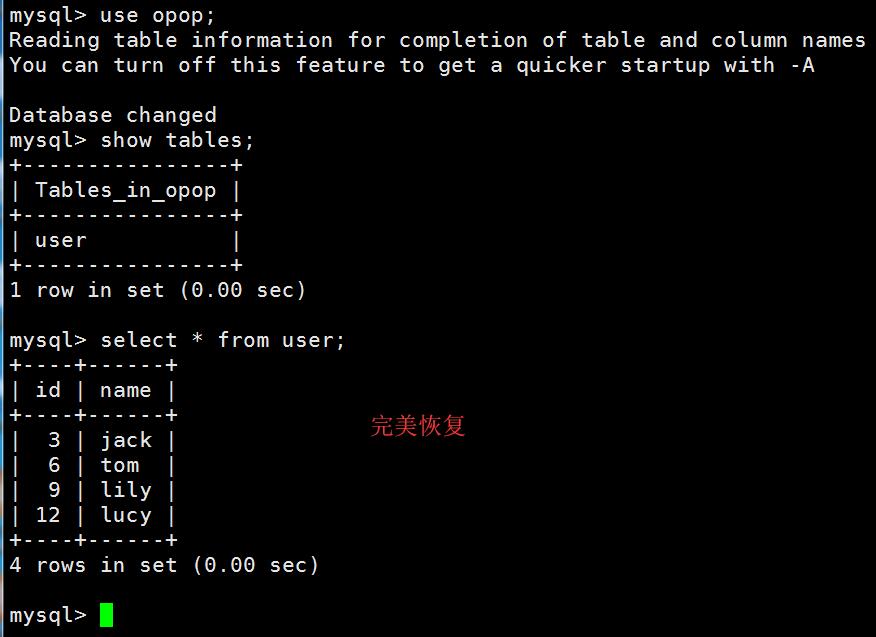
登陆到数据库中查看恢复情况
Xtrabackup增量备份与恢复
增量备份仅能应用于InooDB或XtraDB表,对于MyISAM表,增量与全备相同,在上面的基础上继续创建一个opop2的库然后在opop-2的库里建一张表并插入数据
mysql> create database opop2 charset='utf8mb4';
mysql> use opop2;
mysql> create table user2(id int unsigned primary key auto_increment,name varchar(30));
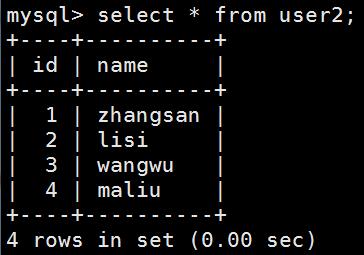
mysql> insert into user2(name) values('zhangsan'),('lisi'),('wangwu'),('maliu');
mysql> commit;
mysql> select * from user2;

备份开始:
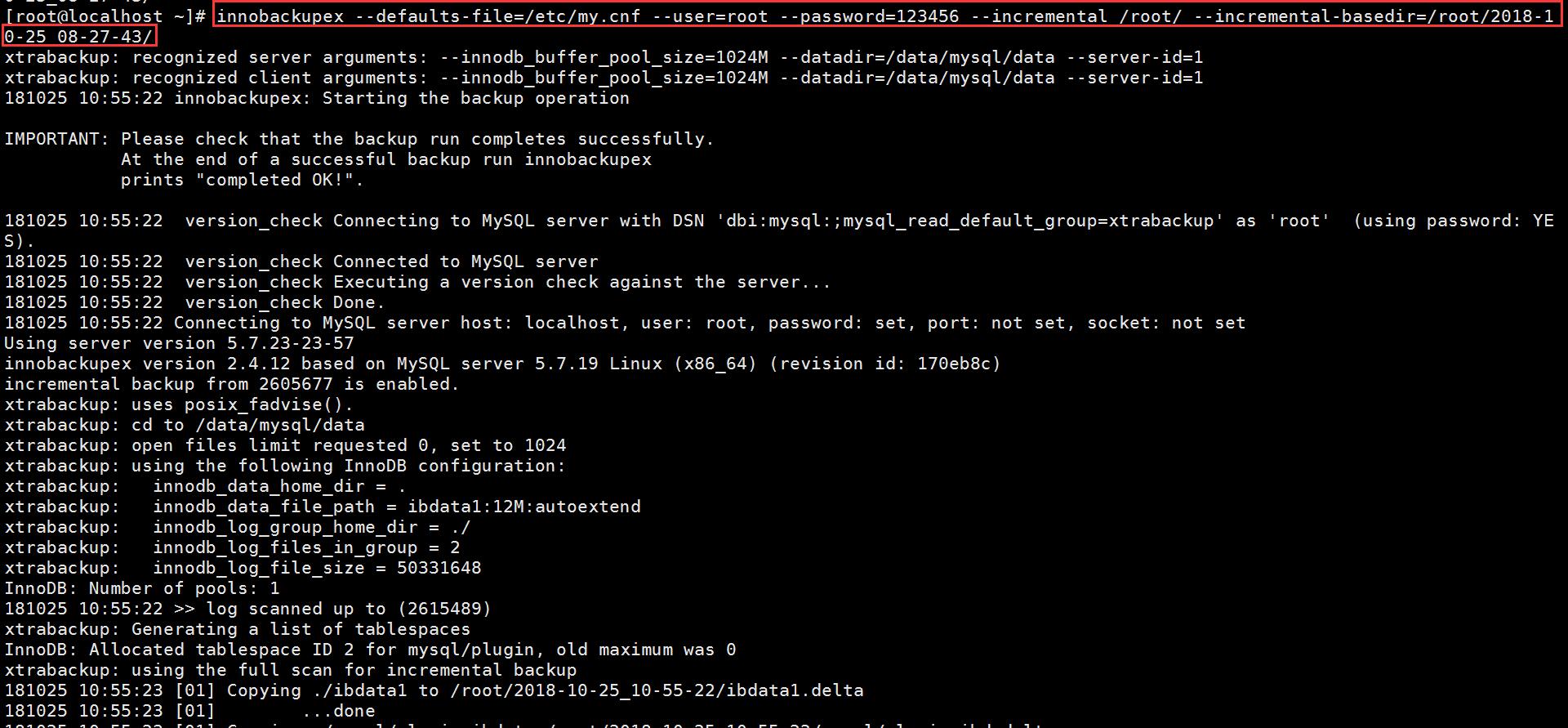
略去中间部分.....

#--incremental /backup/ 指定增量备份文件备份的目录
#--incremental-basedir 指定上一次全备或增量备份的目录

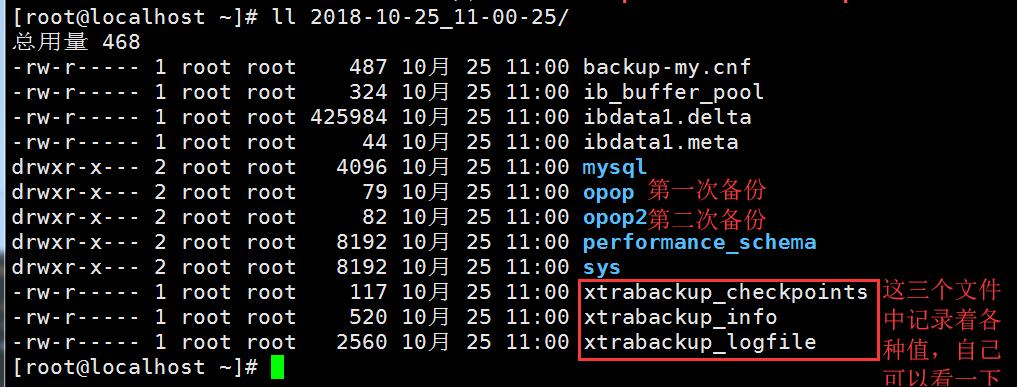
删除一条数据来测试增量恢复 (这里删除的是增量备份的数据)
mysql -uroot -p
mysql> use opop2;
mysql> show tables;
mysql> desc user2;
mysql> delete from user2 where name='lisi';
mysql> select * from user2; #确认lisi用户已经删除
mysql> exit
增量恢复操作过程如下
[root@localhost ~]# innobackupex --apply-log --redo-only /root/2018-10-25_08-27-43/ #第一次的全局备份数据目录
[root@localhost ~]# innobackupex --apply-log --redo-only /root/2018-10-25_08-27-43/ --incremental-dir=/root/2018-10-25_11-00-25/ #第二次的增量备份数据目录
注:这里相当于一个合并的动作
恢复全部数据:
[root@localhost ~]# innobackupex --defaults-file=/etc/my.cnf --copy-back /root/2018-10-25_08-27-43/
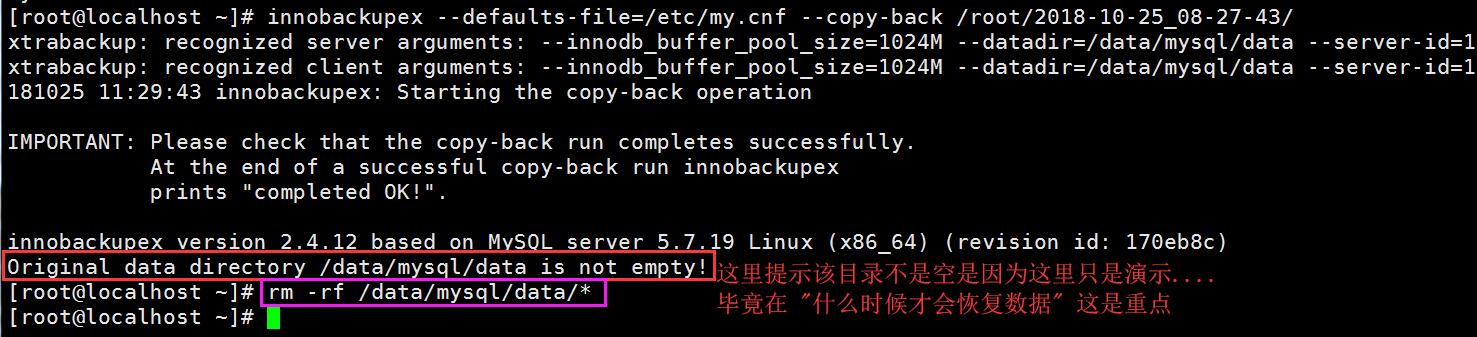
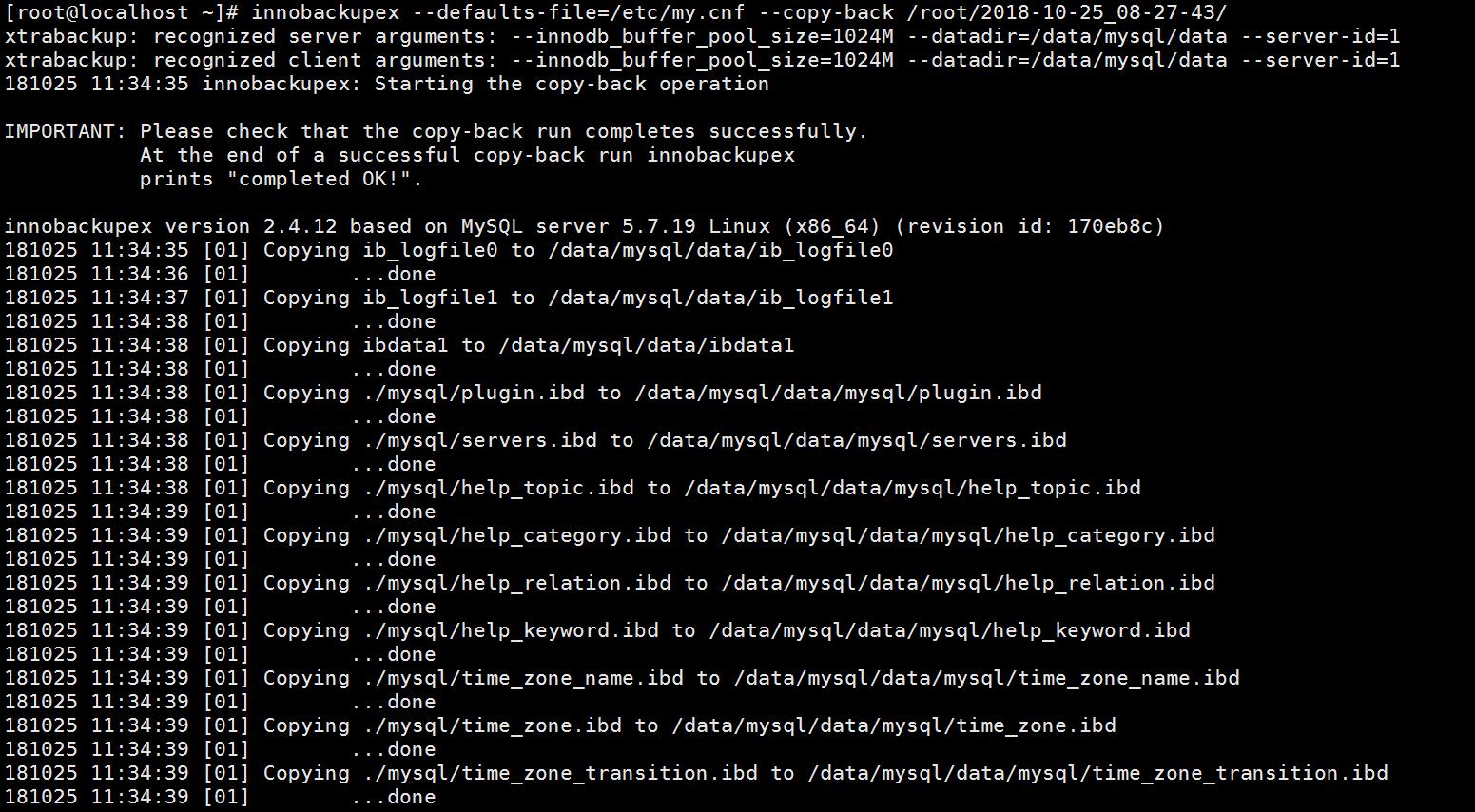
省略中间的一部分..........
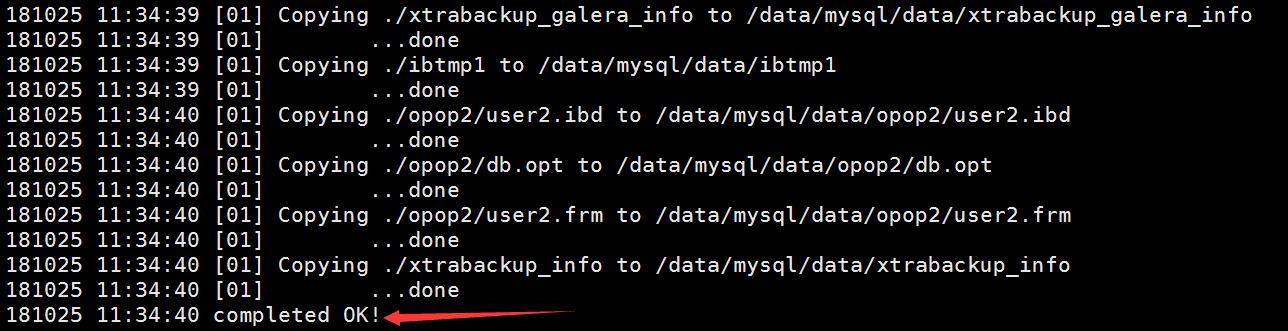
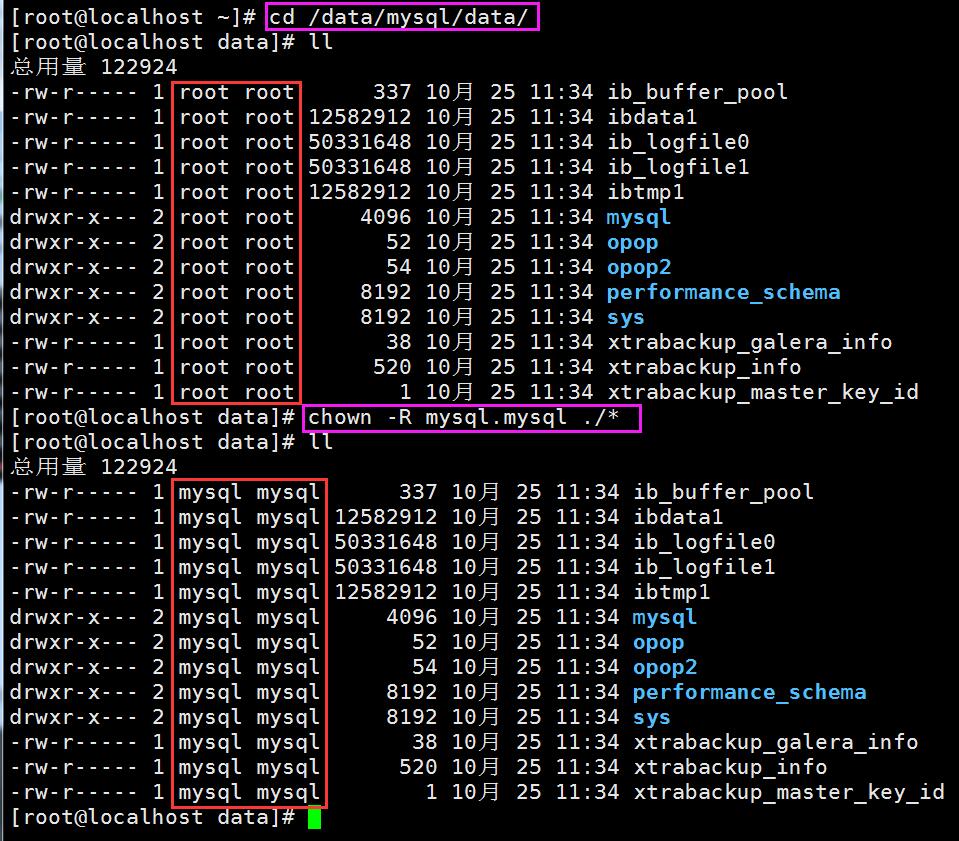
[root@localhost data]# systemctl restart mysql@bootstrap.service
#因为该实验中是做的Percona XtraDB Cluster集群,所以使用该命令,如不是Percona XtraDB Cluster 集群,在centos上则使用 systemctl 或 service 启动或重启
[root@localhost data]# mysql -uroot -p

xtrabackup 备份和恢复的更多相关文章
- MySql在生产环境中是用mysqldump还是xtrabackup备份和恢复数据
如题,究竟该使用mysqldump还是xtrabackup,要说用,两个都能备份,都支持热备,但是生产环境我们要考虑的是效率,就是不管备份还是恢复,都要快,要稳定. 之前我在维护mysql数据库的时候 ...
- xtrabackup备份和恢复数据脚本
该脚本用于备份和恢复MySQL数据库. 总结xtrabackup备份的两个坑: 1.在恢复数据的过程中,如果中途出错,则数据将会被破坏,后续很难再恢复. 2.在恢复过程中,如果版本过低,在准备全量数据 ...
- Percona Xtrabackup备份及恢复
1. http://www.percona.com/software/percona-xtrabackup下载并安装 2. 全量备份 a.全量备份到制定目录 innobacku ...
- 利用Xtrabackup备份集合恢复一台从库的过程
1 time tar -xvf Open..tarx.gz real 35m22.502s user 10m16.499s sys 1m28.578s You have new m ...
- 从xtrabackup备份恢复单表
目前对MySQL比较流行的备份方式有两种,一种上是使用自带的mysqldump,另一种是xtrabackup,对于数据时大的环境,普遍使用了xtrabackup+binlog进行全量或者增量备份,那么 ...
- 从xtrabackup备份恢复单表【转】
目前对MySQL比较流行的备份方式有两种,一种上是使用自带的mysqldump,另一种是xtrabackup,对于数据时大的环境,普遍使用了xtrabackup+binlog进行全量或者增量备份,那么 ...
- xtrabackup备份原理及流式备份应用
目录 xtrabackup备份原理及流式备份应用 0. 参考文献 1. xtrabackup 安装 2. xtrabackup 备份和恢复原理 2.1 备份阶段(backup) 2.2 准备阶段(pr ...
- 13-MySQL DBA笔记-迁移、升级、备份、恢复数据库
第13章 迁移.升级.备份.恢复数据库本章将为读者讲述数据库的各种维护任务:迁移.升级.备份和恢复.因为每个人熟悉的工具不同,其对应的迁移.升级.备份和恢复的方式也都略有不同,本书将尽量对笔者认为最具 ...
- MySQL自动备份实战--xtrabackup备份
MySQL数据备份企业实战.制作shell脚本 功能1:使用xtrabackup以每周为一个备份周期做备份(数据库+二进制日志,备份至本地/data/backup).提示: 周一某个时间点做一次完全备 ...
随机推荐
- 通过kubernetes构建ela服务
一.kubernetes 通过yaml 创建pod与service apiVersion: extensions/v1beta1 kind: Deployment metadata: name: el ...
- NIO 学习笔记一
Java NIO 由以下几个核心部分组成: ChannelsBuffersSelectors Channel 和 Buffer 基本上,所有的 IO 在NIO 中都从一个Channel 开始.Chan ...
- userDefineFunc.js
var scareMe = function(){ console.log("cynthia") scareMe = function(){ console.log("w ...
- Python 练习:使用 # 号输出长方形
使用 # 号输出一个长方形,用户可以指定宽和高 height = int(input("please input height: "))width = int(input(&quo ...
- python中收集函数的解包问题
收集参数的解包问题 - 把参数放入list或者字典中,直接把list/dict中的值放入收集参数中- 语法:参照案例 # 收集参数的问题 def stu(*args): print("=&q ...
- plsql如何导出查询结果
mark一下,感谢大牛分享:http://www.cnblogs.com/Marydon20170307/p/8385674.html
- BigDecimal常被忽略的问题
一:相除精度丢失的问题 BigDecimal的api除法相对加减乘要实现的复杂多了,只介绍常用的我遇到的问题: 问题:两数相除,如果9/3=3整除没问题,但是10/3=0.33333333...... ...
- 安装office2010提示要安装MSXML6.10.1129.0解决方法
系统win7 32位 安装office2010出现了错误,提示要安装MSXML6.10.1129.0解决方法 1.下载MSXML6.10.1129.0进行安装 2.若本机已安装过不管用: a.在运行里 ...
- django项目中在settings中配置静态文件
STATICFILES_DIRS = [ os.path.join(BASE_DIR,'static'), ] 写成大写可能看不太懂,但是小写的意思非常明显:staticfiles_dir = [ o ...
- ccf--20150903--模板生成系统
本题思路:首先,使用一个map来存储所有需要替换的关键词,然后,再逐行的替换掉其中的关键词,记住,find每次的其实位置不一样,否则会出现递归生成没有出现关键词就清空掉.最后输出. 题目和代码如下: ...