
spring框架学习笔记6:JDBC模板
JDBC模板:Spring中对数据库的操作。
这一部分对熟悉DBUtils的QueryRunner的开发者来说,非常简单
这是以前我简单写的dbutils的知识:
http://www.cnblogs.com/xuyiqing/p/8397428.html
导包:
1.spring中的包
2.c3p0连接池包
3.数据库驱动包
最终导入这些包:
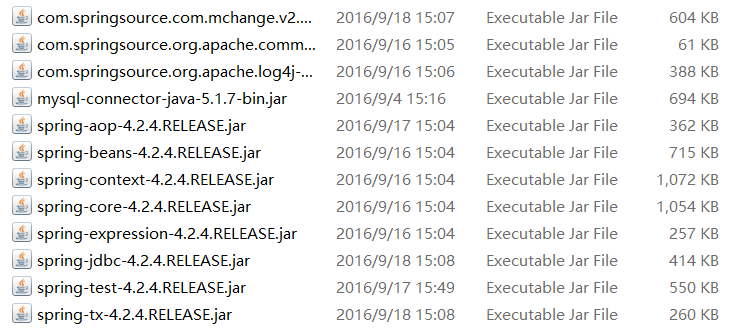
2.准备数据库测试:
简单的测试:
    @Test

    public void fun1() throws Exception{

        //准备连接池

        ComboPooledDataSource dataSource = new ComboPooledDataSource();

        dataSource.setDriverClass("com.mysql.jdbc.Driver");

        dataSource.setJdbcUrl("jdbc:mysql:///mybase");

        dataSource.setUser("root");

        dataSource.setPassword("xuyiqing");

        //1 创建JDBC模板对象

        JdbcTemplate jt = new JdbcTemplate();

        jt.setDataSource(dataSource);

        //2 书写sql,并执行

        String sql = "insert into t_user values(null,'Tom') ";

        jt.update(sql);

    }
接下来使用Spring框架管理对象:
创建实体类:
package bean;

public class User {

    private Integer id;

    private String name;

    public Integer getId() {

        return id;

    }

    public void setId(Integer id) {

        this.id = id;

    }

    public String getName() {

        return name;

    }

    public void setName(String name) {

        this.name = name;

    }

    @Override

    public String toString() {

        return "User [id=" + id + ", name=" + name + "]";

    }

}
数据库操作功能:
package jdbctemplate;

import java.util.List;

import bean.User;

public interface UserDao {

    //增

    void save(User u);

    //删

    void delete(Integer id);

    //改

    void update(User u);

    //查

    User getById(Integer id);

    //查

    int getTotalCount();

    //查

    List<User> getAll();

}
package jdbctemplate;

import java.sql.ResultSet;

import java.sql.SQLException;

import java.util.List;

import org.springframework.jdbc.core.JdbcTemplate;

import org.springframework.jdbc.core.RowMapper;

import org.springframework.jdbc.core.support.JdbcDaoSupport;

import bean.User;

//使用JDBC模板实现增删改查

public class UserDaoImpl extends JdbcDaoSupport implements UserDao {

    @Override

    public void save(User u) {

        String sql = "insert into t_user values(null,?) ";

        super.getJdbcTemplate().update(sql, u.getName());

    }

    @Override

    public void delete(Integer id) {

        String sql = "delete from t_user where id = ? ";

        super.getJdbcTemplate().update(sql,id);

    }

    @Override

    public void update(User u) {

        String sql = "update  t_user set name = ? where id=? ";

        super.getJdbcTemplate().update(sql, u.getName(),u.getId());

    }

    @Override

    public User getById(Integer id) {

        String sql = "select * from t_user where id = ? ";

        return super.getJdbcTemplate().queryForObject(sql,new RowMapper<User>(){

            @Override

            public User mapRow(ResultSet rs, int arg1) throws SQLException {

                User u = new User();

                u.setId(rs.getInt("id"));

                u.setName(rs.getString("name"));

                return u;

            }}, id);

    }

    @Override

    public int getTotalCount() {

        String sql = "select count(*) from t_user  ";

        Integer count = super.getJdbcTemplate().queryForObject(sql, Integer.class);

        return count;

    }

    @Override

    public List<User> getAll() {

        String sql = "select * from t_user  ";

        List<User> list = super.getJdbcTemplate().query(sql, new RowMapper<User>(){

            @Override

            public User mapRow(ResultSet rs, int arg1) throws SQLException {

                User u = new User();

                u.setId(rs.getInt("id"));

                u.setName(rs.getString("name"));

                return u;

            }});

        return list;

    }

}
现在就完成了数据库操作,接下来配置到Spring来管理对象
注意配置文件:
先写一个键值对配置文件:db.properties
jdbc.jdbcUrl=jdbc:mysql:///mybase

jdbc.driverClass=com.mysql.jdbc.Driver

jdbc.user=root

jdbc.password=xuyiqing
xml配置文件:
<?xml version="1.0" encoding="UTF-8"?>

<beans xmlns:xsi="http://www.w3.org/2001/XMLSchema-instance" xmlns="http://www.springframework.org/schema/beans" xmlns:context="http://www.springframework.org/schema/context" xsi:schemaLocation="http://www.springframework.org/schema/beans http://www.springframework.org/schema/beans/spring-beans-4.2.xsd http://www.springframework.org/schema/context http://www.springframework.org/schema/context/spring-context-4.2.xsd ">

<!-- 指定spring读取db.properties配置 -->

<context:property-placeholder location="classpath:db.properties"  />

<!-- 1.将连接池放入spring容器 -->

<bean name="dataSource" class="com.mchange.v2.c3p0.ComboPooledDataSource" >

    <property name="jdbcUrl" value="${jdbc.jdbcUrl}" ></property>

    <property name="driverClass" value="${jdbc.driverClass}" ></property>

    <property name="user" value="${jdbc.user}" ></property>

    <property name="password" value="${jdbc.password}" ></property>

</bean>

<!-- 2.将UserDao放入spring容器 -->

<bean name="userDao" class="jdbctemplate.UserDaoImpl" >

    <property name="dataSource" ref="dataSource" ></property>

</bean>

</beans>
测试:
package jdbctemplate;

import java.beans.PropertyVetoException;

import javax.annotation.Resource;

import org.junit.Test;

import org.junit.runner.RunWith;

import org.springframework.jdbc.core.JdbcTemplate;

import org.springframework.test.context.ContextConfiguration;

import org.springframework.test.context.junit4.SpringJUnit4ClassRunner;

import com.mchange.v2.c3p0.ComboPooledDataSource;

import bean.User;

//演示JDBC模板

@RunWith(SpringJUnit4ClassRunner.class)

@ContextConfiguration("classpath:applicationContext.xml")

public class Demo {

    @Resource(name="userDao")

    private UserDao ud;

    @Test

    public void fun2() throws Exception{

        User u = new User();

        u.setName("tom");

        ud.save(u);

    }

    @Test

    public void fun3() throws Exception{

        User u = new User();

        u.setId(2);

        u.setName("jack");

        ud.update(u);

    }

    @Test

    public void fun4() throws Exception{

        ud.delete(2);

    }

    @Test

    public void fun5() throws Exception{

        System.out.println(ud.getTotalCount());

    }

    @Test

    public void fun6() throws Exception{

        System.out.println(ud.getById(1));

    }

    @Test

    public void fun7() throws Exception{

        System.out.println(ud.getAll());

    }

}
spring框架学习笔记6:JDBC模板的更多相关文章
- Spring框架学习笔记(8)——spring boot+mybatis plus+mysql项目环境搭建
之前写的那篇Spring框架学习笔记(5)--Spring Boot创建与使用,发现有多小细节没有提及,,正好现在又学习了mybatis plus这款框架,打算重新整理一遍,并将细节说清楚 1.通过I ...
- Spring框架学习笔记(5)——Spring Boot创建与使用
Spring Boot可以更为方便地搭建一个Web系统,之后服务器上部署也较为方便 创建Spring boot项目 1. 使用IDEA创建项目 2. 修改groupid和artifact 3. 一路n ...
- Spring框架学习笔记(1)
Spring 框架学习笔记(1) 一.简介 Rod Johnson(spring之父) Spring是分层的Java SE/EE应用 full-stack(服务端的全栈)轻量级(跟EJB比)开源框架, ...
- spring框架学习笔记7:事务管理及案例
Spring提供了一套管理项目中的事务的机制 以前写过一篇简单的介绍事务的随笔:http://www.cnblogs.com/xuyiqing/p/8430214.html 还有一篇Hibernate ...
- Spring框架学习笔记(3)——SpringMVC框架
SpringMVC框架是基于Spring框架,可以让我们更为方便的进行Web的开发,实现前后端分离 思路和原理 我们之前仿照SpringMVC定义了一个自定义MVC框架,两者的思路其实都是一样的. 建 ...
- 手写Spring框架学习笔记
以下是咕泡公开课的学习笔记 一.创建工程springdemo 二.在pom中配置servlet <dependency> <groupId>javax.servlet</ ...
- Spring框架学习笔记(1)——HelloWorld
1.创建一个新的项目,并添加Spring框架 2.创建HelloWorld.java package com.broadtext.beans.helloworld; public class Hell ...
- spring框架学习笔记1:搭建测试
Spring框架介绍: Spring框架涵盖了web.service.dao三层,本身是一个存放对象的容器 形象来说:Spring是项目中对象管家 Spring框架的两大核心思想:控制反转(IOC). ...
- Spring框架学习笔记(1)——控制反转IOC与依赖注入DI
Spring框架的主要作用,就是提供了一个容器,使用该容器就可以创建并管理对象.比如说Dao类等,又或者是具有多依赖关系的类(Student类中包含有Teacher类的成员变量) Spring有两个核 ...
随机推荐
- springboot整合devtool无法热部署
参见https://www.cnblogs.com/winner-0715/p/6666579.html.
- poj2115(扩展欧基里德定理)
题目链接:https://vjudge.net/problem/POJ-2115 题意:模拟for循环for(int i=A;i!=B;i+=C),且数据范围为k位无符号数以内,即0~1<< ...
- groupby一个as_index参数解释
- FortiGate双链路不同运营商上网配置
1.防火墙端口配置 2.LLB配置
- Windows Server 2016离线安装.NET Framework 3.5
windows server 2016默认是不安装.netframework3.5的,可以在添加删除程序中单独添加.但是有时候系统安装文件不在的时候,找不到安装程序就不能安装成功. 这时候单独下载do ...
- jdk1.8 HashMap的实现
在了解HashMap之前,我们先进行位运算知识的补充 1.Java 位运算:(都是二进制的运算) << :相当于乘以2的倍数 --->1<<4 =1*2*2*2*2 ...
- node.js中 koa 框架的基本使用方法
一.安装 koa npm install koa --save 二.简单使用 const koa = require('koa'); //注意使用koa需要new,跟express有点不同 let a ...
- MySQL开发——【联合查询、多表连接、子查询】
联合查询 所谓的联合查询就是将满足条件的结果进行拼接在同一张表中. 基本语法: select */字段 from 数据表1 union [all | distinct] select */字段 fro ...
- spring boot项目升级到2.0.1,提示java.lang.ClassNotFoundException: org.apache.log4j.Logger错误
首先肯定是版本出现了一点兼容问题 所以我就进入项目,查看依赖树,cd到项目目录下,mvn dependency:tree 我看到我的项目原先是1.5.9和现在2.0.1的区别在于org.slf4j的依 ...
- 《笨方法学Python》加分题6
types_of_people = 10 x = f"There are {types_of_people} types of peoples." binary = "b ...