
Bootstrap Modal 使用remote从远程加载内容
一、页面的准备
		<!-- 弹出模态窗口-->

	    <div class="modal fade" style="top:13%;"  tabindex="-1" role="dialog" id="showModal">

		  <div class="modal-dialog" role="document">

		      <div class="modal-content">

		      	<!-- 内容会加载到这里 -->

		      </div>

		    </div><!-- /.modal-content -->

		  </div><!-- /.modal-dialog -->

</div><!-- /.modal --><!-- 弹出模态窗口-->
<div class="modal fade" style="top:13%;" tabindex="-1" role="dialog" id="showModal">
<div class="modal-dialog" role="document">
<div class="modal-content">
<!-- 内容会加载到这里 -->
</div>
</div><!-- /.modal-content -->
</div><!-- /.modal-dialog -->
</div><!-- /.modal -->
<button type="button" id="addBtn" class="btn btn-primary">新增用户</button><button type="button" id="addBtn" class="btn btn-primary">新增用户</button>
	$("#addBtn").click(function(){

		// 打开模态框

		$("#showModal").modal({

			backdrop: 'static',  	// 点击空白不关闭

			keyboard: false,		// 按键盘esc也不会关闭

			remote: '/sys/toAddUser' 	// 从远程加载内容的地址

		});

}); $("#addBtn").click(function(){
// 打开模态框
$("#showModal").modal({
backdrop: 'static', // 点击空白不关闭
keyboard: false, // 按键盘esc也不会关闭
remote: '/sys/toAddUser' // 从远程加载内容的地址
});
});
<div class="modal-header">
<button type="button" class="close" data-dismiss="modal" aria-label="Close"><span aria-hidden="true">×</span></button>
<h4 class="modal-title">添加用户</h4>
</div>
<div class="modal-body">
<form id="addForm">
<div class="form-group">
<label for="account">账号</label>
<input type="text" class="form-control" id="account" name="account" placeholder="账号(用于登录)">
</div>
<div class="form-group">
<label for="username">用户名</label>
<input type="text" class="form-control" id="username" name="username" placeholder="用户名">
</div>
<div class="form-group">
<label for="password">密码</label>
<input type="password" class="form-control" id="password" name="password" placeholder="Password">
</div>
</form>
</div>
<div class="modal-footer">
<button type="button" id="resetBtn" class="btn btn-default" >重置</button>
<button type="button" id="saveBtn" class="btn btn-primary">提交</button>
</div><div class="modal-header">
<button type="button" class="close" data-dismiss="modal" aria-label="Close"><span aria-hidden="true">×</span></button>
<h4 class="modal-title">添加用户</h4>
</div>
<div class="modal-body">
<form id="addForm">
<div class="form-group">
<label for="account">账号</label>
<input type="text" class="form-control" id="account" name="account" placeholder="账号(用于登录)">
</div>
<div class="form-group">
<label for="username">用户名</label>
<input type="text" class="form-control" id="username" name="username" placeholder="用户名">
</div>
<div class="form-group">
<label for="password">密码</label>
<input type="password" class="form-control" id="password" name="password" placeholder="Password">
</div>
</form>
</div>
<div class="modal-footer">
<button type="button" id="resetBtn" class="btn btn-default" >重置</button>
<button type="button" id="saveBtn" class="btn btn-primary">提交</button>
</div>
二、后台的介绍
三、最终效果
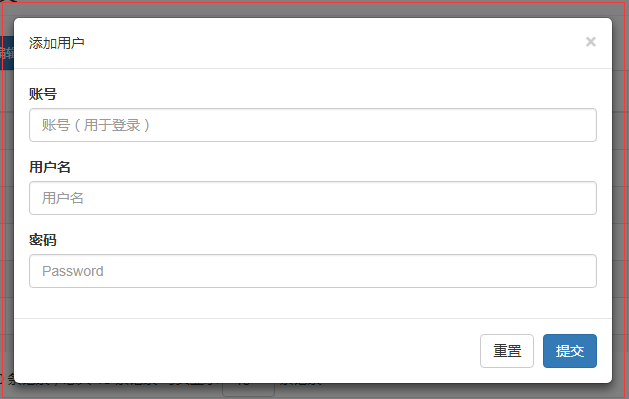
四、解决下小bug
		// 每次隐藏时,清除数据,确保不会和主页dom元素冲突。确保点击时,重新加载。

		$("#showModal").on("hidden.bs.modal", function() {

            // 这个#showModal是模态框的id

	        $(this).removeData("bs.modal");

	        $(this).find(".modal-content").children().remove();

});// 每次隐藏时,清除数据,确保不会和主页dom元素冲突。确保点击时,重新加载。
$("#showModal").on("hidden.bs.modal", function() {
// 这个#showModal是模态框的id
$(this).removeData("bs.modal");
$(this).find(".modal-content").children().remove();
});
五、说下注意事项
Bootstrap Modal 使用remote从远程加载内容的更多相关文章
- bootstrap模态框modal使用remote第二次加载显示相同内容解决办法
bootstrap模态框modal使用remote动态加载内容,第二次加载显示相同内容解决办法 bootstrap的modal中,使用remote可以动态加载页面到modal-body中,并弹窗显示 ...
- bootstrap模态框modal使用remote动态加载内容,第二次加载显示相同内容解决办法
bootstrap的modal中,使用remote可以动态加载页面到modal-body中,并弹窗显示 如果提供的是 URL,将利用 jQuery 的 load 方法从此 URL 地址加载要展示的内容 ...
- bootstrap模态框远程加载网页的正确处理方式
bootstrap模态框远程加载网页的方法 在bootsrap模态框文档里给出了这个方法: 使用链接模式 <a data-toggle="modal" href=" ...
- 在Unity中创建可远程加载的.unity3d包
在一个Unity项目中,发布包本身不一定要包括所有的Asset(译为资产或组件),其它的部分可以单独发布为.unity3d,再由程序从本地/远程加载执行,这部分不在本文讨论范围.虽然Unity并没有直 ...
- Ext2.0之Tabpanel AJAX远程加载多标签页面模式开发技巧
目前开发的方式是采用远程load页面来实现多页面效果,类似于126邮箱多标签页效果.但是比126邮箱的方式更好,因为页面打开后是load到本地的,126似乎还会重新请求.在近期项目该开发方式已经基本成 ...
- CSS远程加载字体
CSS 远程加载字体的方法,做网站CSS的都知道,用户浏览网站时,网页上的字体是加载本地的.换言之,如果网站使用了用户电脑所没有安装的字体,那显示字体就会被默认字体所代替了,自然效果就大受影响了. 上 ...
- 钓鱼攻击之远程加载恶意Word模版文件上线CS
0x00 前言 利用Word文档加载附加模板时的缺陷所发起的恶意请求而达到的攻击目的,所以当目标用户点开攻击者发给他的恶意word文档就可以通过向远程服务器请求恶意模板并执行恶意模板上的恶意代码.这里 ...
- Win8 Metro动态加载内容框架
制作背景 为了参加ImagineCup 2013 世界公民类比赛,我们设计制作了一个可动态扩展的幼教类App.这个App需要能动态加载内容,内容包括带动画可交互的电子书,动画,视频,游戏. 技术支持 ...
- paip.gui控件tabs控件加载内容的原理以及easyui最佳实现
paip.gui控件tabs控件加载内容的原理以及easyui最佳实现 //////////////tabs控件的加载 同form窗体一样,俩个方式 两个方式:一个是url,简单的文本可以使用这个,不 ...
随机推荐
- Landsat8 卫星数据下载
具体参考 https://www.ixxin.cn/2016/11/27/landsat8freedata/
- javasscript基础
一.使用JS完成注册表单数据校验 1.需求分析 用户在进行注册的时候会输入一些内容,但是有些用户会输入一些不合法的内容,这样会导致服务器的压力过大,此时我们需要对用户输入的内容进行一个校验(前端校验和 ...
- Android--判断listview上下滑动的方法
elv_music_res_fragment.setOnScrollListener(new AbsListView.OnScrollListener() { private int mLastFir ...
- (网页)logback的使用和logback.xml详解(转)
转自博客园:行走在云端的愚公: 一.logback的介绍 Logback是由log4j创始人设计的另一个开源日志组件,官方网站: http://logback.qos.ch.它当前分为下面下个模块: ...
- JsonParseException:非法的unquoted字符((CTRL-CHAR,代码9)):必须被转义
其它异常,Could not read document: Illegal unquoted character ((CTRL-CHAR, code 10)): has to be escaped ...
- [20180124]奇怪的SQL*Net message from dblink.txt
[20180124]奇怪的SQL*Net message from dblink.txt --//生产系统出现大量的SQL*Net message from dblink事件,自己分析看看. 1.环境 ...
- 通过日志过滤的方法,统计每天内容详情页面的PV数
1.目的: 每天凌晨0点1分统计用户点击进入内容详情页的次数,对内容点击量形成榜单. 2.分析: A./data/log/epg.access.log日志实时打印用户访问页面的日志,并且每天凌晨0点会 ...
- VS发布web应用程序报:无法识别的特性“xmlns:xdt”。请注意特性名称区分大小写 或 未能将文件obj\...复制到obj\...未能找到路径
问题1:无法识别的特性“xmlns:xdt”.请注意特性名称区分大小写 问题2:未能将文件obj\...复制到obj\...未能找到路径 解决办法:将web项目文件下的obj文件夹从项目中排除,然后再 ...
- python遍历本地文件系统 按文件大小排序
在这个例子中,主要会用到python内置的和OS模块的几个函数: os.walk() : 该方法用来遍历指定的文件目录,返回一个三元tuple(dirpath, dirnames, filenames ...
- 修改css的(屏蔽)overflow: hidden;实现浏览器能把网页全图保存成图片
摘要: 1.项目需要,需要对网页内容“下载”保存成全图片 2.QQ浏览器等主流浏览器都支持这种下载保存功能 3.项目需要场景:编写好的项目维护文档,放在服务器上.如果是txt不能带图片可视化,如果wo ...