
TeamViewer 版本v13.2.26558 修改ID
TeamViewer 使用频繁后会被判定为商业用途,不可用。此软件的账号和设备mac地址绑定。
修改TeamViewer ID后可以重新开始使用。下述方法可以成功修改TeamViewer ID。
Window版本(TeamViewer-v13.2.26558.exe下载地址)
1.关闭TeamViewer。
2.开始 > 运行,输入 %appdata%,删除TeamViewer的文件夹。
3.开始 > 运行,输入 regedit;
删除 HKEY_LOCAL_MACHINE\SOFTWARE\ 之下的 TeamViewer;
删除 HKEY_CURRENT_USER\SOFTWARE\ 之下的 TeamViewer;
4.开始 > 运行,输入 cmd,输入 ipconfig /all ,查看本地网卡的MAC地址。

4.控制面板 > 网络和Internet> 网络和共享中心 > 更改适配器设置 > 本地连接/无线网卡;
单击右键 > 属性 > Microsoft 网络客户端 > 配置 > 高级;
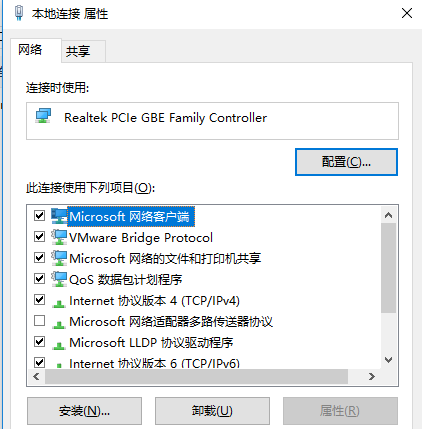
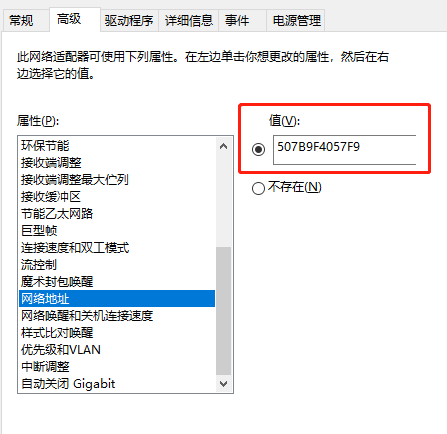
在数值栏输入一个和上文相近的MAC地址或随意12位数字字符串,点确定保存。
重启电脑,你会发现你的 TeamViewer ID 已改变。成功!
MacOS版本(TeamViewer-v13.2.26558.dmg下载地址)
1.关闭TeamViewer。
2.把下面的代码写入到一个文件。并执行。
PHP:
#!/usr/bin/env php

<?php

$hone_dir_lib = '/Users/phpdragon/library/preferences/';

del_libary_files($hone_dir_lib);

$platformEpert = random_generator(6);

$platformSerialNumber = random_generator(8);

$replace_str = sprintf('IOPlatformExpert%s%sIOPlatformSerialNumber%s%s%sUUID',$platformEpert,chr(0),chr(0),$platformSerialNumber,chr(0));

$nul_str = '\x00'; //空字符

$pattern =  sprintf('/IOPlatformExpert[0-9a-zA-Z]{6,6}\x00IOPlatformSerialNumber%s[0-9a-zA-Z]{8,8}%sUUID/',$nul_str,$nul_str);

$files = [

    '/Applications/TeamViewer.app/Contents/MacOS/TeamViewer',

    '/Applications/TeamViewer.app/Contents/MacOS/TeamViewer_Service',

    '/Applications/TeamViewer.app/Contents/Helpers/TeamViewer_Desktop',

];

foreach($files as $file){

    idpatch($file,$pattern,$replace_str);

}

echo 'IOPlatformExpert: '.$platformEpert."\r\n";

echo 'IOPlatformSerialNumber: '.$platformSerialNumber."\r\n";

echo "

ID changed sucessfully.

!!! Restart computer before using TeamViewer !!!!

";

function idpatch($file,$pattern,$replace_str){

    if(!is_file($file)){

        return;

    }

    $content = file_get_contents($file);

    $content = preg_replace($pattern,$replace_str, $content);

    file_put_contents($file,$content);

}

function del_libary_files($dir){

    if(!is_dir($dir)) return false;

    $handle = opendir($dir);

    $files = [];

    if($handle){

        while(($fl = readdir($handle)) !== false){

            $file = $dir.$fl;

            if(is_file($file) && (strpos(strtolower($file),'teamviewer') !== false)){

                echo "delete ".$file ."\r\n";

                unlink($file);

            }

        }

    }

    return $files;

}

function random_generator($length = 8){

    $pattern = '1A2B3C4D5E6F7G8H9IJKLOMNOPQRSTUVWXYZ';

    for($i=0;$i<$length;$i++){

        $key .= $pattern{mt_rand(0,35)};    //生成php随机数

    }

    return $key;

}
命令行执行: sudo php TeamViewer-change-id.php
Python:
#!/usr/bin/env python

#coding:utf-8

import sys

import os

import glob

import platform

import re

import random

import string

print('''

--------------------------------

TeamViewer ID Changer for MAC OS

--------------------------------

''')

if platform.system() != 'Darwin':

    print('This script can be run only on MAC OS.')

    sys.exit();

if os.geteuid() != 0:

    print('This script must be run form root.')

    sys.exit();

if os.environ.has_key('SUDO_USER'):

    USERNAME = os.environ['SUDO_USER']

    if USERNAME == 'root':

       print('Can not find user name. Run this script via sudo from regular user')

       sys.exit();

else:

    print('Can not find user name. Run this script via sudo from regular user')

    sys.exit();

HOMEDIRLIB = '/Users/' + USERNAME  + '/library/preferences/'

GLOBALLIB  =  '/library/preferences/'

CONFIGS = []

# Find config files

def listdir_fullpath(d):

    return [os.path.join(d, f) for f in os.listdir(d)]

for file in listdir_fullpath(HOMEDIRLIB):

    if 'teamviewer'.lower() in file.lower():

        CONFIGS.append(file)

if not CONFIGS:

    print ('''

There is no TemViewer configs found.

Maybe you have deleted it manualy or never run TeamViewer after installation.

Nothing to delete.

''')

# Delete config files

else:

    print("Configs found:\n")

    for file in CONFIGS:

        print file

    print('''

This files will be DELETED permanently.

All TeamViewer settings will be lost

''')

    raw_input("Press Enter to continue or CTR+C to abort...")

    for file in CONFIGS:

        try:

            os.remove(file)

        except:

            print("Cannot delete config files. Permission denied?")

            sys.exit();

    print("Done.")

# Find binaryes

TMBINARYES = [

'/Applications/TeamViewer.app/Contents/MacOS/TeamViewer',

'/Applications/TeamViewer.app/Contents/MacOS/TeamViewer_Service',

'/Applications/TeamViewer.app/Contents/Helpers/TeamViewer_Desktop',

]

for file in TMBINARYES:

    if os.path.exists(file):

        pass

    else:

        print("File not found: " + file)

        print ("Install TeamViewer correctly")

        sys.exit();

# Patch files

def idpatch(fpath,platf,serial):

    file = open(fpath, 'r+b')

    binary = file.read()

    PlatformPattern = "IOPlatformExpert.{6}"

    SerialPattern =  "IOPlatformSerialNumber%s%s%sUUID"

    binary = re.sub(PlatformPattern, platf, binary)

    binary = re.sub(SerialPattern % (chr(0), "[0-9a-zA-Z]{8,8}", chr(0)), SerialPattern%(chr(0), serial, chr(0)), binary)

    file = open(fpath,'wb').write(binary)

    return True

def random_generator(size=8, chars=string.ascii_uppercase + string.digits):

    return ''.join(random.choice(chars) for _ in range(size))

RANDOMSERIAL = random_generator()

RANDOMPLATFORM = "IOPlatformExpert" + random_generator(6)

for file in TMBINARYES:

        try:

            idpatch(file,RANDOMPLATFORM,RANDOMSERIAL)

        except:

            print "Error: can not patch file " + file

            print "Wrong version?"

            sys.exit();

print "PlatformDevice: " + RANDOMPLATFORM

print "PlatformSerial: " + RANDOMSERIAL

print('''

ID changed sucessfully.

!!! Restart computer before using TeamViewer !!!!

''')
命令行执行: sudo python TeamViewer-change-id.py
TeamViewer 版本v13.2.26558 修改ID的更多相关文章
- 【TeamViewer】v13.2.26558版本 修改ID
TeamViewer是一款远程协作软件,可以让你在一台机器上操作另一台机器.比如我最近就经常在家里连接公司的电脑进行远程工作.可以说是对于程序员很好用的一个软件. TeamViewer 使用频繁后会被 ...
- Hibernate持久化对象修改id重新保存的办法
Hibernate持久化对象修改id重新保存的办法——Hibernate学习记录二 2017年11月10日 20:16:48 筱光 阅读数:1122 版权声明:本文为博主原创文章,未经博主允许不得 ...
- JAVA 8 主要新特性 ----------------(二)版本中数据结构的修改浅析
一.版本中数据结构的修改浅析1.HashMap.HashSet.ConcurrentHashMap的数据结构发生变化 (1)HashMap简介(结构:哈希表+链表) HashMap存储的数据是无序的, ...
- windows下MySQL5.6以上版本,如何通过修改配置文件来修改数据库的最大连接数啊?
并没有my.ini文件,只有一个my-default.ini文件,并且里面并没有max_connections windows下MySQL5.6以上版本,如何通过修改配置文件来修改数据库的最大连接数啊 ...
- teamview修改id
怎么修改 TeamViewer ID 呢?按照下列的操作步骤,就能很简单的改变TeamViewer的id哦!1. 开始 > 运行,录入%appdata%,删除TeamViewer的文件夹: ...
- Git版本回退和撤销修改
版本回退: 在实际工作中,我们会不断对文件进行修改,然后不断提交修改到版本库里,一旦你把文件改乱了,或者误删了文件,还可以从最近的一个commit恢复,然后继续工作,而不是把几个月的工作成果全部丢失. ...
- 在pom.xml文件中自定义JDK版本+阿里maven镜像修改
在学习和开发中 总是修改jdk版本 但是这些配置文件又不想记 在此记录一下 方便查询: <build> <plugins> <!-- 指定jdk --> <p ...
- Solr schema.xml中修改id的类型为int
使用solr6的版本的时候(solr5不存在这个问题),在修改schema.xml的field时,想使用int做为id的数据类型,修改后重新加载配置的时候报错.原来schema.xml中field i ...
- Broadcast BCM94322 用ubuntu修改ID
1.按这个教程的6楼做的http://bbs.pcbeta.com/viewthread-1324168-1-1.html.注意我先下载 的是ubuntu9.05版本,做U盘启动进live 模式,43 ...
随机推荐
- js中函数对象创建的总结
在JavaScript的函数对象创建方法中,可以分为三种情况: 1:第一种是使用function语句定义函数 <script type="text/javascript"&g ...
- keystone 安装随笔
keystone 代码库 git clone https://git.openstack.org/openstack/keystone.git cd keystone keystone配置文件 etc ...
- css冲刺
CSS知识点及面试题 1.一般与文本相关的属性都可以继承text-/font-/line- 2.background属性1)background-repeat:repeat/repeat-x/repe ...
- JAVA自学笔记10
JAVA自学笔记10 1.形式参数与返回值 1)类名作为形式参数(基本类型.引用类型) 作形参必须是类的对象 2)抽象类名作形参 需要该抽象类的子类对象,通过多态实现 3)接口名为形参 需要的是该接口 ...
- C#隐藏手机号中间四位为*
使用正则:Regex.Replace(手机号, "(\\d{3})\\d{4}(\\d{4})", "$1****$2"); 效果:
- WSL(Windows Subsystem for Linux)的安装与使用及 mongodb安装
有关WSL的介绍这里就不做解释了.另外,本文仅适用于win10 build 16215以及之后的版本,之前的版本可参考官方链接. (可使用“winver”命令查看windows版本号) 安装:1. ...
- 打开KVM Console的一些注意事项
今天早上跟思科CIMC里的KVM console较劲了很久,终于成功的打开了KVM console. 总结了下面的一些注意事项.如果你也遇到了KVM console打不开,那么可以尝试一下. 我不想花 ...
- tp5.1的安装与运行流程
今天安装tp5.1的时候出现问题,我这里使用的是将tp直接解压缩后放在项目里面,结果提示下面的错误:Warning: require(D:\workspace\zhiyuedu\vendor/topt ...
- 汉诺塔系列问题: 汉诺塔II、汉诺塔III、汉诺塔IV、汉诺塔V、汉诺塔VI
汉诺塔 汉诺塔II hdu1207: 先说汉若塔I(经典汉若塔问题),有三塔.A塔从小到大从上至下放有N个盘子.如今要搬到目标C上. 规则小的必需放在大的上面,每次搬一个.求最小步数. 这个问题简单, ...
- 高斯模糊的Java实现
1.http://jhlabs.com/ip/index.html public static byte[] blur(byte[] data) throws IOException { ByteAr ...