
javaweb(3)之JSP&EL&JSTL
JSP(Java Server Page)
介绍
什么是 JSP ?
从用户角度看,JSP 就是一个网页。
从开发者角度看,它其实就是一个继承了 Servlet 的 java 类,所以可以直接说 JSP 就是一个 Servlet。
为什么会有 JSP ?
HTML 通常情况下用来显示一成不变的静态内容,但实际上大部分我们需要的网页上是需要显示一些静态数据的,这些动作都涉及到了逻辑处理,这些都需要代码辅助完成。
HTML 中是不支持写 java 代码的,而JSP 里面可以写 java 代码。
查看 JSP 翻译后的文件示例:
/*
 * Generated by the Jasper component of Apache Tomcat
 * Version: Apache Tomcat/7.0.92
 * Generated at: 2019-01-04 07:39:33 UTC
 * Note: The last modified time of this file was set to
 *       the last modified time of the source file after
 *       generation to assist with modification tracking.
 */
package org.apache.jsp;

import javax.servlet.*;
import javax.servlet.http.*;
import javax.servlet.jsp.*;

public final class index_jsp extends org.apache.jasper.runtime.HttpJspBase
    implements org.apache.jasper.runtime.JspSourceDependent {

  private static final javax.servlet.jsp.JspFactory _jspxFactory =
          javax.servlet.jsp.JspFactory.getDefaultFactory();

  private static java.util.Map<java.lang.String,java.lang.Long> _jspx_dependants;

  private volatile javax.el.ExpressionFactory _el_expressionfactory;
  private volatile org.apache.tomcat.InstanceManager _jsp_instancemanager;

  public java.util.Map<java.lang.String,java.lang.Long> getDependants() {
    return _jspx_dependants;
  }

  public javax.el.ExpressionFactory _jsp_getExpressionFactory() {
    if (_el_expressionfactory == null) {
      synchronized (this) {
        if (_el_expressionfactory == null) {
          _el_expressionfactory = _jspxFactory.getJspApplicationContext(getServletConfig().getServletContext()).getExpressionFactory();
        }
      }
    }
    return _el_expressionfactory;
  }

  public org.apache.tomcat.InstanceManager _jsp_getInstanceManager() {
    if (_jsp_instancemanager == null) {
      synchronized (this) {
        if (_jsp_instancemanager == null) {
          _jsp_instancemanager = org.apache.jasper.runtime.InstanceManagerFactory.getInstanceManager(getServletConfig());
        }
      }
    }
    return _jsp_instancemanager;
  }

  public void _jspInit() {
  }

  public void _jspDestroy() {
  }

  public void _jspService(final javax.servlet.http.HttpServletRequest request, final javax.servlet.http.HttpServletResponse response)
        throws java.io.IOException, javax.servlet.ServletException {

    final javax.servlet.jsp.PageContext pageContext;
    javax.servlet.http.HttpSession session = null;
    final javax.servlet.ServletContext application;
    final javax.servlet.ServletConfig config;
    javax.servlet.jsp.JspWriter out = null;
    final java.lang.Object page = this;
    javax.servlet.jsp.JspWriter _jspx_out = null;
    javax.servlet.jsp.PageContext _jspx_page_context = null;

    try {
      response.setContentType("text/html;charset=UTF-8");
      pageContext = _jspxFactory.getPageContext(this, request, response,
                  null, true, 8192, true);
      _jspx_page_context = pageContext;
      application = pageContext.getServletContext();
      config = pageContext.getServletConfig();
      session = pageContext.getSession();
      out = pageContext.getOut();
      _jspx_out = out;

      out.write("\r\n");
      out.write("<html>\r\n");
      out.write("<head>\r\n");
      out.write("    <title>Title</title>\r\n");
      out.write("</head>\r\n");
      out.write("<body>\r\n");
      out.write("<h1>hhhh</h1>\r\n");
      out.write("</body>\r\n");
      out.write("</html>\r\n");
    } catch (java.lang.Throwable t) {
      if (!(t instanceof javax.servlet.jsp.SkipPageException)){
        out = _jspx_out;
        if (out != null && out.getBufferSize() != 0)
          try {
            if (response.isCommitted()) {
              out.flush();
            } else {
              out.clearBuffer();
            }
          } catch (java.io.IOException e) {}
        if (_jspx_page_context != null) _jspx_page_context.handlePageException(t);
        else throw new ServletException(t);
      }
    } finally {
      _jspxFactory.releasePageContext(_jspx_page_context);
    }
  }
}
例:
指令
page
<%@ page contentType="text/html;charset=UTF-8" language="java" %>
- 参数:
- contentType:告知浏览器当前 JSP 的 MIME 类型和以何编码来解析该 JSP 返回的内容。
- pageEncoding:指定 JSP 内容的编码。
- extends:指定 JSP 翻译成 java 文件后继承的类。
- import:导包使用。
- session:可选 true 或 false,默认为 true。指定当前 JSP 能否直接使用 session 对象。
查看 JSP 翻译后的 java 文件可以发现,session 如果指定为 true,在 _jspService 方法中就会声明一个 session 变量,并通过 pageContext.getSession() 赋值;如果 session 指定为 false,那么就不会声明这个变量,即后续不能直接使用 session。
- errorPage:指定当前 JSP 出错时跳转到的页面。
- isErrorPage:可选 true 或 false,指定当前 JSP 是不是错误页,默认 false。如果指定为 true,在当前 JSP 中就可以直接使用 exception 对象。
include
<%@include file="page.jsp" %>
将指定 JSP 文件包含到当前 JSP。
- 示例:
-
<%@ page contentType="text/html;charset=UTF-8" language="java" %>
<html>
<head>
    <title>page1</title>
</head>
<body>
<% String str = "hello";%>
<%=str%>
<h1>这是 page1 的内容</h1>
</body>
</html>
page1.jsp
<%@ page contentType="text/html;charset=UTF-8" language="java" %>
<html>
<head>
    <title>page2</title>
</head>
<body>
<%@include file="page1.jsp" %>
<h1>这是 page2 的内容</h1>
</body>
</html>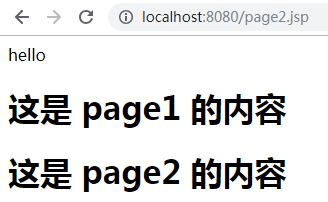
page2.jsp
/*
 * Generated by the Jasper component of Apache Tomcat
 * Version: Apache Tomcat/7.0.92
 * Generated at: 2019-01-04 08:25:20 UTC
 * Note: The last modified time of this file was set to
 *       the last modified time of the source file after
 *       generation to assist with modification tracking.
 */
package org.apache.jsp;

import javax.servlet.*;
import javax.servlet.http.*;
import javax.servlet.jsp.*;

public final class page2_jsp extends org.apache.jasper.runtime.HttpJspBase
    implements org.apache.jasper.runtime.JspSourceDependent {

  private static final javax.servlet.jsp.JspFactory _jspxFactory =
          javax.servlet.jsp.JspFactory.getDefaultFactory();

  private static java.util.Map<java.lang.String,java.lang.Long> _jspx_dependants;

  static {
    _jspx_dependants = new java.util.HashMap<java.lang.String,java.lang.Long>(1);
    _jspx_dependants.put("/page1.jsp", Long.valueOf(1546590314039L));
  }

  private volatile javax.el.ExpressionFactory _el_expressionfactory;
  private volatile org.apache.tomcat.InstanceManager _jsp_instancemanager;

  public java.util.Map<java.lang.String,java.lang.Long> getDependants() {
    return _jspx_dependants;
  }

  public javax.el.ExpressionFactory _jsp_getExpressionFactory() {
    if (_el_expressionfactory == null) {
      synchronized (this) {
        if (_el_expressionfactory == null) {
          _el_expressionfactory = _jspxFactory.getJspApplicationContext(getServletConfig().getServletContext()).getExpressionFactory();
        }
      }
    }
    return _el_expressionfactory;
  }

  public org.apache.tomcat.InstanceManager _jsp_getInstanceManager() {
    if (_jsp_instancemanager == null) {
      synchronized (this) {
        if (_jsp_instancemanager == null) {
          _jsp_instancemanager = org.apache.jasper.runtime.InstanceManagerFactory.getInstanceManager(getServletConfig());
        }
      }
    }
    return _jsp_instancemanager;
  }

  public void _jspInit() {
  }

  public void _jspDestroy() {
  }

  public void _jspService(final javax.servlet.http.HttpServletRequest request, final javax.servlet.http.HttpServletResponse response)
        throws java.io.IOException, javax.servlet.ServletException {

    final javax.servlet.jsp.PageContext pageContext;
    javax.servlet.http.HttpSession session = null;
    final javax.servlet.ServletContext application;
    final javax.servlet.ServletConfig config;
    javax.servlet.jsp.JspWriter out = null;
    final java.lang.Object page = this;
    javax.servlet.jsp.JspWriter _jspx_out = null;
    javax.servlet.jsp.PageContext _jspx_page_context = null;

    try {
      response.setContentType("text/html;charset=UTF-8");
      pageContext = _jspxFactory.getPageContext(this, request, response,
                  null, true, 8192, true);
      _jspx_page_context = pageContext;
      application = pageContext.getServletContext();
      config = pageContext.getServletConfig();
      session = pageContext.getSession();
      out = pageContext.getOut();
      _jspx_out = out;

      out.write("\r\n");
      out.write("<html>\r\n");
      out.write("<head>\r\n");
      out.write("    <title>page2</title>\r\n");
      out.write("</head>\r\n");
      out.write("<body>\r\n");
      out.write("\r\n");
      out.write("<html>\r\n");
      out.write("<head>\r\n");
      out.write("    <title>page1</title>\r\n");
      out.write("</head>\r\n");
      out.write("<body>\r\n");
 String str = "hello";
      out.write('\r');
      out.write('\n');
      out.print(str);
      out.write("\r\n");
      out.write("<h1>这是 page1 的内容</h1>\r\n");
      out.write("</body>\r\n");
      out.write("</html>\r\n");
      out.write("\r\n");
      out.write("<h1>这是 page2 的内容</h1>\r\n");
      out.write("</body>\r\n");
      out.write("</html>\r\n");
    } catch (java.lang.Throwable t) {
      if (!(t instanceof javax.servlet.jsp.SkipPageException)){
        out = _jspx_out;
        if (out != null && out.getBufferSize() != 0)
          try {
            if (response.isCommitted()) {
              out.flush();
            } else {
              out.clearBuffer();
            }
          } catch (java.io.IOException e) {}
        if (_jspx_page_context != null) _jspx_page_context.handlePageException(t);
        else throw new ServletException(t);
      }
    } finally {
      _jspxFactory.releasePageContext(_jspx_page_context);
    }
  }
}
page2_jsp.java:page2翻译后的java文件
查看翻译后文件可以发现,include 指令就是将指定 JSP 文件的内容拿到自己对应的类中执行输出。
taglib
<%@ taglib prefix="" uri="" %>
引入标签库。
- 参数:
- prefix:别名。
- uri:标签库地址。
动作标签
include
<jsp:include page="page1.jsp"></jsp:include>
作用和 include 指令一样,也是将指定 JSP 页包含到当前 JSP 页中。
- 示例:
-
<%@ page contentType="text/html;charset=UTF-8" language="java" %>
<html>
<head>
    <title>page1</title>
</head>
<body>
<% String str = "hello";%>

<h1>这是 page1 的内容</h1>

<%=str%>
</body>
</html>
page1.jsp
<%@ page contentType="text/html;charset=UTF-8" language="java" %>
<html>
<head>
    <title>page2</title>
</head>
<body>
<jsp:include page="page1.jsp"></jsp:include>
<h1>这是 page2 的内容</h1>
</body>
</html>
page2.jsp
/*
 * Generated by the Jasper component of Apache Tomcat
 * Version: Apache Tomcat/7.0.92
 * Generated at: 2019-01-04 08:49:08 UTC
 * Note: The last modified time of this file was set to
 *       the last modified time of the source file after
 *       generation to assist with modification tracking.
 */
package org.apache.jsp;

import javax.servlet.*;
import javax.servlet.http.*;
import javax.servlet.jsp.*;

public final class page2_jsp extends org.apache.jasper.runtime.HttpJspBase
    implements org.apache.jasper.runtime.JspSourceDependent {

  private static final javax.servlet.jsp.JspFactory _jspxFactory =
          javax.servlet.jsp.JspFactory.getDefaultFactory();

  private static java.util.Map<java.lang.String,java.lang.Long> _jspx_dependants;

  private volatile javax.el.ExpressionFactory _el_expressionfactory;
  private volatile org.apache.tomcat.InstanceManager _jsp_instancemanager;

  public java.util.Map<java.lang.String,java.lang.Long> getDependants() {
    return _jspx_dependants;
  }

  public javax.el.ExpressionFactory _jsp_getExpressionFactory() {
    if (_el_expressionfactory == null) {
      synchronized (this) {
        if (_el_expressionfactory == null) {
          _el_expressionfactory = _jspxFactory.getJspApplicationContext(getServletConfig().getServletContext()).getExpressionFactory();
        }
      }
    }
    return _el_expressionfactory;
  }

  public org.apache.tomcat.InstanceManager _jsp_getInstanceManager() {
    if (_jsp_instancemanager == null) {
      synchronized (this) {
        if (_jsp_instancemanager == null) {
          _jsp_instancemanager = org.apache.jasper.runtime.InstanceManagerFactory.getInstanceManager(getServletConfig());
        }
      }
    }
    return _jsp_instancemanager;
  }

  public void _jspInit() {
  }

  public void _jspDestroy() {
  }

  public void _jspService(final javax.servlet.http.HttpServletRequest request, final javax.servlet.http.HttpServletResponse response)
        throws java.io.IOException, javax.servlet.ServletException {

    final javax.servlet.jsp.PageContext pageContext;
    javax.servlet.http.HttpSession session = null;
    final javax.servlet.ServletContext application;
    final javax.servlet.ServletConfig config;
    javax.servlet.jsp.JspWriter out = null;
    final java.lang.Object page = this;
    javax.servlet.jsp.JspWriter _jspx_out = null;
    javax.servlet.jsp.PageContext _jspx_page_context = null;

    try {
      response.setContentType("text/html;charset=UTF-8");
      pageContext = _jspxFactory.getPageContext(this, request, response,
                  null, true, 8192, true);
      _jspx_page_context = pageContext;
      application = pageContext.getServletContext();
      config = pageContext.getServletConfig();
      session = pageContext.getSession();
      out = pageContext.getOut();
      _jspx_out = out;

      out.write("\r\n");
      out.write("<html>\r\n");
      out.write("<head>\r\n");
      out.write("    <title>page2</title>\r\n");
      out.write("</head>\r\n");
      out.write("<body>\r\n");
      org.apache.jasper.runtime.JspRuntimeLibrary.include(request, response, "page1.jsp", out, false);
      out.write("\r\n");
      out.write("<h1>这是 page2 的内容</h1>\r\n");
      out.write("</body>\r\n");
      out.write("</html>\r\n");
    } catch (java.lang.Throwable t) {
      if (!(t instanceof javax.servlet.jsp.SkipPageException)){
        out = _jspx_out;
        if (out != null && out.getBufferSize() != 0)
          try {
            if (response.isCommitted()) {
              out.flush();
            } else {
              out.clearBuffer();
            }
          } catch (java.io.IOException e) {}
        if (_jspx_page_context != null) _jspx_page_context.handlePageException(t);
        else throw new ServletException(t);
      }
    } finally {
      _jspxFactory.releasePageContext(_jspx_page_context);
    }
  }
}
page2_jsp.java:page2翻译后的java文件
查看翻译后文件可以发现,与 include 指令不同的是:该标签是将指定 JSP 文件执行后返回的内容拿到当前 JSP 中直接输出,而不是将代码拿到当前 JSP 中执行。
forward
<jsp:forward page="page2.jsp"></jsp:forward>
请求转发功能。
相当于执行如下代码:
request.getRequestDispatcher("page2.jsp").forward(request, response);还可以搭配 param 标签传递参数:
<jsp:forward page="page2.jsp"> <jsp:param name="name" value="zhangsan"></jsp:param> <jsp:param name="age" value="20"></jsp:param> </jsp:forward>- 示例:
-
<%@ page contentType="text/html;charset=UTF-8" language="java" %>
<html>
<head>
    <title>page1</title>
</head>
<body>

<jsp:forward page="page2.jsp">
    <jsp:param name="name" value="zhangsan"></jsp:param>
    <jsp:param name="age" value="20"></jsp:param>
</jsp:forward>
<h1>这是 page1 的内容</h1>
</body>
</html>
page1.jsp
<%@ page contentType="text/html;charset=UTF-8" language="java" %>
<html>
<head>
    <title>page2</title>
</head>
<body>
<h1>这是 page2 的内容</h1>
<hr>
<%
    String name = request.getParameter("name");
    Integer age = Integer.parseInt(request.getParameter("age"));
%>
name:<%=name%> <br>
age:<%=age%>
</body>
</html>
page2.jsp
/*
 * Generated by the Jasper component of Apache Tomcat
 * Version: Apache Tomcat/7.0.92
 * Generated at: 2019-01-04 09:18:25 UTC
 * Note: The last modified time of this file was set to
 *       the last modified time of the source file after
 *       generation to assist with modification tracking.
 */
package org.apache.jsp;

import javax.servlet.*;
import javax.servlet.http.*;
import javax.servlet.jsp.*;

public final class page1_jsp extends org.apache.jasper.runtime.HttpJspBase
    implements org.apache.jasper.runtime.JspSourceDependent {

  private static final javax.servlet.jsp.JspFactory _jspxFactory =
          javax.servlet.jsp.JspFactory.getDefaultFactory();

  private static java.util.Map<java.lang.String,java.lang.Long> _jspx_dependants;

  private volatile javax.el.ExpressionFactory _el_expressionfactory;
  private volatile org.apache.tomcat.InstanceManager _jsp_instancemanager;

  public java.util.Map<java.lang.String,java.lang.Long> getDependants() {
    return _jspx_dependants;
  }

  public javax.el.ExpressionFactory _jsp_getExpressionFactory() {
    if (_el_expressionfactory == null) {
      synchronized (this) {
        if (_el_expressionfactory == null) {
          _el_expressionfactory = _jspxFactory.getJspApplicationContext(getServletConfig().getServletContext()).getExpressionFactory();
        }
      }
    }
    return _el_expressionfactory;
  }

  public org.apache.tomcat.InstanceManager _jsp_getInstanceManager() {
    if (_jsp_instancemanager == null) {
      synchronized (this) {
        if (_jsp_instancemanager == null) {
          _jsp_instancemanager = org.apache.jasper.runtime.InstanceManagerFactory.getInstanceManager(getServletConfig());
        }
      }
    }
    return _jsp_instancemanager;
  }

  public void _jspInit() {
  }

  public void _jspDestroy() {
  }

  public void _jspService(final javax.servlet.http.HttpServletRequest request, final javax.servlet.http.HttpServletResponse response)
        throws java.io.IOException, javax.servlet.ServletException {

    final javax.servlet.jsp.PageContext pageContext;
    javax.servlet.http.HttpSession session = null;
    final javax.servlet.ServletContext application;
    final javax.servlet.ServletConfig config;
    javax.servlet.jsp.JspWriter out = null;
    final java.lang.Object page = this;
    javax.servlet.jsp.JspWriter _jspx_out = null;
    javax.servlet.jsp.PageContext _jspx_page_context = null;

    try {
      response.setContentType("text/html;charset=UTF-8");
      pageContext = _jspxFactory.getPageContext(this, request, response,
                  null, true, 8192, true);
      _jspx_page_context = pageContext;
      application = pageContext.getServletContext();
      config = pageContext.getServletConfig();
      session = pageContext.getSession();
      out = pageContext.getOut();
      _jspx_out = out;

      out.write("\r\n");
      out.write("<html>\r\n");
      out.write("<head>\r\n");
      out.write("    <title>page1</title>\r\n");
      out.write("</head>\r\n");
      out.write("<body>\r\n");
      out.write("\r\n");
      if (true) {
        _jspx_page_context.forward("page2.jsp" + "?" + org.apache.jasper.runtime.JspRuntimeLibrary.URLEncode("name", request.getCharacterEncoding())+ "=" + org.apache.jasper.runtime.JspRuntimeLibrary.URLEncode("zhangsan", request.getCharacterEncoding()) + "&" + org.apache.jasper.runtime.JspRuntimeLibrary.URLEncode("age", request.getCharacterEncoding())+ "=" + org.apache.jasper.runtime.JspRuntimeLibrary.URLEncode("20", request.getCharacterEncoding()));
        return;
      }
      out.write("\r\n");
      out.write("<h1>这是 page1 的内容</h1>\r\n");
      out.write("</body>\r\n");
      out.write("</html>\r\n");
    } catch (java.lang.Throwable t) {
      if (!(t instanceof javax.servlet.jsp.SkipPageException)){
        out = _jspx_out;
        if (out != null && out.getBufferSize() != 0)
          try {
            if (response.isCommitted()) {
              out.flush();
            } else {
              out.clearBuffer();
            }
          } catch (java.io.IOException e) {}
        if (_jspx_page_context != null) _jspx_page_context.handlePageException(t);
        else throw new ServletException(t);
      }
    } finally {
      _jspxFactory.releasePageContext(_jspx_page_context);
    }
  }
}
page1_jsp.java:page1翻译后的java文件
可以看到,参数的携带实际上是将我们通过 param 标签指定的参数先 URL 编码,然后通过 ? 方式拼接到 URL 后面。
9个内置对象
所谓内置对象,就是我们可以直接在 JSP 中使用的已经创建好的对象,有九个如下:
application
它实际上就是 javax.servlet.ServletContext 类的实例,点击查看详细。
request
它是 javax.servlet.http.HttpServletRequest 类的实例,点击查看详细。
session
它是 javax.servlet.http.HttpSession 类的实例,点击查看详细。
pageContext
它是 javax.servlet.jsp.PageContext 类的实例,当前 JSP 的上下文对象,其它几个内置对象也可以通过它获取到。
application 即 ServletContext 实例之前就说过,它在整个应用程序内被共享。
request 仅在一次请求内有效。
session 在一次会话内有效。
而新引入的 pageContext 则只是在当前 JSP 范围内有效,即每个 JSP 都有它独立的 pageContext 对象。
config
它是 javax.servlet.ServletConfig 类的实例,点击查看详细。
exception
它是 java.lang.Throwable 类的实例,JSP 报错时抛出的异常对象。
当 JSP 中 page 指令的 isErrorPage 参数值指定为 true 时,才可直接使用 exception 对象。out
它是 javax.servlet.jsp.JspWriter 类的实例。
- 示例:
-
<%@ page contentType="text/html;charset=UTF-8" isErrorPage="true" language="java" %>
<html>
<head>
    <title>Title</title>
</head>
<body>
<%
    out.write("这是 out 输出的内容");
%>

<%
    response.getWriter().write("这是 response.getWriter() 输出的内容");
%>
</body>
</html>
page.jsp
可以看到在代码中 response.getWriter() 是后输出的,但是实际访问时它却是先输出的。这是因为 out 对象输出的内容会放到 response 的缓冲区中, response.getWriter() 的内容输出后才会接着输出 out 对象输出的内容。而通过查看 JSP 对应 java 代码我们知道,JSP 页面内容就是使用 out 对象输出的,所以得出结论:当我们在 JSP 中使用 response.getWriter() 输出内容时,在浏览器渲染后 response.getWriter() 输出的内容会出现在页面的最顶部。
page
它是当前 JSP 翻译成 java 类的实例。
response
它是 javax.servlet.http.HttpServletResponse 类的实例,点击查看详细。
EL(Expression Language)
介绍
EL 表达式可以帮助我们简化 JSP 中的 java代码。
取值
在四大作用域中取值
<%@ page contentType="text/html;charset=UTF-8" isErrorPage="true" language="java" %>
<html>
<head>
    <title>Title</title>
</head>
<body>
<%
    pageContext.setAttribute("str", "from pageContext");
    request.setAttribute("str", "from request");
    session.setAttribute("str", "from session");
    application.setAttribute("str", "from application");
%>

${pageScope.str} <br>
${requestScope.str} <br>
${sessionScope.str} <br>
${applicationScope.str} <br>
<%--在 el 表达式中不指定 scope 直接使用 name,会依次在 pageContext->request->session->application --%>
${str}
</body>
</html>
page.jsp
取array和list中的值
<%@ page import="java.util.List" %>
<%@ page import="java.util.ArrayList" %>
<%@ page contentType="text/html;charset=UTF-8" isErrorPage="true" language="java" %>
<html>
<head>
    <title>Title</title>
</head>
<body>
<%
    String[] array = {"a", "b", "c", "d"};
    pageContext.setAttribute("array", array);

    List list = new ArrayList();
    list.add(11);
    list.add(22);
    list.add(33);
    list.add(44);
    pageContext.setAttribute("list", list);
%>

${array[0]},${array[1]},${array[2]},${array[3]}
<hr/>
${list[0]},${list[1]},${list[2]},${list[3]}
</body>
</html>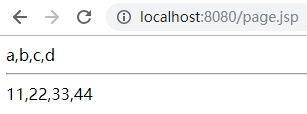
page.jsp
取map中的值
<%@ page import="java.util.HashMap" %>
<%@ page import="java.util.Map" %>
<%@ page contentType="text/html;charset=UTF-8" isErrorPage="true" language="java" %>
<html>
<head>
    <title>Title</title>
</head>
<body>
<%
    String[] array = {"aa", "bb"};

    Map map = new HashMap();
    map.put("name1", "zhangsan");
    map.put("name2", "lisi");
    map.put("name3", "wangwu");
    map.put("name4", "zhaoliu");
    pageContext.setAttribute("map", map);
%>
${map["name1"]},${map["name2"]},${map.name3},${map.name4}
</body>
</html>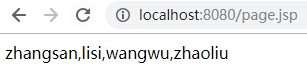
page.jsp
取对象属性的值
package com.zze.bean;

public class User {
    private String name;
    private Integer age;

    public String getName() {
        return name;
    }

    public void setName(String name) {
        this.name = name;
    }

    public Integer getAge() {
        return age;
    }

    public void setAge(Integer age) {
        this.age = age;
    }
}
com.zze.bean.User
<%@ page import="com.zze.bean.User" %>
<%@ page contentType="text/html;charset=UTF-8" isErrorPage="true" language="java" %>
<html>
<head>
    <title>Title</title>
</head>
<body>
<%
    User user = new User();
    user.setName("张三");
    user.setAge(18);

    pageContext.setAttribute("user", user);
%>
姓名:${pageScope.user.name} <br>
年龄:${user.age}
</body>
</html>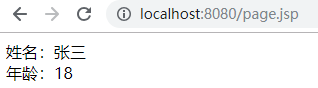
page.jsp
11个隐式对象
隐式对象即在 EL 表达式中能直接使用的对象,有 11 个如下:
pageContext
就是 JSP 内置对象的 pageContext。
pageScope
当前 JSP 页的 Map 域。
requestScope
当前请求的 Map 域。
sessionScope
当前会话的 Map 域。
applicationScope
当前应用程序的 Map 域。
header
请求头键和值的 Map。
headerValues
请求头键和值的 Map,值为数组结构。
param
请求参数的参数名和值的 Map。
paramValues
请求参数的参数名名和值的 Map,值为数组结构。
initparam
所有初始化参数的 Map(这里的初始化参数指的是全局初始化参数)。
cookie
所有 Cookie 的键和值 Map。
JSTL(Java Standard Tag Library)
介绍
JSTL 是一个不断完善的开放源代码的 JSP 标签库。
它的作用是简化 JSP 中代码中 java 代码的编写,即替换 <% %> 写法,一般与 EL 表达式配合使用。
使用
1、 导包: jstl.jar、standard.jar 。
2、在 JSP 中使用 taglib 指令引入标签库。
set
将指定 key-value 值存放到域对象。
<%@ page contentType="text/html;charset=UTF-8" language="java" %>
<%@ taglib prefix="c" uri="http://java.sun.com/jsp/jstl/core" %>
<html>
<head>
    <title>set</title>
</head>
<body>
<%--
参数:
    var:名称
    value:值
    scope:默认为 page ,还有 request、session、application 选项
        为 page 时,相当于 <% pageContext.setAttribute("名称","值"); %>
        为 request 时,相当于 <% request.setAttribute("名称","值"); %>
        为 session 时,相当于 <% session.setAttribute("名称","值"); %>
        为 application 时,相当于 <% application.setAttribute("名称","值"); %>
--%>
<c:set var="age" value="18" scope="page"></c:set>
${age}
</body>
</html>
set.jsp
if
简单的 if 条件判断。
<%@ page contentType="text/html;charset=UTF-8" isErrorPage="true" language="java" %>
<%@ taglib prefix="c" uri="http://java.sun.com/jsp/jstl/core" %>

<html>
<head>
    <title>if</title>
</head>
<body>
<c:set var="age" value="18" scope="page"></c:set>
<%--
参数:
    test:条件表达式
    var:指定变量接收条件表达式结果
    scope:标识条件表达式中的变量从哪个域中取
下面代码相当于:
--%>
<%
    Integer age = Integer.parseInt(pageContext.getAttribute("age").toString());
    boolean flag = age >= 18;
    pageContext.setAttribute("flag", flag);
    if (flag) {
%>
成年人
<%
    }
%>

<c:if test="${age>=18}" var="flag" scope="page">
成年人
</c:if>
${flag}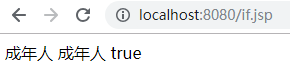
if.jsp
forEach
循环。
<%@ page import="com.zze.bean.User" %>
<%@ page import="java.util.ArrayList" %>
<%@ page import="java.util.List" %>
<%@ page contentType="text/html;charset=UTF-8" isErrorPage="true" language="java" %>
<%@ taglib prefix="c" uri="http://java.sun.com/jsp/jstl/core" %>

<html>
<head>
    <title>forEach</title>
</head>
<body>
<%--
for 循环
参数:
    begin:起始数字
    end:结束数字
    var:定义一个变量代指当前遍历对象
    step:增幅
--%>
<c:forEach begin="1" end="10" var="item" step="2">
    ${item}
</c:forEach>
<%
    List<User> userList = new ArrayList<User>();
    userList.add(new User("张三", 18));
    userList.add(new User("李四", 19));
    userList.add(new User("王五", 20));
    pageContext.setAttribute("userList", userList);
%>
<hr>
<%--
foreach 循环
参数:
    begin:起始下标从 0 开始
    end:结束下标
    step:下标增幅
    var:定义一个变量代指当前遍历对象
    items:指定要遍历的可迭代对象
    varStatus:定义一个保存了当前遍历信息的对象,有如下属性:
        begin:当前遍历的起始下标从 0 开始
        end:当前遍历的结束下标
        step:当前遍历的下标增幅
        count:当前遍历的是第几个,从 1 开始
        current:代指当前遍历对象,和 var 定义的变量指向同一个地址
        first:当前遍历对象是否是第一个
        last:当前遍历对象是否是最后一个
        index:当前遍历对象的下标
--%>
<c:forEach begin="0" end="${userList.size()}" step="2" var="user" items="${userList}" varStatus="s">
    user.name:${user.name},user.age:${user.age},s.step:${s.step},s.begin:${s.begin},s.end:${s.end},s.count:${s.count},s.current:${s.current},s.current == user:${s.current == user},s.first:${s.first},s.last:${s.last}<br>
</c:forEach>
</body>
</html>
forEach.jsp
补充
CRUD实例下载
自定义标签库
最简单的标签库
1、创建一个标签处理类,该类需要继承 SimpleTagSupport 类,重写 doTag 方法:
package com.zze.tag;

import javax.servlet.jsp.JspException;
import javax.servlet.jsp.tagext.SimpleTagSupport;
import java.io.IOException;

public class HelloTag extends SimpleTagSupport {

    @Override
    public void doTag() throws JspException, IOException {
        getJspContext().getOut().print("<h1>Hello My Tag!!!</h1>");
    }
}
com.zze.tag.HelloTag
2、在 WEB-INF 下创建标签库配置文件:
<?xml version="1.0" encoding="UTF-8" ?>

<taglib xmlns="http://java.sun.com/xml/ns/j2ee"
    xmlns:xsi="http://www.w3.org/2001/XMLSchema-instance"
    xsi:schemaLocation="http://java.sun.com/xml/ns/j2ee http://java.sun.com/xml/ns/j2ee/web-jsptaglibrary_2_0.xsd"
    version="2.0">
    <description>tag created by zze</description>
    <tlib-version>1.0</tlib-version>
    <short-name>myTag</short-name>
    <!--标签库唯一标识-->
    <uri>zze.test</uri>
    <tag>
        <description>Outputs Hello</description>
        <!--标签名称-->
        <name>helloTag</name>
        <tag-class>com.zze.tag.HelloTag</tag-class>
        <body-content>empty</body-content>
    </tag>
</taglib>
WEB-INF/tld/mytag.tld
3、在 jsp 中使用:
<%@ page contentType="text/html;charset=UTF-8" language="java" %>
<%@ taglib prefix="mytag" uri="zze.test"%>
<html>
  <head>
    <title>自定义标签库测试</title>
  </head>
  <body>
  <mytag:helloTag/>
  </body>
</html>

index.jsp
带属性的标签库
1、创建一个标签处理类,声明一个属性并给它 setter ,重写 doTag 方法:
package com.zze.tag;

import javax.servlet.jsp.JspException;
import javax.servlet.jsp.tagext.SimpleTagSupport;
import java.io.IOException;
import java.util.HashMap;

public class TableTag extends SimpleTagSupport {
    private String map;

    public void setMap(String map) {
        this.map = map;
    }

    @Override
    public void doTag() throws JspException, IOException {
        HashMap<String, Integer> maps = (HashMap<String, Integer>) (getJspContext().getAttribute(map));
        Object[] array = maps.keySet().toArray();

        for (String str : maps.keySet()) {
            getJspContext().getOut().write("<tr>");
            getJspContext().getOut().write("<td>");
            getJspContext().getOut().write(str);
            getJspContext().getOut().write("</td>");
            getJspContext().getOut().write("<td>");
            getJspContext().getOut().write("" + maps.get(str));
            getJspContext().getOut().write("</td>");
            getJspContext().getOut().write("</tr>");
        }
    }
}
com.zze.tag.TableTag
2、在 WEB-INF 下创建标签库配置文件:
<?xml version="1.0" encoding="UTF-8" ?>

<taglib xmlns="http://java.sun.com/xml/ns/j2ee"
    xmlns:xsi="http://www.w3.org/2001/XMLSchema-instance"
    xsi:schemaLocation="http://java.sun.com/xml/ns/j2ee http://java.sun.com/xml/ns/j2ee/web-jsptaglibrary_2_0.xsd"
    version="2.0">
    <description>tag created by zze</description>
    <tlib-version>1.0</tlib-version>
    <short-name>myTag</short-name>
    <uri>zze.test</uri>

    <tag>
        <name>tr</name>
        <tag-class>com.zze.tag.TableTag</tag-class>
        <body-content>empty</body-content>
        <attribute>
            <!--声明一个属性-->
            <name>map</name>
            <required>true</required>
            <fragment>true</fragment>
        </attribute>
    </tag>
</taglib>
WEB-INF/tld/mytag.tld
3、在 jsp 中使用:
<%@ page import="java.util.HashMap" %>
<%@ page contentType="text/html;charset=UTF-8" language="java" %>
<%@ taglib prefix="mytag" uri="zze.test" %>
<html>
<head>
    <title>自定义标签库测试</title>
</head>
<body>
<%
    HashMap<String, Integer> maps = new HashMap<String, Integer>();
    maps.put("张三", 18);
    maps.put("李四", 23);
    maps.put("王五", 23);
    pageContext.setAttribute("map", maps);
%>
<table border="1">
    <mytag:tr map="map"/>
</table>
</body>
</html>

index.jsp
javaweb(3)之JSP&EL&JSTL的更多相关文章
- JavaWeb之JSP & EL & JSTL
JSP & EL & JSTL JSP Java Server Page 什么是JSP 从用户角度看,就是一个网页.从程序员角度看,就是一个Java类,它继承Servlet,所以可以说 ...
- JavaEE之动态页面技术(JSP/EL/JSTL)
动态页面技术(JSP/EL/JSTL) JSP技术 jsp脚本和注释 jsp脚本: 1)<%java代码%> ----- 内部的java代码翻译到service方法的内部 2)<%= ...
- jsp&el&jstl mvc和三层架构
jsp:java在html中插入java 一.JSP技术 1.jsp脚本和注释 jsp脚本:(翻译成servlet,源码位置apache-tomcat-7.0.52\work\Catalina\loc ...
- 动态页面技术JSP/EL/JSTL
本节内容: jsp脚本和注释 jsp运行原理 jsp指令(3个) jsp内置/隐式对象(9个) jsp标签(动作) EL技术 JSTL技术 JavaEE的开发模式 动态页面技术:就是在html中嵌入j ...
- 《JavaWeb从入门到改行》JSP+EL+JSTL大杂烩汤
title: Servlet之JSP tags: [] notebook: javaWEB --- JSP是什么 ? JSP就是Servlet,全名是"JavaServer Pages&qu ...
- JavaWeb之动态页面技术JSP/EL/JSTL
一.JSP技术 1.jsp脚本和注释 jsp脚本: 1)<%java代码%> ----- 内部的java代码翻译到service方法的内部 2)<%=java变量或表达式> - ...
- JavaWeb基础Day17 (JSP EL表达式 jstl标签库 beanutil工具类)
JSP jsp的实质就是指在html界面中嵌入Java代码 jsp脚本 <% Java代码 %> 相当于写在service方法中. <%=java 变量或者表达式 %> ...
- JavaWeb 补充(JSP&EL&JSTL)
1. JSP: 1. 指令 2. 注释 3. 内置对象 2. MVC开发模式 3. EL表达式 4. JSTL标签 5. 三层架构 JSP: 1. 指令 * 作用:用于 ...
- 回锅的美食:JSP+EL+JSTL大杂烩汤
title: Servlet之JSP tags: [] notebook: javaWEB --- JSP是什么 ? JSP就是Servlet,全名是"JavaServer Pages&qu ...
随机推荐
- Linux Shell函数返回值
转:http://blog.csdn.net/ithomer/article/details/7954577 Shell函数返回值,一般有3种方式:return,argv,echo 1) return ...
- Android中的指纹识别
转载请注明出处:http://blog.csdn.net/wl9739/article/details/52444671 评论中非常多朋友反映,依据我给出的方案,拿不到指纹信息这个问题,在这里统一说明 ...
- Intel Fortran 调用Delphi编制的DLL
module link_cont interface subroutine I_FileOpenCont (ncase,ndata,lpool,xfiles) integer(kind=) :: nc ...
- 【iCore4 双核心板_uC/OS-II】例程二:任务的建立与删除
一.实验说明: 本例程建立三个任务,通过任务寄存器来实现任务的建立与删除功能.红灯和绿灯同时以固定 频率闪烁,当任务寄存器为5时,删除绿灯闪烁的任务LED1,此时只有红灯闪烁,当任务寄存器的 值为10 ...
- vue实例-转载
http://blog.csdn.net/yuanyuanispeak/article/details/73526795
- replay的意义
数据库重放: () 在测试环境中重新创建实际的生产数据库工作量. () 在生产中实施更改之前,确定和分析潜在的不稳定性. () 捕获生产中的工作量:
- Iterator和ListIterator
Iterator和ListIterator主要区别有: 一.ListIterator有add()方法,可以向List中添加对象,而Iterator不能. 二.ListIterator和Iterator ...
- PHP连接MySQL数据库的三种方式(mysql、mysqli、pdo)
PHP与MySQL的连接有三种API接口,分别是:PHP的MySQL扩展 .PHP的mysqli扩展 .PHP数据对象(PDO) ,下面针对以上三种连接方式做下总结,以备在不同场景下选出最优方案. P ...
- Qt编写自定义控件10-云台仪表盘
前言 做过安防视频监控的同学都清楚,在视频监控系统软件上都可以看到一个云台控制区域,可以对球机进行下下左右等八个方位的运动控制,还可以进行复位,一般都是美工作图好,然后贴图的形式加入到软件中,好处是程 ...
- docker-compose & docker 镜像/加速
docker-compose: http://sanwen.net/a/nuwruoo.html docker加速: http://guide.daocloud.io/dcs/daocloud-915 ...