
扩容Linux文件系统
扩容Linux文件系统
腾讯云 云硬盘扩容
https://cloud.tencent.com/product/cbs
https://cloud.tencent.com/document/product/362/6738
普通云硬盘(HDD Cloud Storage) 容量最大为16TB
高性能云硬盘(Premium Cloud Storage) 容量最大为4TB
SSD云硬盘(SSD Cloud Storage) 容量最大为4TB
单台虚拟机最多可挂载 10 块云盘,容量达 40TB。您可以轻松搭建大容量的文件系统,用于大数据、数据仓库、日志处理等业务。
请注意,由于MBR的限制,选择任何一种方式时,请保持任意分区的大小不超过2TB(若您扩容后的空间已经大于2TB则不可选择第二种方式。
一般系统分区方案
/boot 500M
/ 30G
SWAP 8G
/data 剩下空间
扩容分三步
1) 扩容实体云硬盘大小
2) 扩容分区
确定文件系统分区表形式
扩容分区
3) 扩容文件系统
GPT分区云硬盘扩容
umount 挂载点
parted [磁盘路径]
e2fsck -f /dev/vdb1
resize2fs /dev/vdb1
mount 分区路径 挂载点
# 具体命令

umount -lf /data

parted /dev/vdb

e2fsck -f /dev/vdb1

resize2fs /dev/vdb1

mount /dev/vdb1  /data

或

echo "/dev/vdb  /data  ext4  defaults,noatime,nodiratime   0 0" >>/etc/fstab

mount -a
新空间增加到已有分区中(GPT分区格式)
查看数据盘信息
执行命令
parted 磁盘路径 print
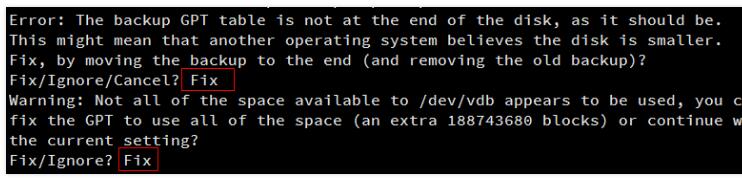
确认云硬盘的容量变化。如在过程中收到如下提示,请输入Fix:
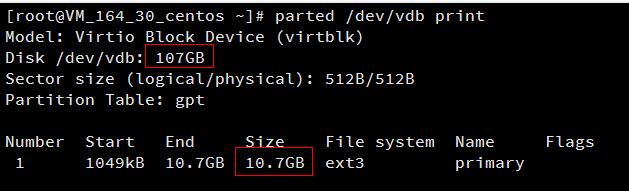
这里扩容后的云硬盘大小为107GB,已有分区的大小为10.7GB。
卸载已挂载数据盘
执行以下命令确认该云硬盘是否还有分区已挂载:
mount | grep '磁盘路径'

这里云硬盘上有一个分区(vdb1)挂载在/data上,需要将其解挂。
使用以下命令解挂:
umount 挂载点
本例中即执行umount /data进行卸载。
注:要将云硬盘上所有分区的文件系统都解挂,如vdb1、vdb2......
再次使用mount | grep '/dev/vdb'命令来确认此硬盘上所有分区的文件系统都已解挂。

数据盘分区
确认云硬盘所有分区均已卸载后,执行以下命令,将原分区删除并以同样的起始偏移新建一个分区:
parted [磁盘路径]
接下来输入unit s,将显示和操纵单位变成sector(默认为GB),输入print来查看分区信息,记住已有分区的Start值。
删除分区并新建后,Start值必须与这个相同,否则数据将会丢失。
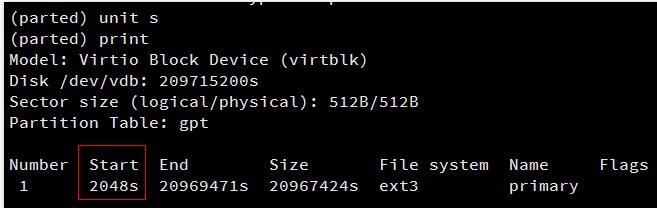
执行以下命令删除原有分区:
rm [分区Number]
由上图可知云硬盘上有一个分区,Number号为“1”,执行rm 1,结果如下图:

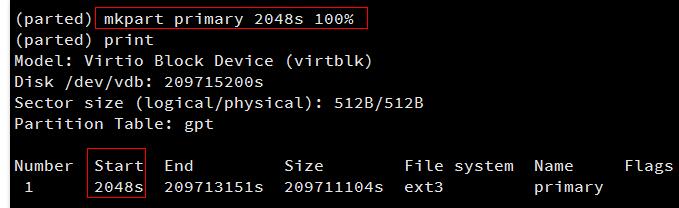
输入mkpart primary [原分区起始扇区] 100%
新建一个主分区。
本例中使用mkpart primary 2048s 100%,此主分区从第2048个扇区开始(必须与删除之前的分区一致),100%表示此分区到磁盘的最末尾。
如果出现如图状态请输入Ignore:

再次输入print可发现新分区已经新建成功,输入quit,即可退出parted工具:
检查扩容后分区的文件系统
使用以下命令检查扩容后的分区:
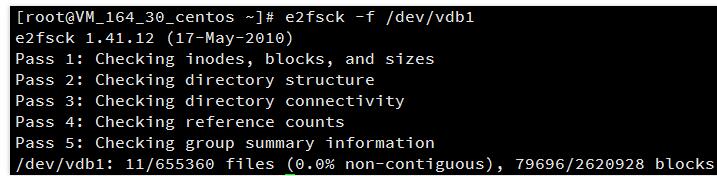
e2fsck -f 分区路径
前述步骤中本例已新建了分区1,使用e2fsck -f /dev/vdb1进行操作。结果如下:
扩容文件系统
执行以下命令进行分区上文件系统的扩容操作:
resize2fs 分区路径

挂载新分区
执行以下命令挂载分区:
mount 分区路径 挂载点
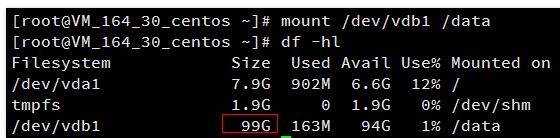
这里通过mount /dev/vdb1 /data
手动挂载新分区,并使用df -h命令查看,出现以下信息说明挂载成功,即可以查看到数据盘了。
MBR分区云硬盘扩容
下面两种情况都可以选择使用自动扩容工具(devresize.py)进行扩容
1、原有的硬盘(数据盘)只有一个MBR主分区并制作了文件系统
2、原有的硬盘(数据盘)没有分区,直接在此硬盘上制作了文件系统
自动扩容工具适用于Linux操作系统,用于将扩容时新扩的云硬盘存储空间添加到已存在的文件系统中,扩容能够成功必须满足下面3个条件:
1、文件系统是ext2/ext3/ext4,并且只有一个主分区没有其他主分区和扩展分区
2、当前文件系统不能有错误
3、扩容后的磁盘大小不超过2TB
umount 挂载点
wget -O /tmp/devresize.py http://mirrors.tencentyun.com/install/virts/devresize.py 下载一键扩容工具
python /tmp/devresize.py 硬盘路径 云硬盘,而不是分区名
mount 分区路径 挂载点
# 具体命令

umount -lf /data

wget -O /tmp/devresize.py http://mirrors.tencentyun.com/install/virts/devresize.py

python /tmp/devresize.py  /dev/vdb

mount /dev/vdb1  /data

或

echo "/dev/vdb  /data  ext4  defaults,noatime,nodiratime   0 0" >>/etc/fstab

mount -a
新空间增加到已有分区中(MBR分区格式)
卸载正在使用的硬盘分区
执行以下命令卸载分区:
umount 挂载点

下载一键扩容工具
执行以下命令下载工具:
wget -O /tmp/devresize.py http://mirrors.tencentyun.com/install/virts/devresize.py
执行扩容工具
执行以下命令进行扩容:
python /tmp/devresize.py 硬盘路径
请注意,这里硬盘路径是需要扩容的云硬盘,而不是分区名。若您的文件系统在vdb1上,则应执行
python /tmp/devresize.py /dev/vdb
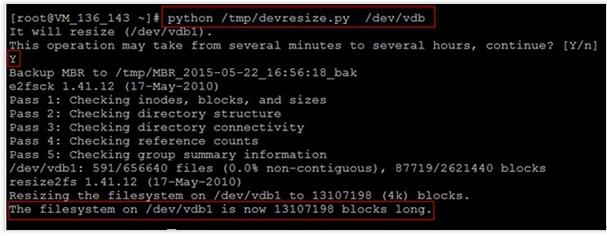
若输出“The filesystem on /dev/vdb1 is now XXXXX blocks long.“则表示扩容成功。
重新挂载扩容后的分区
执行以下命令挂载扩容后的分区:
mount 分区路径 挂载点
并通过以下命令查看扩容后的分区容量:
df -h
这里通过mount /dev/vdb1 /data命令手动挂载扩容后的分区(如果原先是没有分区的,执行mount /dev/vdb /data),
用df -h命令查看,出现以下信息说明挂载成功,即可以查看到数据盘了:
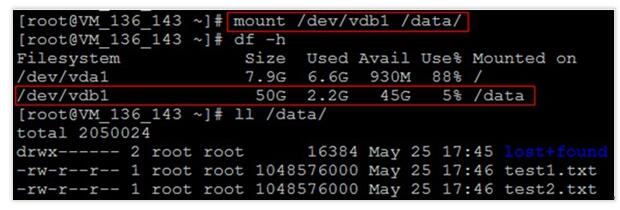
再执行ll /data命令,可以查看到,扩容后原分区的数据没有丢失,新增加的存储空间已经扩容到文件系统中。
devresize.py
#!/usr/bin/env python

# coding: utf-8

# FileName: devresize.py

"""

It only handle the following two situations:

1. There is only one primary partiion in the disk with a format of ext2/3/4;

2. The disk is raw with a file system whose format is ext2/3/4.

"""

import struct

import array

import fcntl

import time

import sys

import os

import glob

import logging

BLKSSZGET = 0x1268

BLKGETSIZE = 0x1260

BLKRRPART = 0x125f

BLKGETSIZE64 = 0x80041272

logger = None

def read_ub(data):

    return struct.unpack('B', data[0])[0]

def read_us(data):

    return struct.unpack('<H', data[0:2])[0]

def read_ui(data):

    return struct.unpack('<I', data[0:4])[0]

def read_ul(data):

    return struct.unpack('<Q', data[0:8])[0]

def init_log():

    global logger

    log_file = 'devresize.log'

    fmt_file = '%(asctime)s - [%(levelname)-5.5s]- %(filename)s:%(lineno)s - %(message)s'

    fmt_stream = '[%(levelname)s] - %(message)s'

    logger = logging.getLogger('devresize')

    logger.setLevel(logging.DEBUG)

    file_handler = logging.FileHandler(log_file)

    file_handler.setLevel(logging.DEBUG)

    file_handler.setFormatter(logging.Formatter(fmt_file))

    logger.addHandler(file_handler)

    stream_handler = logging.StreamHandler()

    stream_handler.setLevel(logging.INFO)

    stream_handler.setFormatter(logging.Formatter(fmt_stream))

    logger.addHandler(stream_handler)

class PartitionEntry(object):

    PartitionTypes = {

        0x05: "Microsoft Extended",

        0x83: "Linux",

        0x85: "Linux Extended"

    }

    def __init__(self, data):

        self.data = data

        self.boot_sig = data[0]

        self.start_head, self.start_sector, self.start_cylinder = (

            PartitionEntry.get_hsc(data[1:1 + 3]))

        self.partition_type = read_ub(data[4])

        self.end_head, self.end_sector, self.end_cylinder = (

            PartitionEntry.get_hsc(data[5:5 + 3]))

        self.start_lba = read_ui(data[8:8 + 4])

        self.sector_num = read_ui(data[12:12 + 4])

        self.partition_type_name = PartitionEntry.PartitionTypes.get(self.partition_type, "other")

    @staticmethod

    def get_hsc(data):

        h, s, c = struct.unpack('BBB', data[0:3])

        c = (c | ((s & 0xC0) << 2))

        s = (s & 0x3F)

        return h, s, c

    @staticmethod

    def cal_hsc(sector, hh, ss):

        s = sector % ss + 1

        sector /= ss

        h = sector % hh

        sector /= hh

        c = sector & 0xFF

        s |= (sector >> 2) & 0xC0

        return h, s, c

    def vaild_type(self):

        return self.partition_type in self.PartitionTypes

    def isprimary(self):

        return self.partition_type == 0x83

    def __str__(self):

        if not self.vaild_type():

            print "%x" % self.partition_type

            return "This isn't a Linux Partition!"

        return """

        Start h,s,c: %u %u %u

        End h,s,c: %u %u %u

        Partition Type Name:%s

        Start LBA: %u

        Sector Number: %u

        """ % (self.start_head, self.start_sector, self.start_cylinder,

               self.end_head, self.end_sector, self.end_cylinder,

               self.partition_type_name, self.start_lba, self.sector_num)

class MBR(object):

    def __init__(self, data):

        self.data = data

        self.boot_code = data[:446]

        self.mbr_sig = data[510:512]

        if self.check_mbr_sig():

            self.partitions = ([PartitionEntry(data[446 + 16 * i:446 + 16 * (i + 1)])

                                for i in range(0, 4)])

        else:

            self.partitions = None

        if self.partitions is not None:

            self.vaild_part_num = len(filter(lambda x: x.vaild_type(), self.partitions))

        else:

            self.vaild_part_num = 0

        self.device_heads = 0

        self.device_sectors = 0

        self.cal_device_hs()

    def cal_device_hs(self):

        if self.partitions is not None and self.vaild_part_num == 1:

            self.device_heads = self.partitions[0].end_head + 1

            self.device_sectors = self.partitions[0].end_sector & 0x3F

    def check_mbr_sig(self):

        mbr_sig = read_us(self.mbr_sig)

        if mbr_sig == 0xAA55:

            return True

        else:

            return False

def get_device_size(fd):

    buf = array.array('c', [chr(0)] * 8)

    fcntl.ioctl(fd, BLKSSZGET, buf, True)

    logical_sector_size = read_ul(buf)

    buf = array.array('c', [chr(0)] * 8)

    try:

        fcntl.ioctl(fd, BLKGETSIZE, buf, True)

        device_size = read_ul(buf) * 512

    except IOError:

        fcntl.ioctl(fd, BLKGETSIZE64, buf, True)

        device_size = read_ul(buf)

    device_sector_number = device_size / logical_sector_size

    logger.debug(

        '''device_size:%d

        device_sector_number:%d

        logical_sector_size:%d''' % (device_size, device_sector_number, logical_sector_size))

    return device_size, device_sector_number, logical_sector_size

def backup_mbr(data):

    bak_name = '/tmp/MBR_%s_bak' % time.strftime("%Y-%m-%d_%X", time.localtime())

    bak_file = open(bak_name, 'w')

    bak_file.write(data)

    bak_file.close()

    logger.info("Backup MBR to %s" % bak_name)

    return bak_name

def is_first_start():

    bak_file_list = glob.glob('/tmp/MBR_%s*bak' % time.strftime("%Y-%m-%d", time.localtime()))

    return len(bak_file_list) == 0

def cal_new_part(part_data, mbr, start_lab, new_end):

    device_heads, device_sectors = mbr.device_heads, mbr.device_sectors

    new_partition_sector_num = new_end - start_lab + 1

    begin_h, begin_s, begin_c = PartitionEntry.cal_hsc(start_lab, device_heads, device_sectors)

    end_h, end_s, end_c = PartitionEntry.cal_hsc(new_end, device_heads, device_sectors)

    new_part_data = list(part_data[:])

    new_part_data[1:1 + 3] = list(struct.pack('BBB', begin_h, begin_s, begin_c))

    new_part_data[5:5 + 3] = list(struct.pack('BBB', end_h, end_s, end_c))

    new_part_data[0xc:] = list(

        struct.pack('BBBB', (new_partition_sector_num & 0xff), ((new_partition_sector_num >> 8) & 0xff),

                    ((new_partition_sector_num >> 16) & 0xff), ((new_partition_sector_num >> 24) & 0xff)))

    logger.debug("""

    Start h,s,c: %u %u %u

    End h,s,c: %u %u %u

    Partition Type Name:%s

    Start LBA: %u

    Sector Number: %u

    """ % (begin_h, begin_s, begin_c,

           end_h, end_s, end_c,

           mbr.partitions[0].partition_type_name,

           mbr.partitions[0].start_lba,

           new_partition_sector_num))

    return new_part_data

# filesystem type must be ext2/3/4

def check_format(dev):

    blkid_ret = os.popen('blkid %s' % dev)

    s = blkid_ret.read()

    if blkid_ret.close() is not None:

        return False

    return True in [i in s for i in ['ext2', 'ext3', 'ext4']]

def part_probe(fd):

    logger.debug('part_probe')

    fd.flush()

    fcntl.ioctl(fd, BLKRRPART)

def resize2fs(dev):

    ret = os.system('e2fsck -f %s' % dev)

    logger.debug('e2fsck ret is %d' % ret)

    if ret not in (0, 1):

        raise RuntimeError('e2fsck failed!!')

    if ret == 1:

        logger.info('File system errors corrected')

    ret = os.system('resize2fs %s' % dev)

    logger.debug('resize2fs ret is %d' % ret)

    if ret != 0:

        raise RuntimeError('resize2fs failed!!')

def check_mount(target_dev):  # target_dev is mounted!

    return os.system('mount | grep "%s " > /dev/null' % target_dev) == 0

def write_mbr(fd, mbr_data):

    fd.seek(0)

    fd.write(mbr_data)

    part_probe(fd)

    fd.close()

    time.sleep(1)

def check_arg(device):

    return not device[-1].isdigit()

def get_disk_path(partation_name):

    for i, ch in enumerate(os.path.basename(partation_name)[::-1]):

        if not ch.isdigit():

            return partation_name[::-1][i::][::-1]

    logger.error("invalid para %s" % partation_name)

    raise Exception("invalid para %s" % partation_name)

def main():

    if len(sys.argv) < 2:

        print "Usage: %s block_device" % sys.argv[0]

        sys.exit(1)

    init_log()

    logger.debug("user input:%s" % ' '.join(sys.argv))

    device = sys.argv[1]

    if not check_arg(device):

        logger.error("The argument should be a whole disk not a partation!like %s" % get_disk_path(device))

        sys.exit(1)

    if not os.access(device, os.W_OK):

        logger.error("Permission denied")

        sys.exit(1)

    fd = open(device, 'r+')

    data = fd.read(512)

    mbr = MBR(data)

    device_size, device_sector_number, logical_sector_size = get_device_size(fd)

    if mbr.vaild_part_num > 1:

        logger.error("Disk %s have multi partition." % device)

        sys.exit(1)

    target_partition = ''

    resize_part_flag = True

    if mbr.vaild_part_num == 1:  # only one partition, which is the primary partition

        if not mbr.partitions[0].isprimary():  # and the filesystem type is ext2/3/4.

            logger.error("Must be primary partition.")

        resize_part_flag = True

        if device[-1].isdigit():

            target_partition = device + 'p1'  # ex: /dev/nbd0 -> /dev/nbd0p1

        else:

            target_partition = device + ''  # ex: /dev/vdb -> /dev/vdb1

        logger.debug(mbr.partitions[0])

    if mbr.vaild_part_num == 0:  # no partition but whole disk is ext2/3/4

        resize_part_flag = False

        target_partition = device

    logger.debug('target_partition:%s' % target_partition)

    if not check_format(target_partition):

        logger.error("Only can process ext2/3/4.")

        sys.exit(1)

    if check_mount(target_partition):

        logger.error("Target device %s must be unmounted." % target_partition)

        sys.exit(1)

    logger.info("It will resize (%s).\n"

                "This operation may take from several minutes to several hours, continue? [Y/n]"

                % target_partition)

    user_input = raw_input()

    if user_input.lower() != 'y' and user_input != '':

        logger.warn("User input neither 'y' nor '[Enter]',exit.")

        sys.exit(1)

    if not is_first_start():

        logger.warn('We find some MBR backup file in /tmp,maybe the MBR is already changed,'

                    'do you want to just resize the filesystem? [Y/n]')

        user_input = raw_input()

        if user_input.lower() == 'y' or user_input == '':

            resize_part_flag = False

    if resize_part_flag:

        logger.debug("Begin to change the partation")

        if (mbr.partitions[0].start_lba + mbr.partitions[0].sector_num) == device_sector_number:

            logger.error("No free sectors available.")

            sys.exit(1)

        if mbr.partitions[0].sector_num > 0xFFFFFFFF * 512 / logical_sector_size:

            logger.error("Can't process the partition which have exceeded 2TB.")

            sys.exit(1)

        new_start_sector = mbr.partitions[0].start_lba

        new_end_sector = device_sector_number - 1

        if (new_end_sector - new_start_sector + 1) * logical_sector_size > 0xFFFFFFFF * 512:

            user_input = raw_input("The size of this disk is %.2fTB (%d bytes).\n"

                                   "But DOS partition table format can not be used on drives for volumes larger than 2TB (2199023255040 bytes).\n"

                                   "Do you want to resize (%s) to 2TB?[Y/n]"

                                   % (round(device_size / 1024.0 / 1024 / 1024 / 1024, 2), device_size,

                                      target_partition))

            if user_input.lower() != 'y' and user_input != '':

                logger.warn("User input neither 'y' nor '[Enter]',exit.")

                sys.exit(1)

            new_end_sector = 0xFFFFFFFF * 512 / logical_sector_size + new_start_sector - 1

        new_mbr_data = list(data)[:]

        new_mbr_data[446:446 + 16] = cal_new_part(data[446:446 + 16], mbr,

                                                  new_start_sector, new_end_sector)

        backup_mbr(data)

    try:

        if resize_part_flag:

            write_mbr(fd, ''.join(new_mbr_data))

        resize2fs(target_partition)

    except Exception, e:

        logger.error(e)

        logger.error('Some error occurred!!Maybe you should call the customer service staff.')

if __name__ == '__main__':

    main()
腾讯云主机做raid
https://cloud.tencent.com/document/product/362/2932
都是系统层面的raid
windows主机
windows2012R2:使用系统自带磁盘管理器里的 ,新建镜像卷功能,把两个弹性云硬盘连接到云主机,然后新建镜像卷做raid1
Linux主机
centos6:Linux内核提供了md模块在底层管理RAID设备,我们可以使用mdadm工具来调用md模块。安装mdadm(以CentOS为例)
f
扩容Linux文件系统的更多相关文章
- 为Xen虚拟机扩容根文件系统(LVM)
===== 为Xen虚拟机扩容根文件系统(LVM) ===== 1. 增加1个4G的映像文件 # dd if=/dev/zero of=data.img bs=4k seek=1024k count= ...
- linux文件系统体系结构 和 虚拟文件系统(VFS)
图 1. Linux 文件系统组件的体系结构 用户空间包含一些应用程序(例如,文件系统的使用者)和 GNU C 库(glibc),它们为文件系统调用(打开.读取.写和关闭)提供用户接口.系统调用接口的 ...
- Linux文件系统
今天学习了Linux文件系统,现在来做个小总结. 首先Linux中一切都是文件,下面这个清单是Linux系统的顶层目录结构. 清单 1. Linux 系统的顶层目录结构 / 根目录 ├── bin 存 ...
- linux 文件系统简介
linux文件系统简介 文件系统是linux的一个十分基础的知识,同时也是学习linux的必备知识. 本文将站在一个较高的视图来了解linux的文件系统,主要包括了linux磁盘分区和目录.挂载基 ...
- Linux文件系统层次结构标准
该标准的目的是定义Linux文件系统的标准路径,使得开发者和用户可以在合理的位置找到需要的东西. Linux的文件布局的大体想法是将文件和目录分为如下3组: 对运行Linux的某一特定系统唯一的文件和 ...
- linux文件系统节点详解
linux文件系统有两层结构,逻辑结构和物理结构.也就是inode和block. 每个文件都有一个inode, 记录文件属性:权限,时间还有最重要的block号码. block是实际存放文件内容的地方 ...
- Linux文件系统应用---系统数据备份和迁移(用户角度)
1 前言 首先承诺:对于从Windows系统迁移过来的用户,困扰大家的 “Linux系统下是否可以把系统文件和用户文件分开到C盘和D盘中” 的问题也可以得到完满解决. 之前的文章对Linux的文 ...
- linux 文件系统解析及相关命令
简介 文件系统就是分区或磁盘上的所有文件的逻辑集合. 文件系统不仅包含着文件中的数据而且还有文件系统的结构,所有Linux 用户和程序看到的文件.目录.软连接及文件保护信息等都存储在其中. 不同Lin ...
- 磁盘、分区及Linux文件系统 [Disk, Partition, Linux File System]
1.磁盘基础知识 1.1 物理结构 硬盘的物理结构一般由磁头与碟片.电动机.主控芯片与排线等部件组成:当主电动机带动碟片旋转时,副电动机带动一组(磁头)到相对应的碟片上并确定读取正面还是反面的碟面,磁 ...
随机推荐
- 卷积转换为矩阵运算中填充数的计算-GEMM
背景:最近在写一个基于opencl的正向神经网络框架,项目地址 https://github.com/aktiger/YoloOCLInference ,我从这里https://github.com/ ...
- 我的2018:OCR、实习和秋招
真的是光阴似箭,好像昨天还沉浸在考研成功的喜悦,今天却要即将步入2019年,即将硕士毕业.老规矩,还是在每一年的最后一天总结今年以及展望明年.回首2018,经历的东西特别多,视野也开阔了不少,可以说, ...
- VS调试不能进入断点,提示当前不会命中断点还未为文档加载任何符号
经过仔细检查后发现,是DLL版本和源码生成的DLL版本不一致,造成的! 复制新的过去,问题就解决了.
- 微信小程序开发填坑指南V1
近期用了一星期的时间,开发了一个小程序.小程序名称是:小特Jarvis,取自钢铁侠的管家. 后台采用C#编写,WebAPI接口.其实开发时间并不多,小程序本身提供的API,相比公众号的API来说,已经 ...
- Netty 学习笔记(1)通信原理
前言 本文主要从 select 和 epoll 系统调用入手,来打开 Netty 的大门,从认识 Netty 的基础原理 —— I/O 多路复用模型开始. Netty 的通信原理 Netty 底层 ...
- C++中常用的std标准容器
从c++11标准以来,c++中std定义的几种容器的效率非常高,优化的非常好,完全没有必要自己去定义类似的数据结构.了解使用它们,可以满足90%的日常编程需要.该篇文章基于c++11标准,从用户角度来 ...
- MongoDB学习总结(二)
前言:学习札记! MongoDB学习总结(二) 1. 安装.初识 之前写过一篇MongoDB的快速上手文章,里边详细的讲了如何安装.启动MongoDB,这里就不再累述安装过程,简单介绍一下Mongo ...
- TensorFlow 1.4利用Keras+Estimator API进行训练和预测
Tensorflow 1.4中,Keras作为作为核心模块可以直接通过tf.keas进行调用,但是考虑到keras对tfrecords文件进行操作比较麻烦,而将keras模型转成tensorflow中 ...
- vue.config.js
const path = require('path'); const vConsolePlugin = require('vconsole-webpack-plugin'); // 引入 移动端模拟 ...
- 省市区联动,非ajax请求。
需求 不允许用 ajax 请求的方式加载数据,所以把所有的省市区写在数组里,用js动态加载. 数据源 民政部门户网站:http://www.mca.gov.cn/article/sj/xzqh/201 ...