
vue--vuex详解
安装vuex
npm install vuex --save
Vuex
什么是Vuex?
官方说法:Vuex 是一个专为 Vue.js应用程序开发的状态管理模式。它采用集中式存储管理应用的所有组件的状态,并以相应的规则保证状态以一种可预测的方式发生变化。
个人理解:Vuex是用来管理组件之间通信的一个插件
为什么要用Vuex?
我们知道组件之间是独立的,组件之间想要实现通信,我目前知道的就只有props选项,但这也仅限于父组件和子组件之间的通信。如果兄弟组件之间想要实现通信呢?嗯..,方法应该有。抛开怎么实现的问题,试想一下,当做中大型项目时,面对一大堆组件之间的通信,还有一大堆的逻辑代码,会不会很抓狂??那为何不把组件之间共享的数据给“拎”出来,在一定的规则下管理这些数据呢? 这就是Vuex的基本思想了。
Vuex有什么特性?
怎么使用Vuex?
引入Vuex.js文件
创建实例:
<!DOCTYPE html>

<html lang="en">

<head>

    <meta charset="UTF-8">

    <meta name="viewport" content="width=device-width, initial-scale=1.0">

    <meta http-equiv="X-UA-Compatible" content="ie=edge">

    <title>Document</title>

</head>

<script src="./js/vuex.js"></script>

<script src="./js/vue2.0.js"></script>

<body>

    <div id="app">

    </div>

</body>

<script>

    Vue.use(Vuex);//在创建Vue实例之前

   var myStore =  new Vuex.Store({

        state:{

            //存放组件之间共享的数据

            name:"jjk"

        },

         mutations:{

             //显式的更改state里的数据

         },

         getters:{

             //获取数据的方法

         },

         actions:{

             //

         }

    });

    new Vue({

        el:"#app",

        data:{

            name:"dk"

        },

        store:myStore,

        mounted:function(){

            console.log(this)//控制台

        }

    })

</script>

</html>
先解释上面代码的意思:
new Vuex.Store({}) 表示创建一个Vuex实例,通常情况下,他需要注入到Vue实例里. Store是Vuex的一个核心方法,字面上理解为“仓库”的意思。Vuex Store是响应式的,当Vue组件从store中读取状态(state选项)时,若store中的状态发生更新时,他会及时的响应给其他的组件(类似双向数据绑定) 而且不能直接改变store的状态,改变状态的唯一方法就是,显式地提交更改(mutations选项)
他有4个核心选项:state mutations getters actions (下文会仔细分析)
这是上面代码:
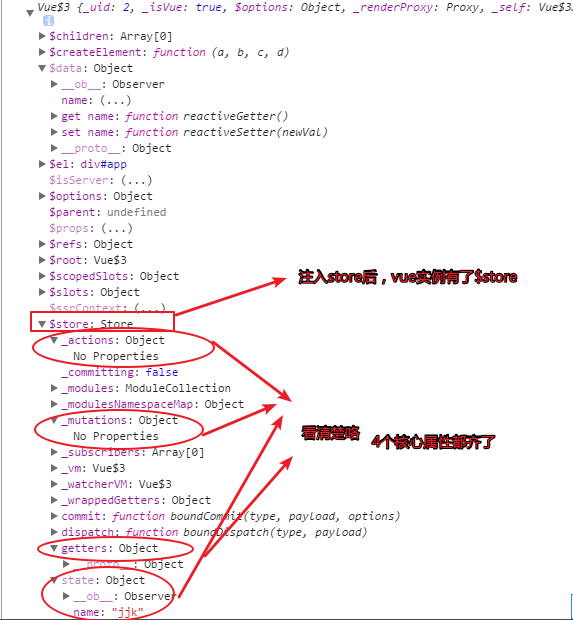
那如何获取到state的数据呢?
一般会在组件的计算属性(computed)获取state的数据(因为,计算属性会监控数据变化,一旦发生改变就会响应)
<!DOCTYPE html>

<html lang="en">

<head>

    <meta charset="UTF-8">

    <meta name="viewport" content="width=device-width, initial-scale=1.0">

    <meta http-equiv="X-UA-Compatible" content="ie=edge">

    <title>Document</title>

</head>

<script src="./js/vuex.js"></script>

<script src="./js/vue2.0.js"></script>

<body>

    <div id="app">

        <hello></hello>

    </div>

</body>

<script>

    Vue.use(Vuex);

   var myStore =  new Vuex.Store({

        state:{

            //存放组件之间共享的数据

            name:"jjk"

        },

         mutations:{

             //显式的更改state里的数据

         },

         getters:{

             //过滤state数据

         },

         actions:{

             //

         }

    });

    Vue.component('hello',{

        template:"<p>{{name}}</p>",

        computed: {

            name:function(){

                return this.$store.state.name

            }

        },

         mounted:function(){

            console.log(this)

        }

    })

    new Vue({

        el:"#app",

        data:{

            name:"dk"

        },

        store:myStore,

        mounted:function(){

            console.log(this)

        }

    })

</script>

</html>
在·chrome中显示:
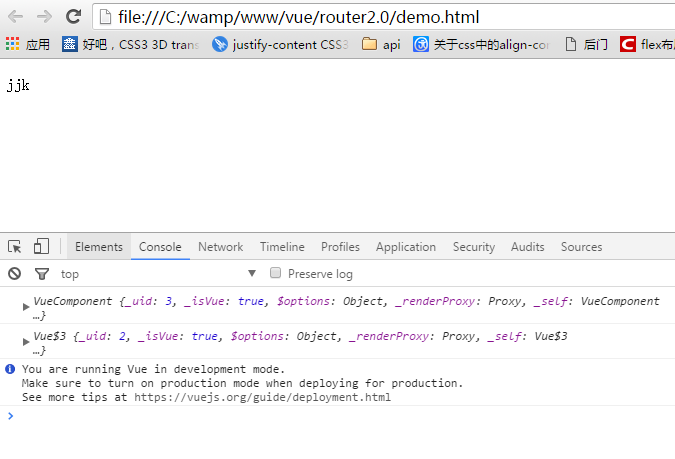
state:用来存放组件之间共享的数据。他跟组件的data选项类似,只不过data选项是用来存放组件的私有数据。
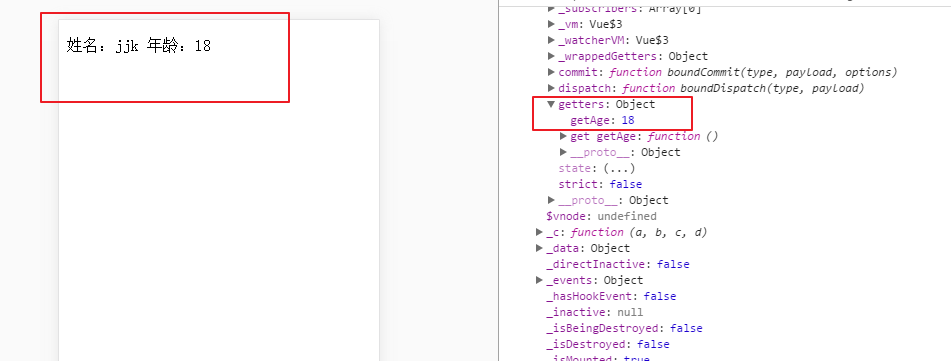
getters:有时候,我们需要对state的数据进行筛选,过滤。这些操作都是在组件的计算属性进行的。如果多个组件需要用到筛选后的数据,那我们就必须到处重复写该计算属性函数;或者将其提取到一个公共的工具函数中,并将公共函数多处导入 - 两者都不太理想。如果把数据筛选完在传到计算属性里就不用那么麻烦了,getters就是干这个的,你可以把getters看成是store的计算属性。getters下的函数接收接收state作为第一个参数。那么,组件是如何获取经过getters过滤的数据呢? 过滤的数据会存放到$store.getters对象中。具体看一个例子:
<!DOCTYPE html>

<html lang="en">

<head>

    <meta charset="UTF-8">

    <meta name="viewport" content="width=device-width, initial-scale=1.0">

    <meta http-equiv="X-UA-Compatible" content="ie=edge">

    <title>Document</title>

</head>

<script src="./js/vuex.js"></script>

<script src="./js/vue2.0.js"></script>

<body>

    <div id="app">

        <hello></hello>

    </div>

</body>

<script>

    Vue.use(Vuex);

   var myStore =  new Vuex.Store({

        state:{

            //存放组件之间共享的数据

            name:"jjk",

            age:18

        },

         mutations:{

             //显式的更改state里的数据

         },

         getters:{

             getAge:function(state){

                 return state.age;

             }

         },

         actions:{

             //

         }

    });

    Vue.component('hello',{

        template:"<p>姓名:{{name}} 年龄:{{age}}</p>",

        computed: {

            name:function(){

                return this.$store.state.name

            },

            age:function(){

                return this.$store.getters.getAge

            }

        },

         mounted:function(){

            console.log(this)

        }

    })

    new Vue({

        el:"#app",

        data:{

            name:"dk"

        },

        store:myStore,

        mounted:function(){

            console.log(this)

        }

    })

</script>

</html>
在chrome中显示:
<!DOCTYPE html>

<html lang="en">

<head>

    <meta charset="UTF-8">

    <meta name="viewport" content="width=device-width, initial-scale=1.0">

    <meta http-equiv="X-UA-Compatible" content="ie=edge">

    <title>Document</title>

</head>

<script src="./js/vuex.js"></script>

<script src="./js/vue2.0.js"></script>

<body>

    <div id="app">

        <hello></hello>

    </div>

</body>

<script>

    Vue.use(Vuex);

   var myStore =  new Vuex.Store({

        state:{

            //存放组件之间共享的数据

            name:"jjk",

            age:18,

            num:1

        },

         mutations:{

             //显式的更改state里的数据

             change:function(state,a){

                //  state.num++;

               console.log(state.num += a);

             }

         },

         getters:{

             getAge:function(state){

                 return state.age;

             }

         },

         actions:{

             //

         }

    });

    Vue.component('hello',{

        template:"<p @click='changeNum'>姓名:{{name}} 年龄:{{age}} 次数:{{num}}</p>",

        computed: {

            name:function(){

                return this.$store.state.name

            },

            age:function(){

                return this.$store.getters.getAge

            },

            num:function(){

                return this.$store.state.num

            }

        },

         mounted:function(){

            console.log(this)

        },

        methods: {

            changeNum: function(){

                //在组件里提交

                // this.num++;

                this.$store.commit('change',10)

            }

        },

        data:function(){

            return {

                // num:5

            }

        }

    })

    new Vue({

        el:"#app",

        data:{

            name:"dk"

        },

        store:myStore,

        mounted:function(){

            console.log(this)

        }

    })

</script>

</html>
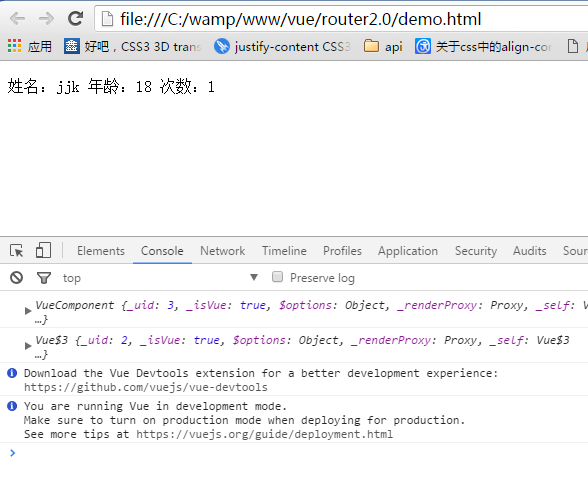
当点击p标签前,chrome中显示:
点击p标签后:
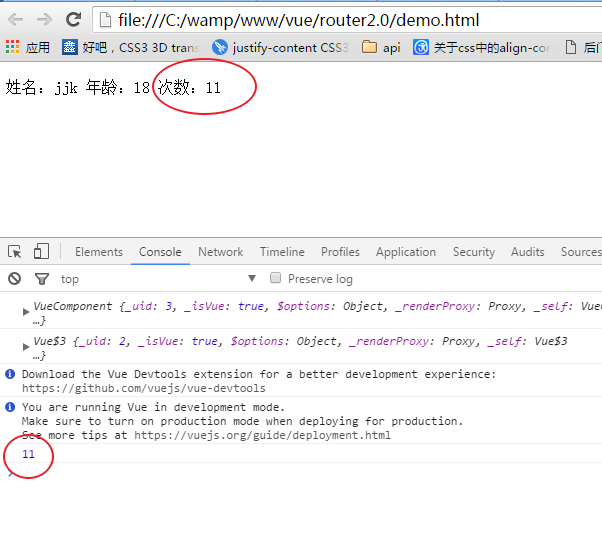
可以看出:更改state的数据并显示在组件中,有几个步骤:1. 在mutations选项里,注册函数 函数里面装逻辑代码。2.在组件里,this.$store.commit('change',payload) 注意:提交的函数名要一一对应 3.触发函数,state就会相应更改 4.在组件的计算属性里 this.$store.state 获取你想要得到的数据
actions:既然mutations只能处理同步函数,我大js全靠‘异步回调’吃饭,怎么能没有异步,于是actions出现了...
actions和mutations的区别
1.Actions 提交的是 mutations,而不是直接变更状态。也就是说,actions会通过mutations,让mutations帮他提交数据的变更。
2.Action 可以包含任意异步操作。ajax、setTimeout、setInterval不在话下
再来看一下实例:
<!DOCTYPE html>

<html lang="en">

<head>

    <meta charset="UTF-8">

    <meta name="viewport" content="width=device-width, initial-scale=1.0">

    <meta http-equiv="X-UA-Compatible" content="ie=edge">

    <title>Document</title>

</head>

<script src="./js/vuex.js"></script>

<script src="./js/vue2.0.js"></script>

<body>

    <div id="app">

        <hello></hello>

    </div>

</body>

<script>

    Vue.use(Vuex);

   var myStore =  new Vuex.Store({

        state:{

            //存放组件之间共享的数据

            name:"jjk",

            age:18,

            num:1

        },

         mutations:{

             //显式的更改state里的数据

             change:function(state,a){

                //  state.num++;

               console.log(state.num += a);

             },

             changeAsync:function(state,a){

                 console.log(state.num +=a);

             }

         },

         getters:{

             getAge:function(state){

                 return state.age;

             }

         },

         actions:{
        //设置延时

             add:function(context,value){

                 setTimeout(function(){
           //提交事件

                    context.commit('changeAsync',value);

                 },1000)

             }

         }

    });

    Vue.component('hello',{

        template:`

                <div>

                    <p @click='changeNum'>姓名:{{name}} 年龄:{{age}} 次数:{{num}}</p>

                    <button @click='changeNumAnsyc'>change</button>

                </div>`,

        computed: {

            name:function(){

                return this.$store.state.name

            },

            age:function(){

                return this.$store.getters.getAge

            },

            num:function(){

                return this.$store.state.num

            }

        },

         mounted:function(){

            console.log(this)

        },

        methods: {

            changeNum: function(){

                //在组件里提交

                // this.num++;

                this.$store.commit('change',10)

            },
        //在组件里派发事件 当点击按钮时,changeNumAnsyc触发-->actions里的add函数被触发-->mutations里的changeAsync函数触发
            changeNumAnsyc:function(){

                this.$store.dispatch('add', 5);

            }

        },

        data:function(){

            return {

                // num:5

            }

        }

    })

    new Vue({

        el:"#app",

        data:{

            name:"dk"

        },

        store:myStore,

        mounted:function(){

            console.log(this)

        }

    })

</script>

</html>
点击按钮一秒后,chrome中显示:
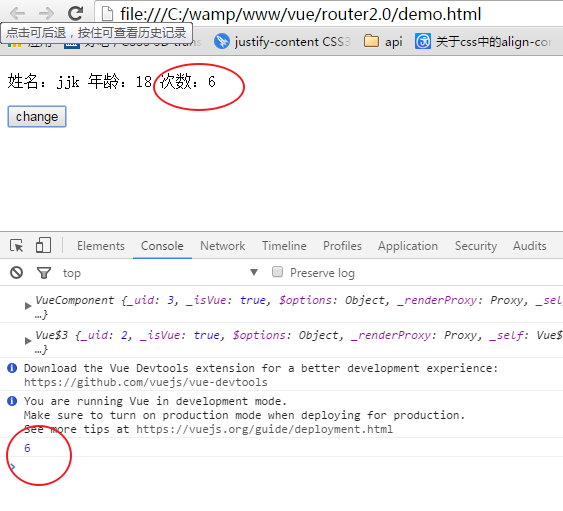
先整明白 context dispatch是什么东西:
context:context是与 store 实例具有相同方法和属性的对象。可以通过context.state和context.getters来获取 state 和 getters。
dispatch:翻译为‘派发、派遣’的意思,触发事件时,dispatch就会通知actions(跟commit一样一样的)参数跟commit也是一样的。
action的大体流程:
1.在actions选项里添加函数(异步)并提交到对应的函数(在mutation选项里)中 context.commit('changeAsync',value);
actions:{

             add:function(context,value){

                 setTimeout(function(){

                    context.commit('changeAsync',value);

                 },1000)

             }

         }
2. 在组件里: changeNumAnsyc:function(){this.$store.dispatch('add', 5);} 将dispatch“指向”actions选项里的函数
3. 在mutations选项里,要有对应的函数 changeAsync:function(state,a){console.log(state.num +=a);}
总结:
各个类型的 API各司其职,mutation 只管存,你给我(dispatch)我就存;action只管中间处理,处理完我就给你,你怎么存我不管;Getter 我只管取,我不改的。 action放在了 methods 里面,说明我们应该把它当成函数来用(讲道理,钩子函数也应该可以的) mutation是写在store里面的,这说明,它就是个半成品,中间量,我们不应该在外面去操作它。getter写在了 computed 里面,这说明虽然 getter我们写的是函数,但是我们应该把它当成计算属性来用。
vue--vuex详解的更多相关文章
- Vue 路由详解
Vue 路由详解 对于前端来说,其实浏览器配合超级连接就很好的实现了路由功能.但是对于单页面应用来说,浏览器和超级连接的跳转方式已经不能适用,所以各大框架纷纷给出了单页面应用的解决路由跳转的方案. V ...
- Vue 实例详解与生命周期
Vue 实例详解与生命周期 Vue 的实例是 Vue 框架的入口,其实也就是前端的 ViewModel,它包含了页面中的业务逻辑处理.数据模型等,当然它也有自己的一系列的生命周期的事件钩子,辅助我们进 ...
- Vue.prototype详解
参考地址:Vue.prototype详解 如果需要设置 全局变量,在main.js中,Vue实例化的代码里添加. 不想污染全局作用域.这种情况下,你可以通过在 原型 上定义它们使其在每个Vue实例中可 ...
- 六. Vue CLI详解
1. Vue CLI理解 1.1 什么是Vue CLI 如果你只是简单写几个Vue的Demo程序, 那么你不需要Vue CLI,如果你在开发大型项目那么你需要它, 并且必然需要使用Vue CLI. 使 ...
- vue:vuex详解
一.什么是Vuex? https://vuex.vuejs.org/zh-cn 官方说法:Vuex 是一个专为 Vue.js应用程序开发的状态管理模式.它采用集中式存储管理应用的所有组件的状态,并以相 ...
- 05-Vue入门系列之Vue实例详解与生命周期
Vue的实例是Vue框架的入口,其实也就是前端的ViewModel,它包含了页面中的业务逻辑处理.数据模型等,当然它也有自己的一系列的生命周期的事件钩子,辅助我们进行对整个Vue实例生成.编译.挂着. ...
- vue实例详解
Vue实例的构造函数 每个 Vue.js 应用都是通过构造函数 Vue 创建一个 Vue 的根实例 启动的 虽然没有完全遵循 MVVM 模式, Vue 的设计无疑受到了它的启发.因此在文档中经常会使用 ...
- Vue入门系列(五)Vue实例详解与生命周期
Vue官网: https://cn.vuejs.org/v2/guide/forms.html#基础用法 [入门系列] (一) http://www.cnblogs.com/gdsblog/p/78 ...
- Vue实例详解与生命周期
http://www.jianshu.com/p/b5858f1e6e76 Vue的实例是Vue框架的入口,其实也就是前端的ViewModel,它包含了页面中的业务逻辑处理.数据模型等,当然它也有自己 ...
- vue指令详解
一.vue简绍 1. Vue.js是什么 Vue.js也称为Vue,读音/vju:/,类似view,错误读音v-u-e. 版本分为v1.0 和 v2.0 2.Vue.js的特点 1. 是一个构建 ...
随机推荐
- Sublime Text3 运行 PHP 文件
在 Zend Studio(12.5)下可以通过 Run(Ctrl + F11)把 PHP 程序的执行结果通过 Debug Output 显示在 IDE 中,这样比开启 Server,再打开浏览器执行 ...
- Linux系统盘扩容-物理机非虚拟机
# Linux系统盘扩容 ## 了解磁盘分区情况 - `blkid` 查看分区情况- `fdisk -l` 分区表 ## 系统挂载分区 - `/etc/fstab` 启动挂载分区情况 ## 双系统下分 ...
- 什么是面向切面编程AOP--知识点汇总
最近在学这方面的内容,读到的这段话我感觉说的很清楚了:这种在运行时,动态地将代码切入到类的指定方法.指定位置上的编程思想就是面向切面的编程. 面向切面编程(AOP是Aspect Orie ...
- redhat 7.5 更换 yum源
因为 redhat 的 yum 是收费,所以需要换成 Centos 的 yum 才可以 首先,卸载 redhat 的 yum 软件 sudo rpm -qa|grep yum 其次,下载 Centos ...
- Android 解析未知格式的json数据
1.递归一有的时候我们需要解析未知的json.或者说是动态的json.那么我们并不知道key具体是多少,或者说key不是固定的.这时候就需要解析动态key的方法. 这个方法是我在实现解析前台传入的js ...
- js多个(N)个数组的的元素组合排序算法,多维数组的排列组合或多个数组之间的排列组合
现在有一批手机,其中颜色有['白色','黑色','金色','粉红色']:内存大小有['16G','32G','64G','128G'],版本有['移动','联通','电信'],要求写一个算法,实现[[ ...
- init_ir_技术实现篇
1. 中断的初始化 中断向量号是8位的,那么它一共有256项(0-255),所以中断描述符表最多只有256项,中断向量表也是256项. 对于不同的中断,在中断初始化和中断处理过程中,其处理方式是不一样 ...
- 基于PHP给大家讲解防刷票的一些技巧
刷票行为,一直以来都是个难题,无法从根本上防止. 但是我们可以尽量减少刷票的伤害,比如:通过人为增加的逻辑限制. 基于 PHP,下面介绍防刷票的一些技巧: 1.使用CURL进行信息伪造 $ch = c ...
- SVN常用命令说明
本文转载至 http://www.blogjava.net/jasmine214--love/archive/2011/01/12/342839.html :1.5 及更新版本 名词说明: WC:W ...
- yum安装mysql-5.6(centos7)
centos 7.3 安装mysql 5.6 rpm -Uvh http://dev.mysql.com/get/mysql-community-release-el7-5.noarch.rpm yu ...