
Django基础,Day6 - 单元测试tests
在django项目app目录下,有个tests.py,我们通常可以直接在这文件中写我们的单元测试代码。
test for a model
根据前面章节的操作步骤下来,在Question Model中有一个函数 was_published_recently(),判断文章发表时间在当前一天之内。代码如
def was_published_recently(self):

      return self.pub_date >= timezone.now() - datetime.timedelta(days=1)
仔细检查,可发现上述函数有个bug。如果发表时间在未来呢,按照上面的代码是会返回true的,显然不对。
编写测试用例 polls/tests.py:
from django.test import TestCase

import datetime

from django.utils import timezone

from .models import Question

class QuestionMethodTests(TestCase):

    def test_was_published_recently_with_future_question(self):

        """

        was_published_recently() should return False for questions whose

        pub_date is in the future.

        """

        time = timezone.now() + datetime.timedelta(days=30)

        future_question = Question(pub_date=time)

        self.assertIs(future_question.was_published_recently(), False)
运行测试用例
$ python manage.py test polls
运行结果如:
Creating test database for alias 'default'...

F

======================================================================

FAIL: test_was_published_recently_with_future_question (polls.tests.QuestionMethodTests)

----------------------------------------------------------------------

Traceback (most recent call last):

  File "E:\workspace_python\mysite\polls\tests.py", line , in test_was_published_recently_with_future_question

    self.assertIs(future_question.was_published_recently(), False)

AssertionError: True is not False

----------------------------------------------------------------------

Ran  test in .002s

FAILED (failures=)

Destroying test database for alias 'default'...
What happened is this:
python manage.py test pollslooked for tests in thepollsapplication- it found a subclass of the
django.test.TestCaseclass - it created a special database for the purpose of testing
- it looked for test methods - ones whose names begin with
test - in
test_was_published_recently_with_future_questionit created aQuestioninstance whosepub_datefield is 30 days in the future - ... and using the
assertIs()method, it discovered that itswas_published_recently()returnsTrue, though we wanted it to returnFalse
修复该bug,代码如
def was_published_recently(self):

    now = timezone.now()

    return now - datetime.timedelta(days=1) <= self.pub_date <= now
重新运行测试代码,则用例通过。
$ python manage.py test polls

Creating test database for alias 'default'...

.

----------------------------------------------------------------------

Ran  test in .001s

OK

Destroying test database for alias 'default'...
添加更多的测试用例,如
from django.test import TestCase

import datetime

from django.utils import timezone

from .models import Question

class QuestionMethodTests(TestCase):

    def test_was_published_recently_with_future_question(self):

        """

        was_published_recently() should return False for questions whose

        pub_date is in the future.

        """

        time = timezone.now() + datetime.timedelta(days=30)

        future_question = Question(pub_date=time)

        self.assertIs(future_question.was_published_recently(), False)

    def test_was_published_recently_with_old_question(self):

        """

        was_published_recently() should return False for questions whose

        pub_date is older than 1 day.

        """

        time = timezone.now() - datetime.timedelta(days=30)

        old_question = Question(pub_date=time)

        self.assertIs(old_question.was_published_recently(), False)

    def test_was_published_recently_with_recent_question(self):

        """

        was_published_recently() should return True for questions whose

        pub_date is within the last day.

        """

        time = timezone.now() - datetime.timedelta(hours=1)

        recent_question = Question(pub_date=time)

        self.assertIs(recent_question.was_published_recently(), True)
test for a view
以view.index 为例,显然现在的代码也有bug,显示了发布时间属于将来的文章,代码如

测试之前,先修复view.index 中应该不显示发布时间在将来的文章。测试代码代码如
polls/views.py:

polls/index.html:
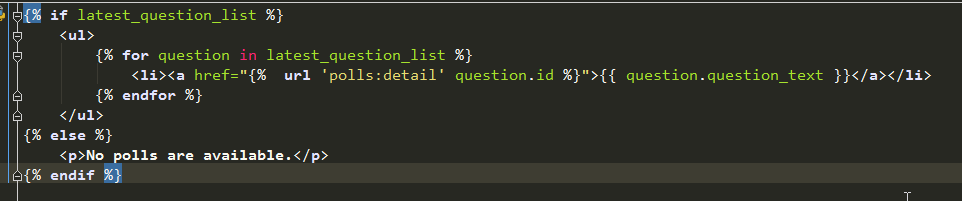
测试用例代码
Django provides a test Client to simulate a user interacting with the code at the view level
from django.test import TestCase

import datetime

from django.urls import reverse

from django.utils import timezone

from .models import Question

class QuestionViewTests(TestCase):

    def test_index_view_with_no_questions(self):

        """

        If no questions exist, an appropriate message should be displayed.

        """

        response = self.client.get(reverse('polls:index'))

        self.assertEqual(response.status_code, 200)

        self.assertContains(response, "No polls are available.")

        self.assertQuerysetEqual(response.context['latest_question_list'], [])

    def test_index_view_with_a_past_question(self):

        """

        Questions with a pub_date in the past should be displayed on the

        index page.

        """

        create_question(question_text="Past question.", days=-30)

        response = self.client.get(reverse('polls:index'))

        self.assertQuerysetEqual(

            response.context['latest_question_list'],

            ['<Question: Past question.>']

        )

    def test_index_view_with_a_future_question(self):

        """

        Questions with a pub_date in the future should not be displayed on

        the index page.

        """

        create_question(question_text="Future question.", days=30)

        response = self.client.get(reverse('polls:index'))

        self.assertContains(response, "No polls are available.")

        self.assertQuerysetEqual(response.context['latest_question_list'], [])

    def test_index_view_with_future_question_and_past_question(self):

        """

        Even if both past and future questions exist, only past questions

        should be displayed.

        """

        create_question(question_text="Past question.", days=-30)

        create_question(question_text="Future question.", days=30)

        response = self.client.get(reverse('polls:index'))

        self.assertQuerysetEqual(

            response.context['latest_question_list'],

            ['<Question: Past question.>']

        )

    def test_index_view_with_two_past_questions(self):

        """

        The questions index page may display multiple questions.

        """

        create_question(question_text="Past question 1.", days=-30)

        create_question(question_text="Past question 2.", days=-5)

        response = self.client.get(reverse('polls:index'))

        self.assertQuerysetEqual(

            response.context['latest_question_list'],

            ['<Question: Past question 2.>', '<Question: Past question 1.>']

        )
***微信扫一扫,关注“python测试开发圈”,了解更多测试教程!***
Django基础,Day6 - 单元测试tests的更多相关文章
- Python之路-(js正则表达式、前端页面的模板套用、Django基础)
js正则表达式 前端页面的模板套用 Django基础 js正则表达式: 1.定义正则表达式 /.../ 用于定义正则表达式 /.../g 表示全局匹配 /.../i 表示不区分大小写 /.../m ...
- django基础入门
1. http协议 1.1 请求协议 请求协议格式: 请求首行: // 请求方式 请求路径 协议和版本,例如:GET /index.html HTTP/1.1 请求头信息: // 请求头名称:请求头内 ...
- python的django基础篇
一.Django基础 Django 是用Python开发的一个免费开源的Web框架,可以用于快速搭建高性能,优雅的网站! Django的特点: 强大的数据库功能:拥有强大的数据库操作接口(QueryS ...
- python3之Django基础篇
一.Django基础 Django 是用Python开发的一个免费开源的Web框架,可以用于快速搭建高性能,优雅的网站! Django的特点: 强大的数据库功能:拥有强大的数据库操作接口(QueryS ...
- Django基础和基本使用
Django基础 Django是Python下的一款著名的Web框架 框架 任何语言进入到高级部分时,会有认证.session.http.连接数据库等等功能操作,没有框架时需要自己实现 框架 是整个或 ...
- Django基础之MTV模型
一.Django基础 一.Django简介 Django是一个开放源代码的Web应用框架,由Python写成.采用了MVC的软件设计模式,即模型(Model).视图(View)和控制器(Control ...
- Django基础之模型(models)层(上)
目录 Django基础之模型(models)层 单表查询 必知必会13条 神奇的双下划线查询 多表查询 外键的字段的增删改查 表与表之间的关联查询 基于双下划线的跨表查询(连表查询) 补充知识 Dja ...
- Django 博客单元测试:测试评论应用
作者:HelloGitHub-追梦人物 文中所涉及的示例代码,已同步更新到 HelloGitHub-Team 仓库 评论应用的测试和博客应用测试的套路是一样的. 先来建立测试文件的目录结构.首先在 c ...
- Django REST framework 单元测试
Django REST framework 单元测试 只是简单记录一下测试代码怎么写 环境 Win10 Python3.7 Django2.2 项目 参照官网 快速开始 写了一个 demo 测试 参照 ...
随机推荐
- DLL组件注册器
在实际程序运行中,尤其是绿色软件,都需要对DLL进行注册才能够使用.下面就是笔者开发的一款简单的DLL注册器. http://pan.baidu.com/s/1mhbrN1e
- 让代码更简单——自定义toBean实现
经过历时三天的鏖战,终于将阶段性项目——新闻发布系统做完了.在编码过程中,发现了很多冗余代码,统一流程,却需要不断重复编码——将用户输入实例化为对象的过程. 例: Person.set("i ...
- 由一个bug引发的SQLite缓存一致性探索
问题 我们在生产环境中使用SQLite时中发现建表报“table xxx already exists”错误,但DB文件中并没有该表.后面才发现这个是SQLite在实现过程中的一个bug,而这个bug ...
- log4j:ERROR Failed to rename [/log/xxx.log] to [/log/xxx.log.2016-11-23.log]
Log4j报错: log4j:ERROR Failed to rename [/log/xxx.log] to [/log/xxx.log.2016-11-23.log] google了一下发现是个b ...
- linux基础:第三关课前考试题整理
1.如何取得/etc/hosts 文件的权限对应的数字内容,如-rw-r--r-- 为 644, 要求使用命令取得644 这样的数字. [root@server ~]# stat /etc/hosts ...
- OSI七层模型详解 TCP/IP协议
总结 OSI中的层 功能 TCP/IP协议族 应用层 文件传输,电子邮件,文件服务,虚拟终端 TFTP,HTTP,SNMP,FTP,SMTP,DNS,Telnet 等等 表示层 数据格式化,代码转 ...
- chrome中不可见字符引发的float问题
起因是刷知乎时碰到这么个问题:https://www.zhihu.com/question/41400503 问题代码如下: <!DOCTYPE html> <html lang=& ...
- 当我们在谈论kmeans(2)
本稿为初稿,后续可能还会修改:如果转载,请务必保留源地址,非常感谢! 博客园:http://www.cnblogs.com/data-miner/ 其他:建设中- 当我们在谈论kmeans(2 ...
- Struts2 讲解笔记
1.第一个Struts2入门案例 1.找jar包 Struts2-core xwork-core ognl javasist freemarker commons-lang commons-io co ...
- ScrollView分栏视图分析
代码精华部分如下: //1.添加scrollView /* 1). 添加一个scrollView; 2).创建关注.热门.附近三个控制器. 3). 存储它们的名字到数组中,遍历并放到本控制器里. 4) ...