
jQuery自定义alert,confirm方法及样式
学过JavaScript的都知道,alert()、confirm()都是window对象特有的方法,而这两个方法我们平时使用的频率也很高,但是比较扎心的就是他自带的样式太。。。
因此,我整理了一个比较常用的一个case来替代我们之前使用的alert和confirm
1.js代码(alert.js)
(function($) {

    $.alerts = {

        alert: function(title, message, callback) {

            if( title == null ) title = 'Alert';

            $.alerts._show(title, message, null, 'alert', function(result) {

                if( callback ) callback(result);

            });

        },

        confirm: function(title, message, callback) {

            if( title == null ) title = 'Confirm';

            $.alerts._show(title, message, null, 'confirm', function(result) {

                if( callback ) callback(result);

            });

        },

        _show: function(title, msg, value, type, callback) {

                    var _html = "";

                    _html += '<div id="mb_box"></div><div id="mb_con"><span id="mb_tit">' + title + '</span>';

                    _html += '<div id="mb_msg">' + msg + '</div><div id="mb_btnbox">';

                      if (type == "alert") {

                      _html += '<input id="mb_btn_ok" type="button" value="确定" />';

                    }

                    if (type == "confirm") {

                      _html += '<input id="mb_btn_no" type="button" value="取消" />';

                      _html += '<input id="mb_btn_ok" type="button" value="确定" />';

                    }

                    _html += '</div></div>';

                    //必须先将_html添加到body,再设置Css样式

                    $("body").append(_html); GenerateCss();

            switch( type ) {

                case 'alert':

                    $("#mb_btn_ok").click( function() {

                        $.alerts._hide();

                        callback(true);

                    });

                    $("#mb_btn_ok").focus().keypress( function(e) {

                        if( e.keyCode == 13 || e.keyCode == 27 ) $("#mb_btn_ok").trigger('click');

                    });

                break;

                case 'confirm':

                    $("#mb_btn_ok").click( function() {

                        $.alerts._hide();

                        if( callback ) callback(true);

                    });

                    $("#mb_btn_no").click( function() {

                        $.alerts._hide();

                        if( callback ) callback(false);

                    });

                    $("#mb_btn_no").focus();

                    $("#mb_btn_ok, #mb_btn_no").keypress( function(e) {

                        if( e.keyCode == 13 ) $("#mb_btn_ok").trigger('click');

                        if( e.keyCode == 27 ) $("#mb_btn_no").trigger('click');

                    });

                break;

            }

        },

        _hide: function() {

             $("#mb_box,#mb_con").remove();

        }

    }

    // Shortuct functions

    myAlert = function(title, message, callback) {

        $.alerts.alert(title, message, callback);

    }

    myConfirm = function(title, message, callback) {

        $.alerts.confirm(title, message, callback);

    };

      //生成Css

  var GenerateCss = function () {

    $("#mb_box").css({ width: '100%', height: '100%', zIndex: '99999', position: 'fixed',

      filter: 'Alpha(opacity=60)', backgroundColor: 'black', top: '0', left: '0', opacity: '0.6'

    });

    $("#mb_con").css({ zIndex: '999999', width: '350px',height:'200px', position: 'fixed',

      backgroundColor: 'White',

    });

    $("#mb_tit").css({ display: 'block', fontSize: '14px', color: '#444', padding: '10px 15px',

      backgroundColor: '#fff', borderRadius: '15px 15px 0 0',

      fontWeight: 'bold'

    });

    $("#mb_msg").css({ padding: '20px', lineHeight: '40px', textAlign:'center',

      fontSize: '18px' ,color:'#4c4c4c'

    });

    $("#mb_ico").css({ display: 'block', position: 'absolute', right: '10px', top: '9px',

      border: '1px solid Gray', width: '18px', height: '18px', textAlign: 'center',

      lineHeight: '16px', cursor: 'pointer', borderRadius: '12px', fontFamily: '微软雅黑'

    });

    $("#mb_btnbox").css({ margin: '15px 0px 10px 0', textAlign: 'center' });

    $("#mb_btn_ok,#mb_btn_no").css({ width: '80px', height: '30px', color: 'white', border: 'none', borderRadius:'4px'});

    $("#mb_btn_ok").css({ backgroundColor: '#41a259' });

    $("#mb_btn_no").css({ backgroundColor: 'gray', marginRight: '40px' });

    //右上角关闭按钮hover样式

    $("#mb_ico").hover(function () {

      $(this).css({ backgroundColor: 'Red', color: 'White' });

    }, function () {

      $(this).css({ backgroundColor: '#DDD', color: 'black' });

    });

    var _widht = document.documentElement.clientWidth; //屏幕宽

    var _height = document.documentElement.clientHeight; //屏幕高

    var boxWidth = $("#mb_con").width();

    var boxHeight = $("#mb_con").height();

    //让提示框居中

    $("#mb_con").css({ top: (_height - boxHeight) / 2 + "px", left: (_widht - boxWidth) / 2 + "px" });

  }

})(jQuery);
2.HTML调用(test.html)
<html>

<head>

    <meta charset="utf-8"/>

    <script src="js/jquery.min.js"></script>

    <script src="js/alert.js"></script>

</head>

<body>

<div id="updateDiv" class="display_none">

     <input id="alert" type="button" value="Alert" />

  <input id="confirm" type="button" value="Confirm" />

</div>

</body>

</html>

<script type="text/javascript">

    $("#alert").bind("click", function () {

        myAlert('系统提示','登录成功!',function(){

            //要回调的方法

            window.location.href="http://www.baidu.com"

        });

    });

    $("#confirm").bind("click", function () {

        myConfirm('系统确认框','登录之后才能查看!',function(r){

            if(r){

                //...点确定之后执行的内容

                window.location.href="http://www.baidu.com"

            }

        });

    });

    alert("消息提示",1,function(r){if(r){

    }});

  </script>
3.效果预览
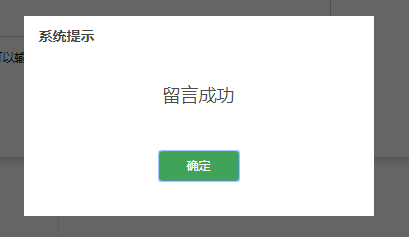
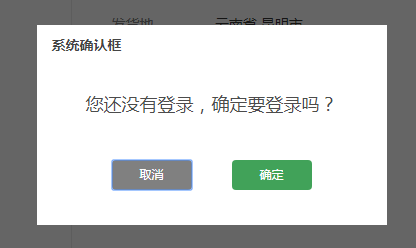
4.参考博客:http://blog.csdn.net/shiyuqiong/article/details/51583811
jQuery自定义alert,confirm方法及样式的更多相关文章
- 给Jquery添加alert,prompt方法,类似系统的Alert,Prompt,可以响应键盘,支持拖动
我们在调用系统的Alert,prompt的弹出提示时,不同的系统会有不同的提示框,视觉效果不统一,而且不好看,功能单一,现在我们通过Jquery模拟Alert,prompt,现实统一视觉效果,而且内容 ...
- jQuery 自定义网页滚动条样式插件 mCustomScrollbar 的介绍和使用方法(转)
系统默认的滚动条样式,真的已经看的够恶心了.试想一下,如果在一个很有特色和创意的网页中,出现了一根系统中默认的滚动条样式,会有多么的别扭. 为了自己定义网页中的滚动条的方法,我真的已经找了很久了,就目 ...
- 利用bootstrap的modal组件自定义alert,confirm和modal对话框
由于浏览器提供的alert和confirm框体验不好,而且浏览器没有提供一个标准的以对话框的形式显示自定义HTML的弹框函数,所以很多项目都会自定义对话框组件.本篇文章介绍自己在项目中基于bootst ...
- jquery仿alert提示框、confirm确认对话框、prompt带输入的提示框插件[附实例演示]
jquery仿alert提示框.confirm确认对话框.prompt带输入的提示框插件实例演示 第一步:引入所需要的jquery插件文件: http://www.angelweb.cn/Inc/eg ...
- jQuery自定义滚动条样式插件mCustomScrollbar
如果你构建一个很有特色和创意的网页,那么肯定希望定义网页中的滚动条样式,这方面的 jQuery 插件比较不错的,有两个:jScrollPane 和 mCustomScrollbar. 关于 jScro ...
- jQuery Validate 表单验证插件----自定义一个验证方法
一.下载依赖包 网盘下载:https://yunpan.cn/cryvgGGAQ3DSW 访问密码 f224 二.引入依赖包 <script src="../../scripts/j ...
- 在Android的webview中定做js的alert,confirm和prompt对话框的方法
在Android的webview中定制js的alert,confirm和prompt对话框的方法 http://618119.com/archives/2010/12/20/199.html 1.首先 ...
- jQuery Validate自定义各种验证方法(转)
一.封装自定义验证方法-validate-methods.js /***************************************************************** j ...
- jquery遍历标签中自定义的属性方法
在开发中我们有时会对html标签添加属性,如何遍历处理 <ul> <li name="li1" sortid="nav_1">aaaaa ...
随机推荐
- UA池和代理池
scrapy下载中间件 UA池 代理池 一.下载中间件 先祭出框架图: 下载中间件(Downloader Middlewares) 位于scrapy引擎和下载器之间的一层组件. - 作用: (1)引擎 ...
- [LeetCode&Python] Problem 844. Backspace String Compare
Given two strings S and T, return if they are equal when both are typed into empty text editors. # m ...
- mysql命令行使用
连接数据库 mysql -P 端口号 -h 远程机地址/ip -u 用户名 -p mysql -uroot -p123456 修改数据库密码 mysqladmin -uroot -p123456 ...
- vue2中使用mint-ui,性别选择
安装需要的组件 import { DatetimePicker,Toast,Popup,Picker } from 'mint-ui'; templete部分 <div class=" ...
- vue day3 bootstrap 联动下拉
<!DOCTYPE html> <html> <head> <meta charset="utf-8" /> <meta ht ...
- ios-上传图片到后台
做第一个项目时,有个版块的个人信息的编辑涉及到头像修改,老大说项目里有通用的代码,让我自己去找.总算找到,搞了许久才弄好,看来理解能力还需要提高啊!! #pragma mark- 修改头像上传后保存 ...
- nginx 文档链接
https://www.cnblogs.com/wcwnina/p/8728391.html NGINX简介 http://www.nginx.cn/doc/ ...
- 用turtle画图
turtle是python自带一个寓教于乐的小乌龟,可以控制乌龟移动(机器人),可以留下足迹. turtledemo里有许多官方例子.刚才随性而发做,看了介绍随手画了一个,有点像自动原包机,通过简单的 ...
- cliipblard.js 实现点击复制
<script src="js/clipboard.min.js"></script> <script type="text/javascr ...
- [转]MyBatis动态传入表名、字段名参数的解决办法
一直在使用Mybatis这个ORM框架,都是使用mybatis里的一些常用功能.今天在项目开发中有个业务是需要限制各个用户对某些表里的字段查询以及某些字段是否显示,如某张表的某些字段不让用户查询到.这 ...