
centos 7 mysql 开启binlog
一、前言
本文章用到的mysql 为5.7版本。
按照https://blog.csdn.net/king_kgh/article/details/74800513中的步骤操作,结果启动失败。
配置文件在 /etc/mysqld
[mysqld]

#

# Remove leading # and set to the amount of RAM for the most important data

# cache in MySQL. Start at 70% of total RAM for dedicated server, else 10%.

# innodb_buffer_pool_size = 128M

#

# Remove leading # to turn on a very important data integrity option: logging

# changes to the binary log between backups.

log_bin=ON

log_bin_basename=/var/lib/mysql/mysql-bin

log_bin_index=/var/lib/mysql/mysql-bin.index

#

# Remove leading # to set options mainly useful for reporting servers.

# The server defaults are faster for transactions and fast SELECTs.

# Adjust sizes as needed, experiment to find the optimal values.

# join_buffer_size = 128M

# sort_buffer_size = 2M

# read_rnd_buffer_size = 2M

datadir=/var/lib/mysql

socket=/var/lib/mysql/mysql.sock

# Disabling symbolic-links is recommended to prevent assorted security risks

symbolic-links=0

log-error=/var/log/mysqld.log

pid-file=/var/run/mysqld/mysqld.pid
启动失败后,发现日志文件/var/log/mysqld.log竟然是空的,什么都没有。
二、解决
启动失败提示如下:

于是照着提示执行了:

这个并没看出任何的错误线索。
接着执行:

这里就清楚了,原来是没有设置server-id。
那就指定一下吧。
log_bin=ON

log_bin_basename=/var/lib/mysql/mysql-bin

log_bin_index=/var/lib/mysql/mysql-bin.index

server-id=123454
再次重启。
结果又报错了,查看/var/log/mysqld.log,发现提示如下:
2019-02-26T06:50:46.581796Z 0 [ERROR] unknown variable 'log_bin_basename=/var/lib/mysql/mysql-bin'
2019-02-26T06:50:46.581811Z 0 [ERROR] Aborting
好吧。。。这网上的教程坑多啊。
后边直接看了官网:
16.1.2.1 Setting the Replication Master Configuration
To configure a master to use binary log file position based replication, you must enable binary logging and establish a unique server ID. If this has not already been done, a server restart is required.
Binary logging must be enabled on the master because the binary log is the basis for replicating changes from the master to its slaves. If binary logging is not enabled on the master using the
log-binoption, replication is not possible.Each server within a replication group must be configured with a unique server ID. This ID is used to identify individual servers within the group, and must be a positive integer between 1 and (232)−1. How you organize and select the numbers is your choice.
To configure the binary log and server ID options, shut down the MySQL server and edit the
my.cnformy.inifile. Within the[mysqld]section of the configuration file, add thelog-binandserver-idoptions. If these options already exist, but are commented out, uncomment the options and alter them according to your needs. For example, to enable binary logging using a log file name prefix ofmysql-bin, and configure a server ID of 1, use these lines:[mysqld]
log-bin=mysql-bin
server-id=1After making the changes, restart the server.
于是,把原来的配置改成和官网一样:
[mysqld]

log-bin=mysql-bin

server-id=1
三、查看binlog文件
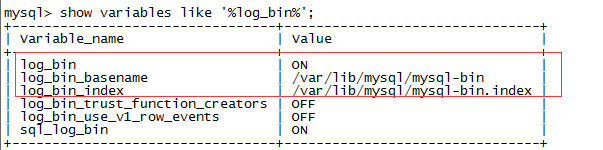
1、mysql> show variables like '%log_bin%';
2、查看目录
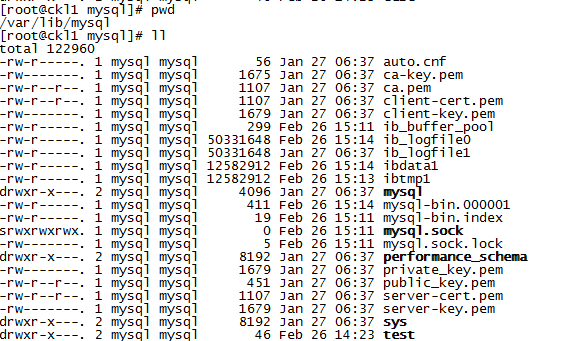
3、show master status;
查看当前正在写入的binlog文件

4、mysql> show binlog events;

5、mysql> show binlog events in 'mysql-bin.000001';
查看指定的文件
内容同上。
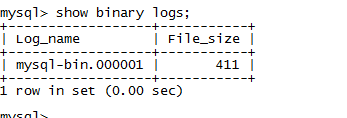
6、mysql> show binary logs;
显示文件列表。
7、也可以用mysqlbinlog查看
https://www.cnblogs.com/snifferhu/p/5280489.html
8、查看binlog相关参数
show variables like "%binlog%";
标红的都是我目前知道的,比较重要的。

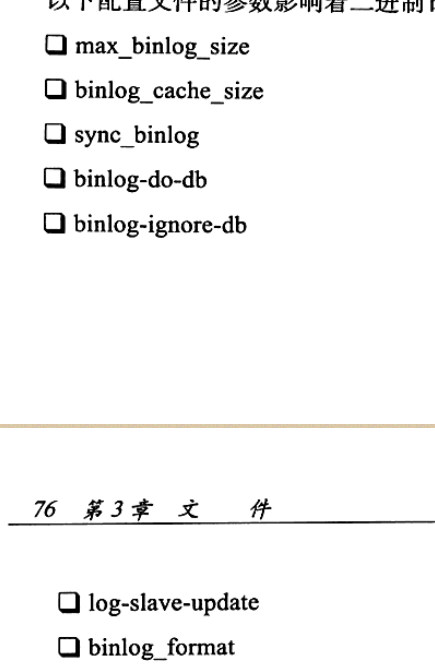
在innodb存储引擎那本书里,重点说了下面的几个参数(也很值得了解下):
centos 7 mysql 开启binlog的更多相关文章
- Centos为mysql开启binlog
1.查询mysql配置文件所在位置 2.编辑配置文件/etc/my.cnf 在文件尾部添加: log-bin=/var/lib/mysql/mysql-bin server-id=123454 (5 ...
- mysql开启binlog
mysql开启binlog,至于为什么要开启binlog,可以google下. ## 设置server_id,一般设置为IP server_id= ## 复制过滤:需要备份的数据库名,多个库以逗号分隔 ...
- MySQL开启binlog并且保存7天有效数据
开启binlog日志(在[mysqld]下修改或添加如下配置): server-id=1 log-bin=mysql-bin binlog_format=MIXED binlog日志模式 Mysql复 ...
- mysql开启binlog日志和慢查询日志
1)首先,为什么要开启binlog日志和慢查询日志呢? binlog日志会记录下数据库的所以增删改操作,当不小心删除.清空数据,或数据库系统出错,这时候就可以使用binlog日志来还原数据库,简单来说 ...
- mysql 开启binlog
登录mysql之后使用下面的命令查看是否开启binlog show variables like 'log_%'; if没有开启则在mysql的配置文件中 加入以下内容 server_id=2 log ...
- mysql 开启binlog日志,恢复误删的表、数据、mysql库
linux下开启mysql的binlog日志功能 1.配置mysql配置文件my.cnf(内容如下). #配置文件储存的位置log-bin=mysql-bin#5.7以及以上版本需要配置这一行(保证唯 ...
- MySQL开启binlog无法启动ct 10 21:27:31 postfix/pickup[4801]: warning: 6BD991A0039: message has been queue
1 详细异常 ct 10 21:27:31 postfix/pickup[4801]: warning: 6BD991A0039: message has been queue Oct 10 21:2 ...
- 【转】【MySQL】mysql 通过bin-log恢复数据方法详解
mysql中bin-log在mysql默认状态下是没有打开的,我们要先打开mysql 开启bin-log功能,然后再通过备份的bin-log进行数据库恢复了. 具体的操作是通过mysqlbinlog这 ...
- mysql中binlog与存储引擎的2PC
mysql内部的2PC mysql开启binlog后实际上可以认为其数据有两份,binlog中一份,引擎中一份(这里先把存储引擎中数据看成整体的单独一份,另外也可以把binlog看成是一个引擎).既然 ...
随机推荐
- Hibernate(7)关联关系_单向1对n
1.单向一对多(@OneToMany)关联是比较少用的(一般用双向一对多代替). 2.实体类: 1端:Publishers.java public class Publishers { private ...
- flask之分页插件的使用、添加后保留原url搜索条件、单例模式
本篇导航: flask实现分页 添加后保留原url搜索条件 单例模式 一.flask实现分页 1.django项目中写过的分页组件 from urllib.parse import urlencode ...
- Spring Boot @Autowired 没法自动注入的问题
Application 启动类: @SpringBootApplication @EnableConfigurationProperties @ComponentScan(basePackages = ...
- ssh-keygen 基本用法
ssh-keygen命令用于为"ssh"生成.管理和转换认证密钥,它支持RSA和DSA两种认证密钥. ssh-keygen(选项) -b:指定密钥长度: -e:读取openssh的 ...
- 使用iperf测试网卡吞吐性能
原 使用iperf测试网卡吞吐性能 2018年12月17日 12:38:41 lancewoo 阅读数:138 首先配置待测试的两个网卡的网络地址到同一网段,保证ping对方的IP地址时可以通.两 ...
- fashion datasets图像检索实践project
Using Siamese Networks and Pre-Trained Convolutional Neural Networks (CNNs) for Fashion Similarity M ...
- [Python设计模式] 第14章 老板来了——观察者模式
github地址:https://github.com/cheesezh/python_design_patterns 题目 用程序模拟以下情景,在一个办公室里,当老板进门的时候,前台秘书就偷偷通知办 ...
- MinFilter(MaxFilter)快速算法C++实现
目录 1.算法简述 1.1.MinFilter(MaxFilter) 算法简述 1.2.MinFilter(MaxFilter) 快速算法简述 2.实现代码 2.1.MinFilterOneRow 单 ...
- Mongodb系列- CRUD操作介绍
---恢复内容开始--- 一 Create 操作 在MongoDB中,插入操作的目标是一个集合. MongoDB中的所有写入操作在单个文档的层次上都是原子的. For examples, see In ...
- 【PHP】解析PHP中的函数
目录结构: contents structure [-] 可变参数的函数 变量函数 回调函数 自定义函数库 闭包(Closure)函数的使用 在这篇文章中,笔者将会讲解如何使用PHP中的函数,PHP是 ...