
flutter 2.X报错 Bad state: Insecure HTTP is not allowed by platform:
flutter2.x开发遇到的问题 Bad state: Insecure HTTP is not allowed by platform:
翻译过来就是:错误状态:平台不允许不安全的HTTP:
产生原因:IOS 和 Android 9.0 对网络请求做了一些限制,不能直接访问 Http 域名的地址。
解决方案如下:
Android 配置
找到下图位置,添加这两行代码
      android:usesCleartextTraffic="true"

      android:networkSecurityConfig="@xml/network_security_config"
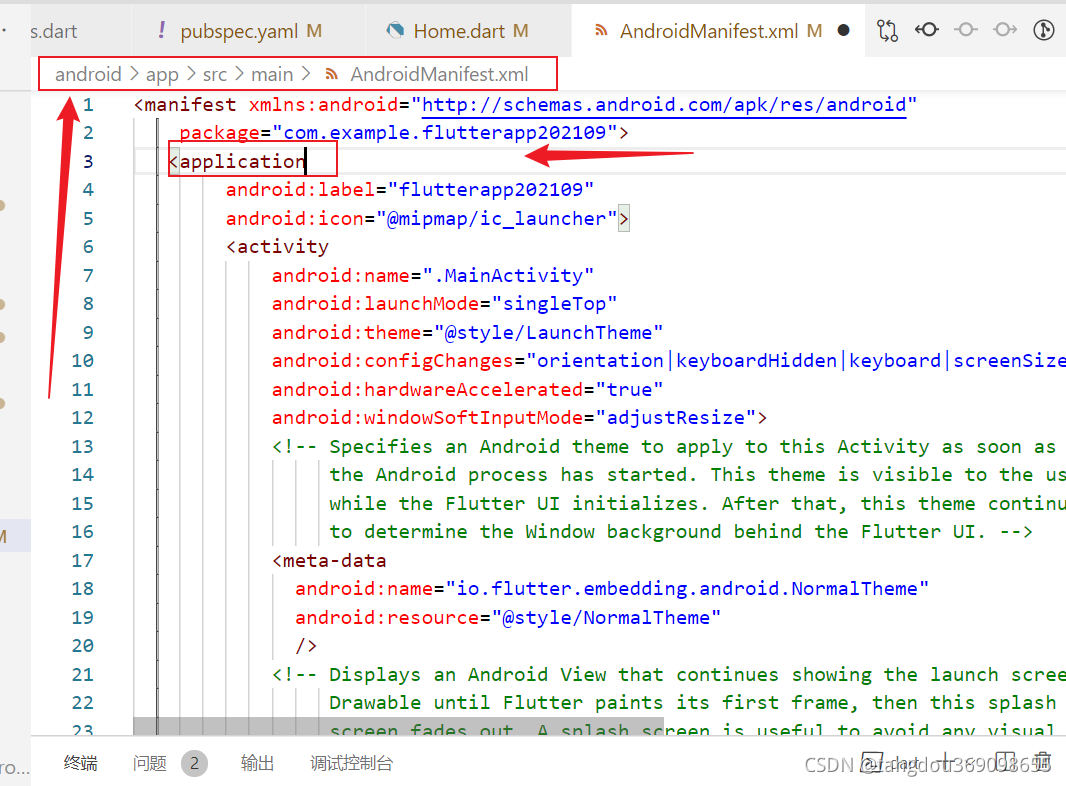
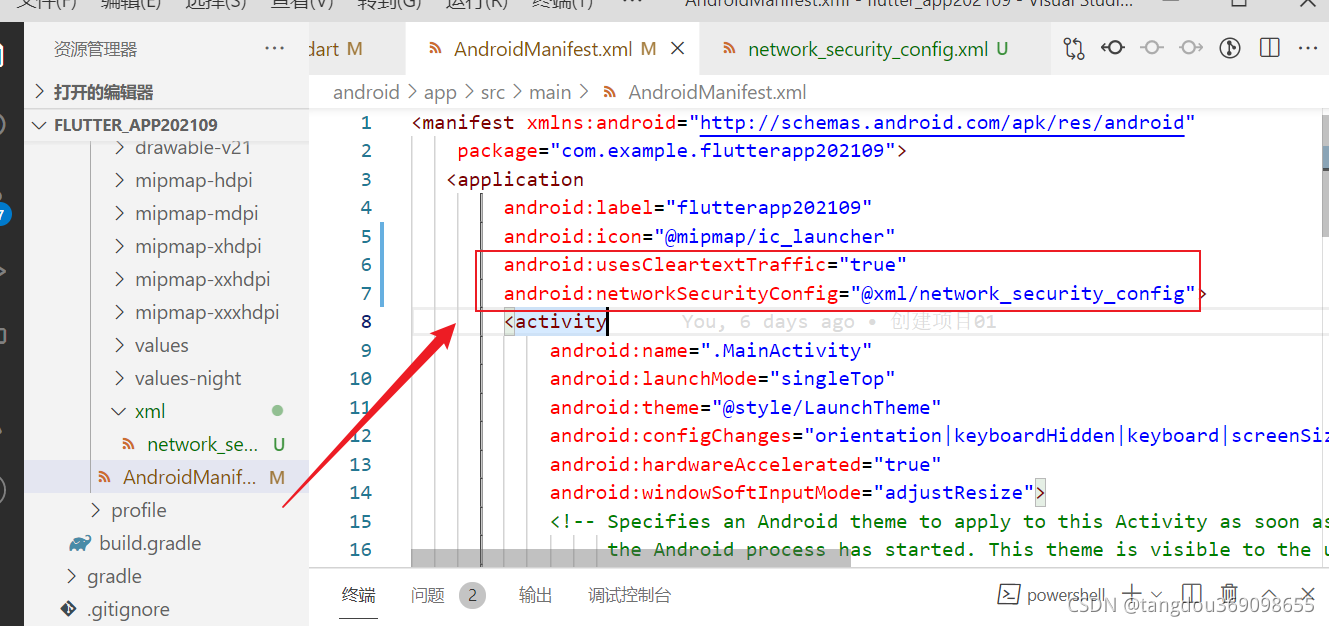
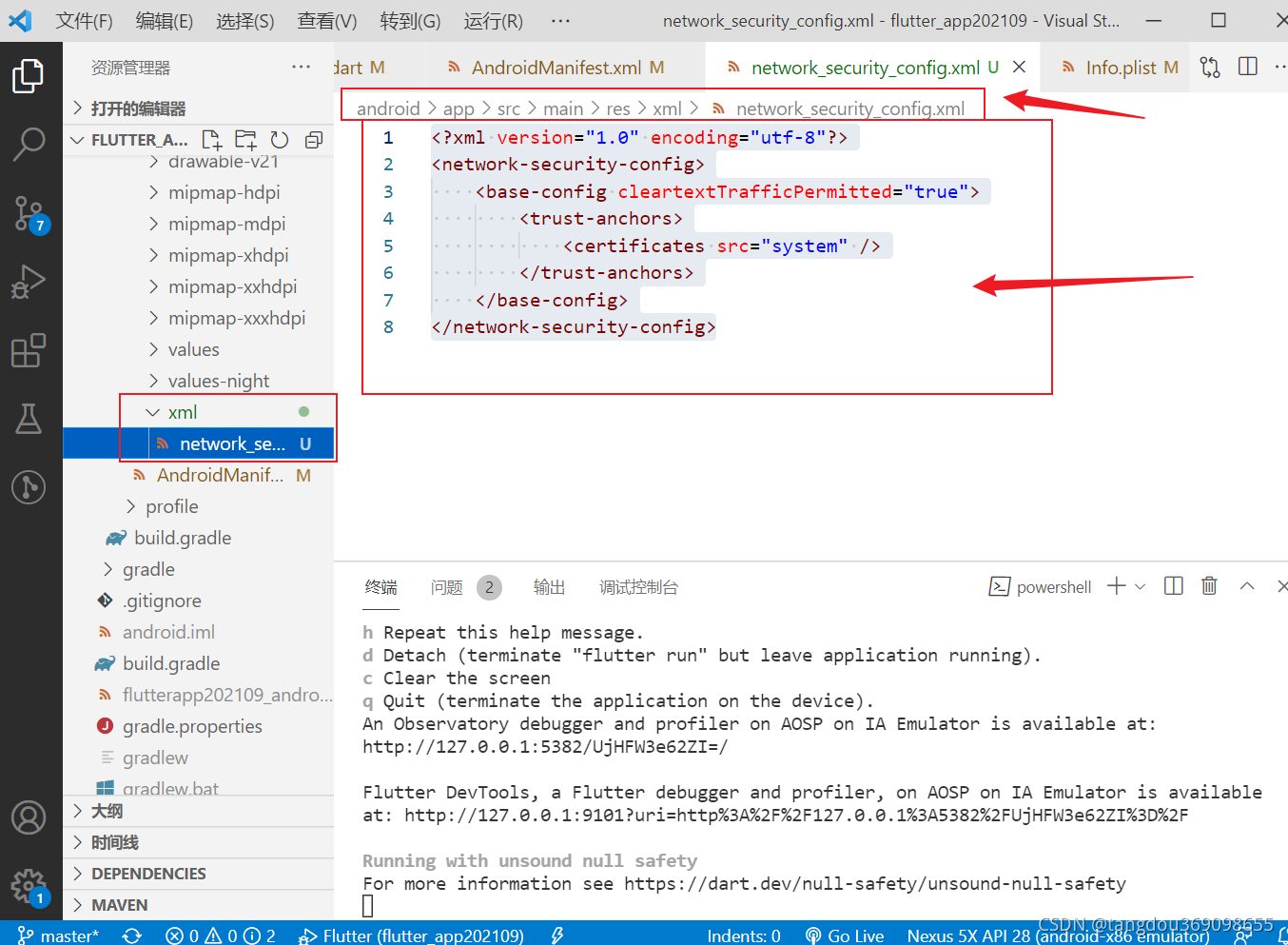
添加 network_security_config.xml 文件,没有这个文件就创建一个,注意一下路径哦
android\app\src\main\res\xml\network_security_config.xml
<?xml version="1.0" encoding="utf-8"?>

<network-security-config>

    <base-config cleartextTrafficPermitted="true">

        <trust-anchors>

            <certificates src="system" />

        </trust-anchors>

    </base-config>

</network-security-config>
IOS 配置
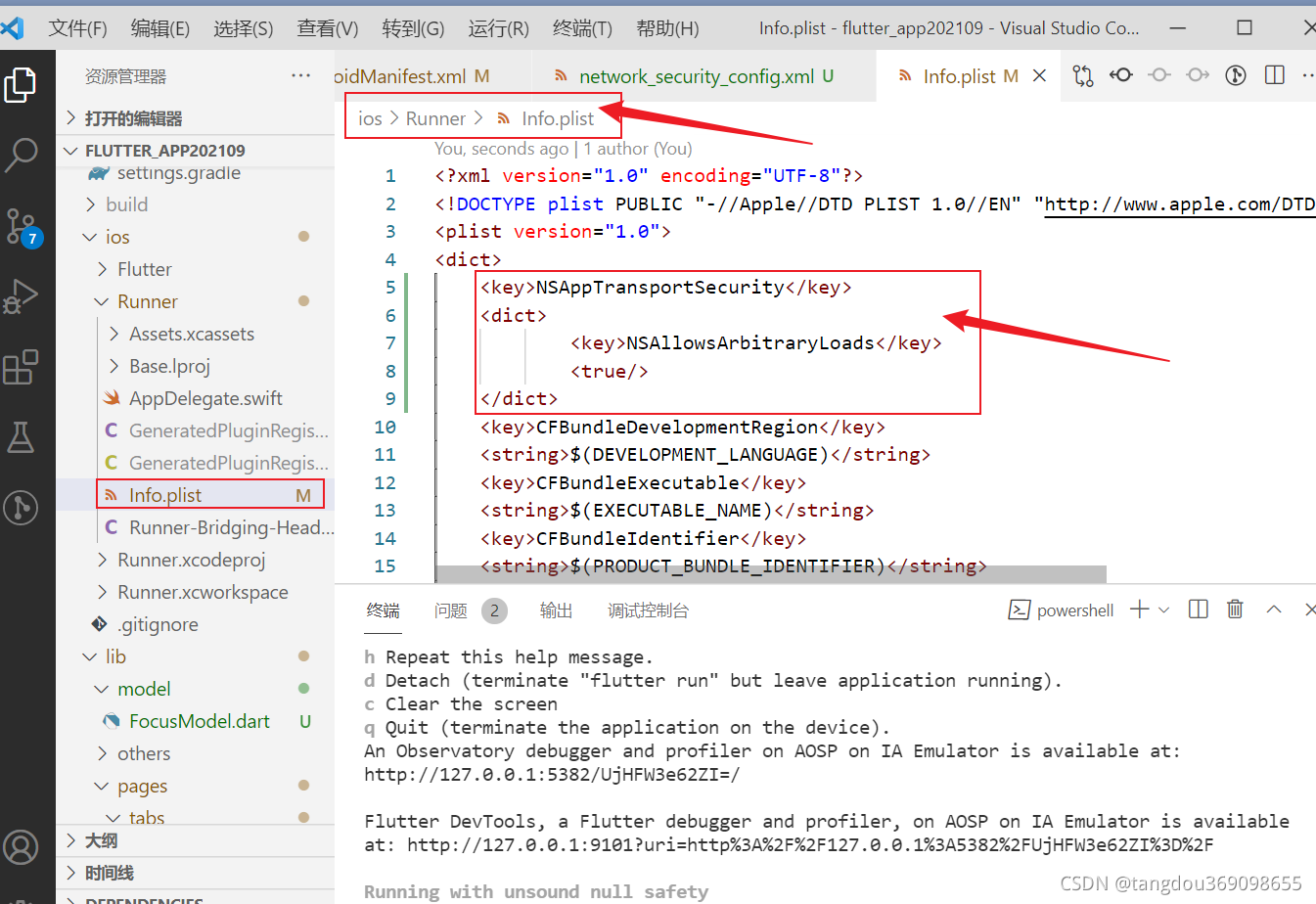
找到 ios/Runner/Info.plist,添加关于 NSAppTransportSecurity NSAllowsArbitraryLoads 的配置
<?xml version="1.0" encoding="UTF-8"?>

<!DOCTYPE plist PUBLIC "-//Apple//DTD PLIST 1.0//EN" "http://www.apple.com/DTDs/PropertyList-1.0.dtd">

<plist version="1.0">

<dict>

	<key>NSAppTransportSecurity</key>

	<dict>

		<key>NSAllowsArbitraryLoads</key>

		<true/>

	</dict>

</dict>

</plist>
搞完以后,重启项目!!重启重启重启重启!重启解决一切问题!!!!
下面的可能用不到,一般上面的都可以解决问题了哦~~~
备注:网上还查资料看到network_security_config.xml有其他配置办法
此办法参考链接:https://www.cnblogs.com/sea-stream/p/13908198.html
补充如下
network_security_config.xml
<?xml version="1.0" encoding="utf-8"?>

<network-security-config>

    <base-config cleartextTrafficPermitted="true" />

</network-security-config>
or
<?xml version="1.0" encoding="utf-8"?>

<network-security-config>

<!-- 配置7.0抓包--start -->

<debug-overrides>

    <trust-anchors>

        <!-- Trust user added CAs while debuggable only -->

        <certificates src="user"/>

    </trust-anchors>

</debug-overrides>

<!-- 配置7.0抓包--end -->

<!-- 配置9.0明文请求--start -->

<base-config cleartextTrafficPermitted="true" />

 <!-- 配置9.0明文请求--end -->

</network-security-config>
flutter 2.X报错 Bad state: Insecure HTTP is not allowed by platform:的更多相关文章
- pip安装报错:is not a supported wheel on this platform
可能的原因1:安装的不是对应python版本的库,下载的库名中cp27代表python2.7,其它同理. 可能的原因2:这个是我遇到的情况(下载的是对应版本的库,然后仍然提示不支持当前平台) 我下载到 ...
- Python——pip安装报错:is not a supported wheel on this platform
pip安装报错:is not a supported wheel on this platform 可能的原因1:安装的不是对应python版本的库,下载的库名中cp35代表python3.5,其它同 ...
- 安装Tensorflow过程pip安装报错:is not a supported wheel on this platform
安装Tensorflow过程pip安装报错:is not a supported wheel on this platform 通过pip安装wheel镜像时,安装指令为: pip install - ...
- Flutter配置环境报错“PKIX path building failed: sun.security.provider.certpath.SunCertPathBuilderException: unable to find valid certification path to requested target”
背景:最近看了很多Flutter漂亮的项目,想要尝试一下.所有环境都搭建好之后,按照文档一步一步配置(抄袭),但始终报如下图错误. PKIX path building failed: sun.sec ...
- Flutter使用SingleTickerProviderStateMixin报错
最近在学习开发Flutter应用项目,在创建tabbar和tabview后,进行网络请求后显示顶部tab标签,设置TabController,并使class类实现SingleTickerProvide ...
- Mysql数据库连接报错!1130:host XXX is not allowed to connect to this mysql server
我猜想是可能是连接的用户权限问题.结果这样子操作mysql库,可以解决此问题.在本机登入mysql后,更改 “mysql” 数据库里的 “user” 表里的 “host” 项,从”localhost” ...
- 远程连接mysql报错【1130 -host 'localhost' is not allowed to connect to this mysql server】
远程连接mysql时包如下错误: 1130 -host 'localhost' is not allowed to connect to this mysql server 解决办法 本地用root账 ...
- MySQL报错:Packets larger than max_allowed_packet are not allowed 的解决方案
在导大容量数据特别是CLOB数据时,可能会出现异常:“Packets larger than max_allowed_packet are not allowed”. 这是由于MySQL数据库有一个系 ...
- mysql 报错 Packets larger than max_allowed_packet are not allowed
登录 mysql, 执行命令 : show variables like '%max_allowed_packet%' 重新设置: set global max_allowed_packet = 1 ...
- mysql报错:1130 -host 'localhost' is not allowed to connect to this mysql server
错误提示:1130 -host 'localhost' is not allowed to connect to this mysql server 原因:手贱把mysql数据库系统中mysql数据库 ...
随机推荐
- Workflow,要不要了解一下
摘要:Workflow本质是开发者基于实际业务场景开发用于部署模型或应用的流水线工具. Workflow(也称工作流,下文中均可使用工作流进行描述)本质是开发者基于实际业务场景开发用于部署模型或应用的 ...
- 还在用双层for循环吗?太慢了
前情提要 我们在开发中经常碰到这样的场景,查出两个 list 集合数据,需要根据他们相同的某个属性为连接点,进行聚合.但是平时我们使用的时候关注过性能吗?下面让我们一起来看看它的表现如何. 来个例子 ...
- django启动报错:DisallowedHost at /
学习django第一天,第一次启动服务就报错,报错内容如下: DisallowedHost at / Invalid HTTP_HOST header: '192.168.116.22:8000'. ...
- C++ 一个简洁的CHECK宏
#define CHECK2(condition, message) \ (!(condition)) ? (std::cerr << "Assertion failed: (& ...
- qtCreator警告解决
警告 qtCreator Warning: QT_DEVICE_PIXEL_RATIO is deprecated. Instead use: QT_AUTO_SCREEN_SCALE_FACTOR ...
- 【Linux】个人笔记本安装Centos并开放22端口供外网连接
〇.参考资料 一.配置及安装内容 (一)配置 [today]低配笔记本(装centos):4+500G 个人电脑(装三个节点的虚拟机集群环境):8+628G (二)所装软件 Linux系统(可选cen ...
- labuladong算法笔记总结
动态规划解题套路框架 学习计划: 最长回文子序列 〇.必读文章 1.数据结构和算法学习指南(学习算法和刷题的框架思维) 了解数据结构的操作和遍历(迭代or递归) 从树刷起,结合框架思维,有利于理解(回 ...
- 【实习项目介绍】XXXXX大数据平台介绍
一.技术架构 1.整体介绍及架构 (1)概述 Odeon大数据平台以全图形化Web操作的形式为用户提供一站式的大数据能力:包括数据采集.任务编排.调度及处理.数据展现(BI)等:同时提供完善的权限管理 ...
- 【大数据面试】【框架】Linux命令、Shell工具、常见Shell脚本(群起脚本、数仓导入)
一.Linux 1.常用高级命令 ps -ef:查看进程详情,ps -ef|grep dae可以搜索指定进程,-e表示环境变量 ps -au:以用户为主的详细格式,显示进程平均占用资源,不包括cmd列 ...
- .NET 6 实现滑动验证码(四)、扩展类
为了能够通过配置文件(appsettings.json)或通过代码进行背景图片与模板进行配置.可自定义资源类型.自定义验证规则,本节创建一些扩展类,用来实现这些功能. 上一节内容:NET 6 实现滑动 ...