
flutter 2.X报错 Bad state: Insecure HTTP is not allowed by platform:
flutter2.x开发遇到的问题 Bad state: Insecure HTTP is not allowed by platform:
翻译过来就是:错误状态:平台不允许不安全的HTTP:
产生原因:IOS 和 Android 9.0 对网络请求做了一些限制,不能直接访问 Http 域名的地址。
解决方案如下:
Android 配置
找到下图位置,添加这两行代码
      android:usesCleartextTraffic="true"

      android:networkSecurityConfig="@xml/network_security_config"
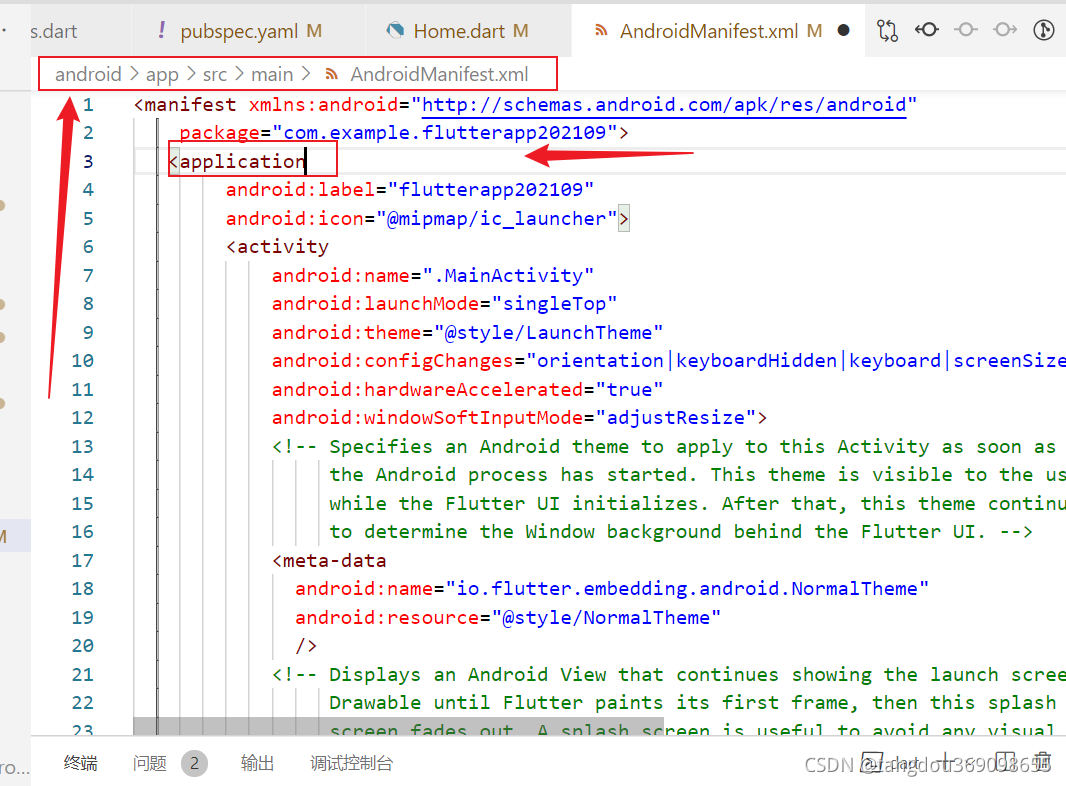
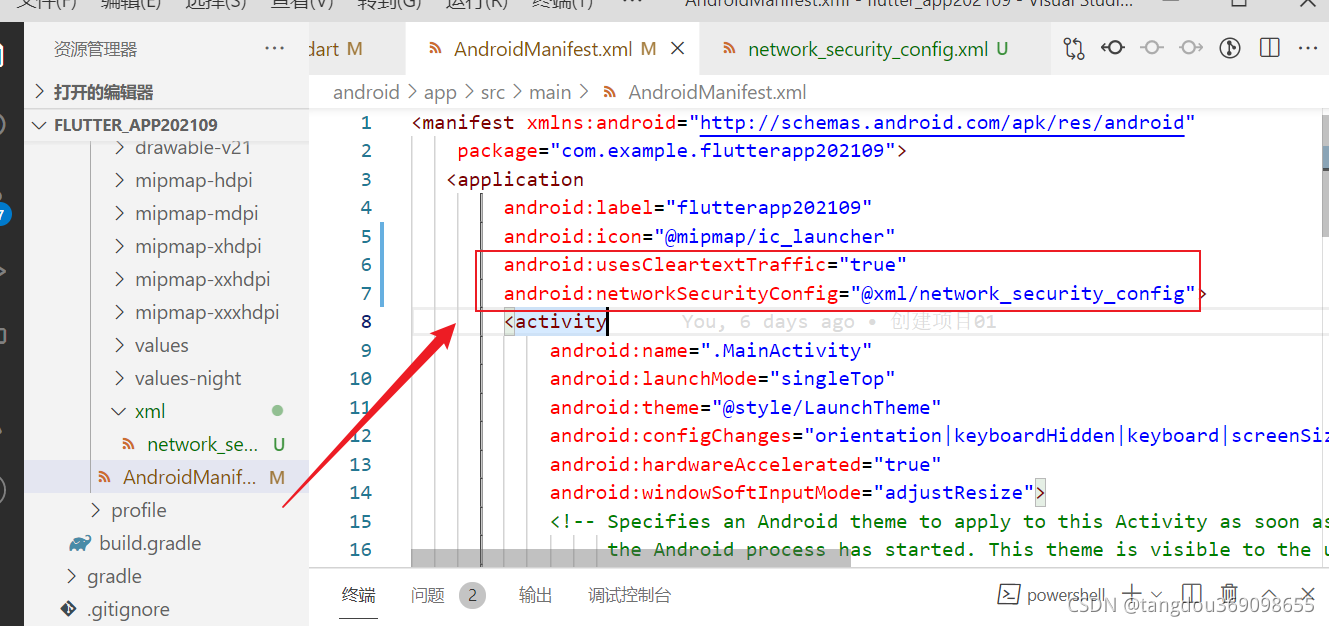
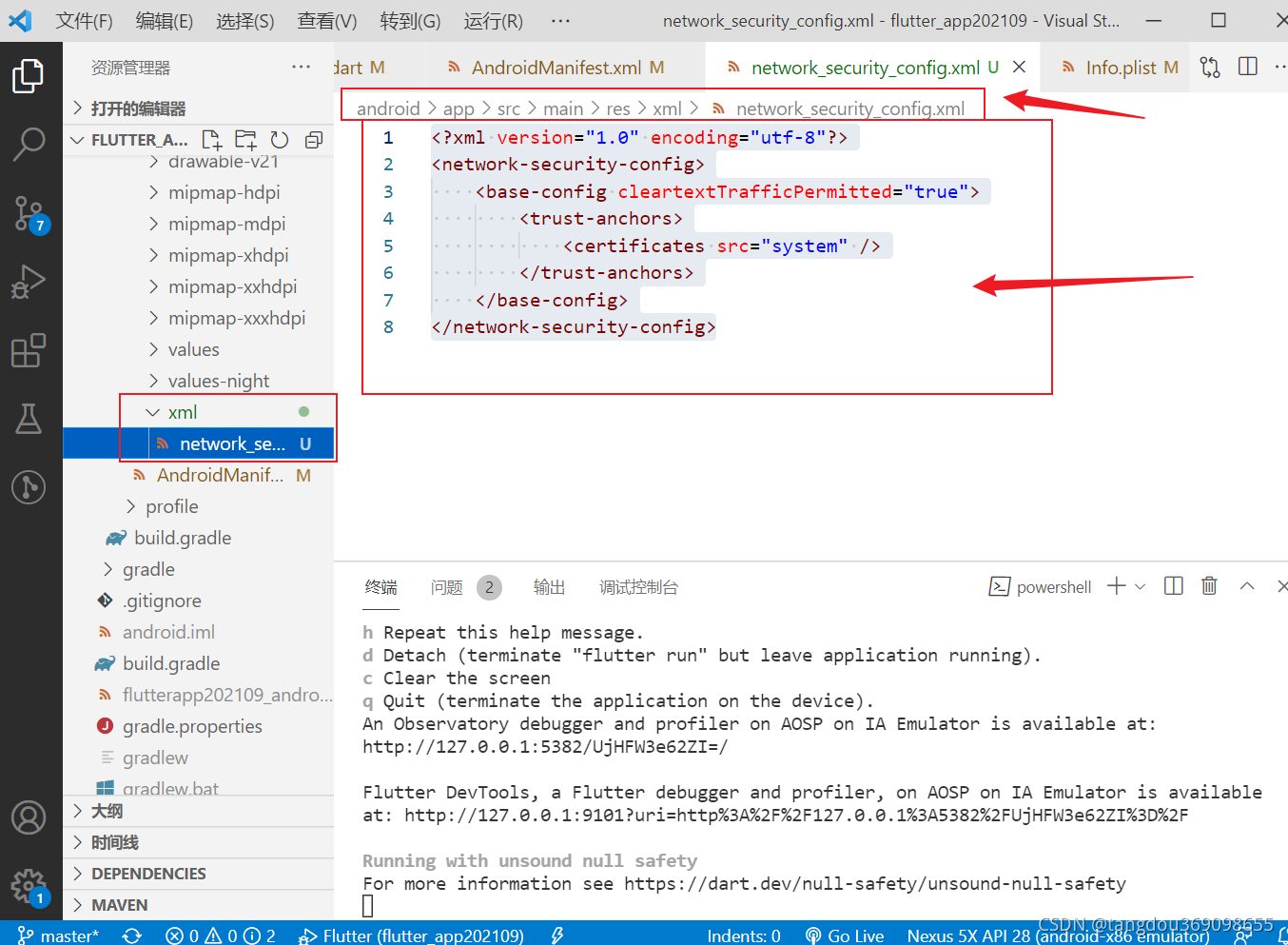
添加 network_security_config.xml 文件,没有这个文件就创建一个,注意一下路径哦
android\app\src\main\res\xml\network_security_config.xml
<?xml version="1.0" encoding="utf-8"?>

<network-security-config>

    <base-config cleartextTrafficPermitted="true">

        <trust-anchors>

            <certificates src="system" />

        </trust-anchors>

    </base-config>

</network-security-config>
IOS 配置
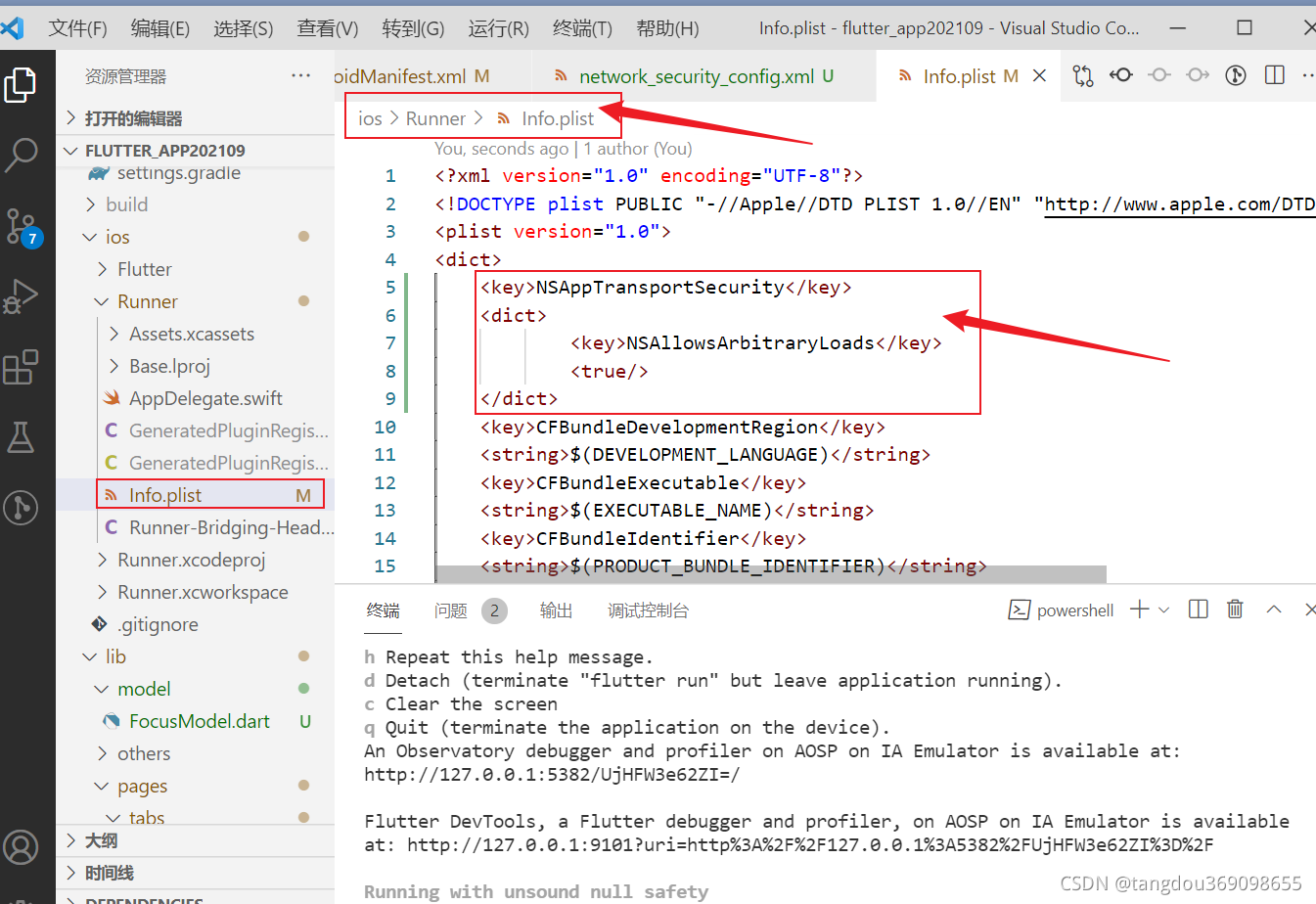
找到 ios/Runner/Info.plist,添加关于 NSAppTransportSecurity NSAllowsArbitraryLoads 的配置
<?xml version="1.0" encoding="UTF-8"?>

<!DOCTYPE plist PUBLIC "-//Apple//DTD PLIST 1.0//EN" "http://www.apple.com/DTDs/PropertyList-1.0.dtd">

<plist version="1.0">

<dict>

	<key>NSAppTransportSecurity</key>

	<dict>

		<key>NSAllowsArbitraryLoads</key>

		<true/>

	</dict>

</dict>

</plist>
搞完以后,重启项目!!重启重启重启重启!重启解决一切问题!!!!
下面的可能用不到,一般上面的都可以解决问题了哦~~~
备注:网上还查资料看到network_security_config.xml有其他配置办法
此办法参考链接:https://www.cnblogs.com/sea-stream/p/13908198.html
补充如下
network_security_config.xml
<?xml version="1.0" encoding="utf-8"?>

<network-security-config>

    <base-config cleartextTrafficPermitted="true" />

</network-security-config>
or
<?xml version="1.0" encoding="utf-8"?>

<network-security-config>

<!-- 配置7.0抓包--start -->

<debug-overrides>

    <trust-anchors>

        <!-- Trust user added CAs while debuggable only -->

        <certificates src="user"/>

    </trust-anchors>

</debug-overrides>

<!-- 配置7.0抓包--end -->

<!-- 配置9.0明文请求--start -->

<base-config cleartextTrafficPermitted="true" />

 <!-- 配置9.0明文请求--end -->

</network-security-config>
flutter 2.X报错 Bad state: Insecure HTTP is not allowed by platform:的更多相关文章
- pip安装报错:is not a supported wheel on this platform
可能的原因1:安装的不是对应python版本的库,下载的库名中cp27代表python2.7,其它同理. 可能的原因2:这个是我遇到的情况(下载的是对应版本的库,然后仍然提示不支持当前平台) 我下载到 ...
- Python——pip安装报错:is not a supported wheel on this platform
pip安装报错:is not a supported wheel on this platform 可能的原因1:安装的不是对应python版本的库,下载的库名中cp35代表python3.5,其它同 ...
- 安装Tensorflow过程pip安装报错:is not a supported wheel on this platform
安装Tensorflow过程pip安装报错:is not a supported wheel on this platform 通过pip安装wheel镜像时,安装指令为: pip install - ...
- Flutter配置环境报错“PKIX path building failed: sun.security.provider.certpath.SunCertPathBuilderException: unable to find valid certification path to requested target”
背景:最近看了很多Flutter漂亮的项目,想要尝试一下.所有环境都搭建好之后,按照文档一步一步配置(抄袭),但始终报如下图错误. PKIX path building failed: sun.sec ...
- Flutter使用SingleTickerProviderStateMixin报错
最近在学习开发Flutter应用项目,在创建tabbar和tabview后,进行网络请求后显示顶部tab标签,设置TabController,并使class类实现SingleTickerProvide ...
- Mysql数据库连接报错!1130:host XXX is not allowed to connect to this mysql server
我猜想是可能是连接的用户权限问题.结果这样子操作mysql库,可以解决此问题.在本机登入mysql后,更改 “mysql” 数据库里的 “user” 表里的 “host” 项,从”localhost” ...
- 远程连接mysql报错【1130 -host 'localhost' is not allowed to connect to this mysql server】
远程连接mysql时包如下错误: 1130 -host 'localhost' is not allowed to connect to this mysql server 解决办法 本地用root账 ...
- MySQL报错:Packets larger than max_allowed_packet are not allowed 的解决方案
在导大容量数据特别是CLOB数据时,可能会出现异常:“Packets larger than max_allowed_packet are not allowed”. 这是由于MySQL数据库有一个系 ...
- mysql 报错 Packets larger than max_allowed_packet are not allowed
登录 mysql, 执行命令 : show variables like '%max_allowed_packet%' 重新设置: set global max_allowed_packet = 1 ...
- mysql报错:1130 -host 'localhost' is not allowed to connect to this mysql server
错误提示:1130 -host 'localhost' is not allowed to connect to this mysql server 原因:手贱把mysql数据库系统中mysql数据库 ...
随机推荐
- DevOps|1024程序员节怎么做?介绍下我的思路
1024,祝每个程序员小哥哥小姐姐节日快乐. 因为在研发效能部门,我支持过几次 1024 程序员节的活动,所以经常有朋友问我1024 程序员节怎么做,本篇就是简单介绍下我的思路,希望对你有用. 102 ...
- C# String.IsNullOrEmpty()方法的使用
IsNullOrEmpty(string)是String类的一个有参的方法,方法需要类的调用,所以String.IsNullOrEmpty(string) IsNullOrEmpty是判断字符串的Nu ...
- (数据科学学习手札146)geopandas中拓扑非法问题的发现、诊断与修复
本文示例代码已上传至我的Github仓库https://github.com/CNFeffery/DataScienceStudyNotes 1 简介 大家好我是费老师,geopandas作为在Pyt ...
- 深度学习环境搭建常用网址、conda/pip命令行整理(pytorch、paddlepaddle等环境搭建)
前言:最近研究深度学习,安装了好多环境,记录一下,方便后续查阅. 1. Anaconda软件安装 1.1 Anaconda Anaconda是一个用于科学计算的Python发行版,支持Linux.Ma ...
- Spring Cloud 整合 nacos 实现动态配置中心
上一篇文章讲解了Spring Cloud 整合 nacos 实现服务注册与发现,nacos除了有服务注册与发现的功能,还有提供动态配置服务的功能.本文主要讲解Spring Cloud 整合nacos实 ...
- Spring Cloud Loadbalancer
Spring Cloud Loadbalancer---客户端负载均衡器 springcloud 2020.0.1 版本之后 删除了eureka中的ribbon,替代ribbon的是spring cl ...
- JAVA-面向对象之对象拷贝
Java 中的数据类型分为基本数据类型和引用数据类型.对于这两种数据类型,在进行赋值操作.用作方法参数或返回值时,会有值传递和引用(地址)传递的差别. Map对象 测试01-等号赋值: @Test p ...
- jquery操作class
<!DOCTYPE html> <html lang="en"> <head> <meta charset="UTF-8&quo ...
- JavaScript入门③-函数(2)原理{深入}执行上下文
00.头痛的JS闭包.词法作用域? 被JavaScript的闭包.上下文.嵌套函数.this搞得很头痛,这语言设计的,感觉比较混乱,先勉强理解总结一下. 为什么有闭包这么个东西?闭包包的是什么? 什么 ...
- ArcObjects SDK开发 021 开发框架搭建-FrameWork包设计
1.框架引擎部分 引擎模块其实就是之前我们说的App-Command-Tool模块,通过这个模块,把系统的主干框架搭建起来. 其中大部分出现在菜单以及工具条上的按钮都会继承这个框架定义ICommand ...