
redis存储token
redis存储token
欢迎关注博主公众号「Java大师」, 专注于分享Java领域干货文章http://www.javaman.cn/sb2/redis-token
在实际开发中,token需要保存在redis中,今天我们就来介绍下token怎么存储在redis中
密码模式实现代码
2.1 创建pom.xml
<?xml version="1.0" encoding="UTF-8"?>

<project xmlns="http://maven.apache.org/POM/4.0.0" xmlns:xsi="http://www.w3.org/2001/XMLSchema-instance"

         xsi:schemaLocation="http://maven.apache.org/POM/4.0.0 https://maven.apache.org/xsd/maven-4.0.0.xsd">

    <modelVersion>4.0.0</modelVersion>

    <parent>

        <groupId>org.springframework.boot</groupId>

        <artifactId>spring-boot-starter-parent</artifactId>

        <version>2.2.6.RELEASE</version>

        <relativePath/> <!-- lookup parent from repository -->

    </parent>

    <groupId>com.dashi</groupId>

    <artifactId>springsecurity-oauth</artifactId>

    <version>0.0.1-SNAPSHOT</version>

    <name>springsecurity-oauth</name>

    <description>Demo project for Spring Boot</description>

    <properties>

        <java.version>1.8</java.version>

        <spring-cloud.version>Greenwich.SR2</spring-cloud.version>

    </properties>

    <dependencies>

        <dependency>

            <groupId>org.springframework.cloud</groupId>

            <artifactId>spring-cloud-starter-oauth2</artifactId>

            <version>2.2.5.RELEASE</version>

        </dependency>

        <!--security依赖-->

        <dependency>

            <groupId>org.springframework.cloud</groupId>

            <artifactId>spring-cloud-starter-security</artifactId>

            <version>2.2.5.RELEASE</version>

        </dependency>

        <!--boot依赖-->

        <dependency>

            <groupId>org.springframework.boot</groupId>

            <artifactId>spring-boot-starter</artifactId>

        </dependency>

        <!--boot依赖-->

        <dependency>

            <groupId>org.springframework.boot</groupId>

            <artifactId>spring-boot-starter-web</artifactId>

        </dependency>

        <!--test依赖-->

        <dependency>

            <groupId>org.springframework.boot</groupId>

            <artifactId>spring-boot-starter-test</artifactId>

            <scope>test</scope>

        </dependency>

        <!--redis依赖 -->

        <dependency>

            <groupId>org.springframework.boot</groupId>

            <artifactId>spring-boot-starter-data-redis</artifactId>

        </dependency>

        <!--commons-pool2对象依赖 -->

        <dependency>

            <groupId>org.apache.commons</groupId>

            <artifactId>commons-pool2</artifactId>

        </dependency>

    </dependencies>

    <build>

        <plugins>

            <plugin>

                <groupId>org.springframework.boot</groupId>

                <artifactId>spring-boot-maven-plugin</artifactId>

            </plugin>

        </plugins>

    </build>

    <dependencyManagement>

        <dependencies>

            <dependency>

                <groupId>org.springframework.cloud</groupId>

                <artifactId>spring-cloud-dependencies</artifactId>

                <version>${spring-cloud.version}</version>

                <type>pom</type>

                <scope>import</scope>

            </dependency>

        </dependencies>

    </dependencyManagement>

</project>
2.2 创建springsecurity配置文件
package com.dashi.springsecurityoauth.config;

import org.springframework.context.annotation.Bean;

import org.springframework.context.annotation.Configuration;

import org.springframework.security.authentication.AuthenticationManager;

import org.springframework.security.config.annotation.web.builders.HttpSecurity;

import org.springframework.security.config.annotation.web.configuration.EnableWebSecurity;

import org.springframework.security.config.annotation.web.configuration.WebSecurityConfigurerAdapter;

import org.springframework.security.crypto.bcrypt.BCryptPasswordEncoder;

import org.springframework.security.crypto.password.PasswordEncoder;

@Configuration

@EnableWebSecurity

public class SecurityConfig extends WebSecurityConfigurerAdapter {

    @Bean

    public PasswordEncoder passwordEncoder(){

        return new BCryptPasswordEncoder();

    }

    @Bean

    public AuthenticationManager authenticationManager() throws Exception {

        return super.authenticationManager();

    }

    @Override

    protected void configure(HttpSecurity http) throws Exception {

        http.csrf().disable()

                .authorizeRequests()

                .antMatchers("/oauth/**","/login/**","/logout/**")

                .permitAll()

                .anyRequest()

                .authenticated()

                .and()

                .formLogin()

                .permitAll();

    }

}
2.3 创建UserService实现UserDetailService接口
package com.dashi.springsecurityoauth.model;

import org.springframework.security.core.GrantedAuthority;

import org.springframework.security.core.userdetails.UserDetails;

import java.util.Collection;

import java.util.List;

public class User implements UserDetails {

    private String username;

    private String password;

    private List<GrantedAuthority> authorities;

    public User(String username, String password, List<GrantedAuthority> authorities) {

        this.username = username;

        this.password = password;

        this.authorities = authorities;

    }

    @Override

    public Collection<? extends GrantedAuthority> getAuthorities() {

        return this.authorities;

    }

    @Override

    public String getPassword() {

        return this.password;

    }

    @Override

    public String getUsername() {

        return this.username;

    }

    @Override

    public boolean isAccountNonExpired() {

        return true;

    }

    @Override

    public boolean isAccountNonLocked() {

        return true;

    }

    @Override

    public boolean isCredentialsNonExpired() {

        return true;

    }

    @Override

    public boolean isEnabled() {

        return true;

    }

}
2.4 创建redis配置
package com.dashi.springsecurityoauth.config;

import org.springframework.beans.factory.annotation.Autowired;

import org.springframework.context.annotation.Bean;

import org.springframework.context.annotation.Configuration;

import org.springframework.data.redis.connection.RedisConnectionFactory;

import org.springframework.security.oauth2.provider.token.TokenStore;

import org.springframework.security.oauth2.provider.token.store.redis.RedisTokenStore;

@Configuration

public class RedisConfig {

    @Autowired

    private RedisConnectionFactory redisConnectionFactory;

    @Bean

    public TokenStore redisTokenStore(){

        return new RedisTokenStore(redisConnectionFactory);

    }

}
2.5 application.properties配置文件修改
spring.redis.host=localhost
2.6 创建认证服务
package com.dashi.springsecurityoauth.config;

import com.dashi.springsecurityoauth.service.UserService;

import org.springframework.beans.factory.annotation.Autowired;

import org.springframework.beans.factory.annotation.Qualifier;

import org.springframework.context.annotation.Configuration;

import org.springframework.security.authentication.AuthenticationManager;

import org.springframework.security.crypto.password.PasswordEncoder;

import org.springframework.security.oauth2.config.annotation.configurers.ClientDetailsServiceConfigurer;

import org.springframework.security.oauth2.config.annotation.web.configuration.AuthorizationServerConfigurerAdapter;

import org.springframework.security.oauth2.config.annotation.web.configuration.EnableAuthorizationServer;

import org.springframework.security.oauth2.config.annotation.web.configurers.AuthorizationServerEndpointsConfigurer;

import org.springframework.security.oauth2.provider.token.TokenStore;

@Configuration

@EnableAuthorizationServer

public class AuthorizationServerConfig extends AuthorizationServerConfigurerAdapter {

    @Autowired

    private PasswordEncoder passwordEncoder;

    @Autowired

    private AuthenticationManager authenticationManager;

    @Autowired

    private UserService userService;

    @Autowired

    @Qualifier("redisTokenStore")

    private TokenStore tokenStore;

    /**

     * 密码模式采用AuthorizationServerEndpointsConfigurer配置

     * @param endpoints

     * @throws Exception

     */

    @Override

    public void configure(AuthorizationServerEndpointsConfigurer endpoints) throws Exception {

        endpoints.authenticationManager(authenticationManager)

                .userDetailsService(userService)

          		//token存储

                .tokenStore(tokenStore);

    }

    /**

     * 授权码模式采用ClientDetailsServiceConfigurer

     * @param clients

     * @throws Exception

     */

    @Override

    public void configure(ClientDetailsServiceConfigurer clients) throws Exception {

        clients.inMemory()

                .withClient("admin")

                .secret(passwordEncoder.encode("112233"))

                .accessTokenValiditySeconds(3600)

                .redirectUris("http://www.baidu.com")

                .scopes("all")

                //配置grant_type,表示授权码授权

                //.authorizedGrantTypes("authorization_code");

                //密码模式

                .authorizedGrantTypes("password");

    }

}
2.7 创建资源服务
package com.dashi.springsecurityoauth.config;

import org.springframework.context.annotation.Configuration;

import org.springframework.security.config.annotation.web.builders.HttpSecurity;

import org.springframework.security.oauth2.config.annotation.web.configuration.EnableResourceServer;

import org.springframework.security.oauth2.config.annotation.web.configuration.ResourceServerConfigurerAdapter;

@Configuration

@EnableResourceServer

public class ResourceServerConfig extends ResourceServerConfigurerAdapter {

    @Override

    public void configure(HttpSecurity http) throws Exception {

        http.authorizeRequests()

                .anyRequest()

                .authenticated()

                .and()

                .requestMatchers()

          		//以/user开头的地址根据token访问资源

                .antMatchers("/user/**");

    }

}
2.8 打开postman,填入下面内容获取token
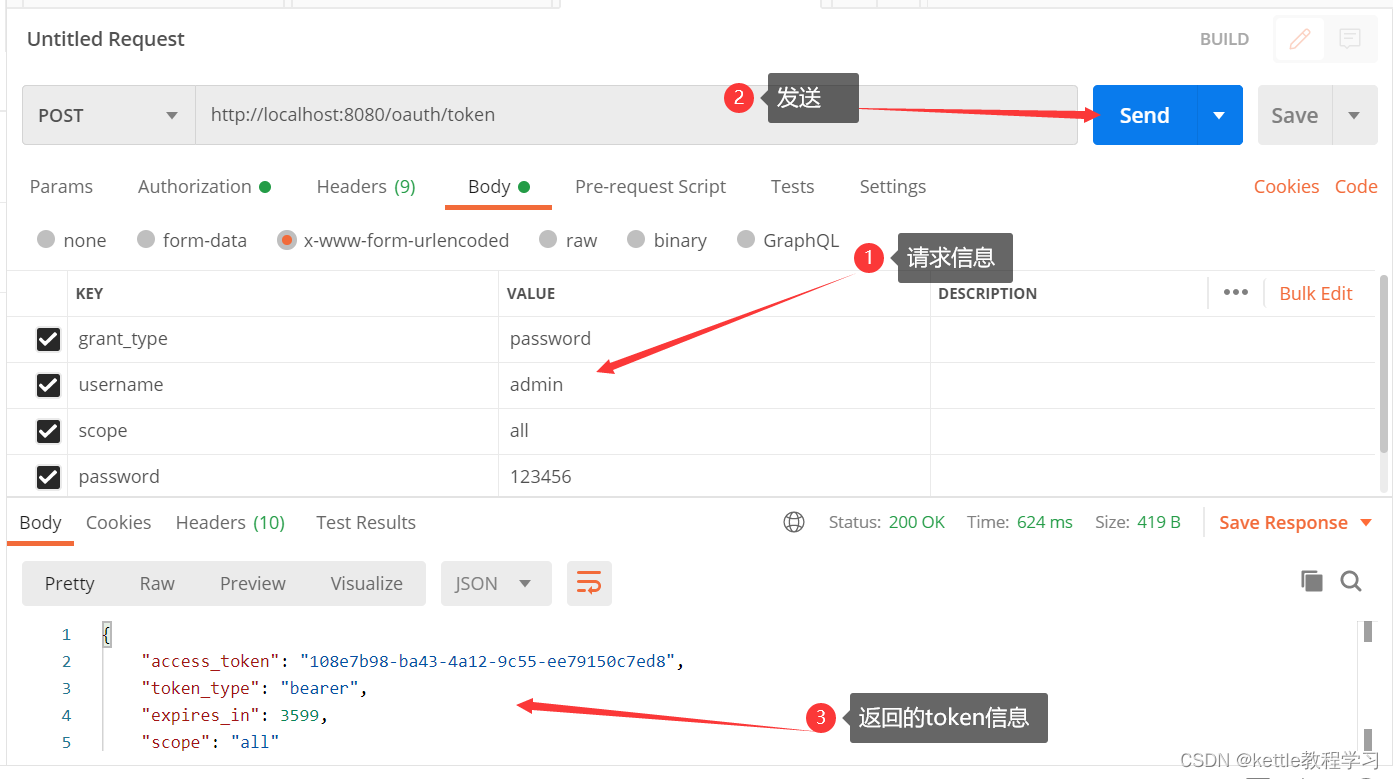
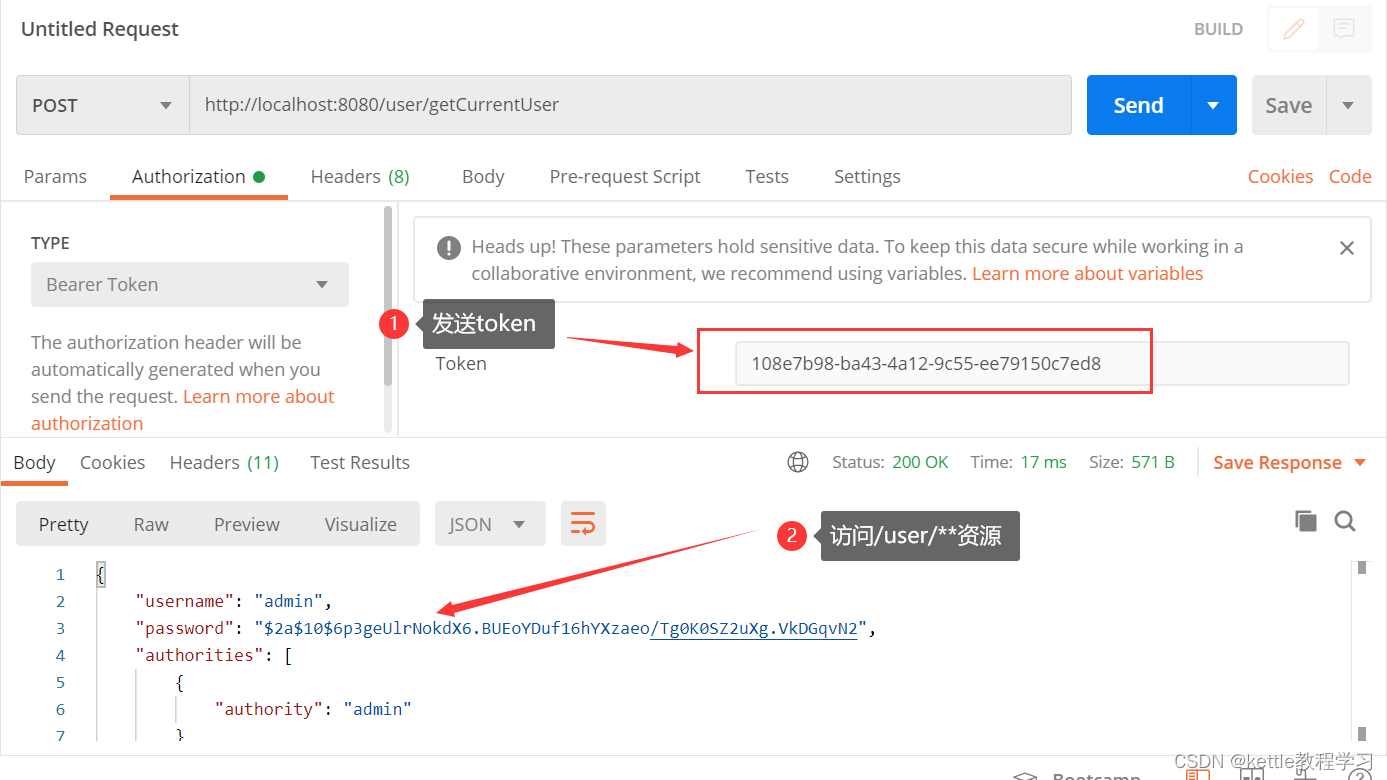
2.9 通过token访问授保护的资源
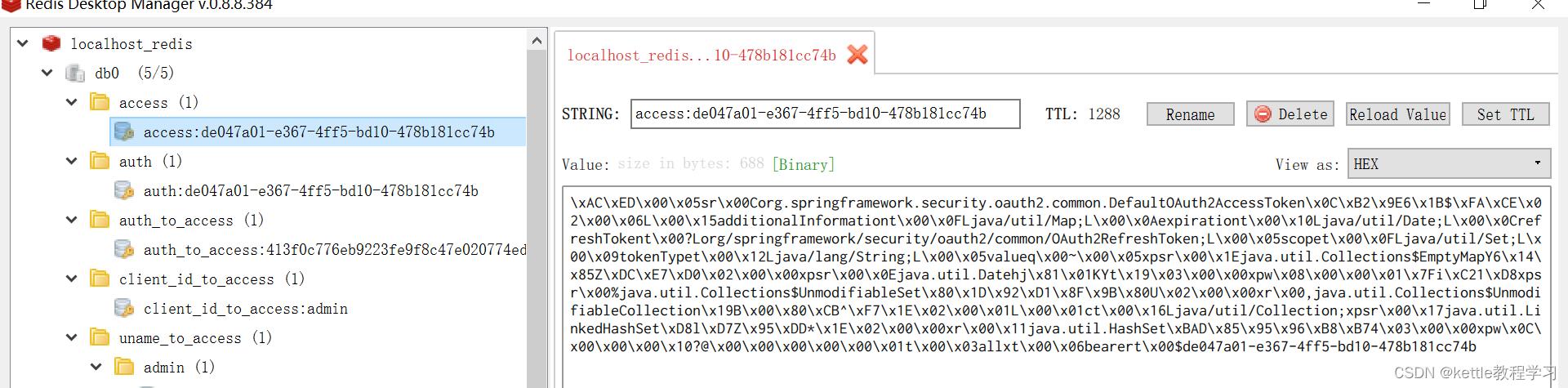
2.8 redis存储,通过RDM发现token已经存储在redis中了
redis存储token的更多相关文章
- 讨论两种Redis中Token的存储方式
摘要:本文讨论一个问题:存储token时,token与对应用户id谁来作为key? 问题起源问题起源于要给公司的后台管理系统添加权限管理,选用的是开源框架shiro,而原本系统上是采用token做了登 ...
- nginx+iis+redis+Task.MainForm构建分布式架构 之 (redis存储分布式共享的session及共享session运作流程)
本次要分享的是利用windows+nginx+iis+redis+Task.MainForm组建分布式架构,上一篇分享文章制作是在windows上使用的nginx,一般正式发布的时候是在linux来配 ...
- RESTful登录设计(基于Spring及Redis的Token鉴权)
转载自:http://www.scienjus.com/restful-token-authorization/ http://m.blog.csdn.net/article/details?id=4 ...
- Redis存储Tomcat集群的Session
Redis存储Tomcat集群的Session 如何 做到把新开发的代码推送到到生产系统中部署,生产系统要能够零宕机.对使用用户零影响. 设想 是使用集群来搞定,通过通知负载均衡Nginx,取下集群中 ...
- redis 存储session实现session共享
nginx 作为代理 tomcat集群 redis存储共享session nginx采用轮询方式将动态请求反向代理给tomcat,tomcat通过加载相应jar包方式实现获得redis中共享的sess ...
- Tomcat 使用Redis存储Session
Tomcat Redis Session Github 地址. 下载 commons-pool2-2.2.jar,jedis-2.5.2.jar,tomcat-redis-session-manage ...
- Asp.net Core 使用Redis存储Session
前言 Asp.net Core 改变了之前的封闭,现在开源且开放,下面我们来用Redis存储Session来做一个简单的测试,或者叫做中间件(middleware). 对于Session来说褒贬不一, ...
- php使用redis存储
一.Redis扩展模块 # wget https://codeload.github.com/phpredis/phpredis/zip/develop -O phpredis.zip # unzip ...
- Redis 存储、查询
[TOC] 数据存储 假设我们在MySQL数据库中有这样一张表: mysql> desc user_info; Field Type Null Key Default Extra id int( ...
随机推荐
- Airtest 的连接安卓模拟器
1. 开启安卓模拟器 2. 查看进程,MEmuHeadless.exe的进行程号, 然后在cmd中输入 netstat -ano|findstr "16116" 3. 到 airt ...
- Flutter 2.10 更新详解
Flutter 2.10 版已正式发布!虽然⾃ 上次稳定版本发布 以来还不到两个⽉,即使在这么短的时间内,我们也已处理和关闭了 1843 个 Issue,合并了来⾃全球 155 位贡献者的 1525 ...
- Tomcat 下载安装,启动,停止,注册服务,开机自启
感谢大佬:https://blog.csdn.net/wangmx1993328/article/details/81013715 目录 Tomcat 下载 startup.bat 启动 Tomcat ...
- mac brew安装
mac 安装homebrew出错 Failed to connect to raw.githubusercontent.com port 443: Connection refused error:原 ...
- Solution -「UR #21」「UOJ #632」挑战最大团
\(\mathcal{Description}\) Link. 对于简单无向图 \(G=(V,E)\),定义它是"优美"的,当且仅当 \[\forall\{a,b,c,d\ ...
- 论文解读(DAEGC)《Improved Deep Embedded Clustering with Local Structure Preservation》
Paper Information Title:<Attributed Graph Clustering: A Deep Attentional Embedding Approach>Au ...
- pytest(3)-测试命名规则
前言 在自动化测试项目中,单元测试框架运行时需要先搜索测试模块(即测试用例所在的.py文件),然后在测试模块中搜索测试类或测试函数,接着在测试类中搜索测试方法,最后加入到队列中,再按执行顺序执行测试. ...
- uni-app支付宝支付成功代码处理,获取trade_no数据
uni-app支付宝支付成功以后返回很多代码,我简单梳理一下,提出trade_no数据 uni.requestPayment({ provider: 'alipay', orderInfo: orde ...
- ensp练习:防火墙安全策略配置
一.实验目的:1. 了解华为防火墙安全策略.2. 掌握华为防火墙安全策略的配置.二.实验仪器:计算机.华为ensp模拟器.华为防火墙三.实验内容:在这里插入图片描述根据网络拓扑图如上(交换机不需要配置 ...
- [c语言]运算符的优先级与结合性
c语言中运算符的优先级和结合性常常被人混淆一谈,本文目的在于简单谈谈两者的区别.本文举几个简单的例子说明,这些运算符也特别常用. 首先要明白的是:优先级决定表达式中各种不同的运算符起作用的优先次序:而 ...