
8、IDEA提交代码出现: Fetch failed fatal: Could not read from remote repository
第一步、确认Git公钥/密钥是否生成:
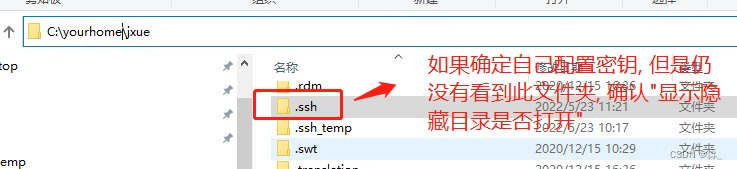
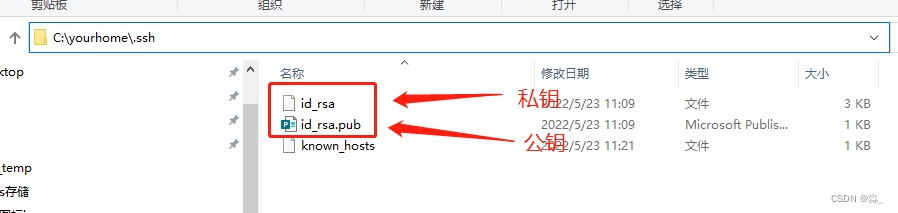
1、 首先查看本地是否生成git密钥,一般在C盘home目录下:【C:你自己的home目录\.ssh】
第二步:添加Git密钥:
右键->Git base here(前提是已经安装GIt), 具体如何安装Git, 请自行安装
按顺序执行命令
1、git config --global user.name "名称" 添加用户名配置

2、git config --global user.email "git邮箱'' 添加git邮箱配置

3、ssh-keygen -t rsa -C "git邮箱" 根据git邮箱生成公钥密钥, 此步骤切记不要输入密码, 因为idea连接的时候不需要密码. 后续步骤直接回车, 具体请参考截图.
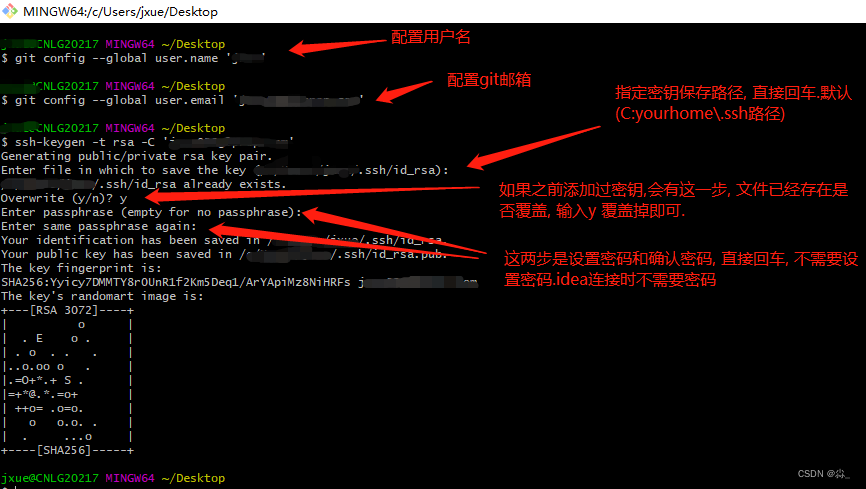
完成以上步骤后, 已经生成密钥。
第三步:Git添加公钥:
将.ssh 的id_rsa.pub文件用编辑器打开, 复制里面的内容添加到git的公钥配置
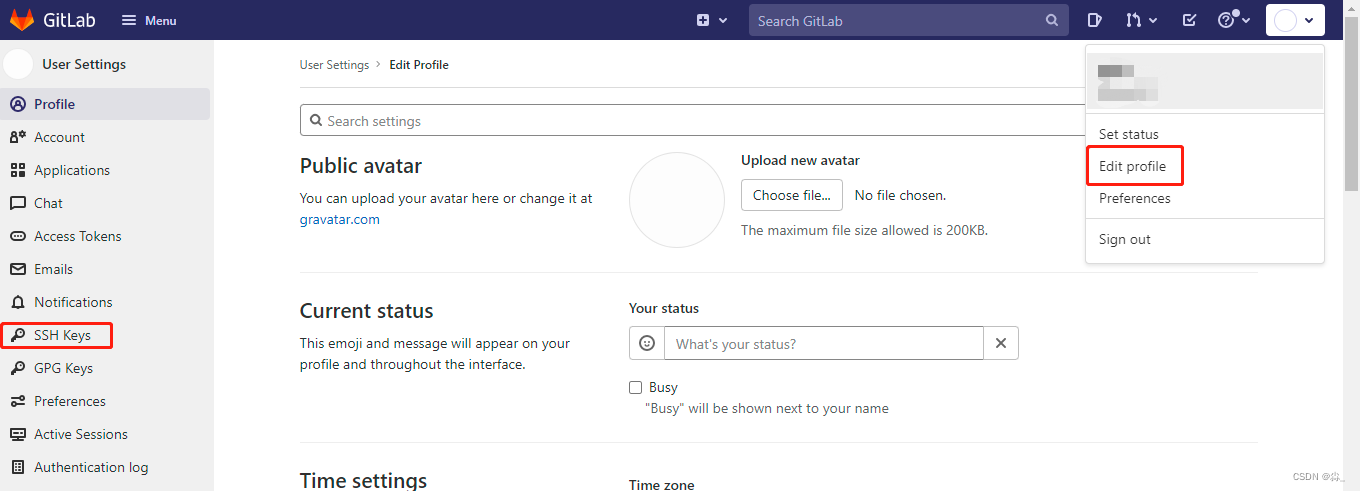
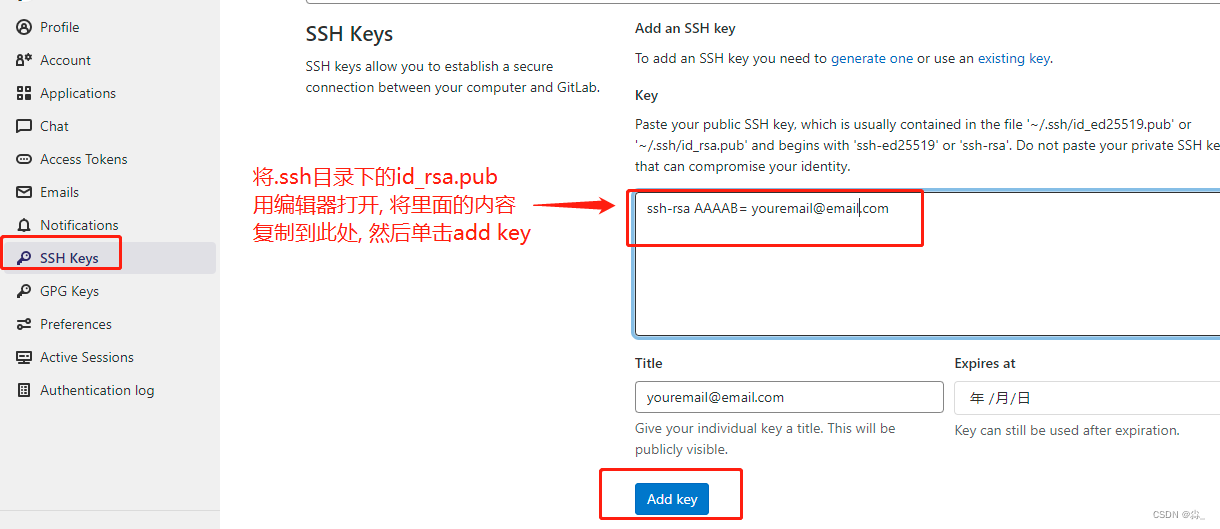
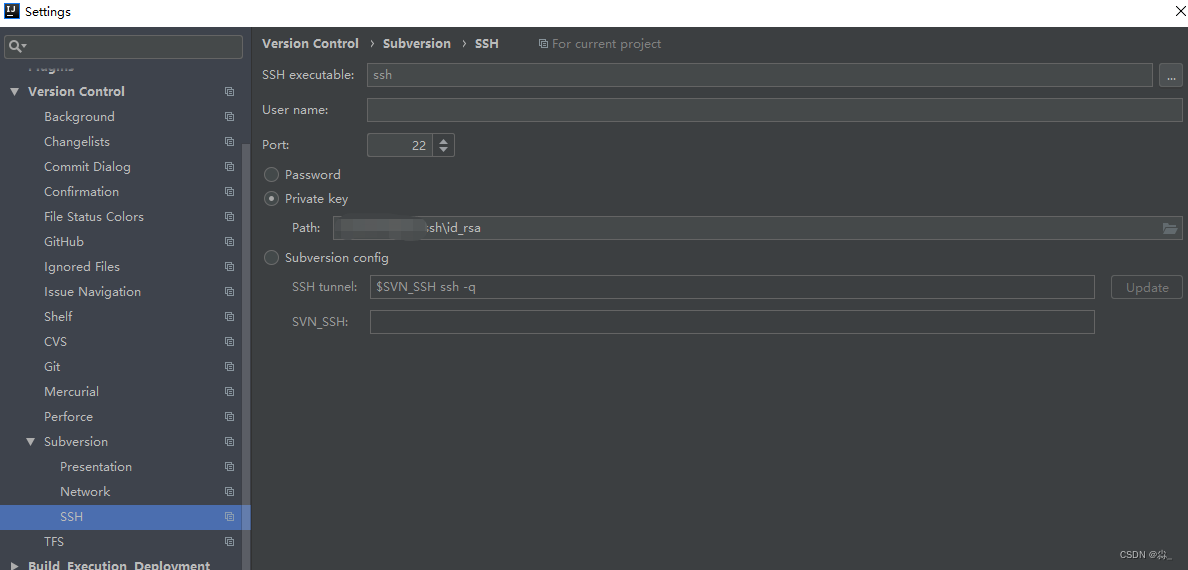
第四步:确认IDEA是否添加私钥:
File->setting->搜索SSH->选择private key 选择你的私钥文件
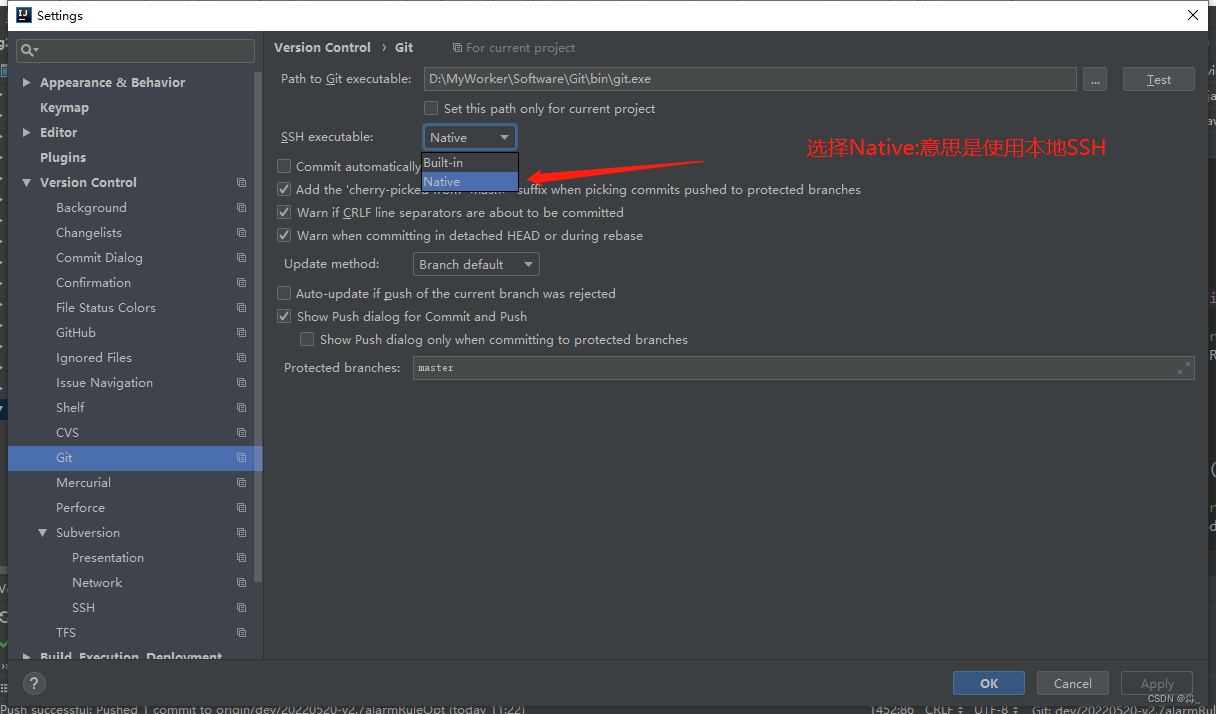
第五步:确认IDEA的Git配置是否是本地:
File ->setting->搜说git->修改SSH excutable 为Native(PS: 操作完如果还是不能提交可以按照第六步重启一下Idea)
最开始没有重启IDEA, 操作完还是不行, 后面重启了一下可以了. 但是后面为了验证是否需要重启IDEA切换了几次, 发现不重启也没问题. 所以如果按照以上步骤仍然没有效果可以重启一下IDEA试试。
第六步: 重启IDEA
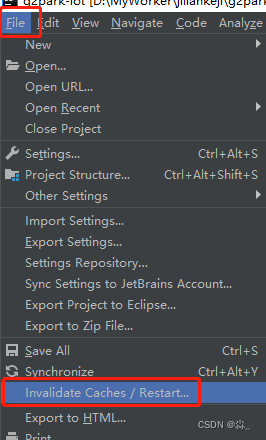
以上步骤操作完成, 就可以使用IDEA正常提交代码了
搜索
复制
8、IDEA提交代码出现: Fetch failed fatal: Could not read from remote repository的更多相关文章
- Push failed: Failed with error: fatal: Could not read from remote repository.
GitLab push远端,出现错误提示:Push failed: Failed with error: fatal: Could not read from remote repository. 原 ...
- gitlab 拉代码提示:Your Account has been blocked. fatal: Could not read from remote repository. 最佳解决方案
今天在脚本服务器上拉取代码,突然发现拉不了代码了,提示: GitLab: Your account has been blocked. fatal: Could not read from remot ...
- 【git基础】Permission denied (publickey). fatal: Could not read from remote repository
运行以下git命令的时候出现错误 git push -u origin master error The authenticity of host 'github.com (13.250.177.22 ...
- fatal:'origin' does not appear to be a git repository fatal:Could not read from remote repository
天gitlab中遇到的问题: 当 git push origin branch_name时遇到报错如下: fatal:'origin' does not appear to be a git repo ...
- git pull 出错 fatal: Could not read from remote repository.Please make sure you have the correct access rights.and the repository exists.
Warning: Permanently added the RSA host key for IP address '192.30.252.131' to the list of known hos ...
- git提示错误关于错误:ssh: Could not resolve hostname github.com: Name or service not known.fatal: Could not read from remote repository.
关于 Git 使用中出现的错误 饥人谷_楠柒 关注 2016.11.02 15:33* 字数 746 阅读 3607评论 5喜欢 10赞赏 1 关于错误:ssh: Could not resolve ...
- Permission denied (publickey). fatal: Could not read from remote repository.
博主在github上下载tiny face的的源代码的时候,遇到git clone命令为:git clone --recursive git@github.com:peiyunh/tiny.git 而 ...
- On branch master nothing to commit, working tree clean ERROR: Repository not found. fatal: Could not read from remote repository.
将gitbash部署hexo到github:hexo deploy 报以下错误: Administrator@liu MINGW64 /Hexo $ hexo d INFO Deploying: gi ...
- github下载报错:Permission denied (publickey). fatal: Could not read from remote repository.
Permission denied (publickey). fatal: Could not read from remote repository. 博主在github上下载tiny face的的 ...
随机推荐
- VScode开发STM32/GD32单片机-MakeFile工程JlinkRTT配置
本次使用开发板为STM32F401CCU6,使用CubeMX配置一个Makefile工程 配置时候为内部时钟 工程选择makefile工程类型 只生成需要的文件 用VSCode打开后显示很多波浪线 选 ...
- MyBatis(入参的类型和日志记录)
入参的类型是对象 1. 新增的参数是对象 2. 空值的处理,占位符 字段,jdbcType=VARCHAR 字符串 字段,jdbcType=DATE ...
- Failed to convert from type [java.lang.String] to type [java.util.Date] for value '2020-02-06'; nested exception is java.lang.IllegalArgumentException]解决
今天做springbook项目前端输入日期传到数据库保存报了一下错误 Whitelabel Error Page This application has no explicit mapping fo ...
- 一篇带你了解如何使用纯前端类Excel表格构建现金流量表
现金流量表(Cash Flow Statement),是指反映企业在一定会计期间现金和现金等价物流入和流出的报表.现金流量表是企业财务报表的三个基本报告之一(另外两个是资产负债表和损益表). 为了全面 ...
- Vue学习之--------深入理解Vuex之多组件共享数据(2022/9/4)
在上篇文章的基础上:Vue学习之--------深入理解Vuex之getters.mapState.mapGetters 1.在state中新增用户数组 2.新增Person.vue组件 提示:这里使 ...
- 微粒群算法PSO 01背包问题 python
import random import math import matplotlib.pyplot as plt import numpy as np import time def init(b_ ...
- html+css 面试题总结附答案
行内元素有哪些? 块级元素有哪些? 块级元素:div p h1 ul li form table行内元素: a b br i span input select laber strong em img ...
- ES6学习笔记(十四)module的简单使用
1.前言 module模块机制是es6新引入的,它解决了作用域的问题,使代码更加规范和结构化. 下面简单的使用一下. 2.基本使用 2.1 模块和脚本的区别 模块代码运行在严格模式下,并且没有任何办法 ...
- ES6 学习笔记(五)基本类型Boolean
Boolean 1.需要注意的地方: 取值:true false 对于值为空字符串,0,-0,NaN,Null,undefined,false的布尔对象,它都会有一个初始值false.对于其它的值如& ...
- Sprint产品待办列表的优先级要怎么排?
在梳理产品待办事项列表的过程中,产品负责人需要先做优先级排列,保证我们 在一定的时间盒内能够交付需要优先级最高.最具价值的用户故事. 那这个用户故事的优先级要怎么排列,我们怎样选择用户故事的实现顺序? ...