
Ajax的使用(jquery的下载)
Ajax学习笔记(jquery的下载)
JQuery的官网下载
地址:http://jquery.com
右上角的"Download JQuery"
三个可供下载的文件:
Production JQuery版本:优化压缩后的版本,具有体积小,主要用于部署网站时使用
Development JQuery版本:未压缩版本有266kb的大小,一般在网站建设时使用
JQuery map文件:一般不需要
最好将三个都下载,方便在需要时切换。
几个主要参数
- URL:请求地址
- data:发送的数据
- async:是否异步
- success:成功之后的回调函数
- error:失败之后的回调函数
引用jQuery脚本库
<script src="JQuery/jquery-3.3.1.js"></script>
在IDEA中,需要导入静态资源约束。否则找不到js文件。报$不存在
   <!--静态资源过滤器-->

    <mvc:default-servlet-handler/>
1、在网页中引入该js文件
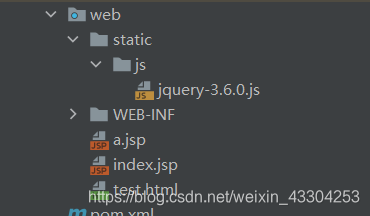
<script src="${pageContext.request.contextPath}/static/js/jquery-3.6.0.js"></script>
例子ajax的简单使用
页面
<%--

  Created by IntelliJ IDEA.

  User: ff

  Date: 2021/8/1

  Time: 12:48

  To change this template use File | Settings | File Templates.

--%>

<%@ page contentType="text/html;charset=UTF-8" language="java" %>

<html>

  <head>

    <title>$Title$</title>

    <script src="${pageContext.request.contextPath}/static/js/jquery-3.6.0.js"></script>

  </head>

  <body>

  <script type="text/javascript">

    function a(){

      $.post({

        url:"${pageContext.request.contextPath}/ajax/a2",

        data:{"name":$("#name").val()},

        success:function (data){

          alert(data);

        }

      })

    }

  </script>

用户名:<input type="text" id="name" onblur="a()">

  </body>

</html>
controller
package com.zheng.controller;

import org.springframework.stereotype.Controller;

import org.springframework.web.bind.annotation.RequestMapping;

import org.springframework.web.bind.annotation.RestController;

import javax.servlet.http.HttpServletResponse;

import java.io.IOException;

@Controller

@RequestMapping("/ajax")

public class AjaxController {

    @RequestMapping("/a2")

    public void ajax1(String name,HttpServletResponse response) throws IOException {

        if("zheng".equals(name)){

            response.getWriter().println("true");

        }else{

            response.getWriter().println("false");

        }

    }

}
web.xml
<?xml version="1.0" encoding="UTF-8"?>

<web-app xmlns="http://xmlns.jcp.org/xml/ns/javaee"

         xmlns:xsi="http://www.w3.org/2001/XMLSchema-instance"

         xsi:schemaLocation="http://xmlns.jcp.org/xml/ns/javaee http://xmlns.jcp.org/xml/ns/javaee/web-app_4_0.xsd"

         version="4.0">

    <!--配置DispatchServlet;这个是springMVC的核心,请求分发器,前端控制器-->

    <servlet>

        <servlet-name>springMVC</servlet-name>

        <servlet-class>org.springframework.web.servlet.DispatcherServlet</servlet-class>

        <init-param>

            <param-name>contextConfigLocation</param-name>

            <!--里边的路径是编写的配置文件-->

            <param-value>classpath:springmvc-servlet.xml</param-value>

        </init-param>

        <!--启动级别-->

        <load-on-startup>1</load-on-startup>

    </servlet>

    <!--在springMVC中,/:代表匹配所有的请求,不包括jsp页面。/*:匹配所有的请求,包括jsp-->

    <servlet-mapping>

        <servlet-name>springMVC</servlet-name>

        <url-pattern>/</url-pattern>

    </servlet-mapping>

</web-app>
springmvc核心配置文件
<?xml version="1.0" encoding="UTF-8"?>

<beans xmlns="http://www.springframework.org/schema/beans"

       xmlns:xsi="http://www.w3.org/2001/XMLSchema-instance"

       xmlns:context="http://www.springframework.org/schema/context"

       xmlns:mvc="http://www.springframework.org/schema/mvc"

       xsi:schemaLocation="http://www.springframework.org/schema/beans

       http://www.springframework.org/schema/beans/spring-beans.xsd

       http://www.springframework.org/schema/context

       http://www.springframework.org/schema/context/spring-context.xsd

        http://www.springframework.org/schema/mvc

       http://www.springframework.org/schema/mvc/spring-mvc.xsd">

    <!--自动扫描包,让指定包下的注解生效,有ioc容器统一管理-->

    <context:component-scan base-package="com.zheng.controller"/>

    <!--静态资源过滤器-->

    <mvc:default-servlet-handler/>

    <mvc:annotation-driven/>

    <!--视图解析器-->

    <bean class="org.springframework.web.servlet.view.InternalResourceViewResolver" id="internalResourceViewResolver">

        <!--前缀-->

        <property name="prefix" value="/WEB-INF/jsp/"/>

        <!--后缀-->

        <property name="suffix" value=".jsp"/>

    </bean>

</beans>
Ajax的使用(jquery的下载)的更多相关文章
- 最新JavaScript、Ajax典藏级学习资料下载分类汇总 (2011年12月21日更新)
其他网站开发相关资料 超强HTML和xhtml,CSS精品学习资料下载汇总 最新htm ...
- jquery插件下载地址
以下是本人收集的jquery插件下载地址: .............版本自行选择. jquery官网:http://jquery.com/ jquery.validate.js 官网下载地址:htt ...
- spring mvc 避免IE执行AJAX时,返回JSON出现下载文件
<!-- 避免IE执行AJAX时,返回JSON出现下载文件 --> <bean id="mappingJacksonHttpMessageConverter" c ...
- 三、jQuery--Ajax基础--Ajax全接触--jQuery中的AJAX
用jQuery实现Ajax jQuery.ajax([settings]) type:类型,“POST”或“GET”,默认为“GET” url:发送请求的地址 data:是一个对象,连同请求发送到服务 ...
- SpringMVC 避免IE执行AJAX时,返回JSON出现下载文件
<?xml version="1.0" encoding="UTF-8"?> <!-- SpringMVC配置文件 --> <be ...
- jquery模板下载网站
jquery模板下载网站 http://www.jqshare.com/
- JavaScript 框架 jQuery 的下载和安装
jQuery 简介: jQuery 是一个 JavaScript 库. jQuery 极大地简化了 JavaScript 编程. jQuery 很容易学习. jQuery 下载: // 官网: htt ...
- 转 Using $.ajaxPrefilter() To Configure AJAX Requests In jQuery 1.5
Using $.ajaxPrefilter() To Configure AJAX Requests In jQuery 1.5 Posted February 18, 2011 at 6:29 PM ...
- Ajax:后台jquery实现ajax无刷新删除数据及demo
aaarticlea/png;base64,iVBORw0KGgoAAAANSUhEUgAAA8gAAAFSCAIAAAChUmFZAAAgAElEQVR4nO29z4scWZbn2/+Hb30zi8
随机推荐
- Less混合结合:nth-child()选择器的高级玩法
1.先看效果图 上图中比较麻烦的是每块的底色处理,下面看怎么处理 2.:nth-child(n) 选择器 匹配属于其父元素的第 N 个子元素,不论元素的类型. n 可以是数字.关键词或公式. 数字:最 ...
- 走进Redis:哨兵集群
为什么需要哨兵 在 Redis 的主从库模式中,如果从库发生了故障,用户的操作是可以继续进行的,因为写操作是只在主库中进行的.那么,如果主库发生了故障,用户的操作将会收到影响.这时候可能会需要选择一个 ...
- java学习第一天.day05
jvm的内存 栈:类方法使用后自动销毁,销毁的好处是释放内存 java方法执行时,在栈区执行 堆: 线程共享的一块内存区域 所有的对象实例以及 数组 都要在堆上分配 每次使用new ...
- mybatisplus使用xml
一.配置xml路径 mybatis-plus: mapper-locations: classpath:mapper/*.xml 二.编写Mapper里面的方法 public interface Us ...
- Python条件语句的用法
python条件语句使用 if 表达式,难度不高,需要注意的是嵌套用法,以及如何设置对应的条件. if 条件判断语句 python 语句是按固定顺序执行的,先执行前面的语句,再执行后面的语句.如果你像 ...
- KingbaseES 全局索引
概述:在分区表上创建的索引可分为全局索引和本地索引.全局索引包括全局非分区索引(Global Nonpartitioned Indexes)和全局分区索引(Global Partitioned Ind ...
- centos7设置时间和上海时区并进行同步
1.设置时区(同步时间前先设置) timedatectl set-timezone Asia/Shanghai 2.安装组件 yum -y install ntp systemctl enable n ...
- dotnet7 aot编译实战
0 起因 这段日子看到dotnet7-rc1发布,我对NativeAot功能比较感兴趣,如果aot成功,这意味了我们的dotnet程序在防破解的上直接指数级提高.我随手使用asp.netcore-7. ...
- kibana配置文件kibana.yml参数详解
server.port: 默认值: 5601 Kibana 由后端服务器提供服务,该配置指定使用的端口号. server.host: 默认值: "localhost" 指定后端服务 ...
- 3.云原生之Docker容器三大核心概念介绍
转载自:https://www.bilibili.com/read/cv15181760/?from=readlist docker search --no-trunc=false [镜像名称] #搜 ...