
Vue中router路由的使用、router-link的使用(在项目中的实际运用方式)
前提:router已经安装
1、先看router中的index.js文件
import Vue from 'vue'

import Router from 'vue-router'

// import HelloWorld from '@/components/HelloWorld'

import Register from '../views/main/Register'

import Login from '@/views/main/Login'

import Home from '@/views/main/Home'

import HomePage from '@/views/end/HomePage'

import AdminInfo from '@/views/end/AdminInfo'

import UserInfo from '@/views/end/UserInfo'

Vue.use(Router)

export default new Router({

  routes: [

    {

      path: '/',

      name: '注册页',

      component: Register

    },

    {

      path:'/login',

      name:'登录页',

      component: Login

    },

    //菜单栏设置

    {

      path:'/Home',

      name: "主界面",

      component: Home,

      redirect: '/HomePage',

      children: [

        {

          path: '/HomePage',

          name: '后台首页',

          component: HomePage

        },

        {

          path:'/AdminInfo',

          name: '管理员信息界面',

          component: AdminInfo

        },{

          path:'/UserInfo',

          name: "用户信息界面",

          component: UserInfo

        }

      ]

    },

  ]

})
2、router-link的使用
<template>

  <div>

    <el-container class="home_container" style="height: 800px">

      <el-header>

        <div>

          <span class="header-left">服装库存管理后台系统</span>

        </div>

        <div class="header-right" style="margin-right: -70%">

          <div class="header-right-left" style="float: left">

            <span>当前登录用户</span>:

          </div>

          <div class="header-right-rigth" style="float: right">

            <span>退出登录</span>

          </div>

        </div>

        <div></div>

      </el-header>

      <el-container>

        <el-aside width="150px">

          <el-menu :default-openeds="['1', '3']">

            <el-submenu index="1">

              <template slot="title"

                ><i class="el-icon-s-home"></i>首页信息</template

              >

              <el-menu-item index="1-1">

                <router-link to="/HomePage" style="color: black; text-decoration: none;" >首页信息</router-link>

              </el-menu-item>

            </el-submenu>

            <el-submenu index="2">

              <template slot="title"><i class="el-icon-menu"></i>信息展示</template>

              <el-menu-item index="2-1">

                <router-link to="/AdminInfo" style="color: black; text-decoration: none;">管理员信息</router-link>

              </el-menu-item>

              <el-menu-item index="2-2">

                <router-link to="/UserInfo" style="color: black; text-decoration: none;">用户信息</router-link>

              </el-menu-item>

              <el-menu-item index="2-3">商品类别</el-menu-item>

              <el-menu-item index="2-4">商品详情</el-menu-item>

            </el-submenu>

            <el-submenu index="3">

              <template slot="title"

                ><i class="el-icon-setting"></i>库存管理</template

              >

              <el-menu-item index="3-1">货号信息</el-menu-item>

              <el-menu-item index="3-2">入库信息</el-menu-item>

              <el-menu-item index="3-3">入库详情</el-menu-item>

              <el-menu-item index="3-4">出库信息</el-menu-item>

              <el-menu-item index="3-4">出库详情</el-menu-item>

            </el-submenu>

            <el-submenu index="4">

              <template slot="title"

                ><i class="el-icon-unlock"></i>辅助管理</template

              >

              <el-menu-item index="3-1"

                ><span><i class="el-icon-unlock"></i></span>

                修改密码</el-menu-item

              >

            </el-submenu>

          </el-menu>

        </el-aside>

        <el-main>

          <router-view></router-view>

        </el-main>

      </el-container>

    </el-container>

  </div>

</template>

<script>

export default {

  data() {

    return {

      menuList: [],

      isCollapse: false,

    };

  },

  methods: {},

  computed: {},

};

</script>

<style scoped>

/* 去除router-link的下划线 */

/* .router-link-active {

  text-decoration: none;

} */

 @import "../../assets/css/base.css";

</style>
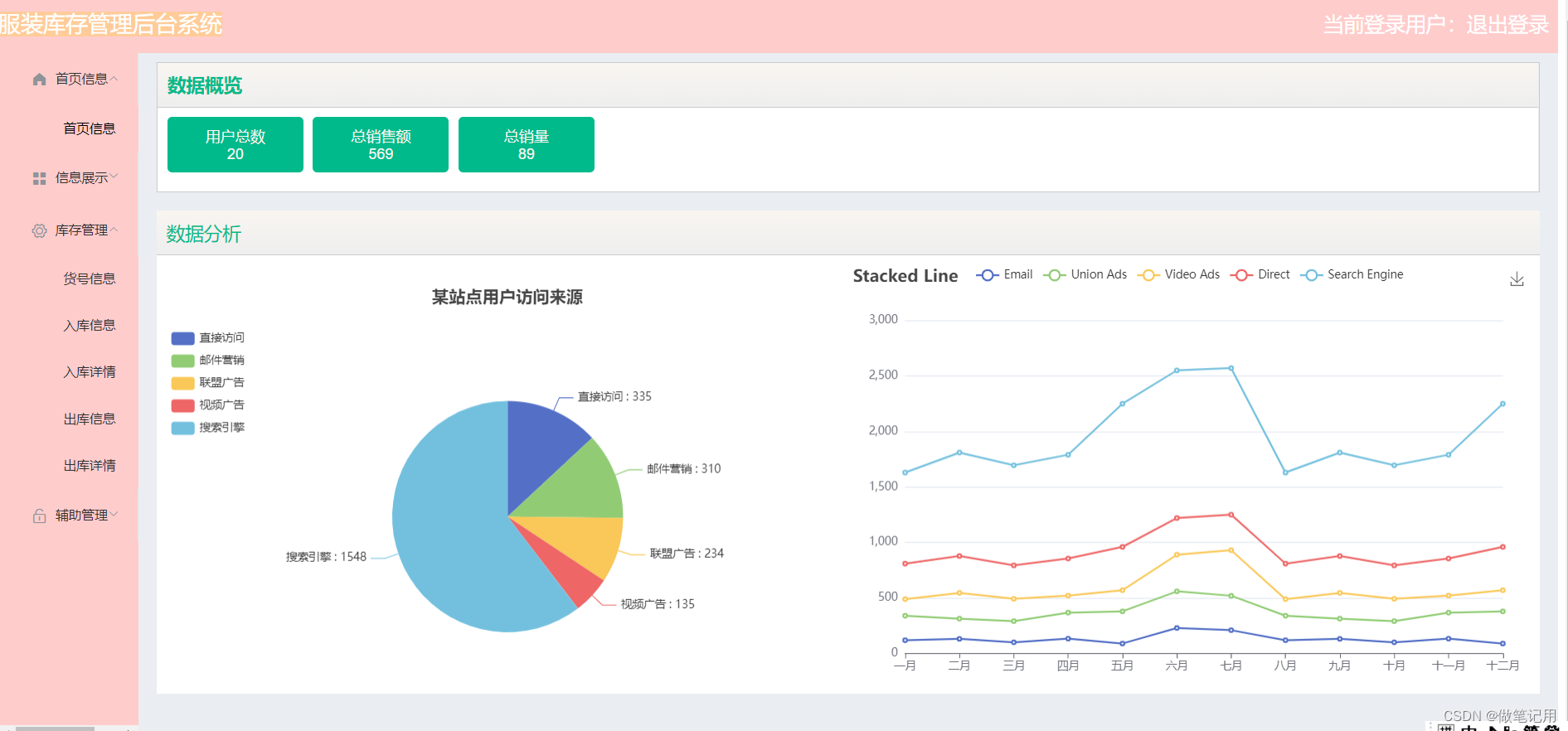
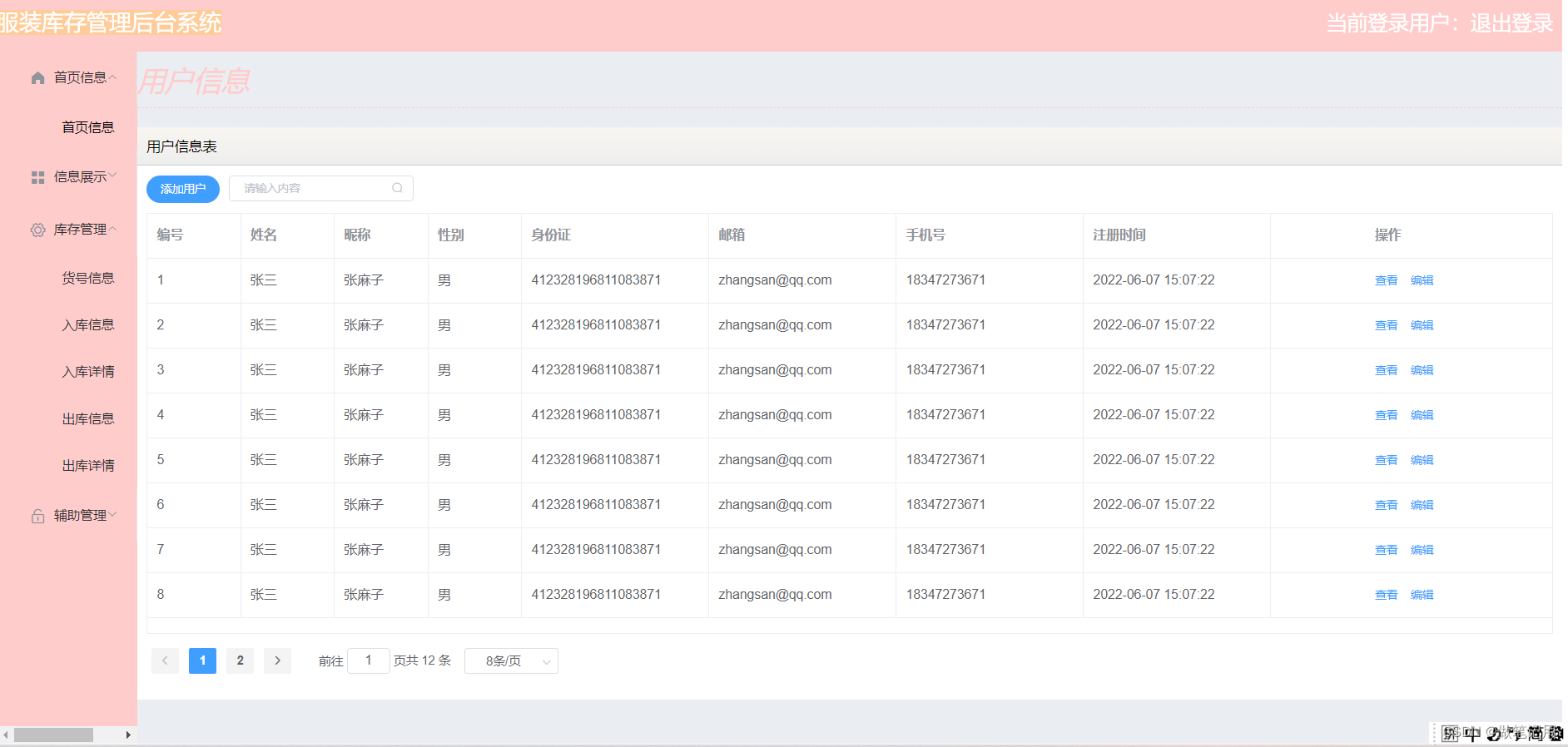
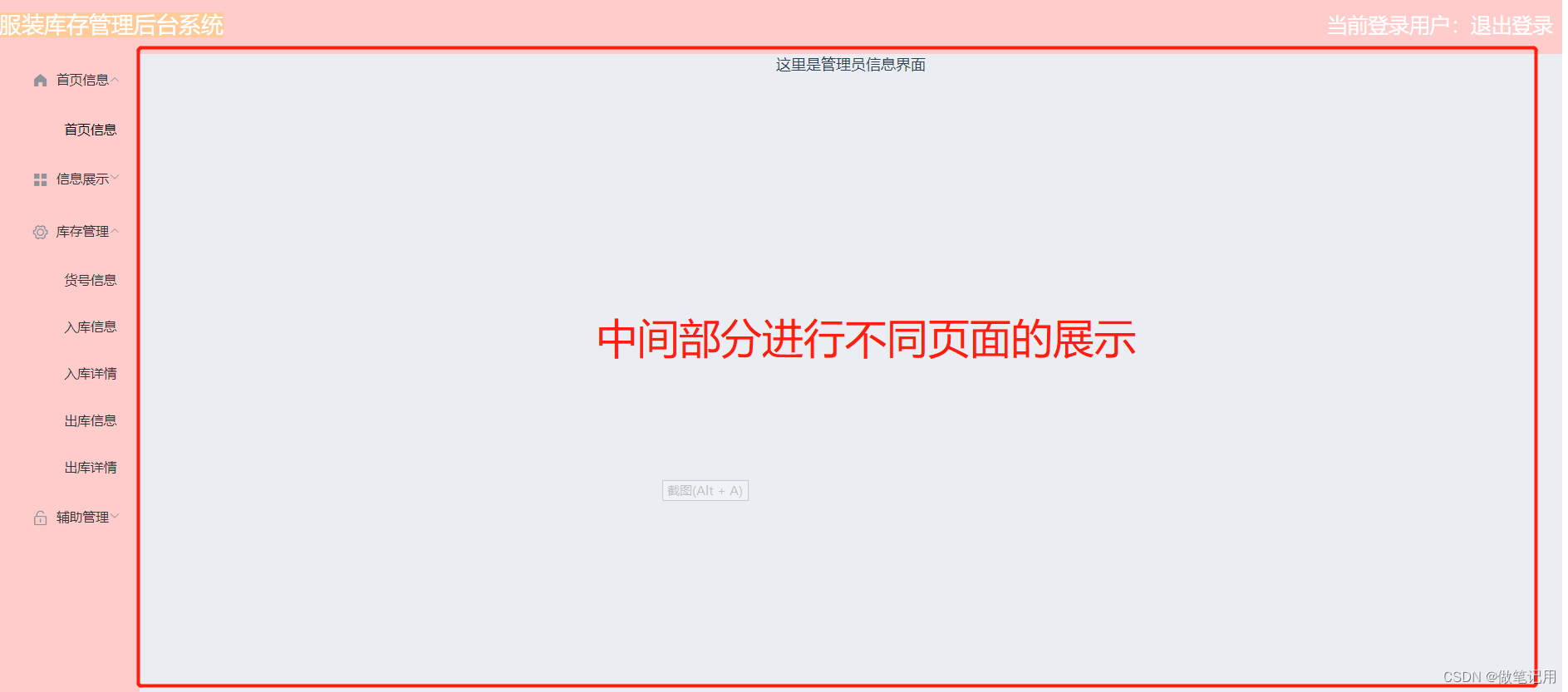
3、实现的效果

Vue中router路由的使用、router-link的使用(在项目中的实际运用方式)的更多相关文章
- Vue 自定义一个插件的用法、小案例及在项目中的应用
1.开发插件 install有两个参数,第一个是Vue构造器,第二个参数是一个可选的选项对象 MyPlugin.install = function (Vue, options) { // 1 ...
- Vue.js搭建路由报错 router.map is not a function,Cannot read property ‘component’ of undefined
错误: 解决办法: 2.0已经没有map了,使用npm install vue-router@0.7.13 命令兼容1.0版本vue 但是安装完之后会出现一个错误: Cannot read prope ...
- vue组件与路由的使用步骤
router:根据不同的地址跳转到不同的页面一.vue-router的使用 1.下载路由模块 npm vue-router --save 2.在router.js中 先引入路由 imp ...
- Vue项目中遇到的问题汇总
一.打包后的打开index.html页面空白的几种情况: 引入的css.js路径报错,此时解决方法:把vue.config.js中的增加publicPath: ‘./’ 或者把原来的baseUrl改为 ...
- 项目中解决实际问题的代码片段-javascript方法,Vue方法(长期更新)
总结项目用到的一些处理方法,用来解决数据处理的一些实际问题,所有方法都可以放在一个公共工具方法里面,实现不限ES5,ES6还有些Vue处理的方法. 都是项目中来的,有代码跟图片展示,长期更新. 1.获 ...
- vue项目中引用echarts的几种方式
准备工作: 首先我们初始化一个vue项目,执行vue init webpack echart,接着我们进入初始化的项目下.安装echarts, npm install echarts -S //或 ...
- vue cli3以上的项目中如何使用axois请求本地json文件
首先明确一点,在vue cli3以上的版本中,存放静态资源的文件是public 我刚开始以为是和vue cli2一样需要放在static文件夹下,但是项目中没有这个文件夹,我就自己创建了一个,结果请求 ...
- vuex在项目中使用的一点总结
以下为vue后台管理项目中使用vuex的一点总结,截取了其中部分代码,如有什么错误,还望指出. 1. token 存储 登陆成功之后,需要把获取到的 token 存储到 vuex 中,配合 axios ...
- 我是如何在公司项目中使用ESLint来提升代码质量的
ESLint:你认识我吗 ESLint是一个语法规则和代码风格的检查工具. 和学习所有编程语言一样,想要入门ESLint,首先要去它的官网看看:https://eslint.org/. ESLint的 ...
- 在 ASP.NET Core 项目中使用 npm 管理你的前端组件包
一.前言 在项目的前端开发中,对于绝大多数的小伙伴来说,当然,也包括我,不可避免的需要在项目中使用到一些第三方的组件包.这时,团队中的小伙伴是选择直接去组件的官网上下载,还是图省事直接在网上搜索,然后 ...
随机推荐
- 感谢有你!Apache DolphinScheduler 项目 GitHub star 突破 8k
本周伊始,Apache DolphinScheduler 项目在 GitHub 上的 Github Star 总数首次突破 8K.目前,Apache DolphinScheduler 社区已经拥有 C ...
- 数据分表Mybatis Plus动态表名最优方案的探索
一.应用场景 大家在使用Mybatis进行开发的时候,经常会遇到一种情况:按照月份month将数据放在不同的表里面,查询数据的时候需要跟不同的月份month去查询不同的表. 但是我们都知道,Mybat ...
- vue 使用 monaco-editor 实现在线编辑器
前言 项目里使用到 monaco-editor 编辑器,实现源码编辑器,看了很多网上教程,记录一下实现过程.在此之前引用很多博主的方法安装但是引入的时候,运行项目总是各种各样的错误,找不到头绪.终于在 ...
- MySQL 数据操纵语句
插入 插入多个字段 insert into grade (`name`) values ('大一'),('大二'),('大三'),('大四'); 修改 设置时间为当前时间 update `studen ...
- 使 Word 段落第一行空出两个字符的位置(段落首行缩进)
描述 使 Word 段落第一行左突出两个字符的位置,即段落首行缩进的方式有两种. "视图"选项卡--"显示"组--标尺 "开始"选项卡--& ...
- ArkUI 组件 Props
在上一篇博客文章中简单地提到了 Props . 在使用 Props 时需要注意到一个点,子组件从寄主页面传递过来的值是单向的,也就是子组件不能直接修改传递下来的值,即单向性. 以上篇文章定义的头像组件 ...
- Python自学教程2:大牛们怎么写注释
在还没开始学代码前,就要先学会写注释.不会写注释的程序员会遭到鄙视和唾弃,甚至在工作中会被人穿小鞋.注释也不是随便写一下就行,用好注释还是有点讲究的. 注释有什么用? 注释(Comments)主要是向 ...
- (最简单详细)IronPython下载、安装及简单使用
说实话,对于我这种小白,在网上找个IronPython找的很费劲,学会操作之后,直接整个随笔,供新手参考.前提是现在你应该有VS了 (1)找到IronPython的网站 很多人肯定就按照习惯搜索,Ir ...
- bat-MD文件转CSV文件
目录 1. bat文件里面写死文件名 2. 拖入文件 注意:每个单元格不能出现字符[|.$.;] 1. bat文件里面写死文件名 @echo off && setlocal enabl ...
- 面试突击79:Bean 作用域是啥?它有几种类型?
Spring 框架作为一个管理 Bean 的 IoC 容器,那么 Bean 自然是 Spring 中的重要资源了,那 Bean 的作用域是什么意思?又有几种类型呢?接下来我们一起来看. PS:Java ...