
MVC入门——列表页
创建控制器UserInfoController
using System;

using System.Collections.Generic;

using System.Linq;

using System.Web;

using System.Web.Mvc;

using MvcApplicationStudy.Models;

namespace MvcApplicationStudy.Controllers

{

    public class UserInfoController : Controller

    {

        //

        // GET: /UserInfo/

        public ActionResult Index()

        {

            TestEntities db = new TestEntities();

            var userInfoList = db.UserInfo.Where<UserInfo>(c => true);

            List<UserInfo> list = userInfoList.ToList();

           // ViewBag.Model = list;

            //return View();

            return View(list);

        }

    }

}
添加视图
@model IEnumerable<MvcApplicationStudy.Models.UserInfo>

@{

    Layout = null;

}

<!DOCTYPE html>

<html>

<head>

    <meta name="viewport" content="width=device-width" />

    <title>Index</title>

</head>

<body>

    <div>

        <table>

             <tr><th>编号</th><th>用户名</th><th>密码</th><th>时间</th><th>详细</th><th>删除</th><th>修改</th></tr>

         @*   @foreach(var userInfo in ViewBag.Model){

                <tr>

                    <td>@userInfo.ID</td>

                    <td>@userInfo.UserName</td>

                    <td>@userInfo.UserPwd</td>

                    <td>@userInfo.RegTime</td>

                    <td>详细</td>

                    <td>删除</td>

                    <td>修改</td>

                </tr>

            }*@

            @foreach(var item in Model){

                 <tr>

                    <td>@Html.DisplayFor(modelItem=>item.ID)</td>

                    <td>@Html.DisplayFor(modelItem=>item.UserName)</td>

                    <td>@Html.DisplayFor(modelItem=>item.UserPwd)</td>

                    <td>@Html.DisplayFor(modelItem=>item.RegTime)</td>

                    <td>@Html.ActionLink("详细", "ShowDetail", new{ id=item.ID})</td>

                    <td>@Html.ActionLink("删除", "DeleteUserInfo", new { id = item.ID }, new { @class="del"})</td>

                    <td>@Html.ActionLink("修改", "EditUserInfo", new { id=item.ID})</td>

                </tr>

            }

        </table>

    </div>

</body>

</html>
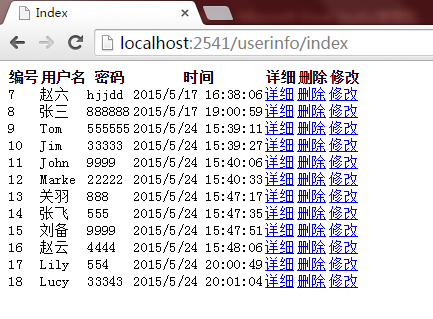
生成页面如下
MVC入门——列表页的更多相关文章
- MVC入门——删除页
添加Action DeleteUserInfo using System; using System.Collections.Generic; using System.Linq; using Sys ...
- MVC入门——编辑页
添加Action EditUserInfo using System; using System.Collections.Generic; using System.Linq; using Syst ...
- MVC入门——详细页
添加Action ShowDetail using System; using System.Collections.Generic; using System.Linq; using System. ...
- Asp.net MVC 3实例学习之ExtShop(四)——完成产品列表页
在完成产品列表页前要做一些准备功夫.首先是去下载MvcPager用了为产品列表分页.下载的可能是基于MVC 2的,没关系,可以用在MVC 3上.如果有担心,下载源代码重新编译一次好了.下载后将DLL添 ...
- Asp.net MVC入门视频教程
编程开发 > Asp.net视频教程 > Asp.net MVC入门视频教程 > 1.传统web处理方式和mvc处理方式 上传日期:2014-08-16 10:02:45 相关摘要 ...
- Java基础-SSM之Spring MVC入门篇
Java基础-SSM之Spring MVC入门篇 作者:尹正杰 版权声明:原创作品,谢绝转载!否则将追究法律责任. 一.Spring MVC简介 1>.什么是Spring MVC 答:Sprin ...
- 无废话MVC入门教程笔记
自学mvc,看了园子里李林峰写的李林峰写的无废话MVC入门教程笔记,现在有的平时忽略的或是不太清楚的点记下来 1,Html.DropDownList //服务端写法 @{ //下拉列表的值 List& ...
- 通过angularjs的directive以及service来实现的列表页加载排序分页
前两篇:(列表页的动态条件搜索,我是如何做列表页的)分别介绍了我们是如何做后端业务系统数据展示类的列表页以及动态搜索的,那么还剩下最重要的一项:数据展示.数据展示一般包含三部分: 数据列头 数据行 分 ...
- ASP.NET MVC 入门系列教程
ASP.NET MVC 入门系列教程 博客园ASP.NET MVC 技术专题 http://kb.cnblogs.com/zt/mvc/ 一个居于ASP.NET MVC Beta的系列入门文章,有朋友 ...
随机推荐
- PatentTips - MPLS Network System
MPLS (Multi Protocol Label Switching) network system has been watched with keen interest as a techni ...
- Codeforces Gym101502 I.Move Between Numbers-最短路(Dijkstra优先队列版和数组版)
I. Move Between Numbers time limit per test 2.0 s memory limit per test 256 MB input standard inpu ...
- HDU 5266 pog loves szh III(区间LCA)
题目链接 pog loves szh III 题意就是 求一个区间所有点的$LCA$. 我们把$1$到$n$的$DFS$序全部求出来……然后设$i$的$DFS$序为$c[i]$,$pc[i]$为$c ...
- python 常用库, 随时添加中
python只有你想不到的库,只要你能想到,肯定有对应的库 前面*的为标准库,**的是pip里面的,***则是要手动安装的1)python运行时服务* copy: copy模块提供了对复合(compo ...
- MAC终端命令行整理
参考:http://www.jianshu.com/p/3291de46f3ff 目录操作 命令名 说明 举例 cd 切换到指定目录 cd test ls 查看这个目录下的所有文件 ls /Users ...
- Bitmap 图片格式并用 C++ 读写 Bitmap
转自 Bitmap 图片格式并用 C++ 读写 Bitmap 1.Bitmap 图片格式 每部分的具体内容就不展开了.要说的有两点: (1)调色板不是必须的,可有可无,有没有调色板可以通过位图文件头的 ...
- Spring IOC知识java反射
[1] Java反射知识-->Spring IoC :http://www.iteye.com/topic/1123081 [2] Java动态代理-->Spring AOP :http: ...
- Direct2D教程(三)简单几何图形
从本章开始,我们介绍D2D几何图形. D2D图形分类 Direct2D支持多种类型的几何图形,包括Simple Geometry(简单几何图形) 矩形 圆角矩形 椭圆 Path Geometry(路径 ...
- python的私有化
1.双下划线(__) 由双下划线開始的属性在执行时被混淆,所以直接訪问是不同意的.实际上以双下划线開始的属性 会在解释时在前面加上下划线和类名.如self.__num会被解析为self._classN ...
- 如何使用电骡eMule上传资源
1 在电脑中创建一个文件夹专门为上传资源使用 在里面放入任意文件并右击显示ED2K链接 链接效果如下 2 登陆verycd网站,并点击上传资源 复制ED2K地址并选择分类