
struts2的单个文件上传
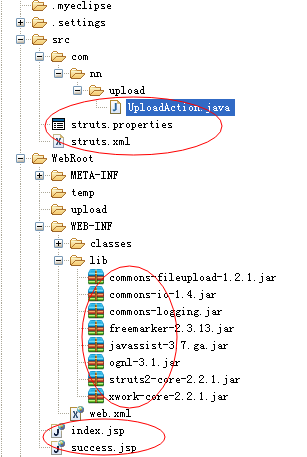
本文主要两种方式,一:通过 FileUtils.copyFile(file, savefile);方法复制;二:通过字节流方式复制
web.xml
<?xml version="1.0" encoding="UTF-8"?>

<web-app version="2.5"

    xmlns="http://java.sun.com/xml/ns/javaee"

    xmlns:xsi="http://www.w3.org/2001/XMLSchema-instance"

    xsi:schemaLocation="http://java.sun.com/xml/ns/javaee

    http://java.sun.com/xml/ns/javaee/web-app_2_5.xsd">

    <!-- struts2 framework -->

    <filter>

        <filter-name>struts</filter-name>

        <filter-class>org.apache.struts2.dispatcher.FilterDispatcher</filter-class>

    </filter>

    <filter>

        <filter-name>struts-cleanup</filter-name>

        <filter-class>org.apache.struts2.dispatcher.ActionContextCleanUp</filter-class>

    </filter>

    <filter-mapping>

        <filter-name>struts</filter-name>

        <url-pattern>*.do</url-pattern>

        <dispatcher>REQUEST</dispatcher>

        <dispatcher>FORWARD</dispatcher>

    </filter-mapping>

    <filter-mapping>

        <filter-name>struts-cleanup</filter-name>

        <url-pattern>/*</url-pattern>

    </filter-mapping>

  <welcome-file-list>

    <welcome-file>index.jsp</welcome-file>

  </welcome-file-list>

</web-app>
struts.xml
<?xml version="1.0" encoding="UTF-8" ?>

<!DOCTYPE struts PUBLIC

    "-//Apache Software Foundation//DTD Struts Configuration 2.0//EN"

    "http://struts.apache.org/dtds/struts-2.0.dtd">

 <struts>

     <include file="struts-default.xml" />
     <!--方法一 -->

     <package name="uploadFile" extends="struts-default">

         <action name="upload" class="com.nn.upload.UploadAction" method="upload">

               <result name="success">/success.jsp</result>

               <result name="input">/index.jsp</result>

         </action>

     </package>

     <!--方法二 -->

     <package name="uploadFile2" extends="struts-default">

         <action name="upload2" class="com.nn.upload.UploadAction" method="uploadByStream">

             <param name="allowTypes">.bmp,.png,.gif,.jpeg,.jpg</param>

               <param name="savePath">/upload</param> <!-- 保存的真实路径 -->

               <result name="success">/success.jsp</result>

               <result name="input">/index.jsp</result>

         </action>

     </package>

</struts>
struts.properties
struts.multipart.parser=jakarta

struts.multipart.saveDir=/temp

struts.multipart.maxSize=

struts.i18n.encoding=utf-

struts.locale=zh_CN

struts.action.extension=do

struts.custom.i18n.resources=globalMsg
UploadAction.java 主要代码
public class UploadAction extends ActionSupport {

    private File file;

    private String  fileName;

    private String fileType;

    // 第二种方法中接受依赖注入的属性

    private String savePath;

    private String allowTypes;

    /**

     * 第一种方法,使用FileUtils从temp中复制到相关路径下面,结束后temp中的文件自动被清楚

     * @return

     */

    public String upload() {

        String realpath = ServletActionContext.getServletContext().getRealPath("/upload");

        if (file != null) {

            String name = this.getFileName().substring();

            SimpleDateFormat  df = new SimpleDateFormat("yyyyMMddHHmmss");

            this.setFileName(df.format(new Date())+name); //文件名字+日期

            File savefile = new File(new File(realpath), this.getFileName());

            if (!savefile.getParentFile().exists())

                savefile.getParentFile().mkdirs();

            try {

                FileUtils.copyFile(file, savefile);

            } catch (IOException e) {

                e.printStackTrace();

            }

            ActionContext.getContext().put("message", "文件上传成功!");

        }

        return "success";

    }

    /**

     * 第二站方式,通过字节流来复制

     * @return

     */

    public String uploadByStream(){

        // 判断是否允许上传

          String filterResult = findFileType(this.getAllowTypes().split(","));

          if (filterResult != null) {

           ActionContext.getContext().put("typeError","您要上传的文件类型不正确");

           return filterResult;

          }

          // 以服务器的文件保存地址和原文件名建立上传文件输出流

          FileOutputStream fos;

          FileInputStream fis;

          String realpath = ServletActionContext.getServletContext().getRealPath(this.getSavePath());

        try {

            String name = this.getFileName().substring();

            SimpleDateFormat  df = new SimpleDateFormat("yyyyMMddHHmmss");

            this.setFileName(df.format(new Date())+name); //文件名字+日期

            realpath = realpath +"\\"+this.getFileName();

            fos = new FileOutputStream(realpath);

            fis = new FileInputStream(this.getFile());

             byte[] buffer = new byte[];

              int len = ;

              while ((len = fis.read(buffer)) > ) {

               fos.write(buffer, , len);

              }

              fos.close();

              fis.close();

              return SUCCESS;

        } catch (FileNotFoundException e) {

            e.printStackTrace();

        } catch (IOException e) {

            e.printStackTrace();

        }

          return INPUT;

    }

    public String findFileType(String[] types) {

          String fileType = this.getFileType();

          for (String type : types) {

              if (type.equals(fileType)) {

                return null;

              }

          }

          return INPUT;

    }

     //省略get set 方法

}
index.jsp
<%@ page language="java" import="java.util.*" pageEncoding="utf-8"%>

<%@taglib prefix="s" uri="/struts-tags"%>

<!DOCTYPE HTML PUBLIC "-//W3C//DTD HTML 4.01 Transitional//EN">

<html>

  <head>

    <script type="text/javascript">

        function check(){

            var file = document.getElementById("file");

            if(file != null){

                var fileType = file.value.substr(file.value.lastIndexOf(".")).toLowerCase(); //截取类型,如.jpg

                var fileName = file.value.substr(file.value.lastIndexOf("\\")); //截取文件名字,如:/01.png

                document.getElementById("fileName").value = fileName;

                document.getElementById("fileType").value = fileType;

                return true;

            }

            alert("请选择文件");

            return false;

        }

    </script>

  </head>

  <body>

    <p>stuts  文件上传实例 </p>

    ${requestScope.typeError}

    <!-- 第一种方式上传链接:

    <form action="/upload.do" method="post" enctype="multipart/form-data" onsubmit="return check();">

     -->

      <form action="/upload2.do" method="post" enctype="multipart/form-data" onsubmit="return check();">

       上传文件:<input type="file" name="file" /><input type="submit"  value="上传"/>

           <input type="hidden" name="fileType" id="fileType"/>

          <input type="hidden" name="fileName" id="fileName"/>

      </form>

  </body>

</html>
success.jsp
 <body>

      ${requestScope.message}<br>

        文件名称:<input type="text" value="<s:property value="fileName"/>"/><br>

         文件为:<img src="${pageContext.request.contextPath}/<s:property value="'upload/'+fileName"/>"><br>

    <s:debug></s:debug>

  </body>
源码下载地址:http://download.csdn.net/detail/u011518709/7896593
struts2的单个文件上传的更多相关文章
- Struts2 单个文件上传/多文件上传
1导入struts2-blank.war所有jar包:\struts-2.3.4\apps\struts2-blank.war 单个文件上传 upload.jsp <s:form action= ...
- sruts2:单个文件上传,多个文件上传(属性驱动)
文件上传功能在Struts2中得到了很好的封装,主要使用fileUpload上传组件. 1. 单个文件上传 1.1 创建上传单个文件的JSP页面.显示提交结果的JSP页面 uploadTest1.js ...
- Struts2 之 实现文件上传和下载
Struts2 之 实现文件上传和下载 必须要引入的jar commons-fileupload-1.3.1.jar commons-io-2.2.jar 01.文件上传需要分别在struts.xm ...
- Struts2 之 实现文件上传(多文件)和下载
Struts2 之 实现文件上传和下载 必须要引入的jar commons-fileupload-1.3.1.jar commons-io-2.2.jar 01.文件上传需要分别在struts.xm ...
- spring mvc文件上传(单个文件上传|多个文件上传)
单个文件上传spring mvc 实现文件上传需要引入两个必须的jar包 1.所需jar包: commons-fileupload-1.3.1.jar ...
- [转]Struts2多个文件上传
转载至:http://blog.csdn.net/hanxiaoshuang123/article/details/7342091 Struts2多个文件上传多个文件上传分为List集合和数组,下面我 ...
- 笨鸟先飞之Java(一)--使用struts2框架实现文件上传
无论是.net还是Java,我们最常接触到的就是文件的上传和下载功能,在Java里要实现这两个经常使用功能会有非常多种解决方案,可是struts2的框架却能给我们一个比較简单的方式,以下就一起来看吧: ...
- springboot文件上传: 单个文件上传 和 多个文件上传
单个文件上传 //文件上传统一处理 @RequestMapping(value = "/upload",method=RequestMethod.POST) @ResponseBo ...
- 4.struts2中的文件上传,下载
Struts2中文件的上传下载,是借用commons里面的包实现文件的上传,需要导入两个jar commons-fileupload-1.2.2.jar commons-io-2.0.1.jar 实现 ...
随机推荐
- laravel C层 (控制器)
<?php namespace App\Http\Controllers; use App\Index; use App\Http\Controllers\Controller; class I ...
- unity gl 画线
using UnityEngine; using System.Collections; public class TGLLine : MonoBehaviour { private static M ...
- GPDB外部表创建示例
创建以|为分隔符的外部表CREATE EXTERNAL TABLE ext_expenses ( name text,date date, amount float4, category text, ...
- 生产者消费者 java.util.concurrent.lock包
package com.mozq.thread.producer2; import java.util.concurrent.locks.Condition; import java.util.con ...
- cmd - 使用curl命令的注意点
前言 最近在cmd中使用curl命令来测试rest api,发现有不少问题,这里记录一下. 在cmd中使用curl命令的注意事项 json不能由单引号包括起来 json数据里的双引号要用反斜杠\转义 ...
- JQ Ajax 同步与异步的区别
$.ajax({ url: xml_addr, type: 'get', dataType: 'xml', timeout: 1000, //设定超时 cache: false, //禁用缓存 asy ...
- 【bzoj3033】太鼓达人
3033: 太鼓达人 Time Limit: 1 Sec Memory Limit: 128 MBSubmit: 521 Solved: 399[Submit][Status][Discuss] ...
- 调试PHP
echo "<br/>"; print_r($array);
- 复习线程——状态和几个Thread方法
一.线程的状态 (参考文章:https://blog.csdn.net/a58220655/article/details/76695142) 状态介绍 新建(new):处于该状态的时间很短暂.已被分 ...
- 关于如何在其他包中写controller和简单介绍@SpringBootApplication
本文参考博客:https://blog.csdn.net/u013473691/article/details/52353923 关于@Configuration和@Bean参考博客:https:// ...