
CentOS7设置系统/yum以及firefox web代理上网
一.系统全局的代理设置;
用vi/vim编辑器打开/etc/profile,追加如下内容:
http_proxy=http://192.168.78.124:8080

ftp_proxy=http://192.168.78.124:8080

export http_proxy

export ftp_proxy
如果需要输入账号和密码,则追加的内容如下:
http_proxy=http://username:passwd@192.168.78.124:8080

ftp_proxy=http://username:passwd@192.168.78.124:8080

export http_proxy

export ftp_proxy
另外,如果不想做全局配置,只为某一用户配置,例如root,则可以将上述内容之一配置追加到/root/.bash_profile
二.yum的代理设置;
用vi/vim编辑器打开/etc/yum.conf,追加如下内容:
http_proxy=http://192.168.78.124:8080

ftp_proxy=http://192.168.78.124:8080
或者:
http_proxy=http://192.168.78.124:8080

ftp_proxy=http://192.168.78.124:8080

proxy_username=username

proxy_password=password
另外,ubuntu的OS apt-get代理联网设置可以用如下方法:
echo 'Acquire::http::proxy “http://192.168.78.124:8080”;' > /etc/apt/apt.conf三.wget的代理设置;
用vi/vim编辑器打开/etc/wgetrc,找到代理设置所在行,然后追加如下内容:
# You can set the default proxies for Wget to use for http, https, and ftp.

# They will override the value in the environment.

#https_proxy = http://proxy.yoyodyne.com:18023/

#http_proxy = http://proxy.yoyodyne.com:18023/

#ftp_proxy = http://proxy.yoyodyne.com:18023/

http_proxy=http://192.168.78.124:8080/

ftp_proxy=http://192.168.78.124:8080/
说明:如果需要设置用户名和密码,依照上述格式即可。
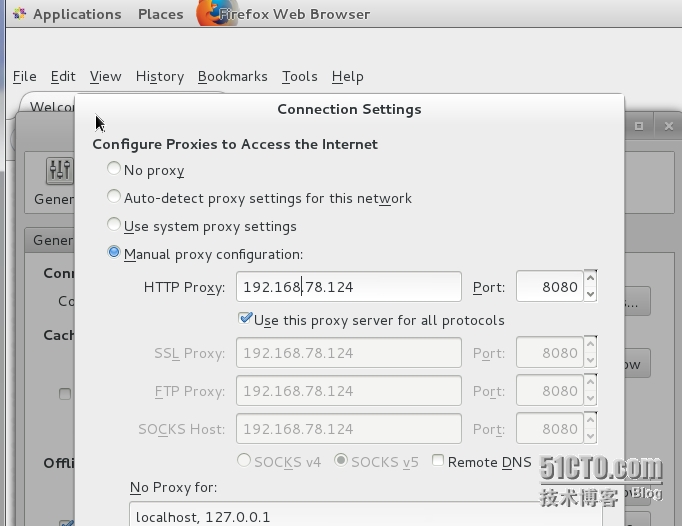
四.firefox浏览器代理联网设置;
说明:设置路径,Edit--> Preferences-->Advanced-->Network-->Settings.
五.附注
192.168.78.124为代理联网服务器IP地址;
8080为自定义端口号。
End.
CentOS7设置系统/yum以及firefox web代理上网的更多相关文章
- centos7设置系统语言为中文
centos7设置系统语言为中文 修改 /etc/locale.conf 文件内容为: LANG="zh_CN.GB18030" LANGUAGE="zh_CN.GB1 ...
- 写了一个Mac快速设置、打开和关闭Web代理的Shell命令
缘由(痛点) 每次在Mac上设置Web代理,都需要点开"系统偏好设置 -- 网络 -- 高级 -- 代理",然后分别设置Web代理(HTTP)和安全Web代理(HTTPS),设置完 ...
- centos7 设置系统时间与网络同步
1.安装ntpdate工具 yum -y install ntp ntpdate 2.设置系统时间与网络时间同步 ntpdate cn.pool.ntp.org 3.将系统时间写入硬件时间 hwclo ...
- centos7设置系统时间与网络时间同步
Linux的时间分为System Clock(系统时间)和Real Time Clock (硬件时间,简称RTC). 系统时间:指当前Linux Kernel中的时间. 硬件时间:主板上有电池供电的时 ...
- CentOS7 设置系统时间
在CentOS 6版本,时间设置有date.hwclock命令, 硬件时钟和系统时钟 (1) 硬件时钟 RTC(Real-Time Clock)或CMOS时钟,一般在主板上靠电池供电,服务器断电后也会 ...
- centos7 设置系统默认启动的界面
系统默认 以某种方式启动 使用systemd创建符号链接指向默认运行级别. 修改方法为:在root下 1.首先删除已经存在的符号链接rm /etc/systemd/system/default.tar ...
- Linux 系统通过 Squid 配置实现代理上网
本文转载自:https://help.aliyun.com/knowledge_detail/41342.html Squid 介绍 Squid 是一个缓存 Internet 数据的软件,其接收用户的 ...
- linux命令行模式下实现代理上网
有些公司的局域网环境,例如我们公司的只允许使用代理上网,图形界面的很好解决就设置一下浏览器的代理就好了,但是linux纯命令行的界面就....下面简单几步就可以实现了! 一.命令行界面的一般代理设置方 ...
- linux命令行模式下实现代理上网(转)
有些公司的局域网环境,例如我们公司的只允许使用代理上网,图形界面的很好解决就设置一下浏览器的代理就好了,但是linux纯命令行的界面就....下面简单几步就可以实现了! 一.命令行界面的一般代理设置方 ...
随机推荐
- jquery获取<div></div>之间的内容.text() 和 .html()区别
jQuery 获取 div 之间的内容,有两种方法,$(selector).text().$(selector).html() . html: <div> <p>test< ...
- hdu 1081 & poj 1050 To The Max(最大和的子矩阵)
转载请注明出处:http://blog.csdn.net/u012860063 Description Given a two-dimensional array of positive and ne ...
- FFmpeg源码简单分析:结构体成员管理系统-AVOption
===================================================== FFmpeg的库函数源码分析文章列表: [架构图] FFmpeg源码结构图 - 解码 FFm ...
- Use the command of tar to multi-part archive method.
We usually meet the package too large to upload internat space when upload have a limited .So we nee ...
- web前端面试系列 - 算法( 数组去重 )
1. 思路:设置一个临时数组temp,然后遍历要去重的数组arr,如果arr中的元素能够在temp中找到,则跳过此元素,否则将此元素存入temp,最后返回temp. 实现一 function uniq ...
- 详谈kubernetes滚动更新-1
系列目录 这个系列分为两个小节,第一个小节介绍deployment滚动更新时,deployment.replicaset.pod的细节以及创建过程以及deployment版本管理的方式 第二个小节将介 ...
- caffe配置Makefile.config----ubuntu16.04--重点是matlab的编译
来源: http://blog.csdn.net/daaikuaichuan/article/details/61414219 配置Makefile.config(参考:http://blog.csd ...
- bvlc_reference_caffenet.caffemodel
#uncoding:utf-8 # set up Python environment: numpy for numerical routines, and matplotlib for plotti ...
- Active Directory的LDAP协议与DN(Distinguished Name)详解
前言 光copy几段代码的文章没什么意思,本章上最基础的代码,主要是为了从编程方面聊LDAP和DN,其它的后面聊,一步步慢慢来吧. Active Directory编程须知 1.域控服务器: Wind ...
- 计算机鼻祖-Donald Knuth(高纳德) 的传奇
李开复说,练内功,不要仅仅花功夫学习各种流行的编程语言和工具,以及一些公司招聘广告上要求的科目.要把数据结构.算法.数据库.操作系统原理.计算机体系结构.计算机网络,离散数学等基础课程学好.最好还是试 ...