
Android Developers - Training
Recently I've been contemplating to create a new App with the true "Android Design",new Android Design does not mean Theme.holo(which was added it api level 14,android 4.0), and I found a website in which android design is carefully talked about thoroughly:Phonekr.com.
Now look at the picture below, it's google's official Android Developers website,except the addition of "Design" tag, in which you can find android official given "colors , patterns " and other design principles, you can also find a"Training " label , there you can find an easy and new access to write a brand new app according with the latest android design elements such as Action Bar,Drawer...etc.
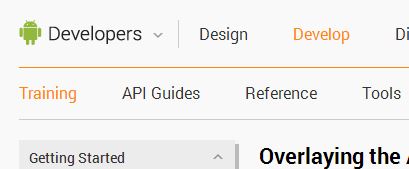
Here I want to make a list of the training program,although I know it's surplus,superfluous..It kind of help me remember when I need'em.
Building your first app
Add the action bar
Support different devices
Managing the activity lifestyle
Building a dynamic UI with fragments
Saving data
Interaciting with other apps
(Many Sub-contents are omitted)
-----
Building Apps with Content Sharing
Building Apps with Multimedia
Building Apps with Graphics & Animation
Building Apps with Connectivity & the Cloud
Building Apps with User Info and Location
-------
Best Practices for User Interface
Best Practices for User Input
Best Practices for Background Jobs
Best Practices for Performance
Best Practices for Security & Privacy
Best Practices for Testing
-------
Using Google Play to Distribute & Monetize
Android Developers - Training的更多相关文章
- 【Android Developers Training】 9. 覆盖于布局之上的Action Bar
注:本文翻译自Google官方的Android Developers Training文档,译者技术一般,由于喜爱安卓而产生了翻译的念头,纯属个人兴趣爱好. 原文链接:http://developer ...
- 【Android Developers Training】 8. 定义Action Bar风格
注:本文翻译自Google官方的Android Developers Training文档,译者技术一般,由于喜爱安卓而产生了翻译的念头,纯属个人兴趣爱好. 原文链接:http://developer ...
- 【Android Developers Training】 7. 添加Action Buttons
注:本文翻译自Google官方的Android Developers Training文档,译者技术一般,由于喜爱安卓而产生了翻译的念头,纯属个人兴趣爱好. 原文链接:http://developer ...
- 【Android Developers Training】 6. 配置Action Bar
注:本文翻译自Google官方的Android Developers Training文档,译者技术一般,由于喜爱安卓而产生了翻译的念头,纯属个人兴趣爱好. 原文链接:http://developer ...
- 【Android Developers Training】 5. 序言:添加Action Bar
注:本文翻译自Google官方的Android Developers Training文档,译者技术一般,由于喜爱安卓而产生了翻译的念头,纯属个人兴趣爱好. 原文链接:http://developer ...
- 【Android Developers Training】 4. 启动另一个Activity
注:本文翻译自Google官方的Android Developers Training文档,译者技术一般,由于喜爱安卓而产生了翻译的念头,纯属个人兴趣爱好. 原文链接:http://developer ...
- 【Android Developers Training】 3. 构建一个简单UI
注:本文翻译自Google官方的Android Developers Training文档,译者技术一般,由于喜爱安卓而产生了翻译的念头,纯属个人兴趣爱好. 原文链接:http://developer ...
- 【Android Developers Training】 0. 序言:构建你的第一个应用
注:本文翻译自Google官方的Android Developers Training文档,译者技术一般,由于喜爱安卓而产生了翻译的念头,纯属个人兴趣爱好. 原文链接:http://developer ...
- 【Android Developers Training】 2. 运行你的应用
注:本文翻译自Google官方的Android Developers Training文档,译者技术一般,由于喜爱安卓而产生了翻译的念头,纯属个人兴趣爱好. 原文链接:http://developer ...
- 【Android Developers Training】 1. 创建一个Android项目工程
注:本文翻译自Google官方的Android Developers Training文档,译者技术一般,由于喜爱安卓而产生了翻译的念头,纯属个人兴趣爱好. 原文链接:http://developer ...
随机推荐
- 【转】supervisord使用
Supervisor (http://supervisord.org) 是一个用 Python 写的进程管理工具,可以很方便的用来启动.重启.关闭进程(不仅仅是 Python 进程).除了对单个进程的 ...
- C 标准库 - <stddef.h>
C 标准库 - <stddef.h> 简介 stddef .h 头文件定义了各种变量类型和宏.这些定义中的大部分也出现在其它头文件中. 库变量 下面是头文件 stddef.h 中定义的变量 ...
- 在A页面刷新父框架中的B页面.(window.parent.?.location="")
window.parent.leftFrame.location='left.jsp?menuid='+menu.id+'&menuname='+menu.title;
- vscode 插件安装以及首选项配置
1.插件 Auto Close Tag Path Intellisense Prettier Vetur vscode-icons Bracket Pair Colorizer 2.vscode 首选 ...
- 两种IO模式:Proactor与Reactor模式
在高性能的I/O设计中,有两个比较著名的模式Reactor和Proactor模式,其中Reactor模式用于同步I/O,而Proactor运用于异步I/O操作. 在比较这两个模式之前,我们首先的搞明白 ...
- Linux kernel Wikipedia
http://en.wikipedia.org/wiki/Linux_kernel Development model The current development model of the Lin ...
- Django-models-m2m
在Django的orm中,如果有多对多的字段,那么他的第三张表时自己生成的,参考官方文档发现第三张表可以自己写↓: 而且第三张表好像是可以自定制的 from django.db import mode ...
- dwr框架中DWRUtil的方法
dwr框架中DWRUtil的方法 2008-10-14 17:57:23| 分类: JAVA | 标签: |举报 |字号大中小 订阅 7. util.js 功能 util.js包含了一些工 ...
- 逆向project实战--Afkayas.1
0x00 序言 去年玩了几个月的渗透測试,当初认为非常高端的样子.如今看来只是都是些小把戏,于是開始折腾逆向project. 学习过程中參考的是<逆向project核心原理>这本书.讲的非 ...
- 获取iOS系统版本号,慎重使用[[[UIDevice currentDevice] systemVersion] floatValue]——【sdk缺陷】
iOS 最常见的获取系统版本的方法是: [[[UIDevice currentDevice] systemVersion] floatValue] 可是.这个floatValue是不靠谱的,这也算是i ...