
微信小程序--问题汇总及详解之tab切换
设置背景颜色就直接在page里设置 page {background-color: rgb(242, 242, 242);}
tab切换:
navigator 页面链接
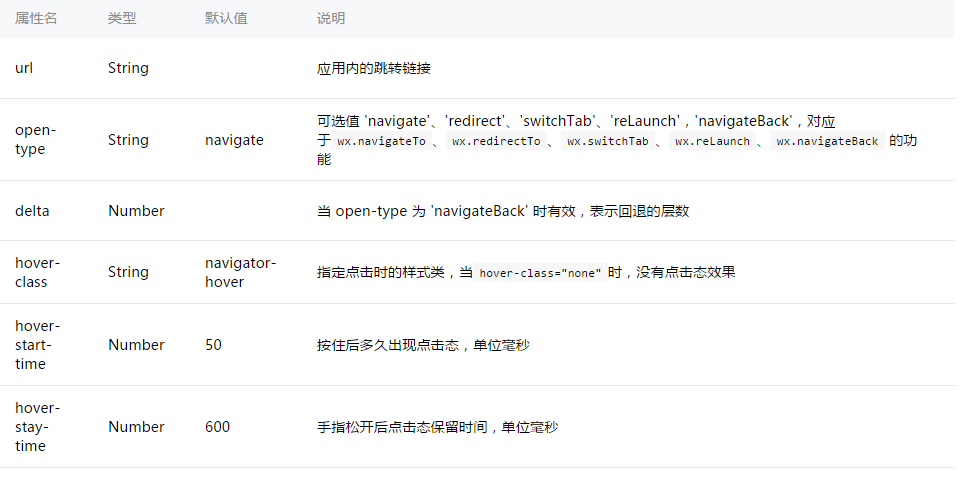
传参的格式为url="路径?title={{item.title}}" 多个用&&连接
下个页面接收参数:
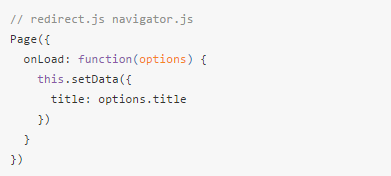
wxml:
<view class="container">

  <view class="swiper-tab">

    <view class="swiper-tab-list {{currentTab==0 ? 'on' : ''}}" data-current="0" bindtap="swichNav">进行中</view>

    <view class="swiper-tab-list {{currentTab==1 ? 'on' : ''}}" data-current="1" bindtap="swichNav">已完成</view>

  </view>

  <swiper current="{{currentTab}}" class="swiper-box" duration="800" style="height:{{winHeight - 71}}px" bindchange="bindChange">

    <!-- 朴智妍一 -->

    <swiper-item>

      <view class="content" wx:for="{{loadingList}}" wx:key="id" >

        <navigator bindtap="bindIndexId" data-index-id="{{item.id}}" url="../..?act_name={{item.act_name}}&&pro_name={{item.pro_name}}">

          <image src="{{item.act_pic}}"></image>

          <view class="txt1">{{item.act_name}}</view>

          <view>{{item.pro_name}}</view>

        </navigator>

      </view>

      <view class="hb" bindtap="addProject">

        <image src="../Image/addT.png" style="width:30rpx;height:30rpx;float:left;margin-top:3rpx;margin-right:16rpx;"></image>

        <view class="text2">添加项目</view>

      </view>

    </swiper-item>

  </swiper>

</view>
wxss:
page {

  background-color: rgb(242, 242, 242);  /*设置背景颜色就直接在page里设置*/

}

.container {

  width: 100%;

}

.swiper-tab {

  width: 84%;

  text-align: center;

  line-height: 60rpx;

  margin-top: 40rpx;

  margin-bottom: 20rpx;

  border: 2rpx solid #1c7bf3;

  border-radius: 6rpx;

}

.swiper-tab-list {

  font-size: 28rpx;

  display: inline-block;

  width: 50%;

  float: left;

  color: #1c7bf3;

}

.on {

  color: #fff;

  background-color: #1c7bf3;

  box-shadow: 0 0 20rpx #d1e5fd;

}

.swiper-box {

  display: block;

  height: 100%;

  width: 100%;

  overflow: hidden;

}

image {

  width: 140rpx;

  height: 140rpx;

  display: inline-block;

  overflow: hidden;

  border-radius: 100%;

  float: left;

  margin-top: 36rpx;

  margin-left: 26rpx;

  margin-right: 30rpx;

}

.content {

  width: 94%;

  height: 220rpx;

  box-shadow: 0 0 20rpx #bbb;

  margin: auto;

  margin-top: 22rpx;

  line-height: 220rpx;

  font-size: 32rpx;

  margin-left: 3%;

  background: #fff;

  border-radius: 8rpx;

}

.content>view {

  float: left;

}

.txt1 {

  color: #ff5438;

}

.hb {

  text-align: center;

  margin-top:70rpx;

  font-size: 28rpx;

  width: 100%;

  margin-left:36%;

}

.text2 {

  color: #bbb;

  float: left;

}

view {

  display: inline-block;

}
js:
/*获取系统信息*/

    wx.getSystemInfo({

      success: function (res) {

        that.setData({

          winWidth: res.windowWidth,

          winHeight: res.windowHeight

        });

      }

    })

  },

  /**  滑动切换tab  **/

  bindChange: function (e) {

    var that = this;

    that.setData({ currentTab: e.detail.current });

  },

  /**  点击tab切换  **/

  swichNav: function (e) {

    var that = this;

    if (this.data.currentTab === e.target.dataset.current) {

      return false;

    } else {

      that.setData({

        currentTab: e.target.dataset.current

      })

    }

  },
var app = getApp()

Page({

  data: {

    winWidth: 0,  /* 页面配置*/

    winHeight: 0,

    currentTab: 0,   // tab切换

    oneList: [{     //遍历数组,前台需要请求遍历的参数

      id: '',

      act_pic:'',

      act_name: '',

      pro_name: '',

    }],

  },

//获取点击的产品ID,并保存在本地缓存   (进行中)

  bindIndexId: function (e) {

    var indexId = e.currentTarget.dataset.indexId

    wx.setStorageSync('indexId', indexId)

  },

onLoad: function () {

    var that = this;

    var tokend = wx.getStorageSync('tokend') //取token

    //刷新页面后得到进行中的数据

    wx.request({

      method: 'GET',

      url: 'https://....?token=' + tokend,

      header: {'content-type': 'application/json'},

      data: {},

      success: function (res) {  // success

       console.log(res)

        that.setData({     //将后台数值与前台数组匹配(集合)

          loadingList: res.data.data

        })

      }

    });
微信小程序--问题汇总及详解之tab切换的更多相关文章
- 微信小程序--问题汇总及详解之form表单
附上微信小程序开发文档链接:https://mp.weixin.qq.com/debug/wxadoc/dev/framework/MINA.html form表单: 当点击 <form/> ...
- 微信小程序--问题汇总及详解之图片上传和地图
地图用的是百度的地图,链接:http://lbsyun.baidu.com/index.php?title=wxjsapi/guide/getlocation 获取日期时间可以用小程序里自带的js文件 ...
- 微信小程序--问题汇总及详解之清空电话号码
wxml: <view class="btns" wx:for="{{phoneList}}" wx:key="id"> < ...
- 微信小程序--问题汇总及详解之picker 增、删
<block wx:for="{{salesList}}" wx:for-index="index" wx:key="id" wx:f ...
- 微信小程序 this和that详解及简单实例
微信小程序中,在wx.request({});方法调用成功或者失败之后,有时候会需要获取页面初始化数据data的情况,这个时候,如果使用,this.data来获取,会出现获取不到的情况,调试页面也会报 ...
- 微信小程序获取用户手机号详解
最近在做一款微信小程序,需要获取用户手机号,具体步骤如下: 流程图: 1.首先,客户端调用wx.login,回调数据了包含jscode,用于获取openid(用户唯一标识)和sessionkey(会话 ...
- 【微信小程序】支付过程详解
一.介绍 今天跟大家分享微信小程序集成支付. 二.分析 1.小程序支付API 地址:https://mp.weixin.qq.com/debug/wxadoc/dev/api/api-pay.html ...
- 微信小程序支付之代码详解
微信小程序自带的一套规则,类似vue语法,但是好多功能都集成在api中,给了很多初学者轮子,所以首先要熟悉这些api,忘记可照官网继续开发 这里主要说下微信小程序的支付,原理类似上篇介绍的公众网页支付 ...
- 微信小程序项目wx-store代码详解
这篇文章会很长,非常长,特别长,无敌长. 真的是挤牙膏般的项目进度,差不多是8月底有开始这个项目的想法,时至今日都1个多月了,抛去频繁的加班时间,王者时间,羽毛球时间...见缝插针的写这个项目,我竟然 ...
随机推荐
- 利用photoshop制作gif图片
首先准备你需要的几张素材图片 1.将素材图片根据发生的顺序放置在不同的图层 2.打开窗口下的时间轴 选择帧动画 3.创建第一张帧动画 选项卡右边这个按钮,点击这个选择新建帧 第一张图片显示其他的隐藏 ...
- <已解决> Eclipse启动失败
参考:http://stackoverflow.com/questions/15404964/starting-eclipse-results-in-failed-to-create-java-vir ...
- xtarbackup恢复
xbstream -x < ynhw-mysql-slave.01.mysql.prod.sg_fullbak_20180326134255.xbstream -C /data/mysql cd ...
- 2018.6.5 Oracle plsql编程 游标的使用
--3.查询10部门所有员工的姓名.(ref游标实现) 动态游标 declare --创建一种游标类型 type type_cursor is ref cursor; --声明变量指定游标类型 v_c ...
- 2017.12.1 如何用java写出一个菱形图案
上机课自己写的代码 两个图形原理都是一样的 1.一共有仨个循环 注意搞清楚每一层循环需要做的事情 2.第一层循环:是用来控制行数 3.第二层循环控制打印空格数 4.第三层循环是用来循环输出星星 imp ...
- IntelliJ IDEA中激活JRebel插件
1. 下载激活软件:https://github.com/ilanyu/ReverseProxy/releases/tag/v1.0 我下载的是 2. 双击文件运行 3. 点击change licen ...
- shiro学习记录(三)
1.使用ehcache缓存权限数据 ehcache是专门缓存插件,可以缓存Java对象,提高系统性能. l ehcache提供的jar包: 第一步:在pom.xml文件中引入ehcache的依赖 &l ...
- java Html&JavaScript面试题:用table显示n条记录,每3行换一次颜色,即1,2,3用红色字体,4,5,6用绿色字体,7,8,9用红颜色字体。
<!DOCTYPE html> <html> <head> <meta charset="UTF-8"> <title> ...
- Oracle数据库学习(三)
6.关于null 数据库中null是一个未知数,没有任何值:进行运算时使用nvl,但是结果仍为空:在聚集函数中只有全部记录为空才会返回null. 7.insert插入 (1)单行记录插入 insert ...
- cf540D. Bad Luck Island(概率dp)
题意 岛上有三个物种:剪刀$s$.石头$r$.布$p$ 其中剪刀能干掉布,布能干掉石头,石头能干掉剪刀 每天会从这三个物种中发生一场战争(也就是说其中的一个会被干掉) 问最后仅有$s/r/p$物种生存 ...