
music21 关联 MuseScore 和 Lilypond
在python安装 music21后,需要关联 musescore 或 lilypond 才能可以用图形化的形式看到 乐谱。
因此 在安装 music21后,需要配置环境变量,yvivid 在 music21的官方 doc 没找到简单的指引,后来搜到相关信息,整理如下。
首先、在 python 中导入music21(安装可以 pip install music21实现):
from music21 import *
然后,查看环境变量有哪些:
>>>environment.keys()

['directoryScratch', 'lilypondPath', 'lilypondVersion', 'lilypondFormat', 'lilypondBackend',
'musicxmlPath', 'midiPath', 'graphicsPath', 'vectorPath', 'pdfPath', 'braillePath', 'musescoreDirectPNGPath',
'showFormat', 'writeFormat', 'ipythonShowFormat', 'autoDownload', 'debug', 'warnings', 'localCorpusSettings',
'localCorporaSettings', 'manualCoreCorpusPath', 'localCorpusPath']
或者是
>>> us = environment.UserSettings()

>>> us.keys()

['directoryScratch', 'lilypondPath', 'lilypondVersion', 'lilypondFormat', 'lilypondBackend', 'musicxmlPath',
'midiPath', 'graphicsPath', 'vectorPath', 'pdfPath', 'braillePath', 'musescoreDirectPNGPath', 'showFormat',
'writeFormat', 'ipythonShowFormat', 'autoDownload', 'debug', 'warnings', 'localCorpusSettings',
'localCorporaSettings', 'manualCoreCorpusPath', 'localCorpusPath']
后续统一使用后者进行配置。
对于 lilypond的配置(路径请自行编写):
us['lilypondPath'] = 'C:/Program Files (x86)/LilyPond/usr/bin/lilypond.exe'
对于 musescore的配置:
us['musescoreDirectPNGPath'] = "C:/Program Files (x86)/MuseScore 2/bin/MuseScore.exe"
us['musicxmlPath'] = "C:/Program Files (x86)/MuseScore 2/bin/MuseScore.exe"
如果 keys()里面没有 相关配置,可以先set出相关配置项。
environment.set("musescoreDirectPNGPath", "C:/Program Files (x86)/MuseScore 2/bin/MuseScore.exe")

environment.set("musicxmlPath", "C:/Program Files (x86)/MuseScore 2/bin/MuseScore.exe")
最后,yvivid做个验证测试:
from music21 import *

littleMelody = converter.parse("tinynotation: 3/4 c4 d8 f g16 a g f#")

littleMelody.show()
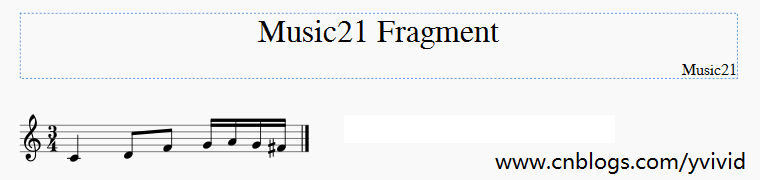
作者:www.cnblogs.com/yvivid
参考文献:
1、http://web.mit.edu/music21/doc/usersGuide/usersGuide_08_installingMusicXML.html
2、https://stackoverflow.com/questions/25879764/creating-images-of-notes-in-music21
music21 关联 MuseScore 和 Lilypond的更多相关文章
- 个人使用的lilypond第一个模板
手残非要用lilypond打谱真是…… 可是lilypond又能满足各种细节标记和谱文混排,这是musescore达不到的 所以还是开这个坑,希望能逐渐自己有能力编写自己的音乐教材 个人用Fresco ...
- Hibernatel框架关联映射
Hibernatel框架关联映射 Hibernate程序执行流程: 1.集合映射 需求:网络购物时,用户购买商品,填写地址 每个用户会有不确定的地址数目,或者只有一个或者有很多.这个时候不能把每条地址 ...
- hibernate多对多关联映射
关联是类(类的实例)之间的关系,表示有意义和值得关注的连接. 本系列将介绍Hibernate中主要的几种关联映射 Hibernate一对一主键单向关联Hibernate一对一主键双向关联Hiberna ...
- hibernate多对一双向关联
关联是类(类的实例)之间的关系,表示有意义和值得关注的连接. 本系列将介绍Hibernate中主要的几种关联映射 Hibernate一对一主键单向关联Hibernate一对一主键双向关联Hiberna ...
- JDBC MySQL 多表关联查询查询
public static void main(String[] args) throws Exception{ Class.forName("com.mysql.jdbc.Driver&q ...
- UML类图(下):关联、聚合、组合、依赖
前言 上一篇文章UML类图(上):类.继承.实现,讲了UML类图中类.继承.实现三种关系及其在UML类图中的画法,本文将接着上文的内容,继续讲讲对象之间的其他几种关系,主要就是关联.聚合.组合.依赖, ...
- Entity Framework 6 Recipes 2nd Edition(12-5)译 -> 自动删除相关联实体
12-5. 自动删除相关联实体 问题 当一个实体被删除时,你想自动删除它相关联的实体 解决方案 假设你有一个表结构由一个course (科目), course 的classes (课程),以及enro ...
- hibernate多对一单向关联
关联是类(类的实例)之间的关系,表示有意义和值得关注的连接. 本系列将介绍Hibernate中主要的几种关联映射 Hibernate一对一主键单向关联Hibernate一对一主键双向关联Hiberna ...
- hibernate一对一外键双向关联
关联是类(类的实例)之间的关系,表示有意义和值得关注的连接. 本系列将介绍Hibernate中主要的几种关联映射 Hibernate一对一主键单向关联Hibernate一对一主键双向关联Hiberna ...
随机推荐
- 【Lua】Lua中ipair和pair的区别
pairs会遍历table的所有键值对. 而ipairs就是固定地从key值1开始,下次key累加1进行遍历,如果key对应的value不存在,就停止遍历.顺便说下,记忆也很简单,带i的就是根据int ...
- 并发包阻塞队列之ArrayBlockingQueue
并发包阻塞队列之ArrayBlockingQueue jdk1.7.0_79 上一节中对并发包中的非阻塞队列ConcurrentLinkedQueue的入队.出队做了一个简要的分析,本文将对并发 ...
- Spring cloud Eureka 服务治理(搭建服务注册中心)
服务之类是微服务架构中最为核心的基础模块,它主要用来实现各个微服务实例的自动化注册和发现. 1. 服务注册 在服务治理框架中,通常会构建一个注册中心,每个服务单元向注册中心登记自己提供的服务,将主机. ...
- echarts折柱混合(图表数据与x轴对应显示)
一天24个小时,每个小时不一定都有对应的数据,所以后台给出的数据,只有每个时间点对应的数据,比如4点,给的是112,5点的242,其他时间没有,则只显示4点,5点时候的数据,那么现在对应的时间点就是后 ...
- Python开发环境Wing IDE如何进行命令行调试
Wing IDE专业的调试探针提供了一种强大的方法来发现和解决复杂的错误.这很像Python Shell但允许用户直接参与进已经暂停的调试程序中: 通过键入在刚才发生异常的地方键入下列数值进行尝试: ...
- DELL R730安装ESXI虚拟化
dell安装esxi需要dell官方提供的镜像文件地址:http://www.dell.com/support/article/us/en/04/SLN290857/dell%E5%AE%9A%E5% ...
- [转]超全!iOS 面试题汇总
转自:http://www.cocoachina.com/programmer/20151019/13746.html 1. Object-c的类可以多重继承么?可以实现多个接口么?Category是 ...
- Android(java)学习笔记92:Android线程形态之 AsyncTask (异步任务)
1. AsyncTask和Handler的优缺点比较: 1)AsyncTask实现的原理和适用的优缺点 AsyncTask是Android提供的轻量级的异步类,可以直接继承AsyncTa ...
- 【洛谷3796】【模板】AC自动机(加强版)
点此看题面 大致题意: 一道模板题,给你\(N\)个模式串和一个文本串,要你求出在文本串中出现次数最多的若干个模式串并输出它们. \(AC\)自动机 都说了是\(AC\)自动机的模板题,做法肯定是\( ...
- java之接口相关知识
1.接口用interface来声明 //定义一个动物接口 public interface Animal{ public void eat(); public void travel(); } 2.接 ...