
【PyCharm编辑器】之报:Spellchecker inspection helps locate typos and misspelling in your code, comments and literals, and fix them in one click.问题
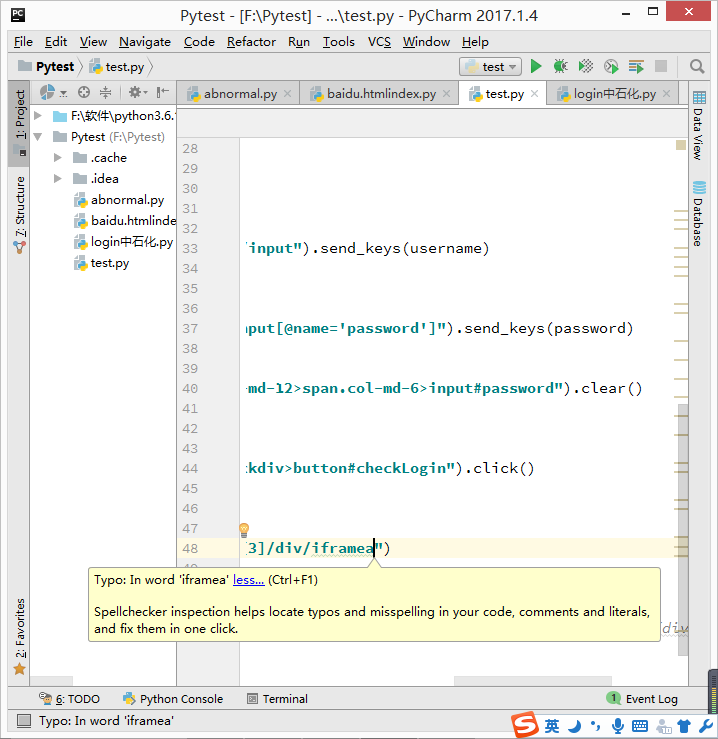
如上图,输入一个单词时会出现波浪线,报:Spellchecker inspection helps locate typos and misspelling in your code, comments and literals, and fix them in one click.
翻译:拼写检查器检查可以帮助查找拼写错误和拼写错误在您的代码、注释和文本、 并修复它们中一次点击。
解决办法:
选中这个单词,右键“Spelling”->“Save ‘miyuehu’ to dictionary...”(单词保存字典中)
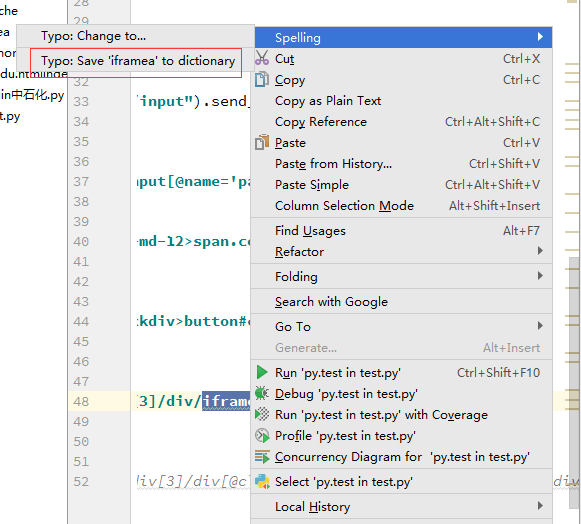
结果:单词不会出现波浪线了,参考原文《android studio对于错误拼写/不识别的英文单词,给予波浪提示。》
【PyCharm编辑器】之报:Spellchecker inspection helps locate typos and misspelling in your code, comments and literals, and fix them in one click.问题的更多相关文章
- Spellchecker inspection helps locate typos and misspelling in your code, comments and literals, and fix them in one click
Pycharm设置 Pycharm总是很多的拼写检查波拉线 Spellchecker inspection helps locate typos and misspelling in your cod ...
- 解决author波浪线Spellchecker inspection helps locate typos and misspelling in your code, comments and literals, and fix them in one click
自从把默认的头注释的author改成自己的名字以后越看越顺眼,但是发现名字下面一直有个波浪线,强迫症简直不能忍. 然后当你把鼠标放上去,再点击提示上的"more",会看到下面的提示 ...
- spellchecker inspection helps locate typeos and misspelling in your code, comments and literals, and fix them in one click
项目layout文件中出现 spellchecker inspection helps locate typos and misspelling in your code, comments and ...
- 解决Spellchecker inspection helps locate typos and misspelling in your code
idea出现这个是因为词库中没有这个单词,所以提示拼写错误 解决办法:双击下面有虚线的单词——>鼠标右键——>spelling——>save 'xxx' to distionary
- 借助取色工具ColorPix对Pycharm编辑器设定自己喜欢的代码颜色_20161202
1.Pycharm编辑器怎么设定自己喜欢的颜色,前几天看爬虫博客,看博主贴出的代码颜色很是喜欢,如下图,设置了好多次找不到他设定的颜色. 2.下班回家想起来之前做表的时候用到过一个取色工具ColorP ...
- PyCharm导入模块报No model named
PyCharm导入模块报No model named 引言 在PyCharm中同目录下import其他模块,出现No model named ...的报错,但实际可以运行的情况. 这很可能是因为PyC ...
- 单点登录(十一)-----遇到问题-----cas启用mongodb验证方式报错--Unable to locate Spring NamespaceHandler for XML schema na
cas启用mongodb验证方式报错--Unable to locate Spring NamespaceHandler for XML schema namespace [http://www.sp ...
- 解决:pycharm连接github报错 Can't login: Received fatal alert: protocol_version
如图1,进行测试连接的时候报错了 知乎的一位网友给了答案,详情参见知乎pycharm连接github报错,如何解决? "" Github 最近升级过协议,可能是你的 JRE 或者 ...
- pycharm安装 package报错:module 'pip' has no attribute 'main'
转自: <pycharm安装 package报错:module 'pip' has no attribute 'main'> https://www.cnblogs.com/Fordest ...
随机推荐
- 从无序序列中求这个序列排序后邻点间最大差值的O(n)算法
标题可能比较绕口,简单点说就是给你一个无序数列A={a1,a2,a3……an},如果你把这个序列排序后变成序列B,求序列B中相邻两个元素之间相差数值的最大值. 注意:序列A的元素的大小在[1,2^31 ...
- APP漏洞扫描用地址空间随机化【转】
转自:http://www.cnblogs.com/alisecurity/p/6141575.html 前言 我们在前文<APP漏洞扫描器之本地拒绝服务检测详解>了解到阿里聚安全漏洞扫描 ...
- LeetCode OJ-- Edit Distance **
https://oj.leetcode.com/problems/edit-distance/ 动态规划,它的小规模问题是:当 word1 word2都比较小的时候,word1变成 word2需要的 ...
- 51Nod 1019 逆序数(线段树)
题目链接:逆序数 模板题. #include <bits/stdc++.h> using namespace std; #define rep(i, a, b) for (int i(a) ...
- luogu P2744 [USACO5.3]量取牛奶Milk Measuring
题目描述 农夫约翰要量取 Q(1 <= Q <= 20,000)夸脱(夸脱,quarts,容积单位——译者注) 他的最好的牛奶,并把它装入一个大瓶子中卖出.消费者要多少,他就给多少,从不有 ...
- VSCode打开大文件插件
hexdump for vscode 其实没什么插件,上面的是十六进制文件的插件,对于大文件还是建议用专业的ST或者Notepad++这些.
- 【IntelliJ Idea】idea下hibernate反向生成工具,根据数据表生成实体
idea插件很齐全,不像ecplise一样.所以直接来步骤吧: 1.选择项目,右键-->Add Frameworks Support-->勾选Hibernate-->勾选Import ...
- node.js中的exports和module.exports
不同的编程语言都有各自的代码组织和复用的方式,如.net.php中的命名空间,python中的import,ruby中的module等,来避免命名空间污染.一直都没搞清楚node中的exports和m ...
- flash+xml无法显示中文的解决办法
flash+xml用来做图片动态浏览效果相当不错,被广泛运用于电子相册制作,很多朋友都会从网上下载一些相关的flash源码下载参考,但是经常发现在使用过程中,修改了xml文件中的英文后要么文本不显示, ...
- SSD配置
SSD: Single Shot MultiBox Detector - 运行“ make -j32”时出错: nvcc warning : The 'compute_20', 'sm_20', an ...