
bootstrap 事件shown.bs.modal用于监听并执行你自己的代码【写hostmanger关联部门遇到的问题及解决方法】
背景:记录写hostmanger中用户下拉框关联部门遇到的问题及解决方法
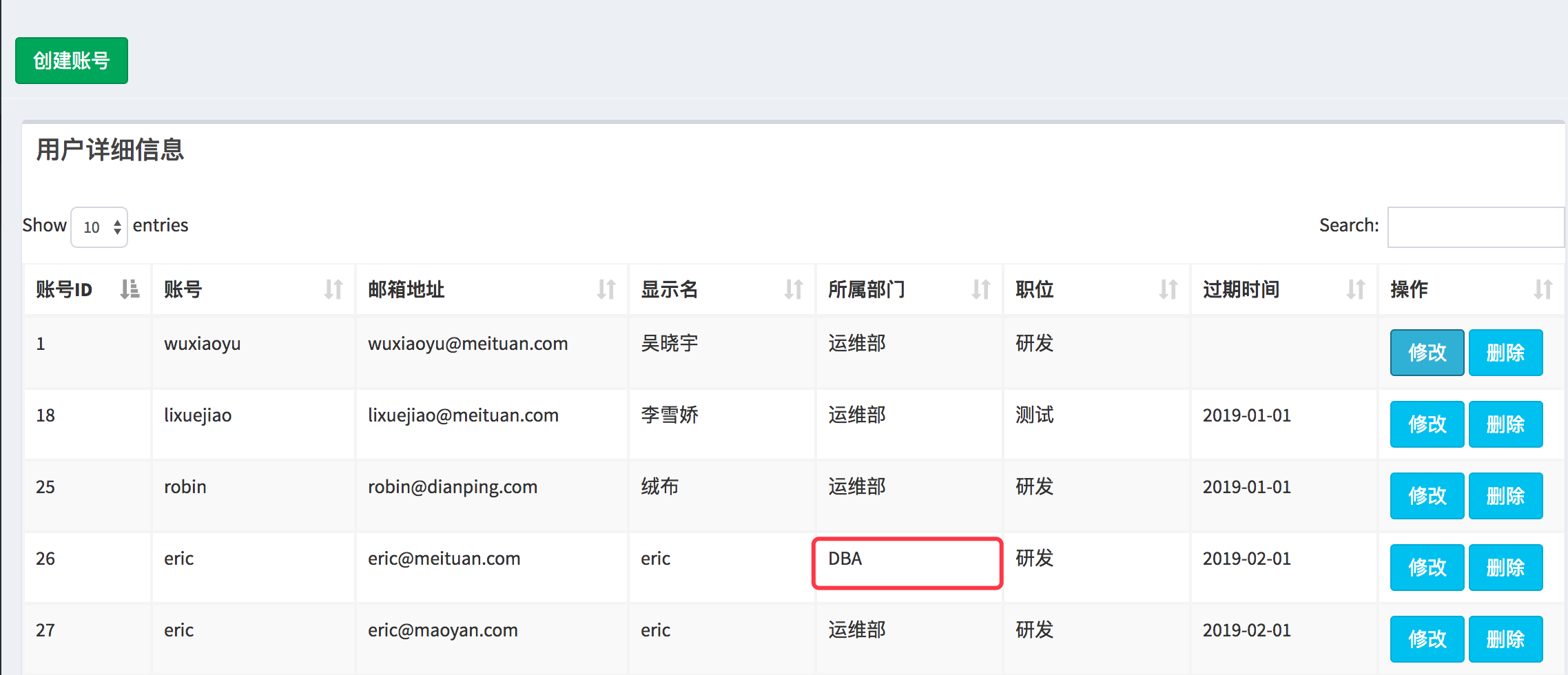
问题:需求是展示页面展示用户所属的部门,点击修改按钮后,弹出对应的model,这个时候部门的select要默认选中用户所在的select
如下图所示:
点击修改弹出model如下:
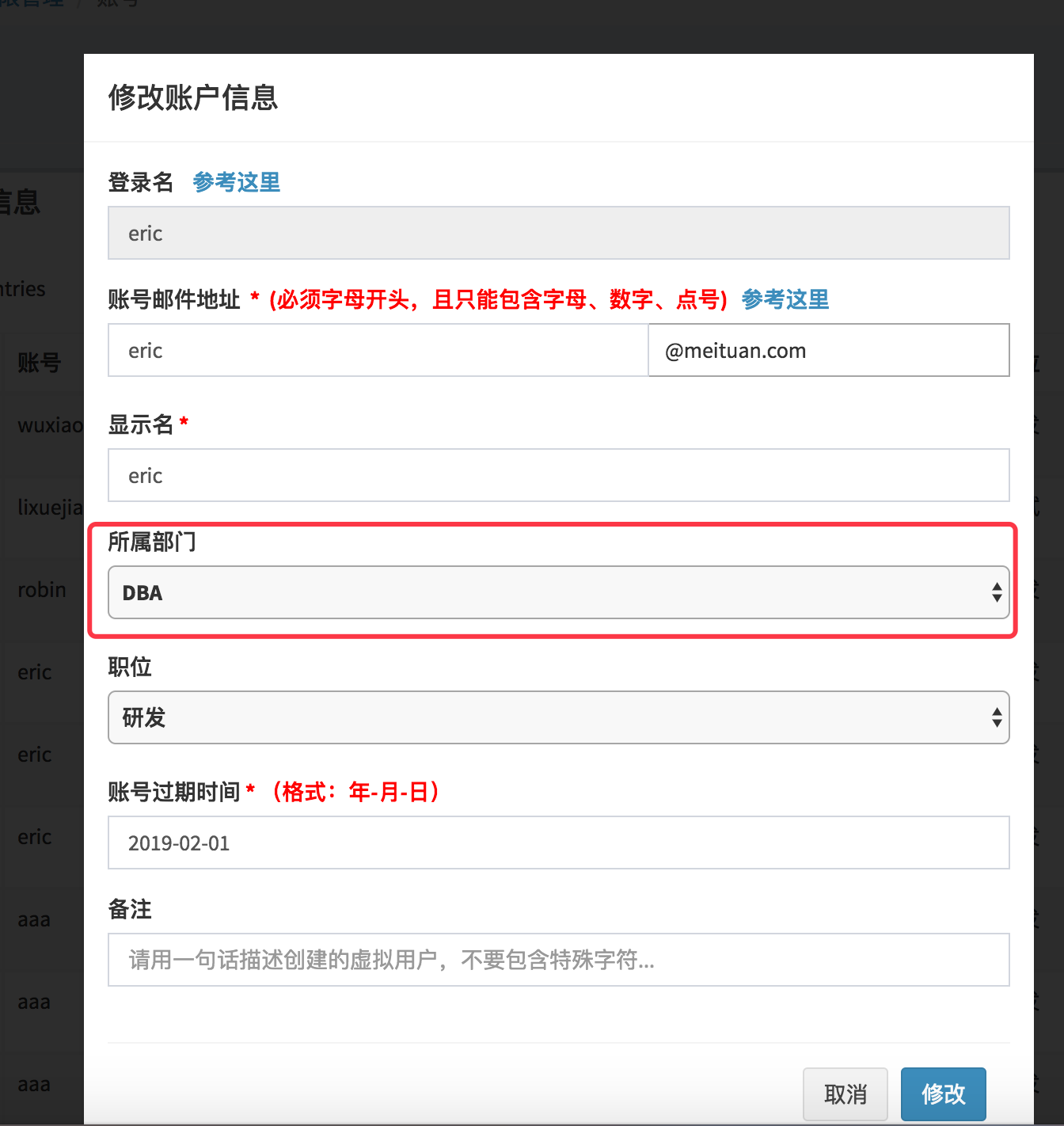
默认这块显示的是select的第一个option
解决办法:
在点击【修改】按钮的时候,可以首先取到这行数据部门列的id和value,在model弹出后,对model中的select元素做操作,如果select中的option的值等于刚才取到的value,则给这个option添加selected=selected属性
首先想到的是利用bootstrap的事件如shown.bs.modal来实现
但是测试的问题是,这个事件并不是在模态对话框出来后执行,而是在模态对话框之前执行,示例如下:
<!DOCTYPE html>

<html lang="en">

<head>

    <meta charset="UTF-8">

    <meta http-equiv="x-ua-compatible" content="IE=edge">

    <meta name="viewport" content="width=device-width, initial-scale=1">

    <title>Title</title>

    <link rel="stylesheet" href="bootstrap.css" %}">

</head>

<body>

    <!--表格展示-->

    <section class="content">

      <div class="row">

        <div class="col-xs-12">

           <div class="box">

              <div class="box-header">

                <h3 class="box-title">用户详细信息</h3>

              </div>

              <div class="box-body">

                <div id="example1_wrapper" class="dataTables_wrapper form-inline dt-bootstrap">

                </div>

              </div>

                  <!-- Table field -->

              <div class="row">

                    <div class="col-sm-12">

                      <table id="example1" class="table table-bordered table-striped dataTable" role="grid" aria-describedby="example1_info">

                        <!--thead-->

                        <thead>

                          <tr role="row">

                            <th class="sorting_asc" tabindex="" aria-controls="example1" rowspan="" colspan="" aria-sort="ascending" aria-label="Rendering engine: activate to sort column descending" style="width: 50px;">账号ID</th>

                            <th class="sorting" tabindex="" aria-controls="example1" rowspan="" colspan="" aria-label="Browser: activate to sort column ascending" style="width: 80px;">账号</th>

                            <th class="sorting" tabindex="" aria-controls="example1" rowspan="" colspan="" aria-label="Engine version: activate to sort column ascending" style="width: 90px;">操作</th>

                          </tr>

                        </thead>

                        <!--tbody-->

                        <tbody>

                              <tr role="row" class="odd">

                                  <td class="sorting_1" id="id"></td>

                                  <td id="department_name">robin</td>

                                  <td>

                                      <!--<button type="button" class="btn btn-primary btn-lg" onclick="openModal();"></button>-->

                                      <button id="modify_user" data-toggle="modal" data-target="#modify_user_modal" class="btn btn-info" onclick="openModal();">修改</button>

                                      <button id="delete_user" data-toggle="modal" data-target="#delete_user_modal" class="btn btn-info">删除</button>

                                  </td>

                              </tr>

                        </tbody>

                        <!--tfoot-->

                      </table>

                    </div>

                  </div>

           </div>

        </div>

      </div>

    </section>

    <!--修改用户模态对话框-->

    <div id="myModal" class="modal">

      <div class="modal-dialog" style="margin-top: 200px;">

        <div class="modal-content">

          <div class="modal-header">

            <h4 class="modal-title">修改账户信息</h4>

          </div>

          <div class="modal-body">

            <form id="modify_user_form" action="/page/userinfo/" role="form"  method="post">

              <div class="form-group">

                <label>登录名</label>

                <input type="text" class="form-control" id="modify_user_name" name='modify_user_name' placeholder="如: sys.yourname"  readonly autofocus >

              </div>

              <div class="form-group">

                <label>备注</label>

                <input type="textarea" class="form-control" id="add_user_description" name='add_user_description'

                       placeholder="请用一句话描述创建的虚拟用户,不要包含特殊字符...">

              </div>

              <div class="modal-footer">

                <input type="text" name="request-type" value="modify" class="hide">

                <button id="modify_user_cancel_btn" type="submit" class="btn btn-default" data-dismiss="modal">取消</button>

                <button id="modify_user_confirm_btn" type="submit" class="btn btn-primary disabled">修改</button>

              </div>

            </form>

          </div>

        </div>

      </div>

    </div>

    <script src="jquery-3.2.1.js"> </script>

    <script src="bootstrap.js"> </script>

    <script>

            function openModal() {

                console.log("before open action");

                $('#myModal').modal({

                    backdrop: true,

                    keyboard: false,

                    show: true,

                    remote: "template.html"

                });

                console.log("after open action");

            }

        $('#myModal').on('shown.bs.modal', function(e) {

            var btn =$(e.relatedTarget); // btn表示的是触发这个model的删除按钮

         alert('在模态框显示完毕后触发!');

        });

    </script>

</body>

</html>

点击【修改】

然后
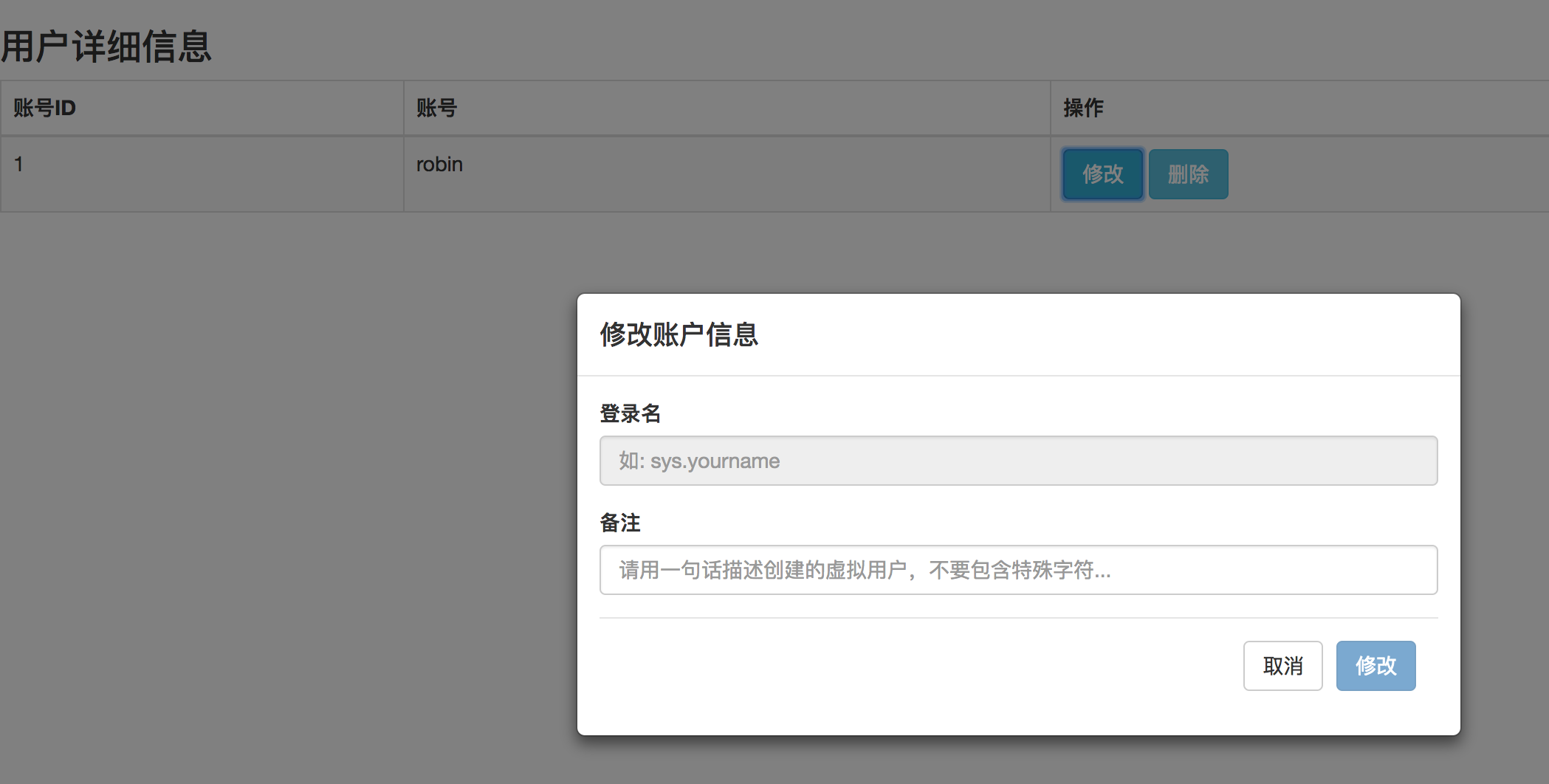
很显然数据显示的顺序是有问题的~~~~~
最后发现原因是 model的class 必须有fade样式
最后发现原因是 model的class 必须有fade样式
最后发现原因是 model的class 必须有fade样式
如下:
<!DOCTYPE html>

<html lang="en">

<head>

    <meta charset="UTF-8">

    <meta http-equiv="x-ua-compatible" content="IE=edge">

    <meta name="viewport" content="width=device-width, initial-scale=1">

    <title>Title</title>

    <link rel="stylesheet" href="bootstrap.css" %}">

</head>

<body>

    <!--表格展示-->

    <section class="content">

      <div class="row">

        <div class="col-xs-12">

           <div class="box">

              <div class="box-header">

                <h3 class="box-title">用户详细信息</h3>

              </div>

              <div class="box-body">

                <div id="example1_wrapper" class="dataTables_wrapper form-inline dt-bootstrap">

                </div>

              </div>

                  <!-- Table field -->

              <div class="row">

                    <div class="col-sm-12">

                      <table id="example1" class="table table-bordered table-striped dataTable" role="grid" aria-describedby="example1_info">

                        <!--thead-->

                        <thead>

                          <tr role="row">

                            <th class="sorting_asc" tabindex="" aria-controls="example1" rowspan="" colspan="" aria-sort="ascending" aria-label="Rendering engine: activate to sort column descending" style="width: 50px;">账号ID</th>

                            <th class="sorting" tabindex="" aria-controls="example1" rowspan="" colspan="" aria-label="Browser: activate to sort column ascending" style="width: 80px;">账号</th>

                            <th class="sorting" tabindex="" aria-controls="example1" rowspan="" colspan="" aria-label="Engine version: activate to sort column ascending" style="width: 90px;">操作</th>

                          </tr>

                        </thead>

                        <!--tbody-->

                        <tbody>

                              <tr role="row" class="odd">

                                  <td class="sorting_1" id="id"></td>

                                  <td id="department_name">robin</td>

                                  <td>

                                      <!--<button type="button" class="btn btn-primary btn-lg" onclick="openModal();"></button>-->

                                      <button id="modify_user" data-toggle="modal" data-target="#modify_user_modal" class="btn btn-info" onclick="openModal();">修改</button>

                                      <button id="delete_user" data-toggle="modal" data-target="#delete_user_modal" class="btn btn-info">删除</button>

                                  </td>

                              </tr>

                        </tbody>

                        <!--tfoot-->

                      </table>

                    </div>

                  </div>

           </div>

        </div>

      </div>

    </section>

    <!--修改用户模态对话框-->

    <div id="myModal" class="modal fade"> <!--- fade fade fade ->

      <div class="modal-dialog" style="margin-top: 200px;">

        <div class="modal-content">

          <div class="modal-header">

            <h4 class="modal-title">修改账户信息</h4>

          </div>

          <div class="modal-body">

            <form id="modify_user_form" action="/page/userinfo/" role="form"  method="post">

              <div class="form-group">

                <label>登录名</label>

                <input type="text" class="form-control" id="modify_user_name" name='modify_user_name' placeholder="如: sys.yourname"  readonly autofocus >

              </div>

              <div class="form-group">

                <label>备注</label>

                <input type="textarea" class="form-control" id="add_user_description" name='add_user_description'

                       placeholder="请用一句话描述创建的虚拟用户,不要包含特殊字符...">

              </div>

              <div class="modal-footer">

                <input type="text" name="request-type" value="modify" class="hide">

                <button id="modify_user_cancel_btn" type="submit" class="btn btn-default" data-dismiss="modal">取消</button>

                <button id="modify_user_confirm_btn" type="submit" class="btn btn-primary disabled">修改</button>

              </div>

            </form>

          </div>

        </div>

      </div>

    </div>

  <!--  需引用jquery 和 bootstrap.js-->

    <script src="jquery-3.2.1.js"> </script>

    <script src="bootstrap.js"> </script>


    <script>

            function openModal() {

                console.log("before open action");

                $('#myModal').modal({

                    backdrop: true,

                    keyboard: false,

                    show: true,

                    remote: "template.html"

                });

                console.log("after open action");

            }

        $('#myModal').on('shown.bs.modal', function(e) {

            var btn =$(e.relatedTarget); // btn表示的是触发这个model的删除按钮,通过这个再去操作页面的其他元素

         alert('在模态框显示完毕后触发!');

        });

    </script>

</body>

</html>
效果:
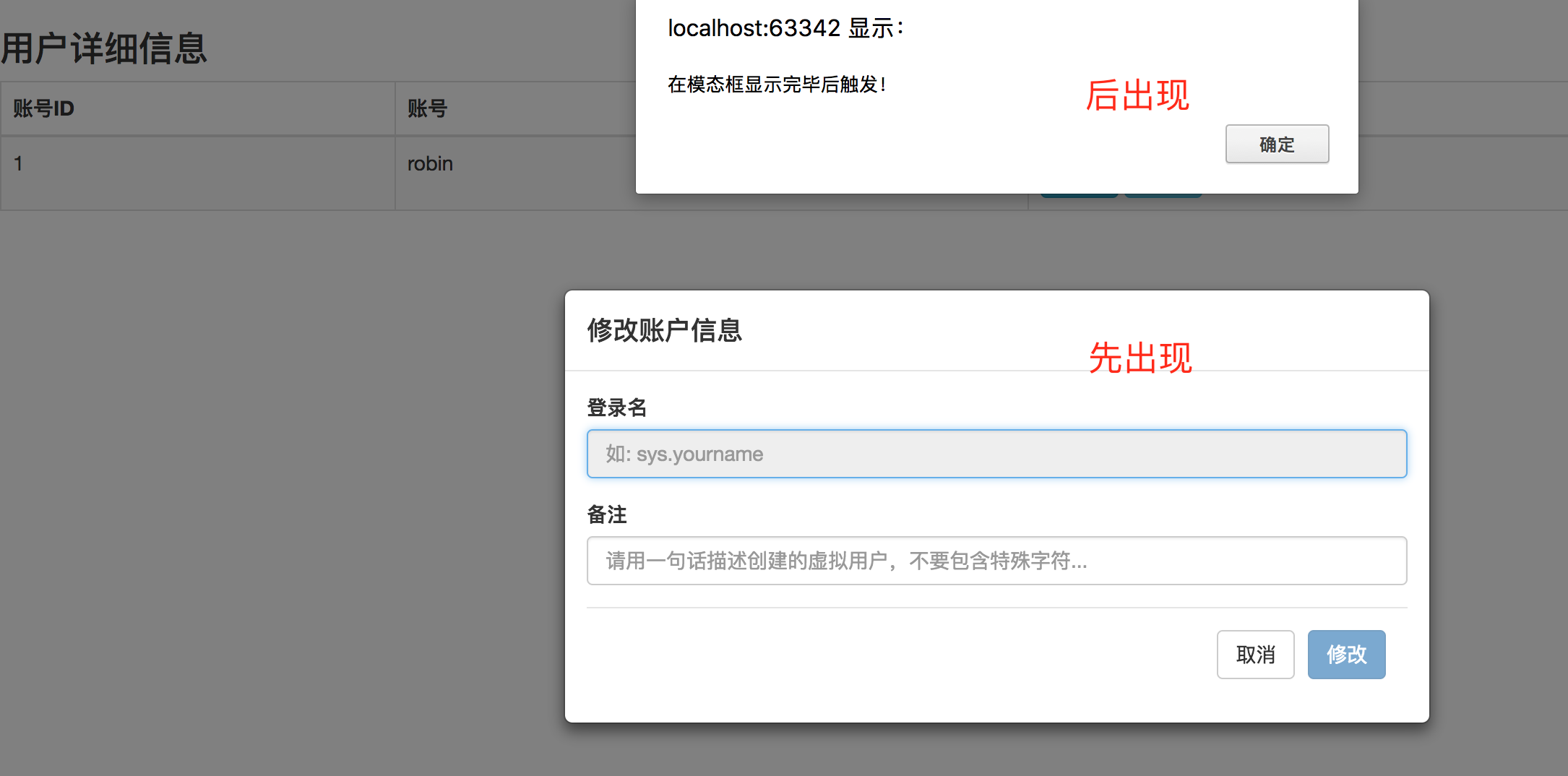
使用 data-target="#modify_user_modal" 这种方式触发模态对话框时, bootstrap按钮上绑定函数的执行顺序
onclick绑定自定义的函数-----> 模态对话框展示------->shown.bs.modal事件
参考文章:
http://v3.bootcss.com/javascript/#modals-events
https://github.com/zhbhun/bootstrap-study-demo/blob/master/modal/event-demo.html
http://www.runoob.com/bootstrap/bootstrap-modal-plugin.html
https://segmentfault.com/q/1010000005085719
bootstrap 事件shown.bs.modal用于监听并执行你自己的代码【写hostmanger关联部门遇到的问题及解决方法】的更多相关文章
- 第二百四十四节,Bootstrap下拉菜单和滚动监听插件
Bootstrap下拉菜单和滚动监听插件 学习要点: 1.下拉菜单 2.滚动监听 本节课我们主要学习一下 Bootstrap 中的下拉菜单插件,这个插件在以组件的形式我们 已经学习过,那么现在来看看怎 ...
- Bootstrap -- 插件: 模态框、滚动监听、标签页
Bootstrap -- 插件: 模态框.滚动监听.标签页 1. 模态框(Modal): 覆盖在父窗体上的子窗体. 使用模态框: <!DOCTYPE html> <html> ...
- 监听EF执行的sql语句及状态
1.监听EF执行sql的方式 db.Database.Log += c => Console.WriteLine($"sql:{c}"); SQL Server Profil ...
- 友盟分享到微信 监听不执行 监听只执行onStart,(onResult,onError,onCancel 不执行)
最近在做一个项目 有一个需求是要分享项目中的一个商品 这对于我来说简直是 so easy (项目是三个人一起写的) 正好看到之前有同事写完了 我就拿过来用吧 一顿复制粘贴 大功告成 这个是监 ...
- quartz2.3.0(九)job任务监听器,监听任务执行前、后、取消手动处理方法
job1任务类 package org.quartz.examples.example9; import java.util.Date; import org.quartz.Job; import o ...
- Bootstrap 下拉菜单和滚动监听插件
一.下拉菜单 常规使用中,和组件方法一样,代码如下: //声明式用法 <div class="dropdown"> <button class="btn ...
- 为不具有change事件的html标签设置监听事件
change事件会在文本内容或选项被更改时触发. 该事件仅适用于<input type="text">和<textarea>以及<select> ...
- ThinkPHP 数据库操作(六) : 查询事件、事务操作、监听SQL
查询事件 查询事件(V5.0.4+) 从 5.0.4+ 版本开始,增加了数据库的CURD操作事件支持,包括: 查询事件仅支持 find . select . insert . update 和 del ...
- 监听浏览器tab选项卡选中事件,点击浏览器tab标签页回调事件,浏览器tab切换监听事件
js事件注册代码: <script> document.addEventListener('visibilitychange',function(){ //浏览器tab切换监听事件 if( ...
随机推荐
- Google 出品的 Java 编码规范,强烈推荐,权威又科学!
原文:google.github.io/styleguide/javaguide.html 译者:Hawstein 来源:hawstein.com/2014/01/20/google-java-sty ...
- Ubuntu编译Android源码过程中的空间不足解决方法
Android源码一般几十G,就拿Android5.0来说,下载下来大概也有44G左右,和编译产生的文件以及Ubuntu系统占用的空间加起来,源码双倍的空间都不够有.编译源码前能分配足够的空间再好不过 ...
- Python读写文件实际操作的五大步骤
Python读写文件在计算机语言中被广泛的应用,如果你想了解其应用的程序,以下的文章会给你详细的介绍相关内容,会你在以后的学习的过程中有所帮助,下面我们就详细介绍其应用程序. 一.打开文件 Pytho ...
- MFC中获得各种指针概述(个人觉得是很重要的重点)
前言:这学期学习MFC(有点过时的东西),上课时,老师讲到获取当前活动指针,获取视图指针,文档指针,文档模板指针等(已晕) 后来下来真正写代码的时候发现这些几乎都是需要用到的东西,所以特此记录下,让自 ...
- (转发)IOS动画中的枚举UIViewAnimationOptions
若本帖转自(博客园·小八究):http://www.cnblogs.com/xiaobajiu/p/4084747.html 可怜目前天朝搜不到什么有价值的东西方便学习,在这里方便初学者. 首先这个枚 ...
- label自适应文本大小
UILabel *label = [[UILabelalloc] initWithFrame:CGRectZero]; NSString *string = @"aa2fkoksdajfis ...
- C#与SQLServer数据库连接
第一种连接数据库方法:直接通过数据库的用户名.密码等连接 步骤: (1)建立SqlConnection对象,指定SqlConnection对象的ConnectionString属性: (2)打开数据库 ...
- Bootstrap 模态框 select2搜索框无法输入
去掉模态框的div中的 tabindex="-1" 这个属性 <div class="modal fade" role="dialog" ...
- LeetCode(292) Nim Game
题目 You are playing the following Nim Game with your friend: There is a heap of stones on the table, ...
- 某比赛小记1- 挑选第N大数字
题目:给1000个数字(有重复),从小到大排列后,挑选第N个数字. 数字文件如下:numbers.rar ,挑选第727个数字. java版本: //数组初始化 String str = " ...