
java在线聊天项目1.3版设计好友列表框功能补充,因只要用户登录就发送一串新列表,导致不同客户端好友列表不同问题
解决完毕后效果图:
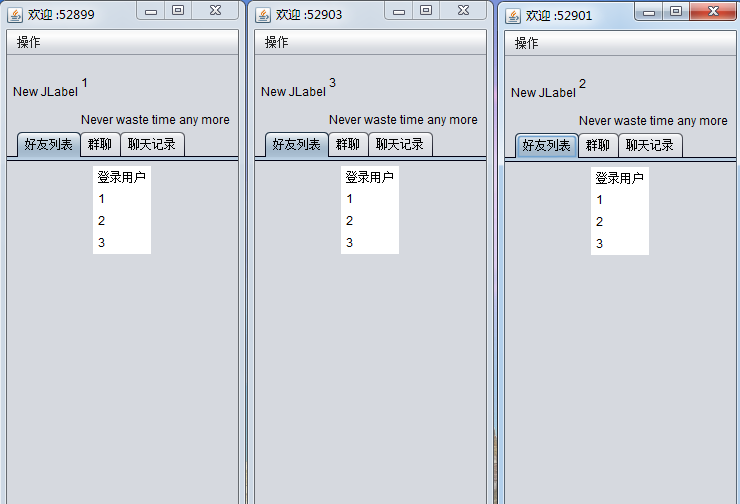
好友列表Vector添加的时候进行判断,如果有相同的则不添加
int flag=0;
for (int i = 0; i < names.size(); i++) {
if (name.equals(names.get(i))) {
flag=1;
}
}
if(flag==0) {
names.add(name);
}
好友列表窗代码如下:
package com.swift.frame;

import java.awt.BorderLayout;

import java.awt.Component;

import java.awt.Container;

import java.awt.Dimension;

import java.awt.FlowLayout;

import java.awt.event.MouseAdapter;

import java.awt.event.MouseEvent;

import java.awt.event.WindowAdapter;

import java.awt.event.WindowEvent;

import java.io.DataInputStream;

import java.io.DataOutputStream;

import java.io.IOException;

import java.net.Socket;

import java.net.SocketException;

import java.util.ArrayList;

import java.util.List;

import java.util.Vector;

import javax.swing.DefaultListModel;

import javax.swing.ImageIcon;

import javax.swing.JButton;

import javax.swing.JDialog;

import javax.swing.JFrame;

import javax.swing.JLabel;

import javax.swing.JList;

import javax.swing.JMenu;

import javax.swing.JMenuBar;

import javax.swing.JMenuItem;

import javax.swing.JPanel;

import javax.swing.JPopupMenu;

import javax.swing.JTabbedPane;

import javax.swing.SwingConstants;

import javax.swing.UIManager;

import javax.swing.UnsupportedLookAndFeelException;

public class FriendsFrame extends JFrame {

    private static final long serialVersionUID = 1L;

    private Socket s;

    private DataOutputStream dos;

    private DataInputStream dis;

    private boolean connected = false;

    Vector<String> names = new Vector<String>();

    JList<String> list = null;

    public FriendsFrame(String name, Socket socket) {

        super("欢迎 " + ":" + socket.getLocalPort());

        this.s = socket;

        connected = true;

        names.add("登录用户");

        try {

            this.dos = new DataOutputStream(s.getOutputStream());

            this.dis = new DataInputStream(s.getInputStream());

        } catch (IOException e) {

            e.printStackTrace();

        }

        JFrame.setDefaultLookAndFeelDecorated(true);

        JDialog.setDefaultLookAndFeelDecorated(true);

        try {

            UIManager.setLookAndFeel("javax.swing.plaf.nimbus.NimbusLookAndFeel");

        } catch (ClassNotFoundException e1) {

            e1.printStackTrace();

        } catch (InstantiationException e1) {

            e1.printStackTrace();

        } catch (IllegalAccessException e1) {

            e1.printStackTrace();

        } catch (UnsupportedLookAndFeelException e1) {

            e1.printStackTrace();

        }

        setBounds(100, 100, 247, 581);

        setVisible(true);

        final JPanel panel = new JPanel();

        panel.setLayout(new BorderLayout());

        getContentPane().add(panel, BorderLayout.NORTH);

        final JLabel label = new JLabel(new ImageIcon("Images/logo.jpg"));

        label.setText("New JLabel");

        panel.add(label, BorderLayout.WEST);

        label.setPreferredSize(new Dimension(74, 74));

        final JPanel panel_1 = new JPanel();

        panel_1.setLayout(new BorderLayout());

        panel.add(panel_1, BorderLayout.CENTER);

        final JLabel advancingSwiftLabel = new JLabel();

        advancingSwiftLabel.setText(name);

        panel_1.add(advancingSwiftLabel, BorderLayout.CENTER);

        final JLabel neverWasterLabel = new JLabel();

        neverWasterLabel.setText("Never waste time any more");

        panel_1.add(neverWasterLabel, BorderLayout.SOUTH);

        final JPanel panel_2 = new JPanel();

        panel_2.setLayout(new BorderLayout());

        getContentPane().add(panel_2, BorderLayout.SOUTH);

        final JPanel panel_3 = new JPanel();

        final FlowLayout flowLayout = new FlowLayout();

        flowLayout.setAlignment(FlowLayout.LEFT);

        panel_3.setLayout(flowLayout);

        panel_2.add(panel_3);

        final JButton button = new JButton();

        panel_3.add(button);

        button.setHorizontalTextPosition(SwingConstants.LEFT);

        button.setHorizontalAlignment(SwingConstants.LEFT);

        button.setText("设置");

        final JButton button_1 = new JButton();

        panel_3.add(button_1);

        button_1.setText("查找");

        final JPanel panel_4 = new JPanel();

        panel_2.add(panel_4, BorderLayout.EAST);

        final JButton button_2 = new JButton();

        panel_4.add(button_2);

        button_2.setText("退出");

        final JTabbedPane tabbedPane = new JTabbedPane();

        getContentPane().add(tabbedPane, BorderLayout.CENTER);

        final JPanel panel_5 = new JPanel();

        tabbedPane.addTab("好友列表", null, panel_5, null);

        list = new JList<String>();

        panel_5.add(list);

        final JPanel panel_6 = new JPanel();

        tabbedPane.addTab("群聊", null, panel_6, null);

        final JPanel panel_7 = new JPanel();

        tabbedPane.addTab("聊天记录", null, panel_7, null);

        this.setDefaultCloseOperation(EXIT_ON_CLOSE);

        final JMenuBar menuBar = new JMenuBar();

        setJMenuBar(menuBar);

        final JMenu menu = new JMenu();

        menu.setText("操作");

        menuBar.add(menu);

        final JMenuItem newItemMenuItem = new JMenuItem();

        newItemMenuItem.setText("设置");

        menu.add(newItemMenuItem);

        final JMenuItem newItemMenuItem_1 = new JMenuItem();

        newItemMenuItem_1.setText("空间");

        menu.add(newItemMenuItem_1);

        final JMenuItem newItemMenuItem_2 = new JMenuItem();

        newItemMenuItem_2.setText("邮箱");

        menu.add(newItemMenuItem_2);

        final JMenu menu_1 = new JMenu();

        menu_1.setText("会员");

        menu.add(menu_1);

        final JMenuItem newItemMenuItem_3 = new JMenuItem();

        newItemMenuItem_3.setText("会员官网");

        menu_1.add(newItemMenuItem_3);

        final JMenuItem newItemMenuItem_4 = new JMenuItem();

        newItemMenuItem_4.setText("会员专区");

        menu_1.add(newItemMenuItem_4);

        menu.addSeparator();

        final JMenu menu_2 = new JMenu();

        menu_2.setText("安全");

        menu.add(menu_2);

        final JMenuItem newItemMenuItem_5 = new JMenuItem();

        newItemMenuItem_5.setText("紧急冻结");

        menu_2.add(newItemMenuItem_5);

        final JMenuItem newItemMenuItem_6 = new JMenuItem();

        newItemMenuItem_6.setText("密码保护");

        menu_2.add(newItemMenuItem_6);

        final JMenuItem newItemMenuItem_7 = new JMenuItem();

        newItemMenuItem_7.setText("退出");

        menu.add(newItemMenuItem_7);

        final FlowLayout flowLayout_1 = new FlowLayout();

        flowLayout_1.setAlignment(FlowLayout.RIGHT);

        this.addWindowListener(new WindowAdapter() {

            @Override

            public void windowClosing(WindowEvent e) {

                disconnect();

                System.exit(0);

            }

        });

        // 调用傻傻的等待接收列表信息

        new Thread(new WaitingReceive()).start();

        // 双击激活聊天对话框

        list.addMouseListener(new MouseAdapter() {

            @Override

            public void mouseClicked(MouseEvent e) {

                if (e.getClickCount() == 2) {

                    new ChatFrame(s);

                }

            }

        });

    }

    public void disconnect() {

        try {

            if (dos != null)

                dos.close();

            if (dis != null)

                dis.close();

            if (s != null)

                s.close();

        } catch (IOException e) {

            e.printStackTrace();

        }

    }

    class WaitingReceive implements Runnable {

        @Override

        public void run() {

            try {

                while (connected) {

                    String name = dis.readUTF();

                    System.out.println(name);

                    int flag=0;

                    for (int i = 0; i < names.size(); i++) {

                        if (name.equals(names.get(i))) {

                            flag=1;

                        }

                    }

                    if(flag==0) {

                        names.add(name);

                    }

                    list.setListData(names);

                }

            } catch (SocketException e) {

                System.out.println("a client has been closed!");

            } catch (IOException e) {

                e.printStackTrace();

            }

        }

    }

    /**

     * WindowBuilder generated method.<br>

     * Please don't remove this method or its invocations.<br>

     * It used by WindowBuilder to associate the {@link javax.swing.JPopupMenu} with

     * parent.

     */

    private static void addPopup(Component component, final JPopupMenu popup) {

        component.addMouseListener(new MouseAdapter() {

            public void mousePressed(MouseEvent e) {

                if (e.isPopupTrigger())

                    showMenu(e);

            }

            public void mouseReleased(MouseEvent e) {

                if (e.isPopupTrigger())

                    showMenu(e);

            }

            private void showMenu(MouseEvent e) {

                popup.show(e.getComponent(), e.getX(), e.getY());

            }

        });

    }

}
java在线聊天项目1.3版设计好友列表框功能补充,因只要用户登录就发送一串新列表,导致不同客户端好友列表不同问题的更多相关文章
- java在线聊天项目1.3版 ——设计好友列表框功能
设计好友列表框功能,思路—— 1.当客户端成功登陆后,则客户端把成功登陆信息发送给服务端, 2.由服务端将接收到来自各个成功登陆的客户端的用户信息添加进好友列表, 3.每当有成功登陆的用户就向各个客户 ...
- java在线聊天项目1.1版 ——开启多个客户端,分别实现注册和登录功能,使用客户端与服务端信息request机制,重构线程,将单独的登录和注册线程合并
实现效果图: eclipse项目中初步整合之前的各个客户端和服务端的窗口与工具类,效果如下图: 已将注册服务器线程RegServer功能放到LoginServer中,使用客户端与服务端的request ...
- java在线聊天项目1.2版 ——开启多个客户端,分别实现数据库注册和登录功能后,成功登陆则登录框消失,好友列表窗出现
登录框消失语句 dispose(); 好友列表窗出现 使用new FriendsFrame(phone,s); 登陆对话框代码修改如下: package com.swift.frame; import ...
- java在线聊天项目0.9版 实现把服务端接收到的信息返回给每一个客户端窗口中显示功能之客户端接收
客户端要不断接收服务端发来的信息 与服务端不断接收客户端发来信息相同,使用线程的方法,在线程中循环接收 客户端修改后代码如下: package com.swift; import java.awt.B ...
- java在线聊天项目0.7版 连接多个客户端问题,开启多个客户端后服务器端只接收到一个 对各种异常的补充处理
问题的原因是 while(connected) { String str=dis.readUTF(); System.out.println(str); } 不断循环执行,一直在死循环获取socket ...
- java在线聊天项目0.6版 解决客户端关闭后异常问题 dis.readUTF()循环读取已关闭的socket
服务端对try catch finally重新进行了定义,当发生异常,主动提示,或关闭出现异常的socket 服务器端代码修改如下: package com.swift; import java.io ...
- java在线聊天项目0.5版 解决客户端向服务器端发送信息时只能发送一次问题 OutputStreamWriter DataOutputStream socket.getOutputStream()
没有解决问题之前客户端代码: package com.swift; import java.awt.BorderLayout; import java.awt.Color; import java.a ...
- java在线聊天项目1.0版 异常处理——开启多个客户端,关闭一个客户端后,在其他客户端中再发出信息会出现异常的处理
异常一 只开启一个客户端,输入信息后关闭,客户端出现如下异常 根据异常说明 ChatClientFrame客户端117行 提示原因是Socket关闭 分析原因 客户端代码 while (connect ...
- java在线聊天项目0.8版 实现把服务端接收到的信息返回给每一个客户端窗口中显示功能
迭代器的方式会产生锁定 服务器端增加发送给每个客户端已收到信息的功能 所以当获取到一个socket,并打开它的线程进行循环接收客户端发来信息时,我们把这个内部类的线程Client保存到集合List&l ...
随机推荐
- 洛谷P1368 均分纸牌(加强版)
P1368 均分纸牌(加强版) 题目描述 有 N 堆纸牌,编号分别为 1,2,…, N.每堆上有若干张,纸牌总数必为 N 的倍数.可以在任一堆上取1张纸牌,然后移动. 移牌规则为:在编号为 1 堆上取 ...
- 如何在 Laravel 中 “规范” 的开发验证码发送功能
什么是ThinkSNS ? ThinkSNS(简称TS),一款全平台综合性社交系统,为国内外大中小企业和创业者提供社会化软件研发及技术解决方案,目前最新版本为ThinkSNS+(简称TS+).Thin ...
- JSF 与 struts2
http://suhuanzheng7784877.iteye.com/blog/1041411
- 2016 CCPC-Final
A.The Third Cup is Free #include <bits/stdc++.h> using namespace std; typedef long long ll; in ...
- Debian 跨版本升级
相对于某些重量级 Linux 发行版而言,同样是通过网络跨版本升级,Debian 的升级过程总要显得轻快很多.不会因为要下载数量惊人的软件包并安装而把升级时间拉得很长,也不用担心中途某些程序崩溃退出导 ...
- 转 简单聊聊IT软件项目的风险及应对
https://www.jianshu.com/p/b347adca87a6 前言 上段时间在一家演讲俱乐部做即兴演讲主持人,聊的就是风险管理,与会的小伙伴分享了不同行业的风险问题,令人受益匪浅,今天 ...
- Django 的一些错误以及处理
django.template.exceptions.TemplateSyntaxError: Invalid block tag on line 589: 'static', expected 'e ...
- Jquery会死吗?我为什么不用vue写富文本!
一.事件背景: 我最近开源了一个个人耗时半年打造的富文本及一套适用于web后台的ui框架,在gitee上受到网友们的关注,部分网友对我采用jquery的技术栈提出了质疑.总结起来:无非是jquery已 ...
- 用TextWriterTraceListener实现建议log文件记录
log4net之类3方组件确实很方便,但是想写个小小的demo之类的程序,有点用不起啊. 微软自带的TraceListener要实现一个简易的日志帮助类还是很简单的,直接上代码,自己备用,也希望对同样 ...
- 日历插件:Bootstrap的datetimepicker插件
注意:可以选择性引入 bootstrap.min.css和bootstrap.min.js,引入样式更好控制 option选项 0-hour 1-day 2-month 3-year 4-all ye ...