
pytest进阶之fixture函数
fixture函数存在意义
firture相对于setup和teardown的优势
- 命名方式灵活,不局限于setup和teardown这几个命名
- conftest.py 配置里可以实现数据共享,不需要import就能自动找到一些配置
- scope="module" 可以实现多个.py跨文件共享前置, 每一个.py文件调用一次
- scope="session" 以实现多个.py跨文件使用一个session来完成多个用例
fixture函数定义
 1 # 定义的夹具函数,使用装饰器pytest.fixture

 2 @pytest.fixture

 3 def my_fruit():

 4     print("login:用户执行登录操作")

 5

 6 # 使用夹具函数的测试用例

 7 def test_my_fruit_in_basket(my_fruit):

 8     print("hello world")

 9

10 if __name__ == '__main__':

11     pytest.main(['test_login.py::test_my_fruit_in_basket', '-s'])

12

13 #执行结果:

14 collected 1 item

15 test_login.py login:

16 用户执行登录操作

17 hello world

18 .

19 ============================== 1 passed in 0.02s ==========================
fixture作用
- 做测试前后的初始化设置,如测试数据准备,链接数据库,打开浏览器等这些操作都可以使用fixture来实现。
- 测试用例的前置条件可以使用fixture实现 。
- 支持经典的xunit fixture ,像unittest使用的setup和teardown。
- fixture可以实现unittest不能实现的功能,比如unittest中的测试用例和测试用例之间是无法传递参数和数据的,但是fixture却可以解决这个问题。
调用fixture有三种方式
- Fixture名字作为测试用例的参数
 1 import pytest

 2

 3 @pytest.fixture

 4 def first_entry():

 5     return "a"

 6 @pytest.fixture

 7 def order(first_entry):

 8     return [first_entry]

 9 def test_string(order):

10     order.append("b")

11     assert order == ["a", "b"], "断言执行失败"

12

13 if __name__ == '__main__':

14     pytest.main(['test_login.py::test_string', '-s'])
- 使用@pytest.mark.usefixtures('fixture')装饰器
import pytest

@pytest.fixture

def my_fruit():

    print("login:用户执行登录操作")

# 被夹具函数装饰的测试用例

@pytest.mark.usefixtures("my_fruit")

def test_my_fruit_in_basket():

    print("hello world")

if __name__ == '__main__':

    pytest.main(['test_login.py', '-s', '-q'])

# 执行结果

login:用户执行登录操作

hello world

.

1 passed in 0.01s
- 使用autouse参数
import pytest

@pytest.fixture(autouse=True)

def my_fruit():

    print("login:用户执行登录操作")

# 被夹具函数装饰的测试用例

def test_my_fruit_in_basket():

    print("hello world")

if __name__ == '__main__':

    pytest.main(['test_login.py', '-s', '-q'])
指定Fixture函数的作用范围
fixture函数的返回值:return 和 yield 和 addfinalizer终结函数
return:
import pytest

@pytest.fixture

def first_entry():

    return "a"

@pytest.fixture

def order(first_entry):

    return [first_entry]

def test_string(order):

    order.append("b")

    assert order == ["a", "b"], "断言执行失败"

if __name__ == '__main__':

    pytest.main(['test_login.py::test_string', '-s'])
yield:
import pytest

from emaillib import Email, MailAdminClient

@pytest.fixture

def mail_admin():

    return MailAdminClient()

# 配置发送者的fixture函数

@pytest.fixture

def sending_user(mail_admin):

    user = mail_admin.create_user() #setup:创建发件人

    yield user                      # 返回发件人

    admin_client.delete_user(user)  #teardown:删除发件人

# 配置收件人的fixture函数

@pytest.fixture

def receiving_user(mail_admin):

    user = mail_admin.create_user()  #setup:创建收件人

    yield user                       #teardown:返回收件人

    admin_client.delete_user(user)  #teardown:删除收件人

def test_email_received(sending_user, receiving_user, email):

    email = Email(subject="Hey!", body="How's it going?")

    sending_user.send_email(email, receiving_user)

    assert email in receiving_user.inbox
项目中的实际使用
@pytest.fixture(scope='session')

def startApp_fixture(start_app):

    driver = start_app

    res = lp(driver).get_agree_info()

    try:

        assert res == "同意"

    except Exception as e:

        log.error("启动APP失败")

        log.exception(e)

        raise e

    else:

        lp(driver).click_agree()

        lp(driver).click_next_step()

        lp(driver).click_alert()

        lp(driver).click_pass()

        # 创建首页

        index_page = indexPage(driver)

        yield index_page, driver

        # 后置条件

        time.sleep(3)

        driver.close_app()

# 调用fixture函数

@pytest.fixture(scope='session')

def Entry_into_index(startApp_fixture)

    index_page = startApp_fixture()[0]

    driver = startApp_fixture()[1]
fixture函数需要传递参数
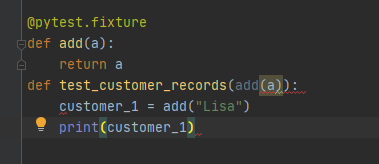
@pytest.fixture

def make_customer_record():

    def _make_customer_record(name):

        return {"name": name, "orders": []}

    return _make_customer_record   #注意此处不加(),非函数调用

def test_customer_records(make_customer_record):

    customer_1 = make_customer_record("Lisa")
pytest进阶之fixture函数的更多相关文章
- pytest进阶之fixture
前言 学pytest就不得不说fixture,fixture是pytest的精髓所在,就像unittest中的setup和teardown一样,如果不学fixture那么使用pytest和使用unit ...
- Pytest - 进阶功能fixture
1. 概述 Pytest的fixture功能灵活好用,支持参数设置,便于进行多用例测试,简单便捷,颇有pythonic.如果要深入学习pytest,必学fixture. fixture函数的作用: 完 ...
- python单元测试框架pytest——fixture函数(类似unitest的setup和teardown)
pytest的setup和teardown函数(曾被一家云计算面试官问到过). pytest提供了fixture函数用以在测试执行前和执行后进行必要的准备和清理工作.与python自带的unitest ...
- pytest框架之fixture前置和后置
一.conftest.py 定义公共的fixture,多个测试类中都可以调用 pytest提供了conftest.py文件,可以将fixture定义在此文件中 运行测试用例时,不需要去导入这个文件,会 ...
- 【pytest官方文档】解读- 如何自定义mark标记,并将测试用例的数据传递给fixture函数
在之前的分享中,我们知道可以使用yield或者return关键字把fixture函数里的值传递给test函数. 这种方法很实用,比如我在fixture函数里向数据库里插入必要的测试数据,那我就可以把相 ...
- Pytest【定制fixture】
在pytest中的fixture是在测试函数运行前后,由pytest执行的外壳函数,fixture中的代码可以定制,满足多变的测试需求:包括定义传入测试中的数据集.配置测试前系统的初始化状态.为批量测 ...
- 【pytest系列】- fixture测试夹具详解
如果想从头学起pytest,可以去看看这个系列的文章! https://www.cnblogs.com/miki-peng/category/1960108.html fixture的优势 pyt ...
- Pytest进阶使用
fixture 特点: 命令灵活:对于setup,teardown可以省略 数据共享:在conftest.py配置里写方法可以实现数据共享,不需要import导入,可以跨文件共享 scope的层次及神 ...
- JavaScript进阶系列04,函数参数个数不确定情况下的解决方案
本篇主要体验函数参数个数不确定情况下的一个解决方案.先来看一段使用函数作为参数进行计算的实例. var calculate = function(x, y, fn) { return fn(x, y) ...
随机推荐
- CSS :nth-of-type() bug
CSS :nth-of-type() bug .tools-hover-box-list-item { pointer-events: auto; box-sizing: border-box; di ...
- 字节跳动-前端面试题 Multi Promise Order
字节跳动-前端面试题 Multi Promise Order Promise Order Async/Await async function async1 () { console.log('asy ...
- Chinese Parents Game
Chinese Parents Game <中国式家长>是一款模拟养成游戏. 玩家在游戏中扮演一位出生在普通的中式家庭的孩子. https://en.wikipedia.org/wiki/ ...
- node os env reader
node os env reader node-os-env-reader.js #!/usr/bin/env node "use strict"; /** * * @author ...
- UI Design & App & Free Icons
UI Design & App & Free Icons icons8 https://icons8.com https://icons8.com/ouch Ouch可以帮助那些不进行 ...
- iOS effect & swiper delete components
iOS effect & swiper delete components mint-ui & cell-swipe https://elemefe.github.io/mint-ui ...
- 新兴公链NGK Global如何借助Defi突围?
Defi正在掀起持续不减的热度,在过去的一段时间里,以Uniswap为代表的去中心化交易所,使得以太坊重新焕发生机.币价也较以往上涨了50%有余.而且这波热度同样波及到交易所和其他公链市场. 但是波及 ...
- 一次"内存泄漏"引发的血案
本文转载自一次"内存泄漏"引发的血案 导语 2017年末,手Q春节红包项目期间,为保障活动期间服务正常稳定,我对性能不佳的Ark Server进行了改造和重写.重编发布一段时间后, ...
- WPF 关于ComboBox在前台绑定XML数据的一些方法,使用XML数据提供器 XmlDataProvider
关于使用 数据提供器:XmlDataProvider 的一些问题,以及在WPF中是如何使用的一些介绍,还有踩到的一些坑,希望其他和我碰到一样问题的,可以更快的解决. 首先,要求是 在WPF 的前台代码 ...
- Svelte v2 已经过时了!
带你走马观花,细看新版变化. 注意:原文发表于2018-04-18,随着框架不断演进,部分内容可能已不适用. 大约是一年之前,我们首次在 Svelte 的 issue 跟踪器上讨论过 v2 版本,现在 ...