
【SpringBoot】Spring Boot,开发社区讨论交流网站首页。
初识Spring Boot,开发社区讨论交流网站首页。
文章目录
1、项目简介
开发一个社区讨论交流网站 社交网站
play-community 玩转讨论交流社区
技术架构
- Spring Boot
- Spring、Spring MVC、MyBatis - SSM
- Redis、Kafka、Elasticsearch
- Spring Security、Shiro、Spring Actuator
- Swagger
Spring Boot makes it easy to create stand-alone, production-grade Spring based Applications that you can "just run".

We take an opinionated view of the Spring platform and third-party libraries so you can get started with minimum fuss. Most Spring Boot applications need minimal Spring configuration.
Spring Boot : https://spring.io/projects/spring-boot#overview
项目开发环境
- 构建工具:Apache Maven
- 集成开发工具:IntelliJ IDEA
- 数据库:MySQL、Redis
- 应用服务器:Apache Tomcat
- 版本控制工具:Git
2、 搭建开发环境
JDK
JDK(Java Development Kit)
搜索JDK并下载
https://www.oracle.com/java/technologies/javase-downloads.html
安装JDK 网上有很多教程的找一个安装下即可
只要JDK8以及8以上的就行
检测JDK安装是否成功
运行java命令
java -version
运行javac命令
java -version
我安装的是OpenJDK - 11
C:\Users\x1c>java -version

openjdk version "11.0.2" 2019-01-15

OpenJDK Runtime Environment 18.9 (build 11.0.2+9)

OpenJDK 64-Bit Server VM 18.9 (build 11.0.2+9, mixed mode)

C:\Users\x1c>javac -version

javac 11.0.2

C:\Users\x1c>
Apache Maven
Maven
http://maven.apache.org
http://maven.apache.org/download.cgi
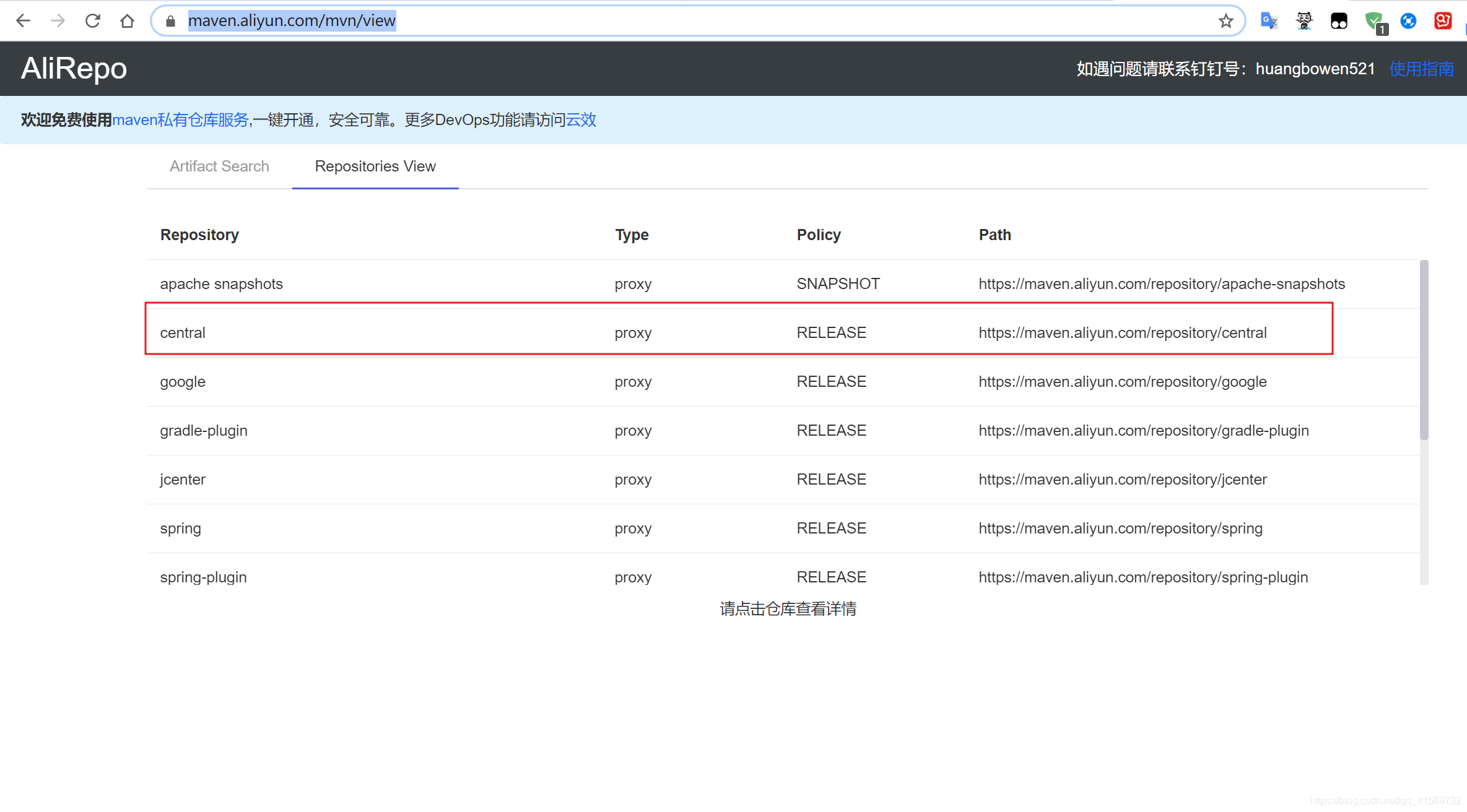
阿里云 https://maven.aliyun.com/mvn/view
Maven
- 可以帮助我们构建项目、管理项目中的jar包
- Maven仓库:存放构件的位置
本地仓库:默认是 ~/.m2/repository
远程仓库:中央仓库、镜像仓库、私服仓库
示例:安装、配置、常用命令
Maven conf/settings.xml 加上阿里镜像
<mirrors>

	<!--阿里云仓库-->

	<mirror>

      <id>alimaven</id>

      <name>aliyun maven</name>

    <url>http://maven.aliyun.com/nexus/content/groups/public/</url>

      <mirrorOf>central</mirrorOf>

    </mirror>

</mirrors>
安装Maven 网上有很多安装下载教程 配置好环境变量
Microsoft Windows [版本 10.0.17134.1425]

(c) 2018 Microsoft Corporation。保留所有权利。

C:\Users\x1c>mvn -version

Apache Maven 3.6.2 (40f52333136460af0dc0d7232c0dc0bcf0d9e117; 2019-08-27T23:06:16+08:00)

Maven home: D:\Environments\apache-maven-3.6.2\bin\..

Java version: 11.0.2, vendor: Oracle Corporation, runtime: D:\Environments\jdk-11.0.2

Default locale: zh_CN, platform encoding: GBK

OS name: "windows 10", version: "10.0", arch: "amd64", family: "windows"

C:\Users\x1c>
一些Maven命令练习
http://maven.apache.org/guides/getting-started/maven-in-five-minutes.html
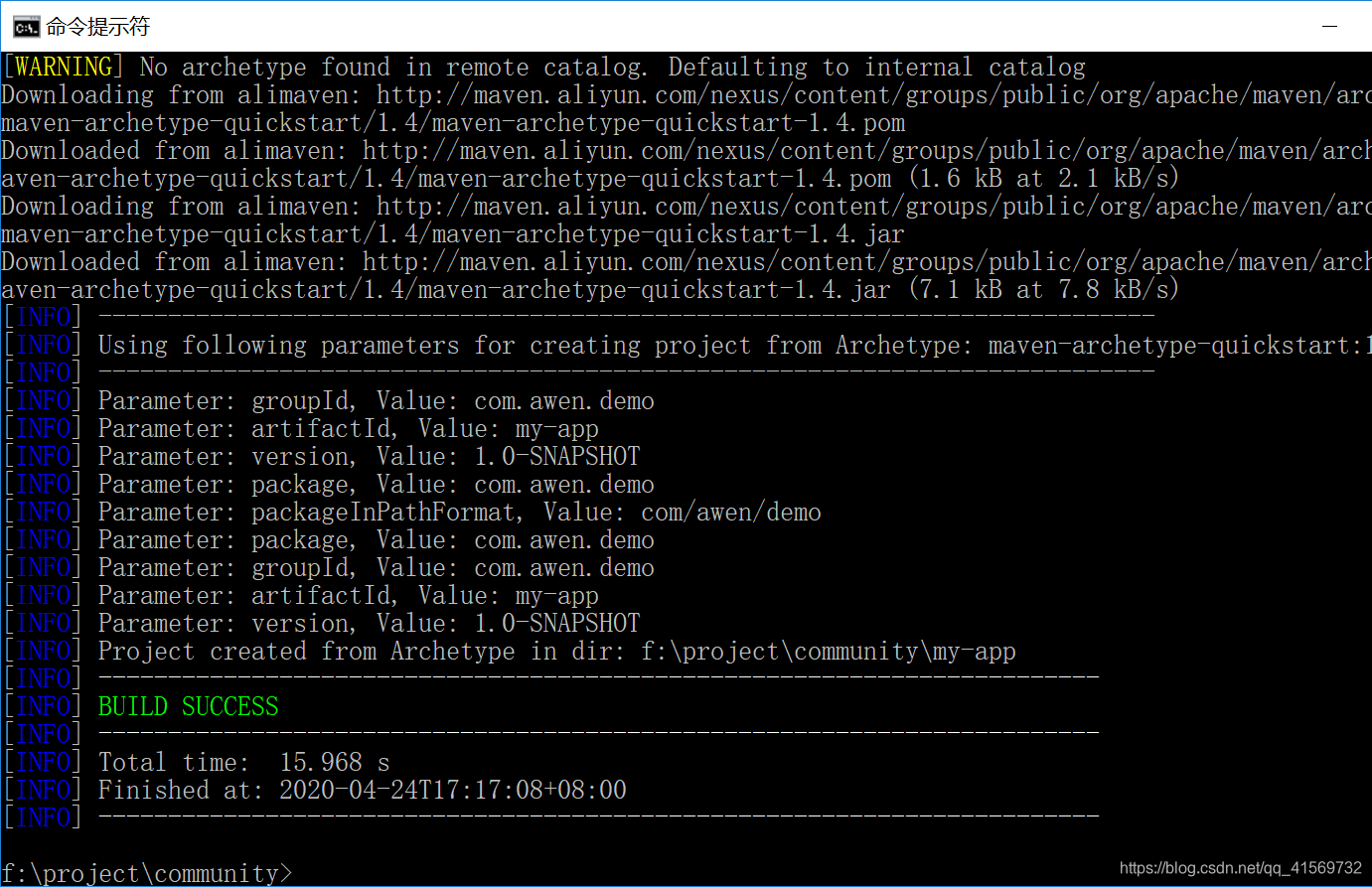
mvn archetype:generate -DgroupId=com.mycompany.app -DartifactId=my-app -DarchetypeArtifactId=maven-archetype-quickstart -DarchetypeVersion=1.4 -DinteractiveMode=false
x1c@DESKTOP-HVI7SH0 MINGW64 /f/project/community

$ mvn archetype:generate -DgroupId=com.mycompany.app -DartifactId=my-app -DarchetypeArtifactId=maven-archetype-quickstart -DarchetypeVersion=1.4 -DinteractiveMode=false

[INFO] Scanning for projects...

------------------------------------------------

...

...

[INFO] BUILD SUCCESS

 -------------------------------------------------------------------

x1c@DESKTOP-HVI7SH0 MINGW64 /f/project/community

$ ls

community/  community-1.1/  community-1.2/  mavendemo2/  my-app/
cd my-app
my-app

|-- pom.xml

`-- src

    |-- main

    |   `-- java

    |       `-- com

    |           `-- mycompany

    |               `-- app

    |                   `-- App.java

    `-- test

        `-- java

            `-- com

                `-- mycompany

                    `-- app

                        `-- AppTest.java
mvn compile
x1c@DESKTOP-HVI7SH0 MINGW64 /f/project/community/my-app

$ pwd

/f/project/community/my-app

x1c@DESKTOP-HVI7SH0 MINGW64 /f/project/community/my-app

$ ls

pom.xml  src/

x1c@DESKTOP-HVI7SH0 MINGW64 /f/project/community/my-app

$ mvn compile

[INFO] Scanning for projects...

[INFO]

...

[INFO] BUILD SUCCESS

。。。
mvn clean
x1c@DESKTOP-HVI7SH0 MINGW64 /f/project/community/my-app

$ mvn clean

[INFO] Scanning for projects...

[INFO]

[INFO] ------------------------< com.awen.demo:my-app >------------------------

[INFO] Building my-app 1.0-SNAPSHOT

[INFO] --------------------------------[ jar ]---------------------------------

[INFO]

[INFO] --- maven-clean-plugin:3.1.0:clean (default-clean) @ my-app ---

[INFO] Deleting F:\project\community\my-app\target

[INFO] ------------------------------------------------------------------------

[INFO] BUILD SUCCESS

[INFO] ------------------------------------------------------------------------

[INFO] Total time:  0.687 s

[INFO] Finished at: 2020-04-24T23:13:52+08:00

[INFO] ------------------------------------------------------------------------
mvn clean test
清理完 测试
Build the Project
mvn package
mvn package
java -cp target/my-app-1.0-SNAPSHOT.jar com.mycompany.app.App
x1c@DESKTOP-HVI7SH0 MINGW64 /f/project/community/my-app

$ mvn package

[INFO] Scanning for projects...

...

[INFO] BUILD SUCCESS

...

x1c@DESKTOP-HVI7SH0 MINGW64 /f/project/community/my-app

$ java -cp target/my-app-1.0-SNAPSHOT.jar com.mycompany.app.App

Hello World!
IntelliJ IDEA
IntelliJ IDEA
- 目前最流行的Java集成开发工具 IDE
- 示例:安装、配置、创建项目
http://www.jetbrains.com/idea
创建SpringBoot项目
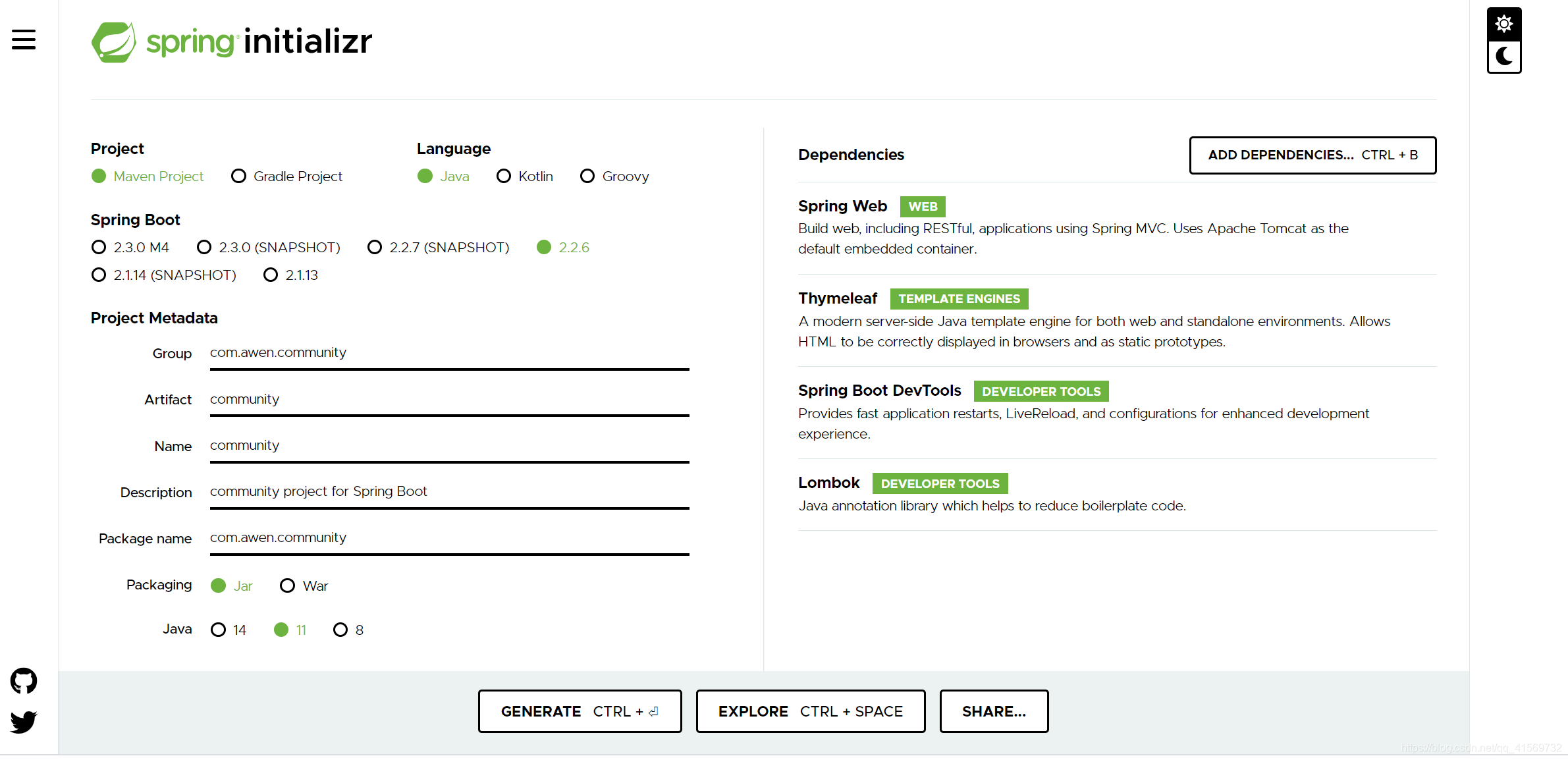
可以https://start.spring.io/ 创建,IDEA打开项目。
或者IntelliJ IDEA使用Spring Initializr创建Spring Boot项目
- 创建 Spring Boot 项目的引导工具
- 示例:创建“玩转讨论交流社区”项目
创建项目的时候选好dependencies 或者找对应依赖可以去:https://mvnrepository.com/
eg:
or
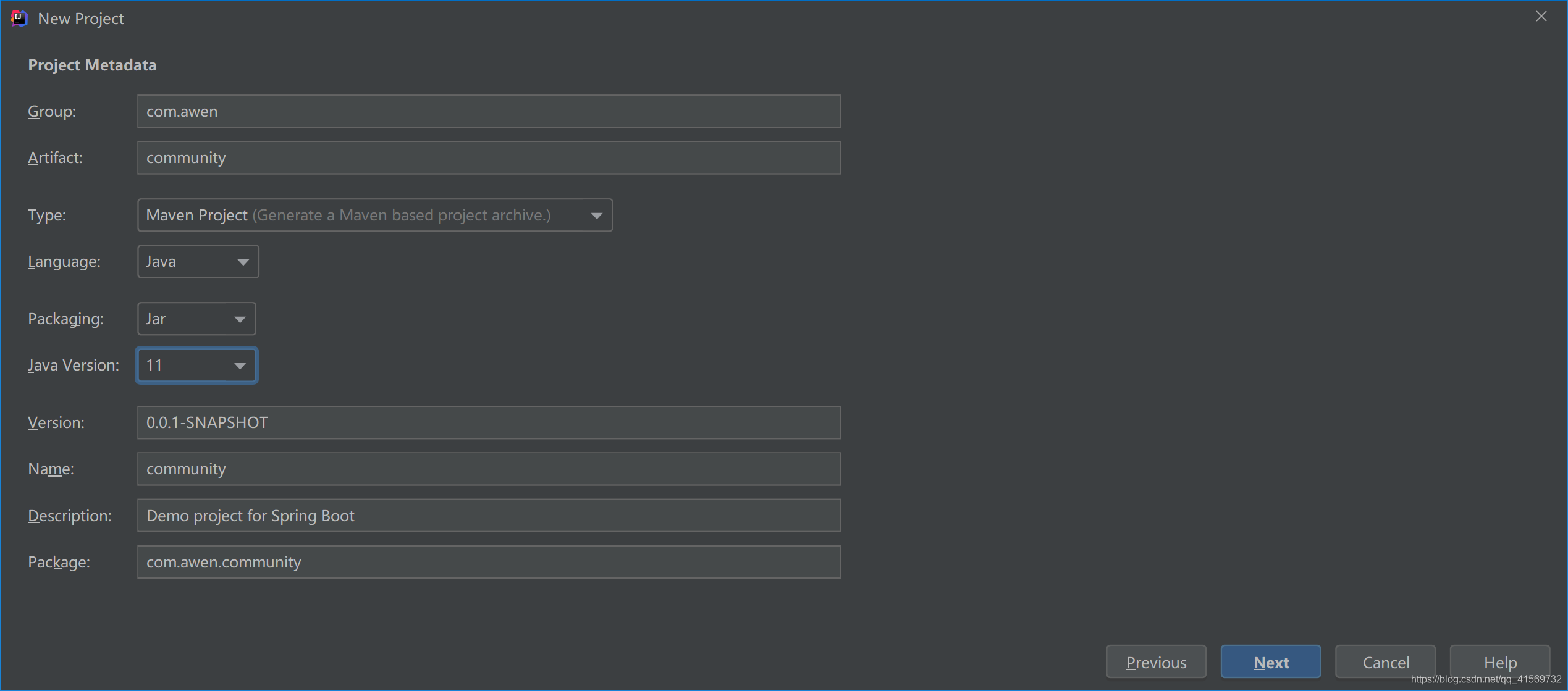
Spring Boot好多了 之前配置地狱
Spring Boot 入门示例
Spring Boot 核心作用
起步依赖、自动配置、端点监控
示例
一个简单的处理客户端请求案例
package com.awen.community.controller HelloController
@Controller

@RequestMapping("/hello")

public class HelloController {

    @RequestMapping("/spring")

    @ResponseBody

    public String sayHello(){

        return "Hello Spring!!!";

    }

}
application.properties
server.port=8080

server.servlet.context-path=/community
http://localhost:8080/community/hello/spring

3、Spring入门
Spring全家桶
Spring全家桶
- Spring Framework
- Spring Boot
- Spring Cloud
- Spring Cloud Data Flow
https://spring.io
Spring Framework
Spring Core
- IoC、AOP
Spring Data Access
- Transactions、Spring MyBatis
Web Servlet
- Spring MVC
Integration
- Email、Scheduling、AMQP、Security
Spring IoC
耦合 Bean
IOC (Inversion of Control 控制反转)
控制反转,是一种面向对象编程的设计思想。
DI (Dependency Injection 依赖注入)
依赖注入,是IoC思想的实现方式。
IoC Container
IoC容器,是实现依赖注入的关键,本质上是一个工厂。
https://blog.csdn.net/qq_41569732/article/details/103962388
4、Spring MVC入门
HTTP
HTTP
HyperText Transfer Protocol
用于传输HTML等内容的应用层协议
规定了浏览器和服务器之间如何通信,
以及通信时的数据格式。https://www.ietf.org
https://developer.mozilla.org/zh-CN
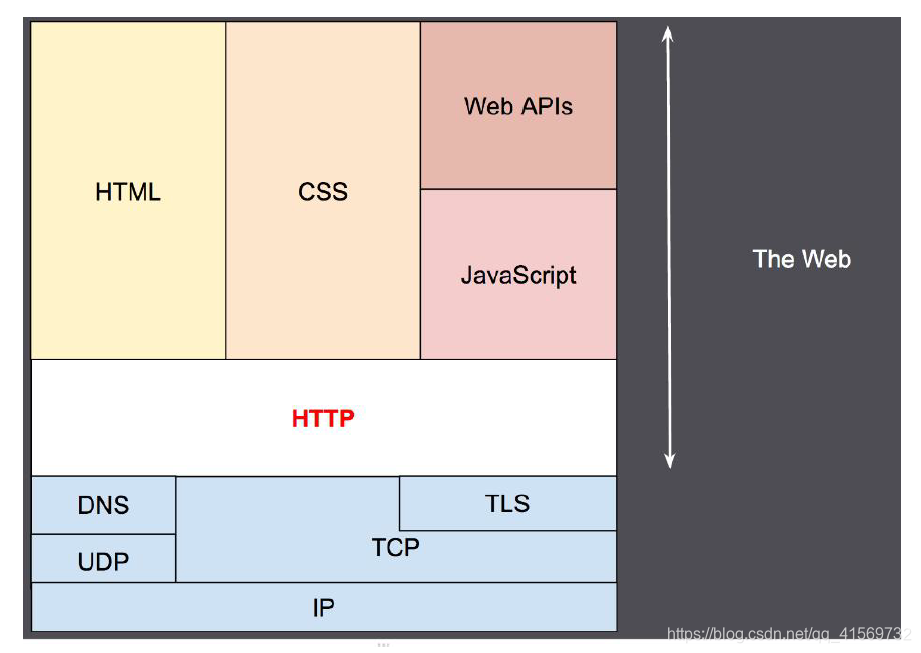
Spring MVC
Spring MVC
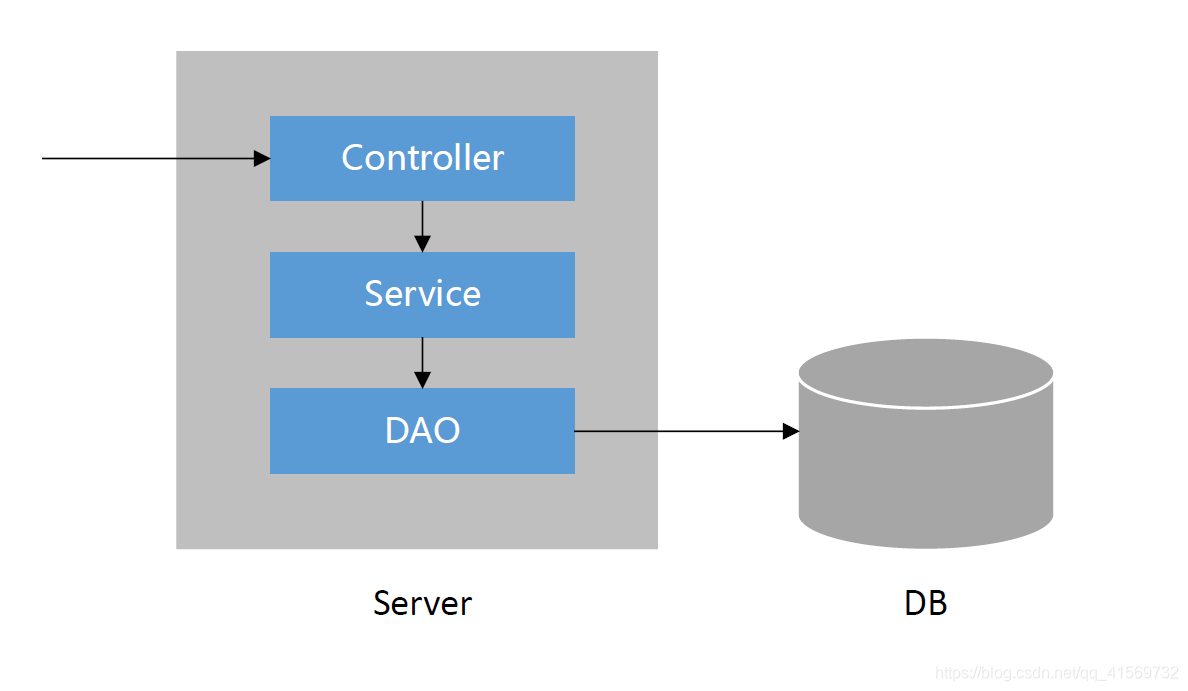
三层架构
表现层、业务层、数据访问层
MVC
Model:模型层
View:视图层
Controller:控制层
核心组件
前端控制器:DispatcherServlet
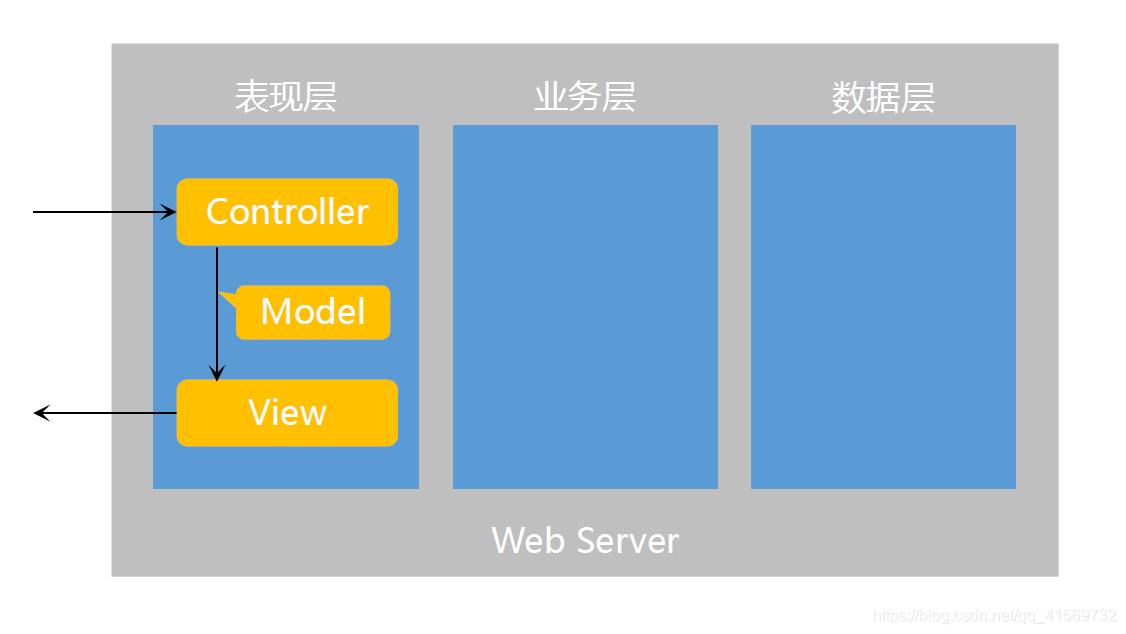
MVC Model Controller View
表现层 业务层 数据层
Web Server
Thymeleaf
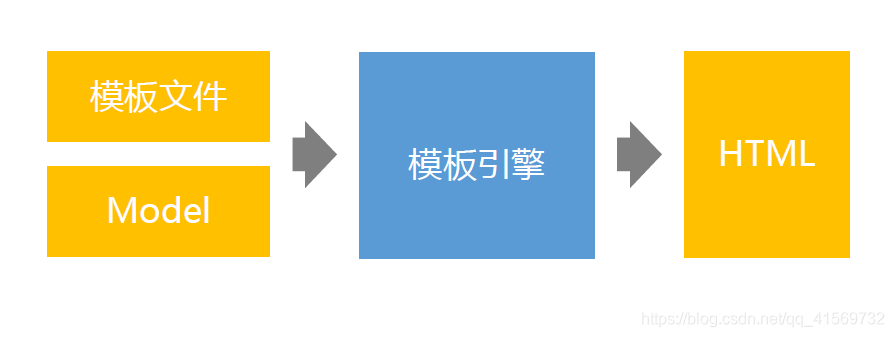
Thymeleaf
模板引擎
生成动态的HTML。
- Thymeleaf
倡导自然模板,即以HTML文件为模板。
常用语法
标准表达式、判断与循环、模板的布局。
https://www.thymeleaf.org
5、Mybatis入门
安装数据库
安装数据库
- 安装MySQL Server
https://dev.mysql.com/downloads/mysql
我安装的是MySQL5.7 https://downloads.mysql.com/archives/community/
- 安装MySQL Workbench
https://dev.mysql.com/downloads/workbench
图形化的
我安装的是Navicat https://www.navicat.com/en/
可以直接使用MySQL就行的
mysql
C:\Users\x1c>mysql -u root -p

Enter password: ******

Welcome to the MySQL monitor.  Commands end with ; or \g.

Your MySQL connection id is 68

Server version: 5.7.28 MySQL Community Server (GPL)

Copyright (c) 2000, 2019, Oracle and/or its affiliates. All rights reserved.

Oracle is a registered trademark of Oracle Corporation and/or its

affiliates. Other names may be trademarks of their respective

owners.

Type 'help;' or '\h' for help. Type '\c' to clear the current input statement.

mysql> exit

Bye

C:\Users\x1c>
MyBatis
核心组件
SqlSessionFactory:用于创建SqlSession的工厂类。
SqlSession:MyBatis的核心组件,用于向数据库执行SQL。
主配置文件:XML配置文件,可以对MyBatis的底层行为做出详细的配置。
Mapper接口:就是DAO接口,在MyBatis中习惯性的称之为Mapper。
Mapper映射器:用于编写SQL,并将SQL和实体类映射的组件,采用XML、注解均可实现。
• 示例使用MyBatis对用户表进行CRUD操作。
Mybatis
http://www.mybatis.org/mybatis-3
https://mybatis.org/mybatis-3/zh/index.html
什么是 MyBatis?

MyBatis 是一款优秀的持久层框架,它支持自定义 SQL、存储过程以及高级映射。MyBatis 免除了几乎所有的 JDBC 代码以及设置参数和获取结果集的工作。MyBatis 可以通过简单的 XML 或注解来配置和映射原始类型、接口和 Java POJO(Plain Old Java Objects,普通老式 Java 对象)为数据库中的记录。
http://www.mybatis.org/spring
What is MyBatis-Spring?

MyBatis-Spring integrates MyBatis seamlessly with Spring. This library allows MyBatis to participate in Spring transactions, takes care of building MyBatis mappers and SqlSessions and inject them into other beans, translates MyBatis exceptions into Spring DataAccessExceptions, and finally, it lets you build your application code free of dependencies on MyBatis, Spring or MyBatis-Spring.
Spring Boot http://mybatis.org/spring-boot-starter/mybatis-spring-boot-autoconfigure/
<dependency>

    <groupId>org.mybatis.spring.boot</groupId>

    <artifactId>mybatis-spring-boot-starter</artifactId>

    <version>2.1.1</version>

</dependency>
6、开发社区首页
开发社区首页
开发流程
- 1次请求的执行过程
- 分步实现
- 开发社区首页,显示前10个帖子
- 开发分页组件,分页显示所有的帖子
7、项目调试技巧
- 响应状态码的含义
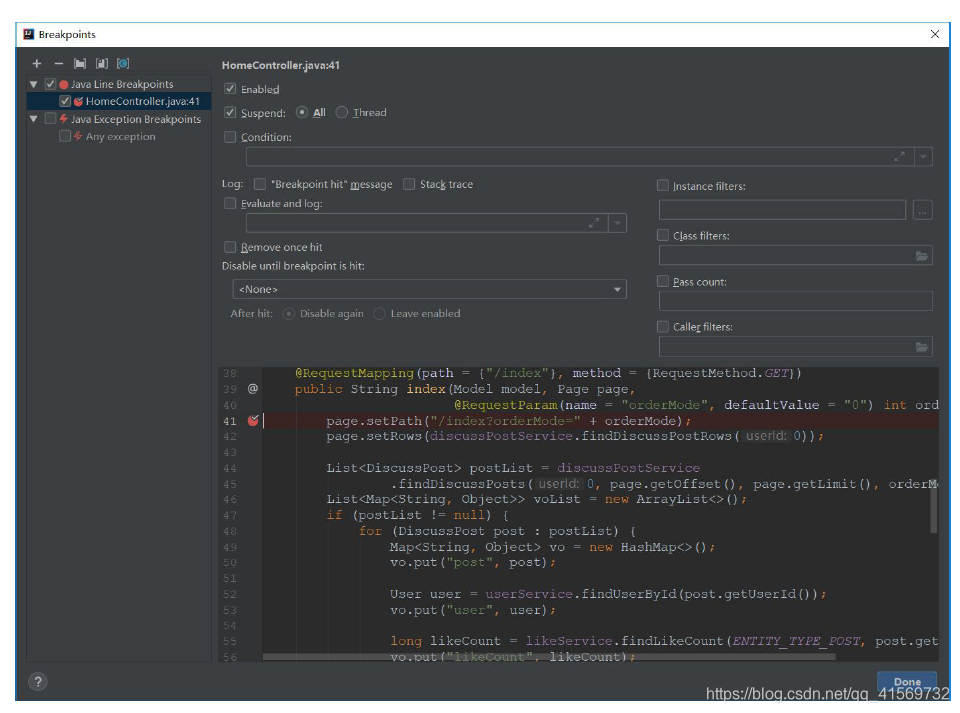
- 服务端断点调试技巧
- 客户端断点调试技巧
- 设置日志级别,并将日志输出到不同的终端
- https://logback.qos.ch
8、版本控制
版本控制
认识Git
- Git简介
- Git的安装与配置
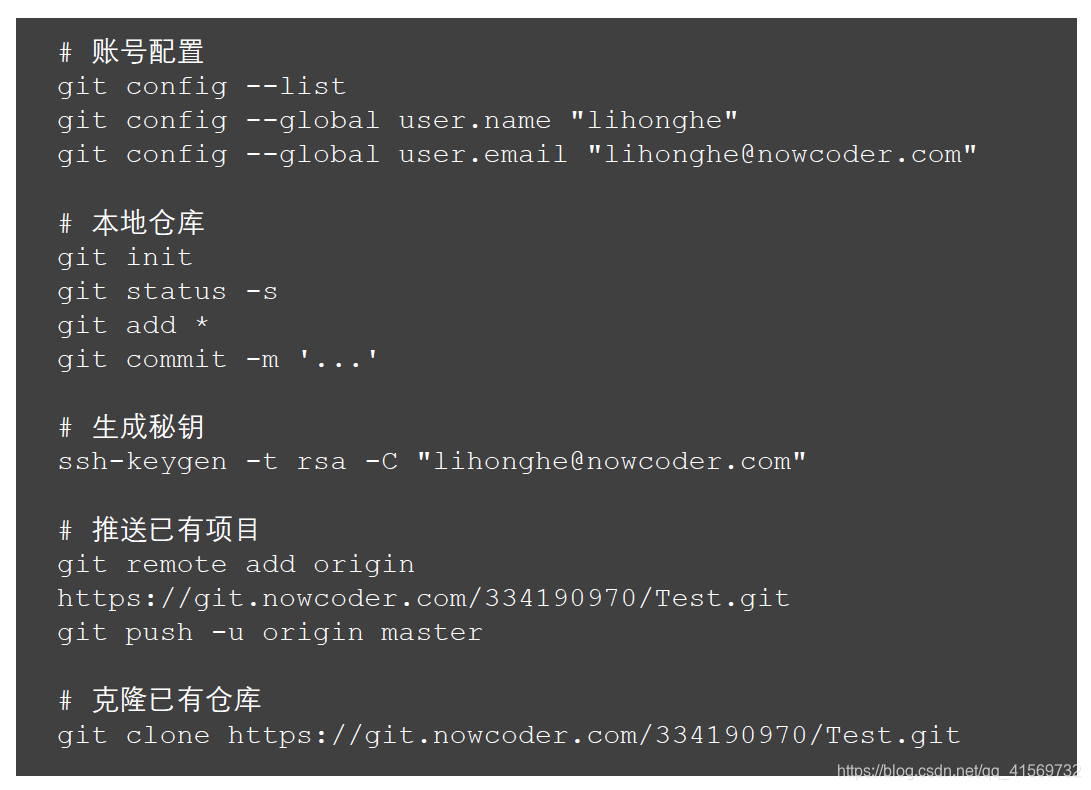
Git常用命令
将代码提交至本地仓库
将代码上传至远程仓库
IDEA集成Git
在IDEA中配置并使用Git
https://git-scm.com
9、记录
1、高薪求职项目课 - vol.7 - https://www.nowcoder.com/courses/semester/senior
是记录这个社区项目的笔记。
Github : https://github.com/liuawen/play-community
Thanks
【SpringBoot】Spring Boot,开发社区讨论交流网站首页。的更多相关文章
- Spring Boot 开发微信公众号后台
Hello 各位小伙伴,松哥今天要和大家聊一个有意思的话题,就是使用 Spring Boot 开发微信公众号后台. 很多小伙伴可能注意到松哥的个人网站(http://www.javaboy.org)前 ...
- 使用Spring Boot开发Web项目(二)之添加HTTPS支持
上篇博客使用Spring Boot开发Web项目我们简单介绍了使用如何使用Spring Boot创建一个使用了Thymeleaf模板引擎的Web项目,当然这还远远不够.今天我们再来看看如何给我们的We ...
- Spring Boot 开发系列一 开发环境的一些九九
从今天开始写这个Spring Boot 开发系列,我是第二周学习JAVA的,公司号称springboot把JAVA的开发提升到填空的能力,本人是NET转JAVA的,想看看这个填空的东西到底有多强.废话 ...
- Spring Boot开发HTTPS协议的REST接口
Spring Boot开发HTTP的REST接口流程在前文中已经描述过,见<SpringBoot开发REST接口>. 如需要支持HTTPS,只需要在如上基础上进行设置.修改/resourc ...
- Spring Boot开发RESTful接⼝服务及单元测试
Spring Boot开发RESTful接⼝服务及单元测试 常用注解解释说明: @Controller :修饰class,⽤来创建处理http请求的对象 @RestController :Spring ...
- 使用Spring boot开发RestFul 风格项目PUT/DELETE方法不起作用
在使用Spring boot 开发restful 风格的项目,put.delete方法不起作用,解决办法. 实体类Student @Data public class Student { privat ...
- 天天玩微信,Spring Boot 开发私有即时通信系统了解一下
1/ 概述 利用Spring Boot作为基础框架,Spring Security作为安全框架,WebSocket作为通信框架,实现点对点聊天和群聊天. 2/ 所需依赖 Spring Boot 版本 ...
- spring boot开发,jar包一个一个来启动太麻烦了,写一个bat文件一键启动
spring boot开发,jar包一个一个来启动太麻烦了,写一个bat文件一键启动 @echo offcd D:\workProject\bushustart cmd /c "title ...
- spring boot 开发环境搭建(Eclipse)
Spring Boot 集成教程 Spring Boot 介绍 Spring Boot 开发环境搭建(Eclipse) Spring Boot Hello World (restful接口)例子 sp ...
随机推荐
- spark streaming 消费 kafka入门采坑解决过程
kafka 服务相关的命令 # 开启kafka的服务器bin/kafka-server-start.sh -daemon config/server.properties &# 创建topic ...
- Java NIO:FileChannel数据传输
调用方式 FileChannel dstChannel; FileChannel srcChannel; dstChannel.transferFrom(srcChannel,0,srcChannel ...
- 08-flask-使用pymysql
代码 from flask import Flask from flask import render_template import pymysql # 创建flask对象 app = Flask( ...
- [打基础]OI/ACM基本功&一些小功能的实现&一些错误(持续更新)
基本功 前导0 如题,有时候需要把3输出成03这样子,可以调用 cout.width(x); ,x表示以几位,用 cout.fill(x); 来给出前导填充的内容,一般x以char的形式给出 例如可以 ...
- 工具-Redis-使用(99.6.2)
@ 目录 1.启动 2.数据结构 3.String命令 4.其他常用命令 5.Hash命令 6.List命令 7.Set命令 8.Zset命令 关于作者 1.启动 redis-server 交互 re ...
- C#使用时间戳
前言 参考博客 C#获取和转换时间戳: https://blog.csdn.net/weixin_39885282/article/details/79462443 获取时间戳: https://ww ...
- MySQL - 数据查询 - 简单查询
1. 简述 查询数据是指从数据库中获取所需要的数据.如Jack 要达到验证用户名和密码的目的,就需要从数据库已保存的用户表中读取当前用户的密码进行验证,以验明正身!保存查询数据是数据库操作中常用且重要 ...
- select * from 多张表的用法
select * from 多张表的用法 其实就是 inner join select * from Class c,Student s where c.ClassID=s.ClassID ...
- [leetcode]54. Spiral Matrix2生成螺旋数组
import java.util.Arrays; /** * Created by lvhao on 2017/7/6. * Given an integer n, generate a square ...
- Media Queries媒体查询
Media Queries能在不同的条件下使用不同的样式,使页面在不同在终端设备下达到不同的页面效果.Media Queries有其自己的使用规则.一个媒体查询由一个可选的媒体类型和媒体特性表达式,使 ...