
JavaSwing实现的文本比较软件
先看效果:截图1
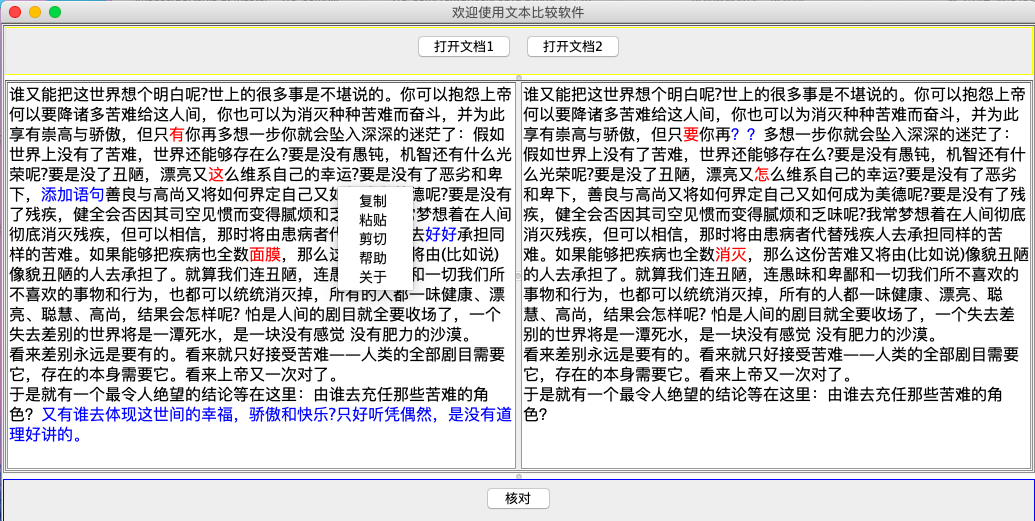
截图2:
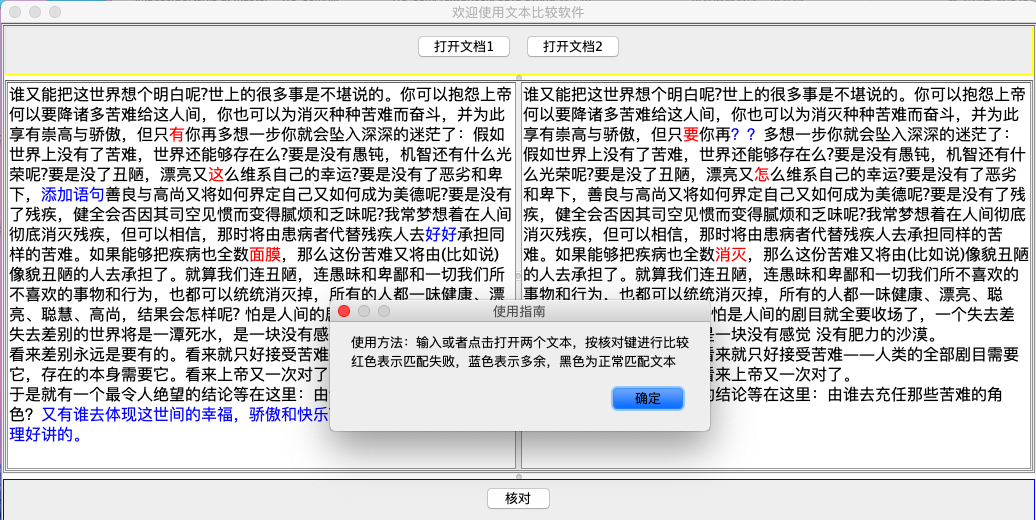
实现思路:
1、界面UI设计
2、功能点 : a 打开文件进行比较 b 粘贴内容进去比较 c 提示帮助 d 窗口可以任意拖动
3、文本比较算法
java类 :
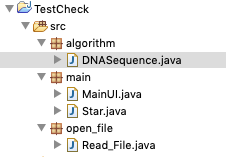
MainUI 类实现界面设计 Read_File 类实现文件读取 DNASequence 类文本比较算法
项目结构:
源代码:
Star.java
import javax.swing.text.BadLocationException;

import javax.swing.text.Document;

import javax.swing.text.SimpleAttributeSet;

import javax.swing.text.StyleConstants;

public class Star

{

    public static void main(String args[]) throws BadLocationException

    {

        //初始化界面

        Windowm windowm = new Windowm();

        //属性设置

        SimpleAttributeSet attrset = new SimpleAttributeSet();

        //字体大小

        StyleConstants.setFontSize(attrset,16);

        //获取JTextPane对象

        Document docs1=windowm.text1.getDocument();

        //设置初次显示文本

        docs1.insertString(docs1.getLength(), "手动输入或者选择文件打开", attrset);

        Document docs2=windowm.text2.getDocument();

        docs2.insertString(docs2.getLength(), "手动输入输入或者选择文间打开\n点击核对试试\n红色表示错误字符\n蓝色表示多余或缺失字符", attrset);

    }

}
MainUI.java
import algorithm.DNASequence;

import open_file.Read_File;

import java.awt.*;

import java.awt.event.ActionEvent;

import java.awt.event.ActionListener;

import java.awt.event.ComponentAdapter;

import java.awt.event.ComponentEvent;

import java.awt.event.MouseAdapter;

import java.awt.event.MouseEvent;

import java.io.File;

import javax.swing.*;

import javax.swing.text.Document;

import javax.swing.text.SimpleAttributeSet;

import javax.swing.text.StyleConstants;

class Windowm extends JFrame

{

    String path1;//第一个文件目录

    String path2;//第二个文件目录

    String File1;//第一个文件

    String File2;//第二个文件

    int point;//保存当前活动窗口

    private static final long serialVersionUID = 1L;

    JPanel myPanel1 = new JPanel();//面板1.1

    JPanel myPanel2 =new JPanel();//面板2.1

    JPanel myPanel3 =new JPanel();//面板3

    JPanel myPanel4 =new JPanel();//面板4

    JTextPane text1=new JTextPane();

    JTextPane text2=new JTextPane();

    JButton bt1 = new JButton("打开文档1");

    JButton bt2 = new JButton("打开文档2");

    JButton bt3 = new JButton("核对");

    JPopupMenu jm = new JPopupMenu();//右键菜单

    JMenuItem copy = new JMenuItem("复制");//菜单项

    JMenuItem path = new JMenuItem("粘贴");

    JMenuItem cut = new JMenuItem("剪切");

    JMenuItem help = new JMenuItem("帮助");

    JMenuItem about = new JMenuItem("关于");

    JScrollPane scro1=new JScrollPane(text1);//添加滚动条

    JScrollPane scro2=new JScrollPane(text2);//添加滚动条

    JSplitPane jSplitPane =new JSplitPane();//设定为拆分布局

    JSplitPane jSplitPane2 =new JSplitPane();//设定为拆分布局

    JSplitPane jSplitPane3 =new JSplitPane();//设定为拆分布局

    public Windowm()

    {

        setVisible(true);

        jm.add(copy);

        jm.add(path);

        jm.add(cut);

        jm.add(help);

        jm.add(about);

        myPanel3.add(bt1);

        myPanel3.add(bt2);

        myPanel4.add(bt3);

        this.setTitle("欢迎使用文本比较软件");

        this.setBounds(100, 100, 600, 500);

        jSplitPane.setContinuousLayout(true);//操作箭头,重绘图形

        jSplitPane2.setContinuousLayout(true);//操作箭头,重绘图形

        jSplitPane3.setContinuousLayout(true);//操作箭头,重绘图形

        jSplitPane2.setOrientation(JSplitPane.VERTICAL_SPLIT);//垂直方向

        jSplitPane.setOrientation(JSplitPane.HORIZONTAL_SPLIT);//水平方向

        jSplitPane3.setOrientation(JSplitPane.VERTICAL_SPLIT);//垂直方向

        myPanel1.setBorder(BorderFactory.createLineBorder(Color.green));

        myPanel2.setBorder(BorderFactory.createLineBorder(Color.red));

        myPanel3.setBorder(BorderFactory.createLineBorder(Color.yellow));

        myPanel4.setBorder(BorderFactory.createLineBorder(Color.blue));

        jSplitPane.setLeftComponent(scro1);//左右布局中添加组件 ,面板1

        jSplitPane.setRightComponent(scro2);//左右布局中添加组件 ,面板2

        jSplitPane2.setTopComponent(myPanel3);//上下布局中添加组件 ,面板1

        jSplitPane2.setBottomComponent(jSplitPane);//上下布局中添加组件 ,面板1

        jSplitPane3.setTopComponent(jSplitPane2);

        jSplitPane3.setBottomComponent(myPanel4);

        jSplitPane.setDividerSize(5);//设置分割线的宽度

        jSplitPane2.setDividerSize(5);//设置分割线的宽度

        jSplitPane3.setDividerSize(5);//设置分割线的宽度

        setContentPane(jSplitPane3);//设置为父模块

        setDefaultCloseOperation(JFrame.EXIT_ON_CLOSE);

        copy.addActionListener(new ActionListener()//窗口监听

            {

                public void actionPerformed(ActionEvent e4)//菜单项

                {

                       try{

                        text1.copy();

                        text2.copy();

                    }catch(Exception e1){

                    }

                }

               }

        );

        path.addActionListener(new ActionListener()//窗口监听

            {

                public void actionPerformed(ActionEvent e4)//菜单项

                {

                       try{

                           if(point==1)//由于有两个窗口,因此设计point来确定粘贴在某个窗口

                               text1.paste();

                           else

                            text2.paste();

                    }catch(Exception e1){

                    }

                }

               }

        );

        cut.addActionListener(new ActionListener()//窗口监听

            {

                public void actionPerformed(ActionEvent e4)//菜单项

                {

                    try{

                           text1.cut();

                           text2.cut();

                    }catch(Exception e1){

                    }

                }

            }

        );

        help.addActionListener(new ActionListener()//窗口监听

            {

                public void actionPerformed(ActionEvent e4)//菜单项

                {

                    JOptionPane.showMessageDialog(null,"使用方法:输入或者点击打开两个文本,按核对键进行比较\n红色表示匹配失败,蓝色表示多余,黑色为正常匹配文本","使用指南",JOptionPane.PLAIN_MESSAGE);

                }

            }

        );

        about.addActionListener(new ActionListener()//窗口监听

            {

                public void actionPerformed(ActionEvent e4)//菜单项

                {

                    JOptionPane.showMessageDialog(null,"原创:将军\nQQ 2910001378@qq.com \n人生苦短,欢迎转载","将军原创",JOptionPane.PLAIN_MESSAGE);

                }

            }

        );

        text1.addMouseListener(new MouseAdapter() {

            public void mouseClicked(MouseEvent e) {

                if (e.getButton() == MouseEvent.BUTTON3) {

                    jm.show(text1, e.getX(), e.getY()); // 弹出菜单

                    point=1;

                }

            }

        });

        text2.addMouseListener(new MouseAdapter() {

            public void mouseClicked(MouseEvent e) {

                if (e.getButton() == MouseEvent.BUTTON3) {

                    jm.show(text2, e.getX(), e.getY()); // 弹出菜单

                    point=2;

                }

            }

        });

        jSplitPane.addComponentListener(new ComponentAdapter() {//拖动窗口监听

            public void componentResized(ComponentEvent e) {

                jSplitPane.setDividerLocation(jSplitPane3.getWidth()/2-7);//设置第一条宽度

            }

        });

       jSplitPane2.setDividerLocation(50);//设定分割线的距离左边的位置

       jSplitPane3.addComponentListener(new ComponentAdapter() {//拖动窗口监听

           public void componentResized(ComponentEvent e) {

               jSplitPane3.setDividerLocation(jSplitPane3.getHeight()-50);//设置第三条高度

           }

       });

    bt1.addActionListener(new ActionListener()//窗口监听

        {

            public void actionPerformed(ActionEvent e4)//菜单项

            {

                try{

                    text1.setText("");

                    JFileChooser jfc=new JFileChooser();

                    jfc.setFileSelectionMode(JFileChooser.FILES_AND_DIRECTORIES );

                    jfc.showDialog(new JLabel(), "选择");

                    File file=jfc.getSelectedFile();

                    path1=file.getAbsolutePath();//获取文件绝对地址

                    new Read_File(path1);

                    File1= Read_File.getFile();

                    SimpleAttributeSet attrset = new SimpleAttributeSet();

                    StyleConstants.setFontSize(attrset,16);//设置字号

                    Document docs=text1.getDocument();

                    docs.insertString(docs.getLength(), File1, attrset);

                }catch(Exception e1){

                }

            }

        }

    );

    bt2.addActionListener(new ActionListener()//窗口监听

        {

            public void actionPerformed(ActionEvent e4)//菜单项

            {

                try{

                    text2.setText("");

                    JFileChooser jfc=new JFileChooser();

                    jfc.setFileSelectionMode(JFileChooser.FILES_AND_DIRECTORIES );

                    jfc.showDialog(new JLabel(), "选择");

                    File file=jfc.getSelectedFile();

                    path2=file.getAbsolutePath();//获取文件绝对地址

                    new Read_File(path2);

                    File2= Read_File.getFile();

                    SimpleAttributeSet attrset = new SimpleAttributeSet();

                    StyleConstants.setFontSize(attrset,16);//设置字号

                    Document docs=text2.getDocument();

                    docs.insertString(docs.getLength(), File2, attrset);

                }catch(Exception e1){

                    System.out.println("选择文件出错");

                }

            }

        }

    );

    bt3.addActionListener(new ActionListener()//窗口监听

        {

            public void actionPerformed(ActionEvent e4)//菜单项

            {

                try{

                    String dnas1;//算法处理之后的字符串1

                    String dnas2;//算法处理之后的字符串2

                    String jtp1;//JTextpane的内容1

                    String jtp2;//JTextpane的内容2

                    int len=0;    //处理后的字符串长度

                    jtp1=text1.getText();//获取窗口文本

                    jtp2=text2.getText();

                    text1.setText("");//清空之前内容

                    text2.setText("");

                    Document docs1=text1.getDocument();

                    Document docs2=text2.getDocument();

                    DNASequence dna=new DNASequence(jtp1,jtp2);//通过构造方法传递参数

                    dna.runAnalysis();

                    dna.traceback();

                    dnas1=dna.getString1();//获取处理后的字符串

                    dnas2=dna.getString2();

                    char[] s = dnas1.toCharArray();//字符串转Char数组

                    char[] p = dnas2.toCharArray();

                    len=dnas1.length();

                    SimpleAttributeSet set2 = new SimpleAttributeSet();//设置一个属性

                    StyleConstants.setFontSize(set2,16);//设置字号

                    for(int i=0;i<len;i++){

                        if(s[i]=='-'){

                            StyleConstants.setForeground(set2,Color.BLUE);//设置文字颜色

                            docs2.insertString(docs2.getLength(),String.valueOf(p[i]), set2);

                        }else if(p[i]=='-'){

                            StyleConstants.setForeground(set2,Color.BLUE);//设置文字颜色

                            docs1.insertString(docs1.getLength(),String.valueOf(s[i]), set2);

                        }else if(s[i]==p[i]){

                            StyleConstants.setForeground(set2,Color.black);//设置文字颜色

                            docs1.insertString(docs1.getLength(),String.valueOf(s[i]), set2);

                            docs2.insertString(docs2.getLength(),String.valueOf(p[i]), set2);

                        }else if(s[i]!=p[i]){                                StyleConstants.setForeground(set2,Color.red);//设置文字颜色

                            docs1.insertString(docs1.getLength(),String.valueOf(s[i]), set2);

                            docs2.insertString(docs2.getLength(),String.valueOf(p[i]), set2);

                        }else{

                            System.out.print("考虑更多颜色");

                        }

                    }

                }catch(Exception e1){

                    System.out.println("选择文件2出错");

                }

            }

        }

    );

    }

}
Read_File.java
import java.io.BufferedReader;

import java.io.FileInputStream;

import java.io.InputStreamReader;

public class Read_File {

     static  String fileName;

    public  Read_File(String str){

            fileName=str;

    }

    public static String getFile(){

        BufferedReader br = null;

        StringBuffer sb = null;

        try {

            br = new BufferedReader(new InputStreamReader(new FileInputStream(fileName),"utf-8")); //这里可以控制编码

            sb = new StringBuffer();

            String line = null;

            while((line = br.readLine()) != null) {

                sb.append(line);

            }

        } catch (Exception e) {

            e.printStackTrace();

        } finally {

            try {

                br.close();

            } catch (Exception e) {

                e.printStackTrace();

            }

        }

        String data = new String(sb); //StringBuffer ==> String

        System.out.println("数据为==> " + data);

        return data;

    }

//    public static void main(String[] args) {

//        new Read_File("1");

//    }

}
DNASequence.java
//https://codereview.stackexchange.com/questions/182601/optimizing-needleman-wunsch-algorithm-in-java

public class DNASequence {

    protected final String seq_1, seq_2;    //要分析的两个序列

    public int alignmentScore;              //使用Needleman-Wunsch算法

    protected Node[][] matrix;              //存储分数和缩进

    protected final int matchScore, mismatchScore, indel;

    //用于打印DNA序列分析的字符串

    String top = "";        // Sequence 1

    String bottom = "";     // Sequence 2

    public DNASequence(String s1, String s2) {

        //我使用一个■作为缓冲,这样序列字符串正确对齐

        // 在矩阵中使用缩进和分数。

        ScoreScheme s = new ScoreScheme(2, -1, -2);

        seq_1 = "\u25A0" + s1;

        seq_2 = "\u25A0" + s2;

        matchScore = s.matchScore;

        mismatchScore = s.mismatchScore;

        indel = s.indel;

        matrix = new Node[seq_1.length()][seq_2.length()];

        for (int i = 0; i < seq_1.length(); i++)

            matrix[i][0] = new Node(i * indel, i, 0);

        for (int i = 0; i < seq_2.length(); i++)

            matrix[0][i] = new Node(i * indel, 0, i);

    }

    //辅助方法,帮助决定使用哪种匹配/不匹配得分。

    protected int score(int i, int j) {

        if (seq_1.charAt(i) == seq_2.charAt(j))

            return matchScore;

        else

            return mismatchScore;

    }

    //在本地级别上实现Needleman-Wunsch algo的Helper方法。

    protected Node match(int i, int j) {

        Node s1,s2,s3;

        s1 = new Node(matrix[i-1][j-1].score + score(i, j), i, j);

        s2 = new Node(matrix[i-1][j].score + indel, i, j);

        s3 = new Node(matrix[i][j-1].score + indel, i, j);

        Node largest = new Node(Math.max(s1.score, Math.max(s2.score, s3.score)), i, j);

        if (s1.compareTo(largest) == 0)

            largest.prev = matrix[i-1][j-1];

        else if(s2.compareTo(largest) == 0)

            largest.prev = matrix[i-1][j];

        else

            largest.prev = matrix[i][j-1];

        return largest;

    }

    public Node runAnalysis() {

        for (int i = 1; i < seq_1.length(); i++) {

            for (int j = 1; j < seq_2.length(); j++){

                matrix[i][j] = match(i, j);

            }

        }

        alignmentScore = matrix[seq_1.length()-1][seq_2.length()-1].score;

        return matrix[seq_1.length()-1][seq_2.length()-1];

    }

    //辅助方法,逐步构建分析结果。它将返回

    //“尾巴”,因为我们可能还需要做一些工作。

    protected Node traceHelper(Node curr) {

        while (curr.prev != null) {

            if (curr.i - curr.prev.i == 1 && curr.j - curr.prev.j == 1){    // If the path leads diagonal

                boolean x = seq_1.charAt(curr.i) == seq_2.charAt(curr.j) ? true : false;

                if(x){

                    top = seq_1.charAt(curr.i) +top;

                    bottom = seq_2.charAt(curr.j) +bottom;

                }else{

                    top = seq_1.charAt(curr.i) + top;

                    bottom = seq_2.charAt(curr.j) + bottom;

                }

            }else if (curr.i - curr.prev.i == 1){               //如果这条路通向山顶

                top = seq_1.charAt(curr.i) + top;

                bottom = "-" +  bottom;                     //如果这条路通向左边

            }else if (curr.j - curr.prev.j == 1){

                top = "-" + top;

                bottom = seq_2.charAt(curr.j) +  bottom;

            }

            curr = curr.prev;

        }

        return curr;

    }

//从矩阵的最后一个节点回溯到第一个索引节点。

    public void traceback() {

        Node curr = matrix[seq_1.length()-1][seq_2.length()-1];

        curr = traceHelper(curr);

        while (curr.i != 0 || curr.j != 0) {

            if (curr.i != 0 && curr.j == 0){

                curr.prev = matrix[curr.i-1][curr.j];

                curr = traceHelper(curr);

            }else if (curr.i == 0 && curr.j != 0) {

                curr.prev = matrix[curr.i][curr.j-1];

                curr = traceHelper(curr);

            }

        }

    //打印DNA序列分析

//        System.out.println(top);

//        System.out.println(bottom);

    }

    public String getString1(){

        return top;

    }

    public String getString2(){

        return bottom;

    }

}

class Node implements Comparable<Node>{

    int i, j;

    int score;

    Node prev;

    public Node(int score, int x, int y) {

        this.i = x;

        this.j = y;

        this.score = score;

        this.prev = null;

    }

    public int compareTo(Node n) {

        return this.score - n.score;

    }

    public String toString() {

        return ""+score;

    }

}

class ScoreScheme {

    int matchScore, mismatchScore, indel;

    public ScoreScheme(int m1, int m2, int i) {

        matchScore = m1;

        mismatchScore = m2;

        indel = i;

    }

}
项目源代码已经上传到我的GitHub仓库 下载点击https://github.com/Wo-com/TextCheck
JavaSwing实现的文本比较软件的更多相关文章
- [转]Windows 下常用盗版软件的替代免费软件列表
当您看完这篇文章,我相信您完全可以把您 Windows 系统里安装的盗版软件清理干净而不影响您的任何工作.如果您仍然希望并且喜欢.享受做一个盗版软件用户的话,那也没有办法,但是请您记住,非常非常重要的 ...
- 【软件分析与挖掘】Vision of Software Clone Management: Past, Present, and Future (Keynote Paper)
abstract: 代码克隆的综述 S1 INTRODUCTION AND MOTIVATION 代码克隆的利弊: 利:可以有效地去耦合,避免其他一些可能的错误: 弊:当被复制的那段code中带 ...
- 你不得不用的MAC软件开发工具软件,个个万里挑一
作为软件行业,尤其是程序员,Mac上都不得不安装一些必备的MAC软件开发工具软件,下面给大家分享一些必装的MAC软件开发工具软件,以备日后之需,有备无患. 其中,包含各种语言的主流 IDE.开发辅助. ...
- JavaSwing程序设计(目录)
一.JavaSwing 概述 JavaSwing 图形界面概述 二.JavaSwing 基本组件 JLabel(标签) JButton(按钮) JTextField(文本框) JPasswordFie ...
- Mac常备必用的软件-mac软件推荐
目录 终端工具 iTerm2,做开发的都用它代替系统自带的“终端”,免费软件,官网直接下载即可. 文件比较工具 meld,开源免费的文件/文本比较工具. 安装方法:brew cask install ...
- Java-Swing中使用Web富文本编辑器
资料下载 (截取出了邮件发送的功能.) 2018/11/10 因为要 win7 电脑 IE 8 的原因,使用了 jxBrower 拓展,更容易使用,参考链接(推荐) 问题介绍 window客户端软件的 ...
- [日常] 免费的文本比较工具Meld使用
需要在linux桌面环境进行文件比较的时候,发现的一款文本比较工具,并且还有windows版本.之前一直在windows下使用的是beyond compare这个的破解版,这个软件本身是收费的而且还非 ...
- 异想家Win10常用的软件推荐
本文总结一下自己日常使用Win10中涉及到的好用小软件,那些装机必备的软件在这里就不一一列出了.我重点想推荐一些自己觉得好用,符合自己偏好,但又不是每个人都知道的小工具: Rolan:一款类似于Win ...
- DBImport V3.7版本发布及软件稳定性(自动退出问题)解决过程分享
DBImport V3.7介绍: 1:先上图,再介绍亮点功能: 主要的升级功能为: 1:增加(Truncate Table)清表再插入功能: 清掉再插,可以保证两个库的数据一致,自己很喜欢这个功能. ...
随机推荐
- 【VSA】One-shot video-based person re-identification with variance subsampling algorithm
目录 解决了什么问题 主要贡献和创新点 基本框架 提出的方法 01 variance confidence方差置信度 02 Variance Subsampling Algorithm 方差二次采样算 ...
- moviepy音视频剪辑:音视频的加载和输出
专栏:Python基础教程目录 专栏:使用PyQt开发图形界面Python应用 专栏:PyQt入门学习 老猿Python博文目录 老猿学5G博文目录 一.概述 在本地进行音视频处理时,首先要从视频文件 ...
- PyQt(Python+Qt)学习随笔:QTreeWidget中获取指定位置项的itemAt方法
老猿Python博文目录 专栏:使用PyQt开发图形界面Python应用 老猿Python博客地址 QTreeWidget的itemAt方法通过视口内的坐标点获取对应坐标位置的项,相关调用方法如下: ...
- bugkuctf web区 sql2
来了!终于做出来(虽然是在大佬帮助下,提前感谢大佬) 在看wp之后发现这是一道典型的.DS_Store源码泄露,其他类型的web源码泄露:https://www.secpulse.com/archiv ...
- 个人项目作业——wc.exe
一.Github项目地址 https://github.com/PIPIYing/wc 二.项目概况 项目描述 Word Count 1. 实现一个简单而完整的软件工具(源程序特征统计程序). 2. ...
- URLEncoder使用踩坑
URLEncoder使用 背景介绍 今天需要传一些描述信息给前端,需要写在header里面,所以要先编码成utf-8的格式,再有前端解码获取. 工作过程 前提:我要传给前端的文字是我从中台那边拿到的. ...
- 【CSP-S 2019】树的重心(重心的性质)
Description 给定一颗 \(n\) 个顶点的树 \(\text T\),共 \(n-1\) 次断边操作,每次将树分为两部分 \(\text T_1, \text T_2\),求: \[\su ...
- SNOI2020 部分题解
D1T1 画图可以发现,多了一条边过后的图是串并联图.(暂时不确定) 然后我们考虑把问题变成,若生成树包含一条边\(e\),则使生成树权值乘上\(a_e\),否则乘上\(b_e\),求最终的生成树权值 ...
- linux tar 压缩和解压缩
tar -c: 建立压缩档案-x:解压-t:查看内容-r:向压缩归档文件末尾追加文件-u:更新原压缩包中的文件 这五个是独立的命令,压缩解压都要用到其中一个,可以和别的命令连用但只能用其中一个. 下面 ...
- OpenResty&Canal
OpenResty&Canal OpenResty 提供缓存功能 封装了Nginx,并且提供了Lua扩展,大大提升了Nginx的并发处理能力10k~1000k Nginx限流 1.控制速率 2 ...