
styled-components all in one
styled-components all in one
CSS in JS
https://www.styled-components.com/
https://github.com/styled-components
# install

$ yarn add styled-components

$ npm i -S styled-components
import styled from 'styled-components'

// const Button = styled.button``

const Button = styled.button`

  background: transparent;

  border-radius: 3px;

  border: 2px solid palevioletred;

  color: palevioletred;

  margin: 0 1em;

  padding: 0.25em 1em;

`
import styled, { css } from 'styled-components'

const Button = styled.button`

  background: transparent;

  border-radius: 3px;

  border: 2px solid palevioletred;

  color: palevioletred;

  margin: 0 1em;

  padding: 0.25em 1em;

  ${props =>

    props.primary &&

    css`

      background: palevioletred;

      color: white;

    `};

`
const Button = styled.button`

  background: transparent;

  border-radius: 3px;

  border: 2px solid palevioletred;

  color: palevioletred;

  margin: 0.5em 1em;

  padding: 0.25em 1em;

  ${props => props.primary && css`

    background: palevioletred;

    color: white;

  `}

`;

const Container = styled.div`

  text-align: center;

`

render(

  <Container>

    <Button>Normal Button</Button>

    <Button primary>Primary Button</Button>

  </Container>

);
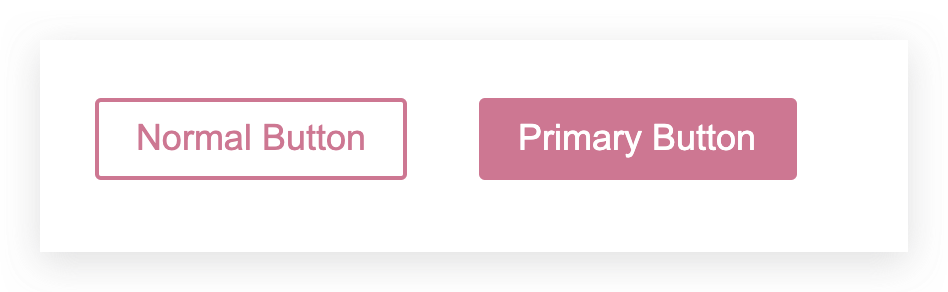
demos
const Button = styled.a`

  /* This renders the buttons above... Edit me! */

  display: inline-block;

  border-radius: 3px;

  padding: 0.5rem 0;

  margin: 0.5rem 1rem;

  width: 11rem;

  background: transparent;

  color: white;

  border: 2px solid white;

  /* The GitHub button is a primary button

   * edit this to target it specifically! */

  ${props => props.primary && css`

    background: white;

    color: black;

  `}

`

render(

  <div>

    <Button

      href="https://github.com/styled-components/styled-components"

      target="_blank"

      rel="noopener"

      primary

    >

      GitHub

    </Button>

    <Button as={Link} href="/docs">

      Documentation

    </Button>

  </div>

)

const Button = styled.a`

  /* This renders the buttons above... Edit me! */

  display: inline-block;

  border-radius: 3px;

  padding: 0.5rem 0;

  margin: 0.5rem 1rem;

  width: 11rem;

  background: transparent;

  color: white;

  border: 2px solid white;

  /* The GitHub button is a primary button

   * edit this to target it specifically! */

  ${props => props.primary && css`

    background: white;

    color: black;

  `}

`

render(

  <div>

    <Button

      href="https://github.com/styled-components/styled-components"

      target="_blank"

      rel="noopener"

      primary

    >

      GitHub

    </Button>

    <Button as={Link} href="/docs">

      Documentation

    </Button>

  </div>

)
tagged templates
`string text`

`string text line 1

 string text line 2`

`string text ${expression} string text`

tag`string text ${expression} string text`
demo
"use strict";

/**

 *

 * @author xgqfrms

 * @license MIT

 * @copyright xgqfrms

 * @created 2020-09-21

 * @modified

 *

 * @description

 * @difficulty Easy Medium Hard

 * @complexity O(n)

 * @augments

 * @example

 * @link

 * @solutions

 *

 * @best_solutions

 *

 */

const log = console.log;

// tagged templates

const name = `xgqfrms`;

const age = 23;

const title = "CEO";

const taggedTemplateFunc = (strs, arg1, arg2, ...args) => {

 log(`\nstrs`, strs);

 log(`arg1`, arg1);

 log(`arg2`, arg2);

 log(`args`, args);

 return strs[0] + arg1 + strs[1] + arg2;

}

taggedTemplateFunc`name=${name}, age=${age}, title=${title}`;

const q = `what's your name`;

taggedTemplateFunc`${q}, name=${name}, age=${age}, title=${title}`;

/*

$ node tagged-templates.js

strs [ 'name=', ', age=', ', title=', '' ]

arg1 xgqfrms

arg2 23

args [ 'CEO' ]

strs [ '', ', name=', ', age=', ', title=', '' ]

arg1 what's your name

arg2 xgqfrms

args [ 23, 'CEO' ]

*/
https://developer.mozilla.org/en-US/docs/Web/JavaScript/Reference/Template_literals#Tagged_templates
let person = 'Mike';

let age = 28;

function myTag(strings, personExp, ageExp) {

  let str0 = strings[0]; // "That "

  let str1 = strings[1]; // " is a "

  // let str2 = strings[2]; // ""

  // There is technically a string after the final expression (in our example), but it is empty (""), so disregard.

  let ageStr;

  if (ageExp > 99){

    ageStr = 'centenarian';

  } else {

    ageStr = 'youngster';

  }

  // We can even return a string built using a template literal

  return `${str0}${personExp}${str1}${ageStr}`;

}

let output = myTag`That ${person} is a ${age}`;

console.log(output);

// That Mike is a youngster
refs
https://www.cnblogs.com/xgqfrms/p/10043199.html
xgqfrms 2012-2020
www.cnblogs.com 发布文章使用:只允许注册用户才可以访问!
styled-components all in one的更多相关文章
- styled components草根中文版文档
1.styled components官网网址 https://www.styled-components.com/docs 以组件的形式来写样式. 1.1安装 yarn add styled-c ...
- 6周学习计划,攻克JavaScript难关(React/Redux/ES6 etc.)
作者:余博伦链接:https://zhuanlan.zhihu.com/p/23412169来源:知乎著作权归作者所有.商业转载请联系作者获得授权,非商业转载请注明出处. 和大家一样,最近我也看了Jo ...
- 大前端的自动化工厂(2)—— SB Family
原文链接:https://bbs.huaweicloud.com/blogs/53c0c3509b7a11e89fc57ca23e93a89f 我坦白我是标题党,SB只是SCSS-Bourbon的简写 ...
- 使用styled-components实现CSS in JS
前面的话 使用jsx语法可以实现HTML in JS,使用svgr可以实现svg in JS,使用styled-components可以实现CSS in JS.这样,使用react开发,就变成了使用J ...
- Next.js v4.1.4 文档中文翻译【转载】
最近想稍稍看下 React的 SSR框架 Next.js,因为不想看二手资料, 所以自己跑到 Github上看,Next.js的文档是英文的,看倒是大概也能看得懂, 但有些地方不太确定,而且英文看着毕 ...
- CSS Overrides: Friend or Foe?
转自:http://www.callumhart.com/blog/css-overrides-friend-or-foe Anyone familiar with CSS will know how ...
- 9 CSS in JS Libraries You Should Know in 2018
转自:https://blog.bitsrc.io/9-css-in-js-libraries-you-should-know-in-2018-25afb4025b9b 实际上 wix 的 styl ...
- 推荐 9 个样式化组件的 React UI 库
简评:喜欢 CSS in JS 吗?本文将介绍一些使用样式组件所构建的 React UI 库,相信你会很感兴趣的. 在 React 社区,对 UI 组件进行样式化的讨论逐步从 CSS 模块到内联 CS ...
- The Road to learn React书籍学习笔记(第一章)
react灵活的生态圈 Small Application Boilerplate: create-react-app Utility: JavaScript ES6 and beyond Styli ...
- Angular Vue React 框架中的 CSS
框架中的 CSS Angular Vue React 三大框架 Angular Vue 内置样式集成 React 一些业界实践 Angular Angular . js (1.x):没有样式集成能力 ...
随机推荐
- jmeter进行分布式压测过程与 注意事项
jmeter命令行运行但是是单节点下的, jmeter底层用java开发,耗内存.cpu,如果项目要求大并发去压测服务端的话,jmeter单节点难以完成大并发的请求,这时就需要对jmeter进行分布式 ...
- bcprov-jdk15on包用于创建CSR(证书请求)
<!-- Eureka注册中心客户端依赖 --> <dependency> <groupId>org.springframework.cloud</group ...
- Windows 10 安装 JDK14 Java 环境,没有 jre 包
一.下载 JDK Oracle JDK 官网下载地址:https://www.oracle.com/technetwork/java/javase/downloads/index.html 二.配置环 ...
- UserControl和CustomControl两者区别
UserControl 将多个WPF控件(例如:TextBox,TextBlock,Button)进行组合成一个可复用的控件组: 由XAML和Code Behind代码组成: 不支持样式/模板重写: ...
- Elasticsearch--ES-Head--docker版安装
1.0ElasticSearch安装 # 拉取ES镜像docker pull elasticsearch:6.5.0 # 设置vm.max_map_count大小sysctl -w vm.max_ma ...
- Python 学习笔记(1)
Mac下载安装Python mac 系统自带有python .但就最新的mac系统而言,它自带的python版本为2.*版本. 虽然不影响对于老python项目的运行,但3.*版本中很多语法都发生了改 ...
- Typora使用与GItHhub图床配置
Typora使用 (windows) 1 快捷键 1.1 表格 快捷方式:CTRL+T ID name year 1 Oracle 10 2 Mysql 10 3 Postgresql 20 1.2 ...
- 一:优化Docker中的Spring Boot应用:单层镜像方法
优化Docker中的Spring Boot应用:单层镜像方法 1.Docker关键概念 2.镜像层内容很重要 3.镜像层影响部署 4.Docker中的Spring Boot应用 5.单层方法 5.1 ...
- 六:SpringBoot-引入JdbcTemplate,和多数据源配置
SpringBoot-引入JdbcTemplate,和多数据源配置 1.JdbcTemplate对象 1.1 JdbcTemplate核心方法 2.SpringBoot中使用JDBCTemplate ...
- Django(中间件)
中间件的概念 中间件顾名思义,是介于request与response处理之间的一道处理过程,相对比较轻量级,并且在全局上改变django的输入与输出.因为改变的是全局,所以需要谨慎实用,用不好会影响到 ...