
GitHub Secrets All In One
GitHub Secrets All In One
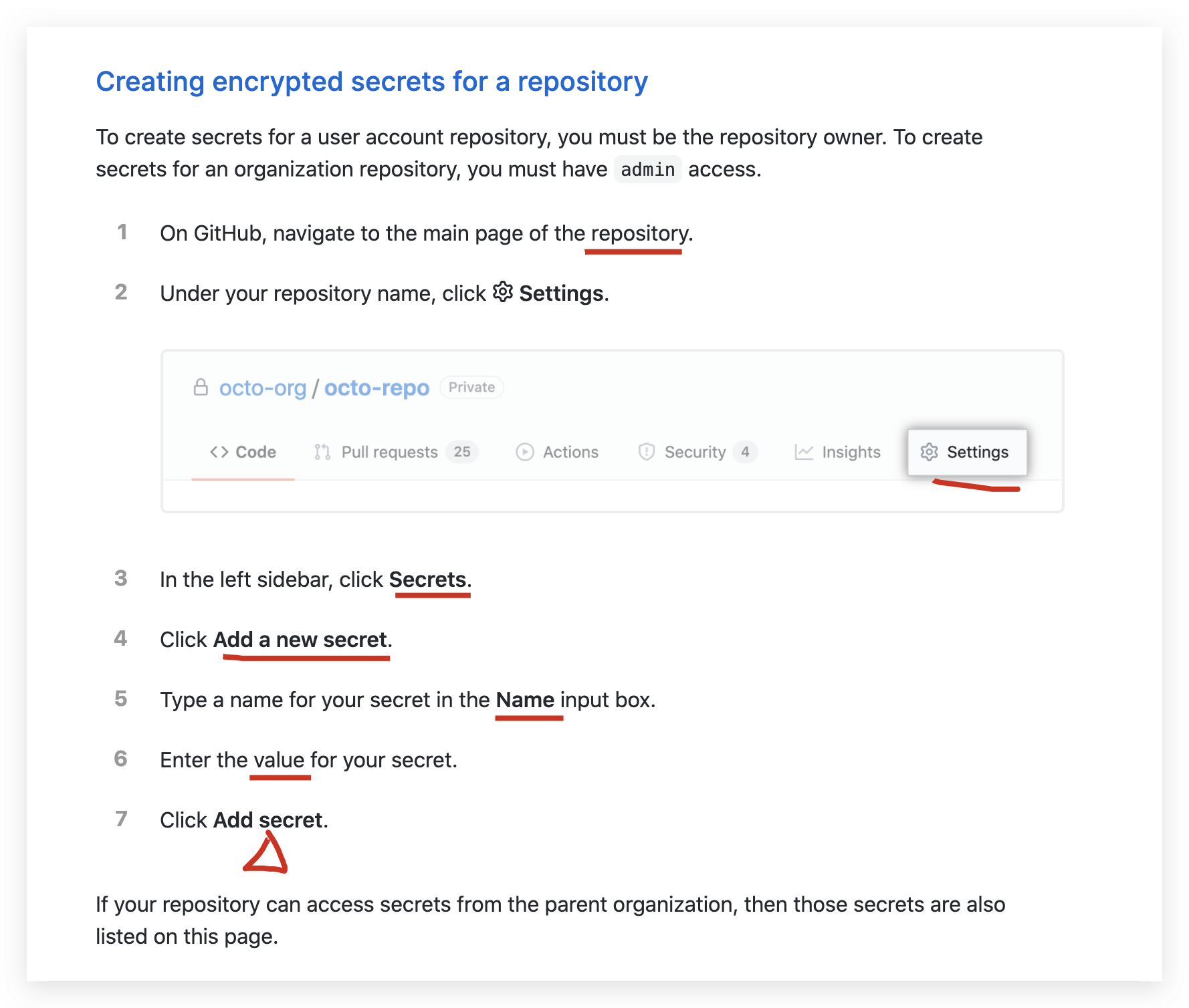
https://docs.github.com/en/free-pro-team@latest/actions/reference/encrypted-secrets
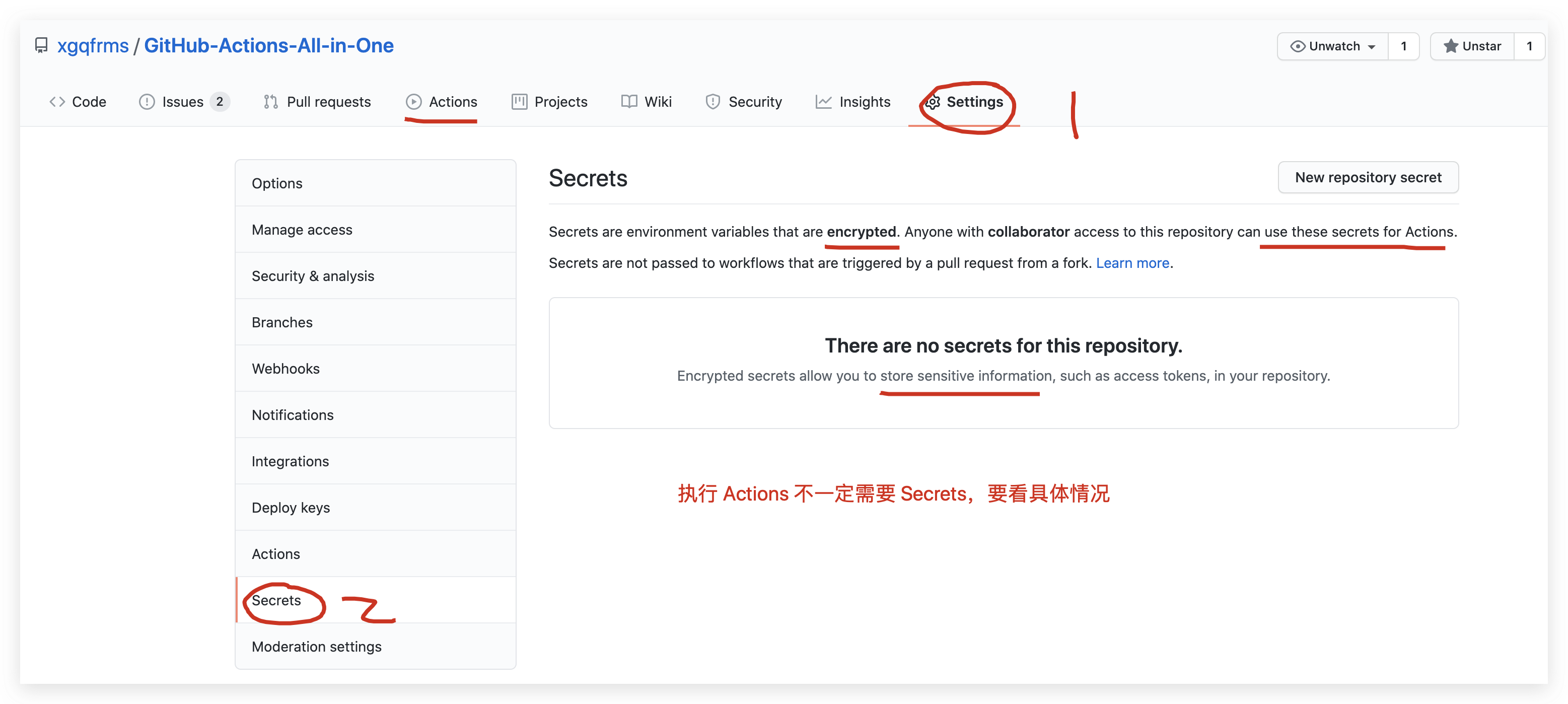
Secrets are environment variables that are encrypted. Anyone with collaborator access to this repository can use these secrets for Actions.
Secrets are not passed to workflows that are triggered by a pull request from a fork. Learn more.
Encrypted secrets allow you to store sensitive information, such as access tokens, in your repository.
GitHub Secrets
store sensitive information
https://github.com/xgqfrms/GitHub-Actions-All-in-One/settings/secrets/actions
https://github.com/xgqfrms/GitHub-Actions-All-in-One/settings/secrets/actions/new
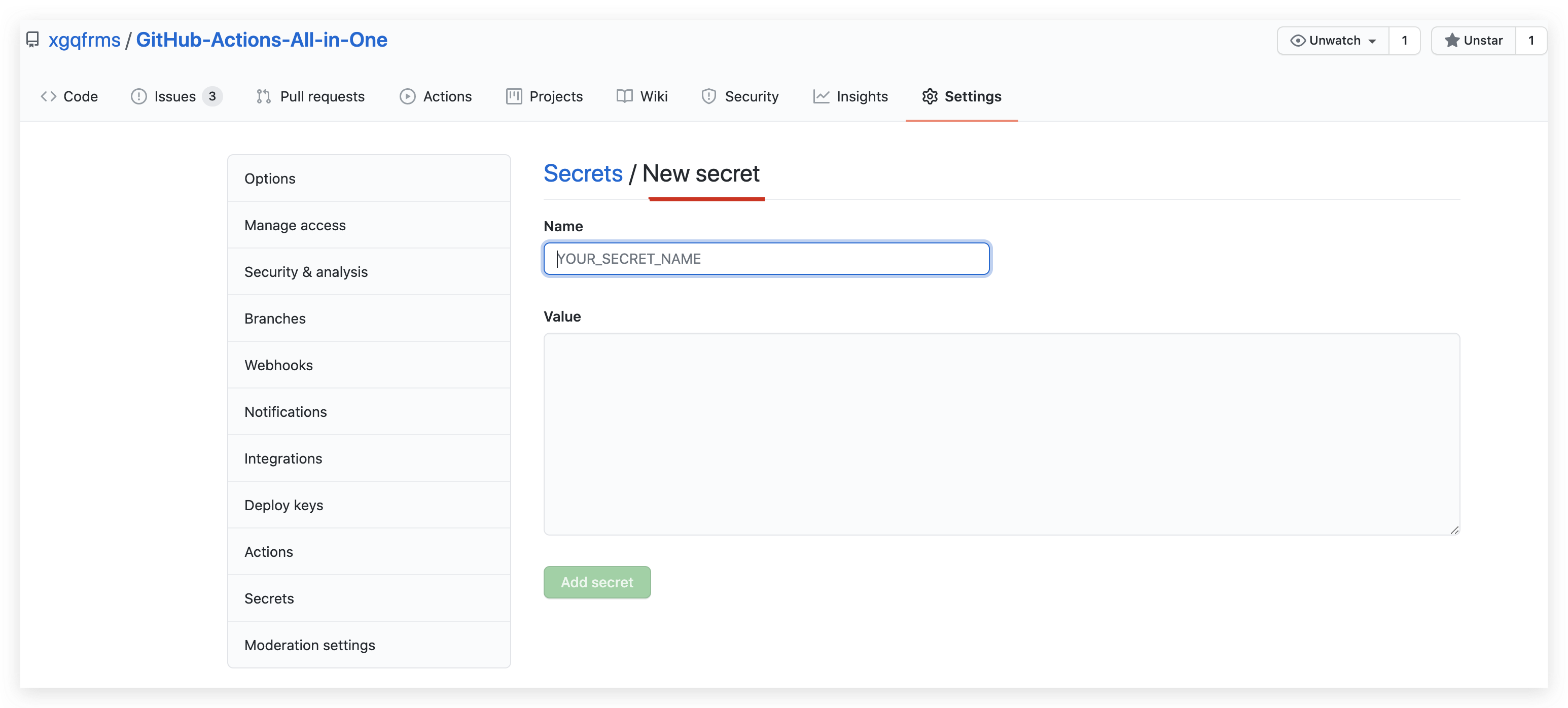

ACCESS_TOKEN
1234567890

To make a secret available to an action, you must set the secret as an input or environment variable in the workflow file
steps:

  - name: access_token action

    with: # Set the secret as an input

      access_token: ${{ secrets.ACCESS_TOKEN }}

    env: # Or as an environment variable

      access_token: ${{ secrets.ACCESS_TOKEN }}
steps:

  - name: Hello world action

    with: # Set the secret as an input

      super_secret: ${{ secrets.SuperSecret }}

    env: # Or as an environment variable

      super_secret: ${{ secrets.SuperSecret }}
Bash, PowerShell, CMD

加密 & 解密

my_secret.json => my_secret.json.gpg
$ gpg --symmetric --cipher-algo AES256 my_secret.json

# 保留密钥信息,作为 GitHub Secrets key 的 value
LARGE_SECRET_PASSPHRASE
1234567890
decrypt_secret.sh
#!/bin/sh

# Decrypt the file

mkdir $HOME/secrets

# --batch to prevent interactive command

# --yes to assume "yes" for questions

gpg --quiet --batch --yes --decrypt --passphrase="$LARGE_SECRET_PASSPHRASE" \

--output $HOME/secrets/my_secret.json my_secret.json.gpg
my_secret.json.gpg => my_secret.json
chmod +x 授权 bash 为可执行文件
$ chmod +x decrypt_secret.sh

$ git add decrypt_secret.sh

$ git commit -m "Add new decryption script"

$ git push
From your workflow, use a step to call the shell script and decrypt the secret.
https://github.com/actions/checkout
name: Workflows with large secrets

on: push

jobs:

  my-job:

    name: My Job

    runs-on: ubuntu-latest

    steps:

      # actions/checkout

      - uses: actions/checkout@v2

      - name: Decrypt large secret

        run: ./.github/scripts/decrypt_secret.sh

        env:

          LARGE_SECRET_PASSPHRASE: ${{ secrets.LARGE_SECRET_PASSPHRASE }}

      # This command is just an example to show your secret being printed

      # Ensure you remove any print statements of your secrets. GitHub does

      # not hide secrets that use this workaround.

      - name: Test printing your secret (Remove this step in production)

        run: cat $HOME/secrets/my_secret.json

      # 仅仅用于演示,才会打印出密钥
{

  "access_token": 1234567890,

  "role": "root",

  "uid": "007",

  "version": "v1.1.1"

}
ACCESS_TOKEN
https://github.com/JamesIves/github-pages-deploy-action/blob/releases/v3/action.yml
name: 'Deploy to GitHub Pages'

description: 'This action will handle the deployment process of your project to GitHub Pages.'

author: 'James Ives <iam@jamesiv.es>'

runs:

  using: 'node12'

  main: 'lib/main.js'

branding:

  icon: 'git-commit'

  color: 'orange'

inputs:

  SSH:

    description: 'You can configure the action to deploy using SSH by setting this option to true. More more information on how to add your ssh key pair please refer to the Using a Deploy Key section of this README.'

    required: false

  ACCESS_TOKEN:

    description: 'Depending on the repository permissions you may need to provide the action with a GitHub personal access token instead of the provided GitHub token in order to deploy. This should be stored as a secret.'

    required: false

  GITHUB_TOKEN:

    description: 'In order for GitHub to trigger the rebuild of your page you must provide the action with the repositories provided GitHub token.'

    required: false

  BRANCH:

    description: 'This is the branch you wish to deploy to, for example gh-pages or docs.'

    required: true

  FOLDER:

    description: 'The folder in your repository that you want to deploy. If your build script compiles into a directory named build you would put it here. Folder paths cannot have a leading / or ./. If you wish to deploy the root directory you can place a . here.'

    required: true

  TARGET_FOLDER:

    description: 'If you would like to push the contents of the deployment folder into a specific directory on the deployment branch you can specify it here.'

    required: false

  BASE_BRANCH:

    description: 'The base branch of your repository which you would like to checkout prior to deploying. This defaults to the current commit SHA that triggered the build followed by master if it does not exist. This is useful for making deployments from another branch, and also may be necessary when using a scheduled job.'

    required: false

  COMMIT_MESSAGE:

    description: 'If you need to customize the commit message for an integration you can do so.'

    required: false

  CLEAN:

    description: 'If your project generates hashed files on build you can use this option to automatically delete them from the deployment branch with each deploy. This option can be toggled on by setting it to true.'

    required: false

    default: 'true'

  CLEAN_EXCLUDE:

    description: "If you need to use CLEAN but you would like to preserve certain files or folders you can use this option. This should be formatted as an array but stored as a string."

    required: false

  GIT_CONFIG_NAME:

    description: "Allows you to customize the name that is attached to the GitHub config which is used when pushing the deployment commits. If this is not included it will use the name in the GitHub context, followed by the name of the action."

    required: false

  GIT_CONFIG_EMAIL:

    description: "Allows you to customize the email that is attached to the GitHub config which is used when pushing the deployment commits. If this is not included it will use the email in the GitHub context, followed by a generic noreply GitHub email."

    required: false

  REPOSITORY_NAME:

    description: "Allows you to speicfy a different repository path so long as you have permissions to push to it. This should be formatted like so: JamesIves/github-pages-deploy-action"

    required: false

  WORKSPACE:

    description: "This should point to where your project lives on the virtual machine. The GitHub Actions environment will set this for you. It is only neccersary to set this variable if you're using the node module."

    required: false

  SINGLE_COMMIT:

    description: "This option can be used if you'd prefer to have a single commit on the deployment branch instead of maintaining the full history."

    required: false

  LFS:

    description: "Migrates files from Git LFS so they can be comitted to the deployment branch."

    required: false

  SILENT:

    description: "Silences the action output preventing it from displaying git messages."

    required: false

  PRESERVE:

    description: "Preserves and restores any workspace changes prior to deployment."

    required: false

outputs:

  DEPLOYMENT_STATUS:

    description: 'The status of the deployment that indicates if the run failed or passed. Possible outputs include: success|failed|skipped'
Github Actions
multi actions
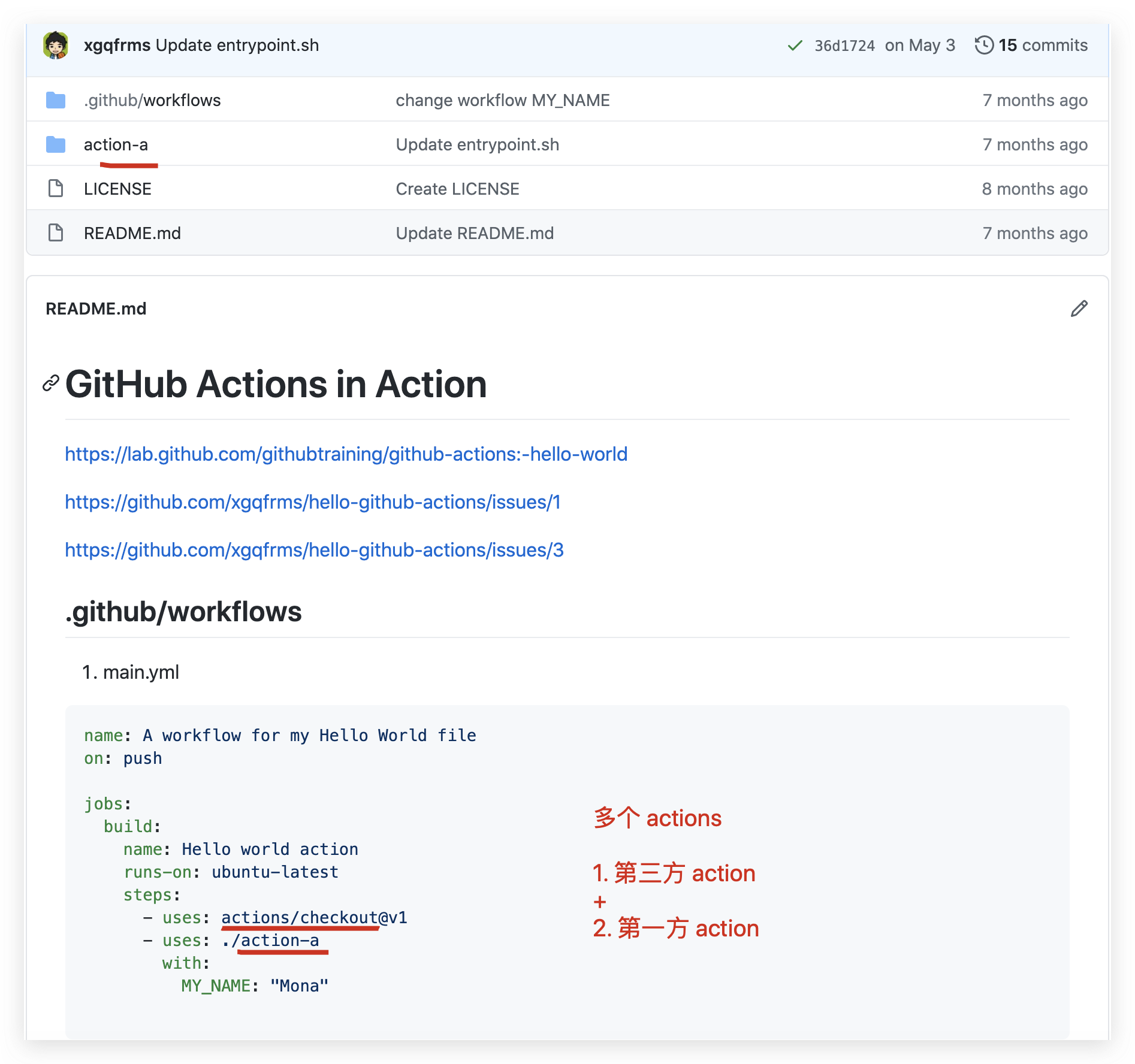
GitHub Actions 术语
CI
持续集成
CD
持续部署
- workflow
一次持续集成运行的过程;
- job
一个 job 或多个 jobs, 构成一个 workflow;
- step
一个 step 或多个 steps, 构成一个 job;
- action
一个 action 或多个 actions, 构成一个 step, 并且 actions 按序依次执行;
refs
GitHub Actions in Action
https://www.cnblogs.com/xgqfrms/p/12818058.html
xgqfrms 2012-2020
www.cnblogs.com 发布文章使用:只允许注册用户才可以访问!
GitHub Secrets All In One的更多相关文章
- GitHub Actions & GitHub Secrets
GitHub Actions & GitHub Secrets tokens & private variable GitHub Secrets https://github.com/ ...
- 使用GitHub进行团队合作
原文: Team Collaboration With GitHub GitHub已经成为的一切开放源码软件的基石.开发人员喜欢它,基于它进行协作,并不断通过它开发令人惊叹的项目.除了代码托管,G ...
- 关于Git和Github
英文原文:Ten Things You Didn't Know Git And GitHub Could Do Git 和 GitHub 都是非常强大的工具.即使你已经使用他们很长时间,你也很有可能不 ...
- 你真的会使用Github吗?
快捷键 r 快速引用 你可以选中别人的评论文字,然后按r,这些内容会以引用的形式被复制在文本框中: t:搜索文件 s:光标定位到搜索窗口 w:选择分支 g n Go to Notifications ...
- GitHub网页端和客户端操作
参见GitHub上的repository中的moreLove.tata.tata2 moreLove 在网页版GitHub上创建的空项目然后填充的tata 在windows客户端创建的空项目然后填充的 ...
- vuepress-theme-reco + Github Actions 构建静态博客,部署到第三方服务器
最新博客链接 Github链接 查看此文档前应先了解,vuepress基本操作 参考官方文档进行配置: vuepress-theme-reco VuePress SamKirkland / FTP-D ...
- Github Packages和Github Actions实践之CI/CD
概述 Github在被微软收购后,不忘初心,且更大力度的造福开发者们,推出了免费私有仓库等大更新.近期又开放了packages和actions两个大招,经笔者试用后感觉这两个功能配合起来简直无敌. G ...
- Azure Terraform(九)GitHub Actions 实现 Infra 资源的自动化部署
思路浅析 使用 Terraform Code 部署 Azure 基础设施资源是特别受欢迎的,我曾经有写文章分享过利用 Azure DevOps 自动部署 Terraform Code 所描述的 Azu ...
- 使用.NET 6开发TodoList应用(31)——实现基于Github Actions和ACI的CI/CD
系列导航及源代码 使用.NET 6开发TodoList应用文章索引 需求和目标 在这个系列的最后一节中,我们将使用GitHub Actions将TodoList应用部署到Azure Container ...
随机推荐
- 浅谈linux IO csy 360技术 2021-01-18
浅谈linux IO csy 360技术 2021-01-18
- connection-backoff ConnectionBackoff Strategy 回退
grpc/connection-backoff.md at master · grpc/grpc https://github.com/grpc/grpc/blob/master/doc/connec ...
- TCP半连接队列和全连接
概述 如上图所示, 在TCP三次握手中,服务器维护一个半连接队列(sync queue) 和一个全连接队列(accept queue). 当服务端接收到客户端第一次SYN握手请求时,将创建的req ...
- pywin32 pywin32 docx文档转html页面 word doc docx 提取文字 图片 html 结构
https://blog.csdn.net/X21214054/article/details/78873338# python docx文档转html页面 - 程序猿tx - 博客园 https:/ ...
- WPF排版布局经验总结(干货)简短不疲倦
本文不过多讲述wpf的基础布局控件,本文只记录WPF排版的技巧,这是个人的总结,不能符合所有情况,如果有何不对的地方,请评论指正,谢谢. 1.区域划分 在接手一个界面的时候,先纵观全局,将眼见的区域划 ...
- LOJ10099矿场搭建
HNOI 2012 煤矿工地可以看成是由隧道连接挖煤点组成的无向图.为安全起见,希望在工地发生事故时所有挖煤点的工人都能有一条出路逃到救援出口处.于是矿主决定在某些挖煤点设立救援出口,使得无论哪一个挖 ...
- SpringMVC听课笔记(五:处理模型数据)
1. Spring MVC 提供了以下几种途径输出数据模型 -- ModelAndView: 处理方法返回值类型为ModelAndView 时,方法体即可通过该对象添加模型数据 -- Map及Mode ...
- SpringBoot整合JavaMail发送邮件
JavaMail是SUN提供给广大Java开发人员的一款邮件发送和接受的一款开源类库,支持常用的邮件协议,如:SMTP.POP3.IMAP,开发人员使用JavaMail编写邮件程序时,不再需要考虑底层 ...
- eclipse中Tomcat修改项目名称
1.打开你的项目目录,找到一个.project文件,打开后修改<name> test</name>中的值,将test修改成你要修改的名字: 2.在项目目录下,打开.settin ...
- 浅聊ARP
今天借用思科公司的Cisco Packet Tracer Student这款软件浅聊ARP 什么是ARP? ARP即地址解析协议(Address Resolution Protocol),是根据Ip地 ...