
redis启动报错:The Windows version of Redis allocates a memory mapped heap for sharing with
windows系统下通过cmd命令:redis-server.exe redis.windows.conf 启动redis报错,控制台报错如下:
The Windows version of Redis allocates a memory mapped heap for sharing with the forked process used for persistence operations. In order to share this memory, Windows allocates from the system paging file a portion equal to the size of the Redis heap. At this time there is insufficient contiguous free space available in the system paging file for this operation (Windows error 0x5AF). To work around this you may either increase the size of the system paging file, or decrease the size of the Redis heap with the --maxheap flag.Sometimes a reboot will defragment the system paging file sufficiently for this operation to complete successfully.
Please see the documentation included with the binary distributions for more details on the --maxheap flag.
Redis can not continue. Exiting.
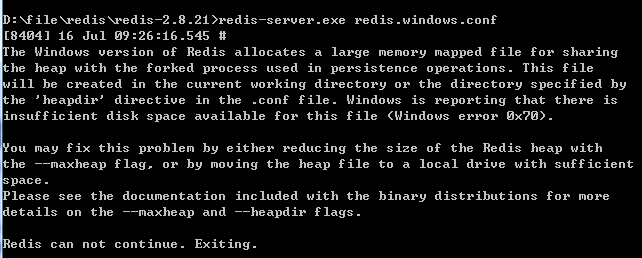
根据上诉的这个情况提示,redis的内存溢出,没有足够的可用空间,可以增加系统的大小分页文件,或减少Redis的堆的大小。
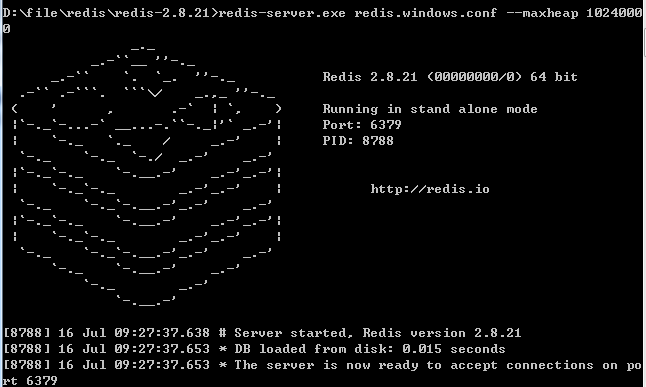
使用命令:redis-server.exe redis.windows.conf --maxheap 10240000(大小自己设置就好)就可以正常启动redis了。
redis启动报错:The Windows version of Redis allocates a memory mapped heap for sharing with的更多相关文章
- redis启动报错Could not connect to Redis at 127.0.0.1:6379: 由于目标计算机积极拒绝,无法连接。
报错内容 解决办法 启动redis-server服务 测试 连接成功
- redis启动报错:Fatal error loading the DB: Invalid argument
redis启动报错 add it to your /etc/rc.local in order to retain the setting after a reboot. Redis must be ...
- Windows 7 上面 redis 启动报错的处理
Windows 7或者是 win10 上面 安装redis 的windows 3.2.100 的版本 启动报错: Creating Server TCP listening socket *:: li ...
- Redis启动报错解决
报错 redis_6379.service - LSB: start and stop redis_6379 Loaded: loaded (/etc/rc.d/init.d/redis_637 ...
- redis启动报错 var/run/redis_6379.pid exists, process is already running or crashed
redis启动显示 /var/run/redis_6379.pid exists, process is already running or crashed 出现这个执行 rm -rf /var/r ...
- soapUI启动报错:The JVM could not be started. The maximum heap size (-Xmx) might be too large or an antivirus or firewall tool could block the execution.
版本: soapUI-5.2.1 问题: 启动soapUI时报错:The JVM could not be started. The maximum heap size (-Xmx) might be ...
- idea 2019 1 spring boot 启动报错 An incompatible version [1.2.12] of the APR based Apache Tomcat Native library is installed, while Tomcat requires version [1.2.14]
1.构建一个简单springboot工程,日志打印报错内容如下: 15:38:28.673 [main] DEBUG org.springframework.boot.devtools.setting ...
- 联想的笔记本有隐藏分区 导致无法安装win10 eufi启动 报错:windows无法更新计算机的启动配置。无法安装
联想的笔记本都带着类似一键还原等的系统恢复软件,这些软件往往是将出厂设置备份在单 独的一个分区,此分区默认为隐藏,在 Windows 的磁盘管理中可以看到.打开磁盘管理器 的方法是右击计算机——管理, ...
- redis在Windows上启动报错
The Windows version of Redis allocates a memory mapped heap for sharing with the forked process used ...
随机推荐
- 简单的Linq查询语句
下面我来我大家介绍几种简单的查询方式. 1.简单语法 这个LINQ语句的第一个关键字是from,from后面加的是范围变量,范围变量后加in,后加上事先实例化的模型,然后点出数据的来源. List是列 ...
- 小程序被冻结,忘记原始ID,如何找回?
登录成功,提示被冻结,选择"账号找回": 阅读须知:账号类型选择“小程序”,需要输入小程序的原始ID,此时已经不记得了~~ 微信:搜索 “ 公众平台安全助手 ” 并关注 点击查 ...
- 状压DP之Mixed Up Cows G
题目 传送们 大意 约翰家有N头奶牛,第i头奶牛的编号是Si,每头奶牛的编号都是唯一的.这些奶牛最近 在闹脾气,为表达不满的情绪,她们在挤奶的时候一定要排成混乱的队伍.在一只混乱的队 伍中,相邻奶牛的 ...
- IBM & Howdoo – 区块链上的智能社交
原文链接:https://www.themsphub.com/ibm-howdoo-smart-social-on-the-blockchain 我们很高兴地宣布,我们成为了一个令人兴奋的新社交网络的 ...
- kafka的认识、安装与配置
认识Kafka 花费越少的精力在数据移动上,就能越专注于核心业务 --- <Kafka:The Definitive Guide> 认识 Kafka 之前,先了解一下发布与订阅消息系统:消 ...
- Spring Boot 2 实战:常用读取配置的方式
1. 前言 在Spring Boot项目中我们经常需要读取application.yml配置文件的自定义配置,今天就来罗列一下从yaml读取配置文件的一些常用手段和方法. 2. 使用@Value注解 ...
- CSS学习之选择器优先级与属性继承
CSS学习之选择器优先级与属性继承 选择器优先级 其实选择器是具有优先级的,我们来看下面这一组案例: <!DOCTYPE html> <html lang="en" ...
- 数据结构之二叉搜索树(BST)--JavaScript实现
原理: 叉排序树的查找过程和次优二叉树类似,通常采取二叉链表作为二叉排序树的存储结构.中序遍历二叉排序树可得到一个关键字的有序序列,一个无序序列可以通过构造一棵二叉排序树变成一个有序序列,构造树的过程 ...
- element-ui(vue版)使用switch时change回调函数中的形参传值问题
需求说明 有多个switch组件 需要知道switch的状态 表格中当前行(scope.row)的数据 问题描述 官方文档中对switch中change的描述: 目前能得到switch的状态值,但是无 ...
- 使用IDEA创建Spring boot项目,继承mybaits。并进行简单的数据库查询操作
本文讲的是使用IEDA创建Spring boot项目,对于环境安装需要自行准备,如JDK1.8.Maven 3.3.IDEA编译器.Mysql5.7等需事前准备好. 1.创建Spring boot项目 ...