
linux netfilter nat2
Netfilter Connection Tracking and NAT Implementation
4 Implementation: Netfilter NAT
NAT is a function module built upon conntrack module, it relies on connection tracking’s results to work properly.
Again, not all protocols supports NAT.
4.1 Data structures and functions
Data structures:
Protocols that support NAT needs to implement the methods defined in:
struct nf_nat_l3proto {}struct nf_nat_l4proto {}
Functions:
nf_nat_inet_fn(): core of NAT module, will be called at all hooking points except NF_INET_FORWARD.
4.2 NAT module init
// net/netfilter/nf_nat_core.c

static struct nf_nat_hook nat_hook = {

    .parse_nat_setup    = nfnetlink_parse_nat_setup,

    .decode_session        = __nf_nat_decode_session,

    .manip_pkt        = nf_nat_manip_pkt,

};

static int __init nf_nat_init(void)

{

    nf_nat_bysource = nf_ct_alloc_hashtable(&nf_nat_htable_size, 0);

    nf_ct_helper_expectfn_register(&follow_master_nat);

    RCU_INIT_POINTER(nf_nat_hook, &nat_hook);

}

MODULE_LICENSE("GPL");

module_init(nf_nat_init);
4.3 struct nf_nat_l3proto {}: protocol specific methods
// include/net/netfilter/nf_nat_l3proto.h

struct nf_nat_l3proto {

    u8    l3proto; // e.g. AF_INET

    u32     (*secure_port    )(const struct nf_conntrack_tuple *t, __be16);

    bool    (*manip_pkt      )(struct sk_buff *skb, ...);

    void    (*csum_update    )(struct sk_buff *skb, ...);

    void    (*csum_recalc    )(struct sk_buff *skb, u8 proto, ...);

    void    (*decode_session )(struct sk_buff *skb, ...);

    int     (*nlattr_to_range)(struct nlattr *tb[], struct nf_nat_range2 *range);

};
4.4 struct nf_nat_l4proto {}: protocol specific methods
manip is the abbraviation of manipulate in the code:
// include/net/netfilter/nf_nat_l4proto.h

struct nf_nat_l4proto {

    u8 l4proto; // L4 proto id, e.g. IPPROTO_UDP, IPPROTO_TCP

    // Modify L3/L4 header according to the given tuple and NAT type (SNAT/DNAT)

    bool (*manip_pkt)(struct sk_buff *skb, *l3proto, *tuple, maniptype);

    // Create a unique tuple

    // e.g. for UDP, will generate a 16bit dst_port with src_ip, dst_ip, src_port and a rand

    void (*unique_tuple)(*l3proto, tuple, struct nf_nat_range2 *range, maniptype, struct nf_conn *ct);

    // If the address range is exhausted the NAT modules will begin to drop packets.

    int (*nlattr_to_range)(struct nlattr *tb[], struct nf_nat_range2 *range);

};
Implementations of these methods, see net/netfilter/nf_nat_proto_*.c. For example, the TCP’s implementation:
// net/netfilter/nf_nat_proto_tcp.c

const struct nf_nat_l4proto nf_nat_l4proto_tcp = {

    .l4proto        = IPPROTO_TCP,

    .manip_pkt        = tcp_manip_pkt,

    .in_range        = nf_nat_l4proto_in_range,

    .unique_tuple        = tcp_unique_tuple,

    .nlattr_to_range    = nf_nat_l4proto_nlattr_to_range,

};
4.5 nf_nat_inet_fn(): enter NAT
nf_nat_inet_fn() will be called in following hooking points:
NF_INET_PRE_ROUTINGNF_INET_POST_ROUTINGNF_INET_LOCAL_OUTNF_INET_LOCAL_IN
namely, all Netfilter hooking points except NF_INET_FORWARD.
Priorities at these hooking points: Conntrack > NAT > Packet Filtering.
conntrack has a higher priority than NAT, since NAT relies on the results of connection tracking.
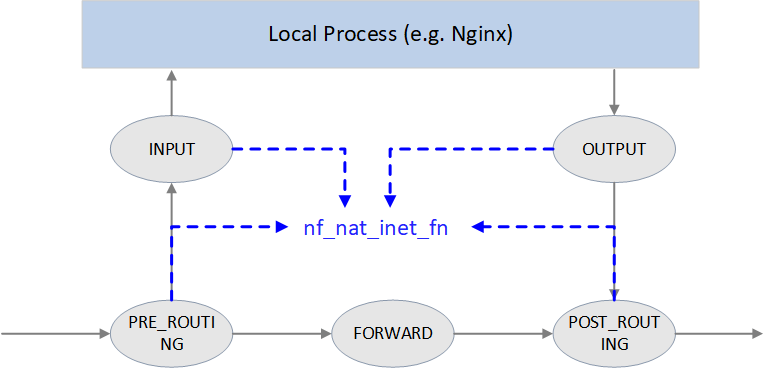
Fig. NAT
unsigned int

nf_nat_inet_fn(void *priv, struct sk_buff *skb, const struct nf_hook_state *state)

{

    ct = nf_ct_get(skb, &ctinfo);

    if (!ct)    // exit NAT if conntrack not exist. This is why we say NAT relies on conntrack's results

        return NF_ACCEPT;

    nat = nfct_nat(ct);

    switch (ctinfo) {

    case IP_CT_RELATED:

    case IP_CT_RELATED_REPLY: /* Only ICMPs can be IP_CT_IS_REPLY.  Fallthrough */

    case IP_CT_NEW: /* Seen it before? This can happen for loopback, retrans, or local packets. */

        if (!nf_nat_initialized(ct, maniptype)) {

            struct nf_hook_entries *e = rcu_dereference(lpriv->entries); // obtain all NAT rules

            if (!e)

                goto null_bind;

            for (i = 0; i < e->num_hook_entries; i++) { // execute NAT rules in order

                if (e->hooks[i].hook(e->hooks[i].priv, skb, state) != NF_ACCEPT )

                    return ret;                         // return if any rule returns non ACCEPT verdict

                if (nf_nat_initialized(ct, maniptype))

                    goto do_nat;

            }

null_bind:

            nf_nat_alloc_null_binding(ct, state->hook);

        } else { // Already setup manip

            if (nf_nat_oif_changed(state->hook, ctinfo, nat, state->out))

                goto oif_changed;

        }

        break;

    default: /* ESTABLISHED */

        if (nf_nat_oif_changed(state->hook, ctinfo, nat, state->out))

            goto oif_changed;

    }

do_nat:

    return nf_nat_packet(ct, ctinfo, state->hook, skb);

oif_changed:

    nf_ct_kill_acct(ct, ctinfo, skb);

    return NF_DROP;

}
It first queries conntrack info for this packet, if conntrack info not exists, it means this connection could not be tracked, then we could never perform NAT for it. So just exit NAT in this case.
If conntrack info exists, and the connection is in IP_CT_RELATED or IP_CT_RELATED_REPLY or IP_CT_NEW states, then get all NAT rules.
If found, execute nf_nat_packet() method, it will further call protocol-specific manip_pkt method to modify the packet. If failed, the packet will be dropped.
Masquerade
NAT module could be configured in two fashions:
- Normal:
change IP1 to IP2 if matching XXX. - Special:
change IP1 to dev1's IP if matching XXX, this is a special case of SNAT, called masquerade.
Pros & Cons:
- Masquerade differentiates itself from SNAT in that when device’s IP address changes, the rules still valid. It could be seen as dynamic SNAT (dynamically adapting to the source IP changes in SNAT rules).
- The drawback of masquerade is that it has degraded performance compared with SNAT, and this is easy to understand.
4.6 nf_nat_packet(): performing NAT
// net/netfilter/nf_nat_core.c

/* Do packet manipulations according to nf_nat_setup_info. */

unsigned int nf_nat_packet(struct nf_conn *ct, enum ip_conntrack_info ctinfo,

               unsigned int hooknum, struct sk_buff *skb)

{

    enum nf_nat_manip_type mtype = HOOK2MANIP(hooknum);

    enum ip_conntrack_dir dir = CTINFO2DIR(ctinfo);

    unsigned int verdict = NF_ACCEPT;

    statusbit = (mtype == NF_NAT_MANIP_SRC? IPS_SRC_NAT : IPS_DST_NAT)

    if (dir == IP_CT_DIR_REPLY)     // Invert if this is reply dir

        statusbit ^= IPS_NAT_MASK;

    if (ct->status & statusbit)     // Non-atomic: these bits don't change. */

        verdict = nf_nat_manip_pkt(skb, ct, mtype, dir);

    return verdict;

}
static unsigned int nf_nat_manip_pkt(struct sk_buff *skb, struct nf_conn *ct,

                     enum nf_nat_manip_type mtype, enum ip_conntrack_dir dir)

{

    struct nf_conntrack_tuple target;

    /* We are aiming to look like inverse of other direction. */

    nf_ct_invert_tuplepr(&target, &ct->tuplehash[!dir].tuple);

    l3proto = __nf_nat_l3proto_find(target.src.l3num);

    l4proto = __nf_nat_l4proto_find(target.src.l3num, target.dst.protonum);

    if (!l3proto->manip_pkt(skb, 0, l4proto, &target, mtype)) // protocol-specific processing

        return NF_DROP;

    return NF_ACCEPT;

}
5. Configuration and monitoring
5.1 Inspect and load/unload nf_conntrack module
$ modinfo nf_conntrack

filename:       /lib/modules/4.19.118-1.el7.centos.x86_64/kernel/net/netfilter/nf_conntrack.ko

license:        GPL

alias:          nf_conntrack-10

alias:          nf_conntrack-2

alias:          ip_conntrack

srcversion:     4BBDB5BBEF460DF5F079C59

depends:        nf_defrag_ipv6,libcrc32c,nf_defrag_ipv4

retpoline:      Y

intree:         Y

name:           nf_conntrack

vermagic:       4.19.118-1.el7.centos.x86_64 SMP mod_unload modversions

parm:           tstamp:Enable connection tracking flow timestamping. (bool)

parm:           acct:Enable connection tracking flow accounting. (bool)

parm:           nf_conntrack_helper:Enable automatic conntrack helper assignment (default 0) (bool)

parm:           expect_hashsize:uint
Remove the module:
$ rmmod nf_conntrack_netlink nf_conntrack
Load the module:
$ modprobe nf_conntrack

# Also support to pass configuration parameters, e.g.:

$ modprobe nf_conntrack nf_conntrack_helper=1 expect_hashsize=131072
5.2 sysctl options
$ sysctl -a | grep nf_conntrack

net.netfilter.nf_conntrack_acct = 0

net.netfilter.nf_conntrack_buckets = 262144                 # hashsize = nf_conntrack_max/nf_conntrack_buckets

net.netfilter.nf_conntrack_checksum = 1

net.netfilter.nf_conntrack_count = 2148

... # DCCP options

net.netfilter.nf_conntrack_events = 1

net.netfilter.nf_conntrack_expect_max = 1024

... # IPv6 options

net.netfilter.nf_conntrack_generic_timeout = 600

net.netfilter.nf_conntrack_helper = 0

net.netfilter.nf_conntrack_icmp_timeout = 30

net.netfilter.nf_conntrack_log_invalid = 0

net.netfilter.nf_conntrack_max = 1048576                    # conntrack table size

... # SCTP options

net.netfilter.nf_conntrack_tcp_be_liberal = 0

net.netfilter.nf_conntrack_tcp_loose = 1

net.netfilter.nf_conntrack_tcp_max_retrans = 3

net.netfilter.nf_conntrack_tcp_timeout_close = 10

net.netfilter.nf_conntrack_tcp_timeout_close_wait = 60

net.netfilter.nf_conntrack_tcp_timeout_established = 21600

net.netfilter.nf_conntrack_tcp_timeout_fin_wait = 120

net.netfilter.nf_conntrack_tcp_timeout_last_ack = 30

net.netfilter.nf_conntrack_tcp_timeout_max_retrans = 300

net.netfilter.nf_conntrack_tcp_timeout_syn_recv = 60

net.netfilter.nf_conntrack_tcp_timeout_syn_sent = 120

net.netfilter.nf_conntrack_tcp_timeout_time_wait = 120

net.netfilter.nf_conntrack_tcp_timeout_unacknowledged = 300

net.netfilter.nf_conntrack_timestamp = 0

net.netfilter.nf_conntrack_udp_timeout = 30

net.netfilter.nf_conntrack_udp_timeout_stream = 180
5.3 Monitoring
conntrack statistics
$ cat /proc/net/stat/nf_conntrack

entries   searched found    new      invalid  ignore   delete   delete_list insert   insert_failed drop     early_drop icmp_error  expect_new expect_create expect_delete search_restart

000008e3  00000000 00000000 00000000 0000309d 001e72d4 00000000 00000000    00000000 00000000      00000000 00000000   000000ee    00000000   00000000      00000000       000368d7

000008e3  00000000 00000000 00000000 00007301 002b8e8c 00000000 00000000    00000000 00000000      00000000 00000000   00000170    00000000   00000000      00000000       00035794

000008e3  00000000 00000000 00000000 00001eea 001e6382 00000000 00000000    00000000 00000000      00000000 00000000   00000059    00000000   00000000      00000000       0003f166

...
There is also a command line tool conntrack:
$ conntrack -S

cpu=0   found=0 invalid=743150 ignore=238069 insert=0 insert_failed=0 drop=195603 early_drop=118583 error=16 search_restart=22391652

cpu=1   found=0 invalid=2004   ignore=402790 insert=0 insert_failed=0 drop=44371  early_drop=34890  error=0  search_restart=1225447

...
Fields:
- ignore: untracked packets (recall that only packets of trackable protocols will be tracked)
conntrack table usage
Number of current conntrack entries:
$ cat /proc/sys/net/netfilter/nf_conntrack_count

257273
Number of max allowed conntrack entries:
$ cat /proc/sys/net/netfilter/nf_conntrack_max

262144
6. Conntrack related issues
6.1 nf_conntrack: table full
Symptoms
Application layer symptoms
Probabilistic connection timeout.
E.g. if the application is written in Java, the raised errors are
jdbc4.CommunicationsExceptioncommunications link failure, etc.Existing (e.g. established) connections works normally.
That is to say, there are no read/write timeouts or something like that at that moment, but only connect timeouts.
Network layer symptoms
With traffic capturing, we could see the first packet (SYN) got siliently dropped by the kernel.
Unfortunately, common NIC stats (
ifconfig) and kernel stats (/proc/net/softnet_stat) don't show these droppings.SYN got restransmitted after
1s+, or the connection is closed by retransmission.Retransmission of the first SYN takes 1s, this is a hardcode value in the kernel, not configurable (See appendix for the detailed implementation) .
Considering other overheads, the real retransmission will take place 1+ second’s later. If the client has a very small connect timeout setting, e.g.
1.05s, then the connection will be closed before retransmission, and reports connection timeout errors to upper layers.
OS/kernel layer symptoms
Kernel log,
$ demsg -T

[Tue Apr  6 18:12:30 2021] nf_conntrack: nf_conntrack: table full, dropping packet

[Tue Apr  6 18:12:30 2021] nf_conntrack: nf_conntrack: table full, dropping packet

[Tue Apr  6 18:12:30 2021] nf_conntrack: nf_conntrack: table full, dropping packet

...
Trouble shooting
The above described phenomenons indicate that conntrack table is blown out.
$ cat /proc/sys/net/netfilter/nf_conntrack_count

257273

$ cat /proc/sys/net/netfilter/nf_conntrack_max

262144
Compare above two numbers, we could conclude that conntrack table indeeded get blown out.
Besides, we could also see dropping statistics in cat /proc/net/stat/nf_conntrack or conntrack -S output.
Resolution
With decreasing priority:
Increase conntrack table size
Runtime configuration (will not disrupt existing connections/traffic) :
 $ sysctl -w net.netfilter.nf_conntrack_max=524288

 $ echo 131072 > /sys/module/nf_conntrack/parameters/hashsize # recommendation: hashsize=nf_conntrack_count/4
Permanent configuration:
 $ echo 'net.netfilter.nf_conntrack_max = 524288' >> /etc/sysctl.conf

 # Write hashsize either to system boot file or module config file

 # Method 1: write to system boot file

 $ echo 'echo 131072 > /sys/module/nf_conntrack/parameters/hashsize' >> /etc/rc.local

 # Method 2: write to module load file

 $ echo 'options nf_conntrack expect_hashsize=131072 hashsize=131072' >> /etc/modprobe.d/nf_conntrack.conf
Side effect:more memory will be reserved by conntrack module. Refer to the appendix for the detailed calculation.
Decrease GC durations (timeout values)
Besides increase conntrack table size, we could also decrease conntrack GC values (also called timeouts), this will acclerate eviction of stale entries.
nf_conntrackhas several timeout setting, each for entries of different TCP states (established、fin_wait、time_wait, etc).For example, the default timeout for established state conntrack entries is 423000s (5 days!) . Possible reason for so large a value may be: TCP/IP specification allows established connection stays idle for infinite long time (but still alive) [8], specific implementations (Linux、BSD、Windows, etc) could set their own max allowed idle timeout. To avoid to accidently GC out such connection, Linux kernel chose a long enough duration. [8] recommends to timeout value to be no smaller than 2 hours 4 minutes (as mentioned previously, Cilium implements its own CT module, as comparison and reference,Cilium's established timeout is 6 hours). But there are also recommendations that are far more smaller than this, such as 20 minutes.
Unless certainly know what you are doing, you should decrease this value with caution, such as 6 hours, which is already smaller significantly than the default one.
Runtime configuration:
$ sysctl -w net.netfilter.nf_conntrack_tcp_timeout_established = 21600
Permanent configuration:
$ echo 'net.netfilter.nf_conntrack_tcp_timeout_established = 21600' >> /etc/sysctl.conf
You could also consider to decrease the other timeout values (especially
nf_conntrack_tcp_timeout_time_wait, which defaults to120s). But still to remind: unless sure what you’re doing, do not decrease these values radically.
7. Summary
Connection tracking (conntrack) is a fairly fundamental and important network module, but it goes into normal developer or system maintainer’s eyes only when they are stucked in some specific network troubles.
For example, in highly concurrent connection conditions, L4LB node will receive large amounts of short-lived requestions/connections, which may breakout the conntrack table. Phenomenons in this case:
- Clients connect to L4LB failed, the failures may be random, but may also be bulky.
- Client retries may succeed, but may also failed again and again.
- Capturing traffic at L4LB nodes, could see that L4LB nodes received SYNC (take TCP as example) packets, but no ACK is replied, in other words, the packets get siliently dropped.
The reasons here maybe that conntrack table size is not big enough, or GC interval is too large, or even there are bugs in conntrack GC.
8. Appendix
8.1 Retransmission interval calculation of the first SYN (Linux 4.19.118)
Call stack: tcp_connect() -> tcp_connect_init() -> tcp_timeout_init().
// net/ipv4/tcp_output.c

/* Do all connect socket setups that can be done AF independent. */

static void tcp_connect_init(struct sock *sk)

{

    inet_csk(sk)->icsk_rto = tcp_timeout_init(sk);

    ...

}

// include/net/tcp.h

static inline u32 tcp_timeout_init(struct sock *sk)

{

    // Get SYN-RTO: return -1 if

    //   * no BPF programs attached to the socket/cgroup, or

    //   * there are BPF programs, but the programs excuting failed

    //

    // Unless users write their own BPF programs and attach to cgroup/socket,

    // there will be no BPF programs. so here will (always) return -1

    timeout = tcp_call_bpf(sk, BPF_SOCK_OPS_TIMEOUT_INIT, 0, NULL);

    if (timeout <= 0)                // timeout == -1, using default value in the below

        timeout = TCP_TIMEOUT_INIT;  // defined as the HZ of the system, which is effectively 1 second, see below

    return timeout;

}

// include/net/tcp.h

#define TCP_RTO_MAX    ((unsigned)(120*HZ))

#define TCP_RTO_MIN    ((unsigned)(HZ/5))

#define TCP_TIMEOUT_MIN    (2U) /* Min timeout for TCP timers in jiffies */

#define TCP_TIMEOUT_INIT ((unsigned)(1*HZ))    /* RFC6298 2.1 initial RTO value    */
8.2 Calculating conntrack memory usage
$ cat /proc/slabinfo | head -n2; cat /proc/slabinfo | grep conntrack

slabinfo - version: 2.1

# name            <active_objs> <num_objs> <objsize> <objperslab> <pagesperslab> : tunables <limit> <batchcount> <sharedfactor> : slabdata <active_slabs> <num_slabs> <sharedavail>

nf_conntrack      512824 599505    320   51    4 : tunables    0    0    0 : slabdata  11755  11755      0
in the above output, objsize means the kernel object size (struct nf_conn here), in unit of bytes. So the above information tells us that each conntrack entry takes 320 bytes of memory.
If page overheads are ignored (kernel allocates memory with slabs), then the memory usage under different table sizes would be:
nf_conntrack_max=512K:512K * 320Byte = 160MBnf_conntrack_max=1M:1M * 320Byte = 320MB
For more accurate calculation, refer to [9].
References
- Netfilter connection tracking and NAT implementation. Proc. Seminar on Network Protocols in Operating Systems, Dept. Commun. and Networking, Aalto Univ. 2013.
- Cilium: Kubernetes without kube-proxy
- L4LB for Kubernetes: Theory and Practice with Cilium+BGP+ECMP
- Docker bridge network mode
- Wikipedia: Netfilter
- Conntrack tales - one thousand and one flows
- How connection tracking in Open vSwitch helps OpenStack performance
- NAT Behavioral Requirements for TCP, RFC5382
- Netfilter Conntrack Memory Usage
linux netfilter nat2的更多相关文章
- Linux Netfilter框架分析
目录 Netfilter框架 Netfilter的5个hook点 netfilter协议栈数据流分析 连接跟踪conntrack conntrack连接跟踪表条目 连接跟踪表大小 管理连接跟踪表 ip ...
- Extended TCP/IP Stack In Linux: Netfilter Hooks and IP Table
https://www.amazon.com/gp/product/1118887735 The chapter about debugging is rather outdated - it des ...
- Linux Netfilter注册钩子点
注册钩子点首先要包含响应的头文件,因为这应该已经属于对kernel的编程了. #include <linux/module.h> #include <linux/kernel.h&g ...
- linux netfilter nat1
linux netfilter nat1 2020整理云笔记上传
- linux netfilter ----iptable_filter
内核中将filter模块被组织成了一个独立的模块,每个这样独立的模块中都有个类似的init()初始化函数:首先来看一下filter模块是如何将自己的钩子函数注册到netfilter所管辖的几个hook ...
- linux netfilter rule match target 数据结构
对于netfilter 可以参考 https://netfilter.org/documentation/HOWTO/netfilter-hacking-HOWTO-3.html netfilter ...
- linux netfilter 五个钩子点
参考http://www.linuxtcpipstack.com/685.html#NF_INET_PRE_ROUTING https://opengers.github.io/openstack/o ...
- Linux netfilter 学习笔记
https://blog.csdn.net/lickylin/article/details/33321905
- linux netfilter
yum -y install iptables//三张表 filter nat mangle [root@wang /]# iptables -t filter -nvL [root@wang /]# ...
随机推荐
- 2016年 实验二、C2C模拟实验
实验二.C2C模拟实验 [实验目的] 掌握网上购物的基本流程和C2C平台的运营 [实验条件] ⑴.个人计算机一台 ⑵.计算机通过局域网形式接入互联网. (3).奥派电子商务应用软件 [知识准备] 本实 ...
- k8s集群,使用pvc方式实现数据持久化存储
环境: 系统 华为openEulerOS(CentOS7) k8s版本 1.17.3 master 192.168.1.244 node1 192.168.1.245 介绍: 在Kubernetes中 ...
- python虚拟环境的配置-ubuntu 18.04后
python虚拟环境的配置 安装相关包 pip install virtualenv pip install virtualenvwrapper 配置~/.bashrc 加入以下内容: ------- ...
- Vue.js 学习笔记之五:编译 vue 组件
正如上一篇笔记中所说,直接使用 ES6 标准提供的模块规范来编写 Vue 组件在很多情况下可能并不是最佳实践.主要原因有两个,首先是市面上还有许多并没有对 ES6 标准提供完全支持的 Web 浏览器, ...
- 19。删除链表倒数第N个节点
class ListNode: def __init__(self, val=0, next=None): self.val = val self.next = next# 这道题还是很简单的,我们只 ...
- 转 RabbitMQ 入门教程(PHP版) 使用rabbitmq-delayed-message-exchange插件实现延迟功能
延迟任务应用场景 场景一:物联网系统经常会遇到向终端下发命令,如果命令一段时间没有应答,就需要设置成超时. 场景二:订单下单之后30分钟后,如果用户没有付钱,则系统自动取消订单. 场景三:过1分钟给新 ...
- APP打开(二)—标准流程
APP打开是一个老生常谈的话题,在互联网时代,在APP遍地的时代,APP打开是每一个APP的必经之路,今天我想通过以下几点来阐述APP打开的标准流程,给这个话题写一点自己的见解. APP打开现状 标准 ...
- javaweb学习笔记整理补课
javaweb学习笔记整理补课 * JavaWeb: * 使用Java语言开发基于互联网的项目 * 软件架构: 1. C/S: Client/Server 客户端/服务器端 * 在用户本地有一个客户端 ...
- Redis 入门与 ASP.NET Core 缓存
目录 基础 Redis 库 连接 Redis 能用 redis 干啥 Redis 数据库存储 字符串 订阅发布 RedisValue ASP.NET Core 缓存与分布式缓存 内存中的缓存 ASP. ...
- 使用Node.js原生API写一个web服务器
Node.js是JavaScript基础上发展起来的语言,所以前端开发者应该天生就会一点.一般我们会用它来做CLI工具或者Web服务器,做Web服务器也有很多成熟的框架,比如Express和Koa.但 ...