
[WPF系列]-高级部分 Shadowed TextBox
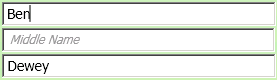
Download Solution
ShadowedTextBoxExample.zip (70.3 KB)
Usage
<local:ShadowedTextBox Label="First Name" Text="{Binding FirstName}" />
Styles
<Style x:Key="shadowedLabelStyle">

    <Setter Property="TextBlock.Foreground" Value="{x:Static SystemColors.ControlDarkBrush}" />

    <Setter Property="FrameworkElement.Opacity" Value="0.8" />

    <Setter Property="TextBlock.FontSize" Value="12" />

    <Setter Property="TextBlock.FontStyle" Value="Italic" />

    <Setter Property="TextBlock.Margin" Value="8,4,4,4" />

</Style>

<Style TargetType="{x:Type local:ShadowedTextBox}">

    <Setter Property="FontSize" Value="14" />

    <Setter Property="Margin" Value="5,2,2,2" />

    <Setter Property="LabelStyle" Value="{StaticResource shadowedLabelStyle}" />

</Style>
ShadowedTextBox.cs
using System.ComponentModel;

using System.Windows;

using System.Windows.Controls;

using System.Windows.Documents;

namespace ShadowedTextBoxExample

{

    public class ShadowedTextBox : TextBox

    {

        #region Properties

        public string Label

        {

            get { return (string)GetValue(LabelProperty); }

            set { SetValue(LabelProperty, value); }

        }

        // Using a DependencyProperty as the backing store for Label.  This enables animation, styling, binding, etc...

        public static readonly DependencyProperty LabelProperty =

            DependencyProperty.Register("Label", typeof(string), typeof(ShadowedTextBox), new UIPropertyMetadata("Label"));

        public Style LabelStyle

        {

            get { return (Style)GetValue(LabelStyleProperty); }

            set { SetValue(LabelStyleProperty, value); }

        }

        // Using a DependencyProperty as the backing store for LabelStyle.  This enables animation, styling, binding, etc...

        public static readonly DependencyProperty LabelStyleProperty =

            DependencyProperty.Register("LabelStyle", typeof(Style), typeof(ShadowedTextBox), new UIPropertyMetadata(null));

        public bool HasText

        {

            get { return (bool)GetValue(HasTextProperty); }

            private set { SetValue(HasTextPropertyKey, value); }

        }

        private static readonly DependencyPropertyKey HasTextPropertyKey =

            DependencyProperty.RegisterReadOnly("HasText", typeof(bool), typeof(ShadowedTextBox), new PropertyMetadata(false));

        public static readonly DependencyProperty HasTextProperty = HasTextPropertyKey.DependencyProperty;

        #endregion

        public ShadowedTextBox()

            : base()

        {

        }

        AdornerLayer myAdornerLayer;

        AdornerLabel myAdornerLabel;

        public override void OnApplyTemplate()

        {

            base.OnApplyTemplate();

            myAdornerLayer = AdornerLayer.GetAdornerLayer(this);

            myAdornerLabel = new AdornerLabel(this, this.Label, this.LabelStyle);

            UpdateAdorner(this);

            DependencyPropertyDescriptor focusProp = DependencyPropertyDescriptor.FromProperty(FrameworkElement.IsFocusedProperty, typeof(FrameworkElement));

            if (focusProp != null)

            {

                focusProp.AddValueChanged(this, delegate

                {

                    UpdateAdorner(this);

                });

            }

            DependencyPropertyDescriptor containsTextProp = DependencyPropertyDescriptor.FromProperty(ShadowedTextBox.HasTextProperty, typeof(ShadowedTextBox));

            if (containsTextProp != null)

            {

                containsTextProp.AddValueChanged(this, delegate

                {

                    UpdateAdorner(this);

                });

            }

        }

        protected override void OnTextChanged(TextChangedEventArgs e)

        {

            HasText = this.Text != "";

            base.OnTextChanged(e);

        }

        protected override void OnDragEnter(DragEventArgs e)

        {

            myAdornerLayer.RemoveAdorners<AdornerLabel>(this); // requires AdornerExtensions.cs

            base.OnDragEnter(e);

        }

        protected override void OnDragLeave(DragEventArgs e)

        {

            UpdateAdorner(this);

            base.OnDragLeave(e);

        }

        private void UpdateAdorner(FrameworkElement elem)

        {

            if (((ShadowedTextBox)elem).HasText || elem.IsFocused)

            {

                // Hide the Shadowed Label

                this.ToolTip = this.Label;

                myAdornerLayer.RemoveAdorners<AdornerLabel>(elem);  // requires AdornerExtensions.cs

            }

            else

            {

                // Show the Shadowed Label

                this.ToolTip = null;

                if (!myAdornerLayer.Contains<AdornerLabel>(elem))  // requires AdornerExtensions.cs

                    myAdornerLayer.Add(myAdornerLabel);

            }

        }

    }

}
[WPF系列]-高级部分 Shadowed TextBox的更多相关文章
- [WPF系列-高级TemplateBinding vs RelativeSource TemplatedParent]
What is the difference between these 2 bindings: <ControlTemplate TargetType="{x:Type Button ...
- [WPF系列] 高级 调试
调试工具 ImageBrush出现TypeConverter问题 'Provide value on 'System.Windows.Baml2006.TypeConverterMarkupExt ...
- [WPF系列]-高级部分 需要区分的东东
ContentControl VS ContentPresenter What's the difference between ContentControl and ContentPresenter ...
- 【WPF系列】Textbox
Style定义实例 给Textbox定义一个阴影效果. <Style x:Key="{x:Type TextBox}" TargetType="{x:Type Te ...
- [WPF系列]从基础起步学习系列计划
引言 WPF技术已经算不什么新技术,一搜一大把关于WPF基础甚至高级的内容.之前工作中一直使用winform所以一直没有深入学习WPF,这次因项目中使用了WPF技术来实现比较酷的展示界面.我在这里只是 ...
- [WPF系列]-数据邦定之DataTemplate 对分层数据的支持
到目前为止,我们仅讨论如何绑定和显示单个集合. 某些时候,您要绑定的集合包含其他集合. HierarchicalDataTemplate 类专用于 HeaderedItemsControl 类型以显示 ...
- [WPF系列]-数据邦定之DataTemplate 根据对象属性切换模板
引言 书接上回[WPF系列-数据邦定之DataTemplate],本篇介绍如何根据属性切换模板(DataTemplate) 切换模板的两种方式: 使用DataTemplateSelecto ...
- [WPF系列]-TreeView的常用事项
引言 项目经常会用Treeview来组织一些具有层级结构的数据,本节就将项目使用Treeview常见的问题作一个总结. DataBinding数据绑定 DataTemplate自定义 <Hier ...
- WPF系列教程——(三)使用Win10 Edge浏览器内核 - 简书
原文:WPF系列教程--(三)使用Win10 Edge浏览器内核 - 简书 在需要显示一些 H5网站的时候自带的WebBrowser总是显示不了,WebBrowser使用的是IE内核,许多H5新特性都 ...
随机推荐
- 在 Ubuntu 上安装 Android Studio
在 Ubuntu 上安装 Android Studio http://www.linuxidc.com/Linux/2013-05/84812.htm 打开terminal,输入以下命令 sudo a ...
- Git GUI下载远程源代码简单使用介绍
学习编程,适当的时候弄些开源项目的源代码来学习实践,对技术是很有帮助的.如果学习.NET.C#的话,codeplex上面有许多不错的源代码,推荐一个ASP.ENT的:HoverTree http:// ...
- identity与ASP.NET 模拟
默认情况下,ASP.NET应用程序以本机的ASPNET帐号运行,该帐号属于普通用户组,权限受到一定的限制,以保障ASP.NET应用程序运行的安全.但是有时需要某个ASP.NET应用程序或者程序中的某段 ...
- 深度学习 - DL
雷锋网 - 2016 | 人工智能在深度学习领域的前世今生(原文链接) Deep Learning - DL,深度学习是机器学习的一种. 深度学习最重要的作用:表示学习 深度学习实践的四个关键要素 计 ...
- Entity Framework
Entity Framework 待整理.. 参考链接:http://www.cnblogs.com/lsxqw2004/archive/2015/08/07/4701979.html http:// ...
- Xamarin.ios引用第三方SDK
引言 诚然,Xamarin是个优秀的跨平台解决方案,但毕竟还是不能将Native中所有的方法都直接实现.诸如各种第三方库,也都只有java/oc原生版本的SDK,无法直接拿过来直接使用.但,不能直接拿 ...
- sql where传入类型不同,造成查询结果差异问题
话说故事是这样的.请听小生慢慢道来: 原有数据样式如下: 正常结果: 问题展现: 此问题主要原因如下: 以下皆可在官网中找到: 为数据类型从高到低依次:(ps:小生用翻译工具翻译,就不在此献丑了) 根 ...
- Java子类属性继承父类属性
public abstract class Parent { String name = "parent"; } public class Son extends Parent{ ...
- entityframework学习笔记--004-无载荷与有载荷关系
1.无载荷(with NO Payload)的多对多关系建模 在数据库中,存在通过一张链接表来关联两张表的情况.链接表仅包含连接两张表形成多对多关系的外键,你需要把这两张多对多关系的表导入到实体框架模 ...
- 转载利用伪元素单个颜色实现 hover 和 active 时的明暗变化效果
1.颜色小tip知识 在背景色上方叠加一个黑色半透明层 rgba(0,0,0,.2) 可以得到一个更暗的颜色 在背景色上方叠加一个白色半透明层 rgba(255,255,255,.2) 可以得到一个更 ...