
python处理日志文件
python处理日志文件
1 打开日志文件
虽然,日志文件的后缀为.log,但是基本上与文本文件没有区别,按照一般读取文本文件的方式打开即可:
fp =open("e:\\data.log")

fp.close()
应用示例:
fp =open("e:\\data.log")

for line in fp.readlines(): # 遍历每一行

    filename = line[:14]    # 每行取前14个字母,作为下面新建文件的名称

    content = line[14:]     # 每行取第15个字符后的所有字符,作为新建文件的内容

    with open("e:\\"+filename+".txt","w") as fp2:

        fp2.write(content+"\n")

fp.close()
2 提取目标信息
日志文件每行字符串由空格分隔,例如对第1个字段(IP、时间等)感兴趣,则使用split()方法对每行字符串进行切片,将第1个子字符串存到列表里,用于下一步处理。
示例代码:
#!/usr/bin/python

# -*- coding: UTF-8 -*-

txt = "Google#Runoob#Taobao#Facebook"

# 第二个参数为 1,返回两个参数列表

x = txt.split("#", 1)

print x
输出结果:
['Google', 'Runoob#Taobao#Facebook']
3 统计分析
在上一步骤中,将感兴趣的目标信息存储到列表中,现使用python统计列表元素出现的次数,参考链接[3]提供了很多实现方法[4],本文使用collections[5]中的most_common()方法。
示例:
from collections import Counter

def counter(arr):

    return Counter(arr).most_common(2) # 返回出现频率最高的两个数

# 结果:[(2, 3), (1, 2)]
4 后记
完整代码(待整理):
# -*- coding: utf-8 -*-

"""

Created on Thu Apr 11 08:24:02 2019

@author: Green

"""

#import sys

#import time

from collections import Counter

#import pyExcel

import xlwt

fp =open("d:\\aa.log")

#print len(fp.readlines()) # 3593512

mycount = 0

IPlists = []

for line in fp.readlines():

    # control times====================

    #mycount += 1

    #if mycount > 100:

    #    break

    #==================================

    data = line.split(" ") # 依空格切片

    IP = data[0]

    IPlists.append(IP)

fp.close()

print 'Length of IPlists:', len(IPlists)

#IPlists.count()

IP_CountResult = Counter(IPlists).most_common()

#print IP_CountResult

#print '[0][0]', IP_CountResult[0][0]

print 'Length of IP_CountResult:', len(IP_CountResult)

f = xlwt.Workbook() # Create workbook

sheet1 = f.add_sheet(u'sheet1',cell_overwrite_ok=True) # Create sheet

row0 = [u'IP', u'Count']

# Create first row

for i in range(0,len(row0)):

    sheet1.write(0, i, row0[i])

for i in range(0,len(IP_CountResult)):

    for j in range(0,len(IP_CountResult[i])):

        sheet1.write(i+1, j, IP_CountResult[i][j])

f.save('d:\\IP_CountResult.xls') # Save the file

#=====================================

# 测试字符串切片(分割)

# txt = "Google Runoob Taobao Facebook"

# 第二个参数为 1,返回两个参数列表

# x = txt.split(" ", 1)

# print x[0]

#=====================================

    #filename = line[:14]

    #content = line[14:]

    #with open("e:\\"+filename+".txt","w") as fp2:

    #    fp2.write(content+"\n")
其他拓展应用,见链接[6-9]
另,研究pandas在数据处理、绘图等方面的应用。
参考链接:
[1]python文件操作--分析系统log并提取有效数据: https://blog.csdn.net/qq_30758629/article/details/80766583
[2]菜鸟教程 - Python split()方法: http://www.runoob.com/python/att-string-split.html
[3]Python统计列表元素出现次数: https://blog.csdn.net/weixin_40604987/article/details/79292493
[4]get_frequency: https://github.com/KARL13YAN/learning/blob/master/get_frequency.py
[5]collections官方文档: https://docs.python.org/3/library/collections.html
[6]python读取日志 - 周一到周五早上6点半检查日志中的关键字,并发送相应的成功或者失败短信: https://blog.csdn.net/shirayukixue/article/details/52120110
日志内容如下:
[16-08-04 06:30:39] Init Outer: StkID:20205 Label:7110 Name:02ͨ Type:3 PriceDigit:4 VolUnit:0 FloatIssued:                                                               0 TotalIssued:                                                               0 LastClose:0 AdvStop:0 DecStop:0

[16-08-04 06:30:39] Init Outer: StkID:20206 Label:9802 Name:982 Type:3 PriceDigit:4 VolUnit:0 FloatIssued:                                                               0 TotalIssued:                                                               0 LastClose:0 AdvStop:0 DecStop:0

[16-08-04 06:30:39] IB Recv DCT_STKSTATIC, Stock Total = 20207 Day=20160804, Ver=1470283608
配置文件如下:
[MobileNo]

user1 = num1

user2 = num2

user3 = num3

[code_IB]

keys = Stock Total

filepath = /home/level2/ib/datacollect.log

exepath = /home/level2/ib

exefile = dcib.exe

failmsg = IB init fail!

day_of_week = 0-4

hour = 06

minute = 30
python如下:
#-*- encoding: utf-8 -*-

import re

import sys

import os

import time

import requests

import ConfigParser

import logging

import thread

from logging.handlers import RotatingFileHandler

from apscheduler.schedulers.blocking import BlockingScheduler

#通过logging.basicConfig函数对日志的输出格式及方式做相关配置

logging.basicConfig(level=logging.DEBUG,

                    format='%(asctime)s %(filename)s[line:%(lineno)d] %(levelname)s %(message)s',

                    datefmt='%a, %d %b %Y %H:%M:%S',

                    filename='search.log',

                    filemode='a')

'''

#定义一个StreamHandler,将INFO级别或更高的日志信息打印到标准错误,并将其添加到当前的日志处理对象

console = logging.StreamHandler()

console.setLevel(logging.INFO)

formatter = logging.Formatter('%(name)-12s: %(levelname)-8s %(message)s')

console.setFormatter(formatter)

logging.getLogger('').addHandler(console)

'''

'''

#定义一个RotatingFileHandler,最多备份5个日志文件,每个日志文件最大10M

Rthandler = RotatingFileHandler('search.log', maxBytes=1*1024*1024,backupCount=2)

Rthandler.setLevel(logging.INFO)

#formatter = logging.Formatter('%(name)-12s: %(levelname)-8s %(message)s')

#Rthandler.setFormatter(formatter)

logging.getLogger('').addHandler(Rthandler)

'''

#读取配置文件

try:

    conf = ConfigParser.ConfigParser()  #生成config对象

    conf.read("search.ini")  #用config对象读取配置文件

    #keys = conf.get("main","keys")  #指定session,option读取值

    #logpath = conf.get("main","filepath")

    mobileno = conf.items("MobileNo")

    #failmsg = conf.get("msg","fail")

    code = conf.sections()

except Exception as exc:

    pass

def getconfig(section):

    #定义全局变量

    global keys, logpath, exepath, exefile, failmsg, day_of_week, hour ,minute

    keys = conf.get(section,"keys")

    logpath = conf.get(section,"filepath")

    exepath = conf.get(section,"exepath")

    exefile = conf.get(section,"exefile")

    failmsg = conf.get(section,"failmsg")

    day_of_week = conf.get(section,"day_of_week")

    hour = conf.get(section,"hour")

    minute = conf.get(section,"minute")

    print keys, logpath, exepath, exefile, failmsg, day_of_week, hour ,minute

#从前端获取参数,关键字,文件名

'''

def getParameters():

    ret = []

    if len(sys.argv) != 3:

        print 'Please input correct parameter,for example:'

        print 'python search.py keyword filepath configpath'

    else:

        for i in range(1,len(sys.argv)):

            print i, sys.argv[i]

            ret.append(sys.argv[i])

        print '+============================================================================+'

        print '  Keyword = %s'%sys.argv[1]

    return ret

'''

def isFileExists(strfile):

    #检查文件是否存在

    return os.path.isfile(strfile)

def sendMailOk(timefile):

    #初始化正常,发送邮件

    datetimes = timefile.split('[')

    times = datetimes[1].split(']')

    code = timefile.split()

    init = [times[0],code[2],"init success!"]

    message = ' '.join(init) #使用字符串的join方法,可以把列表的各个元素连接起来

    logging.info(message)

    url = 'http://***/smsNew/sendMessage.html'

    #payload = {'clientId':'804D0196-6C0D-4CEF-91E1-1BB85E0217DB','Code':'GB2312','toMobileNo':toMobileNo,'message':message}

    #r = requests.post('http://***/smsNew/sendMessage.html?clientId=804D0196-6C0D-4CEF-91E1-1BB85E0217DB&Code=GB2312&toMobileNo=18516235206&message=test')

    #r = requests.post(url,params = payload)

    #print r.url,r.text

    for i in range(len(mobileno)):

        toMobileNo = mobileno[i][1]

        payload = {'clientId':'804D0196-6C0D-4CEF-91E1-1BB85E0217DB','Code':'GB2312','toMobileNo':toMobileNo,'message':message}

        r = requests.post(url,params = payload)

        print r.url,r.text

        print toMobileNo

    #print r.text

    #getConfig()

def sendMalFail():

    #初始化失败发送短信

    url = 'http://***/smsNew/sendMessage.html'

    for i in range(len(mobileno)):

        toMobileNo = mobileno[i][1]

        payload = {'clientId':'804D0196-6C0D-4CEF-91E1-1BB85E0217DB','Code':'GB2312','toMobileNo':toMobileNo,'message':failmsg}

        r = requests.post(url,params = payload)

        logging.error(failmsg)

        print r.url,r.text

        print toMobileNo

def Search(keyword, filename):

    #在文件中搜索关键字

    if(isFileExists(filename) == False ):

        #print 'Input filepath is wrong,please check agin!'

        logging.error('Input filepath is wrong,please check agin!')

        return False

        #sys.exit()

    linenum = 1

    with open(filename, 'r') as fread:

        lines = fread.readlines()

        for line in lines:

            rs = re.search(keyword, line)

            if rs:

                #打印关键字所在行

                #sys.stdout.write('line:%d '%linenum)

                #print line

                lsstr = line.split(keyword)

                #strlength = len(lsstr)

                #logging.info('DC init success! ')

                sendMailOk(lsstr[0])

                '''

                #打印搜索关键字所在行信息

                for i in range(strlength):

                    if (i < (strlength - 1)):

                        sys.stdout.write(lsstr[i].strip())

                        sys.stdout.write(keyword)

                    else:

                        sys.stdout.write(lsstr[i].strip() + '\n')

                '''

                #关闭打印日志程

                killdc = "pkill " + exefile

                os.system(killdc)

                return True

                #sys.exit()

            linenum = linenum + 1

        logging.debug('DC not init ,tye agin!')

        return False

def executeSearch():

    '''

    ls = getParameters()

    if(len(ls) == 2):

        while True:

            for i in range(5):

                Search(ls[0], ls[1]) #初始化成功退出脚本,否则继续循环

                #print i

                time.sleep(60)

            sendMalFail() #连续5次查找都没有初始化,发送失败短信

    else:

        print 'There is a parameter error occured in executeSearch()!'

    '''

    #print keys,logpath,mobileno

    #os.system('cd /home/level2/ib && /bin/echo > datacollect.log && nohup ./dcib.exe > /dev/null 2>&1 &')

    startdc = "cd " + exepath + " && /bin/echo > datacollect.log && nohup ./" + exefile + " > /dev/null 2>&1 &"

    os.system(startdc)

    time.sleep(3)

    for i in range(5):

        if Search(keys,logpath)== True:

            return True

        time.sleep(60)

    sendMalFail()

    while Search(keys,logpath) == False:

        time.sleep(60)

def cron():

    scheduler = BlockingScheduler()

    scheduler.add_job(executeSearch, 'cron', day_of_week=day_of_week,hour=hour, minute=minute)

    scheduler.start()

def main():

    #scheduler = BlockingScheduler()

    for i in range(0,len(code)):

        if re.search('code',code[i]):

            getconfig(code[i])

            print "keys=",keys, "; logpath=",logpath, "; exepath=",exepath, "; exefile=",exefile, "; failmsg=",failmsg, "; day_of_week=",day_of_week, "; hour=",hour ,"; minute=",minute

            scheduler = BlockingScheduler()

            scheduler.add_job(executeSearch, 'cron', day_of_week=day_of_week,hour=hour, minute=minute)

            scheduler.start()

            #thread.start_new_thread(cron,())

            #time.sleep(3)

    #executeSearch()

if __name__=='__main__':

    main()

#    executeSearch()
[7] python每日一练 - 读取log文件中的数据,并画图表: https://www.cnblogs.com/langzou/p/5986245.html
日志内容大致如下:
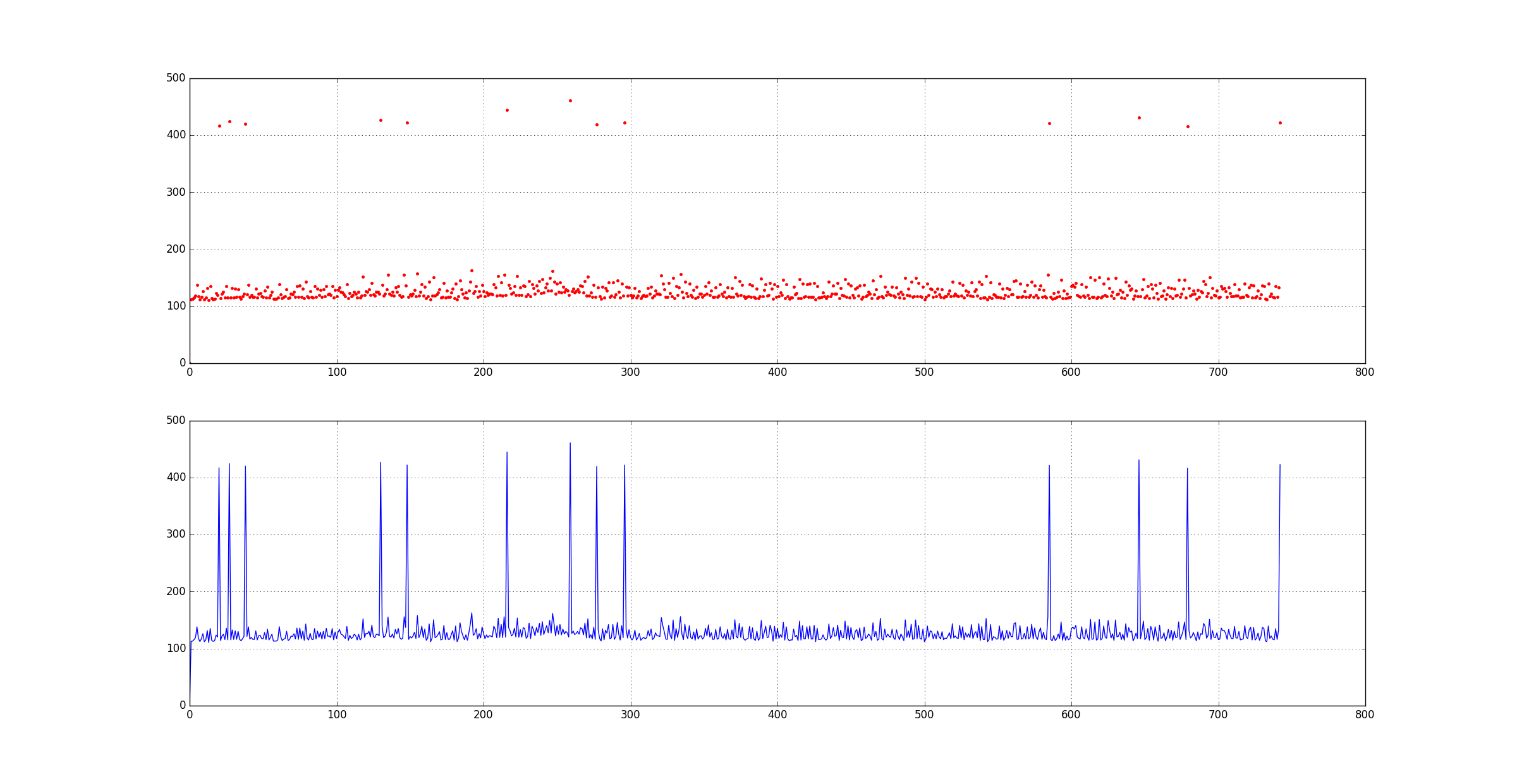
python处理代码:
import matplotlib.pyplot as plt

input = open('serverlog.txt', 'r')

rangeUpdateTime = [0.0]

for line in input:

    line = line.split()

    if 'update' in line:

        rangeUpdateTime.append(float(line[-1]))

plt.figure('frame time')

plt.subplot(211)

plt.plot(rangeUpdateTime, '.r',)

plt.grid(True)

plt.subplot(212)

plt.plot(rangeUpdateTime)

plt.grid(True)

plt.show()
结果:
[8]统计一个文件中每个单词出现的次数,列出出现频率最多的5个单词: https://www.jb51.net/article/137735.htm
[9]Python:string.count()返回str在string里面出现的次数: https://blog.csdn.net/chixujohnny/article/details/50259585
示例代码:
s = 'this is a new technology,and I want to learn this.'

print(s.count('this', 0, len(s)))

#输出为2
python处理日志文件的更多相关文章
- Python实现日志文件写入或者打印--类似于Java的Log4j
开发过Java的应该都知道Log4j的重要性,尤其是在开发测试中,能够让开发和测试人员方便找的bug,Python也有和Log4j相同功能的库那就是logging库,其功能非常强大,在开发测试中很方便 ...
- python 实时遍历日志文件
首先尝试使用 python open 遍历一个大日志文件, 使用 readlines() 还是 readline() ? 总体上 readlines() 不慢于python 一次次调用 readlin ...
- Python中将打印输出导向日志文件
a. 利用sys.stdout将print行导向到你定义的日志文件中,例如: import sys # make a copy of original stdout route stdout_back ...
- python logging 日志轮转文件不删除问题
前言 最近在维护项目的python项目代码,项目使用了 python 的日志模块 logging, 设定了保存的日志数目, 不过没有生效,还要通过contab定时清理数据. 分析 项目使用了 logg ...
- Linux(9)后台运行python程序并输出到日志文件
后台运行python程序并标准输出到文件 现在有test.py程序要后台部署, 里面有输出内容 使用命令: nohup python -u test.py > test.log 2>&am ...
- python 接口测试1 --如何创建和打印日志文件
python自带的logging实在是不好用,推荐使用logbook 思路如下: 1.创建path.py文件,获取工程根路径 2.创建log.py文件,在工程根路径下创建日志文件(文件名称按日期命名) ...
- 使用python脚本实现统计日志文件中的ip访问次数
使用python脚本实现统计日志文件中的ip访问次数,注意此脚本只适用ip在每行开头的日志文件,需要的朋友可以参考下 适用的日志格式: 106.45.185.214 - - [06/Aug/2014: ...
- Linux后台运行python程序并输出到日志文件
后台运行python程序并标准输出到文件 现在有test.py程序要后台部署, 里面有输出内容 使用命令: nohup python -u test.py > test.log 2>&am ...
- python代理池的构建1——代理IP类的构建,以及配置文件、日志文件、requests请求头
一.整体结构 二.代理IP类的构建(domain.py文件) ''' 实现_ init_ 方法, 负责初始化,包含如下字段: ip: 代理的IP地址 port:代理IP的端口号 protocol: 代 ...
随机推荐
- Web微信模拟
一.概要 目的:实现一个具有web微信类似功能的项目 框架:Django 模块:render.HttpResponse.BeautifulSoup.re.time.requests.json.rand ...
- IntelliJ IDEA 使提示不区分大小写
File ==> Settings ==> Editor ==> General ==> Code Completion 第一行 Match case 将默认勾选去掉
- 用 zotero 管理文献和个人知识库
这周开始用了一下 zotero. 这是一款非常好用的文献管理工具,但它更像是一个多功能的收藏夹,或者说是一个知识.笔记.文献的综合管理工具. 入门的时候搜到了阳志平老师的几个图文并茂的教程,这里也推荐 ...
- vue-video-player集成videojs-contrib-hls实现.m3u8文件播放
// 安装依赖 npm install vue-video-player --save npm install videojs-contrib-hls --save // 在main.js中全局引入 ...
- Spring Data REST PATCH请求 远程代码执行漏洞案例(CVE-2017-8046)
恶意的PATCH请求使用精心构造的JSON数据提交到spring-data-rest服务可以执行任意JAVA代码 1. 背景 Spring Data REST是Spring Data项目的一部分,可以 ...
- contos最小包安装完后一些准备
yum upgradeyum install net-toolsyum -y install wgetyum -y install vim-enhanced yum install gcc gcc-c ...
- Problem J. Journey with Pigs
Problem J. Journey with Pigshttp://codeforces.com/gym/241680/problem/J考察排序不等式算出来单位重量在每个村庄的收益,然后生序排列猪 ...
- zoj3781
zoj3781赛场上堵在了缩点上emmmmm把原始图相同颜色的方块缩成一个点,然后与它周围不同颜色的联通块连双向边,然后枚举每个点然后求最大深度的最小值因为每次翻转都相当于深度+1(可以手动模拟一下 ...
- ubuntu创建新用户
ubuntu和windows一样,可以任意创建或者删除新的用户,windows下比较简单,ubuntu下需要使用命令,不过操作起来不是很繁琐,所以我尽量写的详细一些. 如何创建ubuntu新用户? ...
- S0.1 【转】调色板
摘自<数字图像处理编程入门> 我发在csdn下载区了, 作为免费资源,传送:<数字图像处理编程入门> csdn不允许免费资源了,微盘链接:<数字图像处理编程入门> ...